
Quick verdict
- What it is
- Store information collected; independent summary not yet available.
- At a glance
-
- From $2.99/mo
- Free to download
- In-app purchases
Categories and search queries
Official categories
- Productivity
- Utilities
AppCorpus categories
Key functions
| Function | Availability | Access | Scope | Evidence |
|---|---|---|---|---|
| Free app | Yes | Free | — | Store published |
| In-app purchases | Yes | Limited free | — | Store published |
Screens
App Store
21 store screenshots


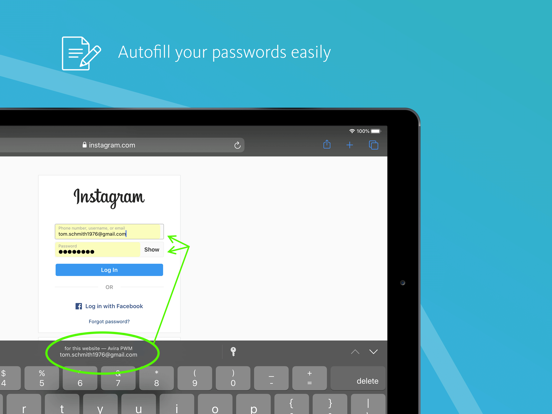
Pricing & paywalls
App Store
- Password Manager Pro - Monthly — $2.99/month
- Password Manager Pro - Monthly — $31.99/year ($2.66/mo)
Ratings & reviews
App Store
-
4/5Convenient but still need to address kinks
I’ve been using Avira app for about a year and it is very convenient especially when using different devices. I did not like that I had to create two different passwords when setting up which created such confusion and a lot of time wasted. Actually needed a more techy friend to help sort it out. Once that was done it went pretty smooth. I love the fact that I don’t have to remember all those passwords especially since each website has different criteria for setting up a password. However, lately on my iPhone I could not access a frequently used website as it kept prompting for the correct password. I was able to gain access to this same website on my laptop with no issues. On my cell, it should’ve worked but it didn’t so since I couldn’t see the password (only see the ....) when signing in, I went ahead and changed the password to the one that worked and which I was using on the laptop. After changing it to the same old password now I actually think that the password is being generated from my cell and not Avira. I’ll have to consult my friend again soon to address this. Then today I set up a different website and password on my laptop and I was able to see it on my cell with no issues. Weird!
NMarin2 · 7 Aug 2026
-
4/5Updates are good
My old review can be found below. I recently had a very pleasant experience with Avira PWM where it helped me change a compromised password. Avira (PWM browser extension) made it extremely simple and quick, and guided me through the whole thing. It offered me the old password and a new password without me having to search around or anything. I haven’t tried adding a password using my phone in a while, but the desktop version seems to have been updated quite well. I first want to say that I love Avira and have used them for some time now! I have their professional version. BUT… their password manager, as convenient as it can sometimes be, has major syncing issues. It has caused a lot of account issues with my work and personal use. I will update or create a password and it never saves. At first, I thought it was me, but I have consistently tried to do everything correctly. It has happened enough that I know it is the app!!! Please fix this!! This is not a new issue. I read other reviews with similar issues.
Aamir Ahamad · 7 Aug 2026
-
4/5Frustrated!
I had encephalitis a few years ago, which has caused memory issues an other challenges. I use three devices so the ability to sync between the three is an absolute necessity. I am confident that I am using the app correctly, however, the syncing seems to be inconsistent. This leads to me having to change passwords multiple times to get it worked out. The Password and Master Password are also an issue for people like me with memory issues. When I first got this app, I loved it. I’m not certain what has changed lately, but I hope we can get it figured out.
jennasix · 7 Aug 2026
-
1/5Awful-Terrible-Incompetent-No Responsive
My six years of experience with Avira has been terrible. Avira has proven to be incompetent, out of touch with cyber security, and apathetic to the concerns of their customers. Despite failing in their sole promise and task of keeping my passwords safe and out of the hands of hackers, they just turned them over to hackers without concern or care. Avira turned over nearly 200 passwords that I have collected for over six years. I started checking emails after a 10 day hiatus due to a hospital visit. It was brought to my immediate attention by Avira that my Password Manager was under attack by hackers. Avira emailed no less than 30 times giving notice of failed attempts from around the world of people trying to gain access to my password manager. I am unaware of the logistics but someone gained control of my Avira PM and they changed the master password. Avira has ignored my requests for assistance and my repeated emails. This should be simple, I have not changed my email or IP address. Someone else with a different IP has changed my account Info. As a security measure I keep my Avira Password in my Norton and Bitwarden PM. They along with my iCloud PM all three have the same Avira Password. Do not trust this company. It isn’t my mistake. Avira allowed someone to change my password. This is the 2nd time Avira has shown a total disregard for my property. Avira had a vault that was advertised to the consumer as a place to hold valuable photos. I used the vault for photos of family, pics of valuable account info, and passwords. everything that I placed in the vault was taken from me all because of my misplaced trust in Avira. Avira removed the website leaving customers without their valuable photos and personal items. They closed that program without my knowledge and refused all requests of mine to pull those irreplaceable items from their vault. Long story short don't trust them with anything.
pSCOTTg · 7 Aug 2026
-
3/5Brilliant Idea, incomplete execution
Free password manager, working across devices with options to securely save anything you want. The autofill is great when it works, and the paid plan has a clear use case but isn’t necessary. However, the implementation of this on iphone has been poor at best. I’m routinely signed out within the same day whch is only noticable when the autofill fails despite a correct master password. Upon opening the app to sign back in, I’m met with an unresponsive “logging in” screen that resists all turn-it-off-and-on-again attempts. This has been unpatched since the start of 2025, and if you’re alright manually copying/pasting you’ll be far more satisfied with the web version.
FlamingDucky · 7 Aug 2026
Privacy & accessibility
App Store
Privacy
- Data Linked to You — Analytics — Identifiers — Device ID Developer declared
- Data Linked to You — App Functionality — Contact Info — Email Address Developer declared
- Data Linked to You — App Functionality — Contact Info — Name Developer declared
- Data Linked to You — App Functionality — Identifiers — Device ID Developer declared
- Data Linked to You — Developer’s Advertising or Marketing — Contact Info — Email Address Developer declared
- Data Linked to You — Contact Info Developer declared
- Data Linked to You — Identifiers Developer declared
- Data Not Linked to You — Analytics — Diagnostics — Crash Data Developer declared
- Data Not Linked to You — Analytics — Diagnostics — Performance Data Developer declared
- Data Not Linked to You — Analytics — Identifiers — User ID Developer declared
- Data Not Linked to You — Analytics — Location — Coarse Location Developer declared
- Data Not Linked to You — Analytics — Usage Data — Product Interaction Developer declared
- Data Not Linked to You — App Functionality — Diagnostics — Crash Data Developer declared
- Data Not Linked to You — App Functionality — Diagnostics — Performance Data Developer declared
- Data Not Linked to You — App Functionality — Identifiers — User ID Developer declared
- Data Not Linked to You — App Functionality — Location — Coarse Location Developer declared
- Data Not Linked to You — App Functionality — Usage Data — Product Interaction Developer declared
- Data Not Linked to You — Diagnostics Developer declared
- Data Not Linked to You — Identifiers Developer declared
- Data Not Linked to You — Location Developer declared
- Data Not Linked to You — Usage Data Developer declared
Accessibility
No accessibility labels collected yet.
Versions
App Store
-
2.18.0
Now save all your credit cards in your secure digital wallet, where the magnetic stripe will never wear off.
-
2.19.0
Bug fixes and performance improvements.
-
2.20.0
Bug fixes and performance improvements.
-
2.21.0
Now supporting Sign in with Apple.
-
2.22.0
With this release, you can now add photos to your secure notes. Securely store copies of your IDs, passport, and other important documents, and always have them available when you need them. We're always working hard to improve our solution, so we added several enhancements and bug fixes to make Avira Password Manager even smoother.
-
2.22.1
With this release, you can now add photos to your secure notes. Securely store copies of your IDs, passport, and other important documents, and always have them available when you need them. We're always working hard to improve our solution, so we added several enhancements and bug fixes to make Avira Password Manager even smoother.
-
2.23
With this release, you can now attach any kind of files: images, pdf files, text documents, videos and more. Attach files to any of your items: Passwords, Notes or Wallet. You can also share your photos and files from other applications directly with Avira Password Manager.
-
2.23.1
With this release, you can now attach any kind of files: images, pdf files, text documents, videos and more. Attach files to any of your items: Passwords, Notes or Wallet. You can also share your photos and files from other applications directly with Avira Password Manager.
-
2.24.0
Bug fixes and performance improvements.
-
2.25.0
Introducing Avira PWM for Apple Watch - you can now easily access your 2FA codes from your hand wrist. Tap the authentication code you need to copy it to the clipboard on all your Apple devices.
-
2.26.0
We've made it even easier to use Authenticators in Avira Password Manager. Now you can approve two-factor authentication (2FA) or access your authentication codes directly from your phone's notifications, making it convenient and easy to log in to your accounts without opening the app.
-
2.26.1
Bug fixes and performance improvements.
-
2.27.0
Bug fixes and performance improvements.
-
2.28.0
Bug fixes and performance improvements.
-
2.28.1
Bug fixes and performance improvements.
-
2.28.2
Bug fixes and performance improvements.
-
2.28.4
Bug fixes and performance improvements.
-
2.28.5
Bug fixes and performance improvements.
-
2.29.0
Bug fixes and performance improvements.
-
2.29.1
Bug fixes and performance improvements.
-
2.29.2
Bug fixes and performance improvements.
-
2.29.3
Bug fixes and performance improvements.
-
2.29.4
Bug fixes and performance improvements.
-
2.29.5
Bug fixes and performance improvements.
-
2.29.6
· 19 Mar 2026
Bug fixes and performance improvements.
Alternatives
- Enpass Password Manager — Same category + similar ratings
- Sticky Password Manager & Safe — Same category + similar ratings
- SecureSafe Password Manager — Same category + similar ratings
- Password Manager iPassSafe — Same category + similar ratings
- Password Manager: Safe — Same category + similar ratings
- pCloud Pass - Password manager — Same category + similar ratings
Availability by market
- US
Data quality & evidence
- Page completeness
- Live store listing
- Last verified
- 7 Aug 2026
- Sources
- App Store
- Independent summary has not been published yet.