
AARP Now
Manage AARP membership and access personalized news, events, and savings
by AARP
iPhone · iPad
Quick verdict
- What it is
- The AARP Now app provides personalized news, alerts, events, and savings to AARP members. It allows users to access digital editions of AARP publications, save articles for later, and register for local events.
- Best for
-
- AARP members
- people 50 and older
- At a glance
-
- From $1.66/mo
- Free to download
- In-app purchases
Categories and search queries
Official categories
- Lifestyle
- News
AppCorpus categories
Key functions
| Function | Availability | Access | Scope | Evidence |
|---|---|---|---|---|
| Apple Wallet | Yes | Unknown | App Store | Store published |
| Free app | Yes | Free | — | Store published |
| In-app purchases | Yes | Limited free | — | Store published |
Screens
App Store
30 store screenshots

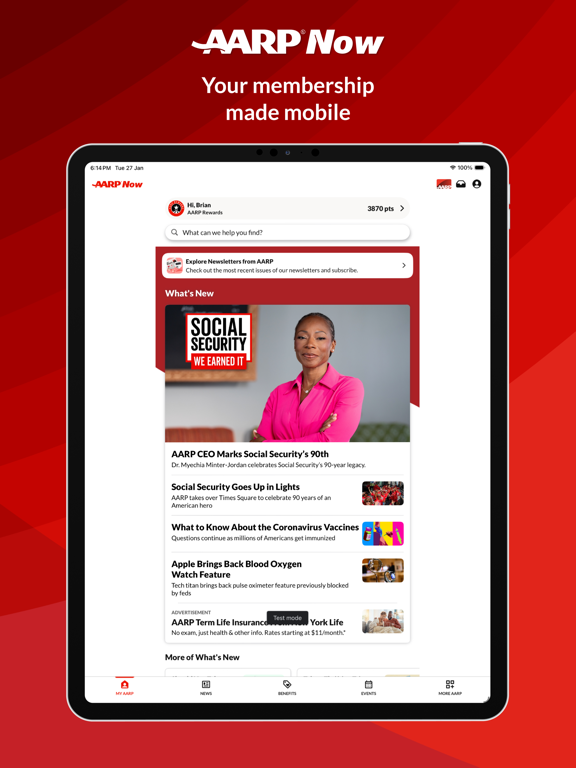


Pricing & paywalls
App Store
- AARP Membership 5 Years — $20.00/year ($1.66/mo)
- AARP Membership 5 Years — $38.00/year ($3.16/mo)
- AARP Membership 5 Years — $55.00/year ($4.58/mo)
- Annual Membership Subscription — $20.00/year ($1.66/mo)
- AARP Renew Membership 5 Years — $38.00/year ($3.16/mo)
- AARP Renew Membership 5 Years — $55.00/year ($4.58/mo)
Ratings & reviews
App Store
-
5/5problem
hi I was wondering why I have to always put in my password? But then when I put an end it doesn't recognize it! I hate when you have to put in the moving letters or whatever. I'm beginning to hate this a lot. Matter fact I've been hating it ever cents. I have my password changed but it's not working like it should I shouldn't have to do the the login part where you have to do the moving letters or whatever all the time. This tells me that this app is not really working correctly so until you have this fixed I don't think I'm gonna use it from that email because I'm having a problem with my email when it says login from the email and I'm doing it the right way but it keeps on telling me to do the moving letters I am visually impaired and even when I do the voice part that's not working at all so until then I'm just gonna go to the app itself and when it's in my email I'm gonna keep on erasing it because it's not working through my email only from the app I hate when it says do the moving letters or type the letters you see you whatever I am visually impaired and the audio does not work sorry for this long part that I had to put in but I am just frustrated when it says login from the email it doesn't work only from the app it works fine but from the email it's horrible so any time I get this in my email with the aARP I am going to discard it with the app it works fine so I'll tell you get that fixed I'm just gonna keep on logging in with the Apple stead of the email from Jeanne PS my password should work and I should not have a problem with it
moosybaby · 30 Aug 2026
-
2/5Is this 2020 or 2010?
‘Cuz this app — the NEW app, replacing two no-longer-supported apps (AARP & AARP Member Benefits), looks like it was designed for iOS 3. First of all, a non-Universal app that doesn’t even support landscape and must be viewed at 2X on an iPad is, IMO, pathetic. Who’s advising you on this stuff, some Windows programmer? And Universal is the minimum. No iPad version is just poor policy, especially for an app that wants to be as much as this one seems to. But here is what really bugs me: If you are working in the app, filling out a form or registering for something, and need to switch to another app for some reason (e.g., to look something up), when you switch back to AARP Now, it opens back to the home page, all entries one had made being lost in the process. That is completely unacceptable. This happened to me just the other day, as I tried to sign up for the driver safety course thru the app (my fundamental error, should have used a browser). I was almost all the way thru, then needed to check something in another app. When I switched back to AARP Now, I was backat the home page as described above. Meanwhile, my credit card was charged, but I cannot find any access to the course, and have not received a purchase confirmation. Because the app reset to home before the process was complete. Fix these please…🤔😉😊
jeffm23 · 30 Aug 2026
-
2/5Easy Fixes
TL;DR: Not optimized for iPad’s bigger screen real estate; Keychain functionality missing. I really blame Apple for this. I’ve seen a lot of this; Apple allows a developer to say their app works on the iPad. Technically, this is true. But what that means to you and me and millions of other users is that we expect the darn thing to not be the iPhone app running on the iPad. We expect orientation modes to work, and the full screen to be utilized. Not a tiny window that renders your big, beautiful iPad into just a mirror of your iPhone screen. But Apple lets developers claim it works on the iPad when really it doesn’t. Next is Keychain, the super helpful iOS built-in password manager. This isn’t Apple’s fault, but the developers. A big, rich organization like AARP ought to support the automated filling in of login credentials on their app. I mean, AARP is constantly warning seniors about the dangers of weak passwords and phishing scams etc., yet they don’t even optimize their app to support using Keychain, which is a great way to create a really strong password without having to memorize (or write down!) a random string of characters! Do better Apple and AARP. We know you have the resources to manage that.
xhat1964 · 30 Aug 2026
-
4/5If you have trouble connecting to your membership
I had missed the deadline to renew, so as soon as I restarted my membership, I installed this app. When I tried to set up the app, it asked me to enter my membership number to “connect my membership with my AARP account.” That is confusing, as what would be the difference between my membership account and my membership? The app showed my membership as having expired, despite my logging in with the same credentials as on the web (where my membership was good and expiration was years in the future). SOLUTION: I followed the activation link in the renewal-success email ON my iPhone. (I had already followed that link on desktop, but that didn’t activate my account on the app.) That link in the email on my iPhone brought the app up directly (no side trip to Mobile Safari!) and instantly activated my account on the app. That’s actually very cool, as many developers don’t connect straight to their apps. Hopefully this helps others.
bfchris · 30 Aug 2026
-
3/5Enjoy the games but lots of bugs
I love the assortment of games the app offers and enjoy playing many of them. But the bugs are bothersome. Occasionally it logs me out, and when I log back in, the Games tab is gone from the navigation bar. And then I get the instructions pop-up for each game, like I’ve never played before. Secondly, there are certain games - Codeword and Two minute Crossword - that I play every day but my score is never indicated in the calendar that appears each day. Someone in the FAQ section suggested that you need to be logged in. And I was logged in to the app, but apparently not into GAMES. When I logged into games, my score did indeed show up on the calendar for that day, but then I was logged out of the app, and had to do that all over. Lastly, I don’t mind the 15 or 30 second ads that come up before certain games, but the 3 minute purple Humpty Dumpty ad is too much! When that one comes up, I close the app and find something else to do.
DMALLAN · 30 Aug 2026
Privacy & accessibility
App Store
Privacy
- Data Linked to You — Analytics — Contact Info — Email Address Developer declared
- Data Linked to You — Analytics — Contact Info — Name Developer declared
- Data Linked to You — Analytics — Contact Info — Physical Address Developer declared
- Data Linked to You — Analytics — Identifiers — Device ID Developer declared
- Data Linked to You — Analytics — Identifiers — User ID Developer declared
- Data Linked to You — Analytics — Usage Data — Product Interaction Developer declared
- Data Linked to You — App Functionality — Contact Info — Email Address Developer declared
- Data Linked to You — App Functionality — Contact Info — Name Developer declared
- Data Linked to You — App Functionality — Contact Info — Phone Number Developer declared
- Data Linked to You — App Functionality — Contact Info — Physical Address Developer declared
- Data Linked to You — App Functionality — Financial Info — Payment Info Developer declared
- Data Linked to You — App Functionality — Identifiers — Device ID Developer declared
- Data Linked to You — App Functionality — Identifiers — User ID Developer declared
- Data Linked to You — App Functionality — Usage Data — Product Interaction Developer declared
- Data Linked to You — Developer’s Advertising or Marketing — Contact Info — Email Address Developer declared
- Data Linked to You — Developer’s Advertising or Marketing — Contact Info — Name Developer declared
- Data Linked to You — Developer’s Advertising or Marketing — Contact Info — Physical Address Developer declared
- Data Linked to You — Developer’s Advertising or Marketing — Identifiers — Device ID Developer declared
- Data Linked to You — Developer’s Advertising or Marketing — Identifiers — User ID Developer declared
- Data Linked to You — Developer’s Advertising or Marketing — Usage Data — Product Interaction Developer declared
- Data Linked to You — Product Personalization — Contact Info — Email Address Developer declared
- Data Linked to You — Product Personalization — Contact Info — Name Developer declared
- Data Linked to You — Product Personalization — Contact Info — Physical Address Developer declared
- Data Linked to You — Product Personalization — Identifiers — Device ID Developer declared
- Data Linked to You — Product Personalization — Identifiers — User ID Developer declared
- Data Linked to You — Product Personalization — Usage Data — Product Interaction Developer declared
- Data Linked to You — Third-Party Advertising — Identifiers — Device ID Developer declared
- Data Linked to You — Contact Info Developer declared
- Data Linked to You — Financial Info Developer declared
- Data Linked to You — Identifiers Developer declared
- Data Linked to You — Usage Data Developer declared
- Data Not Linked to You — Analytics — Diagnostics — Crash Data Developer declared
- Data Not Linked to You — Analytics — Diagnostics — Performance Data Developer declared
- Data Not Linked to You — Analytics — Health & Fitness — Health Developer declared
- Data Not Linked to You — Analytics — Search History Developer declared
- Data Not Linked to You — Analytics — Usage Data — Advertising Data Developer declared
- Data Not Linked to You — App Functionality — Diagnostics — Crash Data Developer declared
- Data Not Linked to You — App Functionality — Diagnostics — Performance Data Developer declared
- Data Not Linked to You — App Functionality — Health & Fitness — Health Developer declared
- Data Not Linked to You — App Functionality — Location — Coarse Location Developer declared
- Data Not Linked to You — App Functionality — Location — Precise Location Developer declared
- Data Not Linked to You — App Functionality — Search History Developer declared
- Data Not Linked to You — Developer’s Advertising or Marketing — Usage Data — Advertising Data Developer declared
- Data Not Linked to You — Product Personalization — Health & Fitness — Health Developer declared
- Data Not Linked to You — Product Personalization — Location — Coarse Location Developer declared
- Data Not Linked to You — Product Personalization — Location — Precise Location Developer declared
- Data Not Linked to You — Product Personalization — Search History Developer declared
- Data Not Linked to You — Diagnostics Developer declared
- Data Not Linked to You — Health & Fitness Developer declared
- Data Not Linked to You — Location Developer declared
- Data Not Linked to You — Search History Developer declared
- Data Not Linked to You — Usage Data Developer declared
- Data Used to Track You — Contact Info — Email Address Developer declared
- Data Used to Track You — Contact Info Developer declared
- Data Used to Track You — Identifiers — Device ID Developer declared
- Data Used to Track You — Identifiers Developer declared
- Data Used to Track You — Usage Data — Advertising Data Developer declared
- Data Used to Track You — Usage Data Developer declared
Accessibility
No accessibility labels collected yet.
Versions
App Store
-
4.0.2
Bug fixes
-
4.0.3
Big fixes
-
4.0.4
Fixes issue where games were opening in external browser. Games now open within the app, with no additional login required. Fixes issue with 1 year term on the Renew Membership form.
-
4.0.5
- Fixes issue where login prompt was displayed when opening a news article from a push notification after a period of inactivity - Fixes issue where login prompts were displaying on the Publications and HotDeals sections of MY AARP when opening the app after a period of inactivity. - Updates to onboarding permissions flow on iPad to prevent issue where buttons were appearing off screen. - Additional minor bug fixes and improvements.
-
4.0.6
• More action recommendations added to My AARP and My Account. • Customer Satisfaction feedback survey. • Fixes issue where some customers with a synced fitness tracker were not receiving rewards due for fitness activity. • Miscellaneous bug fixes and improvements.
-
4.0.7
• More action recommendations added to My AARP and My Account. • Customer Satisfaction feedback survey. • Fixes issue where some customers with a synced fitness tracker were not receiving rewards due for fitness activity. • Miscellaneous bug fixes and improvements.
-
4.0.8
• News Search: can’t find the news story you’re looking for? Use the new Search feature on the News tab to find it! • Customer Satisfaction survey: we want to hear from you! From time to time, you may be invited to give us feedback on your experiences using AARP Now. • Nearby Benefits: you can now move, zoom in and zoom out the map. • Videos with AARP Rewards: we’ve fixed the issue where Rewards videos were sometimes showing a badge with the incorrect number of rewards points. • Performance Improvements: we’ve made improvements to performance when navigating and scrolling. • We’ve also made many additional minor bug fixes and improvements throughout the app.
-
4.0.9
Fixes navigation bar issue on iPadOS 18
-
4.1.0
We have implemented collapsible headers in Benefits and Events for an improved experience when scrolling. We have added an indicator to the Inbox icon so you can see how many new messages are available. A Print option is now available when sharing. Support for sharing is now available when viewing pages in More AARP. Share and Save are now available when accessing an article from a link within an article. We have fixed the issue where Save was not working when accessing an article from a Push notification. We have made many accessibility improvements throughout the app, including improvements to Voice Control and support for larger text. This version also includes many more bug fixes and improvements throughout the app.
-
4.1.1
Bug Fixes
-
4.1.2
Fixes an issue where links within features added to the navigation bar using the Customize Your Navigation feature no longer work, which was introduced in v4.1.1. If you have reset your navigation bar to default as a temporary workaround, you can customize your navigation again after upgrading to v4.1.2. We apologize for any inconvenience caused.
-
4.1.3
Bug Fixes
-
4.1.4
Support for Login without Password
-
4.1.5
We’ve updated the app to recognize user privacy preferences from other devices or AARP sites. Bug fixes
-
4.1.6
- We fixed an issue where the app would sometimes freeze after tapping the Change Password button on the Password Assistance screen and the new password would not be set. - Additional bug fixes and improvements.
-
4.1.7
- iPad landscape orientation support: you asked for it, we listened! Customers with iPads can now use AARP Now in landscape orientation, without ever having to rotate the device. A much better experience for those with an iPad keyboard. - Digital Value Membership: want to purchase AARP Membership through the app, but don’t want to receive a physical card or paper copies of AARP The Magazine or The Bulletin? We’ve got you covered! You can now opt in to a fully digital membership by selecting the Go Digital with AARP checkbox when joining or renewing in AARP Now. - Trying to find an article? We’ve made it easier with article search on My AARP. Start typing what you’re looking for to see suggestions, tap Search to see your results. You’ll find it in no time. - Speaking of search results, we’ve improved the scrolling experience on all search results pages. Whether you’re searching for articles, benefits or events, the updated search results page fits more results on screen as you scroll. - Thoughts to share about AARP Now? This version includes an updated feedback survey with improved display logic, which you may see after using the app a few times. Tell us how you feel and help us improve AARP Now! - We’ve also made major improvements to app analytics to help us better find, troubleshoot, and fix any issues you may encounter. - Last, but not least, this version includes many usability and accessibility improvements and bug fixes to help make the app a smoother experience.
-
4.1.8
Bug fixes & improvements
-
4.1.9
- Search AARP The Magazine and AARP Bulletin: You can now search to find the articles or topics that matter most to you. - My Games, Your Way: Love playing games in AARP Now? Find your Recently Played games right in My Account. It's easier than ever to jump back in. - A Smoother and Faster "More AARP" Experience: With improved browsing of More AARP, say goodbye to page refreshes and loading spinners. Just tap and go. - Swipe Through Articles: When reading What's New, you can now swipe directly into More of What's New without exiting the article. Seamless reading, uninterrupted. - Login Improvements: If you've had trouble logging in, we've got you covered. The updated login form now offers clearer guidance when things don't go as planned. - Delete My Account: Want to delete your account and data? You can now initiate a request to delete your account and data directly from the app. No need to call. - Bug Fixes & Improvements: And as always, we've squashed some bugs and made behind-the-scenes improvements to keep AARP Now working its best.
-
4.2.0
Games Center: Dive into our new Games Center and discover a wide selection of trending and classic games, all in one easy-to-access hub designed just for you. Bug Fixes & Improvements: We've chased down pesky bugs and given the app a tune-up, all to keep your experience speedy and smooth.
-
4.2.1
No more getting stuck at the loading screen! We've fixed an issue where the app could freeze on startup for some users, so getting in is now quicker and smoother.
-
4.2.2
Login Fix: Take Two Okay, we admit it, our last update didn't quite fix the login issue for everyone. This time, we've gone full superhero mode on that pesky loading animation freeze. Getting into the app should now be smooth sailing for everyone. Thanks for hanging in there! Level Up Your Navigation! Spot the new prompt? Now you can add the Games Center to your main menu in just a couple taps. Jump into your favorite games quicker than ever—no map required! Polished for iOS 26 We’ve given the UI a fresh coat of paint and some under-the-hood tweaks, making it shine on the latest iOS. Enjoy a smoother, snappier app experience! News, Your Way—Faster We’ve decluttered the news section and streamlined the navigation, so you get to the headlines you care about in a flash. Less wandering, more reading!
-
4.2.3
This update includes the following fixes: - We've addressed an issue where some customers were logged out when trying to access My Account after a period of inactivity. - We've fixed a couple of bugs with the Add Games to Navigation Bar feature. Update today for an improved AARP Now experience!
-
4.2.4
Global Search: Discover more, faster. Our new Global Search feature lets you search across the app with just a tap. Results appear after you hit “Search” and easy-to-use filters help you narrow down what you’re looking for. Advocacy Center: Introducing the Advocacy Center in My AARP! Easily find and access advocacy resources, tools, and information right when you need them. Rewards Dashboard: We’ve added a brand-new Rewards Dashboard to My AARP, designed especially for rewards members. Now you can quickly view your earned rewards and access all their details from one convenient place. Enhanced Performance & Security: We’ve made updates under the hood to bring you a smoother, safer app experience.
-
4.2.5
Search: Find things faster with more consistent results and smoother scrolling Rewards: Fewer oops moments—your points refresh more reliably, and reward videos play smoothly when you tap play Performance & Security: Better overall stability and accessibility, plus app platform updates, improved diagnostics to catch issues sooner, and bug-fix updates.
-
4.3.0
· 2 Jun 2026
Improved Events experience : We’ve made updates to the Events experience to make sure you see all the AARP events available to you. Discover something new today! Improved Digital Membership Card: We’ve updated the membership card to clearly show your membership status and allow you easily to renew if your membership expires. Benefits Experience Updates: Find relevant benefits near you more easily with improved provider location accuracy. Performance & Reliability Improvements: Enhanced ads quality monitoring, improved login stability, strengthened data privacy and improved navigation across key app sections.
-
4.3.1
· 3 Aug 2026
We've made a few minor improvements and fixed a few bugs for a better app experience.
Alternatives
- AHS: American Home Shield — Same category + similar ratings
- AAA Mobile — Same category + similar ratings
- Sell books with World of Books — Same category + similar ratings
- AAA Auto Club — Same category + similar ratings
- Home by ShowingTime — Same category + similar ratings
Availability by market
- US
Data quality & evidence
- Page completeness
- Independent summary published
- Last verified
- 30 Aug 2026
- Sources
- App Store