
Quick verdict
- What it is
- Store information collected; independent summary not yet available.
- At a glance
-
- Free to download
Categories and search queries
Official categories
- Utilities
- Photo & Video
AppCorpus categories
Key functions
| Function | Availability | Access | Scope | Evidence |
|---|---|---|---|---|
| Free app | Yes | Free | — | Store published |
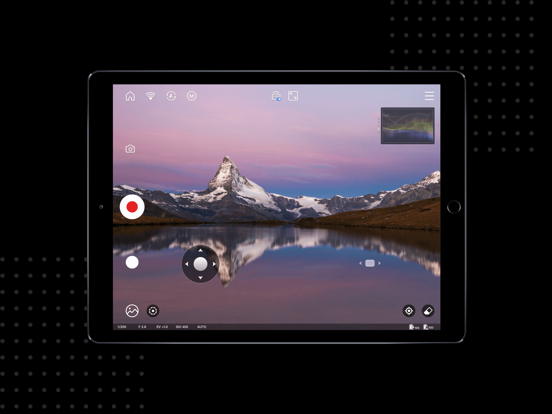
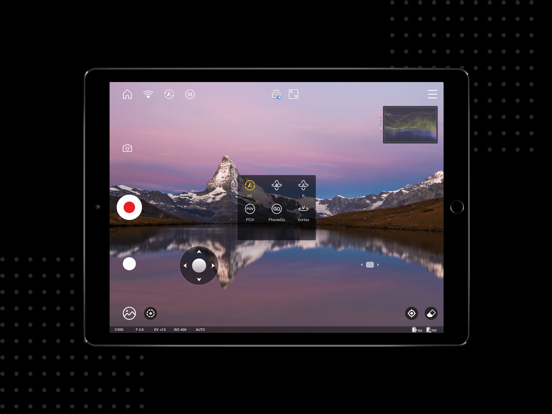
Screens
App Store
16 store screenshots


Pricing & paywalls
App Store
- Free
Ratings & reviews
App Store
-
2/5Cripples the Smooth 4
It’s disappointing that this app is needed to get the full experience from my gimbal (Smooth 4), because it lacks certain key features. The Smooth 4 is targeted towards content creators, yet they don’t allow people to have full customization for basic things like shutter speed, ISO, and frame rate. Frame rates like 24 FPS are only available in 4K (sometimes I want to shoot in 1080 to save space). You can’t shoot slow mow. But perhaps the most infuriating thing: you can’t achieve a shutter speed/ISO setting that’s ideal for the “film look.” When shooting 24 FPS you ideally want a shutter speed of 1/48. The closest you can get is 1/50 (competing apps allow you to select exactly 1/48). But the bigger issue is: in manual exposure mode you can only go down to 100 ISO, when apps like FiLMIC Pro and Moment allow you to go down to about ISO 20. On a final note: the object/face tracking feature stinks and hardly ever works. I’ve had my Smooth 4 for a few years, and I love the gimbal, but I was hoping the software would be fixed by now, but sadly it isn’t.
mattajohnson · 7 Aug 2026
-
1/5Information Gathering
Do not install this app! It seems to be made primarily to gather information about you and your device. I played around with it for about 30 minutes looking for the utility, but at no point did I ever see the utility for operating the gimbal itself. The App wants information and access to all your photos, your location, and your microphone, plus it wants you to sign up for an account. I finally relented to the account signup using a Facebook Account with not much information on it, but even Facebook rejected the signup. I gradually also allowed it access to the photos, mic, and location and that opened up a little more info but still no controls for the gimbal. There are video tutorials, a way to connect with other users by joining some social media thing of theirs, and an operating manual download within the app, as well as information about their other products, but no actual controls to adjust or operate the gimbal. I even tried to download the Mac utility to see if that would work. This package comes directly from their website and not the app store. It was unsigned and not recognized by apple. Very suspicious, and disappointing. I would just stick with the onboard controls built into Gimbal and forget about being able to do more with this thing. I also uninstalled the app.
Mendo Dave · 7 Aug 2026
-
2/5Initial use: needs usability
Just installed it... used for 30 minutes.. had to swipe up to kill the app when it lost communication with the gimbal and locked up... Editing a custom setting is crazy bad User experience... rather than tap/hold/anything to edit it, with it selected you go into custom again (who would guess?), and when you save, give it the same name (OMG I had to type the name in again!) Then you find it didn't save the changes.. I finally got it to save after about 3 tries.. Moving the camera doesn't seem to work smoothly (from UI), it can lock if not in the right mode (I guess you set the mode on the device... as the app doesn't talk to the device??? Oh, wait it does! Oh, maybe it needs to be set there because the app was written by someone else and they have no control over the app and device? no, that isn't it... just stupid I guess... Gave up on using this thing for the night... Will try out the device on a shoot... Didn't seem to come with the cable to control the camera, wanted access to EVERYTHING, GPS even... why? Photos? Why? Need to use to control gimbal... And the gimbal doesn't seem to stabilize the camera enough to turn the zoom by hand without spinning the roll... so, yeah, I want to just lock the roll hard, using the thumb screw... they didn't provide... no way to lock it for a pan/tilt (say if using at s theater to film?) May not be useful at all to me.. -Traderhut Games / Traderhut Photography
Traderhut.com · 7 Aug 2026
-
2/5Several Problems
There are some features that work well. But there are several serious issues that need to be addressed. When I first got the app, it defaulted to the lowest definition setting, and I spent 10 hours filming only to realize that the video quality was subpar when I got the video into post-production. That was an easy fix, and I always double check it now, but tonight I had one take to get an important shot and the steady lighting feature caused the zoom function to glitch resulting in a jarring visual effect that can’t be fixed in post. I wouldn’t have used this feature at all, but the On button to turn on the light wasn’t working either. I had to film without the app after this, but a once in a lifetime shot for a academic presentation was ruined.
Crackle321 · 7 Aug 2026
-
4/5Exicited for the future of handheld gimbals! Add more features!
Just upgraded my old beholder gimbal to the crane V2. It is a great piece of equipment and this app is a great addition to the functionality. It was a bit tricky to figure out how to update firmware on the computer and get the camera to talk to the gimbal with the camera connection cable. It would be nice if there were some better instructional how to tutorials within the app. What really sold me on the crane was the ability to program motion time-lapses and key-framed movements. The app needs some improvements in this area: please add the ability to save the key frames so that you can repeat the same camera movement/ timelapse more than once. Also, the user interface for entering shutter time and timelapse duration is confusing and I can’t figure out if there is a way to tell how many exposures the camera will ultimately take throughout the course of the timelapse. A couple of other simple features I would love to see added to the App: 1. the 3x3 grid capture is great, but what about adding a larger grid to capture “gigapixel” images? (Maybe with a calculation based on focal length?) 2. A “360 grid”to create 360 spherical images for stitching into a 360 degree sphere (also with a focal length calculation) 3. In joystick mode- a slider to adjust the speed of the joystick for slower or faster movement precision
Divineearth · 7 Aug 2026
Privacy & accessibility
App Store
Privacy
- Data Not Collected Developer declared
Accessibility
No accessibility labels collected yet.
Versions
App Store
-
2.8.15
Fixed some knowned issues.
-
2.8.16
1. Newly added waveform and vectorscope; 2. Newly added feature to save image transmission videos; 3. Fixed some other bugs.
-
2.8.18
1. Newly added TransMount Image Transmission Transmitter 2.0. Image transmission supports audio. 2. Fixed some other bugs.
-
2.8.19
1. Compatible with TransMount Image Transmission Transmitter AI. 2. Fixed some other bugs.
-
2.8.20
1. Compatible with WEEBILL 2. 2. Fixed some other bugs.
-
2.8.21
1. Optimized the live streaming feature for better experience. 2. Fixed some known issues, optimized user experience.
-
2.8.22
Fixed some known issues, optimized user experience.
-
2.8.23
Fixed some known issues, optimized user experience.
-
2.8.24
1.Compatible with CRANE-M3. 2.Fixed some known issues.
-
2.8.25
Fixed some known issues.
-
2.8.26
1. Compatible with CRANE-M2 S. 2. Fixed some other bugs.
-
2.8.27
Fixed some other bugs.
-
2.8.28
1. Compatible with WEEBILL 3. 2. Optimized the features and fixed some known issues.
-
2.8.29
Fixed some known issues.
-
2.9.0
1.Compatible with CRANE-M 3S, 2.Compatible with WEEBILL 3S, 3.Fixed some known issues.
-
2.9.1
1. Compatible with CRANE 4. 2. Fixed some known issues.
-
2.9.2
Fixed some known issues.
-
2.9.3
1. Compatible with WEEBILL 3E. 2. Compatible with WEEBILL 3E Lite. 3. Fixed some known issues.
-
2.9.4
Fixed some known issues. Improved user experience.
-
2.9.5
Fixed some known issues. Improved user experience.
-
3.0.0
1. Adapt to support CRANE 4E. 2. Fix some known issues.
-
3.0.1
fix some bugs
-
3.0.2
Fix some known issues.
-
3.0.3
1 Support new devices WEEBILL 5. 2 Fix some known issues.
-
3.0.4
· 23 Jul 2026
Fix some known issues.
Availability by market
- US
Data quality & evidence
- Page completeness
- Live store listing
- Last verified
- 7 Aug 2026
- Sources
- App Store
- Independent summary has not been published yet.