
Quick verdict
- What it is
- Store information collected; an Apoku editorial summary is not yet published.
- At a glance
-
- From $4.16/mo
- Free to download
- In-app purchases
Categories and search queries
Official categories
- Photo & Video
- Productivity
Apoku categories
Key functions
| Function | Availability | Access | Scope | Evidence |
|---|---|---|---|---|
| Free app | Yes | Free | Context-specific | Store published |
| In-app purchases | Yes | Limited free | Context-specific | Store published |
Screens
App Store
12 store screenshots

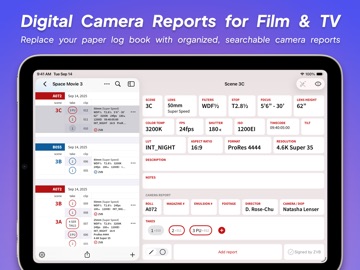


Pricing & paywalls
App Store
- 1 Month — $4.99/month
- 1 Month — $49.99/year ($4.16/mo)
- Multiple Months — $4.99/month
Ratings & reviews
App Store
-
5/5Easy Organization
Our team has been using Zoelog for a couple seasons now and it has been such a great tool. Everyone, including the script supervisor, are able to be on the same page and collaboratively keep all of the work documented, even when some crew are off on a splinter or second unit. The dev is extremely responsive as well. They were able to patch the app and release an update within 24hrs of me bringing an issue to their attention. Great App and worth every penny for the annual subscription.
Steve C23 · 7 Aug 2026
-
5/5Great app!
ZoeLog is a fantastic app! Really changed the work flow for onset note taking. Would love for the app to expand some functionality though so VFX Data Wranglers can use ZoeLog as a VFX Database - feel like this is very doable with a few tweaks that could be optional while setting up a project. Reach out if you want some specific ideas!
4zero1k · 7 Aug 2026
-
4/5Can’t sign up for an account
Downloaded the app and tried to sign up for an account. Filled it out and clicked sign up, but it doesn’t go anywhere or show any sort of dialog as to why it didn’t want to work. Hope that gets fixed. Update: so the app doesn’t seem to recognize auto fill at all (like auto filling email addresses) but there’s no warning to tell you that so it just appears to not work until you try typing it in. Also, $5/mo is not worth setting it up unless production is going to pay for it.
Renato is awesome · 7 Aug 2026
-
5/5Industry Standard
Finally an app that allows you to track all camera settings, notes and creates great cameras reports automatically! No more using productions clunky .word or .excel files after 12+ hour days to write camera reports! Also team editing/logging for multiple cams and teams!
leftovercity · 7 Aug 2026
-
5/5Great interface; amazing app
Getting all the data you need from camera without slowing them down has always been a post/vfx issue. Getting it instantly in a very readable format you can create PDFs from is wonderful. No bugging camera; no transcription errors. Signed up for the full year on day one.
virtualbri · 7 Aug 2026
Privacy & accessibility
App Store
Privacy
- Data Linked to You — Analytics — Purchases — Purchase History Developer declared
- Data Linked to You — App Functionality — Contact Info — Email Address Developer declared
- Data Linked to You — App Functionality — Contact Info — Name Developer declared
- Data Linked to You — App Functionality — Identifiers — Device ID Developer declared
- Data Linked to You — App Functionality — Identifiers — User ID Developer declared
- Data Linked to You — App Functionality — Purchases — Purchase History Developer declared
- Data Linked to You — Product Personalization — Contact Info — Email Address Developer declared
- Data Linked to You — Product Personalization — Contact Info — Name Developer declared
- Data Linked to You — Product Personalization — Identifiers — User ID Developer declared
- Data Linked to You — Product Personalization — Purchases — Purchase History Developer declared
- Data Linked to You — Contact Info Developer declared
- Data Linked to You — Identifiers Developer declared
- Data Linked to You — Purchases Developer declared
- Data Not Linked to You — Analytics — Diagnostics — Crash Data Developer declared
- Data Not Linked to You — Analytics — Diagnostics — Other Diagnostic Data Developer declared
- Data Not Linked to You — Analytics — Diagnostics — Performance Data Developer declared
- Data Not Linked to You — Analytics — Location — Coarse Location Developer declared
- Data Not Linked to You — Analytics — Usage Data — Product Interaction Developer declared
- Data Not Linked to You — App Functionality — User Content — Other User Content Developer declared
- Data Not Linked to You — Product Personalization — User Content — Other User Content Developer declared
- Data Not Linked to You — Diagnostics Developer declared
- Data Not Linked to You — Location Developer declared
- Data Not Linked to You — Usage Data Developer declared
- Data Not Linked to You — User Content Developer declared
Accessibility
No accessibility labels collected yet.
Versions
App Store
-
2.8.11
This update includes bug fixes and improvements to report sharing, as well as modernizing the password system. New Features: 2.8.11 • Added detailed error messages for common login errors. 2.8.8 • Users can choose to separate their CSV files by roll number. 2.8.1 • Improved the timecode keypad to allow for setting an offset when the camera or sound timecode is not synchronized with the time of day. 2.8.2 • Added a timestamp for individual takes, visible in CSV documents. Changes: 2.8.0 • Enhanced the appearance of the Report PDF. • Added a visibility button to password fields. • Eliminated the need for confirming passwords. Bug Fixes: 2.8.11 • New passwords created by web link now appear in keychain suggestions. 2.8.10 • Previous and default metadata show up and autofill and placeholders in the report editor. 2.8.7 • Fixed a bug that could prevent users from changing an entry's date after receiving an old entry warning. • Updated privacy hygiene information. • Reduced hangs and crashes while editing takes. • Corrected clip counting when entries span multiple rolls. 2.8.6 • Various fixes to the camera report pdf for backward compatibility with future updates. • Fixed a rare bug that prevented reports with identical names across cameras on the same day from being exported properly. 2.8.5 • Prevented unnecessary additional saves in the entry editor during smartfill/autofill which could cause some unexpected behavior. • Corrected alignment of the zoelog.io link in pdfs. 2.8.4 • The smartfill button will enter metadata for existing reports with empty fields. 2.8.3 • Fixed an issue that could cause duplicate entries when smartfilling an unsaved entry. • Entry fields layout correctly. 2.8.2 • Fixed an issue where the takes keypad would not show the correct clip numbers in some circumstances. • Resolved a crash that some users were experiencing when trying to "select all" in an entry field. 2.8.0 • Fixed the issue where entries without a roll number were excluded from the camera report PDF. • Addressed the problem of Report PDFs with a large number of takes or clips not displaying correctly by rolling them over to a new page. • Resolved the "Strong Password" bug by removing the password confirmation field and introducing password visibility.
-
2.8.12
This update includes bug fixes and improvements to report sharing, as well as modernizing the password system. New Features: 2.8.11 • Added detailed error messages for common login errors. 2.8.8 • Users can choose to separate their CSV files by roll number. 2.8.1 • Improved the timecode keypad to allow for setting an offset when the camera or sound timecode is not synchronized with the time of day. 2.8.2 • Added a timestamp for individual takes, visible in CSV documents. Changes: 2.8.0 • Enhanced the appearance of the Report PDF. • Added a visibility button to password fields. • Eliminated the need for confirming passwords. Bug Fixes: 2.8.12 • Fixed an issue that caused the settings button to not appear in the list of productions for some users. 2.8.11 • New passwords created by web link now appear in keychain suggestions. 2.8.10 • Previous and default metadata show up and autofill and placeholders in the report editor. 2.8.7 • Fixed a bug that could prevent users from changing an entry's date after receiving an old entry warning. • Updated privacy hygiene information. • Reduced hangs and crashes while editing takes. • Corrected clip counting when entries span multiple rolls. 2.8.6 • Various fixes to the camera report pdf for backward compatibility with future updates. • Fixed a rare bug that prevented reports with identical names across cameras on the same day from being exported properly. 2.8.5 • Prevented unnecessary additional saves in the entry editor during smartfill/autofill which could cause some unexpected behavior. • Corrected alignment of the zoelog.io link in pdfs. 2.8.4 • The smartfill button will enter metadata for existing reports with empty fields. 2.8.3 • Fixed an issue that could cause duplicate entries when smartfilling an unsaved entry. • Entry fields layout correctly. 2.8.2 • Fixed an issue where the takes keypad would not show the correct clip numbers in some circumstances. • Resolved a crash that some users were experiencing when trying to "select all" in an entry field. 2.8.0 • Fixed the issue where entries without a roll number were excluded from the camera report PDF. • Addressed the problem of Report PDFs with a large number of takes or clips not displaying correctly by rolling them over to a new page. • Resolved the "Strong Password" bug by removing the password confirmation field and introducing password visibility.
-
2.8.13
This update includes bug fixes and improvements to report sharing, as well as modernizing the password system. New Features: 2.8.11 • Added detailed error messages for common login errors. 2.8.8 • Users can choose to separate their CSV files by roll number. 2.8.1 • Improved the timecode keypad to allow for setting an offset when the camera or sound timecode is not synchronized with the time of day. 2.8.2 • Added a timestamp for individual takes, visible in CSV documents. Changes: 2.8.0 • Enhanced the appearance of the Report PDF. • Added a visibility button to password fields. • Eliminated the need for confirming passwords. Bug Fixes: 2.8.13 • Changes to the production title take effect without having to dismiss the keyboard first. • Layout glitches in the entry editor during selection have been resolved. 2.8.12 • Fixed an issue that caused the settings button to not appear in the list of productions for some users. 2.8.11 • New passwords created by web link now appear in keychain suggestions. 2.8.10 • Previous and default metadata show up and autofill and placeholders in the report editor. 2.8.7 • Fixed a bug that could prevent users from changing an entry's date after receiving an old entry warning. • Updated privacy hygiene information. • Reduced hangs and crashes while editing takes. • Corrected clip counting when entries span multiple rolls. 2.8.6 • Various fixes to the camera report pdf for backward compatibility with future updates. • Fixed a rare bug that prevented reports with identical names across cameras on the same day from being exported properly. 2.8.5 • Prevented unnecessary additional saves in the entry editor during smartfill/autofill which could cause some unexpected behavior. • Corrected alignment of the zoelog.io link in pdfs. 2.8.4 • The smartfill button will enter metadata for existing reports with empty fields. 2.8.3 • Fixed an issue that could cause duplicate entries when smartfilling an unsaved entry. • Entry fields layout correctly. 2.8.2 • Fixed an issue where the takes keypad would not show the correct clip numbers in some circumstances. • Resolved a crash that some users were experiencing when trying to "select all" in an entry field. 2.8.0 • Fixed the issue where entries without a roll number were excluded from the camera report PDF. • Addressed the problem of Report PDFs with a large number of takes or clips not displaying correctly by rolling them over to a new page. • Resolved the "Strong Password" bug by removing the password confirmation field and introducing password visibility.
-
2.8.14
This update modernizes the password system and improves report sharing reliability, along with many quality-of-life fixes. New Features v2.8.11 • Added clearer error messages for common login issues. v2.8.8 • Introduced an option to separate CSV files by roll number. v2.8.2 • Included per-take timestamps in CSV documents. v2.8.1 • Improved the timecode keypad with support for setting an offset to match camera/sound. Changes & Improvements v2.8.0 • Enhanced Report PDF design and layout. • Replaced password confirmation fields with a visibility toggle. • Modernized password entry UX. Bug Fixes: v2.8.14 • Fixed an issue where roll numbers with trailing spaces didn’t export correctly. v2.8.13 • Made production title changes apply immediately without needing to dismiss the keyboard. • Resolved layout glitches in the entry editor during selection. v2.8.12 • Restored missing settings button in the productions list for some users. v2.8.11 • Ensured new passwords created via web link appear in keychain suggestions. v2.8.10 • Corrected appearance and usage of previous/default metadata in the report editor. v2.8.7 • Fixed date-change issues for entries with old entry warnings. • Improved app stability when editing takes. • Updated privacy hygiene information. • Corrected clip counts for entries spanning multiple rolls. v2.8.6 • Improved backward compatibility for Camera Report PDFs. • Resolved an export issue for identically named reports on the same day across cameras. v2.8.5 • Prevented redundant saves during smartfill/autofill, which could cause erratic behavior. • Fixed alignment of the zoelog.io link in PDFs. v2.8.4 • Enabled the smartfill button to populate existing reports with missing metadata. v2.8.3 • Fixed duplicate entries caused by smartfilling unsaved entries. • Corrected field layout in entry editor. v2.8.2 • Addressed incorrect clip numbers in the takes keypad. • Resolved a crash when selecting all text in an entry field. v2.8.0 • Ensured entries without roll numbers appear in Camera Report PDFs. • Rolled over long reports to new pages to improve PDF rendering. • Fixed “Strong Password” bug by removing confirmation field and adding visibility toggle.
-
3.0.0
ZoeLog has been rebuilt from the ground up - Cross-platform - Real-time sync across your whole team - Faster logging - Camera reports integrated into entry editor for faster editing - Production templates - Copy settings from last season to start new shows faster - Custom report headers - Properly credit your key crew members - Better report flow - Entries appear bottom-to-top, just like on paper
-
3.0.1
Bug fixes and improvements: - Fixed autofill behavior to not add takes - Improved email verification and password reset handling - Reduced UI flickering in purchase screen - Fixed issue where circle mode wasn't preserved when swiping between entries
-
3.0.10
Bug fixes and improvements: - Improved sync performance - Fixed issue where sync could skip entries
-
3.0.11
Bug fixes and improvements: - Fixed issue viewing old productions after subscription expires - Fixed issue where sync could skip entries - Added sync status indicator
-
3.0.12
Bug fixes and improvements: - Major sync reliability improvements - Improved offline handling and connectivity detection - Fixed crashes in entry editor and when switching apps - Fixed crashes on app startup - Fixed sync blocking and reliability issues - Added sync status indicators in more menu - Updated account settings and logout flow
-
3.0.13
Bug fixes and improvements: - Fixed crashes when opening via QR code or credentials link
-
3.0.14
Bug fixes and improvements: - Fixed issue where invalid users could appear in search results - Corrected permission descriptions in user settings
-
3.0.15
Bug fixes and improvements: - Fixed rare issue where entry changes might not be saved when navigating away quickly - Automatically scrolls to newly created items
-
3.0.16
Bug fixes and improvements: - Fixed issue where invalid custom metadata names could cause crashes
-
3.0.17
Bug fixes and improvements: - Fixed delay in detecting subscription status - Fixed issue where outdated data could appear during edits - Fixed issue where entry field updates could retain outdated values
-
3.0.18
Bug fixes and improvements: - Fixed issue where add button could be hidden while offline - Various stability and reliability improvements
-
3.0.19
Bug fixes and improvements: - Fixed issue where custom metadata keys could be removed when editing a production
-
3.0.2
Bug fixes and improvements: - Reintroduced exporting separate CSV files by report - Fixed report sorting order in the sharing dialog - Restored clearer "delete" terminology for cameras and entries - Improved settings and sharing dialog appearance
-
3.0.20
Bug fixes and improvements: - Fixed empty custom metadata keys appearing in PDF reports - Fixed duplicate metadata values appearing in PDF reports - Fixed display issues on larger iOS devices in production, camera, and report lists - General stability improvements
-
3.0.21
· 24 Jun 2026
Bug fixes and improvements: - Fixed issue where email changes didn't update properly
-
3.0.3
Bug fixes and improvements: - Fixed crashes when opening the app via QR code or credentials link - Fixed crashes when editing deleted takes or reports - Fixed crashes when adding entries while swiping between them
-
3.0.5
Bug fixes and improvements: - Fixed sync issues between version 2.x and 3.x users - Fixed crashes when opening the app via QR code or credentials link - Fixed crashes when opening the app for the first time after updating - Fixed issue where active fields could become hidden in the entry editor - Fixed file type detection when sharing - Improved scrolling behavior when swiping or revealing new entries
-
3.0.6
Bug fixes and improvements: - Restored classic compact view (available in the ... "more" menu) - Fixed issue where visibility preferences weren't preserved after creating new entries - Fixed crashes when opening the app from a link or QR code - Fixed missing icons on older iOS versions
-
3.0.7
Bug fixes and improvements: - Improved app startup performance - Improved entry editor appearance - Fixed flashing when editing entries - Entry editor remembers scroll position - Fixed welcome screen layout issues on older iOS versions - Improved sync performance for large productions - Fixed issue that could prevent sync from starting after login - Added warning for invalid characters in metadata keys - Edits appear immediately even when sync is backlogged
-
3.0.8
Bug fixes and improvements: - Improved app startup and sync performance - Improved entry editor appearance - Fixed flashing and warnings when editing - Entry editor remembers scroll position - Fixed crashes when opening via QR code - Fixed sync startup issues after login - Added metadata validation warnings - Edits appear immediately even during sync delays
-
3.0.9
Bug fixes and improvements: - Improved reliability when opening via QR code - Fixed crashes in purchase screen - Improved sync reliability
Alternatives
- CameraKit: Camera Tools — Same category + similar ratings
- LensKit: Lens Tools — Same category + similar ratings
- Cadrage Director's Viewfinder — Same category + similar ratings
- ARRI ECS — Same category + similar ratings
- FinderKit: Viewfinder — Same category + similar ratings
Availability by market
- US
Data quality & evidence
- Page completeness
- Live store listing
- Last verified
- 7 Aug 2026
- Sources
- App Store
- Apoku editorial summary has not been published yet.