
Quick verdict
- What it is
- Store information collected; an Apoku editorial summary is not yet published.
- At a glance
-
- From $79.99/mo
- Free download · core features require a paid plan
- In-app purchases
Categories and search queries
Official categories
- Business
- Finance
Apoku categories
Key functions
| Function | Availability | Access | Scope | Evidence |
|---|---|---|---|---|
| Free app | Yes | Free | Context-specific | Store published |
| In-app purchases | Yes | Limited free | Context-specific | Store published |
| Subscription | Yes | Paid | Context-specific | Store published |
Screens
App Store
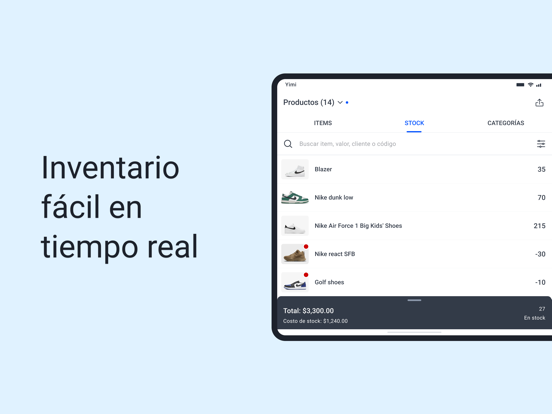
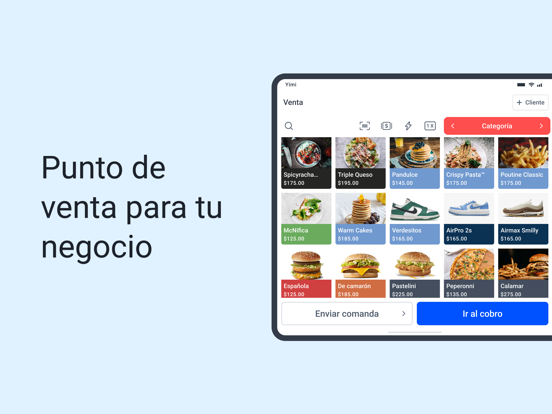
25 store screenshots


Pricing & paywalls
App Store
- Premium — $79.99/month (derived from the IAP title)
Ratings & reviews
App Store
-
5/5Excelente negocios
Un software competitivo y muy completo
Christiancamcho96 · 7 Aug 2026
Privacy & accessibility
App Store
Privacy
- Data Linked to You — Analytics — Contact Info — Email Address Developer declared
- Data Linked to You — Analytics — Contact Info — Phone Number Developer declared
- Data Linked to You — Analytics — Identifiers — User ID Developer declared
- Data Linked to You — Analytics — Usage Data — Advertising Data Developer declared
- Data Linked to You — App Functionality — Contact Info — Email Address Developer declared
- Data Linked to You — App Functionality — Contact Info — Name Developer declared
- Data Linked to You — App Functionality — Contact Info — Phone Number Developer declared
- Data Linked to You — App Functionality — Identifiers — User ID Developer declared
- Data Linked to You — App Functionality — User Content — Customer Support Developer declared
- Data Linked to You — Developer’s Advertising or Marketing — Contact Info — Email Address Developer declared
- Data Linked to You — Developer’s Advertising or Marketing — Contact Info — Name Developer declared
- Data Linked to You — Developer’s Advertising or Marketing — Contact Info — Phone Number Developer declared
- Data Linked to You — Developer’s Advertising or Marketing — Identifiers — User ID Developer declared
- Data Linked to You — Developer’s Advertising or Marketing — Usage Data — Advertising Data Developer declared
- Data Linked to You — Product Personalization — Contact Info — Name Developer declared
- Data Linked to You — Contact Info Developer declared
- Data Linked to You — Identifiers Developer declared
- Data Linked to You — Usage Data Developer declared
- Data Linked to You — User Content Developer declared
- Data Not Linked to You — Analytics — Location — Precise Location Developer declared
- Data Not Linked to You — Analytics — Usage Data — Other Usage Data Developer declared
- Data Not Linked to You — Analytics — Usage Data — Product Interaction Developer declared
- Data Not Linked to You — App Functionality — Contact Info — Physical Address Developer declared
- Data Not Linked to You — App Functionality — Contacts Developer declared
- Data Not Linked to You — App Functionality — Diagnostics — Crash Data Developer declared
- Data Not Linked to You — App Functionality — Location — Coarse Location Developer declared
- Data Not Linked to You — App Functionality — Location — Precise Location Developer declared
- Data Not Linked to You — App Functionality — Usage Data — Product Interaction Developer declared
- Data Not Linked to You — App Functionality — User Content — Photos or Videos Developer declared
- Data Not Linked to You — Developer’s Advertising or Marketing — Usage Data — Product Interaction Developer declared
- Data Not Linked to You — Contact Info Developer declared
- Data Not Linked to You — Contacts Developer declared
- Data Not Linked to You — Diagnostics Developer declared
- Data Not Linked to You — Location Developer declared
- Data Not Linked to You — Usage Data Developer declared
- Data Not Linked to You — User Content Developer declared
- Data Used to Track You — Usage Data — Advertising Data Developer declared
- Data Used to Track You — Usage Data Developer declared
Accessibility
No accessibility labels collected yet.
Versions
App Store
-
2.1.501
Fixed an issue that prevented some orders from appearing correctly. Sales with products containing emojis now work properly. Improved cart behavior to prevent errors when using modifiers with combos. Fixed the missing “Pay Credit Debt” button for customers. Canceled orders older than 5 days are now automatically removed from the main view.
-
2.1.503
Fixed issue with products not loading Fixed an issue that prevented some orders from appearing correctly. Sales with products containing emojis now work properly. Improved cart behavior to prevent errors when using modifiers with combos. Fixed the missing “Pay Credit Debt” button for customers. Canceled orders older than 5 days are now automatically removed from the main view.
-
2.1.523
Bug fixes and new Start menu with featured functions
-
2.1.534
Bug fixes Improved beginner tutorial UX improvements in Print ticket and sales
-
2.1.545
Bug fixes: -Digital ticket sharing -Variant purchases New features: Improved getting started tutorial and feature discovery UX improvement in Print ticket
-
2.1.547
Bug fix when synchronizing offline sales
-
2.1.554
What's new: - New printer flow and improved item creation
-
2.1.567
New Table Flow Now supports TSP printer connections (Star Micronics models) Improved UX when connecting a printer New Reports
-
2.1.584
What's New - Optimized discovery: New navigation experience to easily find tools. - License activation. - Improved Table and Order Flow: Significant improvements in order management and table assignment. Stabilization and improved support for report data, inventory, and shifts.
-
2.1.592
Bug fixes
-
2.1.594
New Home Menu and Improved Onboarding Bug fixes for checkout and shopping cart
-
2.1.607
What's New - New sales ticket design Bug Fixes - Fixes for 58mm printer ticket printing, product variants, cash shifts, order cancellation, and employee access - Several interface fixes across different screens of the application
-
2.1.614
What's New - Better Reports: Improved report visualization directly from the Home screen. - Inventory Filter: New stock filter added to the item catalog. Corrections - Fixed errors when uploading product images. - Resolved visual bugs in printer settings and order details. - Fixed an issue where tickets were not printing when saving an order. - Corrected an error displaying remaining license days.
-
2.1.617
What's New - Improved Reports visualization from the Home screen - New stock filter in the item catalog Bug Fixes - Error when uploading an image to products - Visual bugs on Printers and in Orders - Bug where order tickets were not printed when saving an order - Error displaying the remaining license days
-
2.1.622
What's new: - Cart optimization - Improvements to product and variant stock display and management Bug fixes: - Fixed printed order format to prevent cut-off receipts - Fixed a lock issue within the "Switch user" function
-
2.1.634
What’s New - New "Bank Transfer" payment method - New experience when scheduling orders - Share customer information after completing a sale Bug Fixes - Fixed the error when filtering product categories - Fixed the change calculation error that affected sales reports
-
2.1.637
Fixes and improvements in shift management Fixed an issue that prevented the address from displaying on the map
-
2.1.640
Fixes and improvements to shift management Fixed an issue that prevented the address from being displayed on the map Fixed an issue when switching users in the app Thank you for using Yimi! If you have feedback, contact us through the app.
-
2.1.641
What's New - New format for tickets and invoices - Improvements to the digital/printed ticket format Bug Fixes - Fixed inconsistencies in printer connections - Resolved an error with the cash received amount and change on printed tickets - Fixed inconsistencies in cash register shifts
-
2.1.648
What's New: - Clearer and more compact receipts, with design and printing improvements. -Tips are now shown in the order details. - Better management of register shifts and improved information display. Bug Fixes: -Fixed a bug that froze the customer screen when applying filters. -Visual fix in the customer information query.
-
2.1.653
What's New: - Improvements in plan management - Enhanced tax configuration - Improved ticket design and printing - The app now requires an internet connection to work Fixes: - Inconsistencies in orders and tables - Barcode scanning for product variants
-
2.1.658
What's New - Orders Redesign - Purchasing Optimization - Table Control Optimization Fixes - Fixed an issue where stock was deducted for items removed from the cart. - Fixed a bug that allowed selling out-of-stock products, ignoring the established configuration. - Resolved issues that prevented products and cash register shifts from loading correctly. - Fixed a bug that prevented viewing the history within the order details. - Saving an order is no longer blocked when there is no Bluetooth access.
-
2.1.661
Bug Fixes: - Product images were not displaying during editing - The "Import contacts" button on the customers screen was not performing any action - Resolved timezone issue in the employee report that caused incorrect information to display - Product order settings were not reflecting changes
-
2.1.664
What's New - New Table View for restaurants - Redesign of the Product Grid - Assignment of printing areas to categories for faster, more organized tickets - Automatic discovery and connection of Wi-Fi printers - Full dark mode support for icons, illustrations, and screens - Improved tablet layouts for sales, orders, and reports Fixes - Sharing a ticket no longer crashes the app unexpectedly on iPad - Product categories no longer lose custom order upon restarting the app - Fix in transaction queries - Improvement in importing contacts from the phone - Fixed product images that were not loading correctly
-
2.1.667
· 4 Aug 2026
What's New - New Table View for restaurants - Redesign of the Product Grid - Assignment of printing areas to categories for faster, more organized tickets - Automatic discovery and connection of Wi-Fi printers - Full dark mode support for icons, illustrations, and screens - Improved tablet layouts for sales, orders, and reports Fixes - Sharing a ticket no longer crashes the app unexpectedly on iPad - Product categories no longer lose custom order upon restarting the app - Fix in transaction queries - Improvement in importing contacts from the phone - Fixed product images that were not loading correctly - Correction of the inconsistency in transaction display
Alternatives
- SICAR X Point of Sale — Same category + similar ratings
- My Business Control — Same category + similar ratings
- Loyverse POS - Point of Sale — Same category + similar ratings
- BOSS Small Business Accounting — Same category + similar ratings
Availability by market
- US
Data quality & evidence
- Page completeness
- Live store listing
- Last verified
- 7 Aug 2026
- Sources
- App Store
- Apoku editorial summary has not been published yet.