Quick verdict
- What it is
- Store information collected; independent summary not yet available.
- At a glance
-
- $3.99
Categories and search queries
Official categories
- Lifestyle
- Education
AppCorpus categories
Key functions
| Function | Availability | Access | Scope | Evidence |
|---|---|---|---|---|
| Family Sharing | Yes | Unknown | App Store | Store published |
Screens
App Store
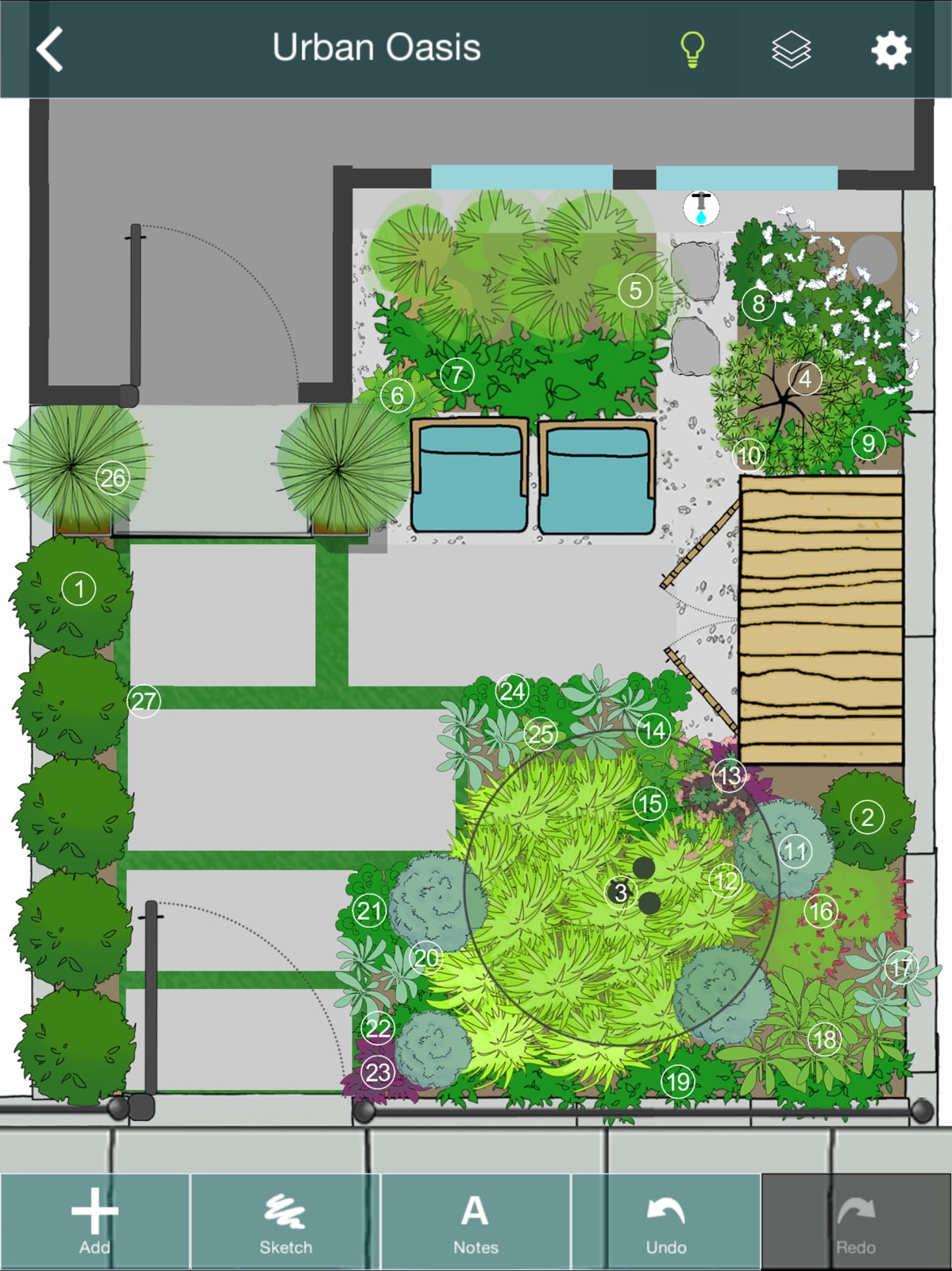
9 store screenshots



Pricing & paywalls
App Store
Shown for US
- Price: $3.99
Ratings & reviews
App Store
Shown for US
-
4/5Great Utility
I’ve really enjoyed this app, especially now that I’m getting better at using it. It’s addictive! Two things I would love to see that would be great value-adds and not too much development cost is the ability to stretch an object horizontally or vertically to slightly change its shape. Also would like more images to pick from. The object resizing works great, but sometimes I want to keep the width but extend the length, and I haven’t seen that ability. I would also like to rescale everything so that, for instance, the property shown is 150 ft long and 120 ft wide, instead of 180 ft long and 150 ft wide. I’m just having a hard time dialing that in, so I don’t know how big all my objects really need to be, or I have to account mentally for some conversion factor as I size my objects. There was some kind of scale thing when I first uploaded and blueprint of my property, but I can’t figure out how to get back to it, and I’m worried that all my objects would not adjust with it anyway. That’s why I think ithe option would be cool to rescale the whole thing. Otherwise it’s perfect!
T-bone Mckensley · 31 Jul 2026
-
2/5Ok but could be better…
This app could be great but there are drawbacks. Simple things such as changing the size of the item makes it frustrating to design. An item’s size can change but not the width and length separately. For instance putting in a fence is immensely time consuming. Individual small fence sections must be added to create the appropriate length. And they don’t link to each other. Trying to get everything lined up is ridiculous. I would love it if you clicked on the item (ie: fence) and a box pops up that you could add the correct measurement and it automatically created the fence to the appropriate length. Along with having certain items link would make the design process more efficient. I would enjoy more options for items. In trying to put a garden bed in there was no brown option for shapes. instead of having to scroll through many different shapes in multiple colors, it would be quicker to have many different shapes options then just choose the color from a color wheel. I also wish the paths and patios could adjust the shape as well… a free form type option. I appreciate the layer buttons and locking layers comes in handy but it would be helpful to set each individual item’s layer. The menu could be more efficient as well. It always takes you back to the main menu instead of where you left off. Or if you back out of a subheading you’re back at the main menu again. For instance if I’m in pathways and I back out it doesn’t take me to hardscapes it takes me to the main menu again. More item options would be nice, especially in hardscapes and structures. The app works fine it’s just not very efficient. A few changes would make it more user friendly.
ZandS mom · 31 Jul 2026
-
4/5Simple, easy to use, but lacks 3D visualization
I’ve had this app for about 3 years now. I use it regularly because I am a gardener, and recently purchased a house on 5 acres. I love the ability to import an aerial photo of my lot. That allowed me to see where my existing features were, and set them on a locked layer. Things like the location of my well head, septic tank, and drain field. On a new layer I made proposed hardscaping: a circular driveway, gravel paths for moving supplies, etc. Other layers were made for the garden plantings, water features, and animal enclosures. The basic tools are easy to use. You can rotate and resize the library images, overlapping them to create the basic shape you want. I have found the app to be very stable, not buggy, and I recommend it to everyone. The graphics are like architectural sketches, not photo-realistic, with water color shading. I like the look. I give the app 4 stars because it lacks 2 things in my opinion: - I would love to have the ability to look at my plan in 3D. It looks great from above, how does it look from the driveway? I would gladly pay $10 to upgrade my version of the app to have this feature. - If I plan a tree, shrub, or perennial in my garden, I would like to be able to record that in the app, so that when a plan is final, I have a map of where everything goes, as well as a shopping list to take to the nursery. I would also happily pay for this upgrade because I already know the app is well done and I will continue to use it.
Kerrie Puchar · 31 Jul 2026
-
4/5See my vision
I have been in the landscape industry for over 30 years now. I have used many different design programs during this time. To include expensive cad based programs. This is a good basic and easy to use design app. Some clients can not see the vision of the landscape I’m trying to sell them. When this happens, I find this app very useful to share that vision. There is a little learning curve to be efficient using this design app. Some may not even experience this curve. I can complete a design in about 20 to 30 minutes and either print it out or email it to my client. I’m hoping they continue to add new objects as this will only make it that much better and easier to use. I would recommend this app to anyone who would be in a position to create new landscapes.
Captain Oh No · 31 Jul 2026
-
2/5Not more useful than other tools
I bought this hoping for the squarespace of landscape design. I’m a graphic designer and I’ve used graph paper to draw to scale, I’ve used procreate, I’ve used illustrator…I wanted more pre-built options where I could adjust the shape of a flowerbed for example, enter actual dimensions and get something to drop plants etc into. This interface just felt like it wanted to sort of be like procreate but clunkier. Lots of steps. No useful tool tips or tutorial videos to get started. The FAQ kind of helped but not really. I can draw faster on my iPad or on paper than I can use this app so I regret spending the money and won’t be using it.
Googling new calendar apps · 31 Jul 2026
Privacy & accessibility
App Store
Privacy
- Data Not Collected Developer declared
Accessibility
No accessibility labels collected yet.
Versions
App Store
-
2.0.1
Version 2.0.1 provides stability improvements. ----------------------- With version 2.0, the Home Outside app has a new name: Palette. The app also has a new icon and a new user interface. We hope you enjoy these new features: - The Gallery presents thumbnail images of each of your designs. - Preview mode allows you to view your design full screen without editing it. In Preview mode, you can also easily clone, delete or share any of your designs. - The Help system has been greatly enhanced. - Built for iOS 5.
-
2.0.2
Bug fixes.
-
2.0.3
- Share your designs on Twitter! - Better support for Retina displays.
-
2.1.0
Designs can be imported and exported via email.
-
2.1.1
Now users can email designs back and forth with friends, editing each other’s designs. The new 'Ask an Expert' feature allows users to share a design with the Home Outside landscape design team. Optimized for 4-inch display.
-
3.0.0
We are grateful for our users’ feedback and suggestions, which we have incorporated into this version. New features include Undo, Redo, Layers, optimization for iPad, improved grouping and ungrouping, new background colors and graph paper background, the ability to import a photo as a background, Facebook sharing, improved palettes with additional and redrawn elements, and several bug fixes.
-
3.1.0
The Holiday palette offers 23 elements that provide seasonal and festive accents for your landscape design.
-
3.1.10
•Simplified interface (updated menu and gallery view) •28 new elements in an updated and reorganized Palette menu •5 new color options in the Sketch tool •Bug fixes
-
3.1.11
•Simplified interface (updated menu and gallery view) •28 new elements in an updated and reorganized Palette menu •5 new color options in the Sketch tool •Bug fixes
-
3.1.12
Performance improvements and bug fixes
-
3.1.13
Performance improvements and bug fixes
-
3.1.14
Performance improvements and bug fixes
-
3.1.2
Bug fixes and stability improvements.
-
3.1.3
We have improved the rotation function so that elements stick slightly every 90 degrees, making them easier to level. We’ve added a grid of guidelines that can be turned on/off, so users can line up elements accurately. It is now possible to lock your layers to prevent inadvertently selecting elements. The palette menu is condensed to make it easier to find the element you’re seeking. Enjoy a number of new free elements as well: lighting, fences, walls, and more. We replaced the Specialty Elements & Tools in-app purchase bundle with the Palette Plus Tools bundle ($9.99). The Holiday Palette, which includes 23 elements that provide seasonal and festive accents for your landscape design, is now free. IN-APP PURCHASES: Palette Plus Tools ($19.99) includes: •Sketch Tool (allows users to draw garden beds and other free-form shapes with an eraser and brushes of different colors, widths and opacity) •Map Tool (This highly accurate mapping tool based on Google Maps allows you to drop pins at the corners of your property and import the map image with measurements into the app as a background.) •Snap to grid (elements snap to guidelines, can be turned on/off in Settings) •Rulers (visible at edges of design; can be turned on or off; user selects feet or meters) •North arrow (appears with Map Tool) •Notes (allows users to tag elements in their designs with typed comments or descriptions) •Animated Figures (a palette of animated elements—a person, dog, cat, bird, and car—that move through your design) Events Palettes ($2.99) includes three new palettes—Event, Wedding, and Party—with 50 functional, beautiful, and fun elements for planning your special event (indoors or out). Also included is a Counting Tool to help you keep track of the number of seats you’ve placed for your guests. From the tents and tables to the chafing dishes and disco ball, these brand-new palettes let you plan the perfect celebration. Plants Palettes ($2.99) includes four specialty plant palettes: Shrub, Perennial, Grass, and Container.
-
3.1.4
This update fixes a bug that made previous in-app purchases unavailable. We apologize for the inconvenience. Please download the update, and your purchases will be restored! We have improved the rotation function so that elements stick slightly every 90 degrees, making them easier to level. We’ve added a grid of guidelines that can be turned on/off, so users can line up elements accurately. It is now possible to lock your layers to prevent inadvertently selecting elements. The palette menu is condensed to make it easier to find the element you’re seeking. Enjoy a number of new free elements as well: lighting, fences, walls, and more. We replaced the Specialty Elements & Tools in-app purchase bundle with the Palette Plus Tools bundle ($9.99). The Holiday palette is now free. IN-APP PURCHASES: Palette Plus Tools ($9.99) includes: •Sketch Tool (allows users to draw garden beds and other free-form shapes with an eraser and brushes of different colors, widths and opacity) •Map Tool (This highly accurate mapping tool based on Google Maps allows you to drop pins at the corners of your property and import the map image with measurements into the app as a background.) •Snap to grid (elements snap to guidelines, can be turned on/off in Settings) •Rulers (visible at edges of design; can be turned on or off; user selects feet or meters) •North arrow (appears with Map Tool) •Notes (allows users to tag elements in their designs with typed comments or descriptions) •Animated Figures (a palette of animated elements—a person, dog, cat, bird, and car—that move through your design) Events Palettes ($2.99) includes three new palettes—Event, Wedding, and Party—with 50 functional, beautiful, and fun elements for planning your special event (indoors or out). Also included is a Counting Tool to help you keep track of the number of seats you’ve placed for your guests. From the tents and tables to the chafing dishes and disco ball, these brand-new palettes let you plan the perfect celebration. Plants Palettes ($2.99) includes four specialty plant palettes: Shrub, Perennial, Grass, and Container. Unlock all in-app purchases for $14.99.
-
3.1.5
This update fixes a bug that affected users who paid $14.99 to unlock all in-app purchases. Those users can now access all of the in-app purchase tools and palettes. We apologize for the inconvenience. We have improved the rotation function so that elements stick slightly every 90 degrees, making them easier to level. We’ve added a grid of guidelines that can be turned on/off, so users can line up elements accurately. It is now possible to lock your layers to prevent inadvertently selecting elements. The palette menu is condensed to make it easier to find the element you’re seeking. Enjoy a number of new free elements as well: lighting, fences, walls, and more. We replaced the Specialty Elements & Tools in-app purchase bundle with the Palette Plus Tools bundle ($9.99). The Holiday palette is now free. IN-APP PURCHASES: Palette Plus Tools ($9.99) includes: •Sketch Tool (allows users to draw garden beds and other free-form shapes with an eraser and brushes of different colors, widths and opacity) •Map Tool (This highly accurate mapping tool based on Google Maps allows you to drop pins at the corners of your property and import the map image with measurements into the app as a background.) •Snap to grid (elements snap to guidelines, can be turned on/off in Settings) •Rulers (visible at edges of design; can be turned on or off; user selects feet or meters) •North arrow (appears with Map Tool) •Notes (allows users to tag elements in their designs with typed comments or descriptions) •Animated Figures (a palette of animated elements—a person, dog, cat, bird, and car—that move through your design) Events Palettes ($2.99) includes three new palettes—Event, Wedding, and Party—with 50 functional, beautiful, and fun elements for planning your special event (indoors or out). Also included is a Counting Tool to help you keep track of the number of seats you’ve placed for your guests. From the tents and tables to the chafing dishes and disco ball, these brand-new palettes let you plan the perfect celebration. Plants Palettes ($2.99) includes four specialty plant palettes: Shrub, Perennial, Grass, and Container. Unlock all in-app purchases for $14.99.
-
3.1.6
•Improvements to design and functionality •NEW palettes: Basic Shapes, Sun/Soil. New elements indicate basic shapes (without outlines) in 6 colors; elements indicating sun/shade and soil conditions, and utilities such as air conditioning units, electrical utilities, septic fields, etc. •Turn on the Snap-to-90 option in Settings to enable the element rotation to snap at 90-degree increments (useful for lining up elements) or turn it off to allow for more precise adjustments to rotation. •In-app step-by-step guide to creating your Property Plan. Premium Tools improvements in Version : •Sketch tool bugs fixed •Map Tool address located on map with a dot, useful while zooming. •Grid is now visible above all Layers. •Ruler increments maintain 0 at upper left with any zoom or position on screen, useful for scaling elements and measuring distances in your design. •Notes tool generates a text file of your Notes that is emailed with your design file. •Home Outside clients can now log in to their account in the app.
-
3.1.7
- The app is now free! All of the previous in-app purchase tools and elements have been integrated into the free app. - Improvements to design and functionality
-
3.1.8
- The app is now free! All of the previous in-app purchase tools and elements have been integrated into the free app. - Improvements to design and functionality
-
3.1.9
•Simplified interface (updated menu and gallery view) •28 new elements in an updated and reorganized Palette menu •5 new color options in the Sketch tool •Bug fixes
-
3.2
•Lots of bug fixes, including Map Tool location search •Updated help to get you started •In-app Design Primer by Julie Moir Messervy •Retina support: looks better on tablet screens
-
3.2.1
Fixes an issue that could cause a crash when saving a design as a photo.
-
3.2.2
Minor bug fixes.
-
3.6.1
Renamed to Yard Planner–try our new AI-powered 3D app: Home Outside AI Map Tool fixed Bug fixes and stabilization
-
3.6.2
· 8 Sep 2024
Bugs fixes and improves
Alternatives
- Landscape Design: Vera — Same category + similar ratings
- Sow: Garden & Landscape Design — Same category + similar ratings
Availability by market
- US
Data quality & evidence
- Page completeness
- Live store listing
- Last verified
- 31 Jul 2026
- Sources
- App Store
- Independent summary has not been published yet.