
Quick verdict
- What it is
- Store information collected; an Apoku editorial summary is not yet published.
- At a glance
-
- Free to download
Categories and search queries
Official categories
- Reference
Apoku categories
Key functions
| Function | Availability | Access | Scope | Evidence |
|---|---|---|---|---|
| Free app | Yes | Free | Context-specific | Store published |
Screens
App Store
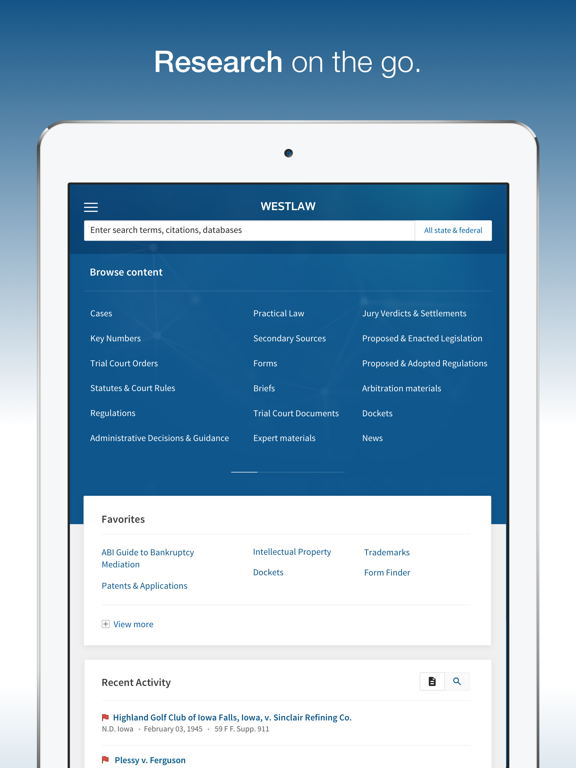
15 store screenshots



Pricing & paywalls
App Store
- Free to download
Ratings & reviews
App Store
-
2/5Use your web browser instead
I used this app for nearly a year and conducted extensive legal research on it. I have deleted it and will go back to accessing Westlaw via a web browser. It is a shame, as I really wanted to keep this app. There are some benefits to using this app over a web browser: - Login is a cinch. - App loads relatively quickly. The shortfalls are numerous: - Citations are limited. Though you get full citations on the web, this app limits case citation to a single one. For those of us following local rules or who wish to use the Bluebook, this makes legal research very inefficient. - Following procedural history is nearly impossible. While analyzing a case, you may wish to review a lower court's disposition, such as to learn more about the facts or understand the reasoning. This app is frequently unable to load that case. Instead, one is met with an error page and an 800-number. - Following stare decisis is nearly impossible. Same reason as above. One clicks on a case cited in an opinion and is disappointed by the 800-number. - Same issue as above with statutes and statutory history. - Trying to select text is a headache. As we all know, Westlaw imposes a popup when text is selected. On a web browser, it is easy to work around. On this app, it frequently blocks selected text and the popup even becomes selected itself. So, goodbye, Westlaw app.
Flummoxed Lawyer · 6 Aug 2026
-
2/5Constant error messages
The app had been working fine. However, over the past few weeks, the app will provide an error message and urges me to “try again”. Trying again never works. The only solution is to restart the app, re-set-up the search, and hope that the problem does not recur. It continues to happen more frequently, rendering the app largely unusable.
AKC501 · 6 Aug 2026
-
4/5Good for paralegal student
I’m only new to law, I’m a paralegal student. The app has been of great help when brainstorming when I’m out and about, with an assignment on my mind, and unable to access my computer. However, one feature that’d be nice to have at hand would be the ability to narrow down searches in cited cases to statutes and such, such as “word/term search” and “reported or unreported”; the app seems a little cramped to add something like that, but perhaps on the left there could be a tab that one could click that’d open up upon the screen with those search elements, then one could hit “search” on the bottom and it’d narrow it down. Just a suggestion, but I must say this app gets it done in a pinch. Thank you
Happygrl123 · 6 Aug 2026
-
1/5Smoldering Garbage Heap
This app is active trash. It patently refuses to remember my login, which is a problem since it makes me login twice. Attempting to access account info will often direct you to pages which you cannot exit out of and have to force quit to return to the home page (where then have to login again 🤣). Navigation to specific statutes or cases is fine, but forget trying to research since case synopses are often no more two or three words. For the cost of their product, this app ought to be the most sophisticated on my phone. Instead, I’m constantly debating deleting it so I don’t have to look at it and be reminded of how useless it is. Rant complete.
BCFiroc86 · 6 Aug 2026
-
3/5What happened?
This app was usable when I needed to quickly reference something. It hasn’t been great for research at any point, but at least it was readable. Now, after the latest round of updates following iOS 11.1.1, the graphics and text are all way to big. Either this app doesn’t support dynamic text, or the developers adapted it for iPhone X, and didn’t care about the users with other versions of iPhones. Please fix this. Your app looks terrible. *UPDATE* The graphics issue was resolved in a recent update. Thank you.
Jkh1987 · 6 Aug 2026
Privacy & accessibility
App Store
Privacy
- Data Linked to You — Analytics — Search History Developer declared
- Data Linked to You — Analytics — Usage Data — Product Interaction Developer declared
- Data Linked to You — App Functionality — Identifiers — User ID Developer declared
- Data Linked to You — App Functionality — Search History Developer declared
- Data Linked to You — App Functionality — Usage Data — Product Interaction Developer declared
- Data Linked to You — Identifiers Developer declared
- Data Linked to You — Search History Developer declared
- Data Linked to You — Usage Data Developer declared
- Data Not Linked to You — App Functionality — Diagnostics — Crash Data Developer declared
- Data Not Linked to You — Diagnostics Developer declared
Accessibility
No accessibility labels collected yet.
Versions
App Store
-
6.2.0
- Email delivery on iPhone and iPad now provides all of the same options and preferences as desktop on a fully redesigned menu - The iPhone app now provides the ability to email multiple documents and lists of items from Search results and KeyCite results - Fixed issue preventing the Username and Password fields from activating when tapping the “Username” and “Password” labels within each field (requiring users to tap the empty space to the right of the labels to present the cursor/keyboard) - Other bug fixes and enhancements Additional iPhone and iPad features for Westlaw Edge subscribers: - Statutes Compare and Regulations Compare - Table of Contents for Cases documents - Procedural Posture Filter for Cases search results - Repealed Status Filter for Statutes & Court Rules search results
-
6.2.1
- Additional bug fixes
-
6.2.2
- iOS 13 compatibility changes - Additional bug fixes
-
6.2.3
Fixed a bug causing the iPad app to crash when filtering search results
-
6.3.0
- KeyCite Citing References now have all filtering and sorting options available on iPhone, including Search within Results. - Added the ability to select and edit the colors of notes and highlights - Additional bug fixes and enhancements Additional features and enhancements for Westlaw Edge subscribers: - Concurrence & Dissent indicators added to Cases documents - Procedural Posture filter enhancements - Compare Versions for State Regulations
-
6.3.1
Additional bug fixes
-
6.4.0
- Offline Mode for iPhone - Ability to create and manage WestClip and KeyCite Alerts for iPhone - Moved the Sort, Email, and Create WestClip Alert options for Search Results to the 3-Dot menu on iPad - Layout and Limits options added to Download menu on both iPad and iPhone - Additional bug fixes and enhancements
-
6.4.1
Additional bug fixes
-
7.0.0
- Moved all Search Result, KeyCite, and Key Number page Filters to the 3-Dot menu on iPad. In addition, all Filters are now fully native on iPad and multiple Filters can be selected and applied simultaneously. - Added access to Profiler References Results and associated Filters for all Profiler content on both iPad and iPhone. - Added Profiler Search Result Filters for iPad and iPhone. - Added multiple Copy with References enhancements and fixes for both iPad and iPhone, including the ability to select the citation format before coping the text. Also, we’ve fixed the issues where formatting and style preferences were not correctly syncing with user preference settings on the desktop site. - Layout & Limits and Content to Append settings have now been added to the Print menu for both iPad and iPhone. - Updated app icon.
-
7.0.1
- Redesigned main menu with updated News and Alerts options - Added ability to view the Original PDF Image for Cases, Patents, and other eligible documents on iPhone
-
7.0.2
Additional bug fixes
-
7.0.3
Bug fixes and performance improvements
-
7.1.0
- Added Split View compatibility along with a fully responsive display, allowing you to open the Westlaw app side-by-side with another app for more efficient multitasking - Added Advanced Search Templates for all content types, providing the app with all of the same expanded Boolean Terms & Connectors search options available on our full desktop site - Fixed an issue where returning to the previous document after following a link brought you back to the beginning of the previous document instead of the link location, causing you to lose your place in your research - Additional bug fixes and enhancements
-
7.1.1
- iOS 15 compatibility updates - Bug fixes and other enhancements
-
7.2.0
- For Westlaw Edge subscribers, KeyCite Overruling Risk now brackets the points of law within the text of the case that are most at risk of being affected by indirect negative treatment. Tapping the orange icon next to the bracketed text provides a link to the impliedly overruling case. - Improved pagination on search results and KeyCite results pages - Additional bug fixes and enhancements
-
7.3.0
- Fixes iOS 16 compatibility issues - Other bug fixes and improvements
-
7.4.0
- Authentication is now fully integrated with our Thomson Reuters OnePass sign-on page - iOS 18 compatibility updates - Other bug fixes and enhancements
-
7.5.0
Bug fixes and other enhancements
-
7.5.1
Bug fixes and other enhancements
-
7.5.2
Bug fixes and other enhancements
-
7.5.3
App icon update and additional bug fixes
-
7.5.4
Bug fixes and other enhancements
-
7.5.5
Bug fixes and other enhancements
-
7.5.6
Bug fixes and additional enhancements
-
7.5.7
· 9 Jun 2026
- Enhanced the sign‑in experience with the option to use a secure, device‑trusted browser for authentication. This change provides a smoother login experience along with improved security and compatibility with enterprise sign‑in methods like single sign‑on (SSO) - Fixed a bug preventing document links from opening in the app - Other bug fixes and enhancements
Alternatives
- West Academic Audio — Same category + similar ratings
- UWorld Legal | Bar Prep — Same category + similar ratings
- LexisNexis® Digital Library — Same category + similar ratings
- Legal Dictionary — Same category + similar ratings
- OYEZ — Same category + similar ratings
- State Statute & Federal Law — Same category + similar ratings
Availability by market
- US
Data quality & evidence
- Page completeness
- Live store listing
- Last verified
- 6 Aug 2026
- Sources
- App Store
- Apoku editorial summary has not been published yet.