
Quick verdict
- What it is
- Store information collected; independent summary not yet available.
- At a glance
-
- From $2.99/mo
- Free to download
- In-app purchases
Categories and search queries
Official categories
- Health & Fitness
- Medical
AppCorpus categories
Key functions
| Function | Availability | Access | Scope | Evidence |
|---|---|---|---|---|
| Free app | Yes | Free | — | Store published |
| In-app purchases | Yes | Limited free | — | Store published |
Screens
App Store
19 store screenshots


Pricing & paywalls
App Store
- Monthly Premium — $2.99/month
- Monthly Premium — $19.99/year ($1.66/mo)
- Premium Access — $49.99
Ratings & reviews
App Store
-
3/5Sync only one way
This app claims to sync with the Apple health app, where I have been keeping my weight measurements for many months. It sends new entries from this app to the Apple app. That's useful. But I cannot import my months of data into this new app. Why not?
MdGIS · 6 Aug 2026
-
3/5Satisfied
Very easy to use but I cannot get the “daily reminder” to save and alert me at my chosen time. How can I fix that?
Hopeful52 · 6 Aug 2026
-
5/5Best minimal tracker!
Feedback: Add a free form note field to the weight entry logging panel. Display this note in log. Trust me, that completes the app. Would actually pay for this plus metric vs freedom units choice toggle.
Anon1q · 6 Aug 2026
-
5/5Issue needing fixed *FIXED*
*edit*. Now 5 stars, developer listened and actually fixed the issues. Great app now! Original review: “Whenever I go to log a new weight for the day, which is every day basically, even though I track in LB’s it auto reverts to KG. Then I click on LB’s and it goes all the way to 495lbs every time. I’m 200lbs so it’s annoying to have to then scroll all the way back each and every time just to track my weight. You also can’t click on the number and type your weight in, it’s only a scroll dial. Please fix”
Drewski6789 · 6 Aug 2026
-
5/5Weight Tracker
There were some bugs initially, most notible was when you'd log a new entry and the wheel would spin to 300+ (i'm half that) so it was annoying to spin it back. however, contacted the developer and the recent update addressed that bug and some other minor annoyances. I apprecate the fact that the developer added notification badges and moved some more permanent settings into the app settings. the developer is very friendly and seems selective with the projects they take on. I'm glad to have found this app as Carrot Fit seems to have been abandoned. Even if not abandoned, this app does one thing and one thing well... logs your weight. that's all i need all while providing an easy on the eyes user interface. thank you! oh, and thank you for not harvesting our data!
[--REDACTED--] · 6 Aug 2026
Privacy & accessibility
App Store
Privacy
- Data Not Collected Developer declared
Accessibility
- Dark Interface — SUPPORTED Store published
- Larger Text — SUPPORTED Store published
- Reduced Motion — SUPPORTED Store published
- Voice Control — SUPPORTED Store published
- VoiceOver — SUPPORTED Store published
Versions
App Store
-
1.4
Added a BMI info pop-up in Settings so you know exactly how BMI tracking works. HealthKit now imports your entire weight history, not just entries logged after enabling sync. Refined the weight picker sliders for a smoother, more efficient scrolling experience.
-
1.5
New design — Updated from solid black to a gradient background CSV export — Export weight data as CSV from Settings Import past data — Import historical weight data from Apple Health (when HealthKit sync is enabled) Privacy & Support links — Quick access to Privacy Policy and Support in Settings Improvements: Daily reminders — Fixed recurring daily notifications Goal tracking — Updates correctly when you adjust your goal weight Bug Fixes: Fixed notification scheduling for reliable daily reminders Improved goal progress display when goals are updated
-
2.0
This update brings a smoother daily logging flow, clearer progress visuals, improved trend charts, new premium themes, and Apple Health sync fixes. Tracking your weight is now easier and more satisfying than ever.
-
2.1
• Improved data reliability and safety • Fixed an issue where existing entries could appear missing after an update • Added automatic recovery for previously saved data • Strengthened safeguards to prevent accidental data loss • General stability and performance improvements
-
2.5
New widgets: Large dashboard, goal progress, and latest weight widgets to keep you on track from your Home Screen. More themes: Added Turquoise Tide and Pink Bloom plus refreshed palette previews for all premium themes. Premium unlock: One-time purchase for advanced insights, all widgets, and all premium themes. Advanced insights: Goal ETA, weekly trend analysis, stability metrics, and plateau detection to understand your progress. Polish and fixes: Smoother theme selection, improved graph styling, and general performance/stability updates. Added the option to remove and edit entries in the past.
-
3.0
- Localization added: The app is now available in German. - Small widget update: Improved the Premium preview for the small widget. - Quick Feedback: Added a Quick Feedback button in Settings to share thoughts faster.
-
3.03
Added app icon badge support for daily weigh-in reminders (based on user feedback). Fixed a bug where the unit setting could revert to kg for lbs users Moved the unit selector into Settings for easier access Added manual weight entry: tap the weight to type instead of using the wheel Fixed today’s entry not clearing on a new day while the app stayed open
-
3.04
Enabling daily reminders now alerts you if notifications are turned off, with a shortcut to fix it in Settings. Small cleanup and stability improvements.
-
3.05
Bug fix: the weight entry form now always starts fresh when opened, instead of restoring a previous value after the app was in the background.
-
3.06
- bug fixes
-
3.07
Editing a weight entry now correctly updates Apple Health instead of creating a duplicate Deleting a weight entry also removes it from Apple Health Fixed incorrect Apple Health values for users tracking in stone
-
4.0
New in Weight Tracker 4.0: • Flexible plans — choose monthly, yearly, or lifetime Premium to fit your budget • Smoother, faster experience across the entire app • Improved charts and trend insights for a clearer view of your progress • Bug fixes and performance improvements
-
4.1
Lock Screen Widgets — Quickly glance at your weight and progress right from your Lock Screen. Choose from multiple styles to match your setup. Free Trial — New users can now try Premium free for 7 days with the yearly plan. We'll even remind you before it ends — no surprises. Bug fixes and performance improvements.
-
4.2
What's New in 4.2 New Widgets: See Your Progress at a Glance • Weight Lost — A bold, motivating widget that shows exactly how much you've lost since day one. Available in small and medium sizes. • Remaining to Goal — See how close you are to your target weight with a clean countdown and progress bar. • Lock Screen Progress — New lock screen widgets that show your total progress right on your lock screen. Choose from a progress ring, detailed view, or compact inline summary. Now Available in 3 New Languages • Português (Brasil) • Magyar (Hungarian) • 한국어 (Korean) The entire app — including all widgets — is now fully localized in 5 languages. Other Improvements • All existing widgets now display in your device language • Improved data sharing between the app and widgets for faster, more reliable updates
-
4.3
Version 4.3 • New Weekly Report — get a personalized weekly summary of your progress • Redesigned Advanced Insights — deeper analysis of your weight trends • New BMI Insights — visual scale bar, healthy weight range, 30-day trend, personalized tips, and health risk level • Bug fixes and performance improvements
-
4.4
• Bug fixes and performance improvements
-
4.5
Daily weight bounces. Your real trend doesn't. This update adds a 7-day trend line to your chart so you can see where you're actually heading — not just yesterday's water weight. Also new: • Reminders that adapt to your streak and your goal • Gentle check-ins if you've been away for a week • Apple Health import right from onboarding • Units auto-detect from your region • Cleaner paywall and pricing • Refreshed reminder setup screen • Lots of small polish and reliability fixes
-
4.6
What's new: • 8 new widgets — Streak, Quick Log, Weight Lost, Remaining to Goal, plus 4 fresh Lock Screen styles (Weight Ring, Details, Inline, and Progress Ring) • Quick Log lets you log a weight without opening the app • Improved VoiceOver and accessibility throughout • Polish across all 8 languages Feedback? [email protected]
-
4.7
Goal Checkpoints — v4.7 Break your weight journey into smaller milestones and celebrate every step forward. • Set 2, 4, 6, or 8 checkpoints evenly spaced between your starting weight and goal • Your Today card always shows the next checkpoint and exactly how far away it is • Each crossing is tracked automatically — no extra logging needed • Research shows sub-goals keep you consistent 2× longer than a single distant target Enable checkpoints in Settings → Goal Checkpoints, or tap the setup card on your Today tab. Also includes bug fixes and performance improvements.
-
4.8
Bug fixes and performance improvements.
-
4.9
Make the Progress screen your own! • Show or hide any section — Goal Progress, Checkpoints, Charts, Statistics and more • Drag to reorder sections into the layout that suits you best • Plus design refinements and small improvements Thanks for using Weight Tracker! Have feedback or an idea? We'd love to hear from you.
-
4.9.1
Minor fixes and translation improvements.
-
5.0
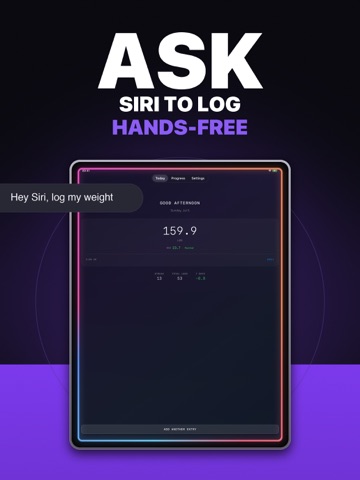
NEW: Log your weight with Siri! Just say "Log my weight" and it's saved — no need to open the app. • Siri support for hands-free weight logging • Performance improvements and bug fixes
-
5.1
Thanks for using Weight Tracker! This update squashes some important bugs: • Fixed: editing an entry could remove its progress photos • Fixed: the edit screen could open with the wrong date or without showing photos • Streaks now stay intact when you travel across time zones • Refreshed edit & delete buttons in your entry list Spotted something off? Tell us: [email protected]
-
5.2
· 3 Aug 2026
New in 5.2: Pace tracking — see if you're on track to reach your goal! • Set a start and target date for your goal (Settings → Goal Weight) • The Progress tab now shows how far along you are in both weight and time • The app suggests a realistic target date and gently warns if your pace is too ambitious • Premium: see whether you're ahead of or behind schedule, based on your trend • Plus accessibility improvements and small fixes This feature came straight from a user suggestion. Got an idea? [email protected]
Availability by market
- US
Data quality & evidence
- Page completeness
- Live store listing
- Last verified
- 6 Aug 2026
- Sources
- App Store
- Independent summary has not been published yet.