
Quick verdict
- What it is
- Store information collected; independent summary not yet available.
- At a glance
-
- Free to download
Categories and search queries
Official categories
- Business
- Travel
AppCorpus categories
Key functions
| Function | Availability | Access | Scope | Evidence |
|---|---|---|---|---|
| Free app | Yes | Free | — | Store published |
Screens
App Store
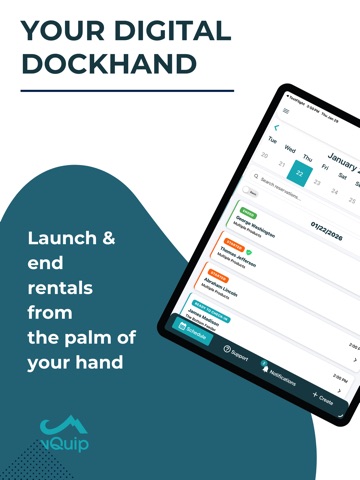
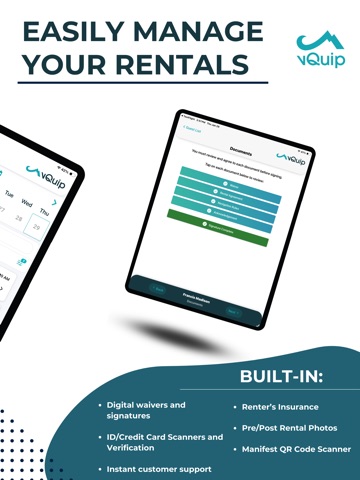
15 store screenshots


Pricing & paywalls
App Store
- Free
Ratings & reviews
App Store
-
5/5Good app great service
The vQuip app is good, but the best part about it is the constant updates and improvements. They also have great service
Grant_Linnuux · 6 Aug 2026
-
3/5Usefull until an update
App works great but every time it updates I have to uninstall and reinstall because I just get a blank screen
Fighterblu22 · 6 Aug 2026
-
1/5Joke of an app and company
They update things all the time crash the app and betray the businesses that pay them for the software. Disgraceful employees
Waydeking · 6 Aug 2026
Privacy & accessibility
App Store
Privacy
- Data Not Collected Developer declared
Accessibility
No accessibility labels collected yet.
Versions
App Store
-
5.1.6
Bug Fixes and Performance Enhancements
-
5.2.0
Overview Version 5.2.0 brings meaningful enhancements to the Launch Flow experience, improving navigation, clarity, and user efficiency. Key updates include module status indicators, smarter navigation logic, and streamlined step transitions. Updates Launch Dashboard Module Status Indicators: We've introduced status indicators on each module in the Launch Dashboard. Modules now show whether they are complete, incomplete, or optional, giving users a clear view of progress. Launch Flow Page Footer: A new footer has been added to Launch Flow pages to support consistency and structure across steps. Employee Attestation Enhancements: When selecting an employee, the signature modal now opens immediately to streamline the process. Once the employee completes the attestation, the reservation will launch automatically. Single-Product Reservations: After tapping "Accept All", users are automatically taken to the next step in the Launch Flow. Equipment Checklist Improvements: Tapping "Accept All" on the Equipment Checklist will now auto-advance the user to the next step. Multi-Product Type Reservations: Updated UI clearly shows which product types have completed their Safety Briefing steps
-
5.2.1
Bug fixes and performance improvements.
-
6.0.0
Overview vQuip OS 6.0 delivers a major enhancement to the final stage of the reservation lifecycle with our new End Rental Refactor. This update introduces a modular, configurable flow designed to better support the unique needs of your operations. The End Rental flow is where employees review the trip and finalize key renter and product details. With this refactor, each component has been rebuilt as a modular action—giving your business the flexibility to tailor the experience. Updates Employee Review: Employees record whether any injuries or damages occurred during the trip. Renter Signoff: Renters sign off confirming no injuries or damages occurred, adding a layer of accountability. Add a Tip: Renters can leave an optional tip for the business team. Rate Us: Renters can leave a rating based on their experience. Post-Rental Photos/Videos: Capture photos and videos of the product(s) post-trip for documentation. Equipment Item Verification: Employees can verify whether all equipment items were returned. Customer Review: Businesses can leave a review for the reservation party.
-
6.1.0
Overview: This release includes improvements to the Schedule dashboard, guest registration workflows, and data collection requirements to streamline operations and improve visibility. Updates: Added an incident report indicator to reservation cards on the Schedule dashboard so teams can quickly see if an incident has been reported. Renamed the action “Copy Address/Phone From Guardian” to “Copy Information From Guardian” for improved clarity. Made the “Copy Information From Guardian” action available on all minor guest forms, not just those with Detailed Registration enabled. When Detailed Registration is turned on, email is now required for all guests to ensure consistent contact information.
-
6.2.0
Overview: This release introduces key enhancements to improve the guest registration process, clarify reservation setup issues, streamline equipment item tracking, and support percentage-based tipping. It also includes improvements to the end-of-rental experience for accounts using the new End Rental workflow. Updates: Updated QR Code Flow from Mobile Dashboard Scanning the QR code from the mobile dashboard now routes users to the Guest List page rather than directly to the name/DOB entry screen. This allows users to check if they are already listed before entering information, reducing duplicate guest entries. Refreshed Equipment Items Module in Launch Flow The Equipment Items module UI in the Launch Flow has been updated to match the module used in the End Rental flow, providing a more consistent and user-friendly experience. New End Rental Tab for Eligible Accounts For accounts using the new End Rental workflow, a new End Rental tab will appear in place of "End Reservation Review." This tab displays summary information, including whether any tips were left during the trip. Support for Percentage-Based Tipping The Tip Module now supports percentage-based tips calculated from the invoice total, enabling automated gratuity collection for rentals that use this configuration.
-
7.0.0
Overview In this release, we’re introducing significant improvements to your login experience and adding new functionality for data sharing preferences. Version 7.0.0 includes a redesigned authentication process for better security and usability. Updates User Authentication Revamp – A new, secure login experience has been implemented across Web Admin and Mobile. Business Admins can now log in to the mobile app using their existing credentials. The new flow requires entering a Company Code before username and password on Web Admin.
-
7.1.0
Overview This update focuses on improving clarity, reducing friction, and preventing common errors for a smoother rental experience. Updates • Accurate Time Display: Reservation start and end times on the Reservation Details page now match the start and end times on the Schedule Dashboard • Clearer Error Messaging: Updated the error shown when a reservation’s start time is after its end time, making it easier for users to understand and correct the issue without contacting support. • Streamlined Attestation Flow: Removed the confirmation modal after tapping Apply signature—your signature is now applied instantly. • Tip Input Validation: Improved the tips module to prevent entering tip amounts that would fail with the payment processor, such as values with overly long decimal places.
-
7.2.0
Overview This release focuses on improving the Safety Briefing and Check-in experience by reducing extra steps and streamlining the user flow. Updates • Safety Briefing “Accept All” Button – The “Accept All” CTA is now a floating action button that stays visible while scrolling. • Reservation Details Auto-Confirm – When checking in a reservation, the page will now automatically confirm once an employee is selected. • Improved Safety Briefing Step Acceptance – Individual step acceptance no longer triggers a loading modal each time, and users remain in place on the page instead of being taken back to the top.
-
7.3.0
Overview This maintenance and feature release focuses on a new look and improved app functionality. Key updates include Dark Mode, document viewing enhancements, and better iPad landscape layout support. Updates • Dark Mode: The vQuip OS mobile app now supports Dark Mode for a comfortable viewing experience, especially in low-light conditions. • Improved Document Viewing: Tapping a document in the Documents tab of a Reservation Details screen now opens the document directly in your device’s web browser for reliable viewing. • iPad Actions Menu Fix: We fixed an issue affecting the Actions Menu layout when using an iPad in landscape mode, ensuring proper display and function.
-
8.0.0
Overview vQuip OS v 8.0 features the Check-in Refactor, which is a complete redesign of the entire Check-in Workflow in the vQuip OS app. This significant update introduces a new Check-in Dashboard that aligns with the existing design concept used in the Launch and End Rental workflows. While the overall core functionality and business rules remain unchanged, this release focuses on providing a better user experience through modern designs and dedicated management tools. Updates Unified Design and Workflow Consistency: The Check-in Dashboard now follows the same design concept as the Launch and End Rental workflows. Furthermore, the mobile app uses the exact same registration pages (Guest Form, Vetting Questions, Documents, and License Photo) as the Web Manifest, with minor mobile adjustments. The dashboard supports up to 6 potential modules, which can be toggled via Web Admin settings. Enhanced Product and Guest Swapping Management: A new Product Manifest page is available, allowing users to easily view and manage all products in one spot. This page enables the crucial feature of Swapping Guests between products by simply selecting a guest card and tapping the desired new product. Products can also be removed if no guests are assigned to them. Dedicated Guest and Minor Management Tools: New pages and features streamline specific guest management tasks. This includes the new Guardian Management Page for viewing information regarding all minors and their associated guardians. The dashboard now displays a dynamic Capacity Bar, and tracks guests who have been removed from products using an Unassigned Guests button, which directs to a new page where unassigned guests can be assigned to a product or permanently Deleted.
-
8.0.1
Bug Fixes and Performance Enhancements
-
8.0.2
Bug Fixes and Performance Enhancements
-
8.1.0
Overview The latest version 8.1.0 introduces a new Reservation Manager that consolidates all reservation tools for easier access and management of guest information, documents, and payment methods. A new QR code feature facilitates quick reservation access, while an enhanced audit log allows for better tracking of reservation changes. Improvements include clearer display of guest badges, optimized dashboard performance, and a better layout for guest information. Additionally, bug fixes address a login authentication timing issue and improve text wrapping in the document acceptance modal for enhanced readability. Updates • New Reservation Manager: A powerful new Reservation Manager with quick access to all reservation tools in one place • New QR code feature for quick reservation access • Enhanced audit log for tracking reservation changes • Improved file management with document upload and organization • Streamlined product swapping capabilities • Enhanced guest badges now display driver and non-driver status more clearly • Improved dashboard performance with optimized reservation loading • Better layout for guest information display Bug Fixes • Fixed login authentication timing issue that could prevent proper sign-in • Resolved text wrapping in document acceptance modal for better readability
-
8.2.0
Overview This update introduces Multi-Product Insurance Updates to streamline the purchasing of insurance for all units on a single reservation. It simplifies the mobile buying process for high-volume accounts and includes an enhancement for Dark Mode in Check In. Updates Multi-Product Insurance: Buy or decline insurance for all units on a reservation with a single decision. Check In Dark Mode: Minor visual update to the Check In screen.
-
8.3.1
Overview This release focuses on improving the insurance status experience, streamlining guest data entry, and enhancing dashboard navigation. Updates • Insurance Status Buy Up: Updated the process for a smoother insurance buy-up experience. • Insurance Dashboard UI: Improved the user interface for the multi-product insurance status dashboard. • Guest Age Tracking: Added a field to capture guest age in the Guest Info Tool. • Emergency Contact: Added a helpful sub-label to the Emergency Contact field. • Auto-Assign Product: Introduced a new setting to auto-assign products based on rules. • Launch Manifest: Updated the launch manifest dashboard
-
8.3.2
Bug Fixes and Performance Enhancements
-
8.3.3
Bug Fixes and Performance Enhancements
-
8.4.0
Overview This update enhances operational efficiency through a more informative dashboard view and several critical stability improvements. We have specifically addressed issues within the attestation workflow and reservation loading to ensure a smoother, more reliable check-in process. Updates • Detailed Dashboard View: A new comprehensive view on reservation cards that displays check-in progress and guest information directly, removing the need to open individual reservations. • Bug Fixes and Performance Enhancements
-
8.5.0
Updates ∙ Reassigning guests is now easier! When a product is full, you can swap guests directly without removing anyone first. ∙ Improved driver’s license scanning for better accuracy and reliability. ∙ General bug fixes and performance improvements.
-
8.6.0
What's New - Revamped the Manifest tool. View and manage guests, product assignments, and summary stats for a manifest all in one place. - The File Manager now supports uploading multiple files at once. Fixes & Improvements - Improved auto-assign logic when adding guests to products on a manifest. - Fixed adding a payment method during reservation creation. - General performance improvements.
-
8.7.0
Overview: This release introduces significant enhancements to the guest check-in experience through automated license photo verification and provides a more efficient reservation management workflow for OS customers on mobile devices. Updates: • At-Home Drivers License Upload: A new end-to-end workflow allowing customers to upload license photos prior to arrival, utilizing AWS Textract for asynchronous confidence scoring and providing employees with tools to review flagged photos during check-in. • Create Reservation Mobile App Revamp: A streamlined, single-page reservation form designed specifically for non-rentals (OS) customers to simplify the booking process within the mobile app. • Marine Multi-Product Insurance Selection: Enables the multi-product insurance selection flow for water sports and marine renter-buy accounts, aligning the purchase experience with the model currently live for power sports. • External Invoice Tip Calculation: For integrated accounts receiving invoice amounts via webhook, the system now automatically calculates and displays the flat tip amount based on the provided percentage and invoice total. • Legacy Rental Logic Integration: The mobile app now automatically detects the LEGACY_RENTALS feature flag to ensure customers are routed to either the new streamlined form or the existing multi-step flow based on their account configuration. • Equipment Items Bug Fix: Resolves an issue within the Launch Equipment Items module to improve system stability and performance.
-
8.7.2
Bug Fixes and Performance Enhancements
-
8.8.0
What's New in 8.8.0 New & Improved - Large tip warning — When ending a rental, the app now flags unusually high tips so you can double-check the amount before applying it. - More reliable check-in insurance validation — Insurance checks during check-in are now more accurate and consistent. Bug Fixes - Fixed an issue where product swap overrides weren't being applied, so authorized swaps now go through as expected. - Fixed the Add Card button on the single-product insurance page when a reservation host hadn't been assigned. - Clearer error handling on the Check-In Dashboard, making issues easier to understand and resolve. - Corrected payment handling when creating reservations for legacy accounts. Plus behind-the-scenes performance and stability improvements.
-
8.8.2
· 4 Aug 2026
Bug fixes and performance improvements.
Availability by market
- US
Data quality & evidence
- Page completeness
- Live store listing
- Last verified
- 6 Aug 2026
- Sources
- App Store
- Independent summary has not been published yet.