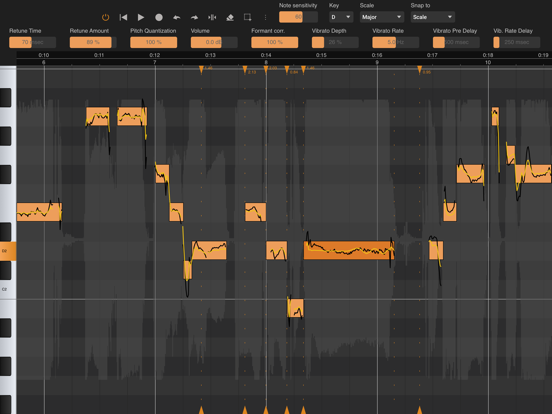
AppCorpus MCP gives your agent current app data, prices, screens, features and sources.
View JSON
GET /api/v3/apps/1664414521
{
  "app_id": 1664414521,
  "canonical_url": "https://appcorpus.com/apps/vocal-tune-studio-1664414521",
  "identity": {
    "name": "Vocal Tune Studio",
    "slug": "vocal-tune-studio",
    "developer": {
      "name": "Davy Wentzler",
      "url": "https://appcorpus.com/developers/davy-wentzler-developer_8391fbe7d52710b0f630a7db704f18f9"
    },
    "icon_url": "https://is1-ssl.mzstatic.com/image/thumb/Purple211/v4/8e/3e/6d/8e3e6df2-1c02-879e-9333-40eeb5941f0e/AppIcon-0-0-1x_U007emarketing-0-11-0-85-220.png/512x512bb.jpg",
    "stores": [
      "apple"
    ],
    "platforms": [
      "iphone",
      "ipad"
    ],
    "status": {
      "state": "active",
      "label": "Active",
      "last_checked": "2026-08-06",
      "last_checked_label": "6 Aug 2026",
      "banner": null,
      "region_note": null
    }
  },
  "listings": [
    {
      "store": "apple",
      "status": "ACTIVE",
      "url": "https://apps.apple.com/us/app/vocal-tune-studio/id1664414521?uo=4",
      "rating": 3.5,
      "rating_count": 25,
      "formatted_price": "$14.99",
      "is_free": false,
      "has_iap": false,
      "has_subscription": false,
      "version": "1.4.5",
      "updated": "2026-05-14",
      "currency": "USD"
    }
  ],
  "summary": {
    "one_liner": null,
    "summary": null,
    "best_for": [],
    "not_for": [],
    "status": "fallback",
    "at_a_glance": [
      "$14.99"
    ]
  },
  "categories": {
    "official": [
      "Music"
    ],
    "appcorpus": [
      {
        "category_id": "music",
        "label": "Music",
        "url": "https://appcorpus.com/categories/music"
      }
    ]
  },
  "use_cases": [],
  "features": [
    {
      "capability_id": "family_sharing",
      "label": "Family Sharing",
      "availability": "yes",
      "access_level": "unknown",
      "scope": "App Store",
      "evidence": "Store published"
    }
  ],
  "pricing": [
    {
      "store": "apple",
      "formatted_price": "$14.99",
      "is_free": false,
      "has_iap": false,
      "has_subscription": false,
      "currency": "USD",
      "market": "us",
      "last_verified": "2026-08-06",
      "rows": [
        "Price: $14.99"
      ]
    }
  ],
  "screens": [
    {
      "url": "https://is1-ssl.mzstatic.com/image/thumb/PurpleSource211/v4/45/f3/3c/45f33cd7-1b73-8225-205c-3dd1a1102a1d/d12f5565-5663-448d-9efc-dfe455dfc30b_Standalone.png/1600x1600bb.jpg",
      "store": "apple",
      "platform": "ipad",
      "alt": "Vocal Tune Studio ipad screenshot 1"
    },
    {
      "url": "https://is1-ssl.mzstatic.com/image/thumb/PurpleSource211/v4/2e/af/84/2eaf84fc-0a0e-4f5d-9773-b456cf9c3085/4b04ed14-7d91-4c2a-b38c-83c0687ab2bb_Standalone.png/552x414bb.png",
      "store": "apple",
      "platform": "ipad",
      "alt": "Vocal Tune Studio ipad screenshot 2"
    },
    {
      "url": "https://is1-ssl.mzstatic.com/image/thumb/PurpleSource211/v4/cd/6a/9b/cd6a9bda-7f34-88a7-2bdd-d06c2aa10797/a5436233-f098-4e6a-bfb0-d3b29e51af84_InsideCubasis.png/1600x1600bb.jpg",
      "store": "apple",
      "platform": "ipad",
      "alt": "Vocal Tune Studio ipad screenshot 3"
    },
    {
      "url": "https://is1-ssl.mzstatic.com/image/thumb/PurpleSource221/v4/9e/cb/90/9ecb9059-6c67-d4c2-52f1-861484db0e72/319039a8-b40c-4e03-b68a-caf10f9c7bab_InsideCubasis.png/552x414bb.png",
      "store": "apple",
      "platform": "ipad",
      "alt": "Vocal Tune Studio ipad screenshot 4"
    },
    {
      "url": "https://is1-ssl.mzstatic.com/image/thumb/PurpleSource211/v4/29/33/7a/29337a1d-88af-bb60-e100-30c704970c64/2fb5bcec-9aba-43df-8fc2-ba5a2b8a50f4_InsideAuria.png/1600x1600bb.jpg",
      "store": "apple",
      "platform": "ipad",
      "alt": "Vocal Tune Studio ipad screenshot 5"
    },
    {
      "url": "https://is1-ssl.mzstatic.com/image/thumb/PurpleSource221/v4/a8/f3/85/a8f3859f-51cf-f07a-7597-95511c6aaae3/e21ba83f-4cbc-47af-af44-1afb9bfe972a_InsideAuria.png/552x414bb.png",
      "store": "apple",
      "platform": "ipad",
      "alt": "Vocal Tune Studio ipad screenshot 6"
    },
    {
      "url": "https://is1-ssl.mzstatic.com/image/thumb/PurpleSource211/v4/85/2b/45/852b456a-0c6d-6238-2287-642f54ed5093/4c08edf3-a5d2-4f7d-8e57-ac7a0739ba84_InsideGarageBand.png/1600x1600bb.jpg",
      "store": "apple",
      "platform": "ipad",
      "alt": "Vocal Tune Studio ipad screenshot 7"
    },
    {
      "url": "https://is1-ssl.mzstatic.com/image/thumb/PurpleSource211/v4/6a/9b/20/6a9b20a9-03ac-b107-0767-2b33d91ac708/533858a1-5c1a-4d25-ad36-b65704059018_InsideGarageBand.png/552x414bb.png",
      "store": "apple",
      "platform": "ipad",
      "alt": "Vocal Tune Studio ipad screenshot 8"
    },
    {
      "url": "https://is1-ssl.mzstatic.com/image/thumb/PurpleSource221/v4/2c/29/b5/2c29b5f8-7ffd-780f-ba69-462aa04c914f/78d76b89-32c0-4eee-9ee1-1ba610ebc6ae_InsideAEMS_TS.png/1600x1600bb.jpg",
      "store": "apple",
      "platform": "ipad",
      "alt": "Vocal Tune Studio ipad screenshot 9"
    },
    {
      "url": "https://is1-ssl.mzstatic.com/image/thumb/PurpleSource221/v4/de/3a/29/de3a29e5-64bc-bbd5-9a97-c43f1953301d/4bd789e5-26fb-47fe-b99c-d483e32f4da2_InsideAEMS_TS.png/552x414bb.png",
      "store": "apple",
      "platform": "ipad",
      "alt": "Vocal Tune Studio ipad screenshot 10"
    },
    {
      "url": "https://is1-ssl.mzstatic.com/image/thumb/PurpleSource211/v4/c8/01/8e/c8018e0c-b558-6ef6-f301-1bee607aec64/ae3ce611-5c0c-459d-ac97-1992c8c3c2fa_InsideAEMS.png/1600x1600bb.jpg",
      "store": "apple",
      "platform": "ipad",
      "alt": "Vocal Tune Studio ipad screenshot 11"
    },
    {
      "url": "https://is1-ssl.mzstatic.com/image/thumb/PurpleSource221/v4/83/82/7e/83827ed6-172f-98c4-f0a9-e924eb8b438a/3960616c-2b0b-4f12-ad1e-ee5cf2ea124d_InsideAEMS.png/552x414bb.png",
      "store": "apple",
      "platform": "ipad",
      "alt": "Vocal Tune Studio ipad screenshot 12"
    },
    {
      "url": "https://is1-ssl.mzstatic.com/image/thumb/PurpleSource211/v4/61/2b/0a/612b0acf-ac02-6604-6a19-a32e46cb9e0f/ac0f3ac2-3bce-4793-a27c-65dc2ce4dce2_Standalone.png/1600x1125bb.jpg",
      "store": "apple",
      "platform": "iphone",
      "alt": "Vocal Tune Studio iphone screenshot 13"
    },
    {
      "url": "https://is1-ssl.mzstatic.com/image/thumb/PurpleSource221/v4/0e/5a/df/0e5adf7a-7923-687e-2b88-294ef752ae4c/b372bb5e-9d5d-49ec-b525-26fff21b764b_InsideCubasis.png/1600x1125bb.jpg",
      "store": "apple",
      "platform": "iphone",
      "alt": "Vocal Tune Studio iphone screenshot 14"
    },
    {
      "url": "https://is1-ssl.mzstatic.com/image/thumb/PurpleSource221/v4/e1/74/95/e17495e4-7436-3564-1e1b-2f775d1e09cc/a22e7201-aad5-4b59-8239-e6707fb130e1_Standalone_TS.png/1600x1125bb.jpg",
      "store": "apple",
      "platform": "iphone",
      "alt": "Vocal Tune Studio iphone screenshot 15"
    },
    {
      "url": "https://is1-ssl.mzstatic.com/image/thumb/PurpleSource211/v4/33/15/6c/33156c1d-d79a-fbee-b74e-4d1feb75dc9c/0a0435fa-937f-4368-9bdb-ac50a38ba24f_InsideGarageBand_TS.png/1600x1125bb.jpg",
      "store": "apple",
      "platform": "iphone",
      "alt": "Vocal Tune Studio iphone screenshot 16"
    },
    {
      "url": "https://is1-ssl.mzstatic.com/image/thumb/PurpleSource211/v4/9c/2d/e6/9c2de6c9-f405-ad74-ab47-6338cd8ba483/1e7c3120-1978-489d-87ec-297480efb78b_InsideAEMS.png/1600x1125bb.jpg",
      "store": "apple",
      "platform": "iphone",
      "alt": "Vocal Tune Studio iphone screenshot 17"
    }
  ],
  "ratings": [
    {
      "store": "apple",
      "average": 3.5,
      "count": 25,
      "market": "us",
      "observed_at": "2026-08-06",
      "reviews": [
        {
          "rating": 4,
          "title": "Waste of money!",
          "body": "UPDATE: The developer responded with some additional instructions and clarification (seen below). Because of this I have upgraded my rating. The plugin is now functional. It does a pretty good job at pitch correction… although not as transparent as desktop solutions we may be used to. For the iPad, this may be the best bet in 2024. Worth a purchase if you need pitch correction with manual control. ORIGINAL POST: I bought this plugin hoping it would be a Melodyne-like option for an iPad running Logic Pro. From the start, operations were extremely buggy, and the audio quality of this plugin is NOT professional. First the app constantly crashed when I tried to select a save folder. Basic DAW transport functions stopped working on my keyboard. Moving audio clips in the Logic timeline was not reflected on tracks with this plugin running. I would imagine this plugin would be ok for making a robotic-autotune voice… but certainly not for more natural sounding performances. And this plugin is way too expensive for what it does and doesn’t do. Let me help you save your money since it’s already too late for me.",
          "author": "Estevanovich",
          "date": "6 Aug 2026"
        },
        {
          "rating": 4,
          "title": "Update - Crashes when audio play is requested",
          "body": "*** Update*** updated from 1 star to 4 star after being contacted. The agent explained that htis app does not support M4A files. It works with WAV, and he said they would see about adding M4A functionality. I have this app, and cannot use it, because every time I load an audio file and ask it to play, the app crashes and loses all my progress. I deleted and redownloaded it to no avail. I will update the review IF someone reaches out to me and corrects the problem.",
          "author": "Chipper1776",
          "date": "6 Aug 2026"
        },
        {
          "rating": 5,
          "title": "AMAZING",
          "body": "I’ve been using Vocal Tune for all my vocals, and it’s an absolute BEAST! Can not recommend this enough. I use Logic Pro for iPad, and it really allows you the space to tune vocals, and have them sounding clean, and natural! It can be tedious, but the mixing process can be like that sometimes! It’s been able to handle different settings, either capturing a whole verse, or a chorus, at times, you may have to run it through again or through specific parts, but it will get the job done, and you can really mess around with it so it sounds clean, and natural. Great iOS replacement for Melodyne, 110% recommend.",
          "author": "Sal_amander",
          "date": "6 Aug 2026"
        },
        {
          "rating": 5,
          "title": "Problems, but still very cool",
          "body": "I initially couldn’t select a folder from within Logic, but I got around this by selecting the folder from within Cubasis 3. My guess is that that is more of a Logic problem than one with this app. The interface seems a little awkward, but again, I think that has more to do with Logic and Apple and what they let developers do than with the app.",
          "author": "lkingston",
          "date": "6 Aug 2026"
        },
        {
          "rating": 5,
          "title": "Have already been fixed",
          "body": "Connected the developer and (obviously, with God’s help) reproduced the bug, sent the screen record. Now, it is fixed, so I can change my feedback. In general, this application is great, especially the vibrato function. It really helps correct the pitch without unnatural sound and so on",
          "author": "HeartOfCringe",
          "date": "6 Aug 2026"
        }
      ]
    }
  ],
  "privacy": [
    {
      "store": "apple",
      "declarations": [
        {
          "title": "Data Not Linked to You",
          "detail": "Analytics — Diagnostics — Performance Data",
          "source": "Developer declared"
        },
        {
          "title": "Data Not Linked to You",
          "detail": "Analytics — Location — Coarse Location",
          "source": "Developer declared"
        },
        {
          "title": "Data Not Linked to You",
          "detail": "Analytics — Other Data — Other Data Types",
          "source": "Developer declared"
        },
        {
          "title": "Data Not Linked to You",
          "detail": "Analytics — Usage Data — Product Interaction",
          "source": "Developer declared"
        },
        {
          "title": "Data Not Linked to You",
          "detail": "App Functionality — Diagnostics — Performance Data",
          "source": "Developer declared"
        },
        {
          "title": "Data Not Linked to You",
          "detail": "App Functionality — Location — Coarse Location",
          "source": "Developer declared"
        },
        {
          "title": "Data Not Linked to You",
          "detail": "App Functionality — Other Data — Other Data Types",
          "source": "Developer declared"
        },
        {
          "title": "Data Not Linked to You",
          "detail": "App Functionality — Usage Data — Product Interaction",
          "source": "Developer declared"
        },
        {
          "title": "Data Not Linked to You",
          "detail": "Diagnostics",
          "source": "Developer declared"
        },
        {
          "title": "Data Not Linked to You",
          "detail": "Location",
          "source": "Developer declared"
        },
        {
          "title": "Data Not Linked to You",
          "detail": "Other Data",
          "source": "Developer declared"
        },
        {
          "title": "Data Not Linked to You",
          "detail": "Usage Data",
          "source": "Developer declared"
        }
      ],
      "accessibility": []
    }
  ],
  "changes": [
    {
      "store": "apple",
      "version": "1.2.6",
      "released_at": null,
      "notes": ""
    },
    {
      "store": "apple",
      "version": "1.2.7",
      "released_at": null,
      "notes": "Initial release"
    },
    {
      "store": "apple",
      "version": "1.3.3",
      "released_at": null,
      "notes": "* Added 'Import audio file' and 'Paste from iOS clipboard' to the Audio Unit mode: please read the warning in the app, since this could lead to all kinds of problems if not used with care. * Added 'Save to audio file' to the Audio Unit mode * Added 'Loop markers' to the standalone mode (double-tap the time bar to activate) * Added 'Clear all audio' to the Audio Unit mode."
    },
    {
      "store": "apple",
      "version": "1.3.4",
      "released_at": null,
      "notes": "* Loop playback didn't work in Loopy Pro. Solved. * When the storage folder was removed, the app will now ask to select a new storage folder"
    },
    {
      "store": "apple",
      "version": "1.3.5",
      "released_at": null,
      "notes": "More detailed error message when recording fails."
    },
    {
      "store": "apple",
      "version": "1.3.6",
      "released_at": null,
      "notes": "* 'Save to audio file' now saves as WAV file instead of FLAC since some apps like GarageBand cannot handle FLAC files * Solved a possible crash when no notes were found in the audio"
    },
    {
      "store": "apple",
      "version": "1.3.8",
      "released_at": null,
      "notes": "Solved an issue when used in Logic Pro for iPad"
    },
    {
      "store": "apple",
      "version": "1.4.0",
      "released_at": null,
      "notes": "When undoing a change in 'Note sensitivity', all previous edits are restored."
    },
    {
      "store": "apple",
      "version": "1.4.3",
      "released_at": null,
      "notes": "* Solved a crash when stereo audio was imported and played over a mono output, as could happen with Bluetooth * Solved an issue where using a low sample rate would cause noisy audio * Solved some cases where a dimmed background was displayed that first had to be clicked away * 'Save to audio file' could result in an audio file that was too short. Solved."
    },
    {
      "store": "apple",
      "version": "1.4.4",
      "released_at": null,
      "notes": "* Solved a crash when stereo audio was imported and played over a mono output, as could happen with Bluetooth * Solved an issue where using a low sample rate would cause noisy audio * Solved some cases where a dimmed background was displayed that first had to be clicked away * 'Save to audio file' could result in an audio file that was too short. Solved. * Added Settings option to the Time-only mode to control the 'Scroll display when end is reached' option"
    },
    {
      "store": "apple",
      "version": "1.4.5",
      "released_at": "2026-05-14",
      "notes": "* Solved an issue with duplicate notes if the host restored the state of the AU * Improved vertical zooming * Increase horizontal zooming range"
    }
  ],
  "alternatives": [],
  "evidence_summary": {
    "index_state": "S1",
    "evidence_level": 1,
    "level_label": "Live store listing",
    "indexable": true,
    "last_verified_at": "2026-08-06",
    "unknown_fields": [
      "Independent summary has not been published yet."
    ],
    "sources": [
      "App Store"
    ]
  },
  "availability_markets": {
    "live": [
      "us"
    ],
    "selected": "us",
    "note": null
  },
  "feature_events": {
    "events": []
  },
  "features_slice": {
    "plans": [],
    "features": [],
    "unknown_features": [
      "family_sharing"
    ],
    "data_cutoff": "6 Aug 2026"
  }
}