
Quick verdict
- What it is
- Store information collected; an Apoku editorial summary is not yet published.
- At a glance
-
- Free to download
- In-app purchases
Categories and search queries
Official categories
- Sports
- Photo & Video
Apoku categories
Key functions
| Function | Availability | Access | Scope | Evidence |
|---|---|---|---|---|
| Free app | Yes | Free | Context-specific | Store published |
| In-app purchases | Yes | Limited free | Context-specific | Store published |
Screens
App Store
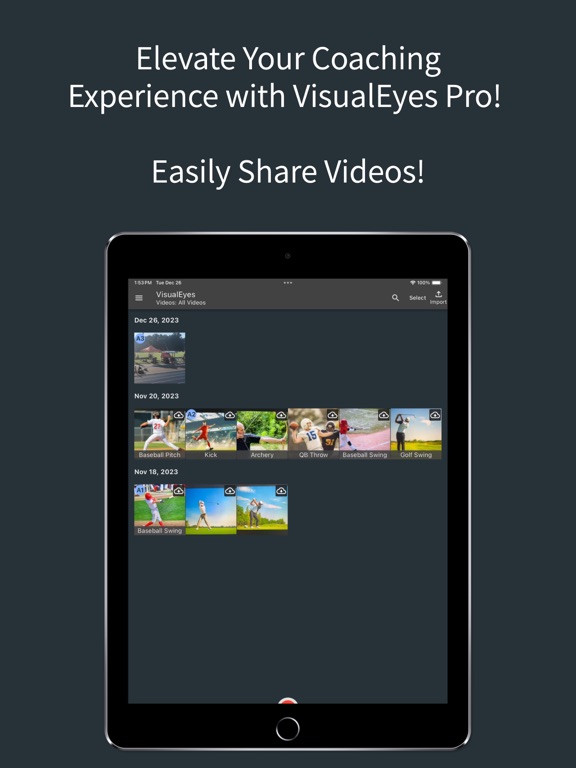
15 store screenshots



Pricing & paywalls
App Store
- VisualEyes Bronze — $4.99
- VisualEyes Bronze — $49.99
- VisualEyes Gold — $14.99
- VisualEyes Gold — $149.99
- VisualEyes Silver — $9.99
- VisualEyes Silver — $99.99
Ratings & reviews
App Store
-
5/5This app is amazing
I've been coaching Long and Triple Jump for almost a decade now. I've been using this app for a few weeks and it is a GAME CHANGER! You get everything you need with the free version, but I'm upgrading just to support and make sure this doesn't go away!
Nnw8604 · 7 Aug 2026
-
4/5Track Coach review
I have this app but still use my old Coach's Eye (no longer available) because you can easily insert on-screen timers. I use these as lap and interval rest timers. I often work with 25 distance runners and don't have time to write down indivdual's times. With the video Ican record those later which is a great help. VE could add on screen splits, cummulative splits, running time etc like a traditional stopwatch (start/stop & split controled by the volume buttons) and with having video traditional stopwatches would be a thing of the past. Something I would gladly pay for!!
harrier46 · 7 Aug 2026
-
3/5Compare Feature Does Not Work
Very happy with the price and functionality of the app. Much better price compared to the bigger names in coaching apps. It would be the absolute best if the compare function worked…every time I try to choose a video to compare, the whole app freezes. Tried it with multiple devices. needs an update, then it will get 5 stars.
mjgreenley · 7 Aug 2026
-
5/5VisualEyes perfect replacement for Coaches Eye
This app provides all of the functionality that I have been missing from Coaches Eye and it’s free! Little tweaks have been made that make it better and more streamlined. I recommend VisualEyes to anyone who hasn’t found their replacement to Coaches Eye!
msuspartans14 · 7 Aug 2026
-
5/5I wish this existed when I was an athlete!
This app has been perfect for recording and reviewing my athletes in practice and at meets! Its user friendly and meets all my expectations! I wish I had an app as useful as this when I was still competing as an athlete!
GoPBears18 · 7 Aug 2026
Privacy & accessibility
App Store
Privacy
- Data Linked to You — App Functionality — Contact Info — Email Address Developer declared
- Data Linked to You — App Functionality — Contact Info — Name Developer declared
- Data Linked to You — App Functionality — Identifiers — Device ID Developer declared
- Data Linked to You — App Functionality — Identifiers — User ID Developer declared
- Data Linked to You — App Functionality — User Content — Audio Data Developer declared
- Data Linked to You — App Functionality — User Content — Photos or Videos Developer declared
- Data Linked to You — Contact Info Developer declared
- Data Linked to You — Identifiers Developer declared
- Data Linked to You — User Content Developer declared
- Data Not Linked to You — Analytics — Diagnostics — Crash Data Developer declared
- Data Not Linked to You — Analytics — Usage Data — Product Interaction Developer declared
- Data Not Linked to You — Diagnostics Developer declared
- Data Not Linked to You — Usage Data Developer declared
Accessibility
No accessibility labels collected yet.
Versions
App Store
-
1.1.4
- Added new icon that signifies videos are in the cloud but don't need to be downloaded - Added the ability to search through Athletes and Tags when add them to videos - Many other bug fixes and performance improvements
-
1.2.0
Now you can easily Share Videos with other users within VisualEyes! - Link User Accounts - Share with linked users when being tagged - Share to anyone who has VisualEyes Many other minor updates and improvements have been made.
-
1.2.1
Bug fixes and minor improvements to video exporting and User Experience
-
1.2.2
Fixed bug on video compare screen when using drawing tools
-
1.2.3
Fixed major issue with Import Videos not showing all albums and failing to load large amounts of videos. Fixed minor UI issue with dialogs appearing white.
-
1.2.4
- Fixed issue with imported videos taking up extra storage space even after being deleted - Fixed other minor issues and bugs
-
1.2.5
- Updated searching of Athletes to search for Team and Sport as well as name - Updated the look and feel of the athletes screen - Updated the look and feel of the settings screen
-
1.2.6
- User experience improvements to Athlete links - Bug fixes - UI Updates
-
1.2.7
- Fixed bug that wouldn't allow videos to be uploaded when storage limitations was not actually met.
-
1.2.8
- Fixed bug where HDR imported videos from iOS devices failed to generate thumbnails
-
1.3.0
- New and improved way to connect with other users using VisualEyes. Added in the ability to set your user connection code and allow others to request to be attached to your account. - Add the ability to mass edit videos by adding tags or athletes to many videos at one time. - Many UI and UX fixes to help create a better experience within VisualEyes. - Many bug fixes throughout
-
1.3.1
- Added ability to share multiple videos at once - Many fixes for crashes and bugs
-
1.3.2
- Bug fixes and UX updates
-
1.4.0
• Video Playback in Comparison Mode: You can now play back both comparison videos simultaneously or individually, with support for adjustable playback speeds. • Improved Video Importing: Video importing has been updated to resolve an issue and provide a smoother, more reliable import experience.
-
1.4.1
Bug fix for menus closing immediately
-
2.1.0
A Brand New Look We've completely redesigned the app from the ground up! Every screen, every interaction — rebuilt with a fresh, modern design for a better experience. This is just the beginning. We have a ton of exciting new features in the pipeline, so stay tuned for what's coming next. Spotted a bug or have a feature request? We'd love to hear from you — drop us a line through the in-app feedback or leave a review. Your input helps shape what we build next..
-
2.1.1
New: Recover Deleted Videos Accidentally deleted a video? You can now restore it from the new Deleted Videos screen. Deleted videos are kept for 30 days before being permanently removed. Performance & Stability Bug fixes and improvements to keep things running smoothly.
-
2.1.2
Bug fixes and video recovery improvement
-
2.1.3
Bug fixes, user experience improvements, and performance enhancements
-
2.1.4
- Tap to view videos directly from the athlete screen - Fixed video comparison glitching when paused - Fixed timer displaying incorrect time during annotations - Navigation buttons now work correctly within collections - Improved menu behavior and layout - General bug fixes and performance improvements
-
2.1.5
- Improved athlete onboarding flow - Fixed videos not uploading in some cases - Fixed stutter on the analysis screen after recording - Added flip animation to the camera switch button - Faster search and better compare-video results
-
2.1.6
Stability & Performance - Fixed an issue where videos could get stuck uploading and prevent new recordings until you restarted the app. - The camera now survives phone calls, lock-screen interruptions, and audio routing changes — no more silent recordings if another app grabs the mic. - Locking and unlocking your device while the camera is open no longer makes the preview vanish or flash. - Fixed a rare hang and stopped half-uploaded videos from appearing on your other devices before they're ready. - Resolved a video stabilization issue and a crash some users saw during data migration. Battery Life - Cut background battery drain by pausing the notifications connection when the app isn't in use. - Additional performance improvements based on crash and performance reports. Thumbnails - Automatically repairs broken thumbnails from earlier uploads and prevents them from happening again. iPad - Modals (camera, bulk tagging, plan management) no longer briefly disappear and re-open when you unlock your iPad. Other Fixes - Recording timer now draws correctly on iOS 17 devices. - Video cells refresh properly after uploads complete. - Various behind-the-scenes improvements to the paywall experience.
-
2.1.7
Stability & Performance • Fixed an issue where some recordings could be saved without sound after a phone call, Siri, or switching apps. • Fixed side-by-side comparison recordings — the two videos and your annotations are now saved on the correct sides, and the "Flip Video" option is captured in the recording. Other Fixes • Improved sign-up: invalid details no longer fail silently, and your email and password are checked as you go so any problem is clear before you continue.
-
2.1.8
Faster recording and importing — the home screen now gets you from opening the app to capturing or adding a video in fewer taps. Tag athletes and add tags right from the Video Analysis screen with new one-tap pills, so you can label clips without leaving the player. Bolder annotations — drawing tools now default to a thicker, more visible stroke that reads clearly on the field and in shared video. Fixed a freeze that could occur when opening the camera right after launching the app.
-
2.1.9
· 10 Jul 2026
This update is all about speed and reliability. Stability & Performance - Fixed freezes when swiping between videos during analysis. - Sharing a video no longer stalls the app while the share sheet opens. - Fixed a freeze when starting a voiceover recording — most noticeable on Macs. - Faster app launch, a quicker compare-video picker, and smoother scrolling in large video libraries. Other Fixes - Fixed recordings that could end up with no sound after moving between recording and analysis. If the microphone can't be secured, you'll now see an alert instead of a silent video. - Returning to the camera from analysis is now instant instead of briefly reloading. - Recordings interrupted mid-take (for example, by a phone call) are now saved instead of discarded.
Alternatives
- CoachView Slowmo Video Player — Same category + similar ratings
- myDartfish Express: Coach App — Same category + similar ratings
- CoachNow: Sports Coaching App — Same category + similar ratings
- Onform: Video Analysis App — Same category + similar ratings
- SlowMo - Video Analysis — Same category + similar ratings
Availability by market
- US
Data quality & evidence
- Page completeness
- Live store listing
- Last verified
- 7 Aug 2026
- Sources
- App Store
- Apoku editorial summary has not been published yet.