AppCorpus MCP gives your agent current app data, prices, screens, features and sources.
View JSON
GET /api/v3/apps/6443729650
{
  "app_id": 6443729650,
  "canonical_url": "https://appcorpus.com/apps/vision-detector-6443729650",
  "identity": {
    "name": "Vision Detector",
    "slug": "vision-detector",
    "developer": {
      "name": "Kazufumi Suzuki",
      "url": "https://appcorpus.com/developers/kazufumi-suzuki-developer_5d4a94a46387461525365bdcf0a7fb7a"
    },
    "icon_url": "https://is1-ssl.mzstatic.com/image/thumb/Purple211/v4/93/06/ea/9306ea45-f5d4-aa85-baaa-bafb88df12f0/AppIcon-0-0-1x_U007emarketing-0-8-0-85-220.png/512x512bb.jpg",
    "stores": [
      "apple"
    ],
    "platforms": [
      "iphone",
      "ipad"
    ],
    "status": {
      "state": "active",
      "label": "Active",
      "last_checked": "2026-07-31",
      "last_checked_label": "31 Jul 2026",
      "banner": null,
      "region_note": null
    }
  },
  "listings": [
    {
      "store": "apple",
      "status": "ACTIVE",
      "url": "https://apps.apple.com/us/app/vision-detector/id6443729650?uo=4",
      "rating": 0.0,
      "rating_count": 0,
      "formatted_price": "Free",
      "is_free": true,
      "has_iap": false,
      "has_subscription": false,
      "version": "3.1.2",
      "updated": "2026-07-29",
      "currency": "USD"
    }
  ],
  "summary": {
    "one_liner": null,
    "summary": null,
    "best_for": [],
    "not_for": [],
    "status": "fallback",
    "at_a_glance": [
      "Free to download"
    ]
  },
  "categories": {
    "official": [
      "Developer Tools",
      "Productivity"
    ],
    "appcorpus": [
      {
        "category_id": "developer-tools",
        "label": "Developer tools",
        "url": "https://appcorpus.com/categories/developer-tools"
      },
      {
        "category_id": "productivity",
        "label": "Productivity",
        "url": "https://appcorpus.com/categories/productivity"
      }
    ]
  },
  "use_cases": [],
  "features": [
    {
      "capability_id": "free_app",
      "label": "Free app",
      "availability": "yes",
      "access_level": "free",
      "scope": null,
      "evidence": "Store published"
    }
  ],
  "pricing": [
    {
      "store": "apple",
      "formatted_price": "Free",
      "is_free": true,
      "has_iap": false,
      "has_subscription": false,
      "currency": "USD",
      "market": "de",
      "last_verified": "2026-07-31",
      "rows": [
        "Free"
      ]
    }
  ],
  "screens": [
    {
      "url": "https://is1-ssl.mzstatic.com/image/thumb/PurpleSource211/v4/a8/cd/f2/a8cdf259-5b81-8f30-4bdb-d6f26ddb9172/iPad.001.png/1600x1600bb.jpg",
      "store": "apple",
      "platform": "ipad",
      "alt": "Vision Detector ipad screenshot 1"
    },
    {
      "url": "https://is1-ssl.mzstatic.com/image/thumb/PurpleSource211/v4/c0/2d/bf/c02dbf9e-2047-e8b7-d0ab-da5bc9d6cc83/iPad.002.png/1600x1600bb.jpg",
      "store": "apple",
      "platform": "ipad",
      "alt": "Vision Detector ipad screenshot 2"
    },
    {
      "url": "https://is1-ssl.mzstatic.com/image/thumb/PurpleSource211/v4/fb/c0/bf/fbc0bf2a-3103-b5a5-cc12-aaac47cd1cf0/1282.001.png/1284x1600bb.jpg",
      "store": "apple",
      "platform": "iphone",
      "alt": "Vision Detector iphone screenshot 3"
    },
    {
      "url": "https://is1-ssl.mzstatic.com/image/thumb/PurpleSource211/v4/a3/fc/d6/a3fcd60d-05e1-d75b-925a-79e09c1bd15c/1282.002.png/1284x1600bb.jpg",
      "store": "apple",
      "platform": "iphone",
      "alt": "Vision Detector iphone screenshot 4"
    },
    {
      "url": "https://is1-ssl.mzstatic.com/image/thumb/PurpleSource221/v4/bd/13/04/bd1304d4-2d5d-eac3-af43-40700a7d339f/App_Store_Connect_Screen.001.png/1280x800bb.jpg",
      "store": "apple",
      "platform": "mac",
      "alt": "Vision Detector mac screenshot 5"
    },
    {
      "url": "https://is1-ssl.mzstatic.com/image/thumb/PurpleSource221/v4/d8/0a/3b/d80a3bb6-b116-46db-ecb3-925c8e5435da/App_Store_Connect_Screen.002.png/1280x800bb.jpg",
      "store": "apple",
      "platform": "mac",
      "alt": "Vision Detector mac screenshot 6"
    }
  ],
  "ratings": [
    {
      "store": "apple",
      "average": 0.0,
      "count": 0,
      "market": "de",
      "observed_at": "2026-07-31",
      "reviews": [
        {
          "rating": 4,
          "title": "Sadly it only supports webcam or live input.",
          "body": "I'm sure this is useful for many people and it is free (thank you dev), but for me it wasn't. I wish we could use mp4 videos or even images to test our CoreML models quickly instead of being limited to webcam and live video inputs. Anyway, it didn't seem right to rate it below 4-star as it is a free app.",
          "author": "Bytuf",
          "date": "31 Jul 2026"
        }
      ]
    }
  ],
  "privacy": [
    {
      "store": "apple",
      "declarations": [
        {
          "title": "Data Not Collected",
          "detail": "",
          "source": "Developer declared"
        }
      ],
      "accessibility": []
    }
  ],
  "changes": [
    {
      "store": "apple",
      "version": "1.0",
      "released_at": null,
      "notes": ""
    },
    {
      "store": "apple",
      "version": "1.1",
      "released_at": null,
      "notes": ""
    },
    {
      "store": "apple",
      "version": "1.2",
      "released_at": null,
      "notes": "Optimized displayed messages."
    },
    {
      "store": "apple",
      "version": "1.3",
      "released_at": null,
      "notes": "Now iOS 13.0 or later is required. Dark mode compatible. Improvement of custom message for objet detection. FPS counter is added. Default language is set to English (US). macOS version is released."
    },
    {
      "store": "apple",
      "version": "1.4",
      "released_at": null,
      "notes": "Some crashing bugs have been fixed."
    },
    {
      "store": "apple",
      "version": "1.5",
      "released_at": null,
      "notes": "LED torch is available in live video mode. The screen layout is now compatible with the Safearea of iPhone X or later models. Improved visual quality of detection overlay for small images. The format of the custom message file has been changed from CSV to TSV."
    },
    {
      "store": "apple",
      "version": "1.5.1",
      "released_at": null,
      "notes": "Ver. 1.5.1 Tap to hide toolbar in landscape mode. Ver. 1.5 LED torch is available in live video mode. The screen layout is now compatible with the Safearea of iPhone X or later models. Improved visual quality of detection overlay for small images. The format of the custom message file has been changed from CSV to TSV."
    },
    {
      "store": "apple",
      "version": "1.5.2",
      "released_at": null,
      "notes": "Reduced memory usage and stabilized performance."
    },
    {
      "store": "apple",
      "version": "1.5.3",
      "released_at": null,
      "notes": "Fixed issue in style transfer model."
    },
    {
      "store": "apple",
      "version": "1.5.4",
      "released_at": null,
      "notes": "Models can be accessed and opened directly from the 'Files' app using the export menu."
    },
    {
      "store": "apple",
      "version": "1.5.5",
      "released_at": null,
      "notes": "The app now reprocesses still images after device rotation. Fixed an issue where overlays were misaligned in the processing of still images from camera. Importing still images from 'Files' app now works correctly. Fixed an issue where the model used for still images could not be changed."
    },
    {
      "store": "apple",
      "version": "1.5.6",
      "released_at": null,
      "notes": "Changed the algorithm for scaling still images. Optimized internal variable management, potentially enhancing memory efficiency. Fixed crash bug with video capture button before loading model. Resolved an issue in style transfer. Implemented displaying the description data of the model after loading."
    },
    {
      "store": "apple",
      "version": "1.5.7",
      "released_at": null,
      "notes": "Added support for files in the .mlpackage and .mlmodelc format."
    },
    {
      "store": "apple",
      "version": "1.5.8",
      "released_at": null,
      "notes": "Reduced memory usage. Bug fix."
    },
    {
      "store": "apple",
      "version": "2.0",
      "released_at": null,
      "notes": "Vision Detector has been completely rebuilt in SwiftUI to align with the latest iOS UI design."
    },
    {
      "store": "apple",
      "version": "2.1",
      "released_at": null,
      "notes": "(2.0) Vision Detector has been completely rebuilt in SwiftUI to align with newer iOS UI design. Improved memory management. (2.1) Improved UI elements. Fixed issues of application flags. Update notification."
    },
    {
      "store": "apple",
      "version": "2.2",
      "released_at": null,
      "notes": "(ver. 2.2) Improved image quality in live video. (ver. 2.1) Improved UI elements. Fixed issues of application flags. Update notification. (ver. 2.0) Vision Detector has been completely rebuilt in SwiftUI to align with newer iOS UI design. Improved memory management."
    },
    {
      "store": "apple",
      "version": "3.0",
      "released_at": null,
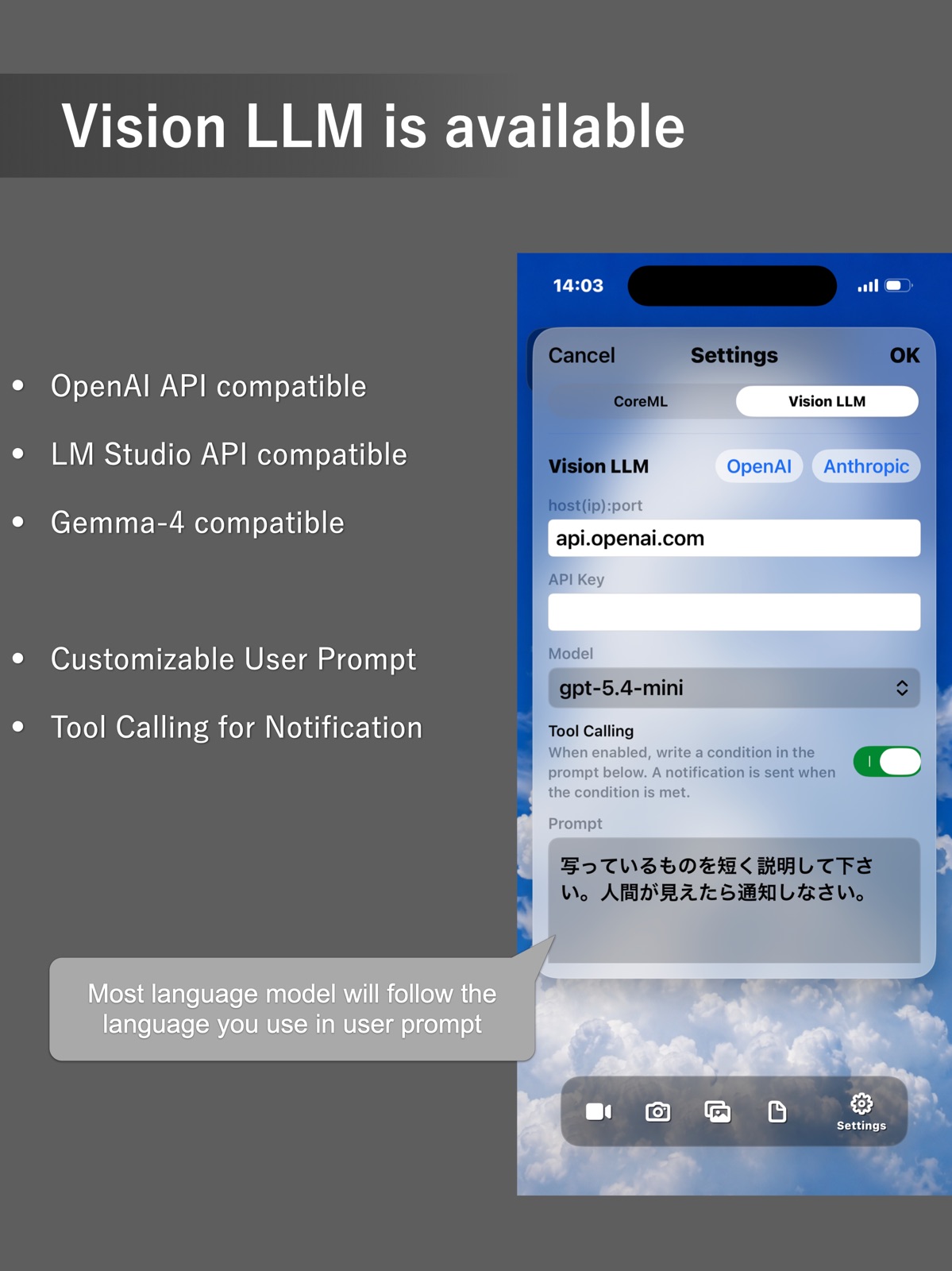
      "notes": "Added support for vision language model (LM Studio, OpenAI, and Anthropic)"
    },
    {
      "store": "apple",
      "version": "3.1",
      "released_at": null,
      "notes": "Broadcasting Notification: Notification by LLM is now broadcasted to all your devices (iOS/macOS) via iCloudKit. Make a prompt to use Notification Center via tool calling: “Notify me using tool calling when a person is detected. Don't notify if there is no one.” Notifications are broadcast via iCloud to all iPhones, iPads, and Macs signed in with the same Apple Account. You can customize how notifications are displayed on each device in its system Notification settings. Notifications are delivered through Apple’s iCloud servers only. No other servers are used."
    },
    {
      "store": "apple",
      "version": "3.1.1",
      "released_at": null,
      "notes": "Improved network configuration. Fixed bug in Anthropic mode."
    }
  ],
  "alternatives": [
    {
      "app_id": 1643868615,
      "name": "TensorFlow TFLite Debugger",
      "url": "https://appcorpus.com/apps/tensorflow-tflite-debugger-1643868615",
      "reason": "Same category + similar ratings"
    },
    {
      "app_id": 1180825853,
      "name": "Python & SQL",
      "url": "https://appcorpus.com/apps/python-sql-1180825853",
      "reason": "Same category + similar ratings"
    }
  ],
  "evidence_summary": {
    "index_state": "S1",
    "evidence_level": 1,
    "level_label": "Live store listing",
    "indexable": true,
    "last_verified_at": "2026-07-31",
    "unknown_fields": [
      "Independent summary has not been published yet."
    ],
    "sources": [
      "App Store"
    ]
  },
  "availability_markets": {
    "live": [
      "us"
    ],
    "selected": "de",
    "note": "No LIVE observation for DE yet."
  },
  "feature_events": {
    "events": []
  },
  "features_slice": {
    "plans": [
      {
        "code": "free",
        "label": "Free",
        "kind": "free",
        "status": "inferred",
        "prices": [],
        "trial": null
      }
    ],
    "features": [],
    "unknown_features": [],
    "data_cutoff": "31 Jul 2026"
  }
}