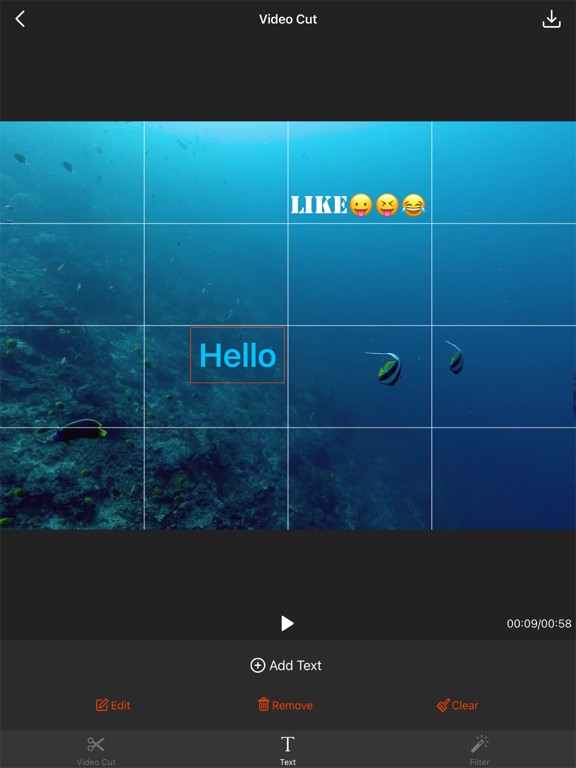
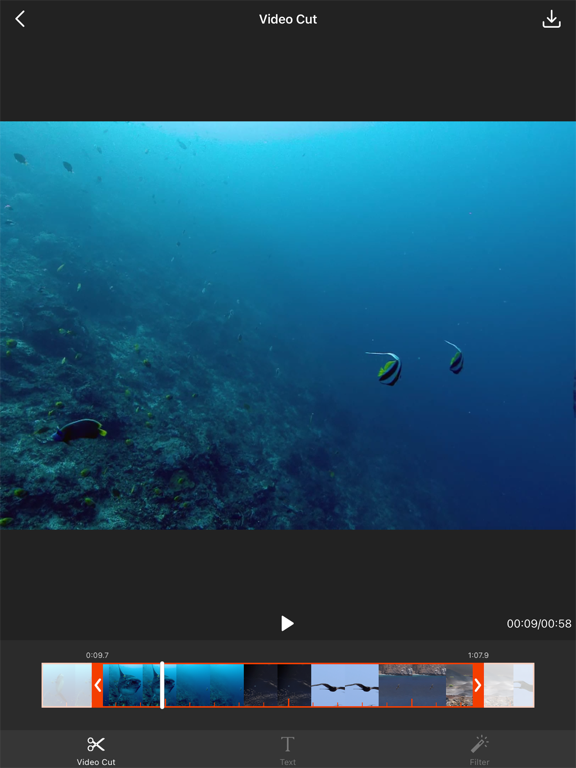
Apoku MCP provides app discovery, detailed cards, evidence, sources and screenshots where available. Unknown or conflicting prices stay explicit.
View JSON
GET /api/v3/apps/1153154310
{
  "app_id": 1153154310,
  "canonical_url": "https://appcorpus.com/apps/video-cut-video-editor-1153154310",
  "identity": {
    "name": "Video Cut - Video Editor",
    "slug": "video-cut-video-editor",
    "developer": {
      "name": "娜 彭",
      "url": "https://appcorpus.com/developers/developer-469-developer_c56864c6558ffaed1fad48b819e04b21"
    },
    "icon_url": "https://is1-ssl.mzstatic.com/image/thumb/Purple211/v4/61/7a/be/617abeb5-afd6-fe67-6282-0a8542b20f77/AppIcon-0-0-1x_U007emarketing-0-8-0-85-220.png/512x512bb.jpg",
    "stores": [
      "apple"
    ],
    "platforms": [
      "iphone",
      "ipad"
    ],
    "status": {
      "state": "active",
      "label": "Active",
      "last_checked": "2026-08-07",
      "last_checked_label": "7 Aug 2026",
      "banner": null,
      "region_note": null,
      "data_state": "stale",
      "data_state_label": "Some store data may be out of date"
    }
  },
  "listings": [
    {
      "store": "apple",
      "status": "ACTIVE",
      "url": "https://apps.apple.com/us/app/video-cut-video-editor/id1153154310?uo=4",
      "rating": 4.5,
      "rating_count": 1511,
      "formatted_price": "Free",
      "is_free": true,
      "has_iap": true,
      "has_subscription": null,
      "version": "3.1.2",
      "updated": "2026-08-07",
      "currency": "USD"
    }
  ],
  "summary": {
    "one_liner": null,
    "summary": null,
    "best_for": [],
    "not_for": [],
    "status": "fallback",
    "at_a_glance": [
      "Free to download",
      "In-app purchases"
    ]
  },
  "categories": {
    "official": [
      "Photo & Video",
      "Utilities"
    ],
    "appcorpus": [
      {
        "category_id": "photo-video",
        "label": "Photo & video",
        "url": "https://appcorpus.com/categories/photo-video"
      },
      {
        "category_id": "utilities",
        "label": "Utilities",
        "url": "https://appcorpus.com/categories/utilities"
      }
    ]
  },
  "use_cases": [],
  "features": [
    {
      "capability_id": "free_app",
      "label": "Free app",
      "availability": "yes",
      "access_level": "free",
      "scope": null,
      "evidence": "Store published"
    },
    {
      "capability_id": "in_app_purchases",
      "label": "In-app purchases",
      "availability": "yes",
      "access_level": "free_limited",
      "scope": null,
      "evidence": "Store published"
    }
  ],
  "pricing": [
    {
      "store": "apple",
      "formatted_price": "Free",
      "is_free": true,
      "has_iap": true,
      "has_subscription": null,
      "currency": "USD",
      "market": "us",
      "last_verified": "2026-08-07",
      "rows": [
        "Remove Ads — $1.99"
      ],
      "state": "current"
    }
  ],
  "screens": [
    {
      "url": "https://is1-ssl.mzstatic.com/image/thumb/PurpleSource116/v4/eb/af/14/ebaf147b-3f81-4b85-e297-5dbaf7d49725/1085f4fb-9285-41c7-b14c-ec8515192fd9_en_sp01.png/1600x1600bb.jpg",
      "store": "apple",
      "platform": "ipad",
      "alt": "Video Cut - Video Editor ipad screenshot 1"
    },
    {
      "url": "https://is1-ssl.mzstatic.com/image/thumb/PurpleSource126/v4/69/4d/6b/694d6bdf-5b51-4bee-1382-9b89a1ef5ab6/65217cfc-56a6-4d1a-9709-0e239005eee6_en_sp01.png/576x768bb.png",
      "store": "apple",
      "platform": "ipad",
      "alt": "Video Cut - Video Editor ipad screenshot 2"
    },
    {
      "url": "https://is1-ssl.mzstatic.com/image/thumb/PurpleSource116/v4/72/ed/cb/72edcb5d-478d-7663-d1be-5e7831d0e1c9/5b093ef4-ca91-4845-83a8-959ec9a41482_en_sp02.png/1600x1600bb.jpg",
      "store": "apple",
      "platform": "ipad",
      "alt": "Video Cut - Video Editor ipad screenshot 3"
    },
    {
      "url": "https://is1-ssl.mzstatic.com/image/thumb/PurpleSource126/v4/1b/80/34/1b803489-0cbe-bf2d-b20d-644c1e03602c/1a590cc4-217c-4cbe-97d2-2d241b96aa47_en_sp02.png/576x768bb.png",
      "store": "apple",
      "platform": "ipad",
      "alt": "Video Cut - Video Editor ipad screenshot 4"
    },
    {
      "url": "https://is1-ssl.mzstatic.com/image/thumb/PurpleSource126/v4/7e/a1/3c/7ea13cea-2d71-2c16-4d78-5c8706f5867d/8679c312-165a-48e9-b9f4-3e4f6cf2c604_en_sp03.png/1600x1600bb.jpg",
      "store": "apple",
      "platform": "ipad",
      "alt": "Video Cut - Video Editor ipad screenshot 5"
    },
    {
      "url": "https://is1-ssl.mzstatic.com/image/thumb/PurpleSource126/v4/5e/cd/24/5ecd2477-247a-99e6-a3b8-5023b6e3047d/155d72e9-6e80-43c8-85f5-1d93cf485e0b_en_sp03.png/576x768bb.png",
      "store": "apple",
      "platform": "ipad",
      "alt": "Video Cut - Video Editor ipad screenshot 6"
    },
    {
      "url": "https://is1-ssl.mzstatic.com/image/thumb/PurpleSource116/v4/b6/81/29/b681295a-9907-a2b6-e0aa-7a247947228b/1395312d-dd74-4455-b4c7-33438a6bc4d6_en_sp01.png/1242x1600bb.jpg",
      "store": "apple",
      "platform": "iphone",
      "alt": "Video Cut - Video Editor iphone screenshot 7"
    },
    {
      "url": "https://is1-ssl.mzstatic.com/image/thumb/PurpleSource126/v4/7d/cb/ae/7dcbae16-f0b5-b18e-e903-df2a79f621db/df4a4f07-7809-4262-b697-c386a2b4e99b_en_sp02.png/1242x1600bb.jpg",
      "store": "apple",
      "platform": "iphone",
      "alt": "Video Cut - Video Editor iphone screenshot 8"
    },
    {
      "url": "https://is1-ssl.mzstatic.com/image/thumb/PurpleSource116/v4/72/bf/c8/72bfc8cf-6ba1-11c4-a678-0d320b85559e/8de30465-3acb-47a9-a6fa-38207a7dc2e8_en_sp03.png/1242x1600bb.jpg",
      "store": "apple",
      "platform": "iphone",
      "alt": "Video Cut - Video Editor iphone screenshot 9"
    }
  ],
  "data_states": {
    "screens": "current"
  },
  "ratings": [
    {
      "store": "apple",
      "average": 4.5,
      "count": 1511,
      "market": "us",
      "observed_at": "2026-08-07",
      "state": "current",
      "reviews": [
        {
          "rating": 5,
          "title": "Great product",
          "body": "I’m 61 and not up to date with all this modern technology, but I needed to create a video for my shooting academy and didn’t have anyone to help. Video Cut made it so easy for someone like me with no experience and I made an amazing promotional video for my company. Thank you Video Cut for creating a product that is so user friendly it made me look so good. I highly recommend Video Cut for anyone regardless of expertise. If you don’t know anything this is for you and with all the features it offers if your good it makes you look great.",
          "author": "Angello Ibarra",
          "date": "7 Aug 2026"
        },
        {
          "rating": 5,
          "title": "True to it’s name",
          "body": "I was searching everywhere for a simple app that would just trim my clips (since I edit videos on another platform) and this app is what I wanted and needed! Absolutely perfect. This app is an editor’s best friend. One thing I could suggest is close trimming (like on apple’s gallery when you hold down on the bar while trimming) so you can get a closer shot at the milliseconds you are trimming to get your clip just right. But honestly no room to complain, this is exactly what I was after and they delivered.",
          "author": "Oy m8",
          "date": "7 Aug 2026"
        },
        {
          "rating": 5,
          "title": "Simply Perfect",
          "body": "This app does just what you want it to do - cut out the parts at the beginning and end of a video you don’t want, and extracts the snippet without decreased quality. You can immediately save it, message it, email it, etc. When you open it and when you want to save it or perform another action, an ad pops up that you can close immediately. That’s it. Small price to pay for a free simple app. I am thinking about paying to unlock additional features also.",
          "author": "Ghost14777",
          "date": "7 Aug 2026"
        },
        {
          "rating": 5,
          "title": "FINALLY!!!",
          "body": "I have been searching for a video trimmer for ages that wouldn’t make us by to have more than 15 minuets of time, AND that wasn’t too hard or didn’t make me wait forever for it to process my trimmed video. It also has simple, not 24/7 ads that pop up, which I can live with ads, as long as they aren’t too constant and all over the place. I really like it, thanks for making an actual friendly and amazing video trimmer!! So happy!!! ❤️❤️❤️❤️❤️❤️❤️",
          "author": "thank you!! 🙏🏻❤️",
          "date": "7 Aug 2026"
        },
        {
          "rating": 5,
          "title": "Best video editing helper I’ve used for years",
          "body": "Downloaded the original editor apps by this developer back in 2014. Used them for almost everything I posted. Then one day an iPhone update made them unusable which forced me to use iMovie (not really as convenient). Just found these again while looking for a proper compressor and even though they all have ads, I’m glad their back. Thank you so much!!",
          "author": "Shaunj1993",
          "date": "7 Aug 2026"
        }
      ]
    }
  ],
  "privacy": [
    {
      "store": "apple",
      "declarations": [
        {
          "title": "Data Not Linked to You",
          "detail": "Analytics — Diagnostics — Crash Data",
          "source": "Developer declared"
        },
        {
          "title": "Data Not Linked to You",
          "detail": "Analytics — Diagnostics — Performance Data",
          "source": "Developer declared"
        },
        {
          "title": "Data Not Linked to You",
          "detail": "Analytics — Identifiers — Device ID",
          "source": "Developer declared"
        },
        {
          "title": "Data Not Linked to You",
          "detail": "Analytics — Usage Data — Advertising Data",
          "source": "Developer declared"
        },
        {
          "title": "Data Not Linked to You",
          "detail": "Analytics — Usage Data — Product Interaction",
          "source": "Developer declared"
        },
        {
          "title": "Data Not Linked to You",
          "detail": "Third-Party Advertising — Identifiers — Device ID",
          "source": "Developer declared"
        },
        {
          "title": "Data Not Linked to You",
          "detail": "Third-Party Advertising — Usage Data — Advertising Data",
          "source": "Developer declared"
        },
        {
          "title": "Data Not Linked to You",
          "detail": "Third-Party Advertising — Usage Data — Product Interaction",
          "source": "Developer declared"
        },
        {
          "title": "Data Not Linked to You",
          "detail": "Diagnostics",
          "source": "Developer declared"
        },
        {
          "title": "Data Not Linked to You",
          "detail": "Identifiers",
          "source": "Developer declared"
        },
        {
          "title": "Data Not Linked to You",
          "detail": "Usage Data",
          "source": "Developer declared"
        },
        {
          "title": "Data Used to Track You",
          "detail": "Identifiers — Device ID",
          "source": "Developer declared"
        },
        {
          "title": "Data Used to Track You",
          "detail": "Identifiers",
          "source": "Developer declared"
        }
      ],
      "accessibility": []
    }
  ],
  "changes": [
    {
      "store": "apple",
      "version": "1.0",
      "released_at": null,
      "notes": ""
    },
    {
      "store": "apple",
      "version": "1.1",
      "released_at": null,
      "notes": "1. Bug Fixes. 2. Optimize the UI. 3. Now you can add the text to the video."
    },
    {
      "store": "apple",
      "version": "1.2",
      "released_at": null,
      "notes": "Fixed the bug that cannot display the fonts and colors when using the third party keyboard."
    },
    {
      "store": "apple",
      "version": "1.3",
      "released_at": null,
      "notes": "1.Bug Fixes. 2.Improve the function of 'Add Text'."
    },
    {
      "store": "apple",
      "version": "1.4",
      "released_at": null,
      "notes": "1. Adapt to iOS14. 2. Bug fixes and improvements."
    },
    {
      "store": "apple",
      "version": "2.1.0",
      "released_at": null,
      "notes": "1. Solve the problem that the video is too short to be processed. 2. You can load iCloud video when you select the video to import. 3. Bug fixes and optimize the UI."
    },
    {
      "store": "apple",
      "version": "2.1.1",
      "released_at": null,
      "notes": "Bug fixes, improved performance."
    },
    {
      "store": "apple",
      "version": "2.2.0",
      "released_at": null,
      "notes": "Bug fixes, improved performance."
    },
    {
      "store": "apple",
      "version": "3.0.1",
      "released_at": null,
      "notes": "Bug fixes, improved performance."
    },
    {
      "store": "apple",
      "version": "3.1.0",
      "released_at": null,
      "notes": "Fixed bugs. Improved user interface."
    },
    {
      "store": "apple",
      "version": "3.1.1",
      "released_at": null,
      "notes": "Fixed bugs."
    },
    {
      "store": "apple",
      "version": "3.1.2",
      "released_at": "2026-04-24",
      "notes": "Fixed bugs."
    }
  ],
  "alternatives": [
    {
      "app_id": 955870934,
      "name": "Trim & Cut Videos video editor",
      "url": "https://appcorpus.com/apps/trim-cut-videos-video-editor-955870934",
      "reason": "Same category + similar ratings"
    },
    {
      "app_id": 1223982201,
      "name": "Crop Video: for Insta Size",
      "url": "https://appcorpus.com/apps/crop-video-for-insta-size-1223982201",
      "reason": "Same category + similar ratings"
    },
    {
      "app_id": 1049220609,
      "name": "Video Editor ‧",
      "url": "https://appcorpus.com/apps/video-editor-1049220609",
      "reason": "Same category + similar ratings"
    },
    {
      "app_id": 971736683,
      "name": "Video FX: Movie Clip Editor",
      "url": "https://appcorpus.com/apps/video-fx-movie-clip-editor-971736683",
      "reason": "Same category + similar ratings"
    }
  ],
  "evidence_summary": {
    "index_state": "S1",
    "evidence_level": 1,
    "level_label": "Live store listing",
    "indexable": true,
    "last_verified_at": "2026-08-07",
    "unknown_fields": [
      "Apoku editorial summary has not been published yet."
    ],
    "sources": [
      "App Store"
    ]
  },
  "availability_markets": {
    "live": [
      "us"
    ],
    "selected": "us",
    "note": null
  },
  "feature_events": {
    "events": []
  },
  "features_slice": {
    "plans": [
      {
        "code": "remove-ads",
        "label": "Remove Ads",
        "kind": "unknown",
        "status": "store_listed",
        "prices": [
          {
            "storefront": "us",
            "formatted": "$1.99",
            "billing_period": null,
            "scope_status": "scoped",
            "market_mismatch": false,
            "source_market": "us",
            "observed_at": "2026-08-07 01:12:50.583464+00:00"
          }
        ],
        "trial": null
      }
    ],
    "features": [],
    "unknown_features": [],
    "data_cutoff": "7 Aug 2026"
  }
}