
Quick verdict
- What it is
- Store information collected; independent summary not yet available.
- At a glance
-
- From $0.58/mo
- Free to download
- In-app purchases
Categories and search queries
Official categories
- Photo & Video
- Utilities
AppCorpus categories
Key functions
| Function | Availability | Access | Scope | Evidence |
|---|---|---|---|---|
| Free app | Yes | Free | — | Store published |
| In-app purchases | Yes | Limited free | — | Store published |
Screens
App Store
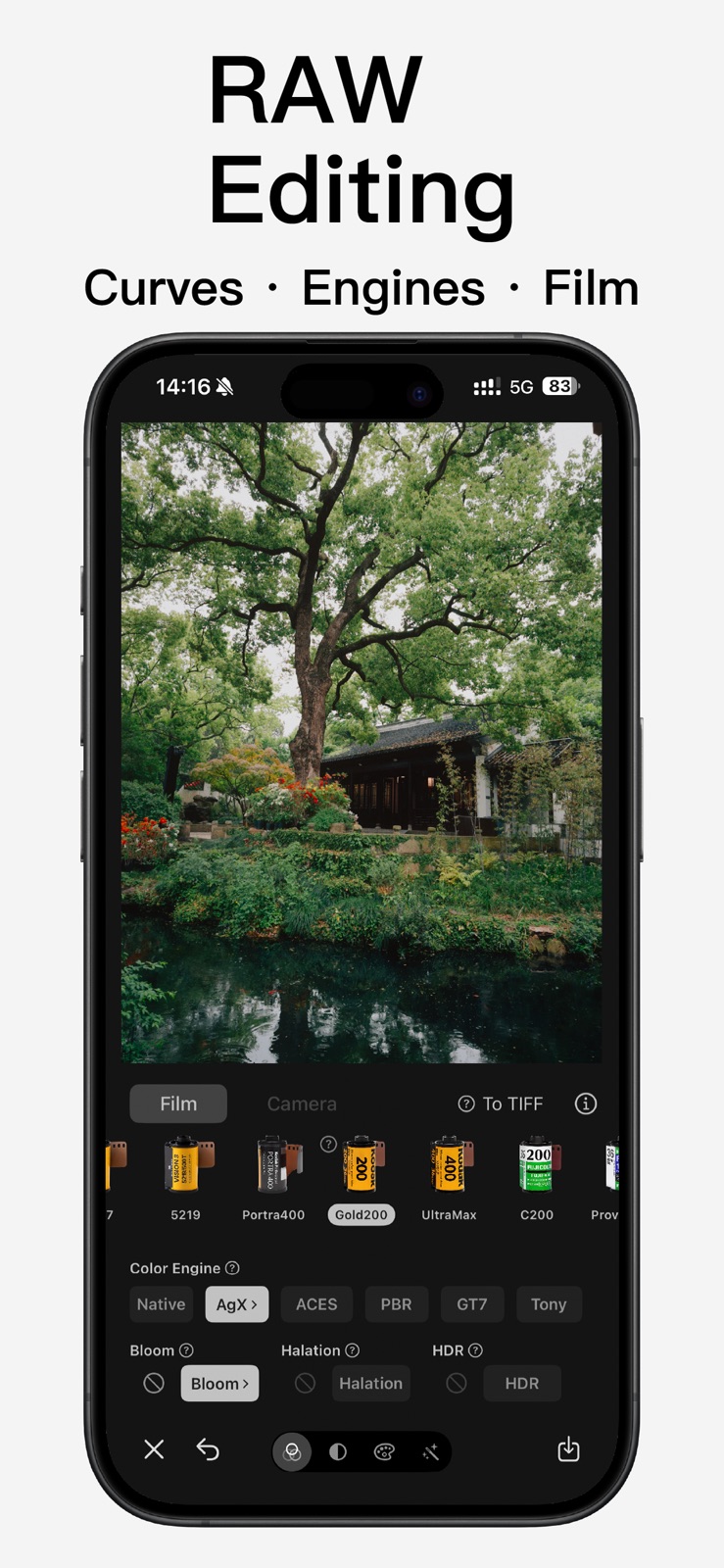
5 store screenshots



Pricing & paywalls
App Store
Shown for US
- Vibe Cam Pro (1 Year) — $6.99/year ($0.58/mo)
- Vibe Cam Pro (1 Year) — $9.99
- Confirm redemption of Pro — $0.00
Ratings & reviews
App Store
Shown for US
-
5/5good app
The sharpening on this camera app is very restrained, which is great.
KurumiCK · 6 Aug 2026
-
4/5Please add “camera control” button support for iPhone 16 etc.
This is a great app. Furthermore, will it be possible to add an adjustment for depth of field of portraits?
otem234 · 6 Aug 2026
-
1/5The collected information exceeded the scope of public disclosure authority.
The collected information exceeded the scope of public disclosure authority. All Chinese companies are required to provide user information to the Chinese Communist Party unconditionally and cannot refuse.
Chat GPTs · 6 Aug 2026
-
5/5App is great, only needs some improvement
最近 App 一打開,1倍的畫面都是糊的耶,只能按 0.5後再放大。 只有我是這樣的嗎! = iPhone 16 =
ivy.little3 · 6 Aug 2026
-
5/5Nice
Good camera
Jusstkk · 6 Aug 2026
Privacy & accessibility
App Store
Privacy
- Data Not Linked to You — Analytics — Diagnostics — Crash Data Developer declared
- Data Not Linked to You — App Functionality — Diagnostics — Performance Data Developer declared
- Data Not Linked to You — Other Purposes — Diagnostics — Other Diagnostic Data Developer declared
- Data Not Linked to You — Diagnostics Developer declared
Accessibility
No accessibility labels collected yet.
Versions
App Store
-
5.10.0
1. Color Engine Corrections ACES: Removed duplicate desaturation steps and redundant CTL stages; Reference Gamut Compression has been moved to the ACEScg space. GT7: Fixed discontinuity issues at the segment joints of the tone curve. Tony McMapface: Moved exposure adjustment before the LUT; added the 'look' parameter to the photo capture path, fixing the issue where the final photo appeared darker than the preview. AgX: Matrix and pipeline aligned with Blender's current Rec.2020 implementation. Khronos PBR Neutral: Unified the sRGB working space and added soft gamut compression. All the above modifications are synchronized across both the CI Kernel (photos) and Metal shaders (viewfinder/video) and have passed numerical verification. 2. RAW Editor Feature Expansions New "Filters" Tab: Fully ported the shooting-side filter system, including intensity adjustment, category navigation, favorites, and locate buttons. Filter intensity shares the same storage as the shooting side, ensuring consistent visual perception across both ends. New "Frames" Tab: Fully ported the shooting-side frame features. Date Watermark Enhancements: The default date now uses the EXIF shooting time. Clicking the watermark on the photo opens a date selection panel with "Today" and "Shooting Time" shortcuts. The frame list preview synchronously displays the actual effective date. 3. Shooting Intent Protection via Exposure Normalization Scene middle-gray normalization now reads the EXIF ExposureBiasValue, excluding the photographer's dialed exposure compensation from the normalization target. A photo intentionally underexposed by one stop will remain one stop darker after passing through the color engine. Normalization gain limits have been tightened (±1.5 EV), with clamping applied to abnormal compensation values. The shooting side and editor now use consistent standards. 4. Tone Algorithm Rewrite Highlights/Shadows have been rewritten from the deprecated shadhi model (Gaussian blur mask + overlay blend) to the darktable tone equalizer model: Guided Filter (He, Sun, Tang) edge-aware mask + log2 EV multiplicative gain. Numerical verification shows that high-contrast edge halos have been reduced from 1.9 EV to 0, eliminating the "masking effect." Internal regional contrast, hue, and channel ratios remain unchanged.
-
5.11.0
This update introduces professional-grade "Depth of Field Blur" and "Portrait Skin Retouching", alongside comprehensive improvements to the interactive and multilingual experience. 【Depth of Field Blur】 Based on monocular depth estimation, it restores spatial depth from a single photo, simulating the shallow depth of field of large-aperture lenses: · Tap or drag to change the focus position in real-time, WYSIWYG. · Provides pro parameters like aperture (blur strength), max blur radius, depth layers, and highlight bokeh. Night point lights can be blurred into bright bokeh spots. · Combines subject segmentation for edge protection, ensuring cleaner transitions for hair and contours. · Optional "Edge-Aware Upsampling" to make blur boundaries fit the subject perfectly. 【Portrait Skin Retouching】 Works exclusively on detected face areas: it first precisely removes blemishes like acne marks and spots, then performs per-pixel adaptive skin evening. It improves skin quality while retaining pores and authentic textures for a natural, non-plastic look. Supports smoothing strength adjustment (set to 0 for blemish removal only), processes multiple faces independently, and does not alter facial features or face shape. 【Experience Optimization】 · Blur and Skin Retouching are now integrated into tabbed panels for clearer operation, with detailed explanations for each parameter. · Toggle states are automatically remembered and applied the next time you enter the editor.
-
5.11.1
This update introduces professional-grade "Depth of Field Blur" and "Portrait Skin Retouching", alongside comprehensive improvements to the interactive and multilingual experience. 【Depth of Field Blur】 Based on monocular depth estimation, it restores spatial depth from a single photo, simulating the shallow depth of field of large-aperture lenses: · Tap or drag to change the focus position in real-time, WYSIWYG. · Provides pro parameters like aperture (blur strength), max blur radius, depth layers, and highlight bokeh. Night point lights can be blurred into bright bokeh spots. · Combines subject segmentation for edge protection, ensuring cleaner transitions for hair and contours. · Optional "Edge-Aware Upsampling" to make blur boundaries fit the subject perfectly. 【Portrait Skin Retouching】 Works exclusively on detected face areas: it first precisely removes blemishes like acne marks and spots, then performs per-pixel adaptive skin evening. It improves skin quality while retaining pores and authentic textures for a natural, non-plastic look. Supports smoothing strength adjustment (set to 0 for blemish removal only), processes multiple faces independently, and does not alter facial features or face shape. 【Experience Optimization】 · Blur and Skin Retouching are now integrated into tabbed panels for clearer operation, with detailed explanations for each parameter. · Toggle states are automatically remembered and applied the next time you enter the editor.
-
5.11.2
This update introduces professional-grade "Depth of Field Blur" and "Portrait Skin Retouching", alongside comprehensive improvements to the interactive and multilingual experience. 【Depth of Field Blur】 Based on monocular depth estimation, it restores spatial depth from a single photo, simulating the shallow depth of field of large-aperture lenses: · Tap or drag to change the focus position in real-time, WYSIWYG. · Provides pro parameters like aperture (blur strength), max blur radius, depth layers, and highlight bokeh. Night point lights can be blurred into bright bokeh spots. · Combines subject segmentation for edge protection, ensuring cleaner transitions for hair and contours. · Optional "Edge-Aware Upsampling" to make blur boundaries fit the subject perfectly. 【Portrait Skin Retouching】 Works exclusively on detected face areas: it first precisely removes blemishes like acne marks and spots, then performs per-pixel adaptive skin evening. It improves skin quality while retaining pores and authentic textures for a natural, non-plastic look. Supports smoothing strength adjustment (set to 0 for blemish removal only), processes multiple faces independently, and does not alter facial features or face shape. 【Experience Optimization】 · Blur and Skin Retouching are now integrated into tabbed panels for clearer operation, with detailed explanations for each parameter. · Toggle states are automatically remembered and applied the next time you enter the editor.
-
5.12.0
This update adds a lens chromatic aberration effect, rewrites the film grain generation algorithm, and adjusts the layout of the capture screen. [New] Chromatic Aberration Simulates the lateral chromatic aberration of real lenses: at light–dark edges, one side shifts toward red-orange and the other toward blue-cyan, becoming more pronounced toward the corners of the frame. This is one of the most recognizable optical signatures of vintage lenses, toy cameras, and disposable film cameras. A phone's main-camera ISP usually corrects it away, so here we add it back algorithmically. The implementation uses a radial polynomial displacement model for lateral chromatic aberration, combined with spectrally weighted multi-tap sampling, producing a continuous transition from orange through white to cyan rather than a crude three-color split. Six parameters are provided — Strength, Corner Concentration, Sharpness Retention, Color Purity, Sample Count, and Color Direction — along with two built-in calibrations, "Fringe" and "Lens." Displacement is measured in 12 MP-equivalent pixels, so the editor preview matches full-resolution exports. Chromatic aberration is off by default and can be enabled on the capture screen and in the RAW editor. [Improved] Film Grain Grain noise has changed from white noise to lattice value noise, restoring the clumping of silver-halide grains instead of a uniform, per-pixel fine sand. We also fixed grain size drifting with output resolution: the editor preview and the exported photo now show the same grain scale. Grain amounts for all film presets have been recalibrated, so finished images look the same as before. The grain slider in the RAW editor now spans 0–100 instead of 0–50; the maximum available grain is unchanged, only the scale is finer. [Changed] Capture Screen · The self-timer has moved to the top toolbar, alongside the flash; · The sharpening toggle has been removed; capture now always uses the no-extra-sharpening output path; · Two buttons remain on each side of the shutter at the bottom, in a symmetric, evenly divided layout. [Other] · After switching cameras, photo and video now retain the previous resolution, format, and frame rate wherever possible; · Fixed an issue where changing the image resolution could affect the capture mode and Live Photos; · Rebuilt the settings storage layer for improved stability.
-
5.12.1
· 4 Aug 2026
This update adds a lens chromatic aberration effect, rewrites the film grain generation algorithm, and adjusts the layout of the capture screen. [New] Chromatic Aberration Simulates the lateral chromatic aberration of real lenses: at light–dark edges, one side shifts toward red-orange and the other toward blue-cyan, becoming more pronounced toward the corners of the frame. This is one of the most recognizable optical signatures of vintage lenses, toy cameras, and disposable film cameras. A phone's main-camera ISP usually corrects it away, so here we add it back algorithmically. The implementation uses a radial polynomial displacement model for lateral chromatic aberration, combined with spectrally weighted multi-tap sampling, producing a continuous transition from orange through white to cyan rather than a crude three-color split. Six parameters are provided — Strength, Corner Concentration, Sharpness Retention, Color Purity, Sample Count, and Color Direction — along with two built-in calibrations, "Fringe" and "Lens." Displacement is measured in 12 MP-equivalent pixels, so the editor preview matches full-resolution exports. Chromatic aberration is off by default and can be enabled on the capture screen and in the RAW editor. [Improved] Film Grain Grain noise has changed from white noise to lattice value noise, restoring the clumping of silver-halide grains instead of a uniform, per-pixel fine sand. We also fixed grain size drifting with output resolution: the editor preview and the exported photo now show the same grain scale. Grain amounts for all film presets have been recalibrated, so finished images look the same as before. The grain slider in the RAW editor now spans 0–100 instead of 0–50; the maximum available grain is unchanged, only the scale is finer. [Changed] Capture Screen · The self-timer has moved to the top toolbar, alongside the flash; · The sharpening toggle has been removed; capture now always uses the no-extra-sharpening output path; · Two buttons remain on each side of the shutter at the bottom, in a symmetric, evenly divided layout. [Other] · After switching cameras, photo and video now retain the previous resolution, format, and frame rate wherever possible; · Fixed an issue where changing the image resolution could affect the capture mode and Live Photos; · Rebuilt the settings storage layer for improved stability.
-
5.7.3
Five open-source standards from film/VFX, 3D rendering, and color science — plus Apple's native pipeline — give you six freely switchable engines: AgX (all-purpose film): Blender 4.0+'s default view transform. Highlights roll off naturally toward off-white, midtones stay restrained and clean, and highlights only desaturate without shifting hue — the most versatile film base. ACES (cinema film): the film-industry standard at Hollywood, Netflix, and Disney. Now with the complete ACES 1.x standard set plus 1.3 Reference Gamut Compression — solid shadows and a restrained, high-contrast cinematic midtone. PBR Neutral (color accuracy): Khronos Group's 2024 industry standard. Strictly linear midtones and true what-you-see-is-what-you-get — ideal for products, materials, and color charts. GT7 (color negative): from Polyphony Digital's 2025 SIGGRAPH paper, using per-channel + ICtCp dual-path tone mapping. Tuned by default to a classic color-negative look (Kodak Portra / Vision3 vibe), with a slight highlight color cast and film-leaning midtones. Switch to Original to restore racing-game-style high-saturation, strict hue fidelity — purpose-built to tame the hue shift that highly saturated colors suffer after the tone curve, so neon, car paint, and blown-out night scenes keep their color. Tony McMapface (zero-knob): Tomasz Stachowiak's open-source 48³ perceptual color LUT. It refuses any stylization, aiming for "what your eyes actually see." Native: keeps Apple's default pipeline, perfectly matching the system Photos app and cross-device AirDrop display. Every engine (except Native) ships with two calibrations — Original and Recommended — switchable with one tap at the top of the parameter panel. Original faithfully restores the algorithm author's original settings for the authentic experience; Recommended is a default fine-tuned for how things look on iPhone screens and for film-simulation use. For most engines, Recommended just brightens things slightly to better suit phone screens (AgX / ACES / PBR / Tony); GT7 instead switches to a different style (racing-game feel ↔ color-negative feel). Every engine previews in real time right in the viewfinder while you shoot, switches losslessly in the RAW editor, and always preserves the original data. HSL Mixer A new 8-color panel inside the RAW editor (red / orange / yellow / green / cyan / blue / purple / magenta), each with hue, saturation, and luminance. The algorithm runs in the perceptually uniform OKLCh color space, so luminance edits feel equally strong in shadows and highlights — avoiding the blotchiness and color noise that traditional HSL often produces in natural scenes. Anchor angles are calibrated to the natural colors common in photography (grass green, skin tone, sky blue, brick red, and so on), behaving just like the Lightroom HSL Mixer. With TAT (Targeted Adjustment) support: press and hold anywhere on the image to pick a color and drag to adjust. It automatically detects the relevant hue segment and adjusts via two coordinated anchors, avoiding the bias of single-anchor color picking. Color Grading A new three-way grading module: shadows, midtones, and highlights each get hue, saturation, and luminance, with two global parameters — Balance and Blend — controlling how the three regions are weighted along the luminance axis and how softly they transition. The algorithm uses three-phase, zero-mean color-vector summation to avoid the visual drift (Abney shift) that highly saturated colors show after a hue rotation — in line with the industry implementations in DaVinci Resolve and Lightroom Color Grading.
-
5.7.5
Five open-source standards from film/VFX, 3D rendering, and color science — plus Apple's native pipeline — give you six freely switchable engines: AgX (all-purpose film): Blender 4.0+'s default view transform. Highlights roll off naturally toward off-white, midtones stay restrained and clean, and highlights only desaturate without shifting hue — the most versatile film base. ACES (cinema film): the film-industry standard at Hollywood, Netflix, and Disney. Now with the complete ACES 1.x standard set plus 1.3 Reference Gamut Compression — solid shadows and a restrained, high-contrast cinematic midtone. PBR Neutral (color accuracy): Khronos Group's 2024 industry standard. Strictly linear midtones and true what-you-see-is-what-you-get — ideal for products, materials, and color charts. GT7 (color negative): from Polyphony Digital's 2025 SIGGRAPH paper, using per-channel + ICtCp dual-path tone mapping. Tuned by default to a classic color-negative look (Kodak Portra / Vision3 vibe), with a slight highlight color cast and film-leaning midtones. Switch to Original to restore racing-game-style high-saturation, strict hue fidelity — purpose-built to tame the hue shift that highly saturated colors suffer after the tone curve, so neon, car paint, and blown-out night scenes keep their color. Tony McMapface (zero-knob): Tomasz Stachowiak's open-source 48³ perceptual color LUT. It refuses any stylization, aiming for "what your eyes actually see." Native: keeps Apple's default pipeline, perfectly matching the system Photos app and cross-device AirDrop display. Every engine (except Native) ships with two calibrations — Original and Recommended — switchable with one tap at the top of the parameter panel. Original faithfully restores the algorithm author's original settings for the authentic experience; Recommended is a default fine-tuned for how things look on iPhone screens and for film-simulation use. For most engines, Recommended just brightens things slightly to better suit phone screens (AgX / ACES / PBR / Tony); GT7 instead switches to a different style (racing-game feel ↔ color-negative feel). Every engine previews in real time right in the viewfinder while you shoot, switches losslessly in the RAW editor, and always preserves the original data. HSL Mixer A new 8-color panel inside the RAW editor (red / orange / yellow / green / cyan / blue / purple / magenta), each with hue, saturation, and luminance. The algorithm runs in the perceptually uniform OKLCh color space, so luminance edits feel equally strong in shadows and highlights — avoiding the blotchiness and color noise that traditional HSL often produces in natural scenes. Anchor angles are calibrated to the natural colors common in photography (grass green, skin tone, sky blue, brick red, and so on), behaving just like the Lightroom HSL Mixer. With TAT (Targeted Adjustment) support: press and hold anywhere on the image to pick a color and drag to adjust. It automatically detects the relevant hue segment and adjusts via two coordinated anchors, avoiding the bias of single-anchor color picking. Color Grading A new three-way grading module: shadows, midtones, and highlights each get hue, saturation, and luminance, with two global parameters — Balance and Blend — controlling how the three regions are weighted along the luminance axis and how softly they transition. The algorithm uses three-phase, zero-mean color-vector summation to avoid the visual drift (Abney shift) that highly saturated colors show after a hue rotation — in line with the industry implementations in DaVinci Resolve and Lightroom Color Grading.
-
5.8.0
This update focuses on "faster shooting access" and "more precise color control," bringing three key improvements. Lock Screen Camera Control, One-Tap Access Fully supports iOS 18 "Camera Control." After setting Vibe Cam as the default camera for Camera Control, you can quickly launch it by pressing the Camera Control button on the lock screen, or via the Control Center and lock screen shortcuts. After Face ID or passcode verification, you will directly enter the full shooting interface, significantly shortening the path from launching to framing, ensuring you never miss a moment worth capturing. Fuji100 Simulation Remake Recalibrated the Fuji100 film simulation, based on the Fujifilm FP-100C peel-apart instant film. It restores its iconic low-saturation color rendering, clear cyan shadows, and soft highlight roll-off, offering a more refined and enduring texture. We have also refined the color curves for Pro400H, Superia 400, C200, Gold 200, and other films, making the overall simulations more stable and closer to the look of real film. Bloom and Halation Upgraded to Curve Control The adjustment for Bloom and Halation has been upgraded from a single slider to a graphical curve panel. You can intuitively grasp the relationship between threshold, intensity, diffusion, and hue on the curve for more precise tuning. The curve and sliders are linked bi-directionally, making the adjustment results clear at a glance. Whether creating a soft highlight glow or restoring the red halation unique to film, you can control it with ease. We continue to optimize stability and usage details. Thank you for choosing Vibe Cam.
-
5.8.1
Lock Screen Camera Control, One-Tap Access Fully supports iOS 18 "Camera Control." After setting Vibe Cam as the default camera for Camera Control, you can quickly launch it by pressing the Camera Control button on the lock screen, or via the Control Center and lock screen shortcuts. After Face ID or passcode verification, you will directly enter the full shooting interface, significantly shortening the path from launching to framing, ensuring you never miss a moment worth capturing. Fuji100 Simulation Remake Recalibrated the Fuji100 film simulation, based on the Fujifilm FP-100C peel-apart instant film. It restores its iconic low-saturation color rendering, clear cyan shadows, and soft highlight roll-off, offering a more refined and enduring texture. We have also refined the color curves for Pro400H, Superia 400, C200, Gold 200, and other films, making the overall simulations more stable and closer to the look of real film. Bloom and Halation Upgraded to Curve Control The adjustment for Bloom and Halation has been upgraded from a single slider to a graphical curve panel. You can intuitively grasp the relationship between threshold, intensity, diffusion, and hue on the curve for more precise tuning. The curve and sliders are linked bi-directionally, making the adjustment results clear at a glance. Whether creating a soft highlight glow or restoring the red halation unique to film, you can control it with ease. We continue to optimize stability and usage details. Thank you for choosing Vibe Cam.
-
5.8.10
[RAW9 Decode Engine Support] At WWDC 2026, Apple introduced its next-generation Apple RAW Decoder, RAW9. It requires iOS 27 or later and is still in system beta, with a known issue of black guide lines. Unlike RAW8 (in use since 2018), RAW9 no longer splits demosaicing and denoising into two separate stages; instead it uses a tiled CoreML model to jointly solve demosaic and denoise on the Apple Neural Engine (ANE), markedly improving render quality on edges, textures, and low-light scenes. For reliable output we still recommend RAW8, switching over fully once iOS 27 reaches a stable release. Our RAW editor now fully supports it: a RAW9 toggle on the color-engine title row lets you switch with one tap, re-developing the same ProRAW or standard RAW with different decoder generations for real-time comparison. Switching only changes the "development process" — the original file is never modified and you can revert to RAW8 anytime. The decoded result still stacks with the color engine, film simulation, HDR, halation, and bloom, and the HDR Gain Map is recomputed for the selected version, keeping the whole pipeline consistent. Tap the ? beside the toggle for the full technical notes (presentRAWVersionAlert). [Tone Adjustment (New)] A new Tone panel sits next to Exposure in the RAW editor's Light tab, with five controls — Contrast, Highlights, Shadows, Whites, and Blacks (each ±50, default 0). Unlike a plain tone curve, Tone operates in scene-referred linear space using professional darkroom algorithms: Contrast and the black/white points follow darktable basicadj, while Highlights and Shadows use a blurred luminance mask for local adaptation (darktable shadhi), reshaping tones by zone — preserving highlight roll-off and lifting shadow detail without going flat. It's fully non-destructive and stacks freely with the decode version and other edits; tap the ? beside "Tone" to see how each parameter works and recommended use.
-
5.8.11
[RAW9 Decode Engine Support] At WWDC 2026, Apple introduced its next-generation Apple RAW Decoder, RAW9. It requires iOS 27 or later and is still in system beta, with a known issue of black guide lines. Unlike RAW8 (in use since 2018), RAW9 no longer splits demosaicing and denoising into two separate stages; instead it uses a tiled CoreML model to jointly solve demosaic and denoise on the Apple Neural Engine (ANE), markedly improving render quality on edges, textures, and low-light scenes. For reliable output we still recommend RAW8, switching over fully once iOS 27 reaches a stable release. Our RAW editor now fully supports it: a RAW9 toggle on the color-engine title row lets you switch with one tap, re-developing the same ProRAW or standard RAW with different decoder generations for real-time comparison. Switching only changes the "development process" — the original file is never modified and you can revert to RAW8 anytime. The decoded result still stacks with the color engine, film simulation, HDR, halation, and bloom, and the HDR Gain Map is recomputed for the selected version, keeping the whole pipeline consistent. Tap the ? beside the toggle for the full technical notes (presentRAWVersionAlert). [Tone Adjustment (New)] A new Tone panel sits next to Exposure in the RAW editor's Light tab, with five controls — Contrast, Highlights, Shadows, Whites, and Blacks (each ±50, default 0). Unlike a plain tone curve, Tone operates in scene-referred linear space using professional darkroom algorithms: Contrast and the black/white points follow darktable basicadj, while Highlights and Shadows use a blurred luminance mask for local adaptation (darktable shadhi), reshaping tones by zone — preserving highlight roll-off and lifting shadow detail without going flat. It's fully non-destructive and stacks freely with the decode version and other edits; tap the ? beside "Tone" to see how each parameter works and recommended use.
-
5.8.12
[RAW9 Decode Engine Support] At WWDC 2026, Apple introduced its next-generation Apple RAW Decoder, RAW9. It requires iOS 27 or later and is still in system beta, with a known issue of black guide lines. Unlike RAW8 (in use since 2018), RAW9 no longer splits demosaicing and denoising into two separate stages; instead it uses a tiled CoreML model to jointly solve demosaic and denoise on the Apple Neural Engine (ANE), markedly improving render quality on edges, textures, and low-light scenes. For reliable output we still recommend RAW8, switching over fully once iOS 27 reaches a stable release. Our RAW editor now fully supports it: a RAW9 toggle on the color-engine title row lets you switch with one tap, re-developing the same ProRAW or standard RAW with different decoder generations for real-time comparison. Switching only changes the "development process" — the original file is never modified and you can revert to RAW8 anytime. The decoded result still stacks with the color engine, film simulation, HDR, halation, and bloom, and the HDR Gain Map is recomputed for the selected version, keeping the whole pipeline consistent. Tap the ? beside the toggle for the full technical notes (presentRAWVersionAlert). [Tone Adjustment (New)] A new Tone panel sits next to Exposure in the RAW editor's Light tab, with five controls — Contrast, Highlights, Shadows, Whites, and Blacks (each ±50, default 0). Unlike a plain tone curve, Tone operates in scene-referred linear space using professional darkroom algorithms: Contrast and the black/white points follow darktable basicadj, while Highlights and Shadows use a blurred luminance mask for local adaptation (darktable shadhi), reshaping tones by zone — preserving highlight roll-off and lifting shadow detail without going flat. It's fully non-destructive and stacks freely with the decode version and other edits; tap the ? beside "Tone" to see how each parameter works and recommended use.
-
5.8.2
Lock Screen Camera Control, One-Tap Access Fully supports iOS 18 "Camera Control." After setting Vibe Cam as the default camera for Camera Control, you can quickly launch it by pressing the Camera Control button on the lock screen, or via the Control Center and lock screen shortcuts. After Face ID or passcode verification, you will directly enter the full shooting interface, significantly shortening the path from launching to framing, ensuring you never miss a moment worth capturing. Fuji100 Simulation Remake Recalibrated the Fuji100 film simulation, based on the Fujifilm FP-100C peel-apart instant film. It restores its iconic low-saturation color rendering, clear cyan shadows, and soft highlight roll-off, offering a more refined and enduring texture. We have also refined the color curves for Pro400H, Superia 400, C200, Gold 200, and other films, making the overall simulations more stable and closer to the look of real film. Bloom and Halation Upgraded to Curve Control The adjustment for Bloom and Halation has been upgraded from a single slider to a graphical curve panel. You can intuitively grasp the relationship between threshold, intensity, diffusion, and hue on the curve for more precise tuning. The curve and sliders are linked bi-directionally, making the adjustment results clear at a glance. Whether creating a soft highlight glow or restoring the red halation unique to film, you can control it with ease. We continue to optimize stability and usage details. Thank you for choosing Vibe Cam.
-
5.8.3
Lock Screen Camera Control, One-Tap Access Fully supports iOS 18 "Camera Control." After setting Vibe Cam as the default camera for Camera Control, you can quickly launch it by pressing the Camera Control button on the lock screen, or via the Control Center and lock screen shortcuts. After Face ID or passcode verification, you will directly enter the full shooting interface, significantly shortening the path from launching to framing, ensuring you never miss a moment worth capturing. Fuji100 Simulation Remake Recalibrated the Fuji100 film simulation, based on the Fujifilm FP-100C peel-apart instant film. It restores its iconic low-saturation color rendering, clear cyan shadows, and soft highlight roll-off, offering a more refined and enduring texture. We have also refined the color curves for Pro400H, Superia 400, C200, Gold 200, and other films, making the overall simulations more stable and closer to the look of real film. Bloom and Halation Upgraded to Curve Control The adjustment for Bloom and Halation has been upgraded from a single slider to a graphical curve panel. You can intuitively grasp the relationship between threshold, intensity, diffusion, and hue on the curve for more precise tuning. The curve and sliders are linked bi-directionally, making the adjustment results clear at a glance. Whether creating a soft highlight glow or restoring the red halation unique to film, you can control it with ease. We continue to optimize stability and usage details. Thank you for choosing Vibe Cam.
-
5.8.5
Lock Screen Camera Control, One-Tap Access Fully supports iOS 18 "Camera Control." After setting Vibe Cam as the default camera for Camera Control, you can quickly launch it by pressing the Camera Control button on the lock screen, or via the Control Center and lock screen shortcuts. After Face ID or passcode verification, you will directly enter the full shooting interface, significantly shortening the path from launching to framing, ensuring you never miss a moment worth capturing. Fuji100 Simulation Remake Recalibrated the Fuji100 film simulation, based on the Fujifilm FP-100C peel-apart instant film. It restores its iconic low-saturation color rendering, clear cyan shadows, and soft highlight roll-off, offering a more refined and enduring texture. We have also refined the color curves for Pro400H, Superia 400, C200, Gold 200, and other films, making the overall simulations more stable and closer to the look of real film. Bloom and Halation Upgraded to Curve Control The adjustment for Bloom and Halation has been upgraded from a single slider to a graphical curve panel. You can intuitively grasp the relationship between threshold, intensity, diffusion, and hue on the curve for more precise tuning. The curve and sliders are linked bi-directionally, making the adjustment results clear at a glance. Whether creating a soft highlight glow or restoring the red halation unique to film, you can control it with ease. We continue to optimize stability and usage details. Thank you for choosing Vibe Cam.
-
5.8.6
Lock Screen Camera Control, One-Tap Access Fully supports iOS 18 "Camera Control." After setting Vibe Cam as the default camera for Camera Control, you can quickly launch it by pressing the Camera Control button on the lock screen, or via the Control Center and lock screen shortcuts. After Face ID or passcode verification, you will directly enter the full shooting interface, significantly shortening the path from launching to framing, ensuring you never miss a moment worth capturing. Fuji100 Simulation Remake Recalibrated the Fuji100 film simulation, based on the Fujifilm FP-100C peel-apart instant film. It restores its iconic low-saturation color rendering, clear cyan shadows, and soft highlight roll-off, offering a more refined and enduring texture. We have also refined the color curves for Pro400H, Superia 400, C200, Gold 200, and other films, making the overall simulations more stable and closer to the look of real film. Bloom and Halation Upgraded to Curve Control The adjustment for Bloom and Halation has been upgraded from a single slider to a graphical curve panel. You can intuitively grasp the relationship between threshold, intensity, diffusion, and hue on the curve for more precise tuning. The curve and sliders are linked bi-directionally, making the adjustment results clear at a glance. Whether creating a soft highlight glow or restoring the red halation unique to film, you can control it with ease. We continue to optimize stability and usage details. Thank you for choosing Vibe Cam.
-
5.8.7
[RAW9 Decode Engine Support] At WWDC 2026, Apple introduced its next-generation Apple RAW Decoder, RAW9. It requires iOS 27 or later and is still in system beta, with a known issue of black guide lines. Unlike RAW8 (in use since 2018), RAW9 no longer splits demosaicing and denoising into two separate stages; instead it uses a tiled CoreML model to jointly solve demosaic and denoise on the Apple Neural Engine (ANE), markedly improving render quality on edges, textures, and low-light scenes. For reliable output we still recommend RAW8, switching over fully once iOS 27 reaches a stable release. Our RAW editor now fully supports it: a RAW9 toggle on the color-engine title row lets you switch with one tap, re-developing the same ProRAW or standard RAW with different decoder generations for real-time comparison. Switching only changes the "development process" — the original file is never modified and you can revert to RAW8 anytime. The decoded result still stacks with the color engine, film simulation, HDR, halation, and bloom, and the HDR Gain Map is recomputed for the selected version, keeping the whole pipeline consistent. Tap the ? beside the toggle for the full technical notes (presentRAWVersionAlert). [Tone Adjustment (New)] A new Tone panel sits next to Exposure in the RAW editor's Light tab, with five controls — Contrast, Highlights, Shadows, Whites, and Blacks (each ±50, default 0). Unlike a plain tone curve, Tone operates in scene-referred linear space using professional darkroom algorithms: Contrast and the black/white points follow darktable basicadj, while Highlights and Shadows use a blurred luminance mask for local adaptation (darktable shadhi), reshaping tones by zone — preserving highlight roll-off and lifting shadow detail without going flat. It's fully non-destructive and stacks freely with the decode version and other edits; tap the ? beside "Tone" to see how each parameter works and recommended use.
-
5.8.8
[RAW9 Decode Engine Support] At WWDC 2026, Apple introduced its next-generation Apple RAW Decoder, RAW9. It requires iOS 27 or later and is still in system beta, with a known issue of black guide lines. Unlike RAW8 (in use since 2018), RAW9 no longer splits demosaicing and denoising into two separate stages; instead it uses a tiled CoreML model to jointly solve demosaic and denoise on the Apple Neural Engine (ANE), markedly improving render quality on edges, textures, and low-light scenes. For reliable output we still recommend RAW8, switching over fully once iOS 27 reaches a stable release. Our RAW editor now fully supports it: a RAW9 toggle on the color-engine title row lets you switch with one tap, re-developing the same ProRAW or standard RAW with different decoder generations for real-time comparison. Switching only changes the "development process" — the original file is never modified and you can revert to RAW8 anytime. The decoded result still stacks with the color engine, film simulation, HDR, halation, and bloom, and the HDR Gain Map is recomputed for the selected version, keeping the whole pipeline consistent. Tap the ? beside the toggle for the full technical notes (presentRAWVersionAlert). [Tone Adjustment (New)] A new Tone panel sits next to Exposure in the RAW editor's Light tab, with five controls — Contrast, Highlights, Shadows, Whites, and Blacks (each ±50, default 0). Unlike a plain tone curve, Tone operates in scene-referred linear space using professional darkroom algorithms: Contrast and the black/white points follow darktable basicadj, while Highlights and Shadows use a blurred luminance mask for local adaptation (darktable shadhi), reshaping tones by zone — preserving highlight roll-off and lifting shadow detail without going flat. It's fully non-destructive and stacks freely with the decode version and other edits; tap the ? beside "Tone" to see how each parameter works and recommended use.
-
5.8.9
[RAW9 Decode Engine Support] At WWDC 2026, Apple introduced its next-generation Apple RAW Decoder, RAW9. It requires iOS 27 or later and is still in system beta, with a known issue of black guide lines. Unlike RAW8 (in use since 2018), RAW9 no longer splits demosaicing and denoising into two separate stages; instead it uses a tiled CoreML model to jointly solve demosaic and denoise on the Apple Neural Engine (ANE), markedly improving render quality on edges, textures, and low-light scenes. For reliable output we still recommend RAW8, switching over fully once iOS 27 reaches a stable release. Our RAW editor now fully supports it: a RAW9 toggle on the color-engine title row lets you switch with one tap, re-developing the same ProRAW or standard RAW with different decoder generations for real-time comparison. Switching only changes the "development process" — the original file is never modified and you can revert to RAW8 anytime. The decoded result still stacks with the color engine, film simulation, HDR, halation, and bloom, and the HDR Gain Map is recomputed for the selected version, keeping the whole pipeline consistent. Tap the ? beside the toggle for the full technical notes (presentRAWVersionAlert). [Tone Adjustment (New)] A new Tone panel sits next to Exposure in the RAW editor's Light tab, with five controls — Contrast, Highlights, Shadows, Whites, and Blacks (each ±50, default 0). Unlike a plain tone curve, Tone operates in scene-referred linear space using professional darkroom algorithms: Contrast and the black/white points follow darktable basicadj, while Highlights and Shadows use a blurred luminance mask for local adaptation (darktable shadhi), reshaping tones by zone — preserving highlight roll-off and lifting shadow detail without going flat. It's fully non-destructive and stacks freely with the decode version and other edits; tap the ? beside "Tone" to see how each parameter works and recommended use.
-
5.9.0
[RAW9 Decoding Engine] Following the integration of RAW9 into the RAW editor in the previous version, this update brings the new generation Apple RAW Decoder to the camera. After enabling "Shoot with RAW9" in "Pro → Other Settings", the film mode will image directly using RAW9. Based on a tiled CoreML model, it jointly solves demosaicing and denoising on the Apple Neural Engine (ANE). Compared to RAW8—used since 2018, which separates demosaicing and denoising into two independent processes—RAW9 delivers significantly superior rendering quality in edges, textures, and low-light scenes. Note: RAW9 is only supported on iOS 27 and above, which is currently in the system beta phase. For stable output, we still recommend prioritizing RAW8 until the official iOS 27 release matures before fully switching. [Standard RAW Chromatic Aberration Correction] We have rewritten the axial chromatic aberration (LoCA / color fringing) correction algorithm for Standard RAW. The correction is now performed in the scene-referred linear space of the development pipeline, prior to the view transform (benchmarking the defringe position in Lightroom / RawTherapee / darktable). The detection utilizes a scale-independent adaptive ratio: normalized by "local chroma protrusion of high-contrast edges / neighborhood chroma energy". Only those exceeding the threshold are identified as color fringes. Then, local desaturation is applied exclusively to the targeted hues using a narrow-band gate in the OKLab hue space, leaving flat solid colors and normal areas unaffected. While maintaining the original purple and green fringing removal, this version adds two new correction channels: orange and blue. The orange band actively avoids skin reds and pure yellows, while the blue band avoids blue skies and water surfaces. These are specifically designed to clean up residual orange and blue fringing on high-contrast edges caused by backlighting and large apertures, resulting in cleaner and more transparent colors. The entire process is non-destructive and can be freely combined with other editing features like decoder versions, color engines, and film simulations.
-
5.9.1
[RAW9 Decoding Engine] Following the integration of RAW9 into the RAW editor in the previous version, this update brings the new generation Apple RAW Decoder to the camera. After enabling "Shoot with RAW9" in "Pro → Other Settings", the film mode will image directly using RAW9. Based on a tiled CoreML model, it jointly solves demosaicing and denoising on the Apple Neural Engine (ANE). Compared to RAW8—used since 2018, which separates demosaicing and denoising into two independent processes—RAW9 delivers significantly superior rendering quality in edges, textures, and low-light scenes. Note: RAW9 is only supported on iOS 27 and above, which is currently in the system beta phase. For stable output, we still recommend prioritizing RAW8 until the official iOS 27 release matures before fully switching. [Standard RAW Chromatic Aberration Correction] We have rewritten the axial chromatic aberration (LoCA / color fringing) correction algorithm for Standard RAW. The correction is now performed in the scene-referred linear space of the development pipeline, prior to the view transform (benchmarking the defringe position in Lightroom / RawTherapee / darktable). The detection utilizes a scale-independent adaptive ratio: normalized by "local chroma protrusion of high-contrast edges / neighborhood chroma energy". Only those exceeding the threshold are identified as color fringes. Then, local desaturation is applied exclusively to the targeted hues using a narrow-band gate in the OKLab hue space, leaving flat solid colors and normal areas unaffected. While maintaining the original purple and green fringing removal, this version adds two new correction channels: orange and blue. The orange band actively avoids skin reds and pure yellows, while the blue band avoids blue skies and water surfaces. These are specifically designed to clean up residual orange and blue fringing on high-contrast edges caused by backlighting and large apertures, resulting in cleaner and more transparent colors. The entire process is non-destructive and can be freely combined with other editing features like decoder versions, color engines, and film simulations.
-
5.9.2
[RAW9 Decoding Engine] Following the integration of RAW9 into the RAW editor in the previous version, this update brings the new generation Apple RAW Decoder to the camera. After enabling "Shoot with RAW9" in "Pro → Other Settings", the film mode will image directly using RAW9. Based on a tiled CoreML model, it jointly solves demosaicing and denoising on the Apple Neural Engine (ANE). Compared to RAW8—used since 2018, which separates demosaicing and denoising into two independent processes—RAW9 delivers significantly superior rendering quality in edges, textures, and low-light scenes. Note: RAW9 is only supported on iOS 27 and above, which is currently in the system beta phase. For stable output, we still recommend prioritizing RAW8 until the official iOS 27 release matures before fully switching. [Standard RAW Chromatic Aberration Correction] We have rewritten the axial chromatic aberration (LoCA / color fringing) correction algorithm for Standard RAW. The correction is now performed in the scene-referred linear space of the development pipeline, prior to the view transform (benchmarking the defringe position in Lightroom / RawTherapee / darktable). The detection utilizes a scale-independent adaptive ratio: normalized by "local chroma protrusion of high-contrast edges / neighborhood chroma energy". Only those exceeding the threshold are identified as color fringes. Then, local desaturation is applied exclusively to the targeted hues using a narrow-band gate in the OKLab hue space, leaving flat solid colors and normal areas unaffected. While maintaining the original purple and green fringing removal, this version adds two new correction channels: orange and blue. The orange band actively avoids skin reds and pure yellows, while the blue band avoids blue skies and water surfaces. These are specifically designed to clean up residual orange and blue fringing on high-contrast edges caused by backlighting and large apertures, resulting in cleaner and more transparent colors. The entire process is non-destructive and can be freely combined with other editing features like decoder versions, color engines, and film simulations.
-
5.9.3
[RAW9 Decoding Engine] Following the integration of RAW9 into the RAW editor in the previous version, this update brings the new generation Apple RAW Decoder to the camera. After enabling "Shoot with RAW9" in "Pro → Other Settings", the film mode will image directly using RAW9. Based on a tiled CoreML model, it jointly solves demosaicing and denoising on the Apple Neural Engine (ANE). Compared to RAW8—used since 2018, which separates demosaicing and denoising into two independent processes—RAW9 delivers significantly superior rendering quality in edges, textures, and low-light scenes. Note: RAW9 is only supported on iOS 27 and above, which is currently in the system beta phase. For stable output, we still recommend prioritizing RAW8 until the official iOS 27 release matures before fully switching. [Standard RAW Chromatic Aberration Correction] We have rewritten the axial chromatic aberration (LoCA / color fringing) correction algorithm for Standard RAW. The correction is now performed in the scene-referred linear space of the development pipeline, prior to the view transform (benchmarking the defringe position in Lightroom / RawTherapee / darktable). The detection utilizes a scale-independent adaptive ratio: normalized by "local chroma protrusion of high-contrast edges / neighborhood chroma energy". Only those exceeding the threshold are identified as color fringes. Then, local desaturation is applied exclusively to the targeted hues using a narrow-band gate in the OKLab hue space, leaving flat solid colors and normal areas unaffected. While maintaining the original purple and green fringing removal, this version adds two new correction channels: orange and blue. The orange band actively avoids skin reds and pure yellows, while the blue band avoids blue skies and water surfaces. These are specifically designed to clean up residual orange and blue fringing on high-contrast edges caused by backlighting and large apertures, resulting in cleaner and more transparent colors. The entire process is non-destructive and can be freely combined with other editing features like decoder versions, color engines, and film simulations.
-
5.9.5
[RAW9 Decoding Engine] Following the integration of RAW9 into the RAW editor in the previous version, this update brings the new generation Apple RAW Decoder to the camera. After enabling "Shoot with RAW9" in "Pro → Other Settings", the film mode will image directly using RAW9. Based on a tiled CoreML model, it jointly solves demosaicing and denoising on the Apple Neural Engine (ANE). Compared to RAW8—used since 2018, which separates demosaicing and denoising into two independent processes—RAW9 delivers significantly superior rendering quality in edges, textures, and low-light scenes. Note: RAW9 is only supported on iOS 27 and above, which is currently in the system beta phase. For stable output, we still recommend prioritizing RAW8 until the official iOS 27 release matures before fully switching. [Standard RAW Chromatic Aberration Correction] We have rewritten the axial chromatic aberration (LoCA / color fringing) correction algorithm for Standard RAW. The correction is now performed in the scene-referred linear space of the development pipeline, prior to the view transform (benchmarking the defringe position in Lightroom / RawTherapee / darktable). The detection utilizes a scale-independent adaptive ratio: normalized by "local chroma protrusion of high-contrast edges / neighborhood chroma energy". Only those exceeding the threshold are identified as color fringes. Then, local desaturation is applied exclusively to the targeted hues using a narrow-band gate in the OKLab hue space, leaving flat solid colors and normal areas unaffected. While maintaining the original purple and green fringing removal, this version adds two new correction channels: orange and blue. The orange band actively avoids skin reds and pure yellows, while the blue band avoids blue skies and water surfaces. These are specifically designed to clean up residual orange and blue fringing on high-contrast edges caused by backlighting and large apertures, resulting in cleaner and more transparent colors. The entire process is non-destructive and can be freely combined with other editing features like decoder versions, color engines, and film simulations.
Alternatives
- RCam Pro - Manual Camera & RAW — Same category + similar ratings
- Filmic Pro Editor - Coloroid — Same category + similar ratings
- DSLR Camera - Manual Camera — Same category + similar ratings
- Blurr: Motion Blur Effect Pro — Same category + similar ratings
- Solo Cam - Vintage Camera — Same category + similar ratings
- CamFun - Film&Creative Camera — Same category + similar ratings
Availability by market
- US
Data quality & evidence
- Page completeness
- Live store listing
- Last verified
- 6 Aug 2026
- Sources
- App Store
- Independent summary has not been published yet.