
Quick verdict
- What it is
- Store information collected; an Apoku editorial summary is not yet published.
- At a glance
-
- Free to download
- In-app purchases
Categories and search queries
Official categories
- Productivity
- Business
Apoku categories
Key functions
| Function | Availability | Access | Scope | Evidence |
|---|---|---|---|---|
| Free app | Yes | Free | Context-specific | Store published |
| In-app purchases | Yes | Limited free | Context-specific | Store published |
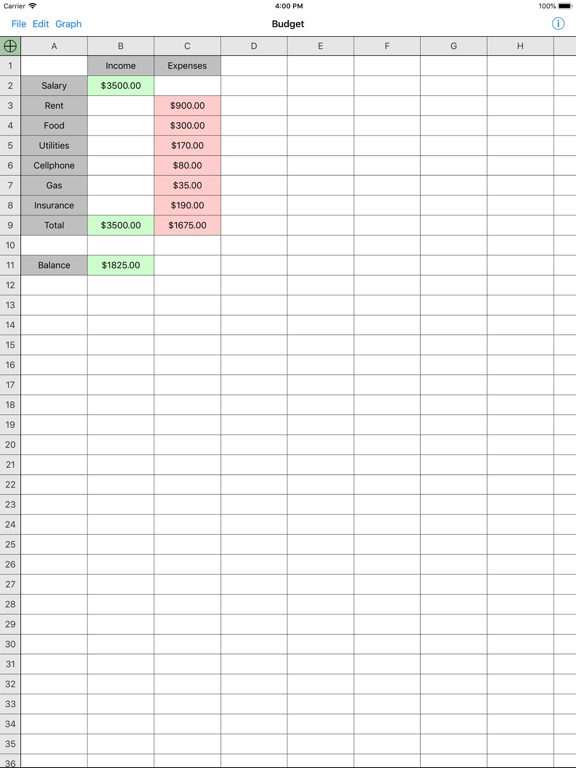
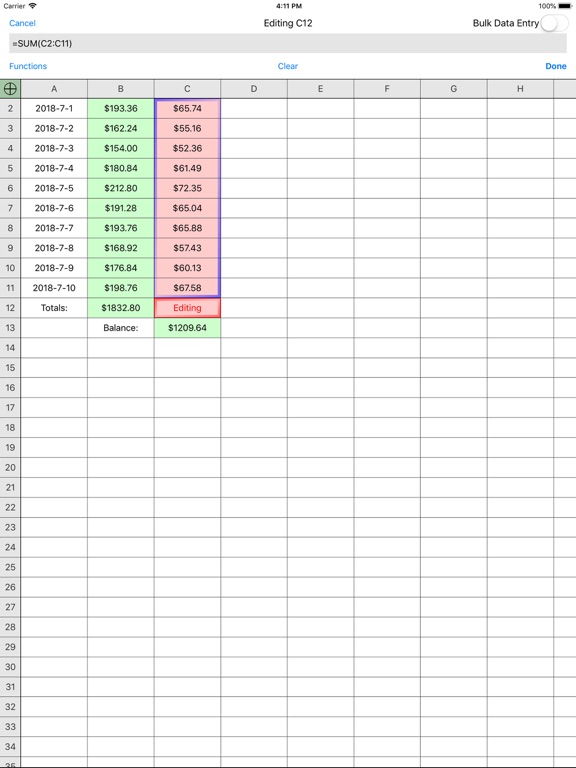
Screens
App Store
15 store screenshots


Pricing & paywalls
App Store
- Remove Ads — $2.99
Ratings & reviews
App Store
-
4/5Can not drag a formula continuously
Apple’s Numbers spreadsheet is very useful and easy to use, however, you’re not able to drag a formula past the length of the page (approximately 25 to 30 cells). This means each time you must stop, scroll the page up, and then re-drag it again. This can take a while if you plan to drag it down 1000 cells. I remember the old Microsoft Excell program used to have the capability to do this continuously without limit.
Jetttfan · 6 Aug 2026
-
2/5issues
easy to use layout, love the touch field and a popup comes up for options. would be great program, one i would of liked the most so far but, it will not print! every time i try using print, app freezes for awhile before eventually shutting itself down. makes program kinda worthless to me. Also, when you use email option, it acts like you are sending it and then sits in your outbox and never gets sent out, it just continuously tries to send itself out but, never does no matter what email account i use. Maybe you have to pay and upgrade for print feature to work but, i doubt it, upgrade only mentions it is to remove Ads. perhaps, the Ads are preventing print from working, have had a couple other apps with Ads in them not work right until i turned internet off but, i need internet to connect to printer so turning internet off is not an option and paying $3 to upgrade just to find print feature still doesn't work is not an option either unless i know for a fact it would fix print issue for sure!!
myHSplace · 6 Aug 2026
-
5/5JRivas
Powerful yet easy to use. I use it for everything, including shopping lists, extensive check-lists and financial analysis. I, however, miss the “cut and paste” inside a cell feature you used to have and ask that you bring it back. With this feature, you can still search the internet by pasting info into your browser copied right from a cell. 🤞 🙏 UPDATE: Thanks for putting back the cut & paste! This makes moving data around much easier and faster. I have a new request for your consideration: add FV (Future Value) to the Functions. Inflation can screw up any budget, but with FV, you can calculate forward easily without having to use a separate financial calculator and then transfer figures back and forth. Thank you so much.
jkj98765 · 6 Aug 2026
-
1/5Full page noisy pop ups - UNINSTALLING
Originally loaded on 3GS. Worked great. Ads were fine. Tried to upgrade but it would not read old spreadsheets created with free version, so went back to free version. NOW: Loaded on 6+. Tried to upgrade and start fresh. Would not take Apple Pay. Wanted credit card number. No way. Free version: Every action brings up full page noisy kid game advertisement. No way. Uninstalling. Begrudgingly going to use Google Sheets (which admittedly is a much more polished product) though I wanted to support small producers, but current version is WAY too abusive. Unless Google Sheets makes me mad, I won't be back. One thing I will miss: I liked the ability to put number and label in same cell and still use in equations e.g. "2 apples" + "4 apples" = 6.
MikeLMA · 6 Aug 2026
-
5/5Flexible and useful
I have been using this for years more often as a data base than computational set though I do have sums and calculations involved. It has good flexibility and inquiries get good responses from the designer. I have not had the problems describes with e-mailing. I do wish it had definable areas for printing like it does for sorting (which I use frequently). I also wish it had an option to set a sort area as the norm. For free I do not think one could ask for or expect more in efficiency and dependability.
ContractorGuitar · 6 Aug 2026
Privacy & accessibility
App Store
Privacy
- Data Linked to You — Analytics — Diagnostics — Performance Data Developer declared
- Data Linked to You — Analytics — Identifiers — Device ID Developer declared
- Data Linked to You — Analytics — Location — Coarse Location Developer declared
- Data Linked to You — Analytics — Usage Data — Advertising Data Developer declared
- Data Linked to You — Analytics — Usage Data — Product Interaction Developer declared
- Data Linked to You — Third-Party Advertising — Diagnostics — Performance Data Developer declared
- Data Linked to You — Third-Party Advertising — Identifiers — Device ID Developer declared
- Data Linked to You — Third-Party Advertising — Location — Coarse Location Developer declared
- Data Linked to You — Third-Party Advertising — Usage Data — Advertising Data Developer declared
- Data Linked to You — Third-Party Advertising — Usage Data — Product Interaction Developer declared
- Data Linked to You — Diagnostics Developer declared
- Data Linked to You — Identifiers Developer declared
- Data Linked to You — Location Developer declared
- Data Linked to You — Usage Data Developer declared
- Data Not Linked to You — Analytics — Diagnostics — Crash Data Developer declared
- Data Not Linked to You — Third-Party Advertising — Diagnostics — Crash Data Developer declared
- Data Not Linked to You — Diagnostics Developer declared
- Data Used to Track You — Diagnostics — Crash Data Developer declared
- Data Used to Track You — Diagnostics — Performance Data Developer declared
- Data Used to Track You — Diagnostics Developer declared
- Data Used to Track You — Identifiers — Device ID Developer declared
- Data Used to Track You — Identifiers Developer declared
- Data Used to Track You — Location — Coarse Location Developer declared
- Data Used to Track You — Location Developer declared
- Data Used to Track You — Usage Data — Advertising Data Developer declared
- Data Used to Track You — Usage Data — Product Interaction Developer declared
- Data Used to Track You — Usage Data Developer declared
Accessibility
No accessibility labels collected yet.
Versions
App Store
-
5.0
1. Selectable Cells (tap and hold on cell) and Rows/Columns (tap and hold on row/column header). 2. Freezable Headers (Edit->Freeze Headers) 3. UI Updates. 4. Performance Improvements. 5. Stability Improvements.
-
5.0.1
Bug fixes, iOS 8 updates, and a more compact extended keyboard for landscape mode on the iPad.
-
5.0.3
Bug fixes, additional updates for iOS 8, TABLE() function, and a preference in the Settings app for using a large or small keyboard in landscape mode on the iPad.
-
5.0.4
Bug fixes.
-
5.0.5
'Copy Values' option added to the Edit menu
-
5.0.6
Added left and right justification options in the Format Area dialog, and added some more flexible data handling.
-
6.0
1. Updated for iOS 9 2. Several date formats are now supported for addition, subtraction, comparison and dragging (NOTE: you must remove the '=' before entering a date in a cell). 3. Print preview and range selection 4. Significant performance improvements with large spreadsheets
-
6.1
1. Updated for iOS 9 2. Several date formats are now supported for addition, subtraction, comparison and dragging (NOTE: you must remove the '=' before entering a date in a cell). 3. Print preview and range selection 4. Significant performance improvements with large spreadsheets 5. Bug fixes
-
6.2
Fix for the large landscape keyboard setting.
-
6.3
Bug fixes and iPad Pro layout.
-
6.4
Bug fixes and compatibility updates.
-
7.2
Updated UI design. Performance improvements. Bug fixes.
-
7.3
Bug fixes.
-
7.3.1
Bug fixes and performance improvements.
-
7.3.2
Bug fixes and performance improvements
-
7.3.3
Bug fixes including CSV importing, handling of blank cells in TABLE() indexing, and a crash
-
7.3.4
Includes a fix for a crash, a fix for failed in-app upgrades, and improved feedback for searches with no results.
-
7.3.5
iOS 13.2 compatibility
-
7.3.6
iOS 13.2 compatibility
-
7.3.7
Bug fixes
-
8.0.0
iCloud support and general compatability update.
-
8.0.8
Printing fix, update to the dark mode color scheme, fix for the keyboard hiding after an error in a formula.
-
8.0.9
Additional keyboard fixes, warning if access to iCloud is lost.
-
8.1.0
Improved iCloud synchronization if the local cache is purged during updates.
-
8.1.4
· 7 Apr 2025
Improved iCloud synchronization if the local cache is purged during updates.
Alternatives
- The Spreadsheet App - Sheets — Same category + similar ratings
- Spreadsheet - Sheetlet — Same category + similar ratings
- SunTable-Spreadsheet view&edit — Same category + similar ratings
- XLSX Sheets: Edit Spreadsheet — Same category + similar ratings
- Zoho Sheet: Spreadsheet App — Same category + similar ratings
- Spreadsheet-xlsx&csv editor — Same category + similar ratings
Availability by market
- US
Data quality & evidence
- Page completeness
- Live store listing
- Last verified
- 6 Aug 2026
- Sources
- App Store
- Apoku editorial summary has not been published yet.