
Quick verdict
- What it is
- Store information collected; independent summary not yet available.
- At a glance
-
- From $0.41/mo
- Free to download
- In-app purchases
Categories and search queries
Official categories
- Productivity
- Utilities
AppCorpus categories
Key functions
| Function | Availability | Access | Scope | Evidence |
|---|---|---|---|---|
| Free app | Yes | Free | — | Store published |
| In-app purchases | Yes | Limited free | — | Store published |
Screens
App Store
17 store screenshots

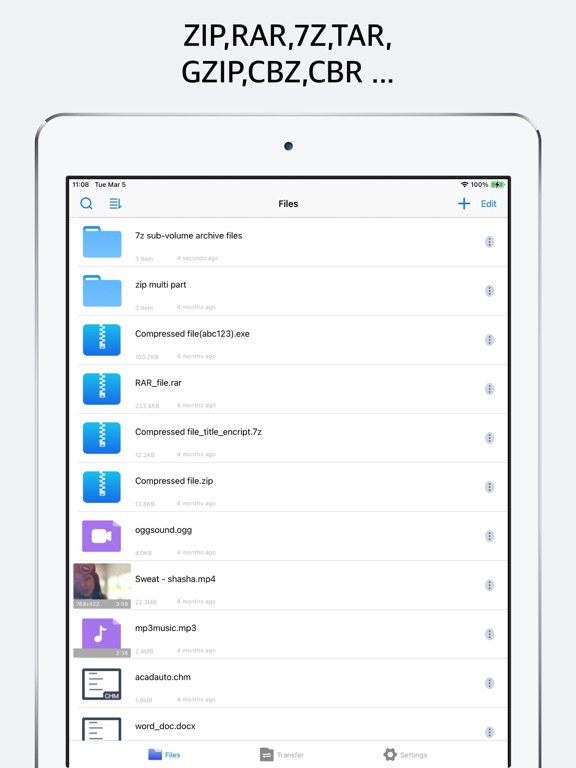

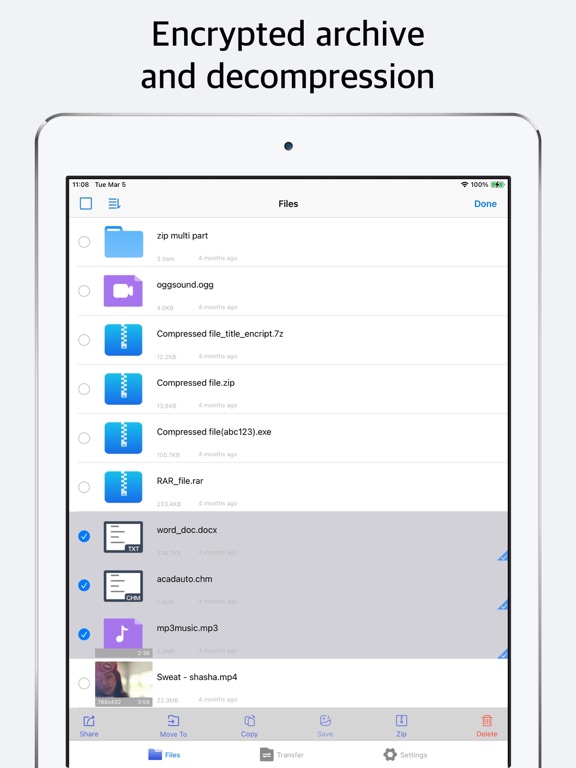
Pricing & paywalls
App Store
- Annual professional version — $4.99/year ($0.41/mo)
- Passcode Lock — $0.99
- Pro Version — $7.99
- Remove Ads — $0.99
- Universal video player — $0.99
Ratings & reviews
App Store
-
5/5I love unzip.
so to start I just wanna say I love your app. I use it almost daily and haven’t had a problem with it so far. Seriously Thanks for making the best app for files on the App Store. it’s so easy to use I guess their is no need for instructions. I am also not the brightest sometimes. Maybe I just didn’t see any. Is their any instructions or a how to for the unzip app? I definitely would be interested in reading everything I can do using unzip. Especially because I finally found something I can’t figure out how to do on the unzip app. How do I select multiple photos in search results??? So what I have been trying to do but failing at. is select everything that shows up when I search the word thumbnail and move it to a different folder or share/save it somewhere els on or off the unzip app. so I can re-save all the search results I get when I search thumbnail so it’s all in it’s own folder. Sadly when I use the search. After it loads all my results. The first thing I click. It looks like I can select it. it shows a little check mark at the bottom right side. The only other thing I see is a cancel button at the top right of my screen. I have tried multiple way to select multiple nothing happens. No matter where I click next the first selection dosent seem to do anything and it just opens whatever I click instead of selecting multiple files. well I hope I explained everything clearly enough to understand what I am talking about. Most importantly I hope that someone can please explain to me what I’m doing wrong.
Spacypinup · 6 Sep 2026
-
2/5Lots of Issues
I’ve been using this app for years now. I even paid for the Pro version. I kind of had to as using the ad-supported version is nearly impossible due to the invasive nature of ads the dev has chosen to incorporate. I have a few major issues with this app - first, it’s extremely buggy and slow. 6 seconds to open a folder on an iPhone 13 Pro with 1tb of storage? Unacceptable under the circumstances. Second, I want to be able to swipe back from anywhere. Out of any folder, any file…anywhere. Don’t impede core functionality of iOS. Add swipe back functionality universally throughout this app. Third, don’t make me use your video player. It’s terrible. Let me choose the default player. And if you are going to make me use the built in player, tapping the screen should hide the controls, not renew their existence for another ten seconds. I want to tap the screen while playing a video, and only see the video, not wait for the UI to go away on its own. Incidentally, please make the scrubbing feature more customizable or sensitive. I don’t want to scroll two millimeters and have the video skip ahead by 300 seconds. I consistently have to go forward and back while trying to find the time stamp I want. One of the biggest issues is this apps use of storage. It’s doesn’t clear out deleted files, and clearing the cache does absolutely nothing. Every few months, I have to move everything on this app to a different folder in the iOS Files app, and delete this app so it can clear the cache. Last time I moved everything out of this app, it was still using 17gb of storage. That is absurd. I don’t want to keep doing this. When a file is deleted, it needs to totally disappear and take everything with it. Thank you.
Prometheus6601 · 6 Sep 2026
-
5/5Essential app for iPhone w/ active updates
Very few apps are worth paying for let alone spending the time to actually write a review, however this is one of them. This app is packed with features & has pretty much all functionality you’d expect to find in a similar desktop program—like you can even do split archives. The UI might not be as aesthetically pleasing as it could be but the app more than makes up for that with how functional & easy to use it is. A lifetime subscription is priced at a very reasonable $4.99 and I have absolutely no regrets with my purchase—especially considering the app is still being actively updated with new features & bug fixes. I highly recommend this app and believe me I wouldn’t be here writing a review if I didn’t sincerely mean it. If anyone knows of a better archiving app for iOS you’ll have to prove it to me because I don’t believe it.
SKEvil22 · 6 Sep 2026
-
5/5Good for melon playground mods
I got so many mods on here for free no nothing all you have to do is go to safari and then search melmod and then press the picture of the mod then scroll down till you see the download button then press it now you have to press it again now act like your deleting the app but hold the app till you see delete and then you will see the melon playground mod so press it now unzip it and download all the items one by one now you press the folder button and import it to melon playground now you in melon playground you will see the mod saying cancel and add press add now you will have the mod sometimes it will lag but if it lags that means it worked but you have to wait for the lag sometimes it would be in the other tabs your welcome
Il cacto hipopotamo · 6 Sep 2026
-
5/5Unpacks Archives & Plays Media As Well - Timesaver
I needed an iOS capable app that could open zip, rar, and 7zip archives with media files inside. I had no idea how I was going to find a media player to play the high bitrate FLAC audio music files, and video containers like MKV I use for my HD video files on Windows over a decade and a half before finding iPhone and other Apple products. I was pleasantly surprised that Unzip could play several media files without needing to open an additional app. This is great both for unpacking archives, and listening to and viewing audio and video media files. It is useful for moving files within your data storage folders so they are organized where you want them, in folders named so you know where to find them also.
tekknokat · 6 Sep 2026
Privacy & accessibility
App Store
Privacy
- Data Not Linked to You — Third-Party Advertising — Identifiers — Device ID Developer declared
- Data Not Linked to You — Identifiers Developer declared
- Data Used to Track You — Identifiers — Device ID Developer declared
- Data Used to Track You — Identifiers Developer declared
Accessibility
No accessibility labels collected yet.
Versions
App Store
-
4.10
Bug fixes and performance improvements.
-
4.11
Bug fixes and performance improvements.
-
4.12
Bug fixes and performance improvements.
-
4.13
Bug fixes and performance improvements.
-
4.14
Bug fixes and performance improvements.
-
4.15
Optimize functionality and user experience
-
4.16
Optimize functionality and user experience
-
4.17
Bug fixes and performance improvements.
-
4.9
Bug fixes and performance improvements.
-
5.0
Added file recycling bin and optimized file hiding
-
5.1
Optimize functionality and user experience.
-
5.10
Bug fixes and performance improvements.
-
5.11
New: Import compressed photos and videos. Convert images to PDF files.
-
5.12
Added support for viewing and opening files backed up to iCloud Drive. Improved file backup interaction for a smoother experience.
-
5.13
Optimized iCloud Drive backup interactions. Added support for backing up to subfolders in iCloud Drive.
-
5.14
Fixed issues with in-app purchases in some previous versions.
-
5.15
· 21 May 2026
Bug fixes and enhanced ebook browsing experience.
-
5.16
Support for more eBook formats: EPUB, PRC, AZW, AZW3, AZW4, MOBI
-
5.17
· 18 Aug 2026
Fixed a potential crash issue when extracting encrypted files
-
5.2
Optimize functionality and user experience.
-
5.3
Bug fixes and performance improvements.
-
5.4
Bug fixes and performance improvements.
-
5.5
Optimize functionality and user experience.
-
5.6
Fixed the issue where garbled characters may appear in file names on Windows platform.
-
5.7
Fixed the issue where garbled characters may appear in file names on Windows platform. Support importing photos and videos from photo library.
-
5.8
Optimize functionality and user experience.
-
5.9
Optimize functionality and user experience.
Alternatives
- Unzip – ZIP RAR 7Z Extractor — Same category + similar ratings
- ES File Explorer — Same category + similar ratings
- Rar Sharp — Same category + similar ratings
- Files - File Manager & Browser — Same category + similar ratings
- Documents - File Manager — Same category + similar ratings
- Owlfiles - File Manager — Same category + similar ratings
Availability by market
- US
Data quality & evidence
- Page completeness
- Live store listing
- Last verified
- 6 Sep 2026
- Sources
- App Store
- Independent summary has not been published yet.