
Quick verdict
- What it is
- Store information collected; independent summary not yet available.
- At a glance
-
- Free to download
- In-app purchases
Categories and search queries
Official categories
- Entertainment
- Social Networking
AppCorpus categories
Key functions
| Function | Availability | Access | Scope | Evidence |
|---|---|---|---|---|
| Free app | Yes | Free | — | Store published |
| In-app purchases | Yes | Limited free | — | Store published |
| SharePlay | Yes | Unknown | App Store | Store published |
Screens
App Store
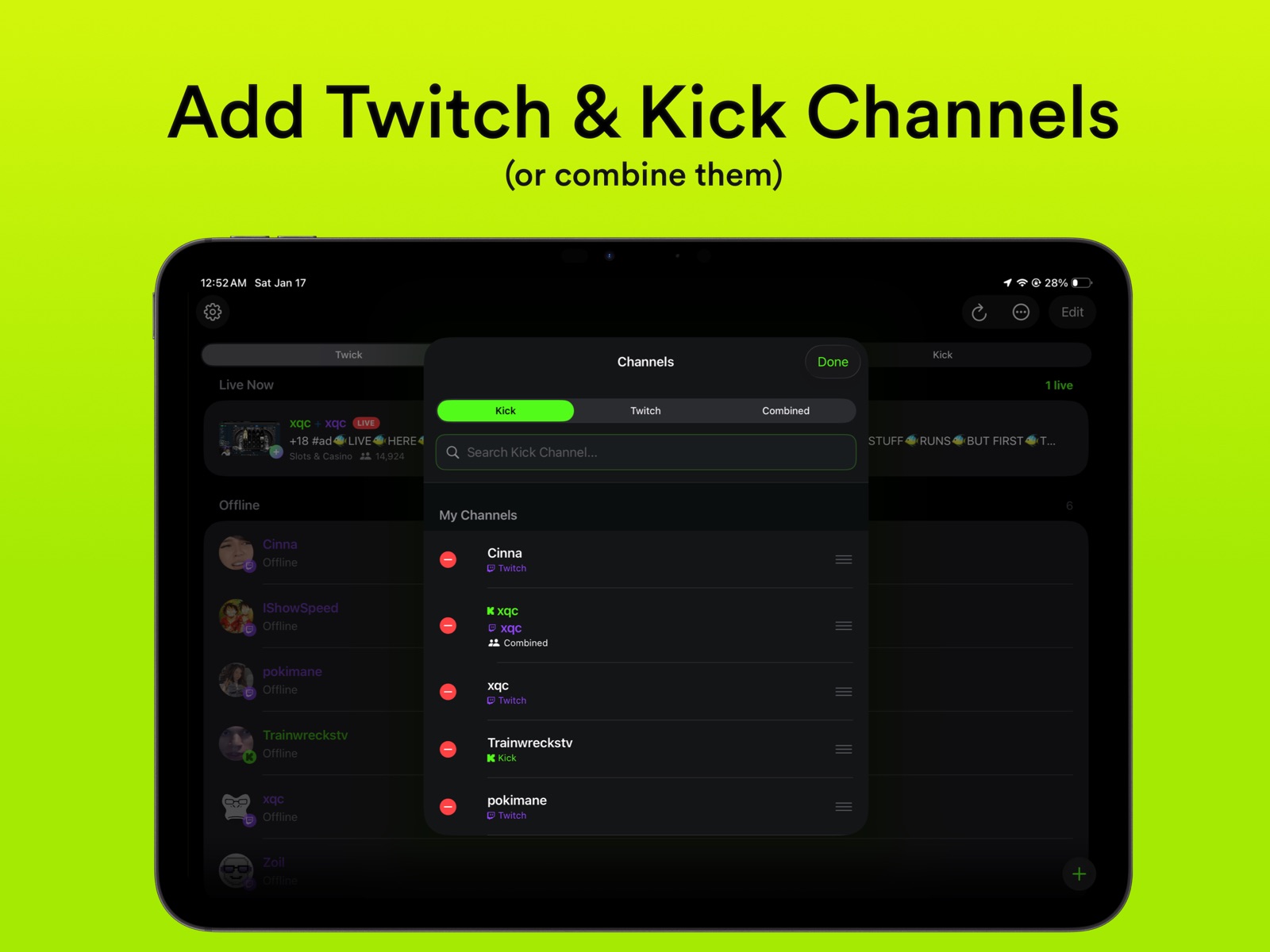
10 store screenshots



Pricing & paywalls
App Store
- Free to download
- In-app purchases
Ratings & reviews
App Store
-
5/5Excellent App
This app makes using twitch chat so much more enjoyable on mobile. Cannot recommend enough. The developers are also very responsive to the community.
Cole 36 · 31 Jul 2026
-
4/5Best App On The Planet
This might be the first person to have a mobile app with 7TV, BTTV, & FFZ support **&** pinned messages support from twitch. I don’t know whats the magic behind it but since I use chatterino on my computer, you can’t see pinned messages still unfortunately. However, this app solves that problem. Well done!
Gxufy · 31 Jul 2026
-
5/5Great app
I’ve been looking for an app that lets you see Kick chat for a very long time. Is great app. Also very easy to switch between Kick and Twitch chats. Love it.
Jay-Money-7 · 31 Jul 2026
-
4/5Chat history isn’t loading
This is a nice app, great UI and thoughtfully implemented, but the chat history isn’t loading when tapping into a stream, even though I have that setting enabled.
e46728228 · 31 Jul 2026
-
5/5Very nice app!
I love how you got Kick and Twitch in the same app and including 7TV integration made it way better!
ItsBr0dyy · 31 Jul 2026
Privacy & accessibility
App Store
Privacy
- Data Not Collected Developer declared
Accessibility
- Dark Interface — SUPPORTED Store published
- Differentiate Without Color Alone — SUPPORTED Store published
- Larger Text — SUPPORTED Store published
- Sufficient Contrast — SUPPORTED Store published
- VoiceOver — SUPPORTED Store published
Versions
App Store
- 1.0
-
1.0.2
We've been hard at work making Twick better for you. This release includes bug fixes and performance enhancements. Happy chatting!
-
1.0.3
# IN-APP STREAMS (Pro) Twick now has support for both Twitch and Kick streams via the app. Streams can be dismissed as well for a chat only experience. # LIVE INDICATORS (Pro) See which channels you added are live with little red or grey dots beside the channel name. # ICLOUD SYNC (Pro) Sync your channels across your Apple devices including the order! # HANDOFF SUPPORT Pick up right where you left off on your iPhone or iPad from the other device! # CHAT SETTINGS Set custom font sizes, row spacing and more! Customize Twick to your hearts content! # USER PROFILES Click on a users username in chat and a profile will open showing you their badges, and profile picture and any other details. # STREAM INFO Press and hold on the channel name on the bottom bar and find a new Stream Info option. It will show the stream title, viewers, uptime and game category as well as the streamers profile picture. # OTHER - The channel selection UI has been polished including automatic keyboard dismissal when a new channel is added. - Bug fixes and performance enhancements. We are committed to making Twick even better for you going forward!
-
1.0.4
# TWITCH & KICK ACCOUNTS Log in with your Twitch and Kick accounts to send chat messages! Manage multiple accounts and switch between them easily. # STREAM SOURCE PICKER (Pro) For combined channels, choose which platform's stream to watch. Tap the TV icon to switch between Kick and Twitch, or turn off the player. # ICLOUD SYNC SETTINGS (Pro) A dedicated sync page shows your sync status and lets you manually sync your channels with a "Sync Now" button. # OTHER - Fixed layout issues after dismissing login screens. - Improved bottom bar behavior. - Bug fixes and stability improvements. We are committed to making Twick even better for you going forward!
-
2.0.0
We have rebuilt Twick from the ground up to provide a faster, more intuitive experience. This update introduces a complete UI overhaul and several features designed to make browsing and chatting more seamless. The interface has been redesigned with a focus on immersion. You can now navigate between streams using fluid swipe gestures, and the new home screen provides a cleaner way to find the content you care about. Here's what Twick 2.0 brings to the table: # STREAM VIDEO Streams are now available to everyone for free! We have integrated a new video engine specifically for Kick, delivering lower latency and improved stream stability with the ability to pick the stream quality. Added support for PiP video for Twitch. # BROWSE TWITCH AND KICK STREAMS Be able to browse your following on your signed in accounts, view top streams or even by category on both Kick and Twitch and easily press and hold to add them to your channels. Switch between different accounts as well right on the page. # SHAZAM Tap the Shazam logo on the stream video and find out what music is playing on stream and play it on Spotify or Apple Music after. # EMOTE PICKER Our brand-new native emote picker is built to be high-performance and battery-efficient, allowing you to browse and use global and channel-specific emotes instantly. A progress bar is visible to show download and loading progress as there may be thousands of emotes to cache on-device. # CHAT OVERHAUL The chat experience has been completely modernized with improvements to support all Twitch badges. Better rendering for replies, first chatters and a new option to see chatters currently active. # STREAMER DETAILS Press and hold on a channel or click the info button within a stream to get more details about the channel. # PLAYER ENHANCEMENTS Twick now supports system-level media controls, allowing you to see "Now Playing" information and manage playback from your device's Control Center. There is also a new toggle for iPhone that ensures that video content is never obstructed by the iPhone notch or Dynamic Island. You can click the line between the video and the chat and also resize to perfection! # CUSTOMIZATION You can now choose to position the chat on either the left or right side of the screen or even hide the chat input entirely. There's also more chat customizability options in the settings such as badge scaling, emote scaling, auto-sync delay for Twitch stream, along with being able to toggle specific emote providers. # OTHER - New settings allow you to clear your cache and manage the app's footprint on your device. - Added a new About page in the Settings. - Added option to choose the default stream for a combined channel. - iCloud Sync now syncs both Twitch and Kick accounts across your Apple devices making it so you only need to log in once and has new granular options (Pro required). - We have resolved an issue where colored username settings were not displaying correctly. - Options to press and hold or filter on the home screen. - Added our new Discord server within the settings, and made improvements to the account linking experience. - Improved efficiently for image caching, especially when watching streams with a ton of chat movement. PS: Join our new Discord! Update the app and find it in the Settings and tap Join Discord Server! We'd love your feedback and to chat with you!
-
2.0.1
# SLEEP TIMER Toggle a sleep timer to automatically go back to the home screen after the set time. # WIDGETS Add widgets to your home screen to see the status of a specific added channel or to see Live Now (upto 4 streamers). # ADD CHAT w/ CHAT TABS Click the + button on the Top Bar in a stream to add another chat and easily switch between chats (great for collaboration streams). # USER TAG SUGGESTIONS Type @ in the chat and a username and Twick will suggest usernames so you can just tap and type. Tag others easily this way! # NEW CHAT BACKGROUND Set the background from Dark to Darker and enjoy a more black background for greater contrast. # OTHER - Made improvements to the Settings to add a preview for the chat customization. See what your chat will look like before. - Links now contain a line beneath them. - Added support for live 7TV, BTTV websocket based updates under the Advanced settings. - Added support for 7TV, FFZ, and BTTV badges. - Added toggle for Haptic Feedback. - Added support to display Twitch subs, raids and announcements in the chat. - Improved chat context so you can swipe further up and see older messages without additional memory consumption. - Removed "Active" badges from the add channel section and changed order for the picker. - Additional bug fixes and improvements.
-
2.0.2
This release includes bug fixes and performance enhancements! Enjoy watching! xqcL
-
2.0.3
# EMOTE SUGGESTIONS Emotes will be suggested as you type messages! Select them to put them into your message. Press and hold on them to see additional details related to that emote! # EMOTE DETAILS Pressing and holding on emotes within the chat show new details like the emote author, along with options to copy. # TIMESTAMPS Timestamps now include the option to set Device, 12/24 Hour Time and to have seconds or not. # REPLY TO MESSAGES Press and hold on a message to reply to messages! # OTHER - Made bug fixes to overlay emotes showing up in the username area. - 7TV badges now show up correctly. - Improved default options when a user selects Reset in the app settings. - Improved stream caching for PiP and for when the device is rotated to prevent a refresh. - Changes to the chat settings apply to previously sent messages too and not just new chats coming in. Thanks for using Twick! Join our Discord server from the app settings to become a part of the Twick community!
-
2.0.4
# EMOTE PICKER Made improvements to the emote picker to segment the emote providers by tab. Now you can view 7TV, BTTV, FFZ badges separately and search through them, or even select All. You can even switch between channel emotes and global emotes. # OTHER - Fixed a bug with the view hierarchy which caused an issue where a user went from a stream directly to the home screen despite navigating through a game category. - Fixed a bug on the Profiles page when a username is tapped where pressing and holding on a badge showed the badge title behind the container. - Redesigned the Profiles page so the username is more visible if the user has a profile banner. - Changed the link redirects from blue to white in the Emote Details sheet. - Open in Browser when viewing on an emote details now opens its listing page on the respective emote provider's website. - Made improvements to the full screen emote preview viewer by adding an option to open the iOS share sheet and zoom in/out. Thanks for using Twick xqcL! Please join our Discord (in the Settings) and become a part of our community!
-
2.0.5
# CARPLAY APP (PRO) Introducing Twick on Apple CarPlay! Tune into audio-only streams of your favourite Twitch and Kick streamers right from your cars dashboard. Browse by saved channels or by category. We are super excited with this one! # LANDSCAPE BUTTON Manually go into landscape mode without having to rotate your device on iPhone. # HOVER EFFECTS If you are using Twick with a mouse or trackpad on iPad, it now supports hover effects on UI elements. You can hover the cursor above emotes to get more details on the emote, along with the top bar buttons feel responsive. # OTHER - The account selector now shows up only in the Following tab and not Top, or Categories. - Improved the statistics page layout and added animations to the graphs. - The buttons on the top bar are now a carousel, meaning you can horizontally swipe to reveal more buttons allowing the channel name to fully be visible in the top. - Added "Last Sync" time to the iCloud Sync page. - Made significant improvements to caching in the emote picker menu, keyboard suggestions and more places where emotes are shown in the app. - Swipe actions are now available in the Twitch and Kick tabs to add or remove from your saved channels. - You can now tap in the chat while typing to dismiss the keyboard without sending your message. - Messages that tag an account that's added to your Twick app will be highlighted. - Fixed issue where replies wouldn't work as expected. - Improved the reply bar when "Reply to message" was selected. - Fixed issue with zoom not working for Twitch native streams. - Added Discord Server button in the About settings page. - A ton of bug fixes and subtle improvements. Thanks for using Twick xqcL! Please join our Discord server from the app to become a part of our community.
-
2.0.6
Dear fellow viewers! Twick was working just fine but sometimes 'fine' gets boring. So here's v2.0.6 to make Twick a little more fun again! Take a look below to see what's new. # IMPROVED UI Twick now has a beautiful new tab bar for iOS/iPadOS 26 users that hides when you scroll down and reappears as you scroll back up. The add channel button is improved to be in-line with this new tab bar. The categories tab for Twitch and Kick now features a 2 poster per row design. A new view as tile option is added to see stream thumbnails larger. Streams can now continue to play in the background of the app so your more immersed. # HIDE TOP BAR A new button in the player overlay controls is available to hide the top bar while watching a stream, to get a more full screen viewing experience. # VOICEOVER Twick now features VoiceOver integration for accessibility purposes in various different places. # OTHER - Added an option to choose if links in chat open in app or outside the app. - Cross-platform emotes are now suggested in the emote suggestions if the saved Twitch account is subbed to a channel. This requires additional permissions so the Twitch login must be refreshed to allow for those new permissions. - The stream preview when pressing and holding on a stream row works in the Twitch and Kick tabs as well. - Rotating your device while the stream is playing no longer causes a reload for the chat. - The chatters sheet now will add users from chat history when a channel is opened. - Pressing and holding a message is improved now to feel more native and work in blank spaces in the message row. - Fixed a bug where pressing the rotate button to switch to landscape, and pressing again to switch to portrait, then going back causes the app UI to be in landscape mode. Thanks for using Twick xqcL! Join our Discord server in the app to be part of the community!
-
2.0.7
This update fixes an issue with the Kick tab where clicking on streams results in no playback. Thanks for using Twick xqcL! Join our Discord server in the app to be part of the community!
-
2.0.8
Hello Twicksters! This update introduces a ton of new features and improvements so buckle up... # UI IMPROVEMENTS - The mini bar when a stream is playing in the background now shows the title of the stream with a marquee effect. - The View Stream Info page has been overhauled showing a nice poster view of the stream thumbnail with more details along with options on where you can view the stream. The View Streamer Details page has also been overhauled. - The Twitch and Kick tabs are now available for free to browse however playing a stream from those tabs requires Twick Pro. - Grid mode now features 3 cards in a row on iPad. Categories in portrait show 2 posters per row on iPhone, in landscape, 4 posters per row. - The stream playing page now has a button in the top bar to save/remove the channel your viewing to access from the Twick tab. # CHAT IMPROVEMENTS Twick now shows if the channel requires you to follow to chat along with slow mode. Shared chats now display along with which channel the message is from if its configured by the streamer. Follower/Slow Mode will be shown now in the chat if those are configured and can be dismissed or turned off in the chat settings. # EMOTES Twitch emotes now show for other channels once you login. # BUG FIXES - Fixed an issue with the Categories not populating as you scroll to the bottom. - Fixed an issue with Top streams not populating as you scroll to the bottom. - Improved an issue in grid mode that prevented swipe controls for offline channels. Thanks for using Twick xqcL! Join our Discord server in the app to be part of the community!
-
2.0.9
Hello again Twicksters! This update introduces new features and improvements so buckle up... # UI IMPROVEMENTS - Added a new search feature to search for categories. - Pressing and holding on the Twick app icon from your home screen now has a new option to Search. - Added a new custom option for Sleep Timers. - Fixed an issue where the chat would be indented from the left when the stream controls were invoked due to a button in the stream player overlay control. - We've overhauled the "No Channels" empty state screen with direct buttons to Search or Add channels manually. - Redesigned Shazam matches to display in a beautiful, blurred album art half-screen bottom sheet with options to open directly in Apple Music or Spotify. - User profile sheets have been fully redesigned with custom rounded cards, borders, horizontal stat grids, badge long-press detail popups, and context menus to save profile photos directly. - Standardized UI buttons into modern capsules that dynamically adjust text color contrast depending on your theme's brightness. - You can now clear your entire channel list in one go with a new "Clear All" button in the Channel Manager. - Locked channels (for free limit users) now display a clean lock badge, reduced opacity, and proper VoiceOver accessibility. # CHAT IMPROVEMENTS - Twick now supports more chat features like detecting user bans, gifted subs, raids/hosting, and reward redemptions! # EMOTES - Access your most-used emotes instantly with the new "Recent" tab, now set as the default in your picker! You can also clear this list at any time in Chat Settings. - Emote picking is now buttery smooth! We replaced the picker layout with a high-performance grid, resolving scrolling lag for large emote lists. # BUG FIXES/OTHER - Fixed an issue with deleted messages where usernames couldn't be tapped to open a profile if a message was revealed after "Tap to Reveal". - Fixed an issue where the tab bar and mini player would show in the View Streamer Details page. - Added the SystemNotification open source library to the Credits & Resources page. - Added logos for 7TV, BTTV, and FFZ in the Credits & Resources page. - Fixed an iCloud syncing issue to ensure channel deletions and settings sync correctly across all your devices without causing sync loops or battery drain. - Fixed a potential crash and playback stall when stream access tokens expire mid-stream by automatically detecting authorization errors, clearing stale cache, and fetching a fresh stream token to resume playback seamlessly. - Introduced a real-time memory monitor that dynamically scales down chat message history and image caches when your device is running low on RAM, preventing out-of-memory crashes and ensuring buttery-smooth performance. - Optimized Home Screen widgets to use significantly less background battery and network data with a smarter status cache and a 15-minute refresh cycle. - Featured widgets can now fetch top streams directly over the network without needing the main app to be open. - Fixed a layout crash in the chat text renderer caused by invalid image bounds or aspect ratio division-by-zero errors. - Corrected a name formatting bug in the Channel Manager where adding a channel would capitalize every word (e.g. turning "xQc" into "Xqc"). - Optimized shimmer loading animations to perfectly match stream tiles and list rows, and auto-stop display link tickers when off-screen to save battery. Thanks for using Twick xqcL! Join our Discord server in the app to be part of the community!
-
2.1.0
Hey chat! Twick v2.1.0 is officially live. Here is what we've cooked up for you... # UI IMPROVEMENTS - Twick now supports Light Mode! Choose between Light, Dark, or Automatic appearance modes in Settings. - Added new chat background options (Dark, Black, Light, or Auto) to fit your preference, accessible in both main Chat Settings and the Quick Settings panel. - Double-tap the video player to easily collapse or expand the chat window while watching. - Renamed the home tab to "Saved" across the app (in both the main tab bar and segment controls). - Added the list/tile layout toggle to the Twitch and Kick tabs for visual consistency. - In portrait mode, double-tapping the drag handle snaps the player height back to the default 16:9 ratio. - In landscape mode, the vertical resize divider line now extends all the way to the top of the screen when the top bar is hidden. - Added manual refresh buttons to Category Stream lists. - Overhauled the Statistics view to feature a new daily hour-by-hour breakdown chart with peak activity highlights, and added interactive tap-to-inspect stats. - Storage Settings now dynamically animates the Cache Limit progress bar. # CHAT IMPROVEMENTS - Added full support for chat restrictions including Followers-Only (with active countdown timers showing when you can send messages), Subscribers-Only, Emotes-Only, and Slow Mode. - When loading a chat room, a status indicator now shows "Connecting to chat..." followed by a friendly "Connected to chat / No messages yet" empty state. - Uptime counters and title marquee scrolling animations are now much smoother and consume less battery. # BUG FIXES/OTHER - Tapping anywhere on a stream list row now correctly starts playback. - Watch-time statistics now continue to track accurately when watching in Picture-in-Picture mode or background audio. - Fixed selection highlights flashing when tapping channel list rows on iOS 17/18. - Improved reliability of stream categories and top streams lists by automatically refreshing credentials in the background. - Improved app launch performance and overall stability by optimizing audio session setup. - Minor improvements to layout handling on iPad when using the floating keyboard. Thanks for using Twick xqcL! Join our Discord server in the app to be part of the community!
-
2.1.1
Twick v2.1.1 is here! Here is what we've cooked up for you... # NEW FEATURES - Browse Tabs: Tapping and watching streams directly from the browse tabs is now entirely free for everyone. - Overlay & Floating Chat: Pro users can now display chat as a transparent overlay on top of the video player, or use a floating chat panel. - Adjustable Chat Opacity: Fine-tune the transparency of overlay and floating chats using quick presets (25%, 50%, 75%) or a custom slider. - Chronological Reply Threads: Tap any "Replying to..." message header to view the root message and all replies sequentially in chronological order, with visual quote boxes. - Local Muting & Filtering: Hide messages from specific users case-insensitively, or filter out specific words, phrases, and custom Regex. Includes iCloud sync support. # PLAYER & UI IMPROVEMENTS - In-Player Chat Search: Search messages in live chat directly from the player's top-bar with a new magnifying glass button. - Remember Stream Quality: Choose your preferred stream quality (Auto, Source, 1080p, etc.) and it will automatically apply to new streams. - Save Animations: Added new particle spray and shine celebration animations when saving a channel. - Settings Overhaul: Reorganized the settings menu into clean, modular sections (Accounts, Stream Player, Chat Display, Emotes & Badges, Muted & Filtered, and Advanced). - Real-time Viewer Counts: Stream viewer counts now update automatically every 60 seconds. - Finer Landscape Sizing: Landscape chat columns can now be dragged narrower (down to 180pt) with a double-tap gesture to snap the width back to default. - Visual Account Status: If a saved account token expires, the account selection picker now displays a "Re-login" badge and links directly to settings for quick re-authentication. # CARPLAY & AUDIO IMPROVEMENTS - Consistent Tabs: Renamed the CarPlay tab from "Twick" to "Saved" to match the main app's Home tab update. - Deep Category Lists: CarPlay category folders pre-fetch multiple pages of streams to match the depth of the mobile stream lists. - Audio Session Fixes: Resolved bugs where starting or stopping local streams would deactivate CarPlay audio. - Smart Failure Recovery: CarPlay now detects load failures (like expired stream URLs) and properly resets the media state to prevent phantom "playing" indicators. # BUG FIXES / OTHER - Haptic-Respecting Toggles: Standard switches now automatically use a custom, silent switch when haptics are disabled in settings. - Dead Token Recovery: If your active account token is invalid, the app now falls back to an anonymous read-only connection instead of blocking chat loading. - Now Playing Widget Art: Lockscreens, Control Center, and CarPlay resolve artwork immediately on startup by falling back to stream thumbnails if the profile picture is still loading. - Network Robustness: Emote image fetches automatically retry on transient network errors. - Dynamic Island Cleanup: Closing a stream now correctly cleans up and removes playback controls from the Dynamic Island and Lock Screen. Thanks for using Twick xqcL! Join our Discord server in the app to be part of the community!
-
2.1.2
Twick v2.1.2 is officially live! Here is everything new in this release... # NEW FEATURES - Zoom to Fill: Added a Zoom to Fill option for the native stream player to stretch the video content and eliminate black sidebars. - Reposition Video: Shift the aspect-fit video left or right in overlay and floating chat modes to tuck it away from the chat panel. # PLAYER & UI IMPROVEMENTS - Resizable Overlay Chat: Added a drag handle on the inner edge of the overlay chat panel to easily resize it in landscape mode. - Floating Chat Optimization: Player controls now respect safe area insets in floating chat mode, keeping top-bar buttons and quality menus accessible and preventing them from clipping. # WIDGET IMPROVEMENTS - Adjusted row heights in the large Home Screen widget so all six top channels fit perfectly without vertical clipping. # BUG FIXES / OTHER - Fixed an issue where Twitch chat history failed to load for channels containing uppercase letters in their username. - Fixed a minor layout alignment issue with the custom silent switch toggle. - The Top Streams widget now downloads and shows real channel profile pictures in the background with a fast loading timeout, falling back to a platform-tinted letter avatar if loading takes too long. - Fixed a bug with the Reduce Transparency feature in iOS to cause the chat to not be visible. - Added a link to the credits page and updated settings descriptions to indicate that chat history is fetched via the third-party robotty.de service. Thanks for using Twick xqcL! Join our Discord server in the app to be part of the community!
-
2.1.3
Twick v2.1.3 has arrived! Here is a breakdown of the new features, layout enhancements, and bug fixes we've packed into this update... # NEW FEATURES - Launch Tab Selection: Choose whether the app opens to your Saved list, Twitch, or Kick by default on launch. - Section Defaults: Select which section (Following, Top, or Categories) loads by default when navigating to the Twitch or Kick tab. - In-App Web Browser: Option to open links directly inside the app using a web overlay instead of redirecting to the external web browser. - Platform Color Bars: Added a settings option to show or hide the colored accent bars next to messages in combined channels. - Shortcuts Integration: Build custom workflows to open streams, set timers, and manage your saved channels directly inside Apple's Shortcuts app. # PLAYER & UI IMPROVEMENTS - Mini-Player Redesign: The mini-player at the bottom of the screen has been completely redesigned to host quick sleep timer settings, iPad template actions, and a clean overflow menu. - Combined Stream Audio Swap: Swapping between Twitch and Kick sources on combined channels now automatically silences the inactive stream to prevent overlapping audio. - Stable Rotation Sizing: Improved layout scaling so the player and chat stay perfectly proportioned when rotating your device or showing/hiding bars. - Seamless Controls Transitions: Smoothed out animation jumps when toolbar controls collapse or hide automatically. - Video Layout Bleed: Prevented the video from clipping under the status bar or Dynamic Island when player toolbars are hidden. - Statistics Chart: Rebuilt the platform usage donut chart inside Statistics for a cleaner, modern look. - iCloud Device Statistics: Added a list of synced device names to the Statistics page, showing which of your iCloud devices contributed to stats. # BUG FIXES / OTHER - Chat Stability on Keyboard: Fixed layout bouncing when typing in chat so that the video stays stable while the keyboard slides in. - Pro Upgrade Links: Widget buttons now correctly open the Pro upgrade screen on launch. - Connection Resilience: Improved live chat connectivity and reconnection times during network transitions. - Shadow Overlay Fix: Confined in-player gradient shadow backdrops so they stay inside the video area and don't overlay the chat panel. Thanks for using Twick xqcL! Join our Discord server in the app to be part of the community!
-
2.1.4
· 29 Jul 2026
Twick v2.1.4 has arrived! Here is a breakdown of the new features, layout enhancements, and bug fixes we've packed into this update... # NEW FEATURES - 7TV Badges Support: 7TV user badges are now enabled by default across chat messages. - Restored Chat Reply Threads: Brought back inline chat reply threads so you can view and respond directly to message threads in chat. # PLAYER & UI IMPROVEMENTS - Smart Keyboard Avoidance: System sheets and external keyboards (like SharePlay contact pickers) no longer shift or shrink the video player while watching a stream. - Player Overlay Tap Targets: Re-aligned and enlarged hit targets for AirPlay, SharePlay, Shazam, and stream stats controls for cleaner touch interactions. - Seamless Device Rotation: Enhanced notch and Dynamic Island orientation tracking to keep video layout perfectly proportioned when rotating landscape left or right. - Faster Kick Stream Loading: Added immediate stream loading placeholders while fetching signed Kick playback URLs. - Animated Viewer Counters: Added smooth numeric transitions for live stream viewer counts. # BUG FIXES / OTHER - Chat Input Stability: Resolved layout jumping when opening and closing the chat keyboard. - Pro Subscription Sheet Triggers: Fixed issue where channel limit prompts weren't opening the Pro upgrade sheet reliably. - Background Chat Connection: Improved background chat connectivity management and settings reliability. Thanks for using Twick xqcL! Join our Discord server in the app to be part of the community!
Availability by market
- US
Data quality & evidence
- Page completeness
- Live store listing
- Last verified
- 31 Jul 2026
- Sources
- App Store
- Independent summary has not been published yet.