
Quick verdict
- What it is
- Store information collected; an Apoku editorial summary is not yet published.
- At a glance
-
- From $4.16/mo
- Free to download
- In-app purchases
Categories and search queries
Official categories
- Productivity
- Business
Apoku categories
Key functions
| Function | Availability | Access | Scope | Evidence |
|---|---|---|---|---|
| Free app | Yes | Free | Context-specific | Store published |
| In-app purchases | Yes | Limited free | Context-specific | Store published |
Screens
App Store
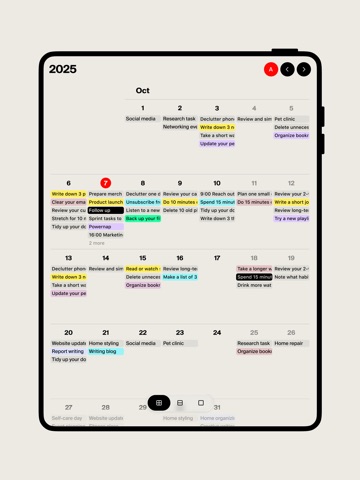
27 store screenshots


Pricing & paywalls
App Store
- Tweek Premium - Monthly — $5.99/month
- Tweek Premium - Monthly — $49.99/year ($4.16/mo)
Ratings & reviews
App Store
-
5/5Tweek Is Simply Life-Changing
I’ve been using Tweek for over a year now, and it’s completely changed how I get things done. For years, I struggled with overly complicated to-do apps—ones that made me spend more time setting up tasks and organizing lists than actually crossing things off. But then I found Tweek, and everything clicked. This app is as close to a paper planner as it gets, but better. It’s simple, clean, and absolutely intuitive. There’s no endless learning curve, no overwhelming features—just a beautifully designed space that helps you stay productive. It’s aesthetically pleasing, easy to use, and it keeps me focused on what matters. I’ve recommended Tweek to my classmates because it truly delivers. If you’re tired of apps that feel like work instead of helping you do the work, Tweek is the answer. It’s not just a to-do list; it’s a productivity tool that actually gets out of your way. Five stars all the way.
Luis A Antonio · 6 Aug 2026
-
4/5A great app for weekly task management
Tweek is awesome if you don’t really need anything powerful for recurring tasks. I like Tweek a lot. It has a distinct personality and clear perspective on managing tasks. It turns out it does not match my perspective, so I’ve struggled to use it. For one, there’s not a great way to inbox tasks to later triage. You can, theoretically, add them to “someday,” but this is somewhat tedious (constantly scrolling down, etc). In general, input feels slightly more tedious than it should be when you want to move fast, and woefully incomplete when you need more structure and detail. Also, can set up recurring tasks, but you cannot defer them. When the date is passed for other tasks, you can set them to persist in your subsequent days, which is great. But not recurring tasks, which is less great. In addition to all of that, the app (both iOS and web) is buggy in some predictable ways. For example, if you create a recurring task with lots of subtasks, it will crash the app. Every time you complete a subtask it will check with you if you want to check that subtask for every future instantiation of that subtask. I get how this could be the case, but it’s not, so I want it to stop. I think what I’m realizing as I type all of this, and I’ll add to the top, is that Tweek is awesome if you don’t really need anything powerful for recurring tasks. Updated review score to reflect my satisfaction with a delightful developer response.
ry3bee · 6 Aug 2026
-
2/5So Close
This app is so close to everything I have been searching for in a digital planner. It has the reminders, the planner concept & the calendar. I really like the weekly review with the Someday spot. Think Bullet Journal meets iCal. But unless I am missing something, you can set a time for your reminders but you cannot add an event & it’s start time to that event in the app. Which means I have to go back to the original calendar to do all of that for it to show up on Tweek. But it’s advertised to support managing multiple calendars-how is that if it added multiple steps. I thought it was a feature of the subscription since that was when you can sync to Apple & Google but it’s not. Again, unless I am missing something but I read every question on Help & Support before posting this review. At this point, I feel like I jipped almost $40 for more work. Not very happy. A good 7-day trial would have been nice to try on. Also, you cannot select which calendar to place a task on when it is added. Finally-I would love to see Outlook syncing & saw that it is in the works since 2024 per Help & Support.
FancyMomma22 · 6 Aug 2026
-
5/5I always come back to Tweek
There are so many more feature-filled apps to plan a week, and I continue to use some of them. But to sit down and list everything I need to get done in the week, then drag and drop them until the week makes sense, that's how I use Tweek. There is nothing better. Besides it's simplicity, I love that the web app and the iPhone app both allow me to look at pretty much the same thing. On the web app, you can see the week at a glance but even on my smaller iPhone, I can see multiple days on the screen. The point for me when I'm deciding what to plan for each day is to look at the week as a whole. I can scroll through the week, which is helpful. Some other weekly apps make you swipe from one day to the next, which makes dragging and dropping to rearrange tasks to be a little more awkward. Tweek is the way to plan the week!
Overnightwalker · 6 Aug 2026
-
5/5Excellent, functional, could use iCal support
Tweek is a fantastic planner and todo list. It beautifully and functionally replicates how I was tracking tasks in a paper journal - most tasks assigned to a day, with some others in a floating pool. Tweek’s UI is well-done, too; the menus are simply designed and very useful, without being cluttered or complex. Your focus is always on the actually important part: Your tasks. The week-centric view is just the right granularity for my use-cases, and there’s a monthly zoom-out view as well. I’m also a fan of the quality-of-life features. Things like (optionally) sorting completed tasks to the bottom, or rolling over undone tasks to the next day, makes managing a large number of tasks easy. And those are list-specific settings, as well as, so different lists can have different behavior as appropriate. I do have two criticisms of the app. The minor one is that there’s no preview of the different UI densities (“default” and “compact”), so you have to pick one, back out of the settings to see it, and then go back into the settings to change it. The major criticism is that the app supports only Google Calendar integration right now. I would love to have my calendar events reflected in Tweek, but Apple Calendar (or any other standard iCal-supporting service) is unsupported. Otherwise, I’m very happy with Tweek.
snowcrabby · 6 Aug 2026
Privacy & accessibility
App Store
Privacy
- Data Not Linked to You — App Functionality — Contact Info — Email Address Developer declared
- Data Not Linked to You — App Functionality — Contact Info — Name Developer declared
- Data Not Linked to You — App Functionality — Diagnostics — Crash Data Developer declared
- Data Not Linked to You — App Functionality — Diagnostics — Other Diagnostic Data Developer declared
- Data Not Linked to You — App Functionality — Diagnostics — Performance Data Developer declared
- Data Not Linked to You — App Functionality — Identifiers — User ID Developer declared
- Data Not Linked to You — App Functionality — User Content — Audio Data Developer declared
- Data Not Linked to You — App Functionality — User Content — Other User Content Developer declared
- Data Not Linked to You — App Functionality — User Content — Photos or Videos Developer declared
- Data Not Linked to You — Contact Info Developer declared
- Data Not Linked to You — Diagnostics Developer declared
- Data Not Linked to You — Identifiers Developer declared
- Data Not Linked to You — User Content Developer declared
Accessibility
No accessibility labels collected yet.
Versions
App Store
-
2.30.65
In this release: *added support for ProMotion displays with 120 Hz refresh rate that enables smoother animations and better user experience More to come, follow us on X (Twitter) @tweekHQ for updates.
-
2.30.66
In this release: *bug fixes and stability improvements More to come, follow us on X (Twitter) @tweekHQ for updates.
-
2.30.67
In this release: *bug fixes and stability improvements More to come, follow us on X (Twitter) @tweekHQ for updates.
-
2.30.68
In this release: *Improved performance *Minor bug fixes More to come, follow us on X (Twitter) @tweekHQ for updates.
-
2.30.69
In this release: *added new native liquid-looking header for iOS 26 *bug fixes and stability improvements More to come, follow us on X (Twitter) @tweekHQ for updates.
-
2.30.70
In this release: *New detailed Monthly View screen that enables goals overview *New fresh-looking view-switcher control, that allows to jump between daily, weekly and monthly views faster *New feature that moves recurrent tasks to the next day (only works when “move to the next day” feature enabled in the calendar settings) *Bug fixes and improvements More to come — follow us on X (Twitter) @tweekHQ for updates.
-
2.30.71
In this release: *New detailed Monthly View screen that enables goals overview *New fresh-looking view-switcher control, that allows to jump between daily, weekly and monthly views faster *New feature that moves recurrent tasks to the next day (only works when “move to the next day” feature enabled in the calendar settings) *Bug fixes and improvements More to come — follow us on X (Twitter) @tweekHQ for updates.
-
2.30.72
In this release: *bug fixes and stability improvements More to come, follow us on X (Twitter) @tweekHQ for updates.
-
2.30.73
In this release: *added new interactive widget for premium users, complete available tasks and create a new one right from your home screen *since now day view can be opened by pressing day number in a monthly view *bug fixes and stability improvements Please note that interactive widgets are available only in medium and large sizes and for premium users only. More to come, follow us on X (Twitter) @tweekHQ for updates.
-
2.30.74
In this release: *added ability to show week numbers and day names in the monthly view, don’t forget to turn it on in the user profile. *bug fixes and stability improvements More to come, follow us on X (Twitter) @tweekHQ for updates.
-
2.30.75
In this release: *ability to create custom color themes for Tweek. Now you’ll finally be able to match Tweek appearance to your personal preference *bug fixes and stability improvements More to come, follow us on X (Twitter) @tweekHQ for updates.
-
2.30.76
In this release: *bug fixes and stability improvements More to come, follow us on X (Twitter) @tweekHQ for updates.
-
2.30.77
In this release: *dramatically improved app start performance *improved Apple Calendar / Reminders app integration stability *improved auto-scroll behaviour on the main screen *bug fixes and stability improvements Follow updates on X (Twitter) @tweekHQ.
-
2.30.78
In this release: *bug fixes and stability improvements More to come, follow us on X (Twitter) @tweekHQ for updates.
-
2.30.79
In this release: *bug fixes and stability improvements More to come, follow us on X (Twitter) @tweekHQ for updates.
-
2.30.80
In this release: *bug fixes and stability improvements More to come, follow us on X (Twitter) @tweekHQ for updates.
-
2.30.81
In this release: *implemented one-way sync with Outlook Calendar *bug fixes and stability improvements Follow updates on X (Twitter) @tweekHQ.
-
2.30.82
In this release: *added two-way Google Calendar sync for non-recurrent events. Make sure to reconnect Google Calendar for feature to work properly *bug fixes and stability improvements Follow updates on X (Twitter) @tweekHQ.
-
2.30.83
In this release: *bug fixes and stability improvements More to come, follow us on X (Twitter) @tweekHQ for updates.
-
2.30.84
In this release: *improved recurrent event notifications *bug fixes and stability improvements Follow updates on X (Twitter) @tweekHQ.
-
2.30.85
In this release: *new horizontal layout for iPad and macOS versions (see calendar settings to switch it on) *bug fixes and stability improvements Follow updates on X (Twitter) @tweekHQ.
-
2.30.86
In this release: *improved Google Calendar integration - saving connected calendars state, ability to change default task color for connected calendar (please reconnect your Google Calendar for feature to work properly) *bug fixes and stability improvements Follow updates on X (Twitter) @tweekHQ.
-
2.30.87
In this release: *bug fixes and stability improvements Follow updates on X (Twitter) @tweekHQ.
-
2.30.88
In this release: *bug fixes and stability improvements Follow updates on X (Twitter) @tweekHQ.
-
2.30.89
· 1 Jul 2026
In this release: *improved AppleCalendar and Reminders.app integration to avoid duplication of events and missing changes to tasks made on other platforms *bug fixes and stability improvements Follow updates on X (Twitter) @tweekHQ.
Alternatives
- Mindlist — To Do List & Tasks — Same category + similar ratings
- Dawn - Minimal Calendar — Same category + similar ratings
- NoteCircle: To-Do List — Same category + similar ratings
- Folderly - Academic Organizer — Same category + similar ratings
- NotePlan - To-Do List & Notes — Same category + similar ratings
- Superlist: To-Do List & Notes — Same category + similar ratings
Availability by market
- US
Data quality & evidence
- Page completeness
- Live store listing
- Last verified
- 6 Aug 2026
- Sources
- App Store
- Apoku editorial summary has not been published yet.