
Quick verdict
- What it is
- Store information collected; an Apoku editorial summary is not yet published.
- At a glance
-
- $12.99
Categories and search queries
Official categories
- Business
- Productivity
Apoku categories
Key functions
| Function | Availability | Access | Scope | Evidence |
|---|---|---|---|---|
| Document scanning | Yes | Unknown | Context-specific |
From listing
|
| PDF export | Yes | Unknown | Context-specific |
From listing
|
| Family Sharing | Unknown | Unknown | Scope unknown | Store published |
Screens
App Store
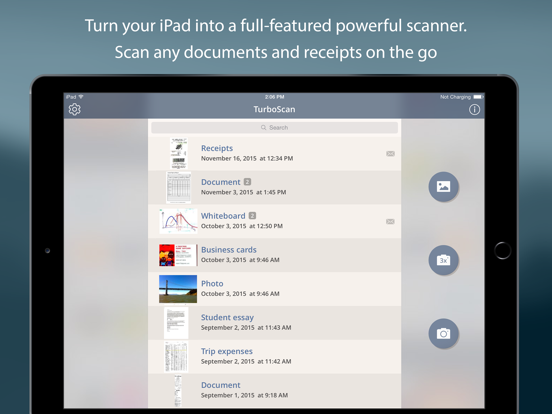
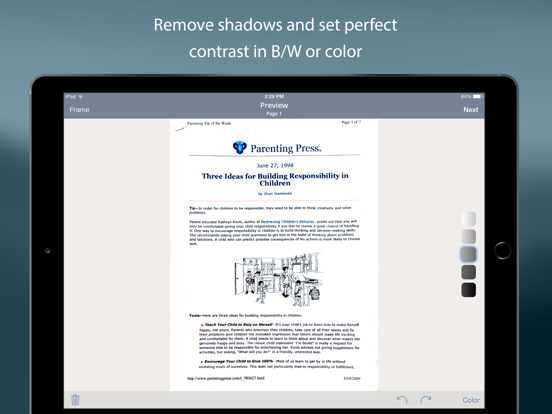
20 store screenshots


Pricing & paywalls
App Store
- Price: $12.99
Ratings & reviews
App Store
-
5/5Greatest app you thought you’d hardly use
Wrong, you will use this app more often than you can imagine. It’s a one-time charge and you have the highest quality scanner you could own. Best of all, it’s with you all of the time. I have owned scanners/printers that take up room, need ink replacement, and must be replaced frequently, and I must have access to it at the time I need it. With TurboScan, it’s there when I need it. I have just installed the TurboFax Pro, as I am occasionally needing to fax an item as opposed to emailing it, as some businesses do not allow access to their computers via outside emails. I’ve always had to leave home, either drive to bank (free faxing), or to a postal annex type place and pay per sheet (usually costing $1.00 per page). The thing is, I’ve now had to take the time to drive somewhere, go inside a business, and pay someone more money to fax something I could have done from home, for less time and less money. I can’t wait to try it out! P.S. I do not write reviews, but when I found the TurboFax app today, I felt I had to rate and review the company that makes these two app. Outstanding!!!!!
Kicks bad reviews out · 29 Sep 2026
-
1/5Choose One That Won’t Fail
I initially gave it 5 stars. It did all the things. I depended on it. Then, after iOS 11 came out, it just went off the rails. For some reason it wouldn’t reinstall(I have the paid version). When it did, I’d lost most of my backups. I was able to get most of them off my external HD bc I backup in several places to prevent data loss. However trying to migrate the files from the HD back into TurboScan was impossible. I contacted the developer who basically said oh well sorry. We’re talking hundreds of scans -personal and business. I managed to somehow re-upload them to my iCloud but they will never be searchable in the TurboScan app.(Hope that makes sense?) The real issue is, when the files upload, there’s no way to get the files named right—it’s just however the Cloud decides to name them, which def isn’t the names I had. Now they’re all in the Cloud under numerical-type names...I have to search the Cloud using my pc—before this cluster, all I did was go into TurboScan and search by the name I had saved the file under. Now, I have new scans saved to TurboScan, and the Cloud and backup to pc, but anything before whatever date, is just in the Cloud. Basically I got a mess, have to use 3 devices to access scans I used to find right in the app. Nightmare! Choose another app that has better interface between devices and allows for scan importing as well as exporting. While I truly loved this app, when it stopped working right, it’s created a monumental cluster. Save yourself headaches—use another app.
blondiemalone · 29 Sep 2026
-
5/5Very Few Apps I Love
There are very few apps that I truest love. Most apps now days want you to “subscribe”.. NO, I absolutely hate that. I will pay u once, if I want to update, I’ll pay an update fee, but I am digressing. This app is truly great!!!! I like taking pics of documents to file and remember things, problem with that, you are also taking a picture of the background. This app recognizes the paper size and auto takes a cutout picture of just that. AWESOME program. Please, stick to non subscription business model, or at least have a lifetime option for further programs. I do have one suggestion, I recently started taking pics of business cards. Your program really has a hard time auto recognizing the size to cut out. I even put the business cards on a while background and it still couldn’t auto cut. Maybe, you could have an option to tell the program what paper size at the time u are taking the pic? Or if the problem is just with business cards, have a toggle switch, letting the program know this is a business card? Regardless, minor issue. Keep up the fantastic programming!!!
RitiFamily · 29 Sep 2026
-
5/5One of the Most Useful Apps I’ve Ever Used
This is an app that everyone should have on their phones! It has saved me from innumerable administrative headaches! Whether for personal or professional use, it has come in handy too many times to count. In the store and want to scan a product label? Want to capture a bulletin posted on the wall? Need to retain a sales contract in an easily searchable format? No worries, this app does it all! It also scans in several versions - simple black/white, color, photo, etc. And they’re easily printable via AirPrint or transmittable via email, directly from the app. It’s user friendly and has intuitive controls - this is obviously an app that was researched and perfected by the creator. I’ve found myself sifting through files in our file room, nowhere near one of our office scanners - no need because I can scan and email the documents right from the file room! You will not be disappointed by this exceptional app, and btw I find it to be far & away the best when I compared it to the few other scanning apps out there. Turboscan is the best! 6 stars!
TombRater · 29 Sep 2026
-
2/5TurboScan no longer airdropping to TurboScan
We love TurboScan. We’ve been using it for years. It is always done everything we needed to do. But since we bought these new/used iPhone 13s and upgraded to the latest iOS 17, when we try to transfer TurboScans from one iOS device to another iOS device it no longer gives the option to accept the airdropped TurboScan scans in TurboScan on the receiving iOS device. Instead, now the file is just dumped it into some folder called “Files”. I guess it’s called that! We’ve never used “Files” before. We don’t want to use “Files” because when it’s in TurboScan, you can see and searchthe scans by name, you can organize them into folders. And lots of other options that we are used to, that we wish was still that way. We noticed that the copyright is 2024. So we assume TurboScan is still active and updating the app. But there is no contact information to get a hold of TurboScan to tell him about this latest undesirable change. So now we’ll have to search the Internet to see if we can find them. It’s too bad. Because before this time, we were really, really happy with TurboScan. But now when we transfer from one iOS device to another iOS device, it goes into some folder and is no longer available in TurboScan on the other iOS device. Which throws off the way we do things and just does not work well for us, as we use TurboScan to keep everything organized, and so we are able to search and find things by name, etc. Please, TurboScan fix this problem, make it so when we airdrop from one iOS device to another iOS device, we get the option to accept it directly into TurboScan, just like we used to be able to do. Please make TurboScan work the way it always used to work!
ToneCustomHomeControl · 29 Sep 2026
Privacy & accessibility
App Store
Privacy
- Data Not Collected Developer declared
Accessibility
- Dark Interface — SUPPORTED Store published
- VoiceOver — SUPPORTED Store published
Versions
App Store
-
2.9.8
• Define default "From" email account in Settings • Fixed a bug with calling TurboScan from other apps like XpenseTracker • Other improvements and fixes
-
3.0.1
Automatic shutter Add page button in Preview iOS 13 fixes and other improvements
-
3.0.2
Bug fixes
-
3.0.3
• Auto and manual shooting improvements • Option to update date when adding pages • Other fixes and improvements
-
3.1.0
New album import screen. Various fixes and improvements.
-
3.1.1
Various fixes and improvements.
-
3.2.1
• Folders • "Select All" feature • Selection in search results • Other fixes and improvements
-
3.2.2
• Trash bin (access recently deleted scans in Settings) • Improved focusing on some pages • Cleaner cropping of page edges • Option to alphabetize folders • Other fixes and improvements
-
3.2.3
Minor fixes and improvements.
-
3.2.4
• Dark appearance • Improved VoiceOver for visually impaired • Open more image types from other apps • Search by folder names as well • Other fixes and improvements
-
3.2.5
Bugfixes
-
3.2.8
Bug fixes and improvements. Improved focusing on iPhone 13 Pro & 14 Pro.
-
3.2.9
Improved camera focusing and zoom out feature with iPhone 13 & 14 Pro for easy scanning
-
3.3.0
• Fixed distorted screen issue when opening the app in landscape mode • Font size in the main list is adjusted according to iPhone Settings • Enhanced functionality of the Frame Size button on the Frame screen • Fixed rotation and other issues with importing some PDFs • Other small fixes and improvements
-
3.3.1
• Auto framing for more document types • Ability to scan darker pages/pictures on lighter backgrounds • Fixed iphone 15 scanning problems • Small fixes and improvements
-
3.3.2
Bug fixes.
-
3.3.3
Bug fixes and minor improvements
-
3.3.4
Bug fixes and improvements
-
3.3.5
• You can now sort documents within folders. To access folder options, long-press a folder. • Minor fixes and improvements
-
3.3.6
Dark and tinted icons to personalize your home screen Small fixes and improvements
-
3.3.7
• Preserves black areas in scans • Smaller fixes and improvements
-
3.3.8
• You can now zoom in on the document view • Preview: swipe left for next screen, right for frame adjustment • Small fixes and improvements
-
3.3.9
• Rotate, crop and adjust brightness in existing scans. • Smaller fixes and improvements.
-
3.4.0
Privacy Policy link in About (we do not collect your data). Small fixes and improvements.
-
3.4.1
· 14 Apr 2026
Fixed an issue with slow import from Photos. Smaller fixes and improvements.
Alternatives
- Tomato Timer ۬ — Same category + similar ratings
Availability by market
- US
Data quality & evidence
- Page completeness
- Live store listing
- Last verified
- 29 Sep 2026
- Sources
- App Store
- Apoku editorial summary has not been published yet.