
Quick verdict
- What it is
- Store information collected; independent summary not yet available.
- At a glance
-
- From $0.99/mo
- Free to download
- In-app purchases
Categories and search queries
Official categories
- Music
- Entertainment
AppCorpus categories
Key functions
| Function | Availability | Access | Scope | Evidence |
|---|---|---|---|---|
| Family Sharing | Yes | Unknown | App Store | Store published |
| Free app | Yes | Free | — | Store published |
| In-app purchases | Yes | Limited free | — | Store published |
| Siri Shortcuts | Yes | Unknown | App Store | Store published |
Screens
App Store
24 store screenshots

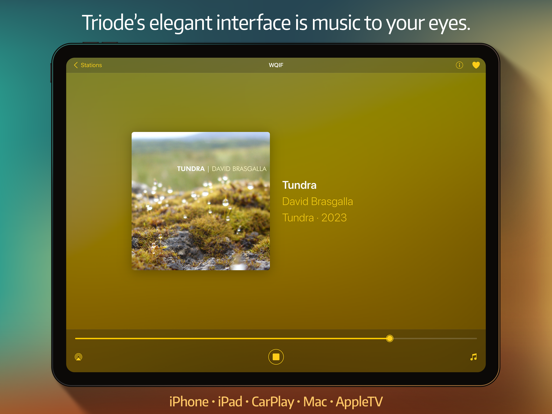

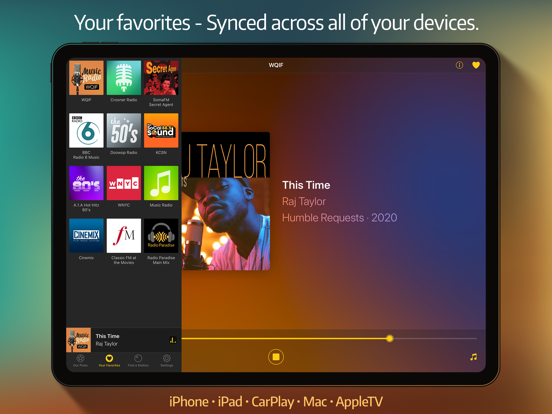
Pricing & paywalls
App Store
- Monthly Subscription — $0.99/month
- Monthly Subscription — $9.99/year ($0.83/mo)
- Forever Purchase — $29.99
Ratings & reviews
App Store
-
4/5Looks great, needs improvement in car
The app looks great but needs some improvement when used as a background in-car radio: 1. I have my car connected via Bluetooth. Sometimes, when I start the car, the app will start playing, but more often not. The needed functionality is seemingly there, but not always working. 2. When I pass tunnels or other regions with sketchy reception, the app stops playing, but it’s not resuming when I get the signal back. There’s a need to restart the audio (while driving). This is different from a regular radio that won’t naturally work in tunnels, but always resumes when in surface. 3. There’s a dialog box “can’t play that station” that is most definitely can’t be seen when the app is in the background (when e.g. navigation in foreground). 4. Sometimes I leave the car when the radio is not playing (stopped by itself) and walk 20 meters away. When I return (Bluetooth established) the app starts playing again. 5. The car “play” button sometimes works and sometimes doesn’t. At times I can hear the chimes (great idea btw) but when I bring the app in the foreground it’s not trying to connect, as the play button is tappable. Edit: thanks for your response, but my car is not equipped with Apple CarPlay.
ephp · 7 Aug 2026
-
5/5Best of the bunch
I came back to Triode after trying other options. I still think it’s the best option, but I can’t figure a few things … when I previously used this app (I had paid for it three years in a row), I could see the artist, album art, track for every song for FIP Monde, which I listen to almost all the time. When I came back to Triode recently and purchased the ‘forever’ option, I no longer see this info. I just get the generic FIP Monde art and have to tap on Shazam to ID the song. It shows up briefly on the screen, then disappears. Did something change to make this not possible? I also use to see a + button to quickly add a track to Apple Music, but I no longer see that, either. I’m thinking I must be missing something, but checking the support I don’t see how to fix this. Still, great app. The buffering is superior to other apps I’ve tried, so it doesn’t drop out as often in CarPlay, it seems to me.
arcanemoth · 7 Aug 2026
-
5/5The Best No-Nonsense Streaming Radio App
There are *so many* streaming radio apps out there. Some are tied to a particular service or broadcaster (Audacy, TuneIn, I Heart Radio, Sirius XM, etc.) But none of them are built to put your interests first, except Triode. It has the best directory of stations, the best stock favorites list, and the best developers behind it – a team with a long track-record of making first class, user-centered software. As a life-long fan of broadcast radio, especially AM and shortwave, it can sometimes feel like my listening options are shrinking. But online streaming is going strong, and a world of amazing stations are just waiting to be found in Triode. If I had one wish for the app, as ridiculous as it sounds, I love the option to introduce some user-configurable artificial static or warble into the output. Download this app, and once you’ve sat with it a bit, buy it. Solid software built for you, not data brokers, is far too rare in iOS-land. This is it.
mfitzhugh · 7 Aug 2026
-
5/5Best radio app in the App Store
After using several others over the years, Triode comes in and takes the internet radio crown. It has art, syncs stations between devices (yay!), has a good search function, and does it all with an uncluttered, delightfully simple interface. It makes me happy every time I use it to play public radio while making coffee in the morning or playing some music to work or relax. Triode has some UI oddities and needs a little more polish to make some of the interactions feel truly modern. An option for custom art from the web or any image file would be a nice touch too (some radio stations don’t provide a great default). Since it’s at the top of a somewhat weak set of options in the App Store, it gets five stars. If the devs (thank you!) keep hammering away with regular updates, it could go from great to sublime.
reflectivecone · 7 Aug 2026
-
5/5Just what I wanted
I’ve been wanting a simple internet radio app for a long time - this is perfect. One piece of feedback: when I add a radio station via search, it pulls a custom icon, and then I tap “change icon”, I see no way to go back to the stations originally downloaded image. Continuing to hit change icon merely cycles through Triode’s set, and removing/adding the station back to favorites doesn’t seem to retrigger a station artwork fetch. It would also be neat if I could rename the stations I add to favorites from “our picks” - it feels odd having some stations with title text below their image (ones I’ve added via search) and some without (ones added from our picks).
revertTS · 7 Aug 2026
Privacy & accessibility
App Store
Privacy
- Data Not Collected Developer declared
Accessibility
No accessibility labels collected yet.
Versions
App Store
- 1.0
-
1.0.1
All: • Ability to reset a station's artwork to original, if available • Improved how to find a station on the search tab • Removed straight quotes iOS: • Re-arrange your list of favorite stations & sync it across all devices - Tap & hold on "Your Favorites" to access the new station organizer • Added setting to turn off Triode's connecting sound macOS: • Re-arrange your list of favorite stations & sync it across all devices - Select File > Organize Stations (or Cmd-S) to access the new station organizer • Improved VoiceOver accessibility throughout app • Fixed "Menubar" typo in Settings • Fixed menu bar window restoration issue on Mojave • Fixed issues with play/pause button not showing correct playback state tvOS: • Internal improvements
-
1.1
⁕ All ⁕ • Improved security and privacy when searching for track info and artwork • Added Track History view: - iOS: Tap "Track History" in Now Playing view under the play/pause button - macOS: Click "Station > Show Track History..." in menu bar (or Cmd-T shortcut) - tvOS: Swipe up for controls, then select "Show Track History" • Track History features: - Browse a list of the last 100 tracks played on your device - Select an item from the list to view detailed information - Details include song/track information and when/where it played - Easily open the track in Apple Music or iTunes and share links or artwork - On iOS, tap on artwork for viewer, then double-tap to zoom in - Your listening history never leaves the device: no remote tracking - Clear Track History for more privacy (in Settings on iOS, menu bar on macOS) ⁕ iOS ⁕ • A long-press on artwork or track info is a shortcut to open Track History • Improved the appearance of the search field in Find A Station • Fixed popover arrow for sharing on iPad ⁕ macOS ⁕ • Improved Station Organizer layout • Added keyboard shortcut and menu item to “Open in Apple Music” (Cmd-M)
-
1.1.1
iOS: • Added setting to stay on stations list, making it easier to sample from your favorites. Tap on station artwork again for the Now Playing view. [Yay Jamie!] • Improved reliability of connecting sound. • Improved reliability of remote control (on lock screen, wired headphones, and AirPods.) • Improved styling on search bar. macOS: • Improved presentation of popover window in menu bar. • A station that fails to play can now be removed from favorites. All: • Improved reliability when switching AirPlay outputs. • Improved detection of stream failures. • Launching the app is a bit faster.
-
1.2
• Compatibility with latest operating systems and hardware • Improved metadata retrieval to avoid losing publisher artwork macOS: • Fixed issue with window size and navigation • Fixed animation while connecting to a station tvOS: • Fixed issues with search bar • Fixed a display issue in station information
-
1.2.1
Fixed a problem with station images not appearing in Now Playing (both on device lock screen and in CarPlay).
-
1.2.3
All: • Added BBC 4 to Our Favorites • Fixed generic artwork for some ambient stations macOS: • Improved support for Control Center widget in Big Sur • Updated icon for Big Sur • Added accent color for controls
-
1.2.5
All: • Fixed a crash when syncing stations with iCloud • Compatibility with the latest operating systems macOS: • Added menus and buttons to open tracks in the Music app
-
1.2.6
• Fixed a crash at launch on older devices running iOS 12.5.5
-
1.3
All: • Set your own artwork for station logos: - Select info icon while the station is playing - Use “Select an Image…” to choose new artwork - New logo will be automatically synced to all devices • Improved labels for Our Picks in list of favorites • Station labels now allow longer titles and work better across all devices • Improved reliability when loading station logos • Added filter that removes repeated stream metadata iOS: • New playing view with a colorful background that matches artwork - On by default, use Settings for original Black style - Tap on track info to hide controls and see full screen version • Fixed icons for Our Picks & Your Favorites in CarPlay main screen • Multitasking indicators are now automatically hidden on iPad macOS: • Added setting to stay on stations list: - Makes it easier to sample from your favorites - Enable with Station > Stay on Station List - Click on station artwork after it's selected for the Now Playing view • Improved layout of Track History window
-
1.3.1
Better integration with Apple Music and visual improvements throughout all apps. All: • Visual improvements in Now Playing view • Better integration with Apple Music in Track History: - Open and play tracks you heard on a station - Replay a song without leaving Triode (iOS only) [Yay Joseph!] • Station updates are now handled correctly when iCloud is not available • Improved presentation when track information is all uppercase • Improved metadata handling for some stations in Canada [Yay Joseph!] iOS: • Fixed minor visual issues on both iPhone and iPad • Fixed display issue with details in Track History • Stations added to Siri (Shortcuts) now include a name • Fixed issues saving Track History on latest version of iOS • Improved appearance of alerts macOS: • Fixed issues with opening Apple Music from Track History and Now Playing • Fixed issues opening Apple Music from menu bar tvOS: • Fixed an issue displaying artwork in stations list
-
1.3.2
• Updated branding for some built-in stations
-
1.3.3
All: • Switched BBC streams in preparation for mid-2023 update • Updated stations with latest streams and track metadata • Stream URLs for custom stations can now be shared (on iOS and macOS) iOS: • Added button to show track in Apple Music (to update a playlist without changing playback) macOS: • Fixed playback starting when audio changed (with a FaceTime call) • Added support for AirPlay 2 • Improved text contrast for buttons in Dark Mode • Websites for custom stations can now be opened in a browser
-
2.0
Triode 2.0 is packed with improvements, including new support for Shortcuts and Widgets, improved Siri and CarPlay support, and a ton of tweaks and refinements. All: • Added support for controlling Triode via Shortcuts: - Quickly find and play stations - Start, stop, or mute playback - Get information about what’s now playing - Start an automatic sleep timer • Better integration with Apple Music for listening to your favorite songs • New category icons for assigning custom station artwork • New vibrant colored backgrounds when assigning station artwork • Improved Triode's ability to detect proper artist & track info when streaming • Better insight when subscribing via an improved purchase view: - Use “Check Subscription” in Settings (gear icon) - Shows subscription expiration date and current status - Automatically syncs your subscription to other devices • “Refresh iCloud Data” now includes station information iOS: • Interactive widgets to control Triode right from the Home Screen: - Controller widget: Play and pause stations, view artwork, and get track info - Stations widget: Shows your favorite stations or recently played items - StandBy Mode - Turn Triode into a clock radio by your bedside - Customize widgets in a variety of available sizes • Set an automatic timer to turn Triode off while you sleep: - In Now Playing, tap the Musical Note icon, then Moon & Stars icon - Select 15, 30, 60 or 120 minute timer • Triode's Now Playing view has a richer, more vibrant appearance • Improved Siri support: - Siri now controls Triode without needing to first unlock your device - Siri is better at recognizing station names - Start playing a station by simply saying “Play WKRP in Triode” • Improved CarPlay support: - Quickly start a station using the new Recent Stations list - Now Playing screen shows the station name in the Up Next position - Choose a favorite station by tapping Up Next position - A new mute button is included below the playback controls - Visual improvements to Triode when CarPlay is in light mode • Fixed display issues with the status bar in latest version of iOS • Fixed issues with station icons being the wrong size on iPad • Fixed an issue where playback would start after taking off AirPods • Fixed a rare issue with connecting sound not stopping macOS: • Interactive widgets to control Triode from your desktop: - Controller widget: Play and pause tracks, view artwork and track info - Stations widget: Shows your favorite stations or recently played items - Customize widgets in a variety of available sizes • Improved Triode's Dock icon: - Consistent appearance when displaying station or album artwork - Enabled with right-click on Dock icon, then enable Artwork Displayed in Dock • Fixed an issue where main section tabs were not clickable tvOS: • Compatibility with tvOS 17
-
2.0.1
Triode 2.0 is packed with improvements, including new support for Shortcuts and Widgets, improved Siri and CarPlay support, and a ton of tweaks and refinements. All: • Added support for controlling Triode via Shortcuts: - Quickly find and play stations - Start, stop, or mute playback - Get information about what’s now playing - Start an automatic sleep timer • Better integration with Apple Music for listening to your favorite songs • New category icons for assigning custom station artwork • New vibrant colored backgrounds when assigning station artwork • Improved Triode's ability to detect proper artist & track info when streaming • Better insight when subscribing via an improved purchase view: - Use “Check Subscription” in Settings (gear icon) - Shows subscription expiration date and current status - Automatically syncs your subscription to other devices • “Refresh iCloud Data” now includes station information • Fixed an issue where subscriptions might not be recognized. iOS: • Interactive widgets to control Triode right from the Home Screen: - Controller widget: Play and pause stations, view artwork, and get track info - Stations widget: Shows your favorite stations or recently played items - StandBy Mode - Turn Triode into a clock radio by your bedside - Customize widgets in a variety of available sizes • Set an automatic timer to turn Triode off while you sleep: - In Now Playing, tap the Musical Note icon, then Moon & Stars icon - Select 15, 30, 60 or 120 minute timer • Triode's Now Playing view has a richer, more vibrant appearance • Improved Siri support: - Siri now controls Triode without needing to first unlock your device - Siri is better at recognizing station names - Start playing a station by simply saying “Play WKRP in Triode” • Improved CarPlay support: - Quickly start a station using the new Recent Stations list - Now Playing screen shows the station name in the Up Next position - Choose a favorite station by tapping Up Next position - A new mute button is included below the playback controls - Visual improvements to Triode when CarPlay is in light mode • Fixed display issues with the status bar in latest version of iOS • Fixed issues with station icons being the wrong size on iPad • Fixed an issue where playback would start after taking off AirPods • Fixed a rare issue with connecting sound not stopping • VoiceOver fixes in stations and now playing views macOS: • Interactive widgets to control Triode from your desktop: - Controller widget: Play and pause tracks, view artwork and track info - Stations widget: Shows your favorite stations or recently played items - Customize widgets in a variety of available sizes • Improved Triode's Dock icon: - Consistent appearance when displaying station or album artwork - Enabled with right-click on Dock icon, then enable Artwork Displayed in Dock • Fixed an issue where main section tabs were not clickable tvOS: • Compatibility with tvOS 17
-
2.1
Identify steaming songs with Shazam, keep your favorite stations backed up and safe, improved display of track info and artwork, bug fixes & more. All: • Identify streaming songs and music with Shazam • Access Shazam via the Now Playing view: - iOS: Tap the music note icon to open the control panel - macOS: Click ⋯ to open the control menu - tvOS: Click up button to reveal the control panel • Added new tools to manage and keep your data safe • Open Triode's Settings > Manage Your Data: - Backup your favorite stations with export & import - Export a list of the current track history - Data is saved as JSON that can be processed by Shortcuts and other apps - On macOS, use File and Station in menu bar • Station artwork now displays a title if needed (in widget or CarPlay) • Subscription expiration dates are now displayed correctly • Improved detection of track, artist, and album meta information • Improved detection of track artwork iOS: • Sleep Timer is no longer stopped if you switch stations • Added a display setting to Hide Album Artwork macOS: • Added Controls to menu bar for controlling playback • Improved layout of ⋯ control menu • Added standard sharing sheet in ⋯ control menu • Improved "Copy to Clipboard" in Track History tvOS: • Reduced prominence of indicator to show control panel • Fixed legal buttons in purchase view
-
2.2
Triode shines thanks to a stunning visual refresh for Liquid Glass. We've also fixed bugs, improved track info, and made it clearer how to re-arrange your favorite stations. All: • Visual refresh across all platforms • Fixed a crash caused by certain track names in the Turkish language iOS: • Added support for Liquid Glass • Title & subtitle is displayed when possible • Favorite stations organizer can now be opened from Settings • The Music button on the Now Playing screen displays a standard menu • Fixed issues with Triode's connecting sound not stopping macOS: • Fixed an issue where clicking on Now Playing at top of stations list would not properly show the view tvOS: • Added support for Liquid Glass
-
2.2.1
All: • Improvements for widgets in clear and tinted modes on the Home Screen and Desktop iOS: • Fixed a crash in small widget causing it to show as a gray grid
-
2.3
• Added “Show in Spotify” button to Track History details: - Searches for track in the Spotify app or on website - On iOS, tap music note icon, then Show Track History: new button on each track - On macOS, Station > Show Track History in menu bar: new button on each track - Not available on tvOS because Spotify app does not support external searches • Station database is now automatically updated: - Data in cloud is updated daily - App performs an automatic check weekly - Use “Refresh iCloud Data” to refresh manually - Current station count is displayed in the search box • Favorites can now be removed using the Organize Favorites view • Now playing on macOS now uses a dissolve animation for artwork • Fixed an issue where album artwork from the stream would not display • Fixed an issue with spaces and newlines in searches giving incorrect results • Fixed an issue with HTML entities appearing in artist or track names • Fixed an issue with now playing and track history not updating with some stream metadata • Fixed an issue on macOS Tahoe where the Play button in station setup was unresponsive
-
2.3.1
· 24 Jun 2026
• Added “Hide Our Picks” to simplify tab bar interface: - On iOS, toggle Hide Our Picks switch in Settings tab - CarPlay uses setting the next time you connect to your vehicle - On macOS, use Station > Hide Our Picks in menu bar - On tvOS, use System Settings > Apps > Triode > Hide Our Picks, then relaunch app • Fixed an issue that could prevent album artwork from appearing correctly • tvOS displays now playing information while the screensaver and other apps are running
Alternatives
- Audials Play - Radio & Podcast — Same category + similar ratings
- Longplay — Same category + similar ratings
- LITT Live Radio — Same category + similar ratings
- OpenTune: FM Radio No Ads — Same category + similar ratings
Availability by market
- US
Data quality & evidence
- Page completeness
- Live store listing
- Last verified
- 7 Aug 2026
- Sources
- App Store
- Independent summary has not been published yet.