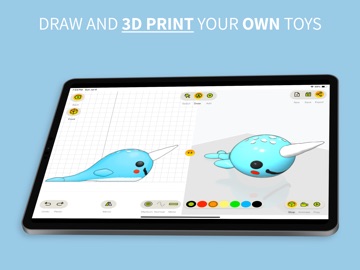
AppCorpus MCP gives your agent current app data, prices, screens, features and sources.
View JSON
GET /api/v3/apps/6711330232
{
  "app_id": 6711330232,
  "canonical_url": "https://appcorpus.com/apps/toycad-easiest-3d-drawing-app-6711330232",
  "identity": {
    "name": "ToyCAD: Easiest 3D Drawing App",
    "slug": "toycad-easiest-3d-drawing-app",
    "developer": {
      "name": "Ammar Hattab",
      "url": "https://appcorpus.com/developers/ammar-hattab-developer_370899fe083e6f3e82522c92d95057db"
    },
    "icon_url": "https://is1-ssl.mzstatic.com/image/thumb/Purple211/v4/da/14/ac/da14acd7-3c8e-4e33-84ae-463fc6493c1b/AppIcon-0-0-1x_U007epad-0-9-0-85-220.png/512x512bb.jpg",
    "stores": [
      "apple"
    ],
    "platforms": [
      "iphone",
      "ipad"
    ],
    "status": {
      "state": "active",
      "label": "Active",
      "last_checked": "2026-08-07",
      "last_checked_label": "7 Aug 2026",
      "banner": null,
      "region_note": null
    }
  },
  "listings": [
    {
      "store": "apple",
      "status": "ACTIVE",
      "url": "https://apps.apple.com/us/app/toycad-easiest-3d-drawing-app/id6711330232?uo=4",
      "rating": 4.6,
      "rating_count": 26,
      "formatted_price": "Free",
      "is_free": true,
      "has_iap": true,
      "has_subscription": false,
      "version": "3.2.14",
      "updated": "2026-06-10",
      "currency": "USD"
    }
  ],
  "summary": {
    "one_liner": null,
    "summary": null,
    "best_for": [],
    "not_for": [],
    "status": "fallback",
    "at_a_glance": [
      "From $6.99/mo",
      "Free to download",
      "In-app purchases"
    ]
  },
  "categories": {
    "official": [
      "Graphics & Design",
      "Education"
    ],
    "appcorpus": [
      {
        "category_id": "graphics-design",
        "label": "Graphics & design",
        "url": "https://appcorpus.com/categories/graphics-design"
      },
      {
        "category_id": "education",
        "label": "Education",
        "url": "https://appcorpus.com/categories/education"
      }
    ]
  },
  "use_cases": [],
  "features": [
    {
      "capability_id": "family_sharing",
      "label": "Family Sharing",
      "availability": "yes",
      "access_level": "unknown",
      "scope": "App Store",
      "evidence": "Store published"
    },
    {
      "capability_id": "free_app",
      "label": "Free app",
      "availability": "yes",
      "access_level": "free",
      "scope": null,
      "evidence": "Store published"
    },
    {
      "capability_id": "in_app_purchases",
      "label": "In-app purchases",
      "availability": "yes",
      "access_level": "free_limited",
      "scope": null,
      "evidence": "Store published"
    }
  ],
  "pricing": [
    {
      "store": "apple",
      "formatted_price": "Free",
      "is_free": true,
      "has_iap": true,
      "has_subscription": false,
      "currency": "USD",
      "market": "us",
      "last_verified": "2026-08-07",
      "rows": [
        "Monthly — $6.99/month",
        "Monthly — $39.99/year ($3.33/mo)",
        "Lifetime — $89.99"
      ]
    }
  ],
  "screens": [
    {
      "url": "https://is1-ssl.mzstatic.com/image/thumb/PurpleSource211/v4/19/9d/e6/199de6b4-f372-43b0-5572-cf67628c71a1/01.png/1600x1600bb.jpg",
      "store": "apple",
      "platform": "ipad",
      "alt": "ToyCAD: Easiest 3D Drawing App ipad screenshot 1"
    },
    {
      "url": "https://is1-ssl.mzstatic.com/image/thumb/PurpleSource211/v4/19/9d/e6/199de6b4-f372-43b0-5572-cf67628c71a1/01.png/360x480bb.jpg",
      "store": "apple",
      "platform": "ipad",
      "alt": "ToyCAD: Easiest 3D Drawing App ipad screenshot 2"
    },
    {
      "url": "https://is1-ssl.mzstatic.com/image/thumb/PurpleSource211/v4/d8/de/c8/d8dec82c-5a48-081e-799a-6ec27dfb5834/02.png/1600x1600bb.jpg",
      "store": "apple",
      "platform": "ipad",
      "alt": "ToyCAD: Easiest 3D Drawing App ipad screenshot 3"
    },
    {
      "url": "https://is1-ssl.mzstatic.com/image/thumb/PurpleSource211/v4/d8/de/c8/d8dec82c-5a48-081e-799a-6ec27dfb5834/02.png/360x480bb.jpg",
      "store": "apple",
      "platform": "ipad",
      "alt": "ToyCAD: Easiest 3D Drawing App ipad screenshot 4"
    },
    {
      "url": "https://is1-ssl.mzstatic.com/image/thumb/PurpleSource211/v4/dd/5b/0b/dd5b0bf3-5ef3-6129-1522-e09cc4e9dd8d/03.png/1600x1600bb.jpg",
      "store": "apple",
      "platform": "ipad",
      "alt": "ToyCAD: Easiest 3D Drawing App ipad screenshot 5"
    },
    {
      "url": "https://is1-ssl.mzstatic.com/image/thumb/PurpleSource211/v4/dd/5b/0b/dd5b0bf3-5ef3-6129-1522-e09cc4e9dd8d/03.png/360x480bb.jpg",
      "store": "apple",
      "platform": "ipad",
      "alt": "ToyCAD: Easiest 3D Drawing App ipad screenshot 6"
    },
    {
      "url": "https://is1-ssl.mzstatic.com/image/thumb/PurpleSource211/v4/53/96/21/53962136-fc07-8e05-2dc3-6cc16a92de4e/04.png/1600x1600bb.jpg",
      "store": "apple",
      "platform": "ipad",
      "alt": "ToyCAD: Easiest 3D Drawing App ipad screenshot 7"
    },
    {
      "url": "https://is1-ssl.mzstatic.com/image/thumb/PurpleSource211/v4/53/96/21/53962136-fc07-8e05-2dc3-6cc16a92de4e/04.png/360x480bb.jpg",
      "store": "apple",
      "platform": "ipad",
      "alt": "ToyCAD: Easiest 3D Drawing App ipad screenshot 8"
    },
    {
      "url": "https://is1-ssl.mzstatic.com/image/thumb/PurpleSource211/v4/5b/fc/60/5bfc605e-71a6-d0ee-01cc-69c6d0744cf7/05.png/1600x1600bb.jpg",
      "store": "apple",
      "platform": "ipad",
      "alt": "ToyCAD: Easiest 3D Drawing App ipad screenshot 9"
    },
    {
      "url": "https://is1-ssl.mzstatic.com/image/thumb/PurpleSource211/v4/5b/fc/60/5bfc605e-71a6-d0ee-01cc-69c6d0744cf7/05.png/360x480bb.jpg",
      "store": "apple",
      "platform": "ipad",
      "alt": "ToyCAD: Easiest 3D Drawing App ipad screenshot 10"
    },
    {
      "url": "https://is1-ssl.mzstatic.com/image/thumb/PurpleSource211/v4/bc/2d/4c/bc2d4c17-7d1d-684a-3bf6-357091e572fc/06.png/1600x1600bb.jpg",
      "store": "apple",
      "platform": "ipad",
      "alt": "ToyCAD: Easiest 3D Drawing App ipad screenshot 11"
    },
    {
      "url": "https://is1-ssl.mzstatic.com/image/thumb/PurpleSource211/v4/bc/2d/4c/bc2d4c17-7d1d-684a-3bf6-357091e572fc/06.png/360x480bb.jpg",
      "store": "apple",
      "platform": "ipad",
      "alt": "ToyCAD: Easiest 3D Drawing App ipad screenshot 12"
    },
    {
      "url": "https://is1-ssl.mzstatic.com/image/thumb/PurpleSource221/v4/f3/5b/e6/f35be624-002b-8262-7ed2-2f79f0f7efd6/07.png/1600x1600bb.jpg",
      "store": "apple",
      "platform": "ipad",
      "alt": "ToyCAD: Easiest 3D Drawing App ipad screenshot 13"
    },
    {
      "url": "https://is1-ssl.mzstatic.com/image/thumb/PurpleSource221/v4/f3/5b/e6/f35be624-002b-8262-7ed2-2f79f0f7efd6/07.png/360x480bb.jpg",
      "store": "apple",
      "platform": "ipad",
      "alt": "ToyCAD: Easiest 3D Drawing App ipad screenshot 14"
    },
    {
      "url": "https://is1-ssl.mzstatic.com/image/thumb/PurpleSource221/v4/0b/9a/1f/0b9a1f36-a42f-501c-3ea7-e2d818cfa81a/08.png/1600x1600bb.jpg",
      "store": "apple",
      "platform": "ipad",
      "alt": "ToyCAD: Easiest 3D Drawing App ipad screenshot 15"
    },
    {
      "url": "https://is1-ssl.mzstatic.com/image/thumb/PurpleSource221/v4/0b/9a/1f/0b9a1f36-a42f-501c-3ea7-e2d818cfa81a/08.png/360x480bb.jpg",
      "store": "apple",
      "platform": "ipad",
      "alt": "ToyCAD: Easiest 3D Drawing App ipad screenshot 16"
    },
    {
      "url": "https://is1-ssl.mzstatic.com/image/thumb/PurpleSource211/v4/23/49/d4/2349d440-b0e6-be6f-ad0b-1521b84403f3/10.png/1600x1600bb.jpg",
      "store": "apple",
      "platform": "ipad",
      "alt": "ToyCAD: Easiest 3D Drawing App ipad screenshot 17"
    },
    {
      "url": "https://is1-ssl.mzstatic.com/image/thumb/PurpleSource211/v4/23/49/d4/2349d440-b0e6-be6f-ad0b-1521b84403f3/10.png/360x480bb.jpg",
      "store": "apple",
      "platform": "ipad",
      "alt": "ToyCAD: Easiest 3D Drawing App ipad screenshot 18"
    },
    {
      "url": "https://is1-ssl.mzstatic.com/image/thumb/PurpleSource211/v4/b4/49/24/b4492460-e255-28f4-15fc-9397e7872d99/09.png/1600x1600bb.jpg",
      "store": "apple",
      "platform": "ipad",
      "alt": "ToyCAD: Easiest 3D Drawing App ipad screenshot 19"
    },
    {
      "url": "https://is1-ssl.mzstatic.com/image/thumb/PurpleSource211/v4/b4/49/24/b4492460-e255-28f4-15fc-9397e7872d99/09.png/360x480bb.jpg",
      "store": "apple",
      "platform": "ipad",
      "alt": "ToyCAD: Easiest 3D Drawing App ipad screenshot 20"
    },
    {
      "url": "https://is1-ssl.mzstatic.com/image/thumb/PurpleSource211/v4/9c/42/f1/9c42f15d-457e-140a-2161-a3fc92bcb558/01.png/1600x1290bb.jpg",
      "store": "apple",
      "platform": "iphone",
      "alt": "ToyCAD: Easiest 3D Drawing App iphone screenshot 21"
    },
    {
      "url": "https://is1-ssl.mzstatic.com/image/thumb/PurpleSource211/v4/fc/e0/dd/fce0dd9a-4732-bddd-0133-877419119423/02.png/1600x1290bb.jpg",
      "store": "apple",
      "platform": "iphone",
      "alt": "ToyCAD: Easiest 3D Drawing App iphone screenshot 22"
    },
    {
      "url": "https://is1-ssl.mzstatic.com/image/thumb/PurpleSource221/v4/a0/41/0f/a0410f39-41a7-1dca-6943-fb6b2f190f85/03.png/1600x1290bb.jpg",
      "store": "apple",
      "platform": "iphone",
      "alt": "ToyCAD: Easiest 3D Drawing App iphone screenshot 23"
    },
    {
      "url": "https://is1-ssl.mzstatic.com/image/thumb/PurpleSource221/v4/6f/15/3b/6f153bd5-32d2-938a-e5d2-50f037fdd466/07.png/1600x1290bb.jpg",
      "store": "apple",
      "platform": "iphone",
      "alt": "ToyCAD: Easiest 3D Drawing App iphone screenshot 24"
    },
    {
      "url": "https://is1-ssl.mzstatic.com/image/thumb/PurpleSource221/v4/a9/0e/70/a90e7042-5090-6da8-4c8e-cc73df7cdd74/04.png/1600x1290bb.jpg",
      "store": "apple",
      "platform": "iphone",
      "alt": "ToyCAD: Easiest 3D Drawing App iphone screenshot 25"
    },
    {
      "url": "https://is1-ssl.mzstatic.com/image/thumb/PurpleSource221/v4/4a/02/da/4a02da29-2b26-340b-ede0-f5beda64dced/05.png/1600x1290bb.jpg",
      "store": "apple",
      "platform": "iphone",
      "alt": "ToyCAD: Easiest 3D Drawing App iphone screenshot 26"
    },
    {
      "url": "https://is1-ssl.mzstatic.com/image/thumb/PurpleSource221/v4/f7/24/0f/f7240f65-614e-d3ca-d403-a23a81654183/06.png/1600x1290bb.jpg",
      "store": "apple",
      "platform": "iphone",
      "alt": "ToyCAD: Easiest 3D Drawing App iphone screenshot 27"
    },
    {
      "url": "https://is1-ssl.mzstatic.com/image/thumb/PurpleSource211/v4/fd/0a/8d/fd0a8d60-1143-6b3d-b615-bd9737d9b986/08.png/1600x1290bb.jpg",
      "store": "apple",
      "platform": "iphone",
      "alt": "ToyCAD: Easiest 3D Drawing App iphone screenshot 28"
    },
    {
      "url": "https://is1-ssl.mzstatic.com/image/thumb/PurpleSource221/v4/8b/e3/8e/8be38e8c-0931-f629-fb43-a9af822cc584/09.png/1600x1290bb.jpg",
      "store": "apple",
      "platform": "iphone",
      "alt": "ToyCAD: Easiest 3D Drawing App iphone screenshot 29"
    },
    {
      "url": "https://is1-ssl.mzstatic.com/image/thumb/PurpleSource211/v4/11/49/07/1149070b-f070-f44f-d716-1176f1dcae68/10.png/1600x1290bb.jpg",
      "store": "apple",
      "platform": "iphone",
      "alt": "ToyCAD: Easiest 3D Drawing App iphone screenshot 30"
    }
  ],
  "ratings": [
    {
      "store": "apple",
      "average": 4.6,
      "count": 26,
      "market": "us",
      "observed_at": "2026-08-07",
      "reviews": [
        {
          "rating": 5,
          "title": "Here since Pre-Release",
          "body": "I supported the app in Kickstarter and followed along while it was developed. There was good communication all along and the finished product is great. I supported it because I have 2 young boys who spend time downloading files for their printer and I wanted to see them get more creative. Thank you for making it possible for my kids to see that they can produce things themselves instead of just aping what others have done.",
          "author": "MonkyInAManSuit",
          "date": "7 Aug 2026"
        },
        {
          "rating": 5,
          "title": "Makes CAD super easy!",
          "body": "This app is pretty amazing. It brings my son’s drawings to reality! The videos aren’t too long and really explain all the tools and uses. We really also like the different joints types you can add to the figure very easily. Has family sharing included as well, I’m going to check out the non-kid version and try to make some things for around the house.",
          "author": "Of the papa",
          "date": "7 Aug 2026"
        },
        {
          "rating": 5,
          "title": "Impressive!",
          "body": "This app lets you draw in 3d and make your own toys. i love the app because it’s very creative. well for the next update, could you add more colors or a color picker? but still, i love the app",
          "author": "I love Bluebanana",
          "date": "7 Aug 2026"
        },
        {
          "rating": 5,
          "title": "Amazing for teaching kids",
          "body": "Using it with my son. It’s so fun to build things easily in ToyCad and print them.",
          "author": "Johnny b printing",
          "date": "7 Aug 2026"
        }
      ]
    }
  ],
  "privacy": [
    {
      "store": "apple",
      "declarations": [
        {
          "title": "Data Linked to You",
          "detail": "App Functionality — Contact Info — Email Address",
          "source": "Developer declared"
        },
        {
          "title": "Data Linked to You",
          "detail": "App Functionality — Identifiers — User ID",
          "source": "Developer declared"
        },
        {
          "title": "Data Linked to You",
          "detail": "App Functionality — Purchases — Purchase History",
          "source": "Developer declared"
        },
        {
          "title": "Data Linked to You",
          "detail": "Contact Info",
          "source": "Developer declared"
        },
        {
          "title": "Data Linked to You",
          "detail": "Identifiers",
          "source": "Developer declared"
        },
        {
          "title": "Data Linked to You",
          "detail": "Purchases",
          "source": "Developer declared"
        },
        {
          "title": "Data Not Linked to You",
          "detail": "App Functionality — User Content — Other User Content",
          "source": "Developer declared"
        },
        {
          "title": "Data Not Linked to You",
          "detail": "User Content",
          "source": "Developer declared"
        }
      ],
      "accessibility": []
    }
  ],
  "changes": [
    {
      "store": "apple",
      "version": "1.0.3",
      "released_at": null,
      "notes": ""
    },
    {
      "store": "apple",
      "version": "1.0.4",
      "released_at": null,
      "notes": "This update brings several important improvements: - Faster Drawing Mode – Users can continue drawing without waiting for the blocking spinner screen, except during certain operations like subtract, duplicate, etc. - Enhanced 3D Rendering – We've improved the realism of 3D rendering by adding shadows, reflections, etc.. for a more lifelike appearance. - New Settings Section – Customize your workspace with the new Settings section, allowing you to adjust the ground and background colors to your preference. Enjoy these upgrades and keep creating!"
    },
    {
      "store": "apple",
      "version": "2.0.1",
      "released_at": null,
      "notes": "The ToyCAD 2.0.1 update brings an exciting new look with a custom kid-friendly theme, plus the option to choose between light and dark modes. We’ve expanded the toys library, added more tutorials, and included quick hint videos to help you master advanced tools faster. Here are some of the awesome new features you’ll find in this version: Text Tool: Add your name or any text to your toys. More Duplicate & Mirror Options: Easily make vertical, triple, or five-copy duplicates. More Colors & Color Picker: Pick from even more colors or create your own shades. Loop Joint: Make wiggly, movable toy parts. Block Drawing Mode: Design toys using blocks, perfect for Minecraft-style creations. Brick Joints: Build LEGO-compatible pieces and parts. Import Models: Bring in models from outside ToyCAD. Faster Saves & Smaller Files: Save and load your work more quickly, with smaller file sizes to save space. Smoother Cover Mode: Enjoy smoother edges for your designs. Cancel Long Operations: If something takes too long, just tap anywhere to stop the process and save your work. We hope you enjoy all these improvements — keep dreaming, building, and creating amazing toys with ToyCAD!"
    },
    {
      "store": "apple",
      "version": "2.0.13",
      "released_at": null,
      "notes": "The ToyCAD 2.0.13 update brings an exciting new look with a custom kid-friendly theme, plus the option to choose between light and dark modes. We’ve expanded the toys library, added more tutorials, and included quick hint videos to help you master advanced tools faster. Here are some of the awesome new features you’ll find in this version: Text Tool: Add your name or any text to your toys. More Duplicate & Mirror Options: Easily make vertical, triple, or five-copy duplicates. More Colors & Color Picker: Pick from even more colors or create your own shades. Loop Joint: Make wiggly, movable toy parts. Block Drawing Mode: Design toys using blocks, perfect for Minecraft-style creations. Brick Joints: Build LEGO-compatible pieces and parts. Import Models: Bring in models from outside ToyCAD. Faster Saves & Smaller Files: Save and load your work more quickly, with smaller file sizes to save space. Smoother Cover Mode: Enjoy smoother edges for your designs. Cancel Long Operations: If something takes too long, just tap anywhere to stop the process and save your work. We hope you enjoy all these improvements — keep dreaming, building, and creating amazing toys with ToyCAD!"
    },
    {
      "store": "apple",
      "version": "2.1.0",
      "released_at": null,
      "notes": "The ToyCAD 2.1.0 update is here, bringing even more ways to learn, play, and share your creations! We’ve added exciting new features to make ToyCAD more fun and interactive than ever: Challenges Mode: Take on 29 fun challenge levels that range from easy to hard! Each challenge tests your ToyCAD skills with different drawing tools, making learning feel like a game. Publish & Share: Now you can publish your designs right from the export menu. Once published, just copy the link and share your toys with friends, family, or classmates! Apple Pencil Hover Support: When drawing with Apple Pencil, you’ll now see a hover cursor on the screen—perfect for improved precision and smoother control. Fixes & Improvements: We’ve squashed several small bugs, especially around saving and loading files, to make your experience faster and more reliable. With these new updates, ToyCAD is more than just a design app—it’s a fun, creative adventure. Jump in, take on challenges, and share your toys with the world!"
    },
    {
      "store": "apple",
      "version": "2.1.1",
      "released_at": null,
      "notes": "Small updates to the subscription"
    },
    {
      "store": "apple",
      "version": "3.1.6",
      "released_at": null,
      "notes": "We’ve added a few important updates to make your design and printing experience smoother: Export with Colors (.3MF Support): You can now export your toys in .3MF format, allowing colors to transfer directly into your 3D printing slicer—no need to assign them manually. Accounts & Cross-Device Access: You can now create an account and sign in from any device. This makes it easy to manage your subscription and access your work across multiple devices. UI Improvements & Fixes: We’ve made several small fixes and improvements to enhance the overall user experience."
    },
    {
      "store": "apple",
      "version": "3.2.14",
      "released_at": "2026-06-10",
      "notes": "Minor fixes to save and export"
    },
    {
      "store": "apple",
      "version": "3.2.5",
      "released_at": null,
      "notes": "This update includes several important fixes to improve your experience: • 3MF file export now works reliably • Layout has been corrected on smaller screens • Subscription flow issues have been resolved • Fixed an issue that could unexpectedly zoom in your view"
    },
    {
      "store": "apple",
      "version": "3.2.7",
      "released_at": null,
      "notes": "Small fixes to the transform tool and the subscription."
    },
    {
      "store": "apple",
      "version": "3.2.8",
      "released_at": null,
      "notes": "A few fixes for the subscription"
    }
  ],
  "alternatives": [
    {
      "app_id": 6769631742,
      "name": "3D Modeling: Design & Sculpt",
      "url": "https://appcorpus.com/apps/3d-modeling-design-sculpt-6769631742",
      "reason": "Same category + similar ratings"
    },
    {
      "app_id": 6745190200,
      "name": "3Dup - Image to 3D Model",
      "url": "https://appcorpus.com/apps/3dup-image-to-3d-model-6745190200",
      "reason": "Same category + similar ratings"
    },
    {
      "app_id": 6745625931,
      "name": "3D Model Maker - ImgTo3D",
      "url": "https://appcorpus.com/apps/3d-model-maker-imgto3d-6745625931",
      "reason": "Same category + similar ratings"
    },
    {
      "app_id": 6741378705,
      "name": "AI 3D Model Generator - Obloid",
      "url": "https://appcorpus.com/apps/ai-3d-model-generator-obloid-6741378705",
      "reason": "Same category + similar ratings"
    },
    {
      "app_id": 6766509743,
      "name": "Blend3D: image to blend 3d",
      "url": "https://appcorpus.com/apps/blend3d-image-to-blend-3d-6766509743",
      "reason": "Same category + similar ratings"
    },
    {
      "app_id": 1566893453,
      "name": "3Draw Modeling",
      "url": "https://appcorpus.com/apps/3draw-modeling-1566893453",
      "reason": "Same category + similar ratings"
    }
  ],
  "evidence_summary": {
    "index_state": "S1",
    "evidence_level": 1,
    "level_label": "Live store listing",
    "indexable": true,
    "last_verified_at": "2026-08-07",
    "unknown_fields": [
      "Independent summary has not been published yet."
    ],
    "sources": [
      "App Store"
    ]
  },
  "availability_markets": {
    "live": [
      "us"
    ],
    "selected": "us",
    "note": null
  },
  "feature_events": {
    "events": []
  },
  "features_slice": {
    "plans": [
      {
        "code": "plan",
        "label": "Monthly",
        "kind": "subscription",
        "status": "store_listed",
        "prices": [
          {
            "storefront": "us",
            "formatted": "$6.99",
            "billing_period": "monthly"
          },
          {
            "storefront": "us",
            "formatted": "$39.99",
            "billing_period": "yearly"
          }
        ],
        "trial": null
      },
      {
        "code": "lifetime",
        "label": "Lifetime",
        "kind": "unknown",
        "status": "store_listed",
        "prices": [
          {
            "storefront": "us",
            "formatted": "$89.99",
            "billing_period": "one_time"
          }
        ],
        "trial": null
      }
    ],
    "features": [],
    "unknown_features": [
      "family_sharing"
    ],
    "data_cutoff": "7 Aug 2026"
  }
}