
Quick verdict
- What it is
- Store information collected; independent summary not yet available.
- At a glance
-
- From $4.99/mo
- $9.99
- In-app purchases
Categories and search queries
Official categories
- Business
- Productivity
AppCorpus categories
Key functions
| Function | Availability | Access | Scope | Evidence |
|---|---|---|---|---|
| In-app purchases | Yes | Limited free | — | Store published |
Screens
App Store
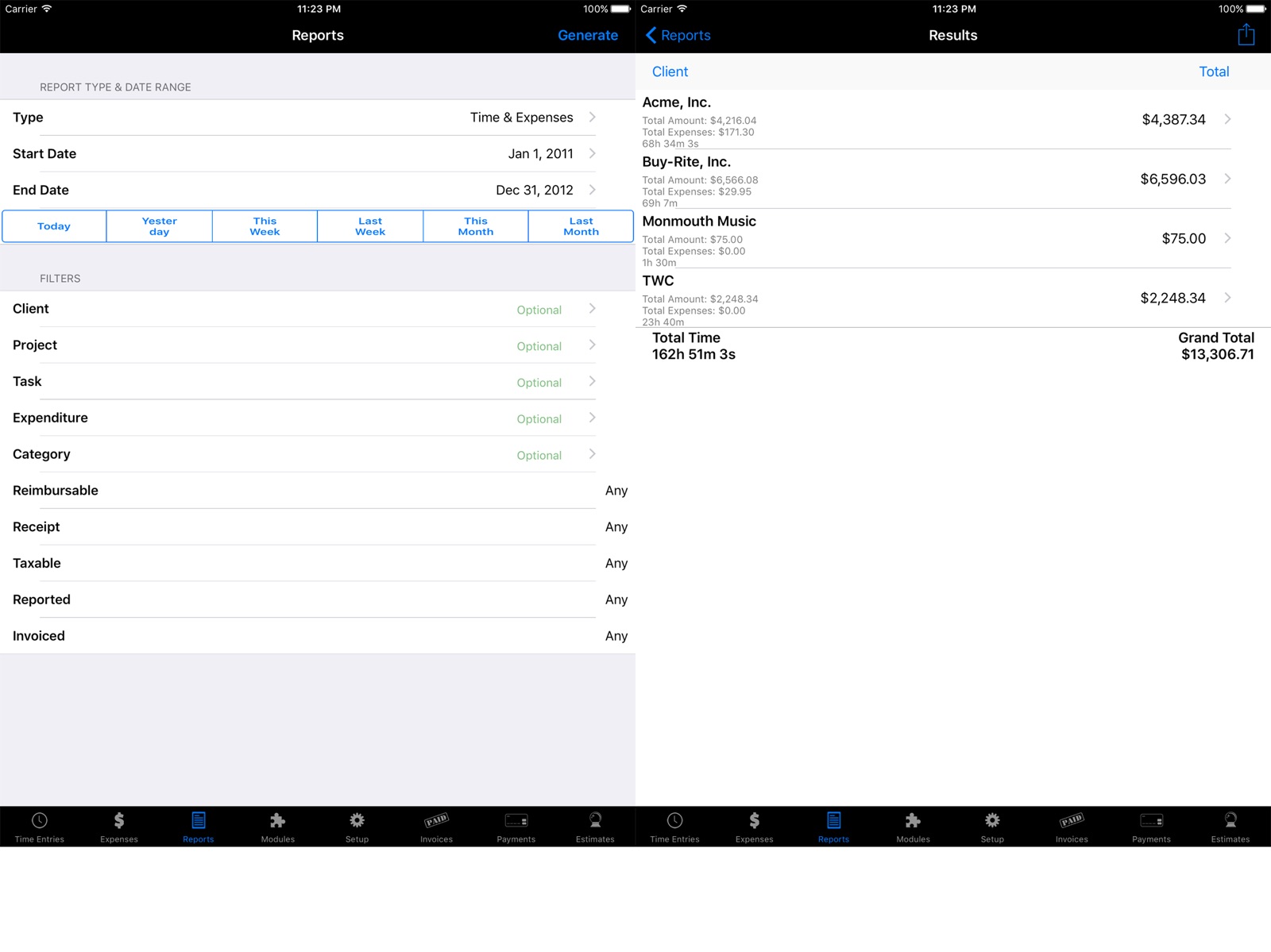
14 store screenshots


Pricing & paywalls
App Store
- Price: $9.99
- Time Master Client Monthly — $4.99/month
- Time Master Client Monthly — $49.99/year ($4.16/mo)
- Invoicing Upgrade — $9.99
- Quickbooks Export — $0.00
- Synchronization Module — $6.99
Ratings & reviews
App Store
-
5/5Excellent software
I’ve used this application for several years, now, as a professional developer tracking my time on various projects. The ease of use, and the ability to get reports out to import into my own unique billing software is phenomenal. The ability to synchronize between devices was very handy when I had both my phone and an iPad regularly in use. Please keep this app going and keep up the good work!
Travel4Life · 5 Aug 2026
-
5/5Perfect for my needs
I’ve written a review before several years ago and wanted to follow up with another review. 16 years of using this app and it still functions beautifully for my needs. While I work full time, I occasionally do freelance work on-the-side and this app has been superb in allowing me to track my hours. I always set up a project as a ‘session’ so I can start and stop the timer as needed, and love that I can include notes after stopping the timer that will appear on the invoice as I enjoy giving my customers transparency into what I worked on during a time period.
Cheshirepoet · 5 Aug 2026
-
5/5Great Billing App for Attorneys
As an attorney I have some clients with several different matters. This separates them easily and keeps an ongoing total of billable hours for the month. It is simple to use and can break down time into 6 minute intervals (although it does not use the .1 denomination, which would be preferable. I would love even more if this were made an option). Great for keeping accurate billing on the fly so that nothing slips through the cracks. I have tried several other billing programs and this is by far the best for the legal profession.
PS Lawyer · 5 Aug 2026
-
3/5Looking for more options
I've been using this app for a number of years. It does have a lot of options available. But I need more granularity in tracking my time. The "sessions" approach is great but if I could just assign a task at stopping a session I wouldn't have to add them in with a spreadsheet. The app does have tasks that can be used for describing a timer, but if I want to track 2 (or more) tasks for the same client (which allows me to track my actual time vs estimated per task), I have to start multiple timers for that one client. Then make sure I start the correct one. Seems like a lot of extra work when the ability to assign tasks is already built into the app. It just isn't implemented in a way that is super useful. I haven't found anything else that does this either to be fair
why nickname?? · 5 Aug 2026
-
4/5Excellent but may not be for everybody
I have relied upon this app for years, and it's worked consistently. Also, contrary to some comments, I really don't think this becoming "a windows app" or the world has "moved on". I'd say for sure that the app doesn't attempt to be the whiz-bang UI experience that the ideal iOS app needs to be to "feel right" to every Apple user. I'm a huge Apple user, have nothing but macs, iPhones, Apple Watch etc.... and yet, every time I've tried to find an app that "supports the whole Apple experience" the app itself, in practical terms, falls short. I'd say if you are causually looking for something to track time, and do so in the "Apple Way" this may not be the best app for you. However, if you are a professional with many clients, different types of jobs, different billing rates and need to reliably and consistently track time, send invoices, assure your data is backed up and available... I have NEVER seen anything that can compare with this. Bottom line: Practical, reliable app from a developer that seems to keep updating and assuring it works. The only downside: A bit of an Apple "meh" experience if you're looking for warm "Appleness". I can live with that.
GaryWiz · 5 Aug 2026
Privacy & accessibility
App Store
Privacy
- Data Not Collected Developer declared
Accessibility
No accessibility labels collected yet.
Versions
App Store
-
6.1
- Fixed issue with Expenses potentially being incorrectly locked. Sync Module: - Updated the Sync API: version 6.1 will be required on all 3 platforms to synchronize.
-
6.1.1
- Cosmetic fixes during backup - Added support for Apple Watch Invoice Module: - Added support for Venmo
-
6.2
- Fixed Time Sheet generator cropping certain text lines. - Modified Time Sheet layout to fit longer client and project names.
-
6.2.1
- Fixed a signature bug in 64-bit iOS. - Fixed a calendar integration bug. - Cosmetic fixes for iOS 10. - Import from Contacts fixes. - Temporarily removed iWatch integration.
-
6.2.2
bug fixes.
-
6.3
iOS 9+ now required Dropbox v2 integration Cosmetic fixes
-
6.3.1
Dropbox integration fixes
-
6.3.2
Fix for expenses currency delimiter. Sizing for iPhone X.
-
6.3.3
Fixed issue with Date Picker calendar on iPhone X.
-
6.3.4
iPhone X fixes
-
6.3.5
- Fixed issue with Statements where clients with only paid invoices were not showing. - Fixed issue where the Status was not changed from Paid to Billed when unapplying a payment to more than one invoice. - Sizing for iPhone X.
-
6.3.6
Fixed issue where not prompting to Mark as Read after Report sent.
-
6.3.7
Fixed issue where a Task associated with a Project code could not be hidden if another task tied to a different Project has the same name. Fixed keypad on Apply payments. Fixed issue where unapplying a payment with multiple invoices was not setting all invoices to Billed if they were Paid. Added confirm cancel on photo receipts if data changed.
-
6.4
Updated Search functions. Misc updates.
-
6.4.1
Fixed in version 6.4.1: - Fixed issues with Dark Mode. - Fixed Sync issue. - Fixed issue where emailing an Invoice could cause a crash. - Fixed issue with Date & Entry filters not showing up on Expenses screen. Fixed in version 6.4: - Updated Search functions. - Removed "Scoped" from all search functions and now will search all notes, codes, etc.
-
6.4.2
Fixed in version 6.4.2: - Fixed issues a few more Dark Mode issues. Fixed in version 6.4.1: - Fixed issues with Dark Mode. - Fixed Sync issue. - Fixed issue where emailing an Invoice could cause a crash. - Fixed issue with Date & Entry filters not showing up on Expenses screen. Fixed in version 6.4: - Updated Search functions. - Removed "Scoped" from all search functions and now will search all notes, codes, etc.
-
6.4.3
- Updated Calendar view for Dark Mode. - Added setting to select Auto, Light or Dark mode. - Updated calendar control to have Date wheel when tapping on Month/Year title. - Tweaks to Search functions.
-
6.5
Added prompt to Allow Full Access in Calendar for iOS 17+ Re-Added support for the Apple Watch.
-
6.5.1
Whats new in 6.5: Added prompt to Allow Full Access in Calendar for iOS 17+ Re-Added support for the Apple Watch. What's new in 6.5.1: Added prompt if Local Network may be off. Bug fix with Calendar integration. Fix issue with Reference and Purpose notes not scrolling.
-
6.5.2
Whats new in 6.5: Added prompt to Allow Full Access in Calendar for iOS 17+ Re-Added support for the Apple Watch. What's new in 6.5.1: Added prompt if Local Network may be off. Bug fix with Calendar integration. Fix issue with Reference and Purpose notes not scrolling. What's new in 6.5.2: Fixed issue with floating Time pickers on iPad, which broke in iOS 26.3.
-
6.5.3
Fix crash for Filters in Time & Expense entires. More descriptive error messages for Dropbox errors. Added crop function to Photo Receipts. Minor UI updates.
-
7.0
Added new Time Master Client option (subscription). Time Master Client is a new separate app. Perfect for contractors, service companies, and any business with field staff, Time Master Client lets workers in the field effortlessly track time, log expenses, and optionally generate invoices — all from their device. When the job is done, data syncs seamlessly back to the Time Master + Billing app, keeping your office and field teams perfectly in sync. Fixed issue with Badges on iOS 17+.
-
7.0.1
UI fixes What's new in 7.0: Added new Time Master Client option (subscription). Time Master Client is a new separate app. Perfect for contractors, service companies, and any business with field staff, Time Master Client lets workers in the field effortlessly track time, log expenses, and optionally generate invoices — all from their device. When the job is done, data syncs seamlessly back to the Time Master + Billing app, keeping your office and field teams perfectly in sync. Fixed issue with Badges on iOS 17+.
-
7.0.2
Fixed issue with photo receipts.
-
7.0.3
· 5 Aug 2026
Fixed issue where photo receipt would rotate during cropping.
Alternatives
- Hours Tracker: Time Tracking — Same category + similar ratings
Availability by market
- US
Data quality & evidence
- Page completeness
- Live store listing
- Last verified
- 5 Aug 2026
- Sources
- App Store
- Independent summary has not been published yet.