
Quick verdict
- What it is
- The CW app allows users to stream the latest episodes of their favorite shows, as well as movies and sports. Users can create a login to continue watching content on any device.
- Best for
-
- someone who wants to watch The CW shows
- someone who wants to watch movies
- At a glance
-
- Free to download
Categories and search queries
Official categories
- Entertainment
- Utilities
AppCorpus categories
Key functions
| Function | Availability | Access | Scope | Evidence |
|---|---|---|---|---|
| Free app | Yes | Free | — | Store published |
Screens
App Store
27 store screenshots


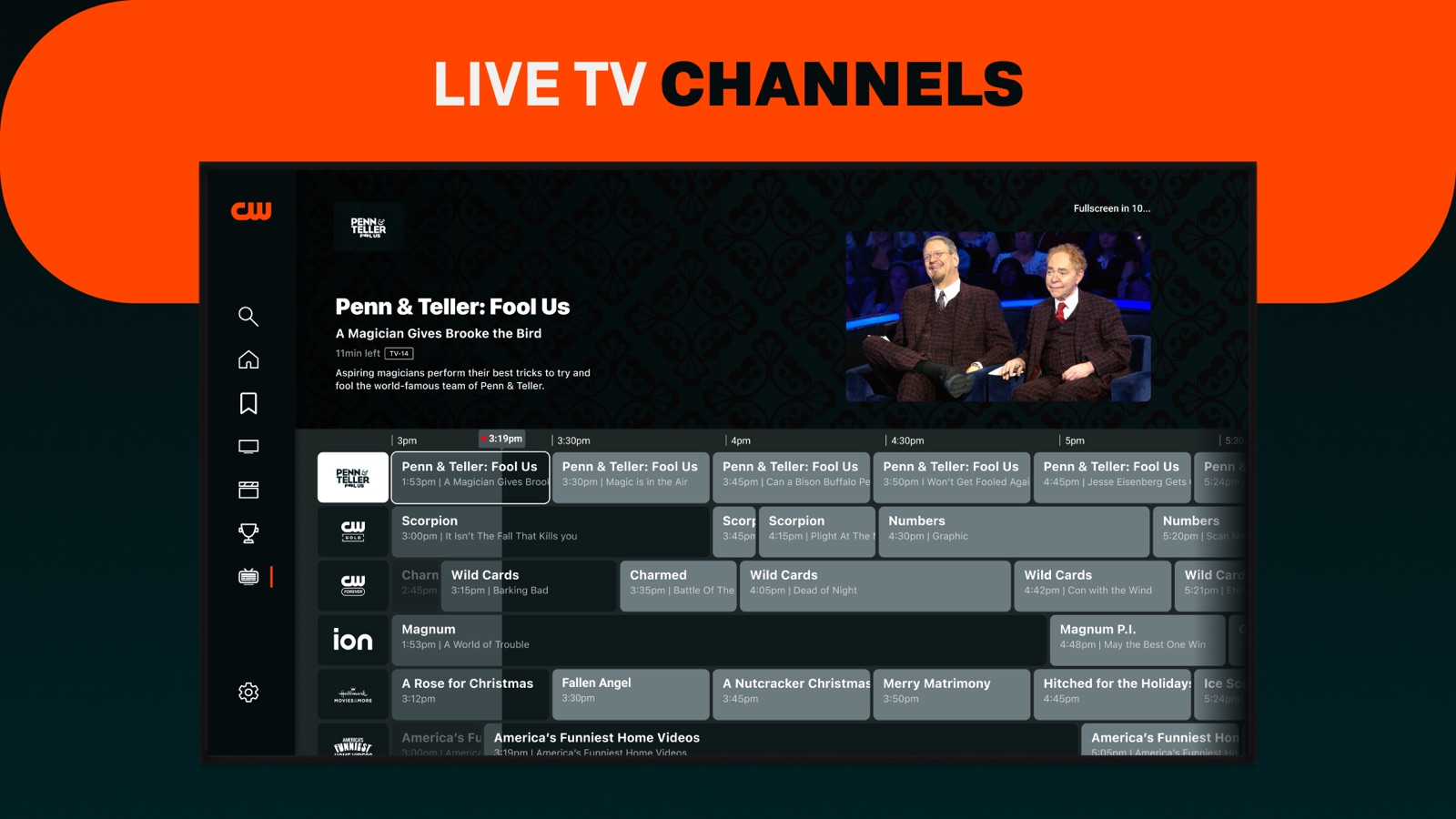
Pricing & paywalls
App Store
- Free
Ratings & reviews
App Store
-
3/5Good but no PIP and too few episodes
I love that they make same season episodes available FREE and without a login, but to have 5 stars it would have to be like other similar apps. I am subtracting 2 stars because of a couple of issues. 1 is EASY to fix and the other may be nuanced with regard to rights, but it is still annoying. Minus 1.5 stars for not having Picture in Picture on the iPhone and iPad (ESPECIALLY the iPad). As a developer, I know how easy Apple makes it for video apps and you almost have to make a conscience effort NOT to allow PIP instead of turning it on. Because it is so easy, it bothers me when developers do it on purpose like you are trying to punish your customers (which is what we are if we watch commercials). PLEASE, just flip the switch and turn on PIP. Minus .5 star for limited episodes. Y’all have been so wildly inconsistent with season start times and episode frequency across your shows that it is easy to miss some before they are no longer available…(seasons start at odd times or y’all have random 2-3 week breaks, etc). I used to know the exact day that an episode would be available but everything is funky now. Unfortunately I get out of rhythm, which causes me to look for something else on another channel/service….and since y’all lost our attention, we stop watching the season all together because we have missed 2-3 episodes of the plot. I then have to wait almost a year to watch it on Netflix. Not sure where you make the most money, but I would assume you make more with commercials, but I might be wrong. Maybe add some type of notification feature so we KNOW when episodes start or give us the entire season please.
TheGoToGuy · 30 Aug 2026
-
1/5iPhone lock up when connected to tv via cable
This new version of the CW app has a bug that needs to be fixed What happens is when you plug the iPhone via cable to your smart TV used to be able to see the monitor on the iPhone and used to be able to see it on the big screen whatever you were watching at the same time just kept the iPhone unlocked because there was activity all the time now the screen goes dark so the iPhone since is no activity and it keeps locking up every five minutes I tried the CBS app to watch their programs and there's no problem there their app works fine you can watch both on the little screen and a big screen so the little screen won't lock up because it keeps the iPhone busy and doesn't let it So this app needs to be fixed because you can see all of the forward you can tap it and you'll see that it's moving but it's a dark screen and you'll see the title of what you're watching on a dark screen on your phone but that interprets it as no movement and within five minutes your phone will lock up And that's extremely annoying imagine having to get up every five minutes to touch open your phone so you can continue to watch a program Disabling your auto lock it's one solution but nobody wants to do that because people tend to forget to lock up your phone again after that and that leads to a security problem So the fix to your app is to let whatever you're watching on the big screen stream on the little one at the same time and that keeps the iPhone busy and he keeps it from locking up that's the solution that's to fix
Ralph nader H · 30 Aug 2026
-
3/5Needs settings
Overall I like the app. I get that contracts limit to the last 5 episodes, though in the modern age of episodic TV having fall finales I wish they would release the early season episodes to streaming services in smaller chunks to let us get caught up and finish the show on the app. However my first complaint / reason for a drop of a star is that unlike other streaming apps, this one maintains the main iOS screen saver settings. When I use my phone normally I want it to lock automatically after a short period of me not touching it ... but if I’m watching an hour long show casted to my TV I don’t want to touch my phone for an hour, and definitely not every 2 minutes. Also, either the setting to go from one episode to the next doesn’t exist or it isn’t obvious / intuitive. Other streaming apps auto-forward too quickly (I sometimes like the music and some movies have post-credit scenes), but to not have the option to skip to next or automatically advance at the end also seems outdated. Other streaming video apps have these issues figured out, more or less, and they seem tome to be things that need to be priorities.
Tom_ATC · 30 Aug 2026
-
1/5Was going good
But the controls and swiping are inconsistent. Episodes air but don’t appear on the app. No landscape mode for browsing, only during play back. Episodes sometimes in ascending, sometimes in descending order. Way too many ads. It’s like they took everything BAD about broadcast television and stuck it in an app. Whatever geriatric individual is overseeing the development and management of this app, they need to have their children play with it and tell them how to fix it. Anyone with experience in using media apps could tell you the UI and UX is outdated. You can’t even close the app while it casts. It’ll make it so its like you’re not even casting and cause you to have to REWATCH ads just to start it up again. On top of that, the audio may go out of sync, causing you again to have to REWARCH ALL THE ADS YOU ALREADY HAVE. It’s as if my grandparents made a major media company’s app, and they’re dead. Edit: tried it again. It was worse than before. I shut down the app , deleted it from my iPad, while casting, and it is STILL casting to my Chromecast. How is this even possible? Had to literally disconnect my Chromecast. I had already watched the commercials before casting, and as soon as I began to cast I had to sit thru another batch of commercials? I immediately deleted it. You have some shows I love, but now they will suffer in viewership from a long time (7 years) fan. I’ll watch them on Netflix when they come out. Sad. Really sad cw. You’re a multimillion dollar company. Get your act together.
Welsed · 30 Aug 2026
-
1/5Horribly bad orientation controls
This app is incomprehensibly bad, at least as far as how it displays when holding the iPad in different orientations. For starters, when you open the app, it only supports portrait orientation, with the home button at the bottom. Now let’s be clear about something. We are watching a video, the only way to watch it is in landscape orientation. And that is exactly how the videos will play, but before you can watch them, you have to browse the selection screen with iPad held upright in portrait orientation. That is incomprehensibly ridiculous. Why wouldn’t you want to browse the listings in the same orientation as you are going to watch them in? As it is, the iPad is often easier to hold in landscape orientation. And it’s not like there isn’t an existing CW app that is used exclusively in landscape orientation. Hello Apple TV! But this gets better. Sometimes I have to have my iPad in landscape orientation with the home button on the left side, so I can have it plugged in while I’m watching something. And while the actual videos “can” play oriented correctly regardless of which side is up, when you pause a video, it will resume upside down if your iPad is held (or on a stand in my case) with the home button is on the left. And of course, when you exit a video, the home screen for the app is sideways. You would think the developers of The CW app have not actually used it themselves. It’s just that incomprehensibly absurd in the way it works.
$1K Master · 30 Aug 2026
Privacy & accessibility
App Store
Privacy
- Data Linked to You — Analytics — Identifiers — Device ID Developer declared
- Data Linked to You — Analytics — Location — Coarse Location Developer declared
- Data Linked to You — Analytics — Usage Data — Advertising Data Developer declared
- Data Linked to You — Analytics — Usage Data — Other Usage Data Developer declared
- Data Linked to You — App Functionality — Identifiers — Device ID Developer declared
- Data Linked to You — App Functionality — Location — Coarse Location Developer declared
- Data Linked to You — App Functionality — Usage Data — Advertising Data Developer declared
- Data Linked to You — App Functionality — Usage Data — Other Usage Data Developer declared
- Data Linked to You — Developer’s Advertising or Marketing — Identifiers — Device ID Developer declared
- Data Linked to You — Developer’s Advertising or Marketing — Location — Coarse Location Developer declared
- Data Linked to You — Developer’s Advertising or Marketing — Usage Data — Advertising Data Developer declared
- Data Linked to You — Product Personalization — Identifiers — Device ID Developer declared
- Data Linked to You — Product Personalization — Location — Coarse Location Developer declared
- Data Linked to You — Third-Party Advertising — Identifiers — Device ID Developer declared
- Data Linked to You — Third-Party Advertising — Location — Coarse Location Developer declared
- Data Linked to You — Third-Party Advertising — Usage Data — Advertising Data Developer declared
- Data Linked to You — Identifiers Developer declared
- Data Linked to You — Location Developer declared
- Data Linked to You — Usage Data Developer declared
- Data Used to Track You — Identifiers — Device ID Developer declared
- Data Used to Track You — Identifiers Developer declared
- Data Used to Track You — Location — Coarse Location Developer declared
- Data Used to Track You — Location Developer declared
- Data Used to Track You — Usage Data — Advertising Data Developer declared
- Data Used to Track You — Usage Data — Other Usage Data Developer declared
- Data Used to Track You — Usage Data Developer declared
Accessibility
No accessibility labels collected yet.
Versions
App Store
-
4.10.1
New Homepage Sports Hub FAST Channels updates Bug fixes and Optimizations
-
4.11.1
- Content HUBs - EPG / FAST Channel Updates - UX Optimizations - Bug Fixes
-
4.12
Added some new features and bug fixes
-
4.13
Simultaneous livestreams mvp Livestream bugs Livestream UX feedback
-
4.13.1
Bug fixes
-
4.13.2
Bug fixes and optimizations
-
4.13.3
Fixed an issue where the latest episodes and live events weren’t showing up on time, thanks for letting us know!
-
4.14.2
Fixed a bug where new content doesn't appear sometimes, and fixed a few other small issues.
-
4.15.0
Fixed an issue that could cause the app to crash Made improvements to playback experience to keep your streaming experience running smoothly
-
4.15.1
- Fixed a crash while playing a trailer from extras - Fixed channels playback functionality to pause playback when navigating away from channels while information card is displayed
-
4.16.0
Improvement to deeplinking functionality and bug fixes
-
4.16.1
Support for PiP is here!
-
4.17
You asked for it, The CW delivered! We've added a login feature, so now you can easily keep track of your favorite shows and channels, and pick up where you left off across all of your devices. Login is completely optional, and as always, The CW app remains totally free!
-
4.17.1
You asked for it, The CW delivered! We've added a login feature, so now you can easily keep track of your favorite shows and channels, and pick up where you left off across all of your devices. Login is completely optional, and as always, The CW app remains totally free!
-
4.17.2
Bug fix to improve continue watching functionality. You asked for it, The CW delivered! We've added a login feature, so now you can easily keep track of your favorite shows and channels, and pick up where you left off across all of your devices. Login is completely optional, and as always, The CW app remains totally free!
-
4.17.3
We squashed a couple bugs to improve your streaming experience
-
4.18.1
We continue to squash bugs to improve your streaming experience
-
4.19.0
Squashed some annoying bugs to make your streaming experience better
-
4.19.2
Fixed some bugs - we're always thinking of you
-
4.20.0
Includes bug fixes and performance improvements. You’re welcome!
-
4.20.3
· 17 Jun 2026
Fixed some bugs, we're always thinking of you
-
4.21.2
· 8 Aug 2026
We have a fancy new player design, and you can now pause and rewind live streams - enjoy!
-
4.8.0
Updated App Icon FAST Channels now included!! Bug Fixes
-
4.8.1
Bug fixes
-
4.8.2
Bug fixes and optimizations!
-
4.9.0
Bug Fixes and Optimizations FAST Channels Updates
Alternatives
- UP Faith & Family — Same category + similar ratings
- Hallmark+ — Same category + similar ratings
Availability by market
- US
Data quality & evidence
- Page completeness
- Independent summary published
- Last verified
- 30 Aug 2026
- Sources
- App Store