
The Clocks: Alarm, World Clock
A simple clock app with alarm and world clock features.
iPhone · iPad
Quick verdict
- What it is
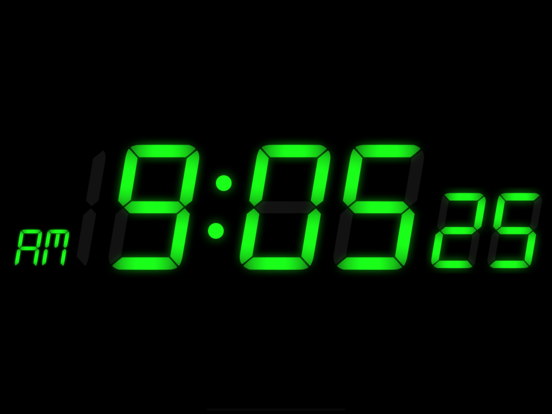
- The Clocks is a utility app that provides three fundamental clock types, in-app music alarms, and a world clock with detailed customization options.
- Best for
-
- someone who needs a simple alarm clock
- someone who travels frequently
- At a glance
-
- Free to download
- In-app purchases
Categories and search queries
Official categories
- Utilities
- Lifestyle
Apoku categories
Key functions
| Function | Availability | Access | Scope | Evidence |
|---|---|---|---|---|
| Free app | Yes | Free | Context-specific | Store published |
| In-app purchases | Yes | Limited free | Context-specific | Store published |
Screens
App Store
15 store screenshots



Pricing & paywalls
App Store
- The Clocks Premium Upgrade — $3.99
Ratings & reviews
App Store
-
5/5Great use for old iPhone!
I love this clock, and have been using it as my alarm clock plus the clock in my living room, on old iPhones, for years. I love the choice of clock faces, the alarm choices, and all the other settings options available. But I just have a question and a suggestion. My question is that the two devices I have that are set on your app are showing two different times—-one is five minutes slower than the other! One would think the app is set to the Atomic Clock, so would simultaneously display the same time on all devices. So why are two devices showing two different times? My suggestion is that your app have a FAQ section, and include a customer service contact form, so that one does not have to go through the Review section to ask a customer service-related question (like my question above). Other than those two things, the app is the best of any of the other clock apps I have tried, including the Apple clock app. I recommend it to anyone with an iPhone, old or new, who wants to get rid of a clunky old alarm clock that takes up way too much space on their bedside table (mine is in landscape mode and taking up minimal space sitting on a business card holder), and/or who travels and doesn’t want to pack a travel clock or depend on hotel wake up calls.
snorincats · 29 Sep 2026
-
5/5My New Bedside Alarm Clock
I had my IPad for a decade but hardly had reason to opt for it over my laptop or phone (i.e., it didn’t get much use). But a recent series of scheduled power outages that rendered my dedicated bedside alarm clock the equivalent of a door stop, I sought a more intelligent solution. I considered my IPad for that solution and found it in the Clocks app. This app with its daily programming capability, selection of displays, selection of alarm sounds, and the ability to adjust the intensity over a broad range completely outclasses the standard one dimensional alarm clock. In fact, both bedside alarm clocks that I’ve tolerated over the years as “good enough” solutions when the powers not interrupted have been decommissioned in favor of the far more capable Clocks app-powered IPad. Thanks to the Clocks app I now utilize my IPad every day of the week whether it’s waking me up or I just need to know the time. I will NEVER again opt for a dedicated bedside alarm clock and plan to take my Clocks app-powered IPad with me on travel so I don’t have to deal with the hotel alarm clock.
David - CA · 29 Sep 2026
-
5/5Does the job well (that Apple abandoned!)
For a free App, it's easy to install and use. The interface is very simple, but that's all I was looking for. An analog clock with second hand to set the exact time on my automatic wristwatch. It runs well:no crashes so far. I only use about once a week. It let's you select analog or digital: for each you can choose minutes only or seconds, too. You can also select a variety of time zones. It would be nice if they allowed you to customize the appearance. For example, it'd be quite cool to have the ability to create a mirror image of my white face Ebel automatic. Or perhaps I could emulate my dream watch, a Panerai, for a weekly reminder of what I might someday afford if I play my cards right.😁 Last, its FREE! I'd be willing to buy it or even lease yearly as long as the price wasn't more than a few bucks. I'm not sure how the developers are supporting it: mine hasn't yet run any ads. It it did, goldangit! I'd gratefully read 'em all. Well maybe I would...😷
John02186 · 29 Sep 2026
-
4/5Great for what it does.
First of all, for such a small app, it does a lot that I needed to do. The reason I got it was because I wanted a clock on my phone that would stay on all night. The built-in iPhone clock times out and there are times where I need to be able to see what time it is. This clock stays on all night, gives me five alarm options and allows me to choose the music I want to wake to. The only downside is that the alarm only goes for two minutes and, if you are a heavy sleeper, may not wake you up. Also, there have been times where it randomly does not go off. It illuminates like it is and has the snooze option or turn off option, just no actual alarm. If I close out the app and reopen it, it comes back to life and works like normal. I would recommend this app for anyone looking for a bedside clock/alarm clock. I also use it in meetings where I need to have the time visible. I would just make sure you completely close out the app each day when you’re done rather than let it hang out in the background to fix the occasional error.
larsen268 · 29 Sep 2026
-
5/5Adore this Clock - It's the Best!!!
I use this in so many different ways. I do a lot of executive and public briefings in rooms that unfathomably have no clock or where it's facing the wrong way, I lead meetings and conduct other events where being mindful of time is important. I travel so time in different zones is also important. Of course, there's the usual needs of desktop clock because the time on my computer can get obscured or is too small to claim my attention (In a meeting driven work life, time is a constant factor.), bedside clock, bathroom clock to keep watch as I get dressed (amazing how a hot shower at 4am can lull away time), or using the second hand on the analog to time intervals during my workout. I literally use this on every IOS device I own. It's that good. I absolutely love being able to resize and re-position the clocks to suit different needs. I shrink the size in meetings and enlarge for easier viewing when I'm m presenting for example. The dimmer is awesome. The color is too. Fancy picture or moving backgrounds shine too bright in a dark room and/or are too distracting for most of my uses. I have no desire to turn my time into yet another "social media" event. The simplicity of this clock is honestly one of its most beneficial features. So why 4 stars? The alarm. It's touchy. I have too be very careful to make sure it rings and/ or rings loud enough to wake me. Otherwise, easily in my top 3 must have apps!
AppKitten · 29 Sep 2026
Privacy & accessibility
App Store
Privacy
- Data Linked to You — Third-Party Advertising — Diagnostics — Performance Data Developer declared
- Data Linked to You — Third-Party Advertising — Identifiers — Device ID Developer declared
- Data Linked to You — Third-Party Advertising — Location — Coarse Location Developer declared
- Data Linked to You — Third-Party Advertising — Usage Data — Advertising Data Developer declared
- Data Linked to You — Third-Party Advertising — Usage Data — Product Interaction Developer declared
- Data Linked to You — Diagnostics Developer declared
- Data Linked to You — Identifiers Developer declared
- Data Linked to You — Location Developer declared
- Data Linked to You — Usage Data Developer declared
- Data Not Linked to You — Third-Party Advertising — Diagnostics — Crash Data Developer declared
- Data Not Linked to You — Diagnostics Developer declared
- Data Used to Track You — Diagnostics — Crash Data Developer declared
- Data Used to Track You — Diagnostics — Performance Data Developer declared
- Data Used to Track You — Diagnostics Developer declared
- Data Used to Track You — Identifiers — Device ID Developer declared
- Data Used to Track You — Identifiers Developer declared
- Data Used to Track You — Location — Coarse Location Developer declared
- Data Used to Track You — Location Developer declared
- Data Used to Track You — Usage Data — Advertising Data Developer declared
- Data Used to Track You — Usage Data — Product Interaction Developer declared
- Data Used to Track You — Usage Data Developer declared
Accessibility
No accessibility labels collected yet.
Versions
App Store
- 1.0.0
-
1.0.1
- Time changes automatically as the device's time zone changes.
-
2.0
- Alarm, world clock (Tap city name to change) - Selecting color of digital clock - Auto-saving settings
-
3.0
• Snooze • Flashlight on shake • Easy button interface • Option for 24 hour mode • iPod music as alarm sounds • More reality to flip clock animation • Option for saving screen from burn-in • Detailed options for customizing each clock • Additional cities and countries for world clock • Enhanced core loop for saving more battery life • Still simple
-
3.0.1
• Fixes snooze bug • Fixes alarm sounds • Options for alarm indicator • Options for brightness control • Settings for burn-in protection • Orange color added to the digital clock's palette. This is an urgent update. There will be a major update soon.
-
3.0.2
• [Urgent] Fixes an alarm bug on some devices • Auto-Brightness applies to "Both" mode • All foreground sounds play even in mute mode
-
3.0.3
• Supports iOS 9.1 • Fixes minor bugs
-
3.0.4
• Fixes pretty bugs
-
3.0.5
- fixes a bug making music alarm not play - larger alarm buttons at last - fixes other pretty bugs
-
3.0.6
- Supports iOS 13.2.3 finally.
-
3.0.7
- Addressed critical issues arising during device rotation in the latest iOS. - Resolved various minor problems stemming from iOS updates.
-
3.0.8
- The issue of city names not being displayed on some devices has been resolved.
-
3.0.9
- Fixed the issue where the app was terminating on some devices.
-
3.1
- Improved app stability
-
3.1.1
- Improved app stability.
-
3.1.2
- Improved app staility.
-
3.1.3
- The app stability has been improved. - Detailed options for adjusting size, position, and rotation with two fingers have been added.
-
3.1.4
· 14 Mar 2024
- The app stability has been improved. - Detailed options for adjusting size, position, and rotation with two fingers have been added.
Alternatives
- One Touch Alarm Clock — Same category + similar ratings
- Alarm Clock HD — Same category + similar ratings
- Alarm Clock for Me - Wake Up! — Same category + similar ratings
- Alarm Clock ◎ — Same category + similar ratings
- Alarm Clock App: myAlarm Clock — Same category + similar ratings
Availability by market
- US
Data quality & evidence
- Page completeness
- Apoku summary published
- Last verified
- 29 Sep 2026
- Sources
- App Store