
Quick verdict
- What it is
- Store information collected; independent summary not yet available.
- At a glance
-
- $9.99
Categories and search queries
Official categories
- Music
- Entertainment
AppCorpus categories
Key functions
| Function | Availability | Access | Scope | Evidence |
|---|---|---|---|---|
| Family Sharing | Yes | Unknown | App Store | Store published |
Screens
App Store
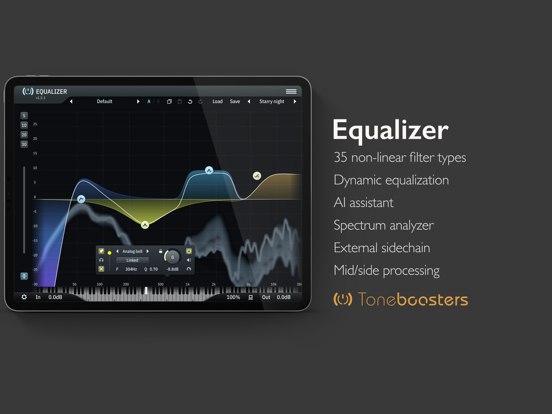
12 store screenshots



Pricing & paywalls
App Store
- Price: $9.99
Ratings & reviews
App Store
-
5/5Absolutely incredible for Garageband on iPad
I very, very rarely review apps, but I am compelled to write one for this app. TB Equalizer is absolutely ridiculously great. Amazing. I have been making beats for more than 22 years, and only a few years ago migrated to Garageband on the iPad from a clunky, hardware-laden home studio. I thought I knew every trick in the GarageBand book, but this app is god mode. I was fed up with Apple’s built-in AUV3 BandEQ module (not the basic 3-channel EQ) because it was so glitchy, which is why I finally decided to get this. I can’t believe it was only $10. If this app was $40 to $50 and I had demoed it first, I would have EASILY paid that. I love the ease of adding more channels. The per-channel magic assist or whatever it’s called is actually very good and helpful 50% of the time. The realtime oscilloscope paired with the dynamic EQ mode is just awesome. I’ve been using the AI assist for the final mix, which also comes in handy and is a nice touch. Even HQ mode legitimately improves sound quality. There are so many great functions, and I find none of them gimmicky. The app is also rock-solid stable in GarageBand. 10 stars for this. I can’t commend the devs enough on a great, great job coding this.
Sample Zombie · 6 Aug 2026
-
5/5Affordable DYANMIC EQ for Ipad
Was looking for an EQ to tame and sculpt some of my synth and keyboard patches for live shows. This fits the bill perfectly! I tried the demo on Windows first and was sold. The analog circuit adds some subtle saturation if you need it. Adding 16 independent dynamic bands is more than enough control for projects and shows. I don’t use the AI, but I mix on my laptop and workstation, not my iPad. Use this as an AUV3 in AUM and KeyStage, it can easily be the only EQ on your iPad. If you have a problem with the price… just go look at the prices on MAC and Windows for EQ’s with half the functionality! EDIT: An idea to make this even better than it is: NEGATIVE dynamic ratios! I would love to be able to quickly punch up about 500-1k on a piano to add some good knock to the sound but maintaining a level frequency response on the sustain. You all don’t have a multi-band compressor; this would hit the mark even harder than you already did! Absolutely a bonkers great EQ.
btklop · 6 Aug 2026
-
5/5Insane
The AI Assist alone is worth the price this costs. This EQ can do everything the Pro-Q can, and then some, at a fraction of the cost. In my own opinion, this is actually better. Here’s the biggest reason why I think that besides the two things I just said: the window containing fine adjustments for frequency, Q, gain,etc. doesn’t only show up in full screen AU mode in Cubasis. You can simply tap on the effect and have access to the window in the half screen display of the effect. However, in order to see the same window in Pro-Q, you have to put it in full screen. This may not seem like a big deal, but it means you don’t have to constantly enter and exit full screen for fine adjustments while mixing. Bottom line, if you want a pro quality EQ on par with Fab Filter, this is an absolute no-brainer.
TBMisamazing · 6 Aug 2026
-
5/5Toneboosters are Top Notch
Toneboosters has been one of the best audio plugin companies since the very early days of audio plugins, the company can trace it’s history almost as long as Waves. You will NEVER regret or have buyer’s remorse when purchasing Toneboosters, you always come away very satisfied! Great prices and extraordinary quality in sound. I hoped to see the whole collection make it’s way to the ARM/Apple platform because these really are one of the industry standards of the last 20 years. I would like to see a bundle deal once the complete collection is ported to iPadOS/iOS!!
Joe Salyers · 6 Aug 2026
-
5/5Since I only use iphone for my projects
Wonderful , professional and best money I have spent on plug-in or eq , wthe reason i don’t need my macbook or anything besides a iPhone to make a albulm.—-thanks for a EQ that is better than fab filter and on the iPhone se (last headphone jack iPhone ) And remembering us iPhone producers Speeddee aka filtheesouth
speeddee(filtheesouth) · 6 Aug 2026
Privacy & accessibility
App Store
Privacy
- Data Not Collected Developer declared
Accessibility
No accessibility labels collected yet.
Versions
App Store
-
1.4.5
- New expansion mode for dynamic EQ - spectrum analyzer and input VU levels are now showing effect of input gain - Zoom control can now zoom in much more - New zoom preset knobs - Fixed an auto-makeup issue for notch filters when changing Q - Add backspace key option to delete multiple EQ nodes after selection - Nodes now have circular hit test areas for mouse interactions - Fixed a bug in the side chain dynamics filter for flat-top filters - New AI-driven EQ suggestion curves
-
1.4.7
- Fixed an issue not showing user programs after deleting a program in save mode - Add load/save menu options for quick access to saved settings - Fixed an issue where the dock did not always appear when re-selecting the same node - stand alone: settings are stored when closing the app and retrieved when re-starting it
-
1.4.8
Fixed an issue with the program manager in certain edge cases
-
1.5.0
Optimizations for new iPad Mini Icon refresh
-
1.5.1
Workflow improvements: - Increased effective screen size for EQ editing - UI settings are now in a dedicated settings menu - New smooth bypass control without zipper noise / artefacts Compatibility improvements - AUv3 support for multi-channel and immersive audio formats (if supported by host)
-
1.5.2
UI improvements New soft bypass control
-
1.5.3
Bug fix: input and output spectrum analyzer buttons are now correctly mapped.
-
1.5.4
UI improvements
-
1.5.5
- Auto dimming of display now works correctly if bypass switch is toggled really quickly in succession - Improved support for linking bypass states between plugin and host - Improved modifier key behavior
-
1.6.0
Efficiency and usability improvements
-
1.6.1
- Improved UI rendering - New app icons - Inproved handling of key commands for copy/paste/undo/redo
-
1.6.2
Improved UI performance Usability and stability improvements
-
1.6.3
- Improved interactivity of the on-screen piano keyboard - Fixed an issue with auto-loudness make up for higher-order filter types - Input, output and side chain spectrum can now be visualised simultaneously
-
1.6.5
UI drawing efficiency updates
-
1.6.6
Spectrum analyzer UI drawing performance improvements
-
1.6.7
Stability and performance improvements
-
1.6.8
UI, workflow and efficiency improvements
-
4.7.0
UI, UX and efficiency improvements Harmonize version numbers with macOS versions
-
4.7.5
Efficiency and performance improvements
-
4.7.7
- Efficiency and usability improvements - Significant reduction in memory requirements
-
4.7.8
Stability and efficiency improvements
-
4.8.6
Efficiency, stability, and compatibility improvements
-
4.8.7
Remove context panel when deleting a filter section UI improvements Efficiency improvements Stability improvements
-
4.8.8
This update provides significant workflow, customisation, personalisation and performance improvements: - Improved UI performance and reduced CPU load - Improved detection of drag vs click/tap logic for UI elements - Fix an issue with manual entry of automation lane values in certain hosts - New option to enable/disable GPU refresh throttling / high frame rate rendering - New option to enable highlighting of UI elements that accept keyboard input - New option to customize color scheme - Improved undo/redo functionality
-
4.8.9
· 28 May 2026
Fix a small UI issue
Availability by market
- US
Data quality & evidence
- Page completeness
- Live store listing
- Last verified
- 6 Aug 2026
- Sources
- App Store
- Independent summary has not been published yet.