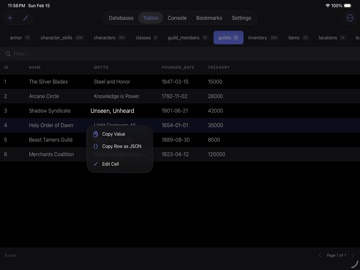
Apoku MCP provides app discovery, detailed cards, evidence, sources and screenshots where available. Unknown or conflicting prices stay explicit.
View JSON
GET /api/v3/apps/6759238277
{
  "app_id": 6759238277,
  "canonical_url": "https://appcorpus.com/apps/tablewright-sqlite-editor-6759238277",
  "identity": {
    "name": "Tablewright: SQLite Editor",
    "slug": "tablewright-sqlite-editor",
    "developer": {
      "name": "ROBERT BARRETT LAUNIUS",
      "url": "https://appcorpus.com/developers/robert-barrett-launius-developer_02f51be94fdf7ff4a4f3b08263bce0f5"
    },
    "icon_url": "https://is1-ssl.mzstatic.com/image/thumb/Purple211/v4/5d/a3/27/5da327c4-816d-d39a-d909-07203737c49d/AppIcon-0-0-1x_U007epad-0-1-85-220.png/512x512bb.jpg",
    "stores": [
      "apple"
    ],
    "platforms": [
      "iphone",
      "ipad"
    ],
    "status": {
      "state": "active",
      "label": "Active",
      "last_checked": "2026-08-07",
      "last_checked_label": "7 Aug 2026",
      "banner": null,
      "region_note": null,
      "data_state": "stale",
      "data_state_label": "Some store data may be out of date"
    }
  },
  "listings": [
    {
      "store": "apple",
      "status": "ACTIVE",
      "url": "https://apps.apple.com/us/app/tablewright-sqlite-editor/id6759238277?uo=4",
      "rating": 5.0,
      "rating_count": 5,
      "formatted_price": "Free",
      "is_free": true,
      "has_iap": true,
      "has_subscription": null,
      "version": "1.3",
      "updated": "2026-08-07",
      "currency": "USD"
    }
  ],
  "summary": {
    "one_liner": null,
    "summary": null,
    "best_for": [],
    "not_for": [],
    "status": "fallback",
    "at_a_glance": [
      "Free to download",
      "In-app purchases"
    ]
  },
  "categories": {
    "official": [
      "Developer Tools",
      "Utilities"
    ],
    "appcorpus": [
      {
        "category_id": "developer-tools",
        "label": "Developer tools",
        "url": "https://appcorpus.com/categories/developer-tools"
      },
      {
        "category_id": "utilities",
        "label": "Utilities",
        "url": "https://appcorpus.com/categories/utilities"
      }
    ]
  },
  "use_cases": [],
  "features": [
    {
      "capability_id": "free_app",
      "label": "Free app",
      "availability": "yes",
      "access_level": "free",
      "scope": null,
      "evidence": "Store published"
    },
    {
      "capability_id": "in_app_purchases",
      "label": "In-app purchases",
      "availability": "yes",
      "access_level": "free_limited",
      "scope": null,
      "evidence": "Store published"
    }
  ],
  "pricing": [
    {
      "store": "apple",
      "formatted_price": "Free",
      "is_free": true,
      "has_iap": true,
      "has_subscription": null,
      "currency": "USD",
      "market": "es",
      "last_verified": "2026-08-07",
      "rows": [
        "SQLPeek Pro"
      ],
      "state": "current"
    }
  ],
  "screens": [
    {
      "url": "https://is1-ssl.mzstatic.com/image/thumb/PurpleSource221/v4/0f/74/ac/0f74acf8-dac9-cdbe-c275-43671bd76ad6/QuickActions.png/1600x1600bb.jpg",
      "store": "apple",
      "platform": "ipad",
      "alt": "Tablewright: SQLite Editor ipad screenshot 1"
    },
    {
      "url": "https://is1-ssl.mzstatic.com/image/thumb/PurpleSource221/v4/0f/74/ac/0f74acf8-dac9-cdbe-c275-43671bd76ad6/QuickActions.png/360x480bb.jpg",
      "store": "apple",
      "platform": "ipad",
      "alt": "Tablewright: SQLite Editor ipad screenshot 2"
    },
    {
      "url": "https://is1-ssl.mzstatic.com/image/thumb/PurpleSource221/v4/00/8d/ff/008dff14-5069-bfbd-7424-091db701ba62/TableEditCell.png/1600x1600bb.jpg",
      "store": "apple",
      "platform": "ipad",
      "alt": "Tablewright: SQLite Editor ipad screenshot 3"
    },
    {
      "url": "https://is1-ssl.mzstatic.com/image/thumb/PurpleSource221/v4/00/8d/ff/008dff14-5069-bfbd-7424-091db701ba62/TableEditCell.png/360x480bb.jpg",
      "store": "apple",
      "platform": "ipad",
      "alt": "Tablewright: SQLite Editor ipad screenshot 4"
    },
    {
      "url": "https://is1-ssl.mzstatic.com/image/thumb/PurpleSource221/v4/26/d4/4f/26d44f9d-1018-22c1-236a-63485e3bb120/Bookmarks.png/1600x1600bb.jpg",
      "store": "apple",
      "platform": "ipad",
      "alt": "Tablewright: SQLite Editor ipad screenshot 5"
    },
    {
      "url": "https://is1-ssl.mzstatic.com/image/thumb/PurpleSource221/v4/26/d4/4f/26d44f9d-1018-22c1-236a-63485e3bb120/Bookmarks.png/360x480bb.jpg",
      "store": "apple",
      "platform": "ipad",
      "alt": "Tablewright: SQLite Editor ipad screenshot 6"
    },
    {
      "url": "https://is1-ssl.mzstatic.com/image/thumb/PurpleSource221/v4/dd/c1/0b/ddc10b4e-1a19-e0ca-b2e3-15a2ee7360d1/TableRowEdit.png/1600x1600bb.jpg",
      "store": "apple",
      "platform": "ipad",
      "alt": "Tablewright: SQLite Editor ipad screenshot 7"
    },
    {
      "url": "https://is1-ssl.mzstatic.com/image/thumb/PurpleSource221/v4/dd/c1/0b/ddc10b4e-1a19-e0ca-b2e3-15a2ee7360d1/TableRowEdit.png/360x480bb.jpg",
      "store": "apple",
      "platform": "ipad",
      "alt": "Tablewright: SQLite Editor ipad screenshot 8"
    },
    {
      "url": "https://is1-ssl.mzstatic.com/image/thumb/PurpleSource221/v4/8b/2d/af/8b2daff1-e698-2a6a-3f2a-97c54cac7446/TableRowInsert.png/1600x1600bb.jpg",
      "store": "apple",
      "platform": "ipad",
      "alt": "Tablewright: SQLite Editor ipad screenshot 9"
    },
    {
      "url": "https://is1-ssl.mzstatic.com/image/thumb/PurpleSource221/v4/8b/2d/af/8b2daff1-e698-2a6a-3f2a-97c54cac7446/TableRowInsert.png/360x480bb.jpg",
      "store": "apple",
      "platform": "ipad",
      "alt": "Tablewright: SQLite Editor ipad screenshot 10"
    },
    {
      "url": "https://is1-ssl.mzstatic.com/image/thumb/PurpleSource211/v4/f5/53/1f/f5531f36-b2d6-9b92-3d4a-74b1d884bdc8/ExportData.png/1600x1600bb.jpg",
      "store": "apple",
      "platform": "ipad",
      "alt": "Tablewright: SQLite Editor ipad screenshot 11"
    },
    {
      "url": "https://is1-ssl.mzstatic.com/image/thumb/PurpleSource211/v4/f5/53/1f/f5531f36-b2d6-9b92-3d4a-74b1d884bdc8/ExportData.png/360x480bb.jpg",
      "store": "apple",
      "platform": "ipad",
      "alt": "Tablewright: SQLite Editor ipad screenshot 12"
    },
    {
      "url": "https://is1-ssl.mzstatic.com/image/thumb/PurpleSource221/v4/e4/b8/65/e4b86503-e438-960c-2b13-60f0eae1ef28/Console.png/1600x1600bb.jpg",
      "store": "apple",
      "platform": "ipad",
      "alt": "Tablewright: SQLite Editor ipad screenshot 13"
    },
    {
      "url": "https://is1-ssl.mzstatic.com/image/thumb/PurpleSource221/v4/e4/b8/65/e4b86503-e438-960c-2b13-60f0eae1ef28/Console.png/360x480bb.jpg",
      "store": "apple",
      "platform": "ipad",
      "alt": "Tablewright: SQLite Editor ipad screenshot 14"
    },
    {
      "url": "https://is1-ssl.mzstatic.com/image/thumb/PurpleSource211/v4/31/96/60/31966056-a453-20b0-aa5c-cd151295acce/TableList.png/1600x1600bb.jpg",
      "store": "apple",
      "platform": "ipad",
      "alt": "Tablewright: SQLite Editor ipad screenshot 15"
    },
    {
      "url": "https://is1-ssl.mzstatic.com/image/thumb/PurpleSource211/v4/31/96/60/31966056-a453-20b0-aa5c-cd151295acce/TableList.png/360x480bb.jpg",
      "store": "apple",
      "platform": "ipad",
      "alt": "Tablewright: SQLite Editor ipad screenshot 16"
    },
    {
      "url": "https://is1-ssl.mzstatic.com/image/thumb/PurpleSource211/v4/c2/c8/21/c2c821e2-2c52-4cf0-dd2c-0762a6f704db/TableRowView.png/1600x1600bb.jpg",
      "store": "apple",
      "platform": "ipad",
      "alt": "Tablewright: SQLite Editor ipad screenshot 17"
    },
    {
      "url": "https://is1-ssl.mzstatic.com/image/thumb/PurpleSource211/v4/c2/c8/21/c2c821e2-2c52-4cf0-dd2c-0762a6f704db/TableRowView.png/360x480bb.jpg",
      "store": "apple",
      "platform": "ipad",
      "alt": "Tablewright: SQLite Editor ipad screenshot 18"
    },
    {
      "url": "https://is1-ssl.mzstatic.com/image/thumb/PurpleSource221/v4/03/db/0f/03db0fc7-20b6-a192-700a-40adcc7a8e1e/EditTableView.png/1600x1600bb.jpg",
      "store": "apple",
      "platform": "ipad",
      "alt": "Tablewright: SQLite Editor ipad screenshot 19"
    },
    {
      "url": "https://is1-ssl.mzstatic.com/image/thumb/PurpleSource221/v4/03/db/0f/03db0fc7-20b6-a192-700a-40adcc7a8e1e/EditTableView.png/360x480bb.jpg",
      "store": "apple",
      "platform": "ipad",
      "alt": "Tablewright: SQLite Editor ipad screenshot 20"
    },
    {
      "url": "https://is1-ssl.mzstatic.com/image/thumb/PurpleSource221/v4/4e/28/14/4e281490-9487-dca1-1314-9f7012fd872d/01_marketing.png/1290x1600bb.jpg",
      "store": "apple",
      "platform": "iphone",
      "alt": "Tablewright: SQLite Editor iphone screenshot 21"
    },
    {
      "url": "https://is1-ssl.mzstatic.com/image/thumb/PurpleSource211/v4/25/33/90/253390c3-e599-7ae7-b411-d889dc57def2/02_marketing.png/1290x1600bb.jpg",
      "store": "apple",
      "platform": "iphone",
      "alt": "Tablewright: SQLite Editor iphone screenshot 22"
    },
    {
      "url": "https://is1-ssl.mzstatic.com/image/thumb/PurpleSource221/v4/85/ed/57/85ed57f3-7f07-c670-e4be-b9397d20b13d/05_marketing.png/1290x1600bb.jpg",
      "store": "apple",
      "platform": "iphone",
      "alt": "Tablewright: SQLite Editor iphone screenshot 23"
    },
    {
      "url": "https://is1-ssl.mzstatic.com/image/thumb/PurpleSource221/v4/db/d5/00/dbd500b3-4394-ae36-d48d-481517abaf34/04_marketing.png/1290x1600bb.jpg",
      "store": "apple",
      "platform": "iphone",
      "alt": "Tablewright: SQLite Editor iphone screenshot 24"
    },
    {
      "url": "https://is1-ssl.mzstatic.com/image/thumb/PurpleSource221/v4/75/54/e4/7554e48d-9627-a6fb-c59e-c3592aeeaa63/06_marketing.png/1290x1600bb.jpg",
      "store": "apple",
      "platform": "iphone",
      "alt": "Tablewright: SQLite Editor iphone screenshot 25"
    },
    {
      "url": "https://is1-ssl.mzstatic.com/image/thumb/PurpleSource221/v4/00/72/fa/0072fa96-4160-4e6e-6141-40a7e0aa0fd7/create-database-marketing.png/1290x1600bb.jpg",
      "store": "apple",
      "platform": "iphone",
      "alt": "Tablewright: SQLite Editor iphone screenshot 26"
    },
    {
      "url": "https://is1-ssl.mzstatic.com/image/thumb/PurpleSource211/v4/c2/17/3e/c2173e56-d1b3-8643-650d-5f198f2a9716/Marketing_05_FKEditor.png/1290x1600bb.jpg",
      "store": "apple",
      "platform": "iphone",
      "alt": "Tablewright: SQLite Editor iphone screenshot 27"
    },
    {
      "url": "https://is1-ssl.mzstatic.com/image/thumb/PurpleSource221/v4/e8/54/a9/e854a917-6b55-4266-769f-ca33b8b478b4/02_DatabaseOpen.png/1290x1600bb.jpg",
      "store": "apple",
      "platform": "iphone",
      "alt": "Tablewright: SQLite Editor iphone screenshot 28"
    }
  ],
  "data_states": {
    "screens": "current"
  },
  "ratings": [
    {
      "store": "apple",
      "average": 5.0,
      "count": 5,
      "market": "es",
      "observed_at": "2026-08-07",
      "state": "current",
      "reviews": [
        {
          "rating": 5,
          "title": "Great",
          "body": "Thanks for implementing the image feature so fast! I have more suggestions: Shortcuts Integration: Add ability to do CRUD operations and Query Data from within Shortcuts. An easy and rapid way to enter data into tables from shortcuts or within the app itself. Maybe through a form that pops up that allows users to type, tab to the next field, save and move on to the next row. Thanks!",
          "author": "SammySamtheThird",
          "date": "7 Aug 2026"
        },
        {
          "rating": 5,
          "title": "Great and easy to use!",
          "body": "Tablewright’s interface is clean and easy to use. Best editor I have been able to find!",
          "author": "BUNOLA19",
          "date": "7 Aug 2026"
        }
      ]
    }
  ],
  "privacy": [
    {
      "store": "apple",
      "declarations": [
        {
          "title": "Data Not Collected",
          "detail": "",
          "source": "Developer declared"
        }
      ],
      "accessibility": []
    }
  ],
  "changes": [
    {
      "store": "apple",
      "version": "1.0",
      "released_at": null,
      "notes": ""
    },
    {
      "store": "apple",
      "version": "1.1",
      "released_at": null,
      "notes": "Introducing Tablewright — formerly SQLPeek, now with powerful new features! NEW IN THIS VERSION: • Create databases from scratch with custom tables • Design schemas with visual table builder • Auto-generate sample data for testing • Preview SQL before execution • Improved UI and performance Same great features: • Browse and edit SQLite databases • Run SQL queries with syntax highlighting • Navigate foreign key relationships • Export to CSV/JSON"
    },
    {
      "store": "apple",
      "version": "1.2",
      "released_at": null,
      "notes": "What's new in 1.2: • Edit cells directly from Console and Bookmarks query results • Save a SELECT query as a bookmark, tap a cell to edit inline • \"Editable\" badge shows when query results allow editing • Import data with configurable options and error handling • Bug fixes and performance improvements"
    },
    {
      "store": "apple",
      "version": "1.3",
      "released_at": "2026-04-01",
      "notes": "BLOB Image Support - View images stored in BLOB columns — JPEG and PNG detected automatically - Image thumbnails in the data grid, row detail, and cell viewer - Upload images from your photo library or camera - Images compressed to JPEG (1024px max) for efficient storage - Copy or share images directly from the cell viewer - Non-image BLOBs now display file size instead of garbled text - Large BLOBs (2MB+) handled gracefully without memory issues"
    }
  ],
  "alternatives": [
    {
      "app_id": 6748661319,
      "name": "DBInspector",
      "url": "https://appcorpus.com/apps/dbinspector-6748661319",
      "reason": "Same category + similar ratings"
    },
    {
      "app_id": 6755796701,
      "name": "SmartQuery",
      "url": "https://appcorpus.com/apps/smartquery-6755796701",
      "reason": "Same category + similar ratings"
    },
    {
      "app_id": 6757487565,
      "name": "SQL Professional Editor",
      "url": "https://appcorpus.com/apps/sql-professional-editor-6757487565",
      "reason": "Same category + similar ratings"
    },
    {
      "app_id": 6761683943,
      "name": "Mobile Database Client",
      "url": "https://appcorpus.com/apps/mobile-database-client-6761683943",
      "reason": "Same category + similar ratings"
    },
    {
      "app_id": 6761800158,
      "name": "SQLite Pro Editor",
      "url": "https://appcorpus.com/apps/sqlite-pro-editor-6761800158",
      "reason": "Same category + similar ratings"
    },
    {
      "app_id": 1612446299,
      "name": "simSQL",
      "url": "https://appcorpus.com/apps/simsql-1612446299",
      "reason": "Same category + similar ratings"
    }
  ],
  "evidence_summary": {
    "index_state": "S1",
    "evidence_level": 1,
    "level_label": "Live store listing",
    "indexable": true,
    "last_verified_at": "2026-08-07",
    "unknown_fields": [
      "Apoku editorial summary has not been published yet."
    ],
    "sources": [
      "App Store"
    ]
  },
  "availability_markets": {
    "live": [
      "us"
    ],
    "selected": "es",
    "note": "No LIVE observation for ES yet."
  },
  "feature_events": {
    "events": []
  },
  "features_slice": {
    "plans": [
      {
        "code": "sqlpeek-pro",
        "label": "SQLPeek Pro",
        "kind": "unknown",
        "status": "store_listed",
        "prices": [],
        "trial": null
      }
    ],
    "features": [],
    "unknown_features": [],
    "data_cutoff": "7 Aug 2026"
  }
}