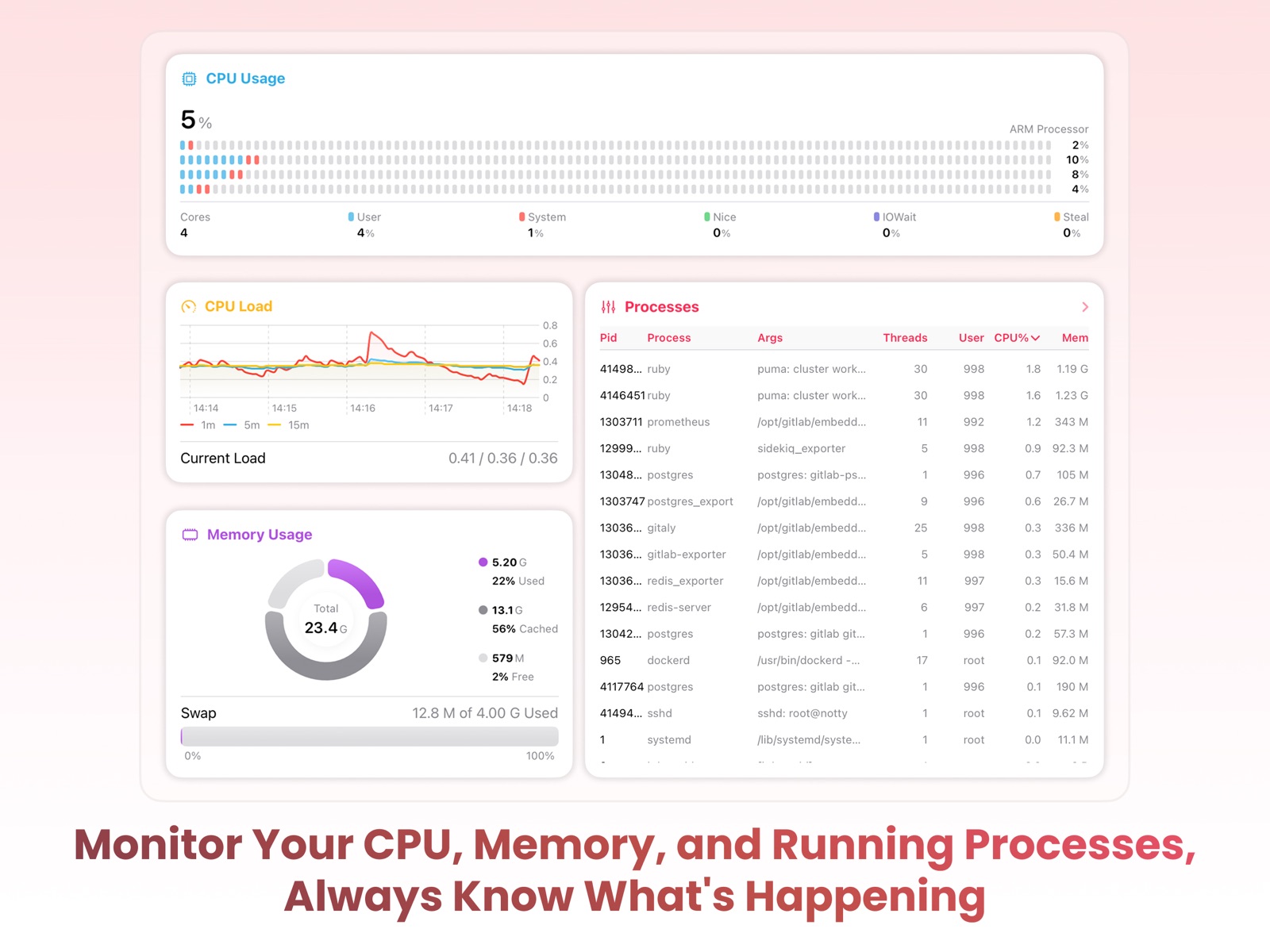
Apoku MCP provides app discovery, detailed cards, evidence, sources and screenshots where available. Unknown or conflicting prices stay explicit.
View JSON
GET /api/v3/apps/6740036221
{
  "app_id": 6740036221,
  "canonical_url": "https://appcorpus.com/apps/swiftserver-monitoring-ssh-6740036221",
  "identity": {
    "name": "SwiftServer - Monitoring & SSH",
    "slug": "swiftserver-monitoring-ssh",
    "developer": {
      "name": "GitSwift LLC",
      "url": "https://appcorpus.com/developers/gitswift-llc-developer_ec261b778edf43132aefc023343a4753"
    },
    "icon_url": "https://is1-ssl.mzstatic.com/image/thumb/Purple221/v4/65/db/3d/65db3dc0-5fe8-8824-e2d7-378100b020bc/AppIcon-0-0-1x_U007epad-0-0-0-1-0-85-220.png/512x512bb.jpg",
    "stores": [
      "apple"
    ],
    "platforms": [
      "iphone",
      "ipad"
    ],
    "status": {
      "state": "active",
      "label": "Active",
      "last_checked": "2026-08-07",
      "last_checked_label": "7 Aug 2026",
      "banner": null,
      "region_note": null,
      "data_state": "stale",
      "data_state_label": "Some store data may be out of date"
    }
  },
  "listings": [
    {
      "store": "apple",
      "status": "ACTIVE",
      "url": "https://apps.apple.com/us/app/swiftserver-monitoring-ssh/id6740036221?uo=4",
      "rating": 4.3,
      "rating_count": 31,
      "formatted_price": "Free",
      "is_free": true,
      "has_iap": true,
      "has_subscription": null,
      "version": "2.1.3",
      "updated": "2026-08-07",
      "currency": "USD"
    }
  ],
  "summary": {
    "one_liner": null,
    "summary": null,
    "best_for": [],
    "not_for": [],
    "status": "fallback",
    "at_a_glance": [
      "From $0.83/mo",
      "Free to download",
      "In-app purchases"
    ]
  },
  "categories": {
    "official": [
      "Developer Tools",
      "Utilities"
    ],
    "appcorpus": [
      {
        "category_id": "developer-tools",
        "label": "Developer tools",
        "url": "https://appcorpus.com/categories/developer-tools"
      },
      {
        "category_id": "utilities",
        "label": "Utilities",
        "url": "https://appcorpus.com/categories/utilities"
      }
    ]
  },
  "use_cases": [],
  "features": [
    {
      "capability_id": "free_app",
      "label": "Free app",
      "availability": "yes",
      "access_level": "free",
      "scope": null,
      "evidence": "Store published"
    },
    {
      "capability_id": "in_app_purchases",
      "label": "In-app purchases",
      "availability": "yes",
      "access_level": "free_limited",
      "scope": null,
      "evidence": "Store published"
    }
  ],
  "pricing": [
    {
      "store": "apple",
      "formatted_price": "Free",
      "is_free": true,
      "has_iap": true,
      "has_subscription": null,
      "currency": "USD",
      "market": "us",
      "last_verified": "2026-08-07",
      "rows": [
        "Monthly Premium — $1.99/month",
        "Monthly Premium — $9.99/year ($0.83/mo)",
        "Lifetime Premuim — $34.99"
      ],
      "state": "current"
    }
  ],
  "screens": [
    {
      "url": "https://is1-ssl.mzstatic.com/image/thumb/PurpleSource211/v4/01/88/11/0188119d-3186-c11c-f780-c316db35fb8f/iPadOS_EN_1.jpg/1600x1600bb.jpg",
      "store": "apple",
      "platform": "ipad",
      "alt": "SwiftServer - Monitoring & SSH ipad screenshot 1"
    },
    {
      "url": "https://is1-ssl.mzstatic.com/image/thumb/PurpleSource211/v4/01/88/11/0188119d-3186-c11c-f780-c316db35fb8f/iPadOS_EN_1.jpg/360x480bb.jpg",
      "store": "apple",
      "platform": "ipad",
      "alt": "SwiftServer - Monitoring & SSH ipad screenshot 2"
    },
    {
      "url": "https://is1-ssl.mzstatic.com/image/thumb/PurpleSource221/v4/b5/ef/36/b5ef367f-613a-2c64-e371-d8a31391be24/iPadOS_EN_2.jpg/1600x1600bb.jpg",
      "store": "apple",
      "platform": "ipad",
      "alt": "SwiftServer - Monitoring & SSH ipad screenshot 3"
    },
    {
      "url": "https://is1-ssl.mzstatic.com/image/thumb/PurpleSource221/v4/b5/ef/36/b5ef367f-613a-2c64-e371-d8a31391be24/iPadOS_EN_2.jpg/360x480bb.jpg",
      "store": "apple",
      "platform": "ipad",
      "alt": "SwiftServer - Monitoring & SSH ipad screenshot 4"
    },
    {
      "url": "https://is1-ssl.mzstatic.com/image/thumb/PurpleSource221/v4/b6/af/97/b6af97d8-101c-74b2-f2e6-ecff7341baef/iPadOS_EN_3.jpg/1600x1600bb.jpg",
      "store": "apple",
      "platform": "ipad",
      "alt": "SwiftServer - Monitoring & SSH ipad screenshot 5"
    },
    {
      "url": "https://is1-ssl.mzstatic.com/image/thumb/PurpleSource221/v4/b6/af/97/b6af97d8-101c-74b2-f2e6-ecff7341baef/iPadOS_EN_3.jpg/360x480bb.jpg",
      "store": "apple",
      "platform": "ipad",
      "alt": "SwiftServer - Monitoring & SSH ipad screenshot 6"
    },
    {
      "url": "https://is1-ssl.mzstatic.com/image/thumb/PurpleSource211/v4/3a/3e/c1/3a3ec1af-1b85-cea0-adab-2ef01914bfec/iPadOS_EN_4.jpg/1600x1600bb.jpg",
      "store": "apple",
      "platform": "ipad",
      "alt": "SwiftServer - Monitoring & SSH ipad screenshot 7"
    },
    {
      "url": "https://is1-ssl.mzstatic.com/image/thumb/PurpleSource211/v4/3a/3e/c1/3a3ec1af-1b85-cea0-adab-2ef01914bfec/iPadOS_EN_4.jpg/360x480bb.jpg",
      "store": "apple",
      "platform": "ipad",
      "alt": "SwiftServer - Monitoring & SSH ipad screenshot 8"
    },
    {
      "url": "https://is1-ssl.mzstatic.com/image/thumb/PurpleSource211/v4/08/b9/e6/08b9e6cd-9ecc-bf5c-5a8a-6e91688e10f6/iPadOS_EN_5.jpg/1600x1600bb.jpg",
      "store": "apple",
      "platform": "ipad",
      "alt": "SwiftServer - Monitoring & SSH ipad screenshot 9"
    },
    {
      "url": "https://is1-ssl.mzstatic.com/image/thumb/PurpleSource211/v4/08/b9/e6/08b9e6cd-9ecc-bf5c-5a8a-6e91688e10f6/iPadOS_EN_5.jpg/360x480bb.jpg",
      "store": "apple",
      "platform": "ipad",
      "alt": "SwiftServer - Monitoring & SSH ipad screenshot 10"
    },
    {
      "url": "https://is1-ssl.mzstatic.com/image/thumb/PurpleSource211/v4/b1/cb/a2/b1cba237-718d-46b1-d7f0-786a0fa2e7c5/iPadOS_EN_6.jpg/1600x1600bb.jpg",
      "store": "apple",
      "platform": "ipad",
      "alt": "SwiftServer - Monitoring & SSH ipad screenshot 11"
    },
    {
      "url": "https://is1-ssl.mzstatic.com/image/thumb/PurpleSource211/v4/b1/cb/a2/b1cba237-718d-46b1-d7f0-786a0fa2e7c5/iPadOS_EN_6.jpg/360x480bb.jpg",
      "store": "apple",
      "platform": "ipad",
      "alt": "SwiftServer - Monitoring & SSH ipad screenshot 12"
    },
    {
      "url": "https://is1-ssl.mzstatic.com/image/thumb/PurpleSource211/v4/e0/2b/70/e02b70b8-7d30-c74f-2e4f-0f968c595a17/iPadOS_EN_7.jpg/1600x1600bb.jpg",
      "store": "apple",
      "platform": "ipad",
      "alt": "SwiftServer - Monitoring & SSH ipad screenshot 13"
    },
    {
      "url": "https://is1-ssl.mzstatic.com/image/thumb/PurpleSource211/v4/e0/2b/70/e02b70b8-7d30-c74f-2e4f-0f968c595a17/iPadOS_EN_7.jpg/360x480bb.jpg",
      "store": "apple",
      "platform": "ipad",
      "alt": "SwiftServer - Monitoring & SSH ipad screenshot 14"
    },
    {
      "url": "https://is1-ssl.mzstatic.com/image/thumb/PurpleSource221/v4/fb/0b/25/fb0b2580-a0cd-4e29-fe18-41169c63b27a/iOS_EN_1.jpg/1320x1600bb.jpg",
      "store": "apple",
      "platform": "iphone",
      "alt": "SwiftServer - Monitoring & SSH iphone screenshot 15"
    },
    {
      "url": "https://is1-ssl.mzstatic.com/image/thumb/PurpleSource211/v4/aa/c1/4c/aac14cd2-471b-32f6-61bb-322d8b6706e2/iOS_EN_2.jpg/1320x1600bb.jpg",
      "store": "apple",
      "platform": "iphone",
      "alt": "SwiftServer - Monitoring & SSH iphone screenshot 16"
    },
    {
      "url": "https://is1-ssl.mzstatic.com/image/thumb/PurpleSource211/v4/46/b7/36/46b73601-4f5c-3c27-4bed-0a80fcebd5a6/iOS_EN_3.jpg/1320x1600bb.jpg",
      "store": "apple",
      "platform": "iphone",
      "alt": "SwiftServer - Monitoring & SSH iphone screenshot 17"
    },
    {
      "url": "https://is1-ssl.mzstatic.com/image/thumb/PurpleSource221/v4/b5/f6/45/b5f64536-b903-25e9-aa19-5091dbc105ae/iOS_EN_4.jpg/1320x1600bb.jpg",
      "store": "apple",
      "platform": "iphone",
      "alt": "SwiftServer - Monitoring & SSH iphone screenshot 18"
    },
    {
      "url": "https://is1-ssl.mzstatic.com/image/thumb/PurpleSource211/v4/27/5f/a2/275fa267-e46e-56cd-d680-81f7589748e2/iOS_EN_5.jpg/1320x1600bb.jpg",
      "store": "apple",
      "platform": "iphone",
      "alt": "SwiftServer - Monitoring & SSH iphone screenshot 19"
    },
    {
      "url": "https://is1-ssl.mzstatic.com/image/thumb/PurpleSource221/v4/67/cb/d7/67cbd74c-6a2d-75db-29fe-a62a823c9663/iOS_EN_6.jpg/1320x1600bb.jpg",
      "store": "apple",
      "platform": "iphone",
      "alt": "SwiftServer - Monitoring & SSH iphone screenshot 20"
    },
    {
      "url": "https://is1-ssl.mzstatic.com/image/thumb/PurpleSource221/v4/71/01/25/710125ea-2ee2-b284-2b18-7464d419a09e/iOS_EN_7.jpg/1320x1600bb.jpg",
      "store": "apple",
      "platform": "iphone",
      "alt": "SwiftServer - Monitoring & SSH iphone screenshot 21"
    },
    {
      "url": "https://is1-ssl.mzstatic.com/image/thumb/PurpleSource211/v4/fe/d4/08/fed408df-5c21-f379-e6ce-13c16f23cc03/iOS_EN_8.jpg/1320x1600bb.jpg",
      "store": "apple",
      "platform": "iphone",
      "alt": "SwiftServer - Monitoring & SSH iphone screenshot 22"
    },
    {
      "url": "https://is1-ssl.mzstatic.com/image/thumb/PurpleSource221/v4/7c/f1/9a/7cf19af4-8e87-6d02-5cd6-38f1d4b784ad/macOS_EN_1.jpg/1600x1600bb.jpg",
      "store": "apple",
      "platform": "mac",
      "alt": "SwiftServer - Monitoring & SSH mac screenshot 23"
    },
    {
      "url": "https://is1-ssl.mzstatic.com/image/thumb/PurpleSource221/v4/61/50/d5/6150d589-5123-f81a-cafd-8c130a826c48/macOS_EN_2.jpg/1600x1600bb.jpg",
      "store": "apple",
      "platform": "mac",
      "alt": "SwiftServer - Monitoring & SSH mac screenshot 24"
    },
    {
      "url": "https://is1-ssl.mzstatic.com/image/thumb/PurpleSource211/v4/be/2a/6f/be2a6fa4-8b28-b93d-5053-0956673426c0/macOS_EN_3.jpg/1600x1600bb.jpg",
      "store": "apple",
      "platform": "mac",
      "alt": "SwiftServer - Monitoring & SSH mac screenshot 25"
    },
    {
      "url": "https://is1-ssl.mzstatic.com/image/thumb/PurpleSource221/v4/f6/21/4f/f6214fcc-9e90-a3f9-8107-3468ee8e560f/macOS_EN_4.jpg/1600x1600bb.jpg",
      "store": "apple",
      "platform": "mac",
      "alt": "SwiftServer - Monitoring & SSH mac screenshot 26"
    },
    {
      "url": "https://is1-ssl.mzstatic.com/image/thumb/PurpleSource211/v4/ad/a1/e1/ada1e119-0643-74e3-e49b-67f40d88c8e9/macOS_EN_5.jpg/1600x1600bb.jpg",
      "store": "apple",
      "platform": "mac",
      "alt": "SwiftServer - Monitoring & SSH mac screenshot 27"
    },
    {
      "url": "https://is1-ssl.mzstatic.com/image/thumb/PurpleSource211/v4/b6/4c/f4/b64cf4de-6016-f27e-276c-b6832c89c7d2/macOS_EN_6.jpg/1600x1600bb.jpg",
      "store": "apple",
      "platform": "mac",
      "alt": "SwiftServer - Monitoring & SSH mac screenshot 28"
    },
    {
      "url": "https://is1-ssl.mzstatic.com/image/thumb/PurpleSource221/v4/d6/74/bb/d674bb8c-6cc3-c759-4b11-36060c3438a7/macOS_EN_7.jpg/1600x1600bb.jpg",
      "store": "apple",
      "platform": "mac",
      "alt": "SwiftServer - Monitoring & SSH mac screenshot 29"
    }
  ],
  "data_states": {
    "screens": "current"
  },
  "ratings": [
    {
      "store": "apple",
      "average": 4.3,
      "count": 31,
      "market": "us",
      "observed_at": "2026-08-07",
      "state": "current",
      "reviews": [
        {
          "rating": 5,
          "title": "Удобно.",
          "body": "Для небольшого количества серверов идеально.",
          "author": "Штайзи",
          "date": "7 Aug 2026"
        },
        {
          "rating": 4,
          "title": "Missing Containers",
          "body": "So far I’m very happy with the app. It delivers most of what it promises. My only issue is that when I connect with a server that has 30 or 40 containers the app will typically only display 24 to 25 of these. It will list the correct number of online/offline containers. Also, there is no mechanism to prompt for private key password. In some cases I would prefer not to store it with the application and just be prompted for it when the application starts. These two issues are the only things preventing me from giving it 5 stars.",
          "author": "controls-guru",
          "date": "7 Aug 2026"
        },
        {
          "rating": 2,
          "title": "Hopeful about the app",
          "body": "If you’re looking for an app that follows Apple’s design standards, this is the one and although version 1.0.7 is still missing a few features, it already shows one of the brightest futures among server management apps. Update: The app hasn’t received any new updates. There are a wide range of issues that make almost all of its features unusable for a pro user. Unfortunately, no longer using it..",
          "author": "m.nassiri",
          "date": "7 Aug 2026"
        },
        {
          "rating": 4,
          "title": "I like it",
          "body": "Just wish it was open source, I’d pay full price at that point.",
          "author": "syscheckin",
          "date": "7 Aug 2026"
        }
      ]
    }
  ],
  "privacy": [
    {
      "store": "apple",
      "declarations": [
        {
          "title": "Data Not Linked to You",
          "detail": "App Functionality — Diagnostics — Crash Data",
          "source": "Developer declared"
        },
        {
          "title": "Data Not Linked to You",
          "detail": "App Functionality — Purchases — Purchase History",
          "source": "Developer declared"
        },
        {
          "title": "Data Not Linked to You",
          "detail": "Diagnostics",
          "source": "Developer declared"
        },
        {
          "title": "Data Not Linked to You",
          "detail": "Purchases",
          "source": "Developer declared"
        }
      ],
      "accessibility": []
    }
  ],
  "changes": [
    {
      "store": "apple",
      "version": "1.0.4",
      "released_at": null,
      "notes": "- Added the option to purchase a lifetime premium version, which can only be purchased after the renewable subscription ends. - Optimized server connection testing."
    },
    {
      "store": "apple",
      "version": "1.0.5",
      "released_at": null,
      "notes": "- Added the option to purchase a lifetime premium version, which can only be purchased after the renewable subscription ends. - Optimized server connection testing."
    },
    {
      "store": "apple",
      "version": "1.0.6",
      "released_at": null,
      "notes": "- Fixed the issue where some servers could not use password login. - Added interactive server authentication."
    },
    {
      "store": "apple",
      "version": "1.0.7",
      "released_at": null,
      "notes": "- Fixed the issue of incorrect calculation of used memory size. - Fixed the issue where some servers' CPU usage always displayed as 100%. - Fixed the issue of incorrect default network interface selection."
    },
    {
      "store": "apple",
      "version": "1.1.0",
      "released_at": null,
      "notes": "This update brings major enhancements to Docker monitoring and management. You can now view detailed information about containers, compose, images, and volumes, and perform actions such as starting and stopping them anytime, anywhere. New Features: - Added Docker management features, including containers, compose, images, and volumes - Added collapsible multi-core CPU status display - You can now manually select the default disk and network interface to display - You can now launch Terminal and SFTP directly from the Dashboard - Added Global View dashboard for server locations Bug Fixes: - Fixed an issue with default network interface selection - Fixed the issue where the Dashboard failed to refresh properly Feedback: [email protected]"
    },
    {
      "store": "apple",
      "version": "1.1.1",
      "released_at": null,
      "notes": "- Fixed some UI detail issues."
    },
    {
      "store": "apple",
      "version": "1.1.2",
      "released_at": null,
      "notes": "- Fixed the crash issue when opening the terminal."
    },
    {
      "store": "apple",
      "version": "1.1.3",
      "released_at": null,
      "notes": "- Bug fixes and small improvements."
    },
    {
      "store": "apple",
      "version": "1.1.4",
      "released_at": null,
      "notes": "- Added support for SFTP folder upload/download - SFTP now supports deleting folders"
    },
    {
      "store": "apple",
      "version": "1.1.5",
      "released_at": null,
      "notes": "- Fixed some known issues."
    },
    {
      "store": "apple",
      "version": "1.1.6",
      "released_at": null,
      "notes": "- Added the server latency display feature."
    },
    {
      "store": "apple",
      "version": "1.1.7",
      "released_at": null,
      "notes": "- Supports batch launching Terminal and SFTP from machine groups; - Optimized session history; - Stability fixes."
    },
    {
      "store": "apple",
      "version": "1.2.0",
      "released_at": null,
      "notes": "This update adds support for macOS system monitoring. You can now view macOS system status including CPU, memory, disk, network, and Docker information. New Features: - Added support for macOS monitoring, including CPU status, memory, disk, network, Docker, and more Bug Fixes: - Fixed an issue where certain Docker versions failed to retrieve container and image information - Fixed an issue where vnstat data could not be retrieved under certain conditions Feedback: [email protected]"
    },
    {
      "store": "apple",
      "version": "1.2.1",
      "released_at": null,
      "notes": "- Fixed an issue where the app crashed immediately after opening - Fixed an issue where CPU always showed 100% usage on certain Linux systems"
    },
    {
      "store": "apple",
      "version": "1.2.2",
      "released_at": null,
      "notes": "- Terminal now supports custom fonts - Fixed color issue in terminal sidebar under dark mode"
    },
    {
      "store": "apple",
      "version": "2.0.0",
      "released_at": null,
      "notes": "SwiftServer 2.0.0 is here! This version brings more stable SSH connections and fixes a series of issues, providing a brand-new, fast, and secure SSH experience. New Features: - New SSH engine for more stable connections - Jump Server support - Redesigned Global View - Widgets and Live Activities - Server tag filtering - Custom status page layout orchestration - SFTP file transfer between servers Fixes: - Improved terminal experience - iOS terminal supports text selection and copying - Improved latency display and dashboard network unit settings - Enhanced SFTP file transfer features - Improved authentication prompts, disconnection handling, and session cleanup Feedback: [email protected]"
    },
    {
      "store": "apple",
      "version": "2.0.1",
      "released_at": null,
      "notes": "- Stability fixes"
    },
    {
      "store": "apple",
      "version": "2.0.2",
      "released_at": null,
      "notes": "- Fixed a crash that could occur while fetching server status - Improved SSH connection stability and compatibility - Refined Dashboard background styles - Fixed Widget refresh issues"
    },
    {
      "store": "apple",
      "version": "2.0.3",
      "released_at": null,
      "notes": "- Fixed an issue that could prevent SwiftServer from opening data after an update"
    },
    {
      "store": "apple",
      "version": "2.0.4",
      "released_at": null,
      "notes": "- Fixed an issue where the app could become unresponsive. - Improved SSH connection stability during network changes. - Added optional Terminal Debug Logs to help diagnose terminal issues. - Added faster entry points from widgets and macOS Dock recent connections. - Improved SFTP folder tapping on iOS, settings controls, and localization polish."
    }
  ],
  "alternatives": [
    {
      "app_id": 6474921250,
      "name": "CareServer",
      "url": "https://appcorpus.com/apps/careserver-6474921250",
      "reason": "Same category + similar ratings"
    },
    {
      "app_id": 1504613231,
      "name": "ShellBean - AI SSH Client",
      "url": "https://appcorpus.com/apps/shellbean-ai-ssh-client-1504613231",
      "reason": "Same category + similar ratings"
    },
    {
      "app_id": 6466196656,
      "name": "MyServers-Server Manager",
      "url": "https://appcorpus.com/apps/myservers-server-manager-6466196656",
      "reason": "Same category + similar ratings"
    },
    {
      "app_id": 6596729064,
      "name": "Nezha Mobile",
      "url": "https://appcorpus.com/apps/nezha-mobile-6596729064",
      "reason": "Same category + similar ratings"
    },
    {
      "app_id": 6479238971,
      "name": "Nex Terminal-SSH & SFTP client",
      "url": "https://appcorpus.com/apps/nex-terminal-ssh-sftp-client-6479238971",
      "reason": "Same category + similar ratings"
    },
    {
      "app_id": 6742527137,
      "name": "TermBean - SSH SFTP Client",
      "url": "https://appcorpus.com/apps/termbean-ssh-sftp-client-6742527137",
      "reason": "Same category + similar ratings"
    }
  ],
  "evidence_summary": {
    "index_state": "S1",
    "evidence_level": 1,
    "level_label": "Live store listing",
    "indexable": true,
    "last_verified_at": "2026-08-07",
    "unknown_fields": [
      "Apoku editorial summary has not been published yet."
    ],
    "sources": [
      "App Store"
    ]
  },
  "availability_markets": {
    "live": [
      "us"
    ],
    "selected": "us",
    "note": null
  },
  "feature_events": {
    "events": []
  },
  "features_slice": {
    "plans": [
      {
        "code": "premium",
        "label": "Monthly Premium",
        "kind": "subscription",
        "status": "store_listed",
        "prices": [
          {
            "storefront": "us",
            "formatted": "$1.99",
            "billing_period": "monthly",
            "scope_status": "scoped",
            "market_mismatch": false,
            "source_market": "us",
            "observed_at": "2026-08-07 01:02:49.724751+00:00"
          },
          {
            "storefront": "us",
            "formatted": "$9.99",
            "billing_period": "yearly",
            "scope_status": "scoped",
            "market_mismatch": false,
            "source_market": "us",
            "observed_at": "2026-08-07 01:02:49.724751+00:00"
          }
        ],
        "trial": null
      },
      {
        "code": "lifetime-premuim",
        "label": "Lifetime Premuim",
        "kind": "unknown",
        "status": "store_listed",
        "prices": [
          {
            "storefront": "us",
            "formatted": "$34.99",
            "billing_period": "one_time",
            "scope_status": "scoped",
            "market_mismatch": false,
            "source_market": "us",
            "observed_at": "2026-08-07 01:02:49.724751+00:00"
          }
        ],
        "trial": null
      }
    ],
    "features": [],
    "unknown_features": [],
    "data_cutoff": "7 Aug 2026"
  }
}