
Quick verdict
- What it is
- Store information collected; independent summary not yet available.
- At a glance
-
- $2.99
Categories and search queries
Official categories
- Weather
- Reference
AppCorpus categories
Key functions
| Function | Availability | Access | Scope | Evidence |
|---|---|---|---|---|
| Family Sharing | Yes | Unknown | App Store | Store published |
Screens
App Store
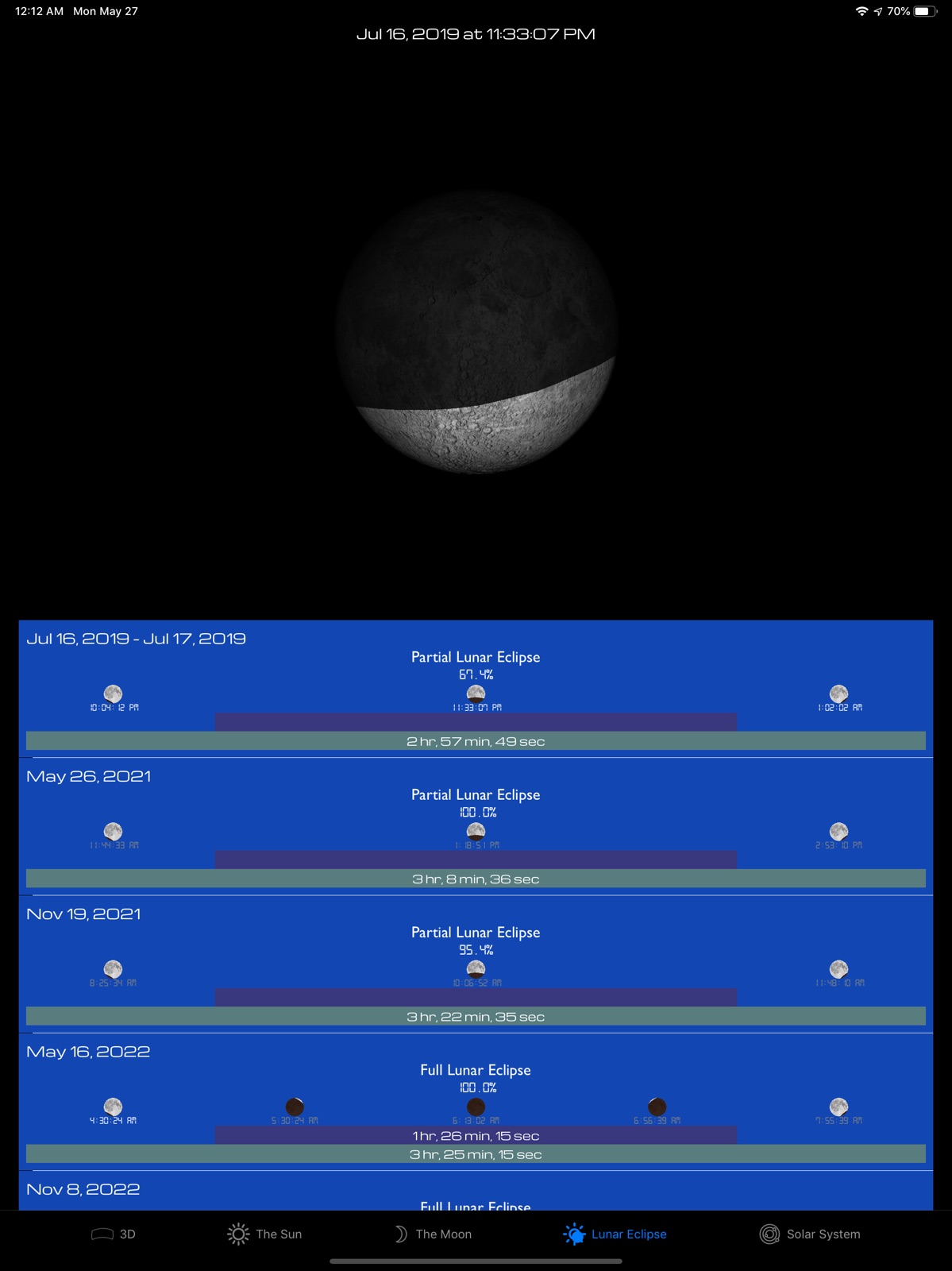
15 store screenshots



Pricing & paywalls
App Store
- Price: $2.99
Ratings & reviews
App Store
-
5/5Farmers best friend
Anyone in agriculture is always aware of the weather, and has to know when the sun is coming up and going down. This app and the moon faces which is very helpful for a grower who relies on moon phases for planting and harvesting them. An essential tool for making a good living
Chasiph · 31 Jul 2026
-
5/5CD1943
Very nice app; great to find planets in your iPhone; easy to use and accurate.
Planet seeker · 31 Jul 2026
-
5/5Mahyar
It is great, useful app.
Mahmood Mahyar · 31 Jul 2026
-
5/5perfect
All are perfect, but the Chinese translation is wrong in the notification.
12345wsxzaq · 31 Jul 2026
Privacy & accessibility
App Store
Privacy
- No Details Provided Developer declared
Accessibility
No accessibility labels collected yet.
Versions
App Store
-
4.1.2
Sky turns black during solar eclipses
-
4.1.3
New: • Daylight duration now shows seconds, in both 3D tab, and Sun tab. Fix: • The next occurences of solstices and equinoxes are now calculated correctly. • The times for sunrise and sunset are calculated with a higher accuracy. Consequently this improves the calculations of duration of daytime, and change in duration of daytime.
-
4.1.4
iPad support. Since some of you are using this app with iPad, it now works correctly on an iPad. There you go.
-
4.1.5
Dutch translation
-
4.2
• Time and date picker so you can choose a date and time by scrolling days, months, and years (awesome) • Takes into account transition from Julian to Gregorian calendaring systems, skipping 10 days in 1582 • Click on background in map location picker to cancel • Lunar eclipse text is back (bug fix)
-
4.2.1
• Codebase updated from Swift 3.2 to Swift 4.0 • Share-button fixed on iPad.
-
4.3
• Ground can be set to satellite view - click on the ground to switch, check it out, it is fantastic - now you can compare sunset position with landmarks in your landscape - and the ground satellite view changes when you choose another location too! (needs access to network) • Ground is shown in AR mode • Tweaks to the graphics in sky view, sun and moon made a little smaller, slight red twilight color at sunrise and sunsets.
-
4.3.1
4.3.1: • Minor changes to the map view on the ground 4.3: • Ground can be set to satellite view - click on the ground to switch, check it out, it is fantastic - now you can compare sunset position with landmarks in your landscape - and the ground satellite view changes when you choose another location too! (needs access to network) • Ground is shown in AR mode • Tweaks to the graphics in sky view, sun and moon made a little smaller, slight red twilight color at sunrise and sunsets.
-
4.3.2
• New button for the time slider • Fixed an issue where the ground did not turn dark in case of solar eclipse, when the ground is sattelite view.
-
4.3.3
• Bugfixes
-
4.3.4
Translations: • Arabic • Hindi • Bengali • Tamil
-
5.0
5.0 New: • Solar System View! Observe the planets around the sun, rewind and fastforward to see their movements around the sun. See why certain dates are better for missions to Mars! Improvements: • Map on the ground when you click on the grass - is now loaded in a smaller resolution, to make it load faster. • Code updated to Swift 4.2. Bugfix: • Views appear as expected on newer iPhones.
-
5.1
New: • In the Solar System View, tap on a planet or the sun to get info such as distances from the sun or the Earth, and Right Ascension + Declination. • In the Solar System View, pinch to zoom in and out to get make the distances more natural. Sun and planet sizes are still exaggerated for visibility. Fix: • Dialogs fitted to newer iPhones. • Motion sensor reinitiated if device is activated after having gone to sleep while in Solar System mode. • Improvements to the algorithms calculating planet positions
-
5.1.1
Bugfix: • Issue where motion sensor is not automatically reactivated in 3D view after a sleep - is fixed • Performance improvements
-
5.2
New: • Constellations and their names added! Names in English, and Latin! • Just click on the sky to toggle between starry sky with or without constellations!
-
5.2.1
Remember to leave a 5 star review :-) 5.2.1 • The delay when turning on and off constellations, has been minimized. 5.2 New: • Constellations and their names added! • Click on the sky to change between starry sky with or without constellations!
-
6.0
New: • Calculate lunar eclipses! • Simulate lunar eclipses! • Scroll in the lunar eclipses table, tap on one of the dates, then swipe over the moon to see the shadow of the earth moving over the moon!
-
6.0.1
6.0 New: • Calculate lunar eclipses! • Simulate lunar eclipses! • Scroll in the lunar eclipses table, tap on one of the dates, then swipe over the moon to see the shadow of the earth moving over the moon! 6.0.1 Fix: • Localization corrections
-
6.0.2
6.0 New: • Calculate lunar eclipses! • Simulate lunar eclipses! • Scroll in the lunar eclipses table, tap on one of the dates, then swipe over the moon to see the shadow of the earth moving over the moon! 6.0.1 Fix: • Localization corrections 6.0.2 Bugfix: • A error that prevented the finding of a lunar eclipse if it was less than seven days away has been solved.
-
6.0.3
• Lunar Eclipse calculation fix
-
6.0.4
New: • Map location changer has received controls for map type • In Lunar Eclipse view, tactile feedback (if the device supports it) has been introduced • In Solar System view, the planets' orbits are shown (although not elliptic) Fix: • Ground is made slightly lighter for night time • Satellite map on ground loads quicker
-
6.0.5
6.0.5 Fix: • Language fixes • Under the hood fixes 6.0.4 New: • Map location changer has received controls for map type • In Lunar Eclipse view, tactile feedback (if the device supports it) has been introduced • In Solar System view, the planets' orbits are shown (although not elliptic) Fix: • Ground is made slightly lighter for night time • Satellite map on ground loads quicker
-
6.0.6
6.0.6 • Chinese translation 6.0.5 Fix: • Language fixes • Under the hood fixes 6.0.4 New: • Map location changer has received controls for map type • In Lunar Eclipse view, tactile feedback (if the device supports it) has been introduced • In Solar System view, the planets' orbits are shown (although not elliptic) Fix: • Ground is made slightly lighter for night time • Satellite map on ground loads quicker
-
6.1
New: • Change view orientation in 3D by swiping with two fingers. Switch mode by simply tapping either of two modes in the new mode control, or simply by swiping with two fingers to activate, tapping with two fingers to deactivate. • 3D function now works in devices with no compass sensor, use two finger swipe to change orientation.
-
6.1.1
· 2 Jul 2019
Bugfix in 6.1.1: • Planets made a little bigger in Skyview so they are easier to find. New in 6.1: • Change view orientation in 3D by swiping with two fingers. Switch mode by simply tapping either of two modes in the new mode control, or simply by swiping with two fingers to activate, tapping with two fingers to deactivate. • 3D function now works in devices with no compass sensor, use two finger swipe to change orientation.
Alternatives
- Sun n Moon — Same category + similar ratings
Availability by market
- US
Data quality & evidence
- Page completeness
- Live store listing
- Last verified
- 31 Jul 2026
- Sources
- App Store
- Independent summary has not been published yet.