
Storm Shield
Receive severe weather alerts and track weather conditions.
iPhone · iPad · Android
Quick verdict
- What it is
- Storm Shield provides severe weather alerts and allows users to track weather conditions.
- Best for
-
- someone who needs severe weather alerts
- At a glance
-
- Free to download
- In-app purchases
Categories and search queries
Official categories
- Weather
- Travel
Apoku categories
Key functions
| Function | Availability | Access | Scope | Evidence |
|---|---|---|---|---|
| Free app | Yes | Free | Context-specific | Store published |
| In-app purchases | Yes | Limited free | Context-specific | Store published |
| Weather alerts | Yes | Unknown | Context-specific |
From listing
|
Screens
25 store screenshots

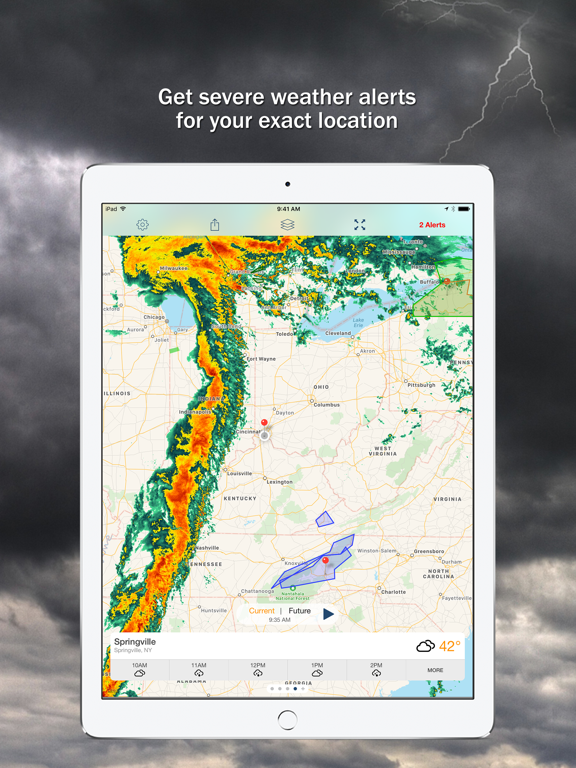
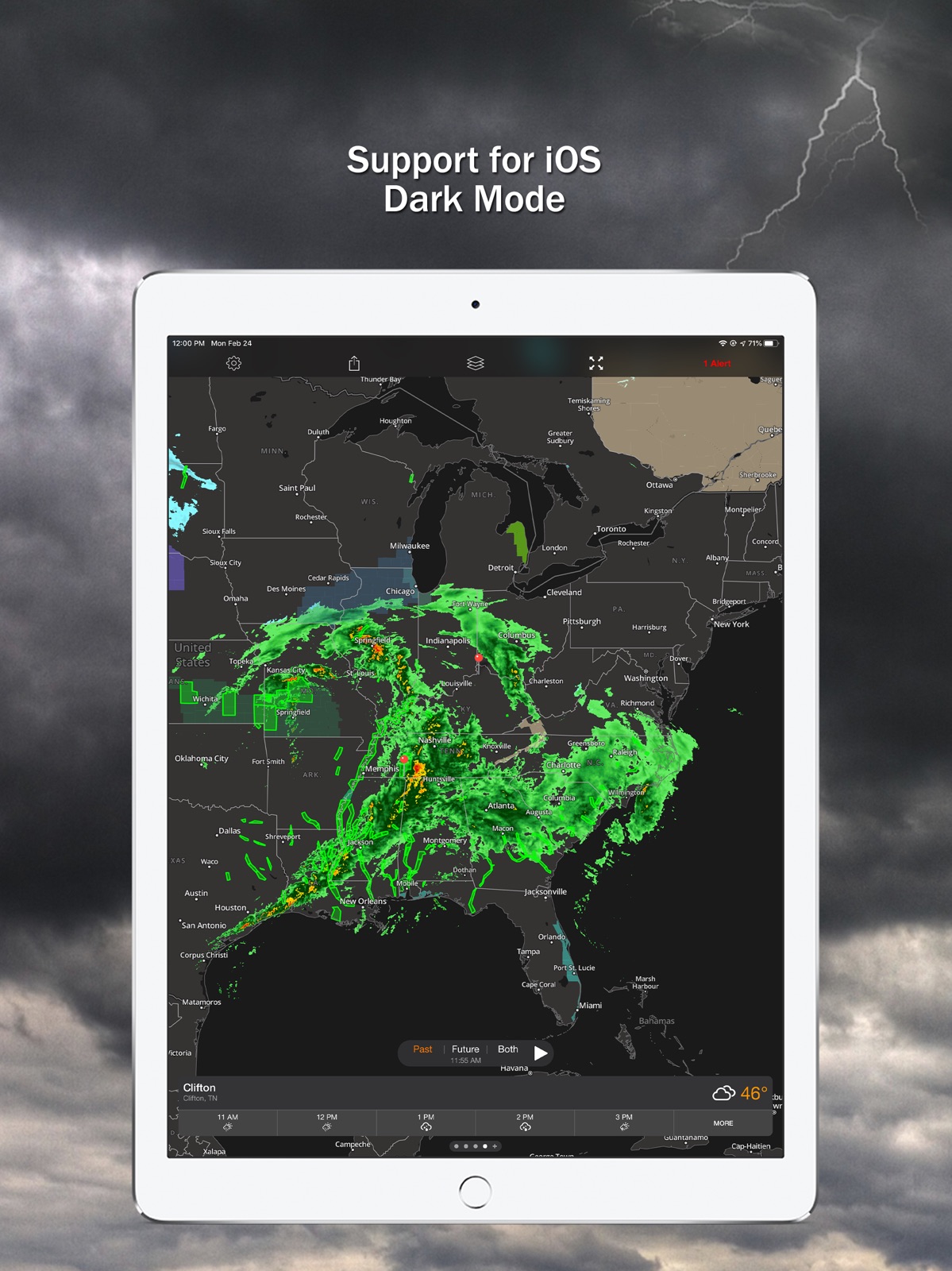
14 store screenshots


Pricing & paywalls
Shown for US
- 30-Day Limited Offer Upgrade
- Lightning Strikes
- Premium Weather
- Weekly Subscription
- Weekly with Free Trial
Shown for US
- Free to download
- In-app purchases
Ratings & reviews
Shown for US
-
5/5Fantastic, but missing Critical Alerts support
Storm Shield is a fantastic weather alert app, but it is missing support for the Critical Alerts feature. First, Storm Shield provides more precise alerts than other apps, so I don’t get alerts about warnings for storms on the far side of my county and headed away from me. Second, the voice alerts actually speak the alert, so you know without having to look at your phone what the alert is for (e.g., flash flood watch vs tornado warning). The only thing missing is support for Critical Alerts, which allows notifications to break through even when a Focus mode is turned on. Ideally, I would be able to pick for each alert type whether the notification is a Critical Alert or not. (The Red Cross Emergency app let’s me do this.) That way I can decide which alerts break through and wake me up at night when the Sleep focus mode is on (e.g., Tornado Warning but not Severe Thunderstorm Warning).
Arandur · 29 Sep 2026
-
2/5Alerts
I have loved this app for a little over 2 years now I believe. So much so that when our friends from California moved here to Tennessee with no experience in severe weather and were nervous about the weather, I recommended it to them to keep them up to date on watches and warnings and give them a heads up if there was a tornado warning in the middle of the night to get to the basement. Got us all set up with locations picked, alerts turned on and everything and felt good about it, until last night when tornadoes went through the area and there was not ONE alert that popped up for any of us other than the tornado watch that came through like 3 hours after it was issued. We never got any alert for the severe thunderstorm warning or the special weather statement that came and went. And thank the good Lord the radar still worked because I had to watch it all night and just happened to notice the red box pop up when the tornado warning was issued right over their location, and was able to call and tell them to get them and their kids downstairs in time for their area to get hit. People’s roofs were ripped off within a mile or two of their home and they would have had no idea they were even in danger if they’d just trusted this app:( makes me sad because it’s always worked for me and my family in the past and I trusted it too, but none of us (3-4 phones) got any alerts when it really mattered despite double and triple checking all our settings were correct.
nayala1 · 29 Sep 2026
-
4/5Adding a star for customer support
Updating my previous review and adding a star for great customer support! Within hours, the developers responded directly to my review, noting a temporary server glitch that prevented me from adding new locations. Works now! It’s a little cumbersome on the search function and only supports U.S., but once the location is set, the swipe-between-locations feature in the main interface is easy to use. I figure the other issue re: dark vs. light background is related to the settings on each of my devices. No big deal. I may keep Storm Shield for local weather monitoring and still stick with my old standby Storm Radar for a global view and peppier radar. Intellicast was the best weather app hands-down, but since its demise, no one has been able to match it. Previously: I’m on the fence trying to decide between weather apps for my iPhone and iPad. Storm Shield is good, but on the iPad I keep getting an error message when I try to add locations. The darker radar background is preferred on the iPad, but I’ve been unable to replicate it on my iPhone. The simple interface, one click between radar and detailed forecast info, is easy to navigate — a big plus!
appfetish · 29 Sep 2026
-
1/5Was ok for 99 cents but $6+tax is not worth it
For $1 a month, I let my subscription ride for a few years bc I thought it was neat getting notified how far a lightning strike was from my location… BUT, tornado and snow alerts were much slower than Apple weather app & weather channel app. It would be snowing outside when the alert would come through, lol. The flood advisories chime all the time whether it rains or not but definitely every time it rains so that was a little annoying. I first downloaded this app after my town was hit on Easter night by a tornado back in 2020. I also find it time consuming to add locations you want alerts for. To pin an address you want to receive alerts for, you can't enter an exact address. You have to enter city or zipcode then a map pulls up with that ENTIRE area and you have to zoom in and find the exact address by following the streets and guessing which house off that road. The houses aren't labeled by numbers either so you have to know the area pretty well. AS OF FEB 1, 2025, the developers are raising this monthly subscription $5 MORE dollars PER MONTH so it will now be $6 + tax per mont. This $5 increase makes this app no longer worth the money IMHO for the lightning strike locations And I cancelled my subscription today. Jan 6, 2025
TheNonPerfectMom · 29 Sep 2026
-
4/5Ok, so I was wrong
This is an update from my last review. If you know where to look, the features I liked about previous versions are still there. So I up-rated my review to 4 stars. The problem is that finding the forecast stuff isn’t straightforward in this version. In this version there is a fairly large button with the options “Current” and “Future”. Click on Future and basically what you get is a “Pay Up” message. To get the old forecast features, click on the little, tiny “More” in the bottom right, up comes a screen with current data plus sunrise/sunset. There is nothing to indicate that scrolling down will get you the forecast for the week that you were looking for. No slide bar shows until you actually start scrolling. Original review - Title: Last update turned a winner into a loser Great app but it’s really not free. With the last update it will only show you what’s happening right now. I can open the door for that. To get any forecast data (i.e., what’s going to happen), you have to buy a subscription. And it’s not clear that will even get you an ad free experience.
Scoot2mtns · 29 Sep 2026
Shown for US
-
2/5
I pay for Premium but don't get it.
R J · 29 Jul 2026
-
2/5
app is fine accept i can't get vocal alerts. I've tried every instruction I could find but nothing gave me alerts
Debbie Selecky · 29 Jul 2026
-
1/5
i had to delete the app.all i got when i tried to view our local radar.was a white blank screen.no radar.so.instead kf rebooting my phone.wich i hate.i just deleted it..its working fine now.knock on wood
sharon rivers · 29 Jul 2026
-
3/5
Broke. No radar. Your Al-powered solution - FAILED. Update. Human fixed it. Me. Delete app folder. Reinstall. Radar working.
Too Wun · 29 Jul 2026
-
1/5
No longer provides radar. I used to like this one, but the radar map quit working.
Joy Patrick · 29 Jul 2026
Privacy & accessibility
Privacy
- Data Linked to You — Analytics — Identifiers — Device ID Developer declared
- Data Linked to You — Analytics — Location — Coarse Location Developer declared
- Data Linked to You — Analytics — Location — Precise Location Developer declared
- Data Linked to You — Analytics — Purchases — Purchase History Developer declared
- Data Linked to You — Analytics — Usage Data — Product Interaction Developer declared
- Data Linked to You — Analytics — User Content — Customer Support Developer declared
- Data Linked to You — App Functionality — Contact Info — Email Address Developer declared
- Data Linked to You — App Functionality — Identifiers — Device ID Developer declared
- Data Linked to You — App Functionality — Location — Coarse Location Developer declared
- Data Linked to You — App Functionality — Location — Precise Location Developer declared
- Data Linked to You — App Functionality — Purchases — Purchase History Developer declared
- Data Linked to You — App Functionality — User Content — Customer Support Developer declared
- Data Linked to You — Developer’s Advertising or Marketing — Identifiers — Device ID Developer declared
- Data Linked to You — Developer’s Advertising or Marketing — Purchases — Purchase History Developer declared
- Data Linked to You — Product Personalization — Contact Info — Email Address Developer declared
- Data Linked to You — Product Personalization — Identifiers — Device ID Developer declared
- Data Linked to You — Product Personalization — Location — Coarse Location Developer declared
- Data Linked to You — Product Personalization — Location — Precise Location Developer declared
- Data Linked to You — Product Personalization — Usage Data — Product Interaction Developer declared
- Data Linked to You — Contact Info Developer declared
- Data Linked to You — Identifiers Developer declared
- Data Linked to You — Location Developer declared
- Data Linked to You — Purchases Developer declared
- Data Linked to You — Usage Data Developer declared
- Data Linked to You — User Content Developer declared
- Data Not Linked to You — Analytics — Diagnostics — Crash Data Developer declared
- Data Not Linked to You — Analytics — Diagnostics — Performance Data Developer declared
- Data Not Linked to You — App Functionality — Diagnostics — Crash Data Developer declared
- Data Not Linked to You — App Functionality — Diagnostics — Performance Data Developer declared
- Data Not Linked to You — App Functionality — Identifiers — User ID Developer declared
- Data Not Linked to You — App Functionality — User Content — Other User Content Developer declared
- Data Not Linked to You — Product Personalization — Identifiers — User ID Developer declared
- Data Not Linked to You — Product Personalization — User Content — Other User Content Developer declared
- Data Not Linked to You — Diagnostics Developer declared
- Data Not Linked to You — Identifiers Developer declared
- Data Not Linked to You — User Content Developer declared
- Data Used to Track You — Contact Info — Email Address Developer declared
- Data Used to Track You — Contact Info Developer declared
- Data Used to Track You — Identifiers — Device ID Developer declared
- Data Used to Track You — Identifiers Developer declared
- Data Used to Track You — Location — Coarse Location Developer declared
- Data Used to Track You — Location — Precise Location Developer declared
- Data Used to Track You — Location Developer declared
Accessibility
No accessibility labels collected yet.
Privacy
- Data collected — Analytics — App activity — App interactions Developer declared
- Data collected — Analytics — Device or other IDs Developer declared
- Data collected — App functionality — App info and performance — Crash logs Developer declared
- Data collected — App functionality — App info and performance — Diagnostics Developer declared
- Data collected — App functionality, Account management — Personal info — Email address Developer declared
- Data collected — App functionality, Account management — Personal info — User IDs Developer declared
- Data shared — Analytics — App activity — App interactions Developer declared
- Data shared — Analytics — Device or other IDs Developer declared
- Data shared — Analytics — Location — Approximate location Developer declared
- Data shared — App functionality — App info and performance — Diagnostics Developer declared
- Security practices — Your data is transferred over a secure connection — Data is encrypted in transit Developer declared
- Security practices — The developer provides a way for you to request that your data be deleted — You can request that data be deleted Developer declared
Accessibility
No accessibility labels collected yet.
Versions
-
4.10
Version 4.10 BUG FIXES: • We fixed a bug on iPad where the map didn't properly display across the entire screen when iPad was in Landscape View. As a result of this fix, we've expanded the Location Card view (at the bottom of the map screen) to be more helpful and show more hours when iPad is in Landscape view. • We fixed another bug where the Hurricane Tracks detail screen could not be closed if it displayed a lot of hurricane track data points. • We fixed a small bug where the app would crash when attempting to Share a map image to the device's Camera Roll. • We fixed a small bug that caused the app's Notifications permission box to not display correctly when the user wanted to enable Weather Alerts in the app, but the iOS device itself had notifications disabled (in iOS Settings). • Additional under-the-hood maintenance items are included in this release.
-
4.11
Version 4.11 APP IMPROVEMENTS: • A new map kit allows for new weather imagery layers that did not exist in version 4.10 and below. You'll notice the base map itself now looks a little different because of this map kit change. This new map kit brings the following NEW features: DARK MODE • Storm Shield App now supports iOS 13's Dark Mode. To enable Dark Mode in Storm Shield App, set your iOS device to 'Dark' in your iOS 'Settings' > 'Display & Brightness'. SEE SEVERE WEATHER ALERTS WHILE RADAR IS ANIMATING • The new map kit allows the Radar and the weather alert polygons to display on the map together while the Radar is animating. In previous versions of the app, the alert polygons would disappear when you started the Radar animation. IMPROVED IMAGERY TO THESE EXISTING PAST WEATHER LAYERS: • Radar • Clouds • Clouds & Radar together • Temperatures Map • Water Temps Map • Wind Speeds Map • Road Weather Map NEW MAP LAYERS • The new map kit adds a new 'Snow Fall' map layer, which replaced the 'Snow Cover' map layer from version 4.10 and below. The 'Snow Cover' layer from the previous app version's map kit depicted the amount of snow on the ground at a given time from all previous accumulations (i.e. snow pack). Conversely, the new 'Snow Fall' layer in the v4.11's map kit update depicts the amount of snow that has fallen in the last 24 hours, which is a better representation of recent snowfall, but does not account for snowfall that occurred more than 24 hours ago. • The new map kit adds a new 'Current Conditions' map layer under the 'Severe Weather Overlays' menu, to help you better see current conditions across a wide area. • The new map kit adds a new 'Current Temperatures' map layer under the 'Severe Weather Overlays' menu, to help you better see current temperatures across a wide area. NEW APP LAUNCH PREFERENCE • We added a new feature in 'Advanced > Show When App Starts' that lets you choose what location you want to see when you launch Storm Shield: choose to always show 'Your Current Location' (if you've allowed location permission) when you launch the app, or always show 'Your Last Viewed Location' when you launch the app. VIEW SEAMLESS PAST-TO-FUTURE RADAR IMAGERY • The new map kit lets you view Past-to-Future Weather imagery seamlessly, without having to switch weather layers (requires an optional in-app purchase to the Premium Weather monthly subscription). FOUR NEW FUTURE IMAGERY MAP LAYERS • The new map kit adds 4 brand new Future imagery map layers that did not exist in any prior version of the app (these require an optional in-app purchase to the Premium Weather monthly subscription): • Future Clouds: See predicted cloud imagery for the next few hours. • Future Clouds & Radar together: See predicted clouds and radar imagery together for the next few hours. • Future Water Temps Map: See predicted future water temperatures map. • Future Wind Speeds Map: See predicted future wind speeds map. • NOTE: If you already have a pre-existing active subscription for the optional Premium Weather in-app purchase, all six Future imagery layers will be enabled automatically when you update your app to this version 4.11 release. • If you do not have an active Premium Weather in-app purchase subscription, or your Premium Weather in-app purchase previously expired, then you will need to purchase the optional Premium Weather in-app subscription to unlock these six Future imagery map layers. IMPROVED IMAGERY TO THESE EXISTING FUTURE IMAGERY LAYERS: • Future Radar: See predicted radar imagery for the next few hours. • Future Temperature Map: See predicted future temperatures map. OTHER APP CHANGES INCLUDE: • We removed the 'Advanced > Weather Layer Imagery Loops' user preference that was in the old v4.10 app, because the new map kit from our weather provider in this version 4.11 app release does not support this capability. • Additional under-the-hood maintenance items are included in this release.
-
4.12
Version 4.12 BUG FIXES: • We fixed a map rendering bug that caused the map pins to appear to move away from their fixed locations on the map as you zoomed the map out to a broader regional or national map view. • We fixed a bug that caused the detailed storm information for an active hurricane or tropical storm to not display when you tapped one of the storm's past or forecasted plot points on the map. • We fixed a bug that would intermittently cause the map view to default to Omaha, Nebraska when you launched the app.
-
4.13
Version 4.13 IMPROVEMENTS: • We fixed a bug that caused the Lightning Alerts on/off switch to turn off inadvertently for a small group of users when the app was placed in the background and then opened again. • Additional under-the-hood maintenance items are included in this release.
-
4.14
Version 4.14 APP IMPROVEMENTS: • NEW! We added a new feature in Settings > Advanced > called 'Opening Weather Alert Notifications'. Now, when you tap a weather alert notification on your iOS device, you can choose to 'Show Map Screen', which opens the app on the Map screen and displays the location for which the alert was about (this is the default app behavior), or you can 'Show Alert Detail Screen', which opens the app and takes you straight to the Alert Detail screen so you can read or listen to the full details for the alert that you just received. • We fixed a bug on the Hurricane Tracks layer where '???' sometimes appeared for one of the data values when viewing a storm's detailed information. • Additional under-the-hood maintenance items are included in this release.
-
4.15
• A few under-the-hood maintenance items are included in this release.
-
4.16
Version 4.16 APP IMPROVEMENTS: • NEW! Improved widgets for iOS 15 and above: Choose either a Small or Large widget to see at a glance active weather alerts and current conditions on your iPhone and iPad home screen. • Additional under-the-hood maintenance items are included in this release.
-
4.17
Version 4.17: A few under-the-hood maintenance items are in this release, including: • Fixed a bug where some map layers were not staying selected in repeat app sessions for some users. • Fixed a bug with the map legend image.
-
4.18
Performance improvements. Thanks for supporting Storm Shield!
-
4.19
Bug fixes and performance improvements.
-
4.19.1
Bug fixes and performance improvements.
-
4.21
Bug fixes and performance improvements.
-
4.21.1
Bug fixes and performance improvements.
-
4.21.2
Bug fixes and performance improvements.
-
4.21.3
Bug fixes and performance improvements.
-
4.21.4
Bug fixes and performance improvements.
-
4.21.5
Bug fixes and performance improvements.
-
4.26.1
Bug fixes and performance improvements.
-
4.26.2
Bug fixes and performance improvements.
-
4.26.3
Bug fixes and performance improvements.
-
4.26.4
Bug fixes and performance improvements.
-
4.26.5
Bug fixes and performance improvements.
-
4.26.6
Bug fixes and performance improvements.
-
4.26.7
· 21 Jun 2025
This app has been updated by Apple to prepare for watchOS 27 compatibility. No new features are included. Bug fixes and performance improvements.
-
4.9
Version 4.9 APP IMPROVEMENTS: TURN SEVERE WEATHER ALERTS ON OR OFF BY LOCATION • This was a popular user request! In Settings, tap Manage Locations, then swipe left on a location name to reveal this new option. Note: Storm Shield supports notifications for up to 25 total locations (for example: 1 Current Location plus 24 Saved Locations). VOICE PLAYBACK OF AN ALERT'S FULL DETAIL TEXT • In the app, when a user taps a location's active alert to read its full text, users can tap a new Play/Pause button at the top of the Alert Detail to have Siri read the complete alert text. This feature is also helpful with Accessibility needs for our visually impaired users. MORE STORM DETAIL FOR HURRICANES AND TROPICAL STORMS • With the Hurricane Tracks overlay enabled, Storm Shield now displays this storm detail: storm name; type of storm (i.e. 'Tropical Depression'); direction, speed, and wind speed; past date and time stamps (i.e. '8 hours ago'); and forecasted date and time stamps (i.e. 'in 2 days'). CUSTOMIZE WEATHER IMAGERY DISPLAY FOR SLOW CELLULAR CONNECTIONS • A new Advanced setting lets you set the number of looping imagery frames to display for weather layers (such as radar) if you are on a slow cellular connection. Using less frames will help looping layers like radar display faster, but you won't see as much imagery. ACCESSIBILITY FIXES: • For our visually-impaired users: when inside the app and you tap an active alert to read its full detail, you can now tap the new Play/Pause button at the top of the Alert Detail screen. This gives Voice Over users more control over the voice read-back of an active alert's full detail text. • When the iOS Accessibility Voice Over ability was on, and there were multiple locations saved in Storm Shield, and those locations had multiple active alerts, a bug caused one location in the app to get its number of alerts confused with the number of active alerts for other locations in the app. This bug has now been squashed. • When the iOS Accessibility Voice Over ability was on, and Local Media Provider content appeared in the Location Card Detail screen, a bug caused the 'Live Stream' and 'Full Story' buttons to not be tappable. This bug has now been squashed. OTHER BUG FIXES: • We squashed an annoying bug that was causing severe weather notifications to stop working for some users, while these notifications continued to work fine for the majority of users. If your device was affected by this, updating your app and opening this version 4.9 should correct that issue. If, after installing and opening this version 4.9 update, you feel you're still not getting weather alert notifications, please submit a Support ticket from within your Storm Shield App, which provides us with additional diagnostic data, and we'll look into it. • A bug was found in Storm Shield iOS version 4.8 (which was released on July 9, 2018), which caused in-app purchase subscriptions that expired to not actually become disabled correctly in the app for some users. The net result was, some users continued to get access to the premium features for free after the in-app purchase subscription expired. This bug has been corrected in Storm Shield iOS version 4.9. • A bug was found in Storm Shield, which caused the purchase of an individual in-app subscription feature to inadvertently also unlock the other in-app subscription purchase feature. As an example: if you purchased the individual 'Lightning' feature, you inadvertently also got the separate 'Future Radar' feature for free. This bug has been corrected in Storm Shield iOS version 4.9. • Additional bug fixes and performance improvements are included in this release.
- 6.0.0 · 16 Mar 2026
Alternatives
- Storm Tracker° — Same category + similar ratings
- Emergency: Severe Weather App — Same category + similar ratings
- Storm Radar: Weather Tracker — Same category + similar ratings
- Tornado Alley Weather Center — Same category + similar ratings
- NOAA Radar & Weather Forecast — Same category + similar ratings
- StormTrack 5 — Same category + similar ratings
Availability by market
- US
Data quality & evidence
- Page completeness
- Apoku summary published
- Last verified
- 29 Sep 2026
- Sources
- App Store, Google Play