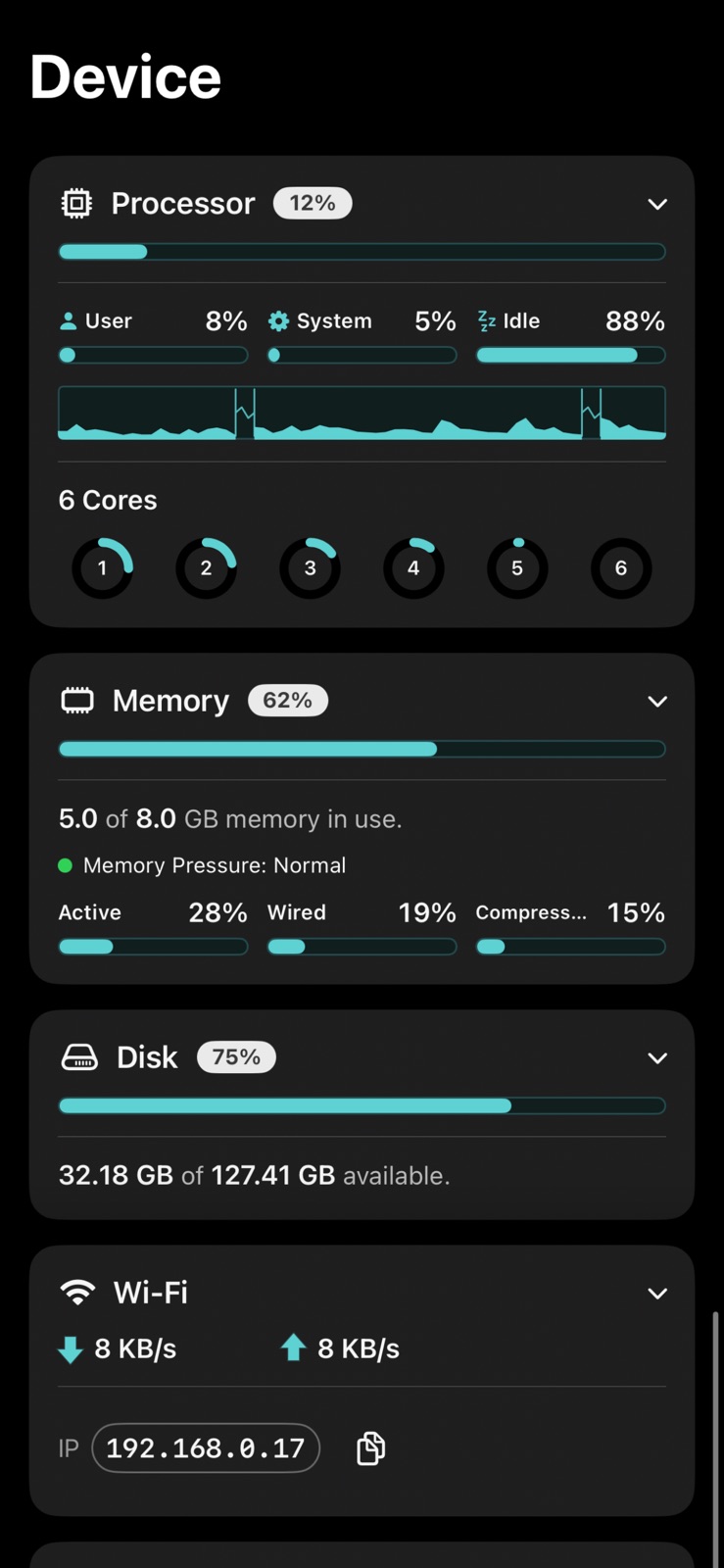
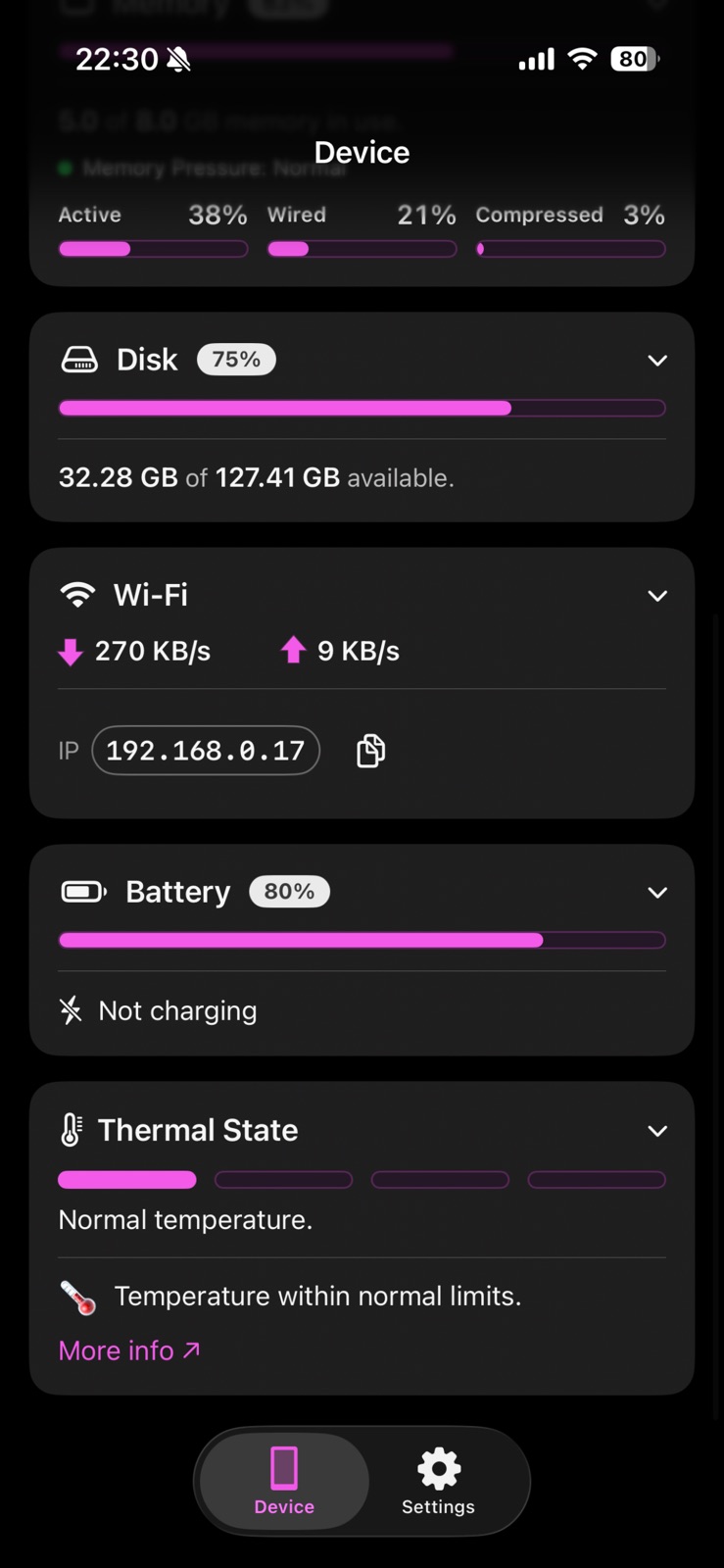
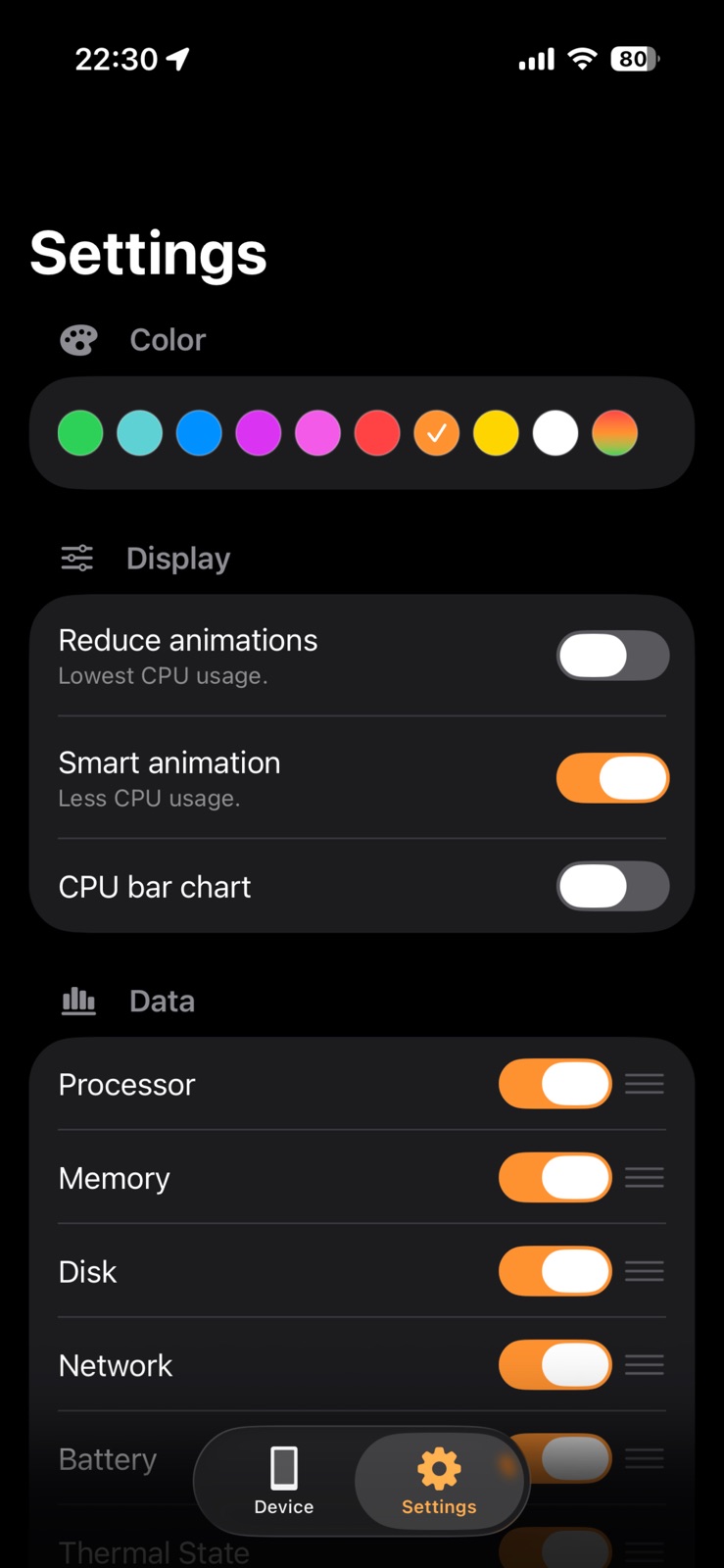
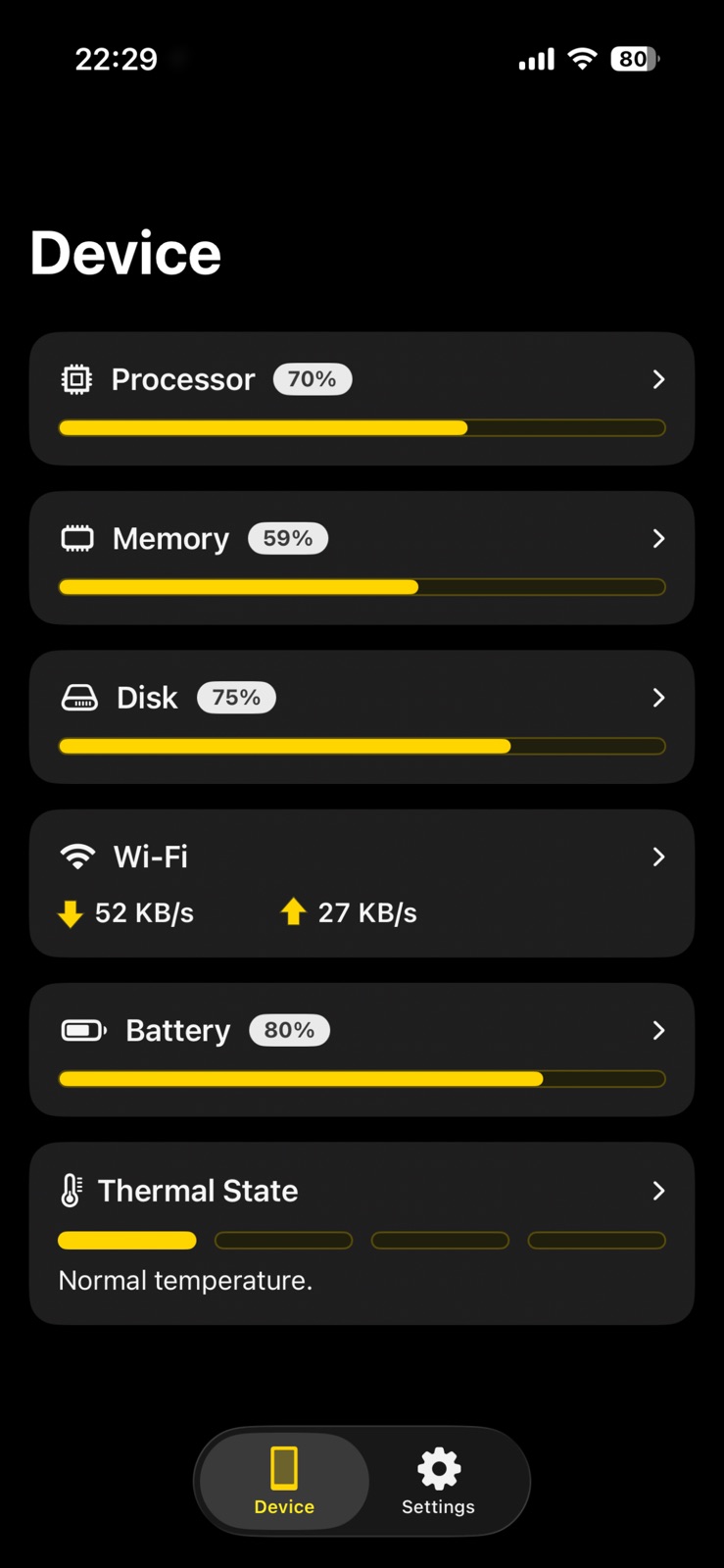
AppCorpus MCP gives your agent current app data, prices, screens, features and sources.
View JSON
GET /api/v3/apps/1528819846
{
  "app_id": 1528819846,
  "canonical_url": "https://appcorpus.com/apps/stats-panel-system-monitor-1528819846",
  "identity": {
    "name": "Stats Panel - System Monitor",
    "slug": "stats-panel-system-monitor",
    "developer": {
      "name": "Andrew Moloney",
      "url": "https://appcorpus.com/developers/andrew-moloney-developer_c36b07310fb002b623ca328d96b4e32c"
    },
    "icon_url": "https://is1-ssl.mzstatic.com/image/thumb/Purple221/v4/5a/52/93/5a5293ca-e605-957e-8fcf-9e7544295414/AppIcon-0-0-1x_U007ephone-0-1-85-220.png/512x512bb.jpg",
    "stores": [
      "apple"
    ],
    "platforms": [
      "iphone"
    ],
    "status": {
      "state": "active",
      "label": "Active",
      "last_checked": "2026-08-06",
      "last_checked_label": "6 Aug 2026",
      "banner": null,
      "region_note": null
    }
  },
  "listings": [
    {
      "store": "apple",
      "status": "ACTIVE",
      "url": "https://apps.apple.com/us/app/stats-panel-system-monitor/id1528819846?uo=4",
      "rating": 0.0,
      "rating_count": 0,
      "formatted_price": "$3.99",
      "is_free": false,
      "has_iap": false,
      "has_subscription": false,
      "version": "1.0.0",
      "updated": "2026-07-20",
      "currency": "USD"
    }
  ],
  "summary": {
    "one_liner": null,
    "summary": null,
    "best_for": [],
    "not_for": [],
    "status": "fallback",
    "at_a_glance": [
      "$3.99"
    ]
  },
  "categories": {
    "official": [
      "Utilities",
      "Developer Tools"
    ],
    "appcorpus": [
      {
        "category_id": "utilities",
        "label": "Utilities",
        "url": "https://appcorpus.com/categories/utilities"
      },
      {
        "category_id": "developer-tools",
        "label": "Developer tools",
        "url": "https://appcorpus.com/categories/developer-tools"
      }
    ]
  },
  "use_cases": [],
  "features": [
    {
      "capability_id": "family_sharing",
      "label": "Family Sharing",
      "availability": "yes",
      "access_level": "unknown",
      "scope": "App Store",
      "evidence": "Store published"
    }
  ],
  "pricing": [
    {
      "store": "apple",
      "formatted_price": "$3.99",
      "is_free": false,
      "has_iap": false,
      "has_subscription": false,
      "currency": "USD",
      "market": "us",
      "last_verified": "2026-08-06",
      "rows": [
        "Price: $3.99"
      ]
    }
  ],
  "screens": [
    {
      "url": "https://is1-ssl.mzstatic.com/image/thumb/PurpleSource221/v4/6a/03/af/6a03af81-9e73-35a5-cd58-60e09531e063/[email protected]/1242x1600bb.jpg",
      "store": "apple",
      "platform": "iphone",
      "alt": "Stats Panel - System Monitor iphone screenshot 1"
    },
    {
      "url": "https://is1-ssl.mzstatic.com/image/thumb/PurpleSource221/v4/68/32/62/683262da-b529-7540-b2ad-b4c426ed3898/[email protected]/1242x1600bb.jpg",
      "store": "apple",
      "platform": "iphone",
      "alt": "Stats Panel - System Monitor iphone screenshot 2"
    },
    {
      "url": "https://is1-ssl.mzstatic.com/image/thumb/PurpleSource221/v4/82/df/a5/82dfa5c0-533c-e7db-232f-e6ad98ba0d19/[email protected]/1242x1600bb.jpg",
      "store": "apple",
      "platform": "iphone",
      "alt": "Stats Panel - System Monitor iphone screenshot 3"
    },
    {
      "url": "https://is1-ssl.mzstatic.com/image/thumb/PurpleSource211/v4/a8/7e/d2/a87ed2f1-39ce-a638-8273-a18835d59759/[email protected]/1242x1600bb.jpg",
      "store": "apple",
      "platform": "iphone",
      "alt": "Stats Panel - System Monitor iphone screenshot 4"
    },
    {
      "url": "https://is1-ssl.mzstatic.com/image/thumb/PurpleSource211/v4/11/90/ba/1190ba3b-5a94-6306-e731-399bcd7b241c/[email protected]/1242x1600bb.jpg",
      "store": "apple",
      "platform": "iphone",
      "alt": "Stats Panel - System Monitor iphone screenshot 5"
    },
    {
      "url": "https://is1-ssl.mzstatic.com/image/thumb/PurpleSource221/v4/73/3b/5f/733b5fcf-92cd-a439-6a32-1634f5f5a3a6/[email protected]/1242x1600bb.jpg",
      "store": "apple",
      "platform": "iphone",
      "alt": "Stats Panel - System Monitor iphone screenshot 6"
    },
    {
      "url": "https://is1-ssl.mzstatic.com/image/thumb/PurpleSource221/v4/2f/84/06/2f8406e9-31fe-cc1a-d2a7-b2a56909c577/Screen02@2x_2.png/1440x900bb.jpg",
      "store": "apple",
      "platform": "mac",
      "alt": "Stats Panel - System Monitor mac screenshot 7"
    },
    {
      "url": "https://is1-ssl.mzstatic.com/image/thumb/PurpleSource211/v4/7b/b2/a7/7bb2a7a3-88ee-91ef-3919-3583691abe0f/[email protected]/1440x900bb.jpg",
      "store": "apple",
      "platform": "mac",
      "alt": "Stats Panel - System Monitor mac screenshot 8"
    },
    {
      "url": "https://is1-ssl.mzstatic.com/image/thumb/PurpleSource221/v4/25/bc/c5/25bcc5b1-623a-bbad-6967-1721cf40c0fe/[email protected]/1440x900bb.jpg",
      "store": "apple",
      "platform": "mac",
      "alt": "Stats Panel - System Monitor mac screenshot 9"
    },
    {
      "url": "https://is1-ssl.mzstatic.com/image/thumb/PurpleSource211/v4/f0/14/39/f01439c8-19d6-3155-e422-d60d55031d5a/[email protected]/1440x900bb.jpg",
      "store": "apple",
      "platform": "mac",
      "alt": "Stats Panel - System Monitor mac screenshot 10"
    },
    {
      "url": "https://is1-ssl.mzstatic.com/image/thumb/PurpleSource211/v4/d7/55/e0/d755e06c-3c5d-f1cc-7467-d574459137d5/[email protected]/1440x900bb.jpg",
      "store": "apple",
      "platform": "mac",
      "alt": "Stats Panel - System Monitor mac screenshot 11"
    },
    {
      "url": "https://is1-ssl.mzstatic.com/image/thumb/PurpleSource221/v4/e8/8a/38/e88a38d4-d23a-5487-3f14-da94b4f7b15d/[email protected]/1440x900bb.jpg",
      "store": "apple",
      "platform": "mac",
      "alt": "Stats Panel - System Monitor mac screenshot 12"
    },
    {
      "url": "https://is1-ssl.mzstatic.com/image/thumb/PurpleSource211/v4/c8/5d/47/c85d4744-924b-92aa-90e3-dd6003e2d1ad/[email protected]/1440x900bb.jpg",
      "store": "apple",
      "platform": "mac",
      "alt": "Stats Panel - System Monitor mac screenshot 13"
    },
    {
      "url": "https://is1-ssl.mzstatic.com/image/thumb/PurpleSource221/v4/1e/21/99/1e219986-34ce-1b72-b275-aa38c40db558/[email protected]/1440x900bb.jpg",
      "store": "apple",
      "platform": "mac",
      "alt": "Stats Panel - System Monitor mac screenshot 14"
    }
  ],
  "ratings": [
    {
      "store": "apple",
      "average": 0.0,
      "count": 0,
      "market": "us",
      "observed_at": "2026-08-06",
      "reviews": [
        {
          "rating": 5,
          "title": "Nice and compact",
          "body": "The single, compact icon is really nice. It gives just the right amount of detail for someone who only wants to monitor high level system resource usage. It doesn't take up a bunch of menu bar space like some of the other apps. Only thing I wish is there was an option to use a slighly smaller icon, since it looks a little oversized height wise next to my other menu bar icons like the control center, wifi, bluetooth icons",
          "author": "mhan_solo3",
          "date": "6 Aug 2026"
        },
        {
          "rating": 3,
          "title": "Glitchy (vanished, never to return…)",
          "body": "Unfortunately, a bit glitchy. After fiddling with the settings, the panel disappeared; can’t seem to bring it back. (It is running, maybe a reboot will fix it). Also, doesn’t display CPU load (per-core) just running CPU (average) load, which isn’t really what I’m after. Color themes are not *really* useful; it’s just a solid color rendering. I thought it would be selecting a true theming, e.g., “green -> red” where happy CPU is green, gets progressively more red under load, etc., but no it just changes the menubar icon to green. Meh. All that said, if not for the glitchiness I’d recommend as a basic tool for viewing system stats, reasonably priced (there are better apps, but also way more expensive).",
          "author": "zbeckman",
          "date": "6 Aug 2026"
        },
        {
          "rating": 5,
          "title": "Well done and useful little tool!",
          "body": "Thank you to the developer for making this available to us. It looks you put a lot of thought and work into this useful utility. It functions well on a MacBook Air M3. Much appreciated and I highly recommended this to anyone looking for a lightweight system monitor. 5***** 10/10",
          "author": "Ted.G.",
          "date": "6 Aug 2026"
        },
        {
          "rating": 5,
          "title": "It's simple and great",
          "body": "I really like the simplicity of the app - It would be really cool if there were some options on where it shows up on your screen (like a sidebar or such). Other than that, It's awesome and it doesn't seem to bog down my computer at all.",
          "author": "austincparker",
          "date": "6 Aug 2026"
        },
        {
          "rating": 4,
          "title": "Nice, wish it could use interval tracking ...",
          "body": "Nicely compact display, useful metrics. I wish that it could utilitze a user-defined interval(option) for measuring and reporting. I'd like to be able to set it to report every 10 (or 15 or ???) seconds, rather than only near real-time. Perfect for an older MBP with 1440x900 (native, I use SwitchResX to simulate retina resolution) resolution. Nice alternative to a more expensive alternatives that is not as compact.",
          "author": "MichaelKnutson",
          "date": "6 Aug 2026"
        }
      ]
    }
  ],
  "privacy": [
    {
      "store": "apple",
      "declarations": [
        {
          "title": "Data Not Collected",
          "detail": "",
          "source": "Developer declared"
        }
      ],
      "accessibility": []
    }
  ],
  "changes": [
    {
      "store": "apple",
      "version": "1.0.0",
      "released_at": "2026-07-20",
      "notes": ""
    }
  ],
  "alternatives": [],
  "evidence_summary": {
    "index_state": "S1",
    "evidence_level": 1,
    "level_label": "Live store listing",
    "indexable": true,
    "last_verified_at": "2026-08-06",
    "unknown_fields": [
      "Independent summary has not been published yet."
    ],
    "sources": [
      "App Store"
    ]
  },
  "availability_markets": {
    "live": [
      "us"
    ],
    "selected": "us",
    "note": null
  },
  "feature_events": {
    "events": []
  },
  "features_slice": {
    "plans": [],
    "features": [],
    "unknown_features": [
      "family_sharing"
    ],
    "data_cutoff": "6 Aug 2026"
  }
}