AppCorpus MCP gives your agent current app data, prices, screens, features and sources.
View JSON
GET /api/v3/apps/6756507981
{
  "app_id": 6756507981,
  "canonical_url": "https://appcorpus.com/apps/speeek-learn-language-with-ai-6756507981",
  "identity": {
    "name": "Speeek: Learn Language with AI",
    "slug": "speeek-learn-language-with-ai",
    "developer": {
      "name": "Michael Yao",
      "url": "https://appcorpus.com/developers/michael-yao-developer_06b2323250b075f5228c61d838bc8b39"
    },
    "icon_url": "https://is1-ssl.mzstatic.com/image/thumb/Purple211/v4/21/97/38/219738a7-619a-739b-60d0-630ca984e1a0/AppIcon-0-0-1x_U007epad-0-1-85-220.png/512x512bb.jpg",
    "stores": [
      "apple"
    ],
    "platforms": [
      "iphone",
      "ipad"
    ],
    "status": {
      "state": "active",
      "label": "Active",
      "last_checked": "2026-08-06",
      "last_checked_label": "6 Aug 2026",
      "banner": null,
      "region_note": null
    }
  },
  "listings": [
    {
      "store": "apple",
      "status": "ACTIVE",
      "url": "https://apps.apple.com/us/app/speeek-learn-language-with-ai/id6756507981?uo=4",
      "rating": 5.0,
      "rating_count": 1,
      "formatted_price": "Free",
      "is_free": true,
      "has_iap": true,
      "has_subscription": false,
      "version": "2.0.5",
      "updated": "2026-05-05",
      "currency": "USD"
    }
  ],
  "summary": {
    "one_liner": null,
    "summary": null,
    "best_for": [],
    "not_for": [],
    "status": "fallback",
    "at_a_glance": [
      "From $8.99/mo",
      "Free to download",
      "In-app purchases"
    ]
  },
  "categories": {
    "official": [
      "Education",
      "Travel"
    ],
    "appcorpus": [
      {
        "category_id": "education",
        "label": "Education",
        "url": "https://appcorpus.com/categories/education"
      },
      {
        "category_id": "travel",
        "label": "Travel",
        "url": "https://appcorpus.com/categories/travel"
      }
    ]
  },
  "use_cases": [],
  "features": [
    {
      "capability_id": "free_app",
      "label": "Free app",
      "availability": "yes",
      "access_level": "free",
      "scope": null,
      "evidence": "Store published"
    },
    {
      "capability_id": "in_app_purchases",
      "label": "In-app purchases",
      "availability": "yes",
      "access_level": "free_limited",
      "scope": null,
      "evidence": "Store published"
    }
  ],
  "pricing": [
    {
      "store": "apple",
      "formatted_price": "Free",
      "is_free": true,
      "has_iap": true,
      "has_subscription": false,
      "currency": "USD",
      "market": "us",
      "last_verified": "2026-08-06",
      "rows": [
        "Discounted Quarterly Plan — $8.99/month",
        "Discounted Quarterly Plan — $12.99/quarter",
        "Discounted Quarterly Plan — $29.99/year ($2.49/mo)",
        "Quarterly Plan — $12.99/month",
        "Quarterly Plan — $17.99/quarter",
        "Quarterly Plan — $34.99/year ($2.91/mo)",
        "Discounted Semiannual Plan — $19.99",
        "Semiannual Plan — $24.99"
      ]
    }
  ],
  "screens": [
    {
      "url": "https://is1-ssl.mzstatic.com/image/thumb/PurpleSource211/v4/7e/9d/0c/7e9d0c14-e2f3-da30-2210-be5fde4d04df/iPad__13-ipadPro129-01.png/1600x1600bb.jpg",
      "store": "apple",
      "platform": "ipad",
      "alt": "Speeek: Learn Language with AI ipad screenshot 1"
    },
    {
      "url": "https://is1-ssl.mzstatic.com/image/thumb/PurpleSource211/v4/7e/9d/0c/7e9d0c14-e2f3-da30-2210-be5fde4d04df/iPad__13-ipadPro129-01.png/360x480bb.jpg",
      "store": "apple",
      "platform": "ipad",
      "alt": "Speeek: Learn Language with AI ipad screenshot 2"
    },
    {
      "url": "https://is1-ssl.mzstatic.com/image/thumb/PurpleSource211/v4/5d/5e/f1/5d5ef189-c8c2-8a9e-c561-7eeb565906aa/iPad__13-ipadPro129-02.png/1600x1600bb.jpg",
      "store": "apple",
      "platform": "ipad",
      "alt": "Speeek: Learn Language with AI ipad screenshot 3"
    },
    {
      "url": "https://is1-ssl.mzstatic.com/image/thumb/PurpleSource211/v4/5d/5e/f1/5d5ef189-c8c2-8a9e-c561-7eeb565906aa/iPad__13-ipadPro129-02.png/360x480bb.jpg",
      "store": "apple",
      "platform": "ipad",
      "alt": "Speeek: Learn Language with AI ipad screenshot 4"
    },
    {
      "url": "https://is1-ssl.mzstatic.com/image/thumb/PurpleSource211/v4/7e/e2/d8/7ee2d8e3-4a91-54a4-04bf-ba5ce3c148db/iPad__13-ipadPro129-03.png/1600x1600bb.jpg",
      "store": "apple",
      "platform": "ipad",
      "alt": "Speeek: Learn Language with AI ipad screenshot 5"
    },
    {
      "url": "https://is1-ssl.mzstatic.com/image/thumb/PurpleSource211/v4/7e/e2/d8/7ee2d8e3-4a91-54a4-04bf-ba5ce3c148db/iPad__13-ipadPro129-03.png/360x480bb.jpg",
      "store": "apple",
      "platform": "ipad",
      "alt": "Speeek: Learn Language with AI ipad screenshot 6"
    },
    {
      "url": "https://is1-ssl.mzstatic.com/image/thumb/PurpleSource221/v4/68/3a/79/683a7936-558e-de5b-4b3c-b2987532ae8e/iPad__13-ipadPro129-04.png/1600x1600bb.jpg",
      "store": "apple",
      "platform": "ipad",
      "alt": "Speeek: Learn Language with AI ipad screenshot 7"
    },
    {
      "url": "https://is1-ssl.mzstatic.com/image/thumb/PurpleSource221/v4/68/3a/79/683a7936-558e-de5b-4b3c-b2987532ae8e/iPad__13-ipadPro129-04.png/360x480bb.jpg",
      "store": "apple",
      "platform": "ipad",
      "alt": "Speeek: Learn Language with AI ipad screenshot 8"
    },
    {
      "url": "https://is1-ssl.mzstatic.com/image/thumb/PurpleSource221/v4/de/08/db/de08dbfc-d9fc-50dd-2d08-f227c96933d4/iPad__13-ipadPro129-05.png/1600x1600bb.jpg",
      "store": "apple",
      "platform": "ipad",
      "alt": "Speeek: Learn Language with AI ipad screenshot 9"
    },
    {
      "url": "https://is1-ssl.mzstatic.com/image/thumb/PurpleSource221/v4/de/08/db/de08dbfc-d9fc-50dd-2d08-f227c96933d4/iPad__13-ipadPro129-05.png/360x480bb.jpg",
      "store": "apple",
      "platform": "ipad",
      "alt": "Speeek: Learn Language with AI ipad screenshot 10"
    },
    {
      "url": "https://is1-ssl.mzstatic.com/image/thumb/PurpleSource211/v4/5f/11/ab/5f11ab6b-3af9-3d53-1205-3e7e65d77f13/iPad__13-ipadPro129-06.png/1600x1600bb.jpg",
      "store": "apple",
      "platform": "ipad",
      "alt": "Speeek: Learn Language with AI ipad screenshot 11"
    },
    {
      "url": "https://is1-ssl.mzstatic.com/image/thumb/PurpleSource211/v4/5f/11/ab/5f11ab6b-3af9-3d53-1205-3e7e65d77f13/iPad__13-ipadPro129-06.png/360x480bb.jpg",
      "store": "apple",
      "platform": "ipad",
      "alt": "Speeek: Learn Language with AI ipad screenshot 12"
    },
    {
      "url": "https://is1-ssl.mzstatic.com/image/thumb/PurpleSource221/v4/26/82/11/268211d2-1b7a-7292-b516-78ae562b9725/iPad__13-ipadPro129-07.png/1600x1600bb.jpg",
      "store": "apple",
      "platform": "ipad",
      "alt": "Speeek: Learn Language with AI ipad screenshot 13"
    },
    {
      "url": "https://is1-ssl.mzstatic.com/image/thumb/PurpleSource221/v4/26/82/11/268211d2-1b7a-7292-b516-78ae562b9725/iPad__13-ipadPro129-07.png/360x480bb.jpg",
      "store": "apple",
      "platform": "ipad",
      "alt": "Speeek: Learn Language with AI ipad screenshot 14"
    },
    {
      "url": "https://is1-ssl.mzstatic.com/image/thumb/PurpleSource221/v4/6c/bd/f4/6cbdf405-c33a-11fb-9ecc-362426b3a054/iPhones__6.9-01.png/1320x1600bb.jpg",
      "store": "apple",
      "platform": "iphone",
      "alt": "Speeek: Learn Language with AI iphone screenshot 15"
    },
    {
      "url": "https://is1-ssl.mzstatic.com/image/thumb/PurpleSource221/v4/da/c0/2e/dac02ee2-411d-7aef-a95d-74dc190e6a87/iPhones__6.9-02.png/1320x1600bb.jpg",
      "store": "apple",
      "platform": "iphone",
      "alt": "Speeek: Learn Language with AI iphone screenshot 16"
    },
    {
      "url": "https://is1-ssl.mzstatic.com/image/thumb/PurpleSource211/v4/eb/4b/79/eb4b7945-7c6f-0983-18da-e981eea5479a/iPhones__6.9-03.png/1320x1600bb.jpg",
      "store": "apple",
      "platform": "iphone",
      "alt": "Speeek: Learn Language with AI iphone screenshot 17"
    },
    {
      "url": "https://is1-ssl.mzstatic.com/image/thumb/PurpleSource211/v4/45/1c/44/451c442f-ab13-84db-c49a-b00c10621a97/iPhones__6.9-04.png/1320x1600bb.jpg",
      "store": "apple",
      "platform": "iphone",
      "alt": "Speeek: Learn Language with AI iphone screenshot 18"
    },
    {
      "url": "https://is1-ssl.mzstatic.com/image/thumb/PurpleSource211/v4/dc/43/a7/dc43a7f0-2621-993c-2bb4-ee188a8dfe2f/iPhones__6.9-05.png/1320x1600bb.jpg",
      "store": "apple",
      "platform": "iphone",
      "alt": "Speeek: Learn Language with AI iphone screenshot 19"
    },
    {
      "url": "https://is1-ssl.mzstatic.com/image/thumb/PurpleSource221/v4/a6/9a/29/a69a29bd-907d-925e-ed50-a4c3bbc93780/iPhones__6.9-06.png/1320x1600bb.jpg",
      "store": "apple",
      "platform": "iphone",
      "alt": "Speeek: Learn Language with AI iphone screenshot 20"
    },
    {
      "url": "https://is1-ssl.mzstatic.com/image/thumb/PurpleSource211/v4/96/b2/ec/96b2ec20-7a4b-a8fa-f4c5-5a612f2f9fc8/iPhones__6.9-07.png/1320x1600bb.jpg",
      "store": "apple",
      "platform": "iphone",
      "alt": "Speeek: Learn Language with AI iphone screenshot 21"
    }
  ],
  "ratings": [
    {
      "store": "apple",
      "average": 5.0,
      "count": 1,
      "market": "us",
      "observed_at": "2026-08-06",
      "reviews": []
    }
  ],
  "privacy": [
    {
      "store": "apple",
      "declarations": [
        {
          "title": "Data Linked to You",
          "detail": "App Functionality — Contact Info — Email Address",
          "source": "Developer declared"
        },
        {
          "title": "Data Linked to You",
          "detail": "App Functionality — Contact Info — Name",
          "source": "Developer declared"
        },
        {
          "title": "Data Linked to You",
          "detail": "App Functionality — Identifiers — User ID",
          "source": "Developer declared"
        },
        {
          "title": "Data Linked to You",
          "detail": "App Functionality — User Content — Customer Support",
          "source": "Developer declared"
        },
        {
          "title": "Data Linked to You",
          "detail": "Product Personalization — Contact Info — Name",
          "source": "Developer declared"
        },
        {
          "title": "Data Linked to You",
          "detail": "Product Personalization — Identifiers — User ID",
          "source": "Developer declared"
        },
        {
          "title": "Data Linked to You",
          "detail": "Product Personalization — Location — Coarse Location",
          "source": "Developer declared"
        },
        {
          "title": "Data Linked to You",
          "detail": "Contact Info",
          "source": "Developer declared"
        },
        {
          "title": "Data Linked to You",
          "detail": "Identifiers",
          "source": "Developer declared"
        },
        {
          "title": "Data Linked to You",
          "detail": "Location",
          "source": "Developer declared"
        },
        {
          "title": "Data Linked to You",
          "detail": "User Content",
          "source": "Developer declared"
        },
        {
          "title": "Data Not Linked to You",
          "detail": "App Functionality — Diagnostics — Crash Data",
          "source": "Developer declared"
        },
        {
          "title": "Data Not Linked to You",
          "detail": "App Functionality — User Content — Audio Data",
          "source": "Developer declared"
        },
        {
          "title": "Data Not Linked to You",
          "detail": "Diagnostics",
          "source": "Developer declared"
        },
        {
          "title": "Data Not Linked to You",
          "detail": "User Content",
          "source": "Developer declared"
        }
      ],
      "accessibility": []
    }
  ],
  "changes": [
    {
      "store": "apple",
      "version": "1.0",
      "released_at": null,
      "notes": ""
    },
    {
      "store": "apple",
      "version": "1.0.1",
      "released_at": null,
      "notes": "What's New in 1.0.1 Smarter pronunciation feedback After every speaking exercise, you'll now see an encouraging message that matches how well you did. Great scores get a celebration, partial scores get motivation, and lower scores get a gentle nudge to keep going. Improved word-building exercises The sentence reconstruction game no longer shuffles the word bank as you build your answer, making it easier to track your progress and undo selections. Better exercises overall Small refinements across fill-in-the-blank and speaking exercises for a smoother experience. Bug fixes & performance improvements Various stability fixes under the hood, including improvements to the speech recognition flow to prevent occasional freezes."
    },
    {
      "store": "apple",
      "version": "1.0.2",
      "released_at": null,
      "notes": "What's New Hear the native-language translation played automatically after each correct answer, reinforcing listening comprehension alongside pronunciation practice. IPA phonetic transcription now appears below sentences in exercises so you always know exactly how a word sounds. Audio playback is smoother and more reliable, with a loading indicator on play buttons and better Bluetooth speaker routing. A soft chime now plays when you start recording — sounds respect your in-app sound settings. The flashcard feed shows a loading indicator while fetching your next sentence after a pass. Bug fixes and performance improvements."
    },
    {
      "store": "apple",
      "version": "1.0.3",
      "released_at": null,
      "notes": "Bug Fixes & Stability This update focuses entirely on stability and reliability improvements under the hood. Navigation is more robust — the app no longer crashes when opening a screen directly from a notification or deep link. Audio playback is more reliable across all exercises. A number of edge cases that could cause the app to freeze or display errors have been resolved. Overall, the app should feel smoother and more dependable."
    },
    {
      "store": "apple",
      "version": "2.0.0",
      "released_at": null,
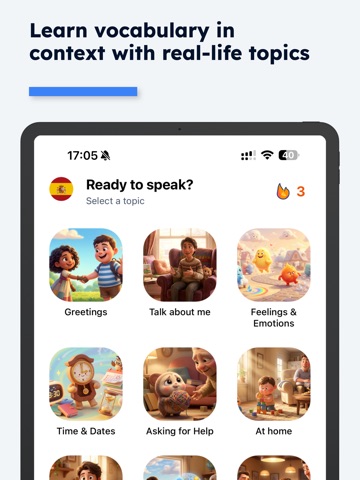
      "notes": "What's New This update is a major redesign of the app with a completely rebuilt practice experience. New: Topic-Based Practice Feed The home screen is now a swipeable sentence practice feed organized by Topics and Sub-topics. Pick a category, choose a sub-topic, then swipe through real-life sentences to speak out loud — making practice more structured and focused than ever. New: Challenge Mode Test yourself with fill-in-the-blank speaking practice. Hear a sentence with a missing word, say the full sentence to fill it in, and get instant pronunciation feedback. New: Stories Tab A dedicated video feed of short immersive clips to help you absorb your target language naturally. Free users get 5 videos; upgrade to Premium for unlimited access. New: Dialogue Tab Dialogue practice now has its own dedicated tab for quicker access. Redesigned Navigation A new floating pill-style tab bar with smooth animations makes switching between Study, Stories, Dialogue, Stats, and Settings feel effortless. Sentence Vocabulary Breakdown Tap any sentence while practicing to see a full vocabulary breakdown with pronunciation audio for each word. Practice Summary When you finish or quit a session, you'll now see your stats — sentences completed, attempts, and accuracy — at a glance. Bug Fixes & Improvements Translations now always display correctly in your app language regardless of topic Streak tracking improvements Performance and stability improvements across the board"
    },
    {
      "store": "apple",
      "version": "2.0.1",
      "released_at": null,
      "notes": "What's New Bluetooth audio support — Audio now plays correctly through Bluetooth wearables and glasses. No more silent output on A2DP devices. Live transcript overlay — See your speech transcribed in real time as a smooth animated banner while you practice and shadow dialogues. Speech speed sheet — Tap the speed button to pick your preferred playback speed from a dedicated menu instead of cycling through options. Daily goal celebration — A cheering sound plays when you hit your daily goal to make the moment feel earned. Daily goal progress — Your progress toward today's goal is now visible right on the Stats screen. Faster loading — Audio and subtopic cards are preloaded in the background so there's less waiting between sentences. Bug fixes and performance improvements."
    },
    {
      "store": "apple",
      "version": "2.0.2",
      "released_at": null,
      "notes": "Completely Redesigned Experience We rebuilt the app from the ground up. Every screen has been redesigned for a smoother, more intuitive feel — from the moment you open the app to your daily practice session. New Onboarding A new personalized onboarding flow helps us understand your goals, learning style, and schedule so we can tailor your plan from day one. Smarter Notifications We made it harder to break a streak (in a good way). Notifications now adapt to where you are in your journey: Streak protection alerts remind you before your streak is at risk Re-engagement reminders check in after 1 day, 3 days, and a week — with messages that actually feel human Rotating message variants so you never see the same notification twice Bug fixes and performance improvements"
    },
    {
      "store": "apple",
      "version": "2.0.3",
      "released_at": null,
      "notes": "Smoother Feed Experience Videos in your feed now load continuously as you scroll — no more stopping to load more. The app automatically fetches the next set of workouts as you browse, keeping your momentum going. Polished UI Details Stat cards have a cleaner, more refined look with updated icon styling. The overall visual experience feels tighter and more consistent across screens. Dark Mode Improvements Video loading placeholders now properly adapt to dark mode, so the app looks great no matter your display setting. Bug Fixes & Stability Fixed an issue where styles on certain screens could appear broken Improved layout handling for notched and edge-to-edge displays Under-the-hood reliability and crash tracking improvements"
    },
    {
      "store": "apple",
      "version": "2.0.5",
      "released_at": "2026-05-05",
      "notes": "- Simplified onboarding: the video feed tour now introduces all controls in a single step, so you can start learning faster. - Fixed a bug where the sound toggle didn't properly sync the video volume. - Your level now defaults to A1 if none has been selected yet. - Removed the C2 level option to better match our current content library."
    }
  ],
  "alternatives": [
    {
      "app_id": 6762476954,
      "name": "Dialog Engine: Learn Languages",
      "url": "https://appcorpus.com/apps/dialog-engine-learn-languages-6762476954",
      "reason": "Same category + similar ratings"
    }
  ],
  "evidence_summary": {
    "index_state": "S1",
    "evidence_level": 1,
    "level_label": "Live store listing",
    "indexable": true,
    "last_verified_at": "2026-08-06",
    "unknown_fields": [
      "Independent summary has not been published yet."
    ],
    "sources": [
      "App Store"
    ]
  },
  "availability_markets": {
    "live": [
      "us"
    ],
    "selected": "us",
    "note": null
  },
  "feature_events": {
    "events": []
  },
  "features_slice": {
    "plans": [
      {
        "code": "discounted-plan",
        "label": "Discounted Quarterly Plan",
        "kind": "subscription",
        "status": "store_listed",
        "prices": [
          {
            "storefront": "us",
            "formatted": "$8.99",
            "billing_period": "monthly"
          },
          {
            "storefront": "us",
            "formatted": "$12.99",
            "billing_period": "quarterly"
          },
          {
            "storefront": "us",
            "formatted": "$29.99",
            "billing_period": "yearly"
          }
        ],
        "trial": null
      },
      {
        "code": "plan",
        "label": "Quarterly Plan",
        "kind": "subscription",
        "status": "store_listed",
        "prices": [
          {
            "storefront": "us",
            "formatted": "$12.99",
            "billing_period": "monthly"
          },
          {
            "storefront": "us",
            "formatted": "$17.99",
            "billing_period": "quarterly"
          },
          {
            "storefront": "us",
            "formatted": "$34.99",
            "billing_period": "yearly"
          }
        ],
        "trial": null
      },
      {
        "code": "discounted-semiannual-plan",
        "label": "Discounted Semiannual Plan",
        "kind": "unknown",
        "status": "store_listed",
        "prices": [
          {
            "storefront": "us",
            "formatted": "$19.99",
            "billing_period": null
          }
        ],
        "trial": null
      },
      {
        "code": "semiannual-plan",
        "label": "Semiannual Plan",
        "kind": "unknown",
        "status": "store_listed",
        "prices": [
          {
            "storefront": "us",
            "formatted": "$24.99",
            "billing_period": null
          }
        ],
        "trial": null
      }
    ],
    "features": [],
    "unknown_features": [],
    "data_cutoff": "6 Aug 2026"
  }
}