
Spanish Dictionary - Dict Box
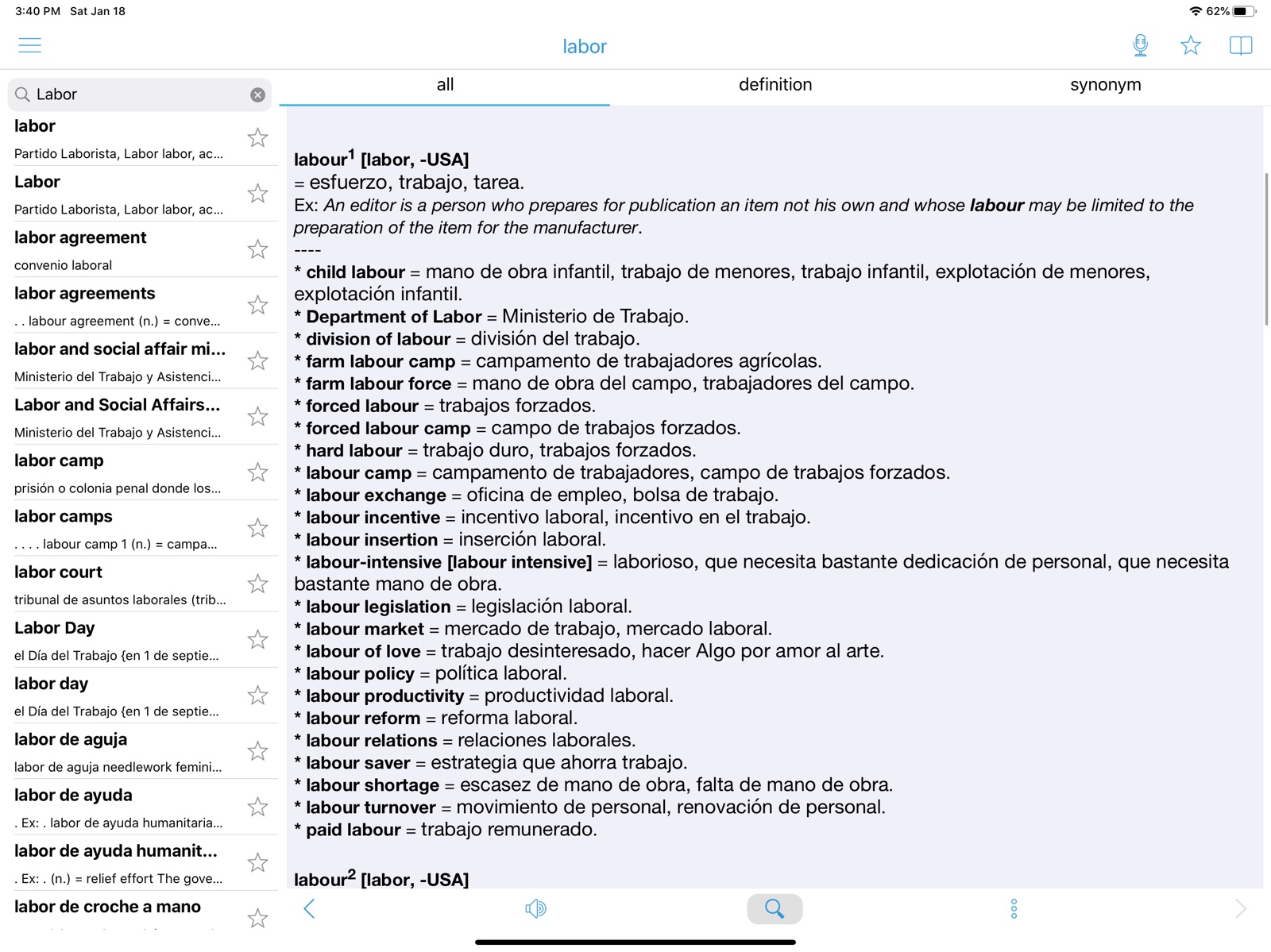
A dictionary and translation app for English and Spanish languages.
by Xung Le
iPhone · iPad
Quick verdict
- What it is
- This app provides a dictionary and translation services for English and Spanish languages, with features like offline pronunciation and word correction.
- Best for
-
- someone who wants to learn Spanish
- someone who needs to translate English to Spanish
- At a glance
-
- Free to download
- In-app purchases
Categories and search queries
Official categories
- Reference
- Education
AppCorpus categories
Key functions
| Function | Availability | Access | Scope | Evidence |
|---|---|---|---|---|
| Free app | Yes | Free | — | Store published |
| In-app purchases | Yes | Limited free | — | Store published |
Screens
App Store
8 store screenshots


Pricing & paywalls
App Store
- Free to download
- In-app purchases
Ratings & reviews
App Store
-
5/5¡Estupendo! 👋 Super handy! More up to date than most, especially the DRAE.
This is extremely useful, even for a bilingual person like myself. It’s better than carrying the heavyweight gold standard Velazquez “A New Pronouncing Dictionary of the Spanish and English Languages”. I use this almost every day. Easy and fast. Also, it is more nimble in keeping up with newer uses if words in the technological arena and in social media. In addition, the academic dictionaries such ad DRAE are sometimes a bit censored. Por ejemplo, la palabra “escatologico” en DRAE se referiere solamente a teología, a pesar wue “scatos” en griego es las heces. En ESTE diccionario te indican que también significa una preocupación con la función eliminatoria y sus productos. Por eso casi siempre termino buscando en este diccionario, ademas de que traduce de un idioma al otro.
Caribbean Jim · 31 Jul 2026
-
5/5Spanish word of the day- Bueno!
I really like this dictionary. It has all the words, phrases, examples, etc. that I need to go through a Spanish book that I'm trying to read - the 400 year old amazing story of Don Quixote; one of the best stories ever written. And naturally, I wanted to read this in its original language after enjoying it in English. This dictionary has been helping immensely! I also like the daily "word of the day" practice options this has, which helps me to continue to refresh and practice the Spanish words I searched for on a daily basis.
o0Ezzmeralda0o · 31 Jul 2026
-
5/5Best Dictionary
Probably the best foreign language to English dictionary I’ve used! I really like how it automatically searches for and displays the word that I have copied - no hitting the search icon, deleting the previous word, and pasting! I like that you can search for a conjugated verb, and it will automatically give you the infinitive and nouns or adjectives based on that verb. I really like the flash card function too. Things to improve: provide conjugation tables, and make the flash card portion of the app able to display either “side” of the card first.
Pablo-gee · 31 Jul 2026
-
3/5Great until?
Have enjoyed using this very much for maybe six months, I find it very helpful with pronunciation and translations in Spanish/ English. Now, suddenly all I can get is the word and the pronunciation, no definition no other details, such as verb, adj, noun, masculine, feminine. I tap the word and it immediately takes me to some ad for an unrelated product. Gives me options to download another app to get definitions but I don’t want to have to use different apps to get to the same place when this one used to be great. I guess I’ll try another app because this has become extremely disappointing.
Onegin113 · 31 Jul 2026
-
5/5Excellent!
Have been using Dictionary Box for a few weeks now and find it easy to use and quite efficient. No having to switch back and forth between the two languages before entering a word because the app automatically detects the language and translates accordingly. Word results include definitions in both languages, as well as links to other dictionaries and sources for further research. All this offline and for free! Curious to check out the premium upgrade, but highly satisfied with the basic version. Kudos!
Horofhay · 31 Jul 2026
Privacy & accessibility
App Store
Privacy
- Data Not Linked to You — Analytics — Diagnostics — Crash Data Developer declared
- Data Not Linked to You — Analytics — Identifiers — Device ID Developer declared
- Data Not Linked to You — Analytics — Location — Coarse Location Developer declared
- Data Not Linked to You — Analytics — Usage Data — Product Interaction Developer declared
- Data Not Linked to You — Third-Party Advertising — Identifiers — Device ID Developer declared
- Data Not Linked to You — Third-Party Advertising — Location — Coarse Location Developer declared
- Data Not Linked to You — Diagnostics Developer declared
- Data Not Linked to You — Identifiers Developer declared
- Data Not Linked to You — Location Developer declared
- Data Not Linked to You — Usage Data Developer declared
- Data Used to Track You — Identifiers — Device ID Developer declared
- Data Used to Track You — Identifiers Developer declared
- Data Used to Track You — Location — Coarse Location Developer declared
- Data Used to Track You — Location Developer declared
Accessibility
No accessibility labels collected yet.
Versions
App Store
-
11.1.0
- Better top bar - Better quick search view - Double tap for quick search - Two fingers tap for dictionary selection - Word suggestion option - Support landscape mode - New feature: Ability to select another image - New feature: Ability to pronounce a word list continuously in background - Better UI for web dictionaries - Better UI for iPhone version
-
11.7.0
- Bugfixes - New UI for ‘Review words with Pictures’ - Better topbar - Word reminder - Ability to select image from Photo camera
-
11.8.0
Fixed crash iOS 8
-
12.11.18
bugfixes & improvements allow to pay monthly and yearly for Premium Version
-
12.11.24
bugfixes for IAP & improvements
-
12.11.45
iOS 11 optimizations
-
12.11.61
fix layout for iPhone X
-
12.12.10
- show preview translation when search - option to change default English accent (US, UK, AU) - save/restore last state of Flashcards - fix navigation bar bug on iOS 11 - other bugfixes and improvements
-
12.13.15
- iOS 13 full compatibility - bugfix "Image Search did not work"
-
12.13.72
- iOS15 full support - Bug fixes & UI improvements
-
12.14.43
· 24 Feb 2026
- UI & performance improvements - Upgrades for deprecated APIs - Bug fixes
-
12.6.11
- Bugfixes for iOS9 - Live Translation for iOS8 & iOS7 - A lot of improvements & bugfixes
-
12.9.36
Fix Image Search Bring back Live Translation Improvements
-
12.9.64
bugfixes
-
12.9.93
critical bugfix widget to translate word in clipboard
-
7.11
- iOS 7 bugfixes - Freeze bugfix - Flash Cards improvements - UI Improvements
-
7.12.3
- iOS 7 bugfixes - Landcape mode for iPhone - Freeze bugfix - view Flash Cards as List - UI Improvements
-
7.14.6
- iOS 7 bugfixes - Better image quality for Picture Dictionary - Better UI for taking note - Introduce auto clipboard mode to show meaning of word in clipboard right after app opens - Ability to filter Spanish words when search
-
8.0.4
- Beautiful UI for iOS7 - Ability to quickly navigate between dictionaries - No more stopping background music when speaking words - Random crash bug fix - Better animation when search - Prettier icon
-
9.12.0
- bugfixes - ability to disable advanced tap mode - ability to share meaning
-
9.25.0
- Search without entering accents - Fix crash bug on iPad air, iPhone 5S - Highlight tapped word - Memory & Performance optimization - Fix conflicts between tap & double tap - Show/sort word count in history - Export word lists to Dropbox - Flashcards: support learning words by frequency in multiple languages - Flashcards: ability to delete word in flashcards list
-
9.30.0
- Ability to add word in to different bookmark lists - Ability to import/export word lists from/to Dropbox - Fix crash bug on iPad air, iPhone 5S - Show/sort word count in history
-
9.37.1
- iOS8 compatibility - Instantly translate if the text is not found in dictionaries - Save translator settings for next use - Ability to add words to multiple bookmark lists - Minor bugfixes & improvements
-
9.5.1
Ability to create multiple word lists and manage them (copy,select,arrange,…) Ability to sync all word lists across multiple devices with Dropbox Search words across all words list (History, Notes, …) Ability to shuffle/edit flash cards Ability to change image if the image doesn’t match Faster offline sound downloading Ability to change speed of flashcards Option to enable/disable auto hide bottom bar Minor improvements + bugfixes
-
9.8.0
- UI adjustments - Tap Mode is set as Default - New icon - Auto pronunciation option - Better dictionary/content quality - Better tap mode -> Ability to select 2 or 3 words - bugfixes
Availability by market
- US
Data quality & evidence
- Page completeness
- Independent summary published
- Last verified
- 31 Jul 2026
- Sources
- App Store