
Quick verdict
- What it is
- Store information collected; independent summary not yet available.
- At a glance
-
- From $3.99/mo
- Free to download
- In-app purchases
Categories and search queries
Official categories
- Music
AppCorpus categories
Key functions
| Function | Availability | Access | Scope | Evidence |
|---|---|---|---|---|
| Family Sharing | Yes | Unknown | App Store | Store published |
| Free app | Yes | Free | — | Store published |
| In-app purchases | Yes | Limited free | — | Store published |
Screens
App Store
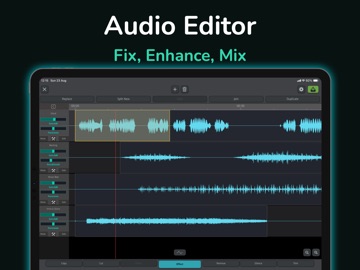
30 store screenshots



Pricing & paywalls
App Store
- PRO Monthly Subscription — $3.99/month
- PRO Monthly Subscription — $19.99/year ($1.66/mo)
- Permanent PRO — $39.99
Ratings & reviews
App Store
-
5/5Great Substitute for Audacity
I mostly downloaded this app because my laptop stopped working. Audacity was my main app for creating clean radio edits fast, which is something I need to do because I work in radio. This app was perfect, in fact, I’m more of an iPad guy anyway, and this paired with AirPods is just a heavenly combination. Yeah, you can pretty much do anything this app does in GarageBand, but this is perfect for when you need those quick and easy edits. For example, simply tapping and reversing bad words, or replacing it with an instrumental section, feels so much quicker. It makes me a couple minutes to do in this app. GarageBand, because it’s a bit more bloated despite how great it is, probably takes 10-15 minutes. Yeah, this is amazing for my workflow. Some suggestions: first of all, please fix the AI vocal remover. It works great, but it starts with a skip every single time. It seems to be some type of error written into the algorithm or something. Also, please add a TV censor bleep type effect like you can do on Audacity and other apps. Maybe you can already do that on this app, but I haven’t figured it out yet. Other than that, I love it.
J Dog 🐶 · 30 Aug 2026
-
5/5Bam plumbing
Yeah, this app is really cool. They should do a free version of it but they pay you gotta pay too much to do anything on this app and it doesn’t give you all the stuff it’s like a beginners course so you can go take it and cut your things in and put it together but they don’t have very many sound functions unless you pay you know I extreme amount of money to do it. It’s insane how much they’re trying to charge you on this thing a month it is a good start up tool for somebody that don’t know what they’re doing and starting up but you can’t get past a certain a certain thing on it so I say this app gets a three stars I wish I got five because Some of the other stuff it would’ve got five. Good luck. Trying this happen. Good luck spending all that money
BAD A*S · 30 Aug 2026
-
4/5Served me well for 3 years, lacking some basic tools
I love SoundLab! As a dancer, mixing music is a must, and Soundlab is great for mixing anywhere and anytime. It’s very intuitive and has various effects. I haven't used the free version since the first day I downloaded it, though, so I can't comment on how that carries over for free users. I don't know if its still the same, but I was able to get all the features with a one-time purchase, and it was so worth it! I will say, while it offers many wonderful effects, there are no curves and you cannot cross-fade. Adjusting the volume of a track isn't simple as in most programs. Also, you can only use it on your phone— no cross-platform on your computer. Also, you cannot make an empty track, which gets annoying after years of use. I hope my complaints don't taint anyones perception of this app, though— it’s great for those who are just starting and need an easy-to-grasp app with tons of features and capacity for greatness.
Charliepuked · 30 Aug 2026
-
5/5AMAZING EXPERIENCE
Honestly i don't even know where to begin on how good this app is. My purpose for downloading this app was so i could create a mix of songs that i needed for a dance. Before downloading SoundLab i tried two different apps and they were so difficult to use. When i tell you that i was able to complete a 7 minute mix with 7 different songs in 1 hour im not lying! I was a little confused at first because i didn't know that i had to buy the music from iTunes (you don't necessarily have to do that but that was my case) but after i did that i was able to do my mix. Honestly im not gonna lie but i did get the premium thingy because i needed to use 7 songs but it is still super good. Without the premium you can do everything but you get more limits (like you can only use 4 different sounds and only 2 effects) Everything else was super easy to do like saving it to your files. I will definitely be using this again for my next dance.
anilu_\223 · 30 Aug 2026
-
5/5Exceptional!
I have used a lot of audio engineering software and hardware throughout the years but this one is the easiest and most portable ready to use one I have ever owned. It is well worth the subscription fee and I use it every day to make my favorite songs sound at least twice as good as before. Plus you can store them as a file on your phone and listen to them offline Whenever you want. With all of the features available you have tons of freedom to make a song sound exactly how you imagine it if not better. I’m super impressed at the quality too with the full sound you get from all the different fx tools. The only thing better I think is pro tools itself. But you don’t even have to buy a microphone for this app it’s super nice. Also if you have other instruments say an electric drum set or whatever and you want to record direct in then all you need is a cheap adaptor for iPhones. This is my second year using this app and last year I created over 80 voice lines and 70 songs most of them covers but it’s a blast to use trust me you can even share your subscription with your family and the main creator is very nice and helpful. For a few months I couldn’t figure out how to hook up my drum kit but he responded quickly 4 different times and now we are friends and I’m sharing my music with him so he can see what his program can really do! 😁
Stylinshades · 29 Jul 2026
Privacy & accessibility
App Store
Privacy
- Data Not Linked to You — Analytics — Diagnostics — Performance Data Developer declared
- Data Not Linked to You — Analytics — Identifiers — Device ID Developer declared
- Data Not Linked to You — Analytics — Usage Data — Advertising Data Developer declared
- Data Not Linked to You — Analytics — Usage Data — Product Interaction Developer declared
- Data Not Linked to You — App Functionality — Usage Data — Product Interaction Developer declared
- Data Not Linked to You — Diagnostics Developer declared
- Data Not Linked to You — Identifiers Developer declared
- Data Not Linked to You — Usage Data Developer declared
- Data Used to Track You — Usage Data — Product Interaction Developer declared
- Data Used to Track You — Usage Data Developer declared
Accessibility
- VoiceOver — SUPPORTED Store published
Versions
App Store
-
2.10.0
New: AI Unmix (6 stems) powered by our next-generation on-device audio AI engine. Separate vocals, drums, bass, guitar, piano, and more. Happy Holidays — thank you for your support!
-
2.10.1
New: AI Unmix (6 stems) powered by our next-generation on-device audio AI engine. Separate vocals, drums, bass, guitar, piano, and more. Fixed: Known issues and stability improvements. Happy Holidays — thank you for your support!
-
2.10.2
New: Stem Split (6 stems) powered by our next-generation on-device audio AI engine. Separate vocals, drums, bass, guitar, piano, and more. Happy Holidays — thank you for your support!
-
2.10.3
Fixed a rare crash when importing files in Noise Reducer.
-
2.10.4
Reduced performance overhead for AI Noise Reducer and Stem Separator.
-
2.10.5
Stability improvements and crash fixes related to audio playback. Thanks to @maididi2! Fixed an occasional gain slider layout issue when adding a track. Track names now default to the media library title/metadata on import. Thanks to @A Smart Man! Added a more prominent playhead indicator to the Vocal Separator waveform. Thanks to @A Smart Man!
-
2.10.6
Fixes an issue where the playback engine incorrectly took exclusive control of the audio device Adds an option to keep playing while zooming the waveform Text to Speech now supports more languages
-
2.10.7
- Introducing Volume Automation for detailed volume adjustment over time - Added track reordering for easier arrangement
-
2.10.8
- Continued improvements to Volume Automation - Bug fixes and minor refinements
-
2.10.9
· 3 Apr 2026
- Fixed an issue affecting app launch on iOS 15
-
2.11.5
· 26 Aug 2026
- New unified colors, icons and page layouts, with Projects and Files managed separately and your most-used features easier to find. - A cleaner layout for the Editor’s panels and buttons. - Vocal Separator and Stem Separator now run on a new generation of AI separation models, with clear gains in both quality and speed. - Stem Separator adds a stem mixer — preview and adjust each stem, then export the balance you set; you can choose 4 Stems, 6 Stems or a model fine-tuned for a single stem, and pick which stems to export. - AI Noise Reducer now uses an upgraded model that cleans up voice recordings better. - You can now share multiple files at once from other apps, such as Voice Memos.
-
2.8.1
- Add overdub recording in audio editor. - Fixed the issue where "double-tap to select all" could be triggered unintentionally. - Long-press drag gesture no longer clears all selections, so you can now move clips without affecting existing selection. - Optimize audio mixing and SRC(sample rate conversion) performance through hardware acceleration.
-
2.8.2
Add custom bitrate options for MP3 export
-
2.8.3
Fix occasional black screen issue in video composer exports.
-
2.8.5
- Add reorder feature for effects selector - Add reduce UI animation option to audio editor - Change waveform auto selection only applies to new users
-
2.8.6
- Redesigned the Pan & Gain sliders to address operation difficulties: expanded the touch area, added OSD indicators, and introduced a direct input field (accessible via long press on the slider or through the track control menu). - Optimized the track control panel layout to reduce accidental touches and added configurable track number display. - Added Text-to-Speech (TTS) functionality: input text to generate speech, create new tracks, insert clip, or replace selected clip.
-
2.9.0
Never lose your creations again - iCloud storage keeps them safe, backed up, and synced across all your devices. - Added built-in iCloud storage support. - Added quick file preview. - Fixed a rare issue that caused batch import and audio extraction to fail. - Fixed a rare issue that caused audio extraction from videos in Photos to fail.
-
2.9.10
New: Loop playback for any selected region, perfect for detailed editing and A/B comparisons. Improved: AI Noise Reducer now runs more reliably on a wider range of devices, including older models.
-
2.9.2
What's New • Removed Personalized Ad Tracking All personalized tracking has been fully removed, ensuring a more privacy-centric experience. • Added Batch Operations for Files/Projects Now you can manage multiple files or projects at once, including copying or moving them to iCloud, as well as archiving projects to iCloud or external directories—all from one convenient interface. • Implemented Project Archiving to iCloud or External Paths Archive your projects directly to iCloud or an external storage device—like a USB drive—to keep your work backed up and portable. • Implemented Project Unarchiving and Import from iCloud or External Paths Easily restore archived projects from iCloud, USB, or other external storage, enabling quick synchronization across devices so you can pick up right where you left off. Other Fixes • Fixed VoiceOver labels on the main view for better accessibility. • Removed the automatic author and album fields on export, giving you complete control over your metadata.
-
2.9.3
- Added multi-level directory support for iCloud storage. - Added batch move for files and folders in iCloud storage. - Fixed a potential error when exporting large files.
-
2.9.4
- Fix cover art image - Add exit reminder for unsaved recordings - Fix iCloud file list layout on iPad - Fix auto-recovery not working for unsaved new projects
-
2.9.5
Polished for iOS 26’s new design style.
-
2.9.6
- Removed value bubble on slider — now shows live value with a text label - Fixed an issue where moving an unselected track or clip caused incorrect selection state - Fix Reverb Pro potential crash - Added Mono export option
-
2.9.7
- Fixed a rare startup stability issue on some devices - Improved visual balance and interface clarity
-
2.9.8
- New next-generation AI Noise Reducer engineered for superior clarity and cleaner vocal isolation. - Fixed a rare issue where the local library might unexpectedly crash. - Fixed an export issue where custom sample-rate files could crash on specific device models.
-
2.9.9
Hot fix: Resolved a stability issue affecting iOS 15.x devices. - New next-generation AI Noise Reducer engineered for superior clarity and cleaner vocal isolation. - Fixed a rare issue where the local library might unexpectedly crash. - Fixed an export issue where custom sample-rate files could crash on specific device models.
Alternatives
- Audio Editor - Music Mixer — Same category + similar ratings
- Audio Editor : Audiolab — Same category + similar ratings
Availability by market
- US
Data quality & evidence
- Page completeness
- Live store listing
- Last verified
- 30 Aug 2026
- Sources
- App Store
- Independent summary has not been published yet.