
Quick verdict
- What it is
- Store information collected; an Apoku editorial summary is not yet published.
- At a glance
-
- Free to download
- In-app purchases
Categories and search queries
Official categories
- Graphics & Design
- Photo & Video
Apoku categories
Key functions
| Function | Availability | Access | Scope | Evidence |
|---|---|---|---|---|
| Free app | Yes | Free | Context-specific | Store published |
| In-app purchases | Yes | Limited free | Context-specific | Store published |
Screens
App Store
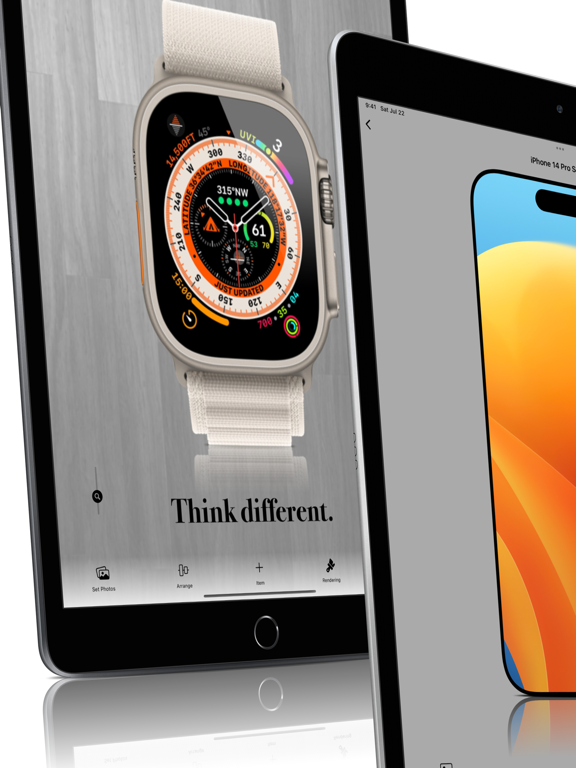
30 store screenshots



Pricing & paywalls
App Store
- Saving iPad Pro — $4.99
- Saving iPhone 11 Pro — $4.99
- Saving iPhone 11 Pro Max — $4.99
- Saving iPhone 14 Pro CGTOP — $4.99
- Saving iPhone X — $4.99
- Saving iPhone XR — $4.99
- Saving iPhone XS — $4.99
- Saving iPhone XS Max — $4.99
- Saving Watch Ultra — $4.99
- Unlimited Daily Saving — $12.99
Ratings & reviews
App Store
-
4/5Would be 5 star
I can accept paying for unlimited saves but then it should be for any option. Instead the app makes you pay additional for specific devices on top of the unlimited save purchase. It’s too much when I already paid $10 for unlimited saves. Great app otherwise.
ZimDMan · 7 Aug 2026
-
5/5Changed my review
Sorry I had given 1 stars at first since I didn’t get the app since there is 2 purchase options. There is a 5 dollar purchase option or a 1 dollar purchase option. I personally didn’t get it. But I purchased the dollar option and now I get it. So with the 1 dollar option you get 2 free screenshots a day. I think this is fine for me right now. But I might purchase the 5 dollar one since this app is amazing. I like it a lot and it’s worth the money but if you think 2 pics per day is enough then maybe just pay 1 dollar.
PlayKun · 7 Aug 2026
-
5/5Yay updates!
So glad to see that this app got an update with new frames for the latest devices and landscape orientation on the iPad. I love this app and use it a lot. Last request, please update the iPad frames? The standard iPad one is the old iPad with the thick bezels (iPad 2 style). I can use the iPad Mini frame instead so no big deal, but what about 10.5 iPad Pro? Or just dropping the thick bezel iPad altogether because it is no longer sold? Thx.
jonathanwylie · 7 Aug 2026
-
5/5Awesome
Old review: I like your app. But I think you should give a lower price for the unlimited version. I don't want to pay $10 only I need 3 templates. Sorry. ------ New review: This app is great, I need only one template to use but not too often, so it's great because I don't need to buy the susbcription. Also you can watch an ad video if you don't want to pay. It's awesome! So far I'll continue using it! Thank you!
Glaciar63 · 7 Aug 2026
-
5/5GREEDY
Seriously. How many times does a person have to pay for this app? You add a couple of different devices and charge again. The word I'm looking for is called update, not pay for the same thing. Just greedy and wrong.
Spencerdl · 7 Aug 2026
Privacy & accessibility
App Store
Privacy
- Data Linked to You — Third-Party Advertising — Diagnostics — Performance Data Developer declared
- Data Linked to You — Third-Party Advertising — Identifiers — Device ID Developer declared
- Data Linked to You — Third-Party Advertising — Location — Coarse Location Developer declared
- Data Linked to You — Third-Party Advertising — Usage Data — Advertising Data Developer declared
- Data Linked to You — Third-Party Advertising — Usage Data — Product Interaction Developer declared
- Data Linked to You — Diagnostics Developer declared
- Data Linked to You — Identifiers Developer declared
- Data Linked to You — Location Developer declared
- Data Linked to You — Usage Data Developer declared
- Data Not Linked to You — Third-Party Advertising — Diagnostics — Crash Data Developer declared
- Data Not Linked to You — Diagnostics Developer declared
- Data Used to Track You — Diagnostics — Crash Data Developer declared
- Data Used to Track You — Diagnostics — Performance Data Developer declared
- Data Used to Track You — Diagnostics Developer declared
- Data Used to Track You — Identifiers — Device ID Developer declared
- Data Used to Track You — Identifiers Developer declared
- Data Used to Track You — Location — Coarse Location Developer declared
- Data Used to Track You — Location Developer declared
- Data Used to Track You — Usage Data — Advertising Data Developer declared
- Data Used to Track You — Usage Data — Product Interaction Developer declared
- Data Used to Track You — Usage Data Developer declared
Accessibility
No accessibility labels collected yet.
Versions
App Store
-
3.4
Hi, Thank you for using SMPRO! - Ver 3.4 * Faster video rendering * Add Motion Mockup * Add Advanced Settings * Show Watermark on Preview Screen It will be hidden if you purchase Unlimited Daily Saving.
-
3.4.1
Hi, Thank you for using SMPRO! - Ver 3.4.1 * Bugfix - Ver 3.4 * Faster video rendering * Add Motion Mockup * Add Advanced Settings * Show Watermark on Preview Screen It will be hidden if you purchase Unlimited Daily Saving.
-
3.5
Hi, Thank you for using SMPRO!!! --Ver 3.5 *Added iPhone SE 2. *You can now set a video as a background. - This allows you to compose multiple motion mocks. *The direction of rotation and start position can be changed by motion mocks. *You can set the rotation speed to match the length of the video in motion. - This makes the motion mockup loop natural when you set a video. *It is now possible to output motion as an image. - One frame is cropped as a still image. *You can now specify Motion JPEG as the video saving type (in Advanced Settings). - It helps to reduce the degradation that occurs when videos are combined multiple times. *The motion data has been changed to a download resource. - This will reduce the the app size, which is bloated due to motion mockups. *The unit of the image size has been changed to pixels. - This makes it easier to figure out the size of the output.
-
3.6
Hi, Thank you for using SMPRO! --Ver 3.6 *Added iPhone 12 mockups - iPhone 12 - [White, Black, Green, Blue, Red] Portrait, Landscape, 3/4 - iPhone 12 mini - [White, Black, Green, Blue, Red] Portrait, Landscape, 3/4 - iPhone 12 Pro - [Graphite, Silver, Gold, Pacific Blue] Portrait, Landscape, 3/4 - iPhone 12 Pro Max - [Graphite, Silver, Gold, Pacific Blue] Portrait, Landscape, 3/4
-
3.7
Hi, Thank you for using SMPRO! --Ver 3.7 *Added iPhone 12 3D mockups *Added iPad Air 4 *Added iPad 2020 10.2inch (iPad 8) - Completely same design as iPad 7. *Added iPad Pro 2020 11inch&12.9inch - Completely same as iPad Pro 2018, but the design from the front is changed from cellular model to WIFI model. Specifically, the antenna has disappeared.
-
3.8
Hi, Thank you for using SMPRO! --Ver 3.8 *Added iPhone 12 3D Left side mockups *Added 35 background images *Added vertical / horizontal inversion function for background image
-
3.9
Hello! Thank you for using SMPRO! --Ver 3.9 *Added iPhone 12 People *Added iMac 2021 *Added IDFA Dialog for TrackingTransparency
-
3.9.1
Hello! Thank you for using SMPRO! --Ver 3.9.1 *Added iPhone 12 mini Purple *Added iPad Pro 2021 11 & 13 inch --Ver 3.9 *Added iPhone 12 Purple *Added iMac 2021 *Added IDFA Dialog for TrackingTransparency
-
4.0
Hello! Thank you for using SMPRO! --Ver 4.0 *Added iPhone 13, mini, Pro, Pro Max. Total 140 frames.
-
4.1
Hello! Thank you for using SMPRO! --Ver 4.1 *Added Apple Watch 7 frames.
-
4.2
Hello! Thank you for using SMPRO! --Ver 4.2 *Added iPhone 13 green frames. *Added iPhone SE 3 frames. *Added iPad 2021 10.2inch (iPad 9) frames. *Added iPad mini 6 frames. *Added iPad Air 5 frames.
-
4.3
Hello! Thank you for using SMPRO! --Ver 4.3 *Added iPhone 14 frames. *Added iPhone 14 Plus frames. *Added iPhone 14 Pro frames. *Added iPhone 14 Pro Max frames. *Changed background UI to make it easier to select user images.
-
4.4
Hello! Thank you for using SMPRO! --Ver 4.4 *Added Apple Watch Ultra. *Changed Motion icon to static to reduce startup time. *Hide the watermark. *Added TIPS to Settings.
-
4.5
Hello! Thank you for using SMPRO! --Ver 4.5 *Added iPad 2022 (iPad 10) frames. *Added iPad Pro 2022 frames. *Hide ads on mockup selection screen *Transparent video support If you want to use transparent video, Turn on Settings > Advanced > Use H265 Codec. SMPRO normally saves videos in the H264 codec; H264 is a universal codec that can be uploaded on a many sites, but it does not support transparent video.
-
4.6
Hello! Thanks for always using SMPRO! - Ver 4.6 * Added iPhone 14 Pro CGTOP mockups * Added MacBook Pro 2022 13inch, 2021 14inch, 2021 16inch * Classic mockups changed to download method In this upgrade, we have added 16 new mockups of the 14 Pro made with 3DCG. All of the new mockups have the same diagonal composition, making them easier to compose. Please use them when you want to show off several images together. One more thing, in order to reduce the app size in version 4.6 The old mockups have been changed to a downloadable version. Downloading is of course free of charge.
-
4.7
Hello! Thanks for using SMPRO! - Ver 4.7 * Increased save limit from 2 per day to 3 * Add iPhone 14 Pro Motion * Add Vertical type iPhone 14 Pro CGTOP * Reduced app size by data compression * Some UI changes * Added choice of SAVE and SHARE buttons * Changed supported OS from iOS12- -> iOS13- * Add "Mockup Size" to "Adjust Position" * Add iPad 9th 3/4Right, iPad mini 5th 3/4Right, iPad mini 6th 3/4Right
-
4.8
Thanks for always using SMPRO! - Ver 4.8 1. Motion360 is added to iPhone14 Pro / Pro Max. 2. Motion and CGTOP are added to iPhone14 Pro Max. 3. New colour Yellow is added to iPhone14 / 14 Plus. 4. CGTOP is added to IPad mini6. 5. Add 3D Left to IPhoneSE3. 6. Renewal of Mockup selection screen design.
-
5.0
1. Composition of multiple mockups is now supported. This has resulted in an application structure with the canvas as the main screen. 2. Context menu Long-tap on an item, or right-click on a Mac, to display the context menu. Locking or deleting an item can be done in the context menu. Locking an item, layer order, etc. are applied to one or more selected items. 3. About Canvas Size Canvas size can be selected by options. The default is AUTO, but AUTO is the size that encompasses all items. 3.What is Ignore Frame? "Ignore Frame" is found in the context menu, When the canvas size is set to AUTO, the item is ignored and the canvas size is determined by other items only. 3. Arrange Menu After selecting items, use this menu to align or evenly space them. 4. About Movie In addition to images, videos can also be input in SMPRO. When video is input, SMPRO outputs video. In this case, the FPS is fixed at 30 and the length of the video is equal to the input video. The size of the video must be a multiple of 16 in horizontal size. If the horizontal size is not a multiple of 16, it will be scaled automatically. Example: For a canvas size of 1000x1000, the output size of the video will be scaled to 1008x1008. Also, if there are multiple videos, the output video will be the same as the longest video, and the other videos will be looped. The output video will also include audio, but the audio of the longest video will be selected. The video codec can be H264 or h265 in the advanced settings. H265 supports transparent video, but currently transparent video seems to be displayed incorrectly in the iOS Photos app. However, the transparent video itself is output normally and can be read by various editing software. (Note: In order to load them in PhotoShop, you need to change the encoding to Apple ProRes in the Finder function of MacOS.) We have also confirmed a bug with H265 output in the Mac Catalyst environment that causes noise. 5. About rendering In previous versions of SMPRO, rendering speed was constant regardless of image size, Since 5.0, rendering speed is now proportional to image size. If speed is a priority, please try using a smaller output size. 6. Canvas saving Starting from SMPRO 5.0, canvas data can be saved. Canvas data is saved in the Documents folder of the application and can be viewed in the File application. For example, data can be shared between iPhone and iPad. 7. About memory usage The number of items that can be placed in a canvas depends on the specified memory usage. The standard setting is 1000 MB. If you wish to place a large number of items, please try increasing the memory usage. 8. About motion When a motion mockup is placed, its canvas will be output as a movie. Motion can also be output as a still image with only the necessary frames.
-
5.1
What's New in SMPRO 5.1 [Addition of simple UI] The new UI has been changed from Ver. 5.0, but you can now choose between the previous UI and the new UI. The previous UI is single and the new UI is multi, which can be selected when the application is launched. The two UIs can be changed at any time, so please choose the one that best suits your purpose. [Support for text composition] The multi-UI now supports text composition. Text options include font, color, shadow, two borders, and character and line spacing. If the shadow is blurred greatly, the edges may be cut off, in which case, please adjust the padding.
-
5.2
## What's New in SMPRO 5.2 * Added Simple mockup for iPhone 14, 14Plus, 14Pro, 14ProMax It is a simple mockup without any decorations such as buttons or cameras. * Added "Write a review" to settings It would be great if you could write a review! * Added transparency to mockup adjustments "Transparency" has been added to the mockup adjustment items. If you set the transparency to 0, you can only see the screen. * Add Head to 2D Back Added one "Head" to the back. * Language setting From Ver5.2, in addition to English and Japanese, we have increased the supported languages to Chinese and Korean. Along with that, you can now select the language from the advanced settings. We plan to add more localized languages in the future. * Snap to Rotation/Movement of Multi UI Item now snaps every 90 degrees when rotating, and snaps to the center and auxiliary lines when moving. Extension lines can be added in advanced settings. * Multi UI undo Added an undo function that allows you to return to the previous operation. * Place two mockups in Multi UI start initial setting From Ver 5.1, you can now choose between two UIs. Multi UI is for synthesizing multiple terminals, I placed two mockups from the beginning. * Behavior when placing images in Multi UI When placing an image in Multi UI, as an initial state, It is now placed in the back with the same size as the Canvas size. This is because images are most often used as backgrounds. * Removed circle behind icon in Multi UI Prioritizing visibility, we used a circular icon, but we changed it to a simpler icon only. Added a gradient to the background of the icon to increase the visibility it lost.
-
5.3
Thank you for always using SMPRO! Version 5.3 *Add iPhone 15, 15Plus, 15Pro, 15ProMax *Add shadows to icons
-
5.4
Thank you for always using SMPRO! * Added Apple Watch Ultra 2 The main body is the same as Apple Watch Ultra, but the band is different. * Added support for file drop input in Single Mode on Mac In Single Mode on Mac, you can now input by dropping image files. If you input multiple images, they will be saved in the Photos app. * Added support for extension menus in apps like the Photos app We have added extension functionality to input into SMPRO in the shared menu of iOS apps such as the Photos app. SMPRO needs to be in Single Mode when doing so. * Fixed a bug in Multi Mode where image quality degraded when the canvas size was small. * Other bug fixes
-
5.5
Thank you for always using SMPRO! * Added Apple Watch Series 9 * Added MacBook Air 2023 * Added MacBook Pro 2023
-
5.6
Thank you for always using SMPRO! * Added iPhone 16 series
-
5.7
· 30 Sep 2025
Thank you for always using SMPRO! * Added iPhone 17 series
Alternatives
- Mockview - Mockup Generator — Same category + similar ratings
- Phone Mockups - Mizframa — Same category + similar ratings
- NiceShots: Mockup Frame Editor — Same category + similar ratings
- Mockuper: Phone Frame Mockup — Same category + similar ratings
- PopFrame – Mockup Creator — Same category + similar ratings
- Animock: 3D Mockup Animator — Same category + similar ratings
Availability by market
- US
Data quality & evidence
- Page completeness
- Live store listing
- Last verified
- 7 Aug 2026
- Sources
- App Store
- Apoku editorial summary has not been published yet.