
Quick verdict
- What it is
- Store information collected; independent summary not yet available.
- At a glance
-
- Free to download
- In-app purchases
Categories and search queries
Official categories
- Weather
- Health & Fitness
AppCorpus categories
Key functions
| Function | Availability | Access | Scope | Evidence |
|---|---|---|---|---|
| Free app | Yes | Free | — | Store published |
| In-app purchases | Yes | Limited free | — | Store published |
Screens
App Store
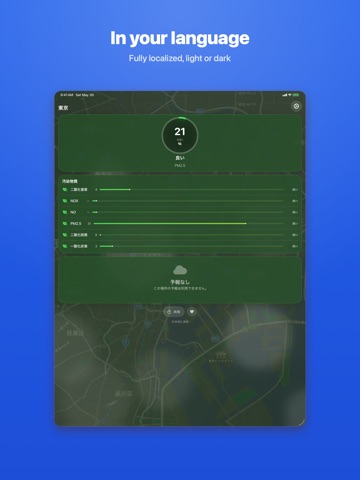
20 store screenshots


Pricing & paywalls
App Store
Shown for US
- Clean Air Hero — $9.99
- Clear Skies — $2.99
- Fresh Air — $0.99
- Perfect Day — $4.99
Ratings & reviews
App Store
Shown for US
-
5/5Helpful app
This app is great. I live in Southern California and am in that group of "highly sensitive individuals" affected by air quality. Fascinating and useful to have data on, for example, which cities are most affected by recent forest fires. The Air Quality Index of mine is 139. No wonder I'm wheezing. Where to go? I check the cities close by. 120s-130s. Check my cousin's city, 40 miles away. AQI only 79. Better! I check the coast. AQI a mere 50! Do I hear a mini-vacation calling? Love the leaf symbols to indicate health points. Green is great, going to green with yellow edge, yellow, yellow with red edge, red. Great visual. A minor annoyance: If you put a lot of cities on your list, it takes a long time to see data on any one of them, and you're blocked from doing anything about it. I'd rather see the current one ASAP, because usually I don't care about the others. Or, I want to be able to access the list of cities so I can just delete some, to have the rest load faster (sometimes I like to look at the cities where my siblings live, just for grins--but not when I'm trying to get local data quickly).
Sequoiawoman · 7 Aug 2026
-
5/5Great air quality app
I have only good things to say about this app. It uses an easily understood system for rating air quality and gives accurate up-to-date information when compared to other data. I appreciate being able to look at a variety of US cities, too. Thanks for making a visually appealing, helpful air quality app!
NorthernNeck · 7 Aug 2026
-
5/5Simplistic
Simple, easy to use format. Gives me needed up to date information. I purchased this app as an easy way to find areas with safe particulate levels suitable for strenuous outside exercise. It was especially valuable when our area was experiencing various levels of smoke due to wildland fires.
ZabaraH · 7 Aug 2026
-
5/5Great app
Has been accurate so far very great and reliable
Aurora Socal · 7 Aug 2026
-
4/5current location doesn't work
Cannot locate, can only manually type in the location. However the interface looks clean and nice. Hope bug correction in the next version.
Gregory.Zhu · 7 Aug 2026
Privacy & accessibility
App Store
Privacy
- Data Not Linked to You — Analytics — Usage Data — Product Interaction Developer declared
- Data Not Linked to You — App Functionality — Diagnostics — Crash Data Developer declared
- Data Not Linked to You — App Functionality — Diagnostics — Performance Data Developer declared
- Data Not Linked to You — App Functionality — Location — Coarse Location Developer declared
- Data Not Linked to You — App Functionality — Location — Precise Location Developer declared
- Data Not Linked to You — Third-Party Advertising — Identifiers — Device ID Developer declared
- Data Not Linked to You — Third-Party Advertising — Usage Data — Advertising Data Developer declared
- Data Not Linked to You — Third-Party Advertising — Usage Data — Product Interaction Developer declared
- Data Not Linked to You — Diagnostics Developer declared
- Data Not Linked to You — Identifiers Developer declared
- Data Not Linked to You — Location Developer declared
- Data Not Linked to You — Usage Data Developer declared
- Data Used to Track You — Identifiers — Device ID Developer declared
- Data Used to Track You — Identifiers Developer declared
- Data Used to Track You — Usage Data — Advertising Data Developer declared
- Data Used to Track You — Usage Data — Product Interaction Developer declared
- Data Used to Track You — Usage Data Developer declared
Accessibility
- Dark Interface — SUPPORTED Store published
- Larger Text — SUPPORTED Store published
- Reduced Motion — SUPPORTED Store published
- Sufficient Contrast — SUPPORTED Store published
- Voice Control — SUPPORTED Store published
- VoiceOver — SUPPORTED Store published
Versions
App Store
-
1.11
This update from Apple will improve the functionality of this app. No new features are included. Keep'n it fresh with updates for your Smog Report!
-
1.3
- Now detects when the EPA's servers are offline - Tap on any AQI indicator to learn more about the Air Quality Index - Improved use of the GPS for the "current location" page - Reduced the size of app by 1MB - Fixed a rare crash and a minor bug - Improved the experience of upgrading the app
-
1.4
Added support for China using data from the U.S. Embassies (StateAir): - Beijing - Chengdu - Guangzhou - Shanghai - Shenyang
-
1.5
- Support for iOS7 - Now expands search for zipcodes not used by the EPA, showing air quality data from the closest EPA location. - Using the new EPA AirNow service. Older versions of Smog Report will stop working in mid 2014 when the EPA takes down the old AirNow service. - Bug fixes
-
1.6
- Fixed "current location" for iOS 8.1.3 - Other bug fixes and updates
-
1.7
Bugfixes: - Purchases and restores were not unlocking the app - Could not add cities
-
1.8
◆ 3D Touch support from the home screen - press and hold on the Smog Report icon to get a quick view! ◆ Quickly view the Smog Report on your notifications screen! - Swipe down from the top of your device, then tap edit on the bottom to add Smog Report to your notification screen! ◆ Updated for iOS 10 - Increased speed and stability
-
1.9
◆ 3D Touch support from the home screen - press and hold on the Smog Report icon to get a quick view! ◆ Quickly view the Smog Report on your notifications screen! - Swipe down from the top of your device, then tap edit on the bottom to add Smog Report to your notification screen! ◆ Updated for iOS 10 - Increased speed and stability
-
2.0
Completely redesigned for iOS 26. No Ads. Completely Free. • New liquid glass interface with animated backgrounds and map snapshots • Home Screen widgets (small & medium) with AQI gauge and pollutant breakdown • Lock Screen widgets (circular & rectangular) • Live Activities — track air quality from the Dynamic Island and Lock Screen • Siri support — ask for air quality without opening the app • Multi-day forecasts with per-pollutant detail • Automatic current location detection • Improved AQI data handling for locations with limited sensor coverage • New app icon
-
2.1
What's New in 2.1 • Home Screen Quick Actions — Long-press the app icon to jump straight to a saved location or add a new one • Tap the AQI gauge to learn what the number means, with a full breakdown of AQI levels and pollutants • Smoother transitions — Switching between locations and updating data now animates seamlessly instead of flashing • Improved map background — Uses your exact GPS position for a more accurate map, updates live as you travel, and is easier to read with better contrast • Better particle effects — Clean air shows soft, dreamy wisps; poor air shows sharp, gritty particles that tell the story at a glance • Forecast bar improvements — Range forecasts now show vibrant gradient fills matching numeric forecasts • Share fix — The share button now shows your actual city name instead of "Current Location"
-
2.2
Live Activity alerts now detect any air quality category change — not just high AQI. Get notified when conditions shift from Good to Moderate, or any other transition. Forecasts have been redesigned so you can visually compare air quality across days at a glance. A new 12-month trend shows your location's historical AQI pattern. Plus: smarter refresh intervals, network auto-retry, configurable alert thresholds, and comprehensive accessibility improvements.
-
2.2.1
Live Activity alerts now detect any air quality category change — not just high AQI. Get notified when conditions shift from Good to Moderate, or any other transition. Forecasts have been redesigned so you can visually compare air quality across days at a glance. A new 12-month trend shows your location's historical AQI pattern. Plus: smarter refresh intervals, network auto-retry, configurable alert thresholds, and comprehensive accessibility improvements.
-
2.3
Apple Watch Support ◆ New companion Watch app — see your AQI at a glance right from your wrist ◆ Watch face complications in four styles: circular gauge, rectangular detail, corner gauge, and inline text ◆ Your primary location syncs automatically from your iPhone Bug Fixes & Improvements ◆ Fixed a crash that could occur on launch in certain configurations ◆ Fixed text wrapping issue with pollutant names on larger displays ◆ Improved launch screen appearance ◆ Added App Privacy Manifest
-
2.4
Smog Report now looks great in Light Mode. A new adaptive design system automatically adjusts backgrounds, text, particles, and map overlays for both light and dark appearances. Choose from three panel styles — transparent glass, frosted glass, or solid material — to match your readability preference. Accessibility improvements include VoiceOver heading navigation, better Dynamic Type support, and more descriptive labels throughout.
-
2.4.1
Stability and performance improvements under the hood. Smoother widget updates, refined animation timing on the settings screen, crisper forecast text, and a handful of behind-the-scenes reliability fixes. If you had any occasional glitches or slow data refreshes, this update quietly fixes them.
-
2.5
Smog Report now includes on-device AI summaries powered by Apple Intelligence. The new Today's Summary card surfaces a plain-English assessment of current air with a tailored tip, and the Forecast card adds outlook commentary when upcoming days warrant attention. New Siri shortcuts let you ask "Check air quality in Atlanta" or "Refresh Smog Report." A Control Center tile and Action Button shortcut bring refresh and quick-open to your fingertips. The Forecast card is redesigned — one row per day with smart expansion for multi-pollutant days. All AI inference runs on-device. No data leaves your phone.
-
2.5.1
Smog Report now includes on-device AI summaries powered by Apple Intelligence. The new Today's Summary card surfaces a plain-English assessment of current air with a tailored tip, and the Forecast card adds outlook commentary when upcoming days warrant attention. New Siri shortcuts let you ask "Check air quality in Atlanta" or "Refresh Smog Report." A Control Center tile and Action Button shortcut bring refresh and quick-open to your fingertips. The Forecast card is redesigned — one row per day with smart expansion for multi-pollutant days. All AI inference runs on-device. No data leaves your phone.
-
2.5.2
Smog Report now includes on-device AI summaries powered by Apple Intelligence. The new Today's Summary card surfaces a plain-English assessment of current air with a tailored tip, and the Forecast card adds outlook commentary when upcoming days warrant attention. New Siri shortcuts let you ask "Check air quality in Atlanta" or "Refresh Smog Report." A Control Center tile and Action Button shortcut bring refresh and quick-open to your fingertips. The Forecast card is redesigned — one row per day with smart expansion for multi-pollutant days. All AI inference runs on-device. No data leaves your phone.
-
2.5.3
Smog Report now includes on-device AI summaries powered by Apple Intelligence. The new Today's Summary card surfaces a plain-English assessment of current air with a tailored tip, and the Forecast card adds outlook commentary when upcoming days warrant attention. New Siri shortcuts let you ask "Check air quality in Atlanta" or "Refresh Smog Report." A Control Center tile and Action Button shortcut bring refresh and quick-open to your fingertips. The Forecast card is redesigned — one row per day with smart expansion for multi-pollutant days. All AI inference runs on-device. No data leaves your phone.
-
2.5.4
Smog Report now includes on-device AI summaries powered by Apple Intelligence. The new Today's Summary card surfaces a plain-English assessment of current air with a tailored tip, and the Forecast card adds outlook commentary when upcoming days warrant attention. New Siri shortcuts let you ask "Check air quality in Atlanta" or "Refresh Smog Report." A Control Center tile and Action Button shortcut bring refresh and quick-open to your fingertips. The Forecast card is redesigned — one row per day with smart expansion for multi-pollutant days. All AI inference runs on-device. No data leaves your phone.
-
2.6
v2.6.0 — Worldwide Air Quality This is our biggest release ever. Smog Report now works in ~100 countries with reference-grade monitor data, and displays the air-quality index your country actually uses. WORLDWIDE COVERAGE via OpenAQ (worldwide) + Singapore NEA (Singapore) alongside EPA AirNow (U.S.). THE RIGHT LOCAL INDEX, AUTOMATICALLY • U.S. → U.S. EPA AQI • UK → DAQI (1–10) • EU → European Common AQI (1–6) • Canada → AQHI • Singapore → PSI • India → NAQI • Korea → CAI • Australia / New Zealand → AU AQI You can also pick any scale from Settings → AQI Scale. 22 LANGUAGES The full app, widgets, Live Activities, and Apple Watch app are now translated into 22 languages including Arabic, Chinese (Simplified + Traditional), French (France + Canada), German, Hindi, Japanese, Korean, Portuguese (Brazil), Spanish (Spain + Latin America), Swedish, and more. OTHER IMPROVEMENTS • AQI gauge now displays your selected scale's native value (no more clamping non-US data to the EPA scale). • Settings → AQI Scale lets you override the country default. • Pollutant names are localized. • Live Activities and widgets all pick up the active scale. • Background refresh routes through whichever data source matches each saved location's country. PRIVACY (unchanged) Your location is sent only to the data source for your country (AirNow / OpenAQ / Singapore NEA), never to a server we operate. No account, no tracking SDK.
-
2.6.1
v2.6.1 — Worldwide Air Quality This is our biggest release ever. Smog Report now works in ~100 countries with reference-grade monitor data, and displays the air-quality index your country actually uses. WORLDWIDE COVERAGE via OpenAQ (worldwide) + Singapore NEA (Singapore) alongside EPA AirNow (U.S.). THE RIGHT LOCAL INDEX, AUTOMATICALLY • U.S. → U.S. EPA AQI • UK → DAQI (1–10) • EU → European Common AQI (1–6) • Canada → AQHI • Singapore → PSI • India → NAQI • Korea → CAI • Australia / New Zealand → AU AQI You can also pick any scale from Settings → AQI Scale. 22 LANGUAGES The full app, widgets, Live Activities, and Apple Watch app are now translated into 22 languages including Arabic, Chinese (Simplified + Traditional), French (France + Canada), German, Hindi, Japanese, Korean, Portuguese (Brazil), Spanish (Spain + Latin America), Swedish, and more. OTHER IMPROVEMENTS • AQI gauge now displays your selected scale's native value (no more clamping non-US data to the EPA scale). • Settings → AQI Scale lets you override the country default. • Pollutant names are localized. • Live Activities and widgets all pick up the active scale. • Background refresh routes through whichever data source matches each saved location's country. PRIVACY (unchanged) Your location is sent only to the data source for your country (AirNow / OpenAQ / Singapore NEA), never to a server we operate. No account, no tracking SDK.
-
2.6.2
v2.6.2 - Worldwide Air Quality This is our biggest release ever. Smog Report now works in ~100 countries with reference-grade monitor data, and displays the air-quality index your country actually uses. WORLDWIDE COVERAGE via OpenAQ (worldwide) + Singapore NEA (Singapore) alongside EPA AirNow (U.S.). THE RIGHT LOCAL INDEX, AUTOMATICALLY • U.S. → U.S. EPA AQI • UK → DAQI (1–10) • EU → European Common AQI (1–6) • Canada → AQHI • Singapore → PSI • India → NAQI • Korea → CAI • Australia / New Zealand → AU AQI You can also pick any scale from Settings → AQI Scale. 22 LANGUAGES The full app, widgets, Live Activities, and Apple Watch app are now translated into 22 languages including Arabic, Chinese (Simplified + Traditional), French (France + Canada), German, Hindi, Japanese, Korean, Portuguese (Brazil), Spanish (Spain + Latin America), Swedish, and more. OTHER IMPROVEMENTS • Apple Watch now works on its own — allow location on your watch and it shows the air quality right where you are, even without your iPhone nearby • AQI gauge now displays your selected scale's native value (no more clamping non-US data to the EPA scale). • Settings → AQI Scale lets you override the country default. • Pollutant names are localized. • Live Activities and widgets all pick up the active scale. • Background refresh routes through whichever data source matches each saved location's country. • Meet UV Report, our new sun-safety companion app — find it under "More from us" in Settings PRIVACY (unchanged) Your location is sent only to the data source for your country (AirNow / OpenAQ / Singapore NEA), never to a server we operate. No account, no tracking SDK.
-
2.7
• Reliability: refreshed our U.S. air-quality data connection to EPA AirNow's new data, so readings keep flowing smoothly. • New privacy control: a "Share anonymous usage data" switch in Settings → Privacy lets you turn usage analytics on or off anytime. • Fixed a rare crash that could occur while viewing the air-quality summary. • Performance and stability improvements throughout.
-
2.7.1
· 6 Aug 2026
• Minor updates and refinements throughout. • Performance and stability improvements.
Alternatives
- Pressure Log Tracker — Same category + similar ratings
- FMENV-AirQuality — Same category + similar ratings
- Check Air Quality - Live AQI — Same category + similar ratings
- St. Cloud Live StormTRACKER — Same category + similar ratings
Availability by market
- US
Data quality & evidence
- Page completeness
- Live store listing
- Last verified
- 7 Aug 2026
- Sources
- App Store
- Independent summary has not been published yet.