
Quick verdict
- What it is
- Store information collected; independent summary not yet available.
- At a glance
-
- Free to download
- In-app purchases
Categories and search queries
Official categories
- Productivity
- Finance
AppCorpus categories
Key functions
| Function | Availability | Access | Scope | Evidence |
|---|---|---|---|---|
| Free app | Yes | Free | — | Store published |
| In-app purchases | Yes | Limited free | — | Store published |
Screens
App Store
10 store screenshots
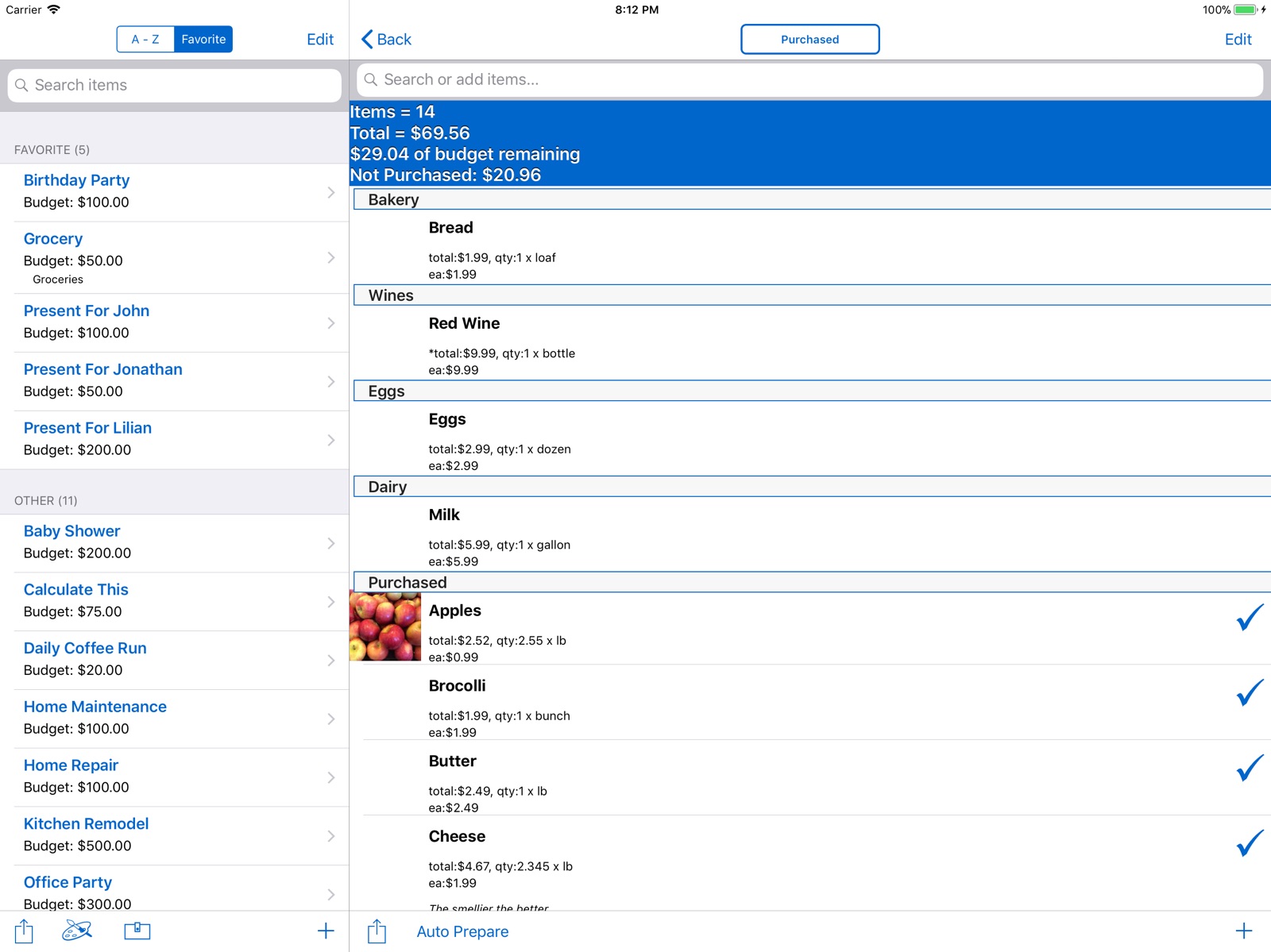


Pricing & paywalls
App Store
- Free to download
- In-app purchases
Ratings & reviews
App Store
-
5/5Great list app
I love everything about this app. Not only do I have my grocery list always with me (instead of leaving it at home on the table as I often used to do), but I can make separate lists for each store where I regularly shop, just adjusting from my master list what I am out of at that time. I have also put my travel/packing list on here. It's great to have a place where I can keep all my lists together. I highly recommend this app.
Tealady55 · 28 Jul 2026
-
5/5This app is my brain!
Love this app and can’t live without it! I use it for so much more than just shopping lists. I have packing lists, lists of questions for the doctor, mechanic or school, and more! The app has so many more features than I even use. Highly recommend!
Hands Full · 28 Jul 2026
-
1/5No longer works
I have used this app for a number of years, being able to create multiple lists for the different stores I shop. I could make my list on my iPad at home, upload it to Dropbox (required), and download to my phone when I went shopping. All of a sudden I’m getting an error when I try to load/download from Dropbox, getting a “general 400” error message. I’ve tried contacting Decimal Software for a resolution, and have received no response. I’m now looking for another app. Not happy, since I’ll have to enter all my lists again!
Kruegdi · 28 Jul 2026
-
5/5Totally customizable
I love this app because you can make different lists for different stores, and organize it by isle. No more wandering around the store a million times when you forget things on the other side of the store
krissyv630 · 28 Jul 2026
-
5/5Awesome app and awesome customer support!
I had been using a different shopping list app until the iPhone iOS 6 update came along. At that point my app would no longer work. I tried twice contacting the developer, but they would not respond. So I searched the App Store and decided to try this one. I had some questions about problems I was having with it so emailed Decimal, and they responded in less than 15 minutes! They told me what I needed to know, and have since emailed again to let me know the latest update was now available! I am so glad the other app crashed. This shopping list app is absolutely amazing! It is perfect for keeping my lists organized and for making my grocery shopping efficient! I have it set up to go with the aisles in my favorite grocery store, and when I walk in the door of that store, my list takes me through the store with zero backtracking! I have separate lists set up for a few stores I shop regularly. A great feature is that no matter how many lists you have items on, until you have checked all items off, the home screen icon on your phone shows you how many total I purchased items are on lists. So you can't forget to pick something up, even if its in a different store list than the one for your main grocery shopping! One more time I want to restate what wonderful customer service comes with this app! You simply can't go wrong with this one!
G Poobah · 28 Jul 2026
Privacy & accessibility
App Store
Privacy
- No Details Provided Developer declared
Accessibility
No accessibility labels collected yet.
Versions
App Store
-
11.0.2
Support for iPhone X screen size. Fixed Dropbox Backup and Restore bug. Other bug fixes.
-
11.1.2
- Fixed layout issues with iPhone X. - Updated Dropbox SDK.
-
12.0
Updated Dropbox SDK.
-
12.1
· 23 Nov 2018
Added Siri Shortcuts for list.
-
6.2.2
Thank you for using Smart Shopping List A LA CARTE and your feedback! Please send your feedback to [email protected]. ✓ This is our most exciting update! We are extremely happy to introduce Aisle Manager! Now you can create your own custom aisles/categories and organize them by the flow of the store. Aisle Manager now affects how items are grouped when you choose group by Purchased. Example: 1: Personal Healthcare 2: Canned Fruits 3: Bakery 4: Milk and Eggs 5: Not Purchased ✓ General camera improvements. ✓ Auto Lock option now disables for the entire app and not just the list screen.
-
6.4.2
✓ iOS 6 support. ✓ iPhone 5 larger screen support. ✓ To make it easier to prepare for your next shopping trips, we are excited to introduce a search feature that will allow you to find all items in all lists. Simply find the item you are looking for, then uncheck the item you wish to pick up in your next trip, it's that easy! Swipe across to edit the item. ✓ User Interface upgrade. Let us know what you think! ✓ Added Aisle Manager as a list of options while in the list screen. Before you had to go into the Add Item screen to access Aisle Manager. ✓ Budget Manager now calculates the shopping list budget against the items that are Not Purchased (new option in Customize called Budget Not Purchased). To calculate against all items instead, turn OFF the Budget Not Purchased option. ✓ Expiration Manager has the Edit mode function swapped to help users focus on preparing their next grocery list in this screen by unchecking or checking off items by expiration dates. ✓ A new Check Off All option is added to the List Screen.
-
6.5.2
✓ We are excited to introduce our Wallet feature. Inspired by the fact that we have too many cards in our wallets, you can now take a photo of the front and back of the card, and store them in the app. Say goodbye to bulky wallets, and hello to slimmer wallets! Also store coupons, insurance information, and anything with a barcode or QR code. When you need it, simply open the Wallet and tap on the card you wish to display. Available in iOS 6.0 or higher. * Please check with the establishment if they accept a photo of the card or coupon before use. ✓ To make it easier to reuse a shopping lists, we have added a new feature called Auto Prepare. For example, if you pick up Eggs and Milk every time for a grocery list, simply set these items to Auto Prepare, and run Auto Prepare to uncheck all these items. ✓ Expiration Manager bug fix. When clearing all expired items, all expired items get cleared. Before, only the expired items on the screen was cleared. ✓ Now you can search within a list itself instead of searching in all lists.
-
6.6.2
✓ Support for Spanish localization. ✓ Expiration Manager enhancement. Added plus and minus buttons to increment or decrement the expiration date by 1. Also, it now shows the number of days from today when you pick a date. ✓ Sales tax percentage is now shown when adding or editing items.
-
6.7.2
✓ Support for German Localization. ✓ Added a Special Fee field for items to help calculate special fees such as CRV to get the real total at purchase. Sales tax are applied if applicable. ✓ Added option to enable delete confirmation for lists and items. By default, this is now turned on. This option is now available in the Settings area. ✓ Added a Delete option when editing an item.
-
6.8.2
✓ Long press the item to edit. ✓ Long press the list to edit. ✓ Swipe right on certain screens to go back. ✓ Swipe down to dismiss wallet photo. ✓ Swipe down to dismiss item photo.
-
6.9.2
- Now you can add items while searching in the list view. - Added two new settings to help customize item defaults. - Added option to Show card photo when editing wallet card. - Updated Facebook sharing, requires iOS 6.0 or higher. - Long press on an item while searching now takes you to the edit item view.
-
6.9.4
- Fixed issue with item defaults settings.
-
7.0.2
- We are happy to introduce the ability to create calendar reminders! Create reminders to pick up an item, or when to go through a shopping list. - Swipe on item in search results now shows a Remind option instead of Edit. Long Press on an item still edits the item. - Update to Email and Text Message: Now you can choose between everything in the list or just the items that are unchecked. - App now requires iOS 6.1 or higher.
-
7.1.2
- Support for iOS 7.0. - Skin colors are now FREE! - The iPad got some major love, brand new UI to take advantage of the larger screen. - Introducing a new user request feature, Sale Manager. This feature will help you track when a item sale expires and provides you the option to be reminded. - Update to Expiration Manager: Added a "Do Not Remind", "4 day" and "6 day" option for reminder. - Dropbox Backup and Restore experience improved.
-
7.1.5
7.1.5 - Bug fixes. 7.1.2 - Support for iOS 7.0. - Skin colors are now FREE! - The iPad got some major love, brand new UI to take advantage of the larger screen. - Introducing a new user request feature, Sale Manager. This feature will help you track when a item sale expires and provides you the option to be reminded. - Update to Expiration Manager: Added a "Do Not Remind", "4 day" and "6 day" option for reminder. - Dropbox Backup and Restore experience improved.
-
7.2.2
- Added an option to check off or uncheck when editing the item. - Clear All option added to Sale Manager. - Now you can scroll right to see the second wallet item photo. - Bug fixes.
-
7.3.2
1. Based on your feedback, we have simplified and improved the overall UI and experience with the item list view. a. Item notes shows up to two lines at the bottom of the item information. This easily helps you read the notes you added instead of long press the item to view the notes. In most cases, this is sufficient and very useful. b. Item names now show up to two lines instead of just one. Designed especially for iPhone users in mind where the screen width is much smaller than the iPad. c. The first photo for the item now shows on the left hand side of the item information for convenience. d. Purchased items are now easier to identify. 2. Performance improvements including support for 64 bit. 3. Added a search bar in the item list view and removed the search button. NOTE: The app now requires iOS 7.0 or higher.
-
7.3.4
Bug fix
-
7.3.5
Minor bug fix
-
8.0.2
- Based on your feedback, we are introducing a Compact Mode for the list view. See a lot more items on the screen and reduced scrolling, if any. - Fixed bug with Sale Manager.
-
8.1.2
1. iPhone 6 and iPhone 6 Plus support. 2. Coupon value now deducts from item subtotal. 3. Added animation to aisles to make it more distinguishable in the list view. 4. Added double tap to zoom for wallet photos in addition to pinch to zoom.
-
8.2.2
Bug fixes.
-
8.3.2
Restored expiration and sale notifications. Added option to conveniently view your app iOS settings from the Settings screen. Bug fixes.
-
9.0.2
Support iOS 9.0. Added list sort by aisles. Improved Auto Prepare to make it even easier to reuse your list. Started work to support Larger Text via Accessibility. Improved resolution of screen share. Bug fixes.
-
9.1.2
Added 3D Touch short cuts. On iPhone 6S or 6S Plus, perform a light press on the app icon to bring up the short cuts.
Availability by market
- US
Data quality & evidence
- Page completeness
- Live store listing
- Last verified
- 28 Jul 2026
- Sources
- App Store
- Independent summary has not been published yet.