
Quick verdict
- What it is
- Store information collected; independent summary not yet available.
- At a glance
-
- Free to download
- In-app purchases
Categories and search queries
Official categories
- Utilities
- Productivity
AppCorpus categories
Key functions
| Function | Availability | Access | Scope | Evidence |
|---|---|---|---|---|
| Free app | Yes | Free | — | Store published |
| In-app purchases | Yes | Limited free | — | Store published |
Screens
App Store
5 store screenshots
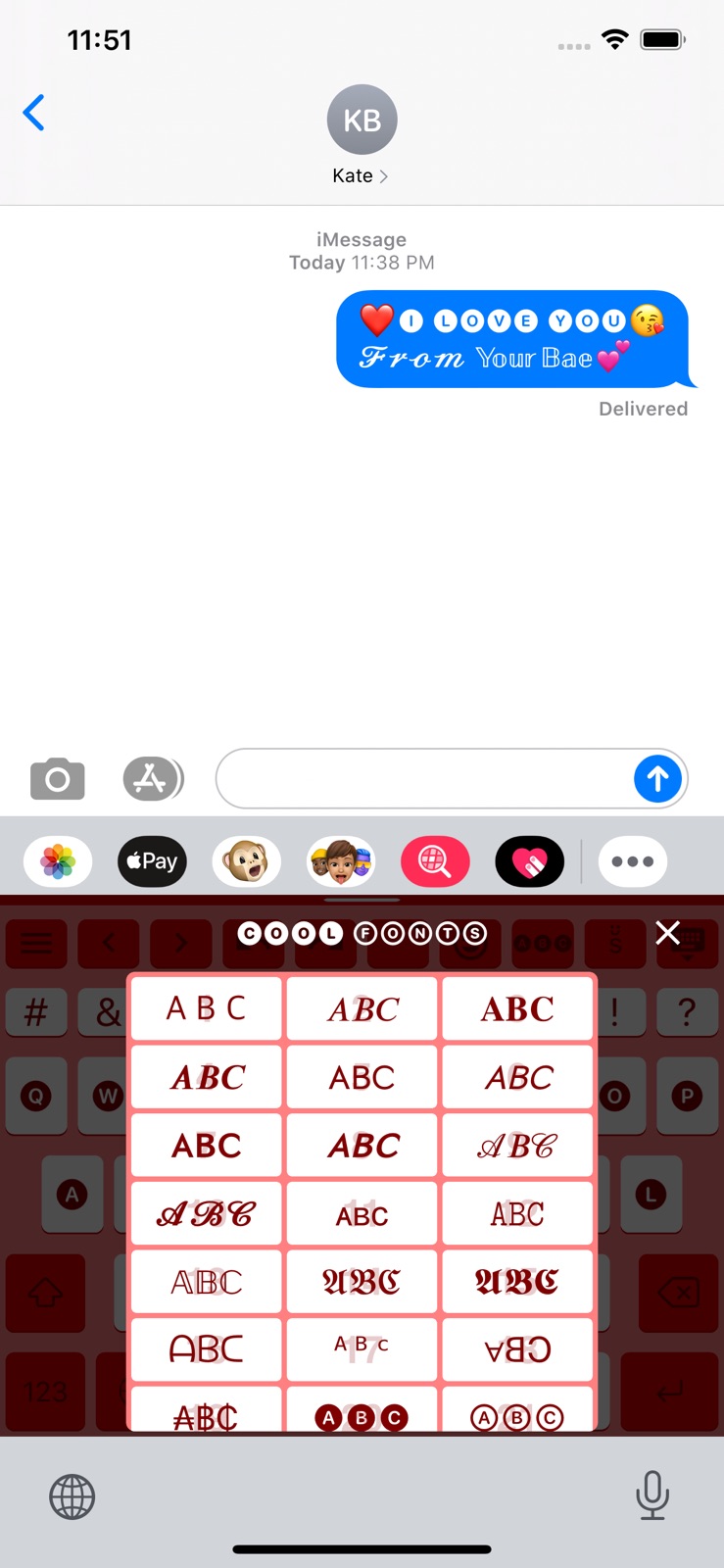


Pricing & paywalls
App Store
- Plus — $0.99
- Plus — $7.99
- Premium — $3.99
- Premium — $9.99
- Premium — $59.99
- Support $0.99 — $0.99
- Support $0.99 — $1.99
- Support $0.99 — $2.99
- Support $0.99 — $4.99
- Support $0.99 — $9.99
Ratings & reviews
App Store
-
5/5Keyboard issue
This is not actually a review. I have a tech-support problem. But the only way to contact tech-support is through Facebook and I refuse to join social media just so that I can email the developer so I’ll put my problem out here. Hopefully they will read it. Auto capitalization of the first word in a sentence does not function properly when using dictation in iOS 16. Every time I try to dictate, the first word does have a capital letter until the microphone deactivates then it turns to a lowercase letter and I have to go back and change it manually. I’m using an iPhone 13 pro max with iOS 16.0 software.
72_R · 6 Aug 2026
-
4/5Almost Perfect!
Just like everyone else is saying, it needs autocorrect and predictive text. The thing is... this would be the PERFECT keyboard for IOS in my opinion if it had those features. I feel the developer really knows what people (or me at least) want in a keyboard and I think he knows that the lack of autocorrect and predictive text is hurting downloads. From what I understand, developing those features is very difficult. Easily a five star review if it had those features. I've tried every other keyboard for IOS that a search in the app store would pull up. None come close to this one. Apple should just buy this keyboard from the developer (if he would sell) and use it for the default IOS keyboard.
Mixer10 · 6 Aug 2026
-
5/5Nice but...
Ok so first of all do we like need to get a premium membership for this keyboard to work like I had it only for 2 weeks and then on monday it just stopped working so I deleted this app, until now because i thought maybe it would let me use the keyboard still and it thankfully did, bro whyyy like just why does it only work for 2 weeks and there no more like am I supposed to buy premium membership just to use this keyboard forever. Ughhh! Anyways just wanted to ask hope you respond Slyder btw I am using the keyboard rn, anyways, hopefully you read ALL of this! Ty!
I LOVED IT SO MUCH!!!! · 6 Aug 2026
-
1/5Automatic 1 Star
This app is being given an automatic one star there’s no reason why the very first thing should be an agreement that demonstrates that this developer is a special kind of snowflake who can’t handle constructive criticism, one negative feedback and therefore want you to enter into an agreement to where you’re not giving negative feedback. To add insult to injury, the apps App Store page does not indicate there are in app purchases however there’s an entire section devoted to premium and the developer not only has in app purchases, but they are also charging for features that come standard included in most other keyboards and even the ChatGPT option that’s included in the paid subscriptions is actually outdated at this point. This app is definitely not worth it and as stated, the developer is a special kind of snowflake
xrraynor91 · 6 Aug 2026
-
4/5Nearly Perfect Keyboard for iOS
This is probably the most complete keyboard available to download on iOS. I prefer it over the top 2 other iOS keyboards (SwiftKey & Gboard). SwiftKey since SwiftKey lacks a true “one hand mode” and also over Gboard because Gboard doesn’t have a true 5th Row. However the one thing that stops me every time from using Slyder on a daily basis is it doesn’t have any form of predicative text & autocorrection. Which in my opinion would make this the best keyboard in the AppStore. I’m truly hoping that within the new few updates those 2 key features are implemented.
Infamous_Ian · 6 Aug 2026
Privacy & accessibility
App Store
Privacy
- Data Not Collected Developer declared
Accessibility
No accessibility labels collected yet.
Versions
App Store
-
1.14.25
Made improvements for the best Slyder experience!
-
1.15.00
AI powered ChatGPT is now available in Keyboard! You can ask ChatGPT within Slyder keyboard and type with response!
-
1.15.01
AI powered ChatGPT is now available in Keyboard! You can ask ChatGPT within Slyder keyboard and type with response! Fixed globe button not functioning properly for some users
-
1.15.03
AI powered ChatGPT is now available in Keyboard! You can ask ChatGPT within Slyder keyboard and type with response! Fixed an issue regarding payments.
-
1.15.04
Made overall quality improvements
-
1.15.05
Made overall quality improvements
-
1.15.06
ChatGPT now supports the most advanced GPT-4 model, enhancing the quality and capabilities of the conversational experience. GPT-3.5 is also updated to the latest model!
-
1.15.07
Fixed keyboard crashing due to memory usage due to new iOS update Fixed Chunjiin keyboard's : character not working in certain apps
-
1.15.08
Fixed ChatGPT not functioning
-
1.15.09
Bug fixes
-
1.15.10
Bug fixes
-
1.15.11
* Added Gemini model developed by Google for the Generative AI chat on top of GPT 4o developed by OpenAI * Fixed crash when editing the first row of the favorites for some users * Overall improvements
-
1.15.12
Bug fixes
-
1.15.13
Bug fixes
-
2.0.0
Slyder Version 2 is here! We are thrilled to announce the release of Slyder Version 2 with a host of exciting new features to enhance your experience: • Apps: Directly open another app or website from your keyboard. Simply type a search query and tap the search engine app to get instant results. • Folders: Organize Favorites with Folders! Once you add folders to Favorites, you can edit folders right from the keyboard. • Smart Recommendation Bar: Get quick access to emojis, apps, and tools based on your context. Note: Ads are displayed for free users. • Number Pad: Easily type numbers with the new number pad tool. • Menu Refresh: Effortlessly access all features, settings, notifications, and more from a streamlined menu. • Plus Membership: Unlock exclusive features including no ads, custom folders, unlimited clipboard history, cool fonts, and ChatGPT 3.5. Premium members enjoy all Plus benefits. • Free Membership: Some features are now limited for free users. Clipboard history is capped at 10, and access to cool fonts is restricted. Smart Recommendation Bar contains Ads which cannot be hidden for free users. Try out these great features and take your productivity to the next level!
-
2.0.1
Bug fixes
-
2.0.2
Fixed bugs
-
2.0.3
Bug fixes
-
2.0.4
Bug fixes
-
2.0.5
Bug fixes
-
2.1.0
Slyder 2.1 packs new tools, smarter suggestions, and a fresh new look! • Premium AI can now search the web on its own to find the most relevant, up-to-date answers — and replies render in rich, formatted text. • New Link button: add buttons that open any website or app directly from the keyboard. • Built-in interactive tutorials walk you through Slyder's gestures — moving the cursor, delete-and-undo, and hiding the keyboard. • Cool Fonts & Fun Text now open in a quick, scrollable banner so you can preview and switch styles instantly. • A smarter, resizable recommendation bar now suggests the number pad and date & time based on what you're typing. • Plus members can now hide context recommendations for a cleaner recommendation bar. • Folders are easier to manage — move items between folders and organize your whole favorites row in one place. • A redesigned app with an iOS Settings-style layout, the latest emojis, and a faster, lighter, more stable keyboard.
-
2.1.1
• Haptic Feedback — choose your feedback style and dial in its strength in the new Haptic settings. • Landscape control for Korean keyboards — grid Korean keyboards now have a setting to turn the standard layout on or off in landscape. • Fixed a "new" badge that wasn't disappearing for some users. • Plus the usual polish and fixes throughout.
-
2.1.2
• A lighter, faster keyboard — we cut its memory use significantly, so it opens quicker and is far less likely to be reset by iOS while you're typing. • Plus the usual polish and fixes throughout.
-
2.2.0
• Insights — a brand-new typing dashboard. See your typing speed, time saved, most-used words, favorite buttons and more, all calculated privately on your device. • A redesigned color picker, plus My Colors — save your favorite keyboard color sets and switch between them with a tap (Plus). • An even smarter recommendation bar that suggests the right emojis, apps and tools for what you're typing. • A new guided setup that walks you through enabling Slyder and picking your favorites in seconds. • Plus the usual polish and fixes throughout.
-
2.3.0
· 5 Jul 2026
Slyder 2.3 makes your keyboard more you than ever — new looks, new fonts, and more! • Gradient Keyboard — Blend up to 5 colors into a smooth gradient across your whole keyboard, add a touch of transparency, and save your favorite combinations (Plus). • Keyboard Font — Choose the font for your keys, from clean and modern to cute hand-drawn Korean styles (Plus). • Emoticons — Insert from 2,000+ face emoticons :) organized by mood, with the right ones suggested as you type. • Insights, now with graphs — Track your typing activity over time with a new interactive graph and switchable metrics. • Free members can now resize the recommendation bar to fit them just right. • Plus smaller improvements and bug fixes throughout.
Alternatives
- MyKeyboard - Custom Keyboard — Same category + similar ratings
- Typewise Custom Keyboard — Same category + similar ratings
- Mister Keyboard: Custom Themes — Same category + similar ratings
Availability by market
- US
Data quality & evidence
- Page completeness
- Live store listing
- Last verified
- 6 Aug 2026
- Sources
- App Store
- Independent summary has not been published yet.