
Quick verdict
- What it is
- Store information collected; an Apoku editorial summary is not yet published.
- At a glance
-
- Free download · core features require a paid plan
- In-app purchases
Categories and search queries
Official categories
- Sports
- Health & Fitness
Apoku categories
Key functions
| Function | Availability | Access | Scope | Evidence |
|---|---|---|---|---|
| Free app | Yes | Free | Context-specific | Store published |
| In-app purchases | Yes | Limited free | Context-specific | Store published |
| Subscription | Yes | Paid | Context-specific | Store published |
| Family Sharing | Unknown | Unknown | Scope unknown | Store published |
Screens
App Store
60 store screenshots


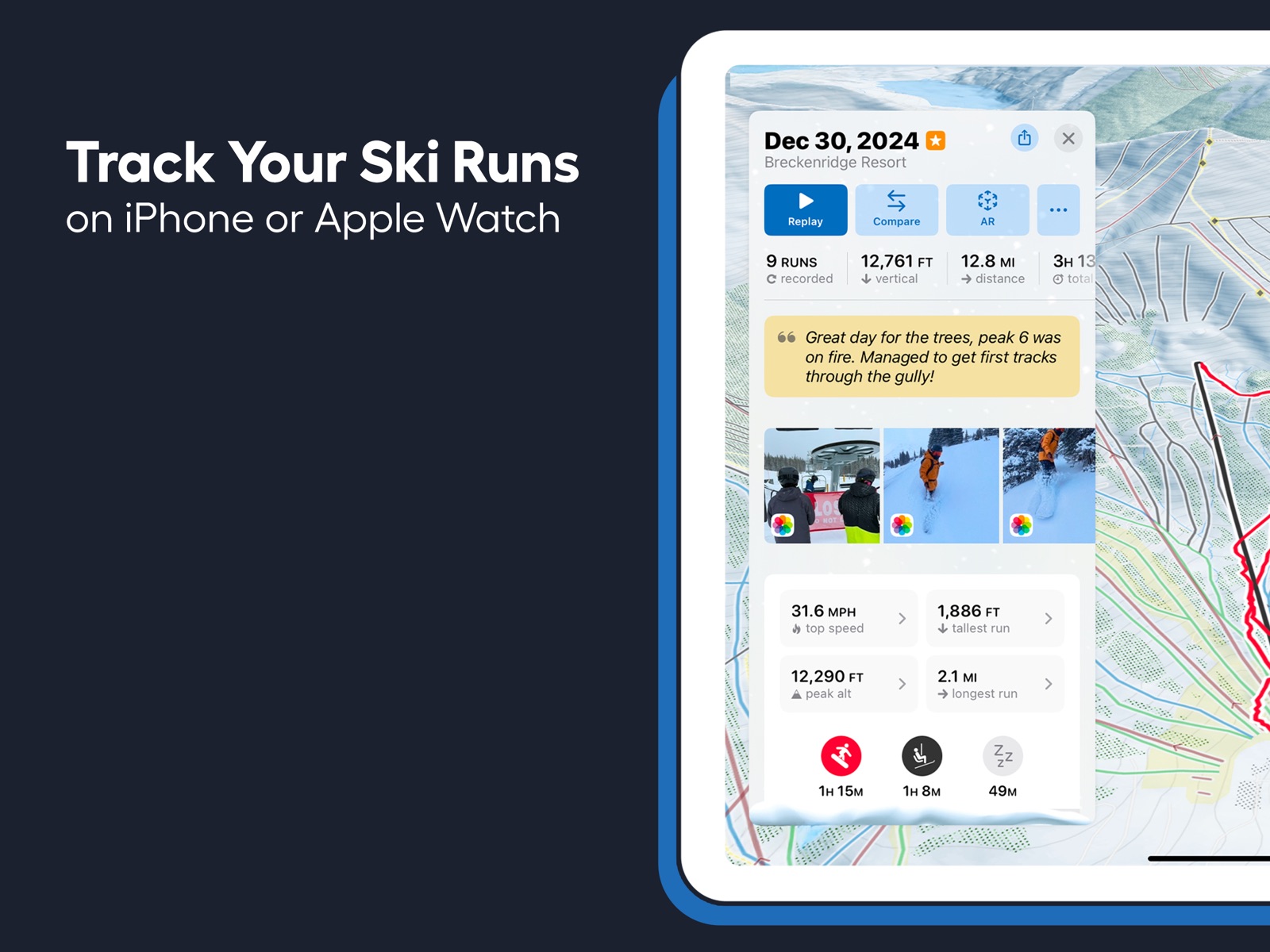

Pricing & paywalls
App Store
- Slopes Premium Family Plan — $59.99
- Slopes Premium Unlimited — $34.99
Ratings & reviews
App Store
-
5/5Amazing app!
I first downloaded slopes at the beginning of this ski season because my friend who recommended it to me skis every weekend loves it. I decided to try it out and I was shocked by how easy it is to manage. All you have to do is open the app once you get to your mountain and choose whether you are skiing, boarding, skiing/boarding back country, racing, etc. Then, hit the ‘start’ button and you are good for the whole time you are on the mountain! Something I was excited about is I can have my phone on do not disturb and keep the app running at the same time since I don’t have to keep my phone on. This saves me a lot of battery as my phone has been dying quickly. Yesterday on Monday (presidents’ day), I had gone boarding the whole day. I got around 19 runs at Blue Mountain in PA and hit a new top speed as well as earning new stats. I was very proud of myself as it was my last day on the slopes before my soccer season and wanted to get a good workout in before I can’t go anymore for the year. However, my phone died and the gps on my phone stopped recording and for whatever reason, my stats didn’t save. I was upset because I track them with my friends and overall just like to know how I can improve. So, I reached out to the support system through Slopes app and got a response immediately! It was amazing since I didn’t know if i was able to get it back at all. Overall, I love this app and would recommend it to ANY skiier/boarder who wants to track stats. Very easy to navigate!
Jillian Drzyzga · 29 Sep 2026
-
5/5Great tracker, a few minor bugs to be fixed but I’ve yet to find better.
Slopes has worked great for me. I appreciate the data it provides, and don’t find it to be obstructive or overly energy consuming. My most used feature, aside from tracking, is probably the visual map of open trails. It only disagrees slightly with reality on occasion, and that’s typically because the resort is opening up specific sections of runs during the early season and the app can only display trail status in binary. You wouldn’t, however, get much better from the resort trail status page as most lack a visual guide or map when slopes gives one - Palisades Tahoe is the only place I ski where I’ll use the resort’s website as they have a map that you can set to filter by open, I use the slopes map everywhere in CO where I live. The only minor complaint I have is about editing of sessions - occasionally, it won’t listen to me and the data won’t change after going in to edit. This was most apparent on a day that I was coaching a complete beginner - I think the low (read: near zero) speeds and low vertical rise of the lift we were taking confused the program enough that it only counted one run, and won’t update when editing. Oh well, only a few hundred feet of vertical lost. I’m sure I’ll make it up once the snow finally arrives!
MW II · 29 Sep 2026
-
5/5Undisputed Best Mountain App
I started using this app in 2018. I can’t compare it to other mountain apps, but I still wouldn’t switch regardless. It works perfectly with your watch or phone. The best way to review this is to tell you how it works on a typical snow day. 1. I arrive at the lift and open the “Slopes” app on my Apple Watch 2. It automatically knows what mountain you are on, so you just select your activity: —— Downhill: snowboard / skis / telemark skis / monoski /sitski / snowbike / other. —— Backcountry: skis / snowboard / splitboard / other —— Other Winter Sports 3. The app will start tracking your session, and you can put your phone away or cover your watch in your sleeve for the rest of your day. Optional Lunch: If you want to take lunch, open the app on your phone/watch and hit the pause button for a specified time or manually resume it. 4. At the end of the day, you tap the checkered flag, and it will load all your stats for the day. Stats: - # of Runs - Total Vertical - Total Time - Total Distance - Average Speed - Top Speed - Tallest Run - Peak Altitude - Longest Run Extra: if you connect your watch, it tracks your health. - Average BPM on runs - Max BPM - KCAL burned 5. Go home after your trip and open the app to see All Lifetime Stats. You will see the best scores for each category out of all your days on the mountain. BEST APP FOR THE MOUNTAIN
Roobbbzzzz · 29 Sep 2026
-
5/5Best snow sports tracker app ever!!!
Slopes is amazing. It tracks so many different winter sports and is pin point accurate on many different data points, like your total vertical, speed, EXACTLY how you skied a run, your elevation, and so much more. You can compete with friends, there’s so many different cool features and it’s so easy to use. Would 110% recommend to anyone who skis, snowboards, snowshoes, does backcountry skiing or snowboarding, and way more!!! Slopes has a world wide GPS of every ski resort ever with all the runs and chairlifts, and you don’t have to pay to use all of its amazing features that you could ever possibly need. It’s literally THE BEST. You can keep track of anyone you have as a friend on the app at their live location when they’re up on the mountain, making super easy to meet up with people and know where someone is. You can also call the local ski patrol with just the touch of a button, so if you don’t know the number and need to call that comes in super useful. It also links to your health data, so you can go over into the health app that comes with your phone and see your heart rate and more!
Hello3217 · 29 Sep 2026
-
1/5Not only unreliable, but disappointing
I was so excited to start using this app, but from day one have had problems. The primary issue is that you can get through an entire day of runs, hitting speeds you wanted recorded, making tracks you wanted to review, understanding the vertical feet that you dropped, etc. This app is not only unreliable, which unto itself you might simply say “oh well, not a great app“, but this app actually is disappointing because after an exciting day on the slopes you sit down, open your pocket, take out the app and take a look at it - and it simply says “no GPS data recorded”. After the first time this happened I read the troubleshooting guide and it said that you needed to make sure you had a reliable connection. Next time I confirmed that I did (my other apps all recorded). Next time GPS data didn’t record I was told it was likely do to keeping the app in an outside pocket where the phone got cold - keep it in an inside pocket to ensure warmth and then it will record your GPS location - so I did. It still did not work. Today I skied at Breck in 38° sunny weather and finished the day, looked at the device, and it said “no GPS data recorded“. I would be OK if an app simply didn’t work, but when you’re so excited to see how you ripped down the mountain side, and this app, let you down, makes you realize that you need to start looking for other apps. I would not waste my time with this app.
JeffreyJ_ · 29 Sep 2026
Privacy & accessibility
App Store
Privacy
- Data Linked to You — Analytics — Identifiers — User ID Developer declared
- Data Linked to You — Analytics — Purchases — Purchase History Developer declared
- Data Linked to You — App Functionality — Contact Info — Email Address Developer declared
- Data Linked to You — App Functionality — Contact Info — Name Developer declared
- Data Linked to You — App Functionality — Identifiers — User ID Developer declared
- Data Linked to You — App Functionality — Location — Coarse Location Developer declared
- Data Linked to You — App Functionality — Location — Precise Location Developer declared
- Data Linked to You — App Functionality — Purchases — Purchase History Developer declared
- Data Linked to You — App Functionality — User Content — Customer Support Developer declared
- Data Linked to You — App Functionality — User Content — Photos or Videos Developer declared
- Data Linked to You — Developer’s Advertising or Marketing — Contact Info — Email Address Developer declared
- Data Linked to You — Developer’s Advertising or Marketing — Contact Info — Name Developer declared
- Data Linked to You — Developer’s Advertising or Marketing — Identifiers — User ID Developer declared
- Data Linked to You — Developer’s Advertising or Marketing — Purchases — Purchase History Developer declared
- Data Linked to You — Product Personalization — Identifiers — User ID Developer declared
- Data Linked to You — Product Personalization — Purchases — Purchase History Developer declared
- Data Linked to You — Contact Info Developer declared
- Data Linked to You — Identifiers Developer declared
- Data Linked to You — Location Developer declared
- Data Linked to You — Purchases Developer declared
- Data Linked to You — User Content Developer declared
- Data Not Linked to You — Analytics — Usage Data — Product Interaction Developer declared
- Data Not Linked to You — App Functionality — Diagnostics — Crash Data Developer declared
- Data Not Linked to You — App Functionality — Diagnostics — Performance Data Developer declared
- Data Not Linked to You — Product Personalization — Usage Data — Product Interaction Developer declared
- Data Not Linked to You — Diagnostics Developer declared
- Data Not Linked to You — Usage Data Developer declared
Accessibility
- Dark Interface — SUPPORTED Store published
- Differentiate Without Color Alone — SUPPORTED Store published
- Larger Text — SUPPORTED Store published
- Reduced Motion — SUPPORTED Store published
- Sufficient Contrast — SUPPORTED Store published
- VoiceOver — SUPPORTED Store published
Versions
App Store
-
2025.10
- Fixed a case where purchases might look like they finished, but behind the scenes they didn't.
-
2025.11
- iOS 26 / watchOS 26 refresh for Liquid Glass: - Slopes uses Apple's Liquid Glass throughout the app, from map overlays to content cards, letting the map's content shine through. - Many cards have more robust actions available, either via the top toolbar or the more button ("...") at the top of the card. - The replay screen got a lot of polish, simplifying the display and adding a new speed heatmap legend. - On Watch, the start screen has a new more modern look. - On iOS 26, Slopes uses the new Apple Health Workout API: - Allows iOS to finally support Auto-Resume from pause like Watch has. - Supports AirPods 3's heart rate sensors. - At supported ski resorts, Slopes can show up in your Smart Stack, prompting you to start recording. - The resort widgets on Watch support direct configuration now, allowing you to track multiple resorts. Note: if you had a resort widget on Watch in the past, you'll need to reconfigure it using this new setup. - Refreshed the "How'd you stack up?" block on the daily summary card to match the more modern look from trip cards. - During the pre-season, at resorts Slopes supports lift/run status for, Slopes will no longer dim all the closed runs at a resort that's closed. - Added Chinese (traditional) translations, thanks to those that helped! Chinese simplified is 71% done, if you'd like to help head to Account -> Translate. - Fixed the "also accepts" for passes at a resort not always showing when it should. - Fixed the pause / resume controls not always showing on iOS when recording on Watch. - Fixed the compare screen not showing speed gradients.
-
2025.12
- Fixed a crash when trying to save off manual calorie estimates when you record on iOS.
-
2025.13
- Rebuilt our share cards, in a new vertical format (finally, eh?) with new modern designs, including a new transparent card is perfect for using in a third-party app to overlay on top of your videos. Try sharing your day / trip / season / and lifetime stats to see the new looks. - Reworked how the "Always Record with Watch" preference works (which starts recordings on your Watch when you hit start on your iPhone). We used to have it on by default, but lots of people don't use their Watch for fitness tracking (like older Watches with aging batteries). So now it's off by default. However, if you recorded a lot with your Watch last season we'll set it to on for you when you update so it keeps working as expected. - If you enable Find my Friends on iPhone, that preference will sync over to your Watch so you don't have to turn it on there. - Fixed the paper map button not getting disabled even we don't have a paper map for the resort. - Fixed some missing placeholder text when the season reset and no one on your leaderboard has recorded yet. - Fixed the look of the "no results" placeholder when exploring a resort and we don't have any lifts / runs for it.
-
2025.14
- Share card saves to IG Stories now scale to fill the story by default, and provide a background color incase you resize them. - Fixed workouts on Watch being saved with 0 calories and 0 duration. - Fixed the Watch app sometimes not showing your current heart rate. - Fixed the resume timer not working on iPhone when recording via Watch. - Fixed a case where the 3D mountain share card might not render. - Fixed a random crash that could occur on your iPhone after opening the Watch app. - Fixed a crash on macOS when trying to use a Slopes widget. - Fixed a crash when viewing details about a resort. - Fixed a crash when trying to re-import .Slopes files. - Fixed a crash when launching the app with an unfinished recording.
-
2025.15
- Big improvements to GPX imports & filtering out of bad GPS data that caused bogus speeds. - The 2025.14 fix for the 0 duration 0 calories workout saves to Apple Health worked in our testing, but turns out we didn't totally squash it. Once more, with feeling! - Fixed a case where the logbook might get stuck in a half-loaded state while recording. - Various UI & animation fixes for iOS 26.1.
-
2025.16
- You can now Double Tap (tap index finger + thumb together) twice to start a workout on Watch on watchOS 26. - Changed the ski / snowboard / etc icons to buttons on the start recording screen for Watch, giving bigger tap targets than just the start button. - Fixed error in Instagram when sharing to your feed or a DM. - Fixed importing when the GPS data has duplicate locations back-to-back. - Fixed the map of your recording not updating if you made an edit in the timeline editor. - Resort forecasts will now match your imperial vs metric preference inside Slopes, instead of always using device settings.
-
2025.17
- Redesigned the start recording screen - made it clearer for new users how to start recording, and exposes a new quick-settings screen. - Fixed an alert showing up if you tried to enable Find My Friends without an account that just said "Help". - Fixed a possible crash when saving an activity. - Fixed a crash when trying to hit the share button when viewing photos from a day's recording. - Fixed the battery warning for Watch popping up when it shouldn't. - Fixed the prompt for setting up Find my Friends while recording not doing anything when you tap it. - Fixed the downhill distance saved to HealthKit being slightly less than what you see in Slopes (not retroactive).
-
2025.18
- Improved the login flow when you previously made an account using Sign in with Google on another platform. - Fixed a case where messages / errors wouldn't show while trying to log in or sign up. - Fixed a crash that could happen when opening / closing cards quickly. - Fixed a background crash that could happen after you finish using Slopes for the day.
-
2025.7
- A new alternate app icon inspired by the traditional look of resort maps, complete with hundreds of happy little trees covered in hand-painted snow. - Reorganized resort search: the "find bathrooms / food / medical help" options are now shown at the top of search results before you begin search, vs being buried in the filters bar. Also added more options: services (tickets / info), lockers, and more. - When using resort search, the results card shrinks down so you can see results highlighted on the map, too. Makes searches like "show me the bathrooms" or "show me groomed runs" much more useful! - The Offline Maps screen now suggests resorts you might want to save based on upcoming trips and other factors, so you don't have to search by name for each one. - The alternate app icon picker screen now supports previewing dark-mode version of the icons. - If you run your phone in dark mode and use the option to force light-mode maps, selecting a trail / lift / etc to view details will now use the right colors on the map to show it's selected state.
-
2025.8
- Moved the recording tab to the center of the bar and made Logbook the first tab, since that's the one the app launches into. - Fixed a case where the pause button might not show up while recording. - Fixed a few issues with Watch-to-iPhone communication when Slopes on the iPhone hadn't been launched for a long time. Issues such as Live Activities not showing up when you start recording on Watch, or Day Passes not activating when recording on Watch. - Fixed cases where launching the app directly into a recording or resort details (via Shortcuts, for example) would leave the map in an invalid state.
-
2025.9
- New onboarding experience with a bit more hand-holding to make sure people are set up and less confused on "what do I do next?" - Streamlined the Sign Up / Log In dialog to make it even faster to log in via Sign in with Apple. - Fixed a case where the "Add Friends" button might be missing on the friends tab. Slopes now requires iOS 17 and watchOS 10. As always, if you can't update, you can always access older versions of Slopes via your purchase history in the App Store.
-
2026.1
- Big overhaul of our GPS filter, which will do a much better job removing bigger temporary spikes in bad data, especially around when you start recording, when you pause/resume, or when you've been inside a building for a while. This should also help with altitude spikes we've seen with Apple Watch Ultra 2 and newer (like when your Watch thinks you are 2,000ft in the air!). - This update will go back and look for obviously-bad altitude data and try to fix it retroactively with the new filter. - Improved the logic around lift-line detection and "waiting for your snowboarder friend to strap in" pauses at the top, improving how we trim lifts & runs to include only active time. - Switched from KM -> Meters for displaying season and lifetime vertical when in metric. - Added additional messaging to help make it clear that offline maps aren't available with day passes, only subscriptions. - Improvements to the Highlights UX, like hiding the buttons / chrome when you tap and hold to pause on a card. - Added new import/export options under Account -> Integrations & Tools. You've always been able to get to your data via the Files app or iTunes File Sharing, but this new UI is a bit more obvious. Additionally, the import option allows for easier bulk importing without mucking around in the Files app. - Fixed the map not zooming in on the compare screen if you got like 6 or 7 runs deep. - Fixed a case where going to share a photo wouldn't auto-apply the photo as the background in the share cards. - Fixed photos not loading when scrolling through the day's slideshow super fast. - Fixed a case where larger logbooks might hang loading if you had photo integration turned on. - Fixed imports failing when the locations were not pre-sorted by time (...like they should be). - Fixed imports failing when all locations have a speed of 0 or -1. - Fixed a timezone issue that caused some recordings on Jan 1 to show in the 2025 Highlights. - Fixed trip cells in the logbook formatting your recorded vertical for the trip as time instead of distance.
-
2026.10
- You can now swipe up and down to collapse and expand the tab bar while you record. - If you expand the tab bar while recording, we don't auto-collapse it anymore for that recording session. - For premium users, when replaying your day run/lift names are no longer low-contrast, making it easier to see which runs you took. - Improved the "what did you tap on the map?" logic to take into account layer ordering. - Fixed your avatar disappearing if you over-scrolled on the replay screen. - Fixed the "+5" text next to the avatars of friends you skied with sometimes being cut off in the logbook. - Fixed the thumbnails on the map for photos you took sometimes being squished. - Fixed the resume button getting squished temporarily when you enable the auto-resume timer. - Fixed downloading offline maps on the account screen for resorts you never looked at the details of before.
-
2026.11
- Tap a person, country, or resort in your lifetime or season summary to search and view matching activities. - Trail detail cards now show the average slope angle, too. - It's the little things: added a zoom-to-fullscreen transition when tapping on a photo on the map during replay. - Fixed the Pass Value Calculator showing "loading" when no resorts you visited belong to a season pass. - Fixed trail details not loading for runs at Lutsen Mountains (and a few other resorts). - Fixed a race condition where the map never fully loads.
-
2026.12
- Drive-away detection: It's not just you: 2.2% of riders this season left Slopes recording while driving away from the resort. Now Slopes catches the vast majority of those, alerting you with a notification + haptics, and then automatically removing the drive-time. We err heavily on the side of caution as it is better to leave a bit of driving than to accidentally clip real skiing, so this only happens when we're very confident and only for end-of-day driving (not mid-day shuttles; that's a whole other problem). As always, the timeline editor is there if you want to tweak what we did. - You can now save recordings even when we didn't detect any runs or lifts. Ruby Hill and other hike-to parks, this one's for you. - Zoom in on the logbook globe and you'll now see resort names under your pins. - Fixed runs and lifts sometimes going missing or getting swapped when cluster detection (how we tell skiing apart from milling around the lodge) got confused about where a pause started or ended. - Fixed the tab bar handle sometimes disappearing during a recording, leaving you no way to bring it back. - Fixed Kosovo and other disputed territories sometimes not showing a flag in the lifetime and season summaries. - Fixed a case where opening a push notification or widget could cause the card UI not to show. - Fixed a few subtle bugs in the recording engine that could lead to the starts/ends of lifts/runs being off by a small amount. - Fixed a case where skiing at Chamonix could sometimes highlight Switzerland in the logbook map. - Fixed a case where the top speed in leaderboards might not match the top speed listed on activities/trips/seasons. - Fixed a case where animations could get disabled.
-
2026.13
· 4 May 2026
- Lots of UX improvements for the timeline editor: - Added a movement heat-bar to help you set the start/end of lifts/runs and avoid including time in lift lines. - Added labels ("Run #1") and duration to the lift/run blocks. - Live-updating of the lift/run's GPS path on the map while you drag the start or end to a new time. - Higher contrast for the full day's GPS path and the action you're editing. - Switched to Slopes's custom resort maps so it is easier to snap to lifts. - UI tweaks to modernize the screen and bring it more inline with iOS 26. - Slopes will no longer re-open to a recording or resort you looked at days ago. Instead we now only restore the last thing you were doing if it was within the past 10 hours or so. - Improved GPS recovery logic for rescuing briefly-lost location points. - Fixed multiple crashes on launch, including one that was sending some iOS 26 users into a crash loop. - Fixed a couple of crashes that could happen during or at the end of a recording session. - Fixed a crash for Ask to Buy users: if a parent approved an in-app purchase while you were waiting, the app could crash. - Fixed several crashes that could happen seemingly at random — loading resort details, network activity, and smart recording reminders. - Fixed crashes in the daily AR playback scene on iOS 26, usually related to opening and closing it multiple times.
-
2026.14
- Huge improvements to the recording engine moving Slopes beyond just lifts & runs at resorts: - When you start in uphill/skinning mode, Slopes now shows live ascent stats. - A new dedicated cat ski mode for the backcountry that's tuned specifically for identifying cat rides vs skiing. - In regular downhill ski mode, hiking is detected separately from lifts. Hikes show live ascent stats, and post-recording totals them separate from lifts. - Better suppression of "phantom runs" during small uphill segments of runs. We'd merge them back into the main run in the end, but your run count could look inflated mid-run if you checked your stats. - Improved our "trim the fat" logic we apply to the start/end of runs to better cut out lift-lines & time waiting for friends at the top of the lift. - Slopes now works in landscape on iPhone, with a wider layout that makes the most of the extra room. - The Overview / Analyze / Vitals switcher is back on the playback card instead of only being accessible under the "..." menu. - You can now pinch to zoom into live photos. - Slopes will now use the heart rate zone ranges in Apple Health when available (iOS 27+). - Fixed a case where drive-away detection could fire if you were bombing a run mid-day. - Fixed searching for seasons, where '2025' only matched '2025/25' and not '2024/25'. - Fixed several peak altitude issues: the value in your season summary now matches the activity and the 3D scene shows the right peak. - Fixed "solo days" counting individual solo recordings instead of actual solo days, and a streak day-count that could be off by one for skiers outside GMT. - Fixed snow conditions where "dumping" and "fresh powder" could get swapped. - Offline map fixes: updating a digital map no longer forces a full re-download, "Erase all" now fully clears your paper maps, and we resolved a couple of related crashes. - Fixed an upcoming trip itinerary that could stay stale after you edited it. - Fixed Logbook lifetime stats not counting up on first appearance, and missing run-number indicators during playback on iOS 17/18. - Fixed some cases where the map could get stuck in a loading state, never showing activity data. - Fixed a case where trip attendees could appear duplicated. - Squashed several crashes. Going forward Slopes now requires iOS 18 or watchOS 11 (Watch Series 4 is the only hardware dropped as a result of this).
-
2026.15
· 17 Sep 2026
- Quick fix for a crasher where bad recordings that had been silently failing to upload in the past were now crashing the sync engine. ---- Previous release notes for our iOS 27 release: - Huge improvements to the recording engine moving Slopes beyond just lifts & runs at resorts: - When you start in uphill/skinning mode, Slopes now shows live ascent stats. - A new dedicated cat ski mode for the backcountry that's tuned specifically for identifying cat rides vs skiing. - In regular downhill ski mode, hiking is detected separately from lifts. Hikes show live ascent stats, and post-recording totals them separate from lifts. - Better suppression of "phantom runs" during small uphill segments of runs. We'd merge them back into the main run in the end, but your run count could look inflated mid-run if you checked your stats. - Improved our "trim the fat" logic we apply to the start/end of runs to better cut out lift-lines & time waiting for friends at the top of the lift. - Slopes now works in landscape on iPhone, with a wider layout that makes the most of the extra room. - The Overview / Analyze / Vitals switcher is back on the playback card instead of only being accessible under the "..." menu. - You can now pinch to zoom into live photos. - Slopes will now use the heart rate zone ranges in Apple Health when available (iOS 27+). - Fixed a case where drive-away detection could fire if you were bombing a run mid-day. - Fixed searching for seasons, where '2025' only matched '2025/25' and not '2024/25'. - Fixed several peak altitude issues: the value in your season summary now matches the activity and the 3D scene shows the right peak. - Fixed "solo days" counting individual solo recordings instead of actual solo days, and a streak day-count that could be off by one for skiers outside GMT. - Fixed snow conditions where "dumping" and "fresh powder" could get swapped. - Offline map fixes: updating a digital map no longer forces a full re-download, "Erase all" now fully clears your paper maps, and we resolved a couple of related crashes. - Fixed an upcoming trip itinerary that could stay stale after you edited it. - Fixed Logbook lifetime stats not counting up on first appearance, and missing run-number indicators during playback on iOS 17/18. - Fixed some cases where the map could get stuck in a loading state, never showing activity data. - Fixed a case where trip attendees could appear duplicated. - Squashed several crashes. Going forward Slopes now requires iOS 18 or watchOS 11.
-
2026.2
- The tab bar now automatically minimizes when you record as we noticed it was confusing a lot of new users, not realizing everything you need is on the recording screen (nearby friends, resort map, live status, etc). Don't worry, you can tap the arrow at the bottom to bring it back if you need to get to other parts of the app. - If you're on the manage friends screen and you accept a friend invite, it'll refresh to show the new friend right away. - Fixed a bug where you could use light-mode maps in dark-mode as a free user. - Fixed a case where photos might not load in the logbook until you scroll. - Fixed sharing from the timeline screen. - Fixed a crash that could occur after you close Slopes for the day. You never would see it, but it bothered me it was crashing.
-
2026.3
- When recording at a resort that supports live lift status, status will auto-refresh a few times a minute while your screen is unlocked and Slopes is sitting in the foreground. - Improved handling of GPX imports when the timezone data is missing. We'll now try to look that up for you. - Fixed a case where a failed import would be endlessly retried every time you launched the app. - (We hope) fixed a rare case where trying to share an activity could crash.
-
2026.4
- Offline Maps now work with day passes! If you have at least 1 day pass waiting on your account then you'll be able to download maps for offline. Offline maps just won't be leveraged until you activate that day pass. - When Find My Friends is enabled, you location will now update a bit more frequently for your friends to see. Still battery friendly, though! - When Find My Friends is enabled and you have Slopes on-screen watching your friends, Slopes will poll the server for location updates a bit more frequently. - Fixed a bug introduced last week that was preventing the logbook from showing new data or responding to deleting data. - Fixed a case where the "via Watch" indicator might get stuck on-screen even after you end recording.
-
2026.5
- Sync your stats between Slopes and the Ikon Pass app! The sync works both ways, so your Slopes recordings will appear in the Ikon Pass app and in the Ikon Pass leaderboards, and Ikon Pass tracked sessions will appear in Slopes with all our detailed analytics. - When you're at a resort comprised of multiple smaller resorts (EX: Niseko, Les 3 Vallées, etc), you can now filter lifts/runs by the smaller resorts when searching. - Named gates, and backcountry access gates, will now show on the map without having to zoom in. - Fixed "Last Run" not being at the top of the run list while recording for premium users.
-
2026.6
- Refreshed design for the account screen with a lot of UX improvements. - Fixed the "VS" share card missing stats for a person. - Fixed the upsell screen not being scrollable on smaller phone screens. - Fixed the start recording button disappearing if you switch tabs back-to-back rapidly.
-
2026.7
- Lowered memory usage when viewing replays in AR, or sharing days with the 3D share card. - Fixed a race condition that could cause a blank tab to show if switching between them quickly. - Fixed the elevation graphs at some resorts (mostly in Canada) where MapBox's digital elevation model had some bad smoothing applied to it, leading to an almost stair-step effect in the data. This lead to incorrect elevation (+/- 2 meters) and incorrect slope detection at affected resorts. - Fixed a race condition where the logbook could show "202X/2X" for the season and empty, instead of loading your data. - Fixed the recording engine getting stuck in a corrupted state, requiring a reinstall to remove a bad recording. - Fixed your lifetime distance being listed off by a factor of 1,000 on the post-recording add-a-note screen. - Fixed a case where we might not use a GPX file's speed values. - Fixed a case where we would fail to import GPX data if the timestamp had more than 3 decimal places.
-
2026.8
- You can now remove multiple resorts from offline storage at once. - Added information on which recordings have not sync'd to the server in the dialog warning you about that. - If you try to troubleshoot sync issues, we'll temporarily turn on extra logging to help support track down the issue. - Fixed some text spacing in dialogs when a resort uses OSM for its ski data. - Fixed your avatar not showing on the map during replays for free users.
-
2026.9
- Check out the new Pass Value Calculator on the seasons summary screen to easily see if your season pass saved money vs buying standard lift tickets. - When in dark mode, the sky in 3D mode will now render as night time. - If you update your email, we'll validate it to help avoid typos like @gmail.c9m. - Working on tracking down 0-or-low calorie estimates from Apple Watch. A speculative fix is in here, but also a lot more logging to help us track it down.
Availability by market
- US
Data quality & evidence
- Page completeness
- Live store listing
- Last verified
- 29 Sep 2026
- Sources
- App Store, Google Play
- Apoku editorial summary has not been published yet.