
Quick verdict
- What it is
- Store information collected; an Apoku editorial summary is not yet published.
- At a glance
-
- From $1.08/mo
- Free download · core features require a paid plan
- In-app purchases
Categories and search queries
Official categories
- Photo & Video
- Utilities
Apoku categories
Key functions
| Function | Availability | Access | Scope | Evidence |
|---|---|---|---|---|
| Free app | Yes | Free | Context-specific | Store published |
| In-app purchases | Yes | Limited free | Context-specific | Store published |
| Subscription | Yes | Paid | Context-specific | Store published |
| Family Sharing | Unknown | Unknown | Scope unknown | Store published |
Screens
App Store
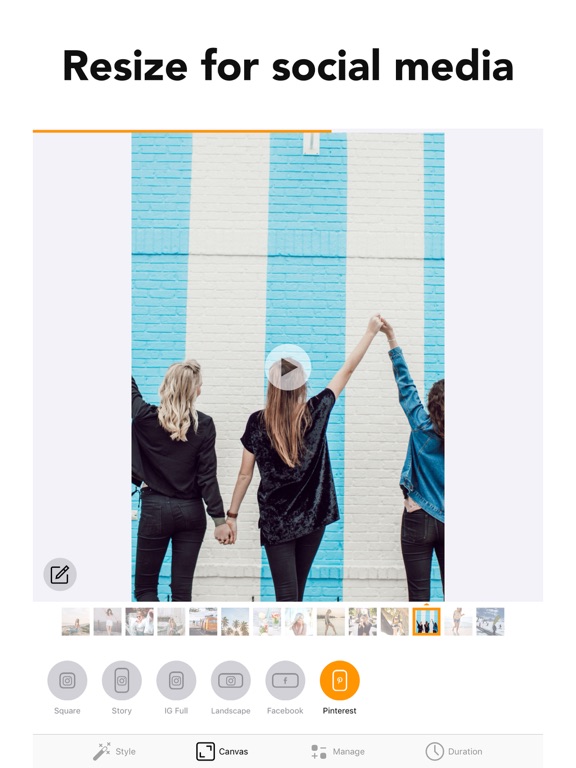
14 store screenshots


Pricing & paywalls
App Store
- Slideshow — $12.99/year ($1.08/mo) (derived from the IAP title)
Ratings & reviews
App Store
-
5/5Perfect!
This app is extremely easy to use. Just click “new project” upload your media (photos and videos!) and it compiles them into a slideshow. There is options to add music, rotate pictures that are sideways, clip videos to make them shorter, and to increase or decrease the speed at which it moves through the slideshow. You can also have the app place the photos in chronological order or put them into the slideshow at random. This is literally everything I was hoping for in an easy to use format! The cost is 7.99 per year. They were very up front about that. No gimmicks or tricks. My only critique: when you’re editing a video clip and you’ve made the change it takes you back tot he beginning of the slideshow instead of starting where you left off. With pictures it doesn’t do the is. A little annoying but not a deal breaker.
CharKachSkin · 29 Sep 2026
-
4/5Slide show
It’s pretty simple but there could be options to make it more user friendly. I’d like to be able to put my photos in a different order more easily then it allows - I don’t like having to delete the photo and adding it back into the slide show somewhere else . You should be able to manage all photos in the slide show and change order simple. I would like more options to control the photo between each slide and the times between each slide and not have it apply to the entire slide show. The music selection that comes with the full paid version is very limited and very weak none of it is any good in my opinion and I used my own. I also would like to have the option to use the full size version of my images not just for fb or social media. I’m using my slide show for family wedding and I don’t like being forced to crop into the specs of social networking sizes. The app is basic but it’s workable for the price it needs some fine tuning. I only used it because my Mac desktop is currently down I needed a slideshow and didn’t want to pay 40-50 like some of the other apps out there since I have better ones on my desktop that hopefully I’ll be able to use soon.
Kwalt6 · 29 Sep 2026
-
5/5Outstanding!!!
I recently used this Picture Slide Show maker, and I couldn't be more impressed! This tool truly encompasses everything you need to create stunning slideshows. The ability to customize music and set your own timing between pictures adds a personal touch that brings memories to life. What stood out to me was the exceptional customer support. I encountered a minor issue, and to my surprise, their team reached out within a few hours to help me resolve it. Their promptness and professionalism made the experience even more enjoyable. Whether you’re crafting a heartfelt tribute, celebrating a special occasion, or just want to share memories with friends and family, this slideshow maker is a must-have. I wholeheartedly recommend it to anyone looking to elevate their picture presentations!
thedeke · 29 Sep 2026
-
5/5Easy!!!! Easy!!!! Easy!!!!
I have spent the last five days gathering a total of 250 images into sixty-one scrapbook-style slides ( 16:9 format ) for a 5-minute memorial video for my 95-year-old mother’s upcoming funeral. After hours of trying to use Canva, iMovie, etc., this was affordable, and SO EASY TO USE!!!! iMovie kept reversing the order of the images from my iOS photo album over and over! Deleting the app and reinstalling didn’t help. Canva was too complicated with too many options. Slideshow Maker Video & Photo was so user friendly……I opened the app. I added the photos. I added the music I purchased for use from Soundstripes. I adjusted the duration of a few slides. I saved it to my photos app! Thank you!!!!!
debdphoto · 29 Sep 2026
-
2/5Would recommend
It did what I needed done, not as well as the program on my Mac desktop which is not working. It would be nice to have instructions. Like after you pick your pictures, you have to select them in the order you want as you go. This is not bad if you have 20-30 pictures but I had 500. Also, not being able to adjust each individual frame size was frustrating, I had to make do. You cannot move the pics within the frame at all, so if you have a tightly cropped pic, you will probably have a missing head or someone’s sleeve only. However, wedding is in a few days and I needed to complete my project. I’m going with two stars simply because of the editing options. However if you consider all of these things before you start your project, it may help and it is a nice video now that it is complete. I also added my own music.
Reviewed by DD · 29 Sep 2026
Privacy & accessibility
App Store
Privacy
- Data Not Linked to You — Analytics — Diagnostics — Crash Data Developer declared
- Data Not Linked to You — Analytics — Identifiers — Device ID Developer declared
- Data Not Linked to You — Analytics — Location — Coarse Location Developer declared
- Data Not Linked to You — Analytics — Purchases — Purchase History Developer declared
- Data Not Linked to You — Analytics — Usage Data — Advertising Data Developer declared
- Data Not Linked to You — Analytics — Usage Data — Product Interaction Developer declared
- Data Not Linked to You — Third-Party Advertising — Identifiers — Device ID Developer declared
- Data Not Linked to You — Third-Party Advertising — Location — Coarse Location Developer declared
- Data Not Linked to You — Third-Party Advertising — Purchases — Purchase History Developer declared
- Data Not Linked to You — Third-Party Advertising — Usage Data — Advertising Data Developer declared
- Data Not Linked to You — Third-Party Advertising — Usage Data — Product Interaction Developer declared
- Data Not Linked to You — Diagnostics Developer declared
- Data Not Linked to You — Identifiers Developer declared
- Data Not Linked to You — Location Developer declared
- Data Not Linked to You — Purchases Developer declared
- Data Not Linked to You — Usage Data Developer declared
- Data Used to Track You — Identifiers — Device ID Developer declared
- Data Used to Track You — Identifiers Developer declared
- Data Used to Track You — Location — Coarse Location Developer declared
- Data Used to Track You — Location Developer declared
- Data Used to Track You — Purchases — Purchase History Developer declared
- Data Used to Track You — Purchases Developer declared
- Data Used to Track You — Usage Data — Advertising Data Developer declared
- Data Used to Track You — Usage Data — Product Interaction Developer declared
- Data Used to Track You — Usage Data Developer declared
Accessibility
No accessibility labels collected yet.
Versions
App Store
-
1.26.1
• You can now add text onto your slides. Give it a try :) • Bug fixes If you have any issues or suggestions let me know at [email protected]
-
1.26.2
• You can now add text onto your slides. Give it a try :) • Bug fixes If you have any issues or suggestions let me know at [email protected]
-
1.27.0
• Tweaked a couple of the themes • Bug fixes If you have any issues or suggestions let me know at [email protected]
-
1.27.1
• Tweaked a couple of the themes • Fixed a bug with the video speed adjustment If you have any issues or suggestions let me know at [email protected]
-
1.28.0
• Added a bunch of new styles • You can now turn on / off elements of a style If you have any issues or suggestions let me know at [email protected]
-
1.29.0
• Minor improvements Previously: • Added a bunch of new styles • You can now turn on / off elements of a style If you have any issues or suggestions let me know at [email protected]
-
1.30.0
• Minor bug fixes Previously: • Added a bunch of new styles • You can now turn on / off elements of a style If you have any issues or suggestions let me know at [email protected]
-
1.31.0
• Minor bug fixes and performance enhancements to improve your experience. If you encounter any issues or have suggestions, please reach out to us at [email protected]
-
1.32.0
• We've squashed numerous bugs and made performance enhancements to improve your experience. If you encounter any issues or have suggestions, please contact us at [email protected]
-
1.33.0
• We've squashed some pesky bugs and made performance enhancements to elevate your user experience. For any issues or suggestions, reach out to us at [email protected].
-
1.34.0
• We've fixed some bugs and boosted performance to enhance your user experience. For any feedback or suggestions, contact us at [email protected].
-
1.35.0
• An all new music picker. You can now extract audio from video and also import audio from your files. • Added the ability to set a default fit / fill style for displaying your photos and videos. For any feedback or suggestions, contact us at [email protected].
-
1.35.1
• An all new music picker. You can now extract audio from video and also import audio from your files. • Added the ability to set a default fit / fill style for displaying your photos and videos. For any feedback or suggestions, contact us at [email protected].
-
1.36.0
• Squashed a bunch of pesky bugs to keep your experience nice and smooth. Previously: • An all new music picker. You can now extract audio from video and also import audio from your files. • Added the ability to set a default fit / fill style for displaying your photos and videos. For any feedback or suggestions, contact us at [email protected].
-
1.37.0
• Squashed a bunch of pesky bugs to keep your experience nice and smooth. Previously: • An all new music picker. You can now extract audio from video and also import audio from your files. • Added the ability to set a default fit / fill style for displaying your photos and videos. For any feedback or suggestions, contact us at [email protected].
-
1.38.0
• Made some improvements to how we work on iPad. • Minor bug fixes and improvements. For any feedback or suggestions, contact us at [email protected].
-
1.38.1
• Made some improvements to how we work on iPad. • Minor bug fixes and improvements. For any feedback or suggestions, contact us at [email protected].
-
1.39.0
• Made some improvements to how we work on iPad. • Minor bug fixes and improvements. For any feedback or suggestions, contact us at [email protected].
-
1.40.0
• Made some improvements to how we work on iPad. • Minor bug fixes and improvements. For any feedback or suggestions, contact us at [email protected].
-
1.41.0
• Minor bug fixes and improvements. For any feedback or suggestions, contact us at [email protected].
-
1.42.0
• Minor bug fixes and improvements. For any feedback or suggestions, contact us at [email protected].
-
1.43.0
• Minor bug fixes and improvements. For any feedback or suggestions, contact us at [email protected].
-
1.44.0
• NEW: Create your own styles! Mix and match transitions, motion, filters, overlays and music, then save your creation to reuse in any slideshow. • Fixed a couple of crashes and gave the motion effects a tune-up. For any feedback or suggestions, contact us at [email protected].
-
1.45.0
• NEW: Blank slides! Add white or black slides from the photo picker — great for titles and section breaks. • Set any color or gradient on a blank slide, and tap to change the gradient direction. • Add text to your slides to make title cards. • Minor bug fixes and improvements. For any feedback or suggestions, contact us at [email protected].
-
1.45.1
· 19 Jul 2026
• NEW: Blank slides! Add white or black slides from the photo picker — great for titles and section breaks. • Set any color or gradient on a blank slide, and tap to change the gradient direction. • Add text to your slides to make title cards. • Minor bug fixes and improvements. For any feedback or suggestions, contact us at [email protected].
-
1.46.0
· 29 Jul 2026
NEW: Position photos and videos within the frame! Your slides, exactly how you want them — no more choosing between fit and fill. • Pinch, drag and rotate any slide right on the edit screen • Zoom in to feature exactly what matters, or zoom out to float the whole image over its blurred background • The blurred background follows your image, staying centered behind it and rotating with it for a polished look • Snapping guides and gentle haptics help you line everything up perfectly • Plays beautifully with motion effects, and your video exports exactly as previewed We'd love to hear what you think — leave a review, and if you have feedback or suggestions, email us at [email protected].
-
1.47.0
· 11 Aug 2026
We've been busy under the hood making SlideShow Maker smoother than ever. • Saving is now faster and more efficient, especially for slideshows with lots of photos • Trimming a video now updates its slide preview instantly, so you always see your new starting frame • Plus other small improvements and polish throughout We'd love to hear what you think — leave a review, and if you have feedback or suggestions, email us at [email protected].
-
1.48.0
25 new transitions, and a save screen that finally tells you what's going on. This update brings a big batch of new ways to move between your photos, including a whole family of strip, corner and pivot reveals. Found one you love? Tap the heart and it's always right there when you build your next slideshow. • 25 new transitions, including strip fills, corner reveals and pivot closes • Tap the heart on any transition to make it a favorite • Your favorites come first in the custom style builder • Mix and match them into your own saved styles Also in this update: • While your slideshow saves, you can now see roughly how much time is left • Frames from your video appear as it's created, so you can watch it come together • A gentle reminder to plug in if your battery is low during a long save • Clearer information when a save takes a while, or doesn't finish We'd love to hear what you think — leave a review, and if you have feedback or suggestions, email us at [email protected].
-
1.48.1
· 5 Sep 2026
25 new transitions, and a save screen that finally tells you what's going on. This update brings a big batch of new ways to move between your photos, including a whole family of strip, corner and pivot reveals. Found one you love? Tap the heart and it's always right there when you build your next slideshow. • 25 new transitions, including strip fills, corner reveals and pivot closes • Tap the heart on any transition to make it a favorite • Your favorites come first in the custom style builder • Mix and match them into your own saved styles Also in this update: • While your slideshow saves, you can now see roughly how much time is left • Frames from your video appear as it's created, so you can watch it come together • A gentle reminder to plug in if your battery is low during a long save • Clearer information when a save takes a while, or doesn't finish We'd love to hear what you think — leave a review, and if you have feedback or suggestions, email us at [email protected].
Alternatives
- SlideShow Maker: Music & Video — Same category + similar ratings
- Quick Slideshow Maker + Music — Same category + similar ratings
- MoShow Slideshow Maker Video — Same category + similar ratings
- SlideShow Maker with Music Fx — Same category + similar ratings
- SlideShow Maker Photo to Video — Same category + similar ratings
- Slideshow Maker Photo Video — Same category + similar ratings
Availability by market
- US
Data quality & evidence
- Page completeness
- Live store listing
- Last verified
- 29 Sep 2026
- Sources
- App Store
- Apoku editorial summary has not been published yet.