
Quick verdict
- What it is
- Store information collected; an Apoku editorial summary is not yet published.
- At a glance
-
- Free to download
Categories and search queries
Official categories
- Business
- Productivity
Apoku categories
Key functions
| Function | Availability | Access | Scope | Evidence |
|---|---|---|---|---|
| Free app | Yes | Free | Context-specific | Store published |
Screens
9 store screenshots


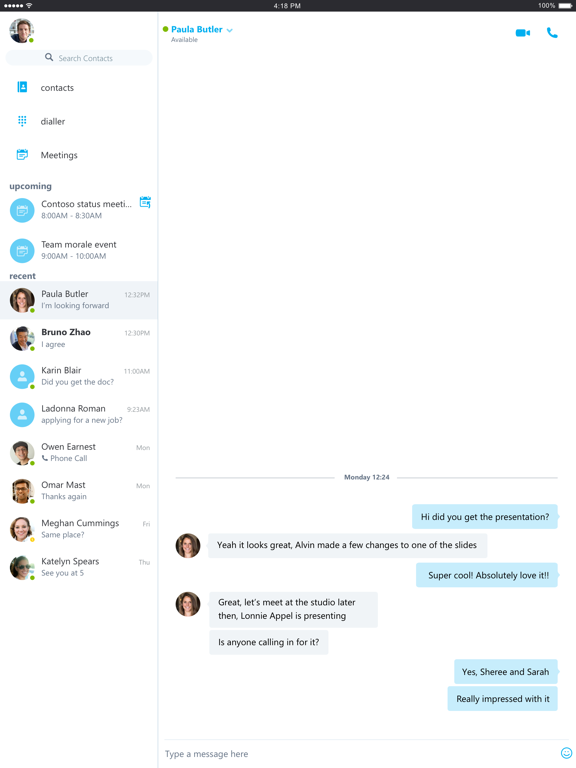

13 store screenshots


Pricing & paywalls
- Free to download
- Free to download
Ratings & reviews
-
4/5Getting better the more we use it
Skype for business is fantastic when it works. You can easily share presentations and hear people clearly. When it works, it is very good and our preferred program. It took a while to get used to it though. In some cases, it was unstable and the participant would lose audio and the program would constantly reconnect. It appears to be dependent on the strength of your wireless signal and if it is a bit low, you can lose connection. It also depends a bit on the device. The best device I have used is my iPad. My iPhone and computer are somewhat less reliable but now work most of the time. The iPad has worked every time. The most confusing part is that for some of my colleagues, Skype works but Business Skype acts buggy. Huh? That makes no sense but it is real as the original Skype appears to be more stable. We will continue to work with the program as the bugs continue to go away but be prepared for some frustration at the beginning.
superbreeder · 29 Sep 2026
-
3/5Old accounts never get removed
S4B seems to be broken when it comes to accounts. When you leave a job and all your accounts and credentials are deleted there, no matter what you do (on iPhone, at Microsoft Online), there is no way to fully remove your old S4B account (on the phone). No menu choice on local app. Web site may or may not show it. Home pc doesn’t show it any more. It’s just stick in your S4B app sign on list forever. Deleted app. Reinstalled. Nope. MS Authenticator doesn’t show the old accounts. Phone doesn’t show them. MS web doesn’t show them. IMHO this is a potential major security flaw with the iPhone version. Leaving old credentials in limbo active state is bound to lead to prior org security risks. Randomly also your valid current business account will suddenly display an error screen (you’re no longer authorized to access that server). NOTHING your corporate IT guys can do. That’s actually a bug in S4B iPhone app. You have to add a new dummy email address to force S4B to try to access it. Do that 2-3 times. Then go back to login to your real business account. It will prompt for your password. And you’re back in. Authentication credentials management on this app are clearly broken. Also S4B does NOT sync with PC S4B. Chats will show up on phone that are active in pc but they’re not syncd properly if at all. Closing chats on pc doesn’t close them on phone and visa versa. So the iPhone version seems to be a never ending Beta. MS really needs to get their act together. They’re making great progress with S4B in the enterprise (although no one seems to be able to get inbound outbound direct dial to work usefully yet... oddly “Skype” app handles that better). S4B, Skype, Lync, Lync2013... the journey continues.
sayvilleguy · 29 Sep 2026
-
1/5Just a bit more effort
The reason this app gets one star is because it doesn't sync up with skype on one's computer. This is the simplest most basic piece of functionality a messaging app should do. If I send a message from my phone to a coworker, I should be able to see it on my computer. If I receive a message on my phone from a coworker, read it, then wish to respond via computer, the message USUALLY DOES NOT SHOW UP ON THE COMPUTER. Highly frustrating, Groupme has been doing this for years guys, literally years. Edit: So I originally stated the syncing issue was my only qualm. I was sorely misguided. This app has continued to disappoint repeatedly. I’m currently traveling internationally and simply unable to connect via WiFi (note groupme connects rapidly). It’s comical how bad this app is and I laud the developers who created it for how little they cared. I desire to someday care so little about what I do and yet still have it published for thousands to use. It will be the greatest practica joke of my life. I have written maybe 10 reviews total in my tenure as an Apple user. This app holds first place for two reviews under my name.
Messthebeast · 29 Sep 2026
-
1/5Needs improvement
Conversations from other devices logged into the same account do not sync efficiently, or at all really. The more I use this between devices there is almost no time when my phone and laptop and tablet load the same conversation history. The app can’t be used in split screen or in a slide over window to view chats. Notifications are unruly. With SFB closed on my iPad, not open in the background, and while working from Skype on my laptop, I was sent a file over SFB and my phone went off alerting me of a Skype for business “call” (which was the file being shared) and I continued on my computer. The notification did not end, and I had to manually reject the “call” from my phone. 3 hours later, after being off work I open my iPad and there’s a SFB incoming call; The notification for a shared file, with SFB closed entirely on my iPad, persisted with the screen off for 3+ hours and would have continued until my battery was completely drained.
Adamsquishy · 29 Sep 2026
-
1/5Unreliable, poorly designed bucket of frustration
The product owners for this app must be incompetent, careless, or both. Skype for business is unreliable, slow, confusing (does the crossed out mic that is gray mean mute is on? Oh wait, tap the button and now mute is on... no wait people can hear me... so mute is on when this button is off), annoying because if you are the meeting creator, Microsoft made the decision to unmute you by default when you join the meeting even though all it takes is one experience in a typical conference room to see how people often dial into a conference room phone first so then there is always awful feedback when the meeting creator joins... basically it’s like Microsoft has never even observed how people actually use Skype and instead just insist it should be used their way and could care less. It’s exactly like every other Microsoft product so I’m not surprised, but this one is particularly bad.
Atreyu8 · 29 Sep 2026
-
1/5
wont even connect anymore. was looking for something more professional, but i guess i'll just stick to discord
Nathan Morehead · 29 Jul 2026
-
5/5
Very good
Ferdinand Solis · 29 Jul 2026
-
5/5
yeas
Bonza Bilai · 29 Jul 2026
-
5/5
Long live Skype, before it got killed. Wasn't great, but better than teams.
Balkanton · 29 Jul 2026
-
1/5
Used Skype since 2013. I take full owner ship and accountability for the choice I made.
Jerobeam Mark Oppelt · 29 Jul 2026
Privacy & accessibility
Privacy
- Data Linked to You — Analytics — Diagnostics — Crash Data Developer declared
- Data Linked to You — Analytics — Diagnostics — Performance Data Developer declared
- Data Linked to You — Analytics — Identifiers — Device ID Developer declared
- Data Linked to You — Analytics — Location — Coarse Location Developer declared
- Data Linked to You — Analytics — Usage Data — Product Interaction Developer declared
- Data Linked to You — App Functionality — Contact Info — Name Developer declared
- Data Linked to You — App Functionality — Contact Info — Phone Number Developer declared
- Data Linked to You — App Functionality — Diagnostics — Crash Data Developer declared
- Data Linked to You — App Functionality — Diagnostics — Performance Data Developer declared
- Data Linked to You — App Functionality — Identifiers — Device ID Developer declared
- Data Linked to You — App Functionality — Identifiers — User ID Developer declared
- Data Linked to You — App Functionality — User Content — Emails or Text Messages Developer declared
- Data Linked to You — Contact Info Developer declared
- Data Linked to You — Diagnostics Developer declared
- Data Linked to You — Identifiers Developer declared
- Data Linked to You — Location Developer declared
- Data Linked to You — Usage Data Developer declared
- Data Linked to You — User Content Developer declared
Accessibility
No accessibility labels collected yet.
Privacy
- Data collected — Analytics — App activity — App interactions Developer declared
- Data collected — Analytics — App info and performance — Crash logs Developer declared
- Data collected — Analytics — App info and performance — Diagnostics Developer declared
- Data collected — Analytics — Device or other IDs Developer declared
- Data collected — App functionality — Messages — Other in-app messages Developer declared
- Data collected — App functionality — Personal info — Email address Developer declared
- Data collected — App functionality — Personal info — Phone number Developer declared
- Data collected — App functionality, Account management — Personal info — User IDs Developer declared
- Data collected — App functionality, Analytics — Location — Approximate location Developer declared
- Security practices — The developer doesn’t provide a way for you to request that your data be deleted — Data can’t be deleted Developer declared
- Security practices — Your data is transferred over a secure connection — Data is encrypted in transit Developer declared
Accessibility
No accessibility labels collected yet.
Versions
App Store
-
6.23.0
Bug fixes and performance improvements
-
6.23.1
Bug fixes and performance improvements
-
6.23.2
Bug fixes and performance improvements
-
6.24.0
Bug fixes and performance improvements
-
6.25.0
Don't prompt for user name and password when the user has already signed into other Office apps on the device. Join a meeting without audio and video but still participate in presented content and chat. Fixed an issue that prevented the app from joining a meeting through a proxy server. Bug fixes and performance improvements.
-
6.25.1
Don't prompt for user name and password when the user has already signed into other Office apps on the device. Join a meeting without audio and video but still participate in presented content and chat. Fixed an issue that prevented the app from joining a meeting through a proxy server. Bug fixes and performance improvements.
-
6.25.2
Don't prompt for user name and password when the user has already signed into other Office apps on the device. Join a meeting without audio and video but still participate in presented content and chat. Fixed an issue that prevented the app from joining a meeting through a proxy server. Bug fixes and performance improvements.
-
6.25.3
Don't prompt for user name and password when the user has already signed into other Office apps on the device. Join a meeting without audio and video but still participate in presented content and chat. Fixed an issue that prevented the app from joining a meeting through a proxy server. Bug fixes and performance improvements.
-
6.25.4
- Do not send chat message text in notifications through Apple Push Notification Service (APNS). - Bug fixes and performance improvements.
-
6.26.0
Bug fixes and performance improvements.
-
6.26.1
Bug fixes and performance improvements.
-
6.26.2
Bug fixes and performance improvements.
-
6.27.0
• The version includes changes to support the latest iOS push notifications architecture. Notifications will not display user specific data. • We have also updated the way emoticons are used in the app. The iOS native keyboard has a richer set of emoticons and is easier to access while typing. We have determined that the subset offered by the app is no longer necessary or needed and has been removed. • The release also includes general bug fixes and performance improvements.
-
6.27.1
• The version includes changes to support the latest iOS push notifications architecture. Notifications will not display user specific data. • We have also updated the way emoticons are used in the app. The iOS native keyboard has a richer set of emoticons and is easier to access while typing. We have determined that the subset offered by the app is no longer necessary or needed and has been removed. • The release also includes general bug fixes and performance improvements
-
6.28.0
Bug fixes and performance improvements.
-
6.28.1
Bug fixes and performance improvements.
-
6.29.0
Bug fixes and performance improvements.
-
6.29.1
Bug fixes and performance improvements.
-
6.29.2
Bug fixes and performance improvements.
-
6.29.3
Bug fixes and performance improvements.
-
6.30.0
Bug fixes and performance improvements.
-
6.30.1
Bug fixes and performance improvements.
-
6.32.0
Bug fixes and performance improvements.
-
6.32.112
Bug fixes and performance improvements.
-
6.34.119
· 10 Jun 2025
Bug fixes and performance improvements.
Alternatives
- Spike: AI Email & Team Chat — Same category + similar ratings
- Wire • Secure Messenger — Same category + similar ratings
- OnPhone: Second Number & eSIM — Same category + similar ratings
- Zoom Workplace for Intune — Same category + similar ratings
- HMA Hotspot VPN & Proxy — Same category + similar ratings
- VPN by Private Internet Access — Same category + similar ratings
Availability by market
- US
Data quality & evidence
- Page completeness
- Live store listing
- Last verified
- 29 Sep 2026
- Sources
- App Store, Google Play
- Apoku editorial summary has not been published yet.