
Quick verdict
- What it is
- Store information collected; independent summary not yet available.
- At a glance
-
- Free to download
Categories and search queries
Official categories
- Developer Tools
- Education
AppCorpus categories
Key functions
| Function | Availability | Access | Scope | Evidence |
|---|---|---|---|---|
| Free app | Yes | Free | — | Store published |
Screens
App Store
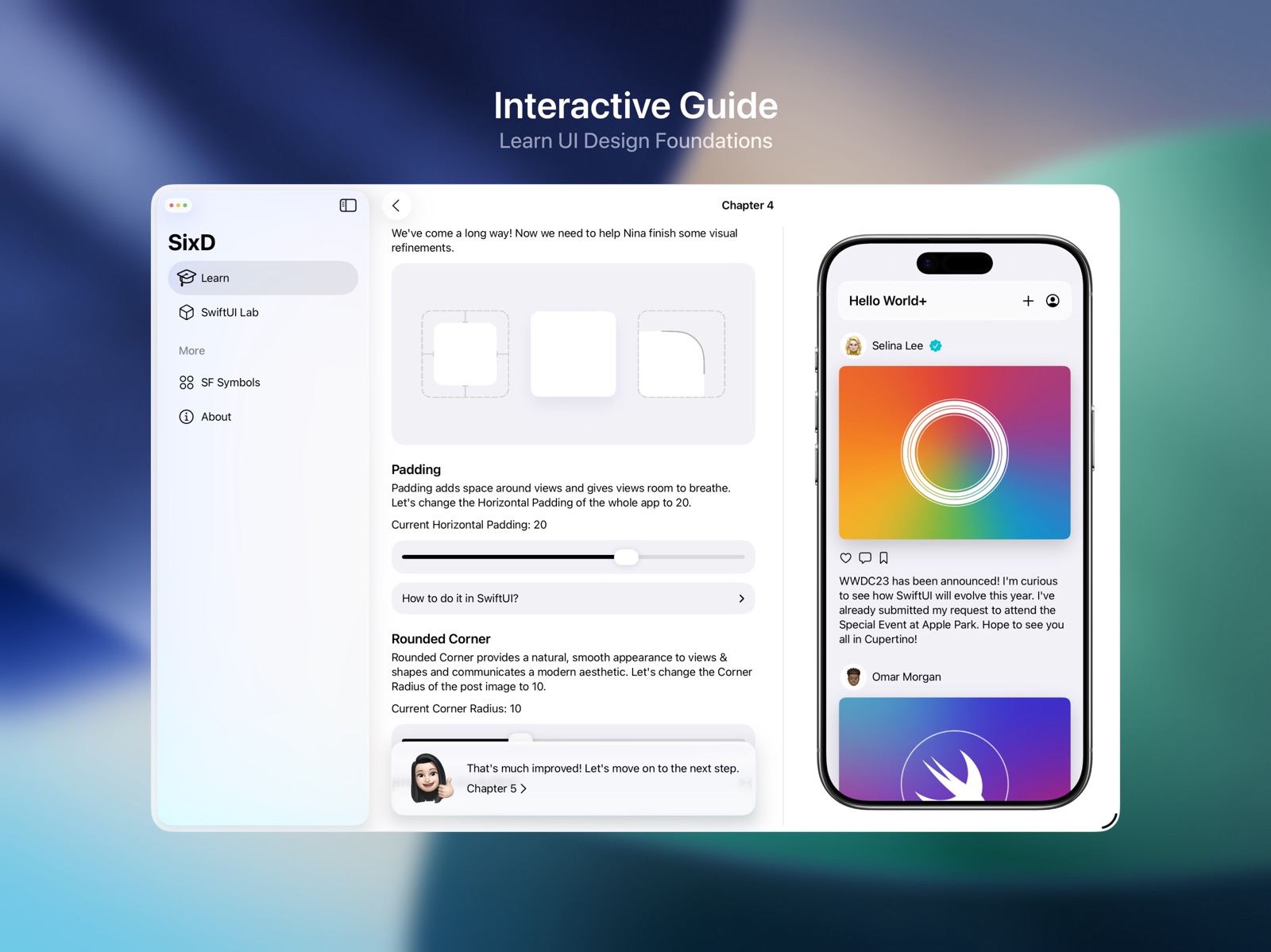
15 store screenshots



Pricing & paywalls
App Store
- Free
Ratings & reviews
App Store
-
5/5Great SwiftUI reference tool
I use it when I am looking for effects such as progressive blur or other component capabilities.
jacob377 · 31 Jul 2026
-
5/5control sixd personal
personal app
Chossca10 · 31 Jul 2026
-
5/5好用
非程序员vibe code 很多都不懂这个app 可以让我学到东西 嫩更好的和ai沟通
( ̀⌄ ́)@@ · 31 Jul 2026
-
5/5十分适合从0️⃣到1️⃣了解SwiftUI
我本身是一个前端工程师,一直试图学习SwiftUI,这个App给我一个十分简单的切入点,让我可以直观地了解到在SwiftUI中基础的组件是如何工作的,以及他们的实际运行代码是怎样的。 非常棒的App,希望以后可以增加更多用例并保持持续更新!
Tsonubin · 31 Jul 2026
-
5/5Good starting point for SwiftUI learners!
The app provides excellent guidance and code for various components
Thrawsty · 31 Jul 2026
Privacy & accessibility
App Store
Privacy
- Data Not Collected Developer declared
Accessibility
No accessibility labels collected yet.
Versions
App Store
- 1.0
-
1.1
• SixD's iPad version is now available for use on M1 and newer Apple Silicon Macs, with support for window resizing • Improved guidance for users when SixD needs more screen space • Improved the design and content of the SwiftUI Lab page • Improved the design and performance of the SF Symbols page • Improved localization
-
2.0
SixD 2.0 is the most significant update ever of SixD. Now it supports multiple platforms, including iOS, iPadOS, and macOS, and features a completely redesigned SwiftUI Lab. • With the brand new SwiftUI Lab, you can explore various SwiftUI components, from fonts to buttons, adjust them with an intuitive graphical interface, and directly copy the SwiftUI code. The SwiftUI Lab will completely change the workflow from design to SwiftUI. • For the first time, SixD introduces an iPhone version with an interface layout specifically designed for compact screens. • SixD on macOS now uses Mac Catalyst, so both Apple Silicon & Intel Mac users can experience it. • Improved details across the entire app, including the search experience for SF Symbols.
-
2.1
New in SwiftUI Lab: • Animation Lab. • Accessibility Lab. • Grid in the Layout lab. Other Updates: • Improved interface and illustration design. • Improved details across the entire app and bug fixes.
-
26.0
Introducing SixD 26. • All new design language inspired by Liquid Glass • 10+ new features, including glass modifiers and WebKit for SwiftUI • Refined experience and visual details throughout the app
-
26.1
· 12 Jul 2026
This update contains bug fixes and improvements.
-
3.1
New in SwiftUI Lab: • Stroke color, stroke opacity, and stroke width are now available in the Shape Lab. • Title display modes are now available in the Navigation Lab. • Photos picker is now available in the Picker Lab. • Adaptive SwiftUI code generation that rearranges the modifier order, which ensures effects like shadow are always rendered as intended, even in complex designs. • Improved feedback when copying the SwiftUI code. New in Interactive Guide: • Improved navigation design for iPadOS, macOS, and visionOS. • UI design refinement. New in SF Symbols: • New categories: Productivity and Entertainment. • Improved search results. Other Updates: • Improved localization. • Improved details across the entire app and bug fixes. __________________________________________________ Get ready for the era of spatial computing with SixD 3.0. Highlight for the visionOS version: • Learn and create with building blocks of the spatial computing era in SwiftUI Lab. • Apply pre-built component features with one click. For example, add a loop spin rotation for your 3D model. • All-new design that feels right at home with visionOS.
-
3.2
New in SwiftUI Lab: • Create a custom animation curve intuitively, and explore Phase and Keyframe animation in the all-new Animation Lab* • More advanced padding customization and List Style is now available in the Layout Lab • Map Style is now available in the MapKit Lab* • Magnify Gesture and Rotate Gesture is now available in the Gesture Lab* • Quick Look for PDF files is now available in the Quick Look Lab * Requires iOS 17 or iPadOS 17 and later New in Interactive Guide: • UI design refinement for iOS Other Updates: • Improved localization • Improved details across the entire app and bug fixes ____________________________________________ New in SixD for visionOS: • A new SwiftUI Lab dedicated to spatial computing • Create 3D objects (RealityView Entities), adjust their metallic, roughness, etc. with a graphical interface, and get RealityView code directly • Create visionOS windows with or without a glass background • Create visionOS volumes and customize its Z Offset • Create an immersive space with a customized skybox • Create a portal to an alternate world • Create particle effects with presets, including fireworks, rain, and more • ARKit hand tracking visualization accurate to joints
-
3.3
SixD 3.3 is a refinement version dedicated to iOS 16 and macOS 13. • Improved localization for visionOS • Improved SF Symbols search results • Improved details across the entire app and bug fixes SixD will support iOS 17+ and macOS 14+ in the future to focus on the latest SwiftUI features.
-
4.0
SixD 4.0 brings an incredible amount of new SwiftUI Lab features and a complete redesign. New in SwiftUI Lab: • Introducing Search - finding the SwiftUI Lab you need has never been easier. You can now search SwiftUI Labs by titles like "Layout" or keywords like "VStack" and "Padding" • Metal Shader effects, including progressive blur, are now available in the Effect Lab • Mesh Gradient effects with intuitive graphical controls are now available in the Color Lab* • Swift Charts, including sector charts, bar charts, and more, are now available in the new Charts Lab • Camera View, with capabilities of masking and blur effect to achieve a translucent interface effect, is now available in the new Camera Lab • Web View and In-App Safari View are now available in the new Web Lab • Video Player and Audio Player are now available in the new AVKit Lab * Requires iOS 18 or iPadOS 18 and later New in SF Symbols: • Curated most-frequent symbols will be displayed on the top, helping you find icons for "back", "search", and "info," easier than ever • Updated symbols library, including new symbols referring to Apple Intelligence New in app design and experiences: • SixD for Mac introduced a redesigned sidebar with fluid micro-interaction • SixD for Mac now opens new SwiftUI Lab in a new window, and will allow the user to view the SwiftUI code in full-window, taking more advantage of a native desktop experience* • Refined the text selection interaction of SwiftUI code • Refined visual design language and the usage of accent color * Requires macOS 15 and later
-
4.1
Improved search experience and visual refinement. ____________________________________________ SixD 4.0 brings an incredible amount of new SwiftUI Lab features and a complete redesign. New in SwiftUI Lab: • Introducing Search - finding the SwiftUI Lab you need has never been easier. You can now search SwiftUI Labs by titles like "Layout" or keywords like "VStack" and "Padding" • Metal Shader effects, including progressive blur, are now available in the Effect Lab • Mesh Gradient effects with intuitive graphical controls are now available in the Color Lab* • Swift Charts, including sector charts, bar charts, and more, are now available in the new Charts Lab • Camera View, with capabilities of masking and blur effect to achieve a translucent interface effect, is now available in the new Camera Lab • Web View and In-App Safari View are now available in the new Web Lab • Video Player and Audio Player are now available in the new AVKit Lab * Requires iOS 18 or iPadOS 18 and later New in SF Symbols: • Curated most-frequent symbols will be displayed on the top, helping you find icons for "back", "search", and "info," easier than ever • Updated symbols library, including new symbols referring to Apple Intelligence New in app design and experiences: • SixD for Mac introduced a redesigned sidebar with fluid micro-interaction • SixD for Mac now opens new SwiftUI Lab in a new window, and will allow the user to view the SwiftUI code in full-window, taking more advantage of a native desktop experience* • Refined the text selection interaction of SwiftUI code • Refined visual design language and the usage of accent color * Requires macOS 15 and later
-
4.2
• Improved search experience and visual refinement • Improved localization • Bug fixes ____________________________________________ SixD 4.0 brings an incredible amount of new SwiftUI Lab features and a complete redesign. New in SwiftUI Lab: • Introducing Search - finding the SwiftUI Lab you need has never been easier. You can now search SwiftUI Labs by titles like "Layout" or keywords like "VStack" and "Padding" • Metal Shader effects, including progressive blur, are now available in the Effect Lab • Mesh Gradient effects with intuitive graphical controls are now available in the Color Lab* • Swift Charts, including sector charts, bar charts, and more, are now available in the new Charts Lab • Camera View, with capabilities of masking and blur effect to achieve a translucent interface effect, is now available in the new Camera Lab • Web View and In-App Safari View are now available in the new Web Lab • Video Player and Audio Player are now available in the new AVKit Lab * Requires iOS 18 or iPadOS 18 and later New in SF Symbols: • Curated most-frequent symbols will be displayed on the top, helping you find icons for "back", "search", and "info," easier than ever • Updated symbols library, including new symbols referring to Apple Intelligence New in app design and experiences: • SixD for Mac introduced a redesigned sidebar with fluid micro-interaction • SixD for Mac now opens new SwiftUI Lab in a new window, and will allow the user to view the SwiftUI code in full-window, taking more advantage of a native desktop experience* • Refined the text selection interaction of SwiftUI code • Refined visual design language and the usage of accent color * Requires macOS 15 and later
Alternatives
- DockUI: Design For SwiftUI — Same category + similar ratings
- DetailsPro — Same category + similar ratings
Availability by market
- US
Data quality & evidence
- Page completeness
- Live store listing
- Last verified
- 31 Jul 2026
- Sources
- App Store
- Independent summary has not been published yet.