
Quick verdict
- What it is
- Store information collected; independent summary not yet available.
- At a glance
-
- $9.99
- In-app purchases
Categories and search queries
Official categories
- Utilities
- Education
AppCorpus categories
Key functions
| Function | Availability | Access | Scope | Evidence |
|---|---|---|---|---|
| In-app purchases | Yes | Limited free | — | Store published |
Screens
App Store
14 store screenshots

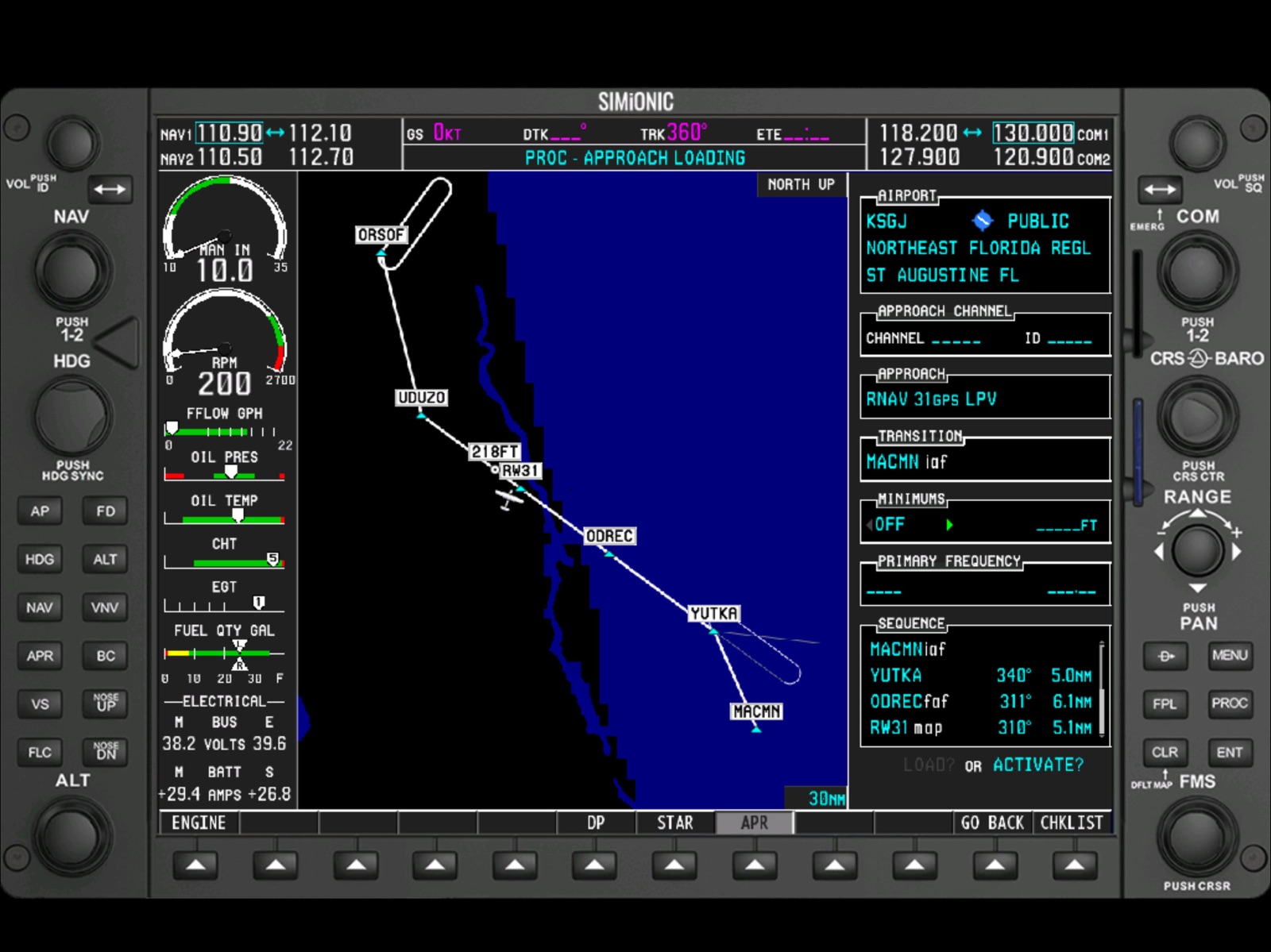


Pricing & paywalls
App Store
Shown for US
- Price: $9.99
- Aircraft Customization — $1.99
- Beechcraft Baron G58 — $1.99
Ratings & reviews
App Store
Shown for US
-
3/5Good Start
This application is almost perfect. It's very useful for learning to use the G1000, and it connects to x-plane as well; however when connected to x-plane, the navigational position is not correct. Consequently, if you track a VOR or GPS airway, localizer, or glideslope CDI; the airplane will not be centered on the course being tracked because he G1000 course guidance (the needles in the PFD) do not agree with the needles in the x-plane navigational equipment. The airplane location will actually be off course; so you may not see the airport upon arrival at the DH/DA or MDA. The navigational error can be a serious problem while connected to an online ATC service, such as: Pilotedge or VatSim. The controller will often recommend a course correction while tracking on an airway; the only solution is to use the native virtual instruments presented in the flight simulator to navigate; hence negating the purpose of the G1000 application. The autopilot is severely underdamped when connected to x-plane; so it's best to use the x-plane native autopilot. The transponder IDENT does not send the IDENT message to x-plane; so again you must use the native transponder in x-plane to ident. And, the turn-rate indicator is wrong; it too does not agree with the x-plane native turn coordinator--it indicates a full standard rate turn when in fact the plane is performing a half-standard rate turn. All these errors are observed when hand flying the airplane because the G1000 autopilot is unusable while connected to x-plane because it does not implement a properly compensated control loop. In summary; the G1000 app is good for learning in standalone mode, but it performs poorly when connected to x-plane due to the navigational position errors and other errors noted above. The x-plane support needs quite a bit of work. Once the developer fixes these issues, it will be a near perfect app; and warrant investigating the purchase of the hardware bezel.
PilotVince · 5 Aug 2026
-
2/5Terrible FMS Control - You can’t scroll at all
I got this device to help transition from 30 years of flying steam gauges. Most flight sims don’t include the aux menu so I bought this product to review the cockpit instrument check. The FMS “knob” is so difficult to use it’s almost useless. You need to hit the iPad screen repeatedly just to get the menu to appear, then it disappears before you have a chance to pick your selection. Is there any way to adjust how long the FMS “knob” remains active? If it was user configurable, or if you simply doubled the amount of time the knob was active, MAYBE it would be worth 4+, but as of now, it’s a solid 2.
JJCEagle · 5 Aug 2026
-
4/5Good for training
I passed the G1000 checkride yesterday in a Cessna 172S NAV III, transitioning from steam gauges. The Simionic simulators were an invaluable tool that I highly recommend to anybody wanting to learn the G1000 to fly an actual aircraft. Every single task the CFI wanted to see me perform I was able to do without any hesitation or problem. Thanks to Simionic for an excellent learning tool!
DANMAN999 · 5 Aug 2026
-
4/5Good app with the PFD
This works good with the PFD app, so you need two iPads to make it work, I could not get it to work by itself, but it works great with the PFD app. I have one hardware bezel from the author, and I am saving money for another. I would give it 5 stars if it worked on its own, I did try to contact the author through his website, but I received no reply. The nice thing it works with any plane in X-Plane 11. Connection to X-Plane is easy, and I haven’t had any connection issues, connection to the PFD on the other iPad has been working flawlessly. Using the direct to airport and creating a flight plan has also worked flawlessly, I haven’t tried this on FSX yet, I would like to see support for other planes.
TJohnson1962 · 5 Aug 2026
-
4/5Very happy, but…
Bought the PFD months ago, and so happy with the results, a definetly recommended tool to improve your skills with the G1000, and become a master with thr real system while airborne.. Today I’ve bought the MFD, as I want to improve my skills on it, and also so happy once exploring all its functionalities The only problem I am having is that there is no way to pair both iPads, as despite being connected to the same local network, neither the PFD detects the MFD, nor the way round:( Any clue how to troubleshot that? Thank you!
ruby_uri · 5 Aug 2026
Privacy & accessibility
App Store
Privacy
- Data Not Collected Developer declared
Accessibility
No accessibility labels collected yet.
Versions
App Store
-
5.1.2
Fixes a bug causing wrong aircraft type is shown in the AUX-SYSTEM STATUS page.
-
5.2.0
1. Minor bug fixes
-
5.3.0
1. Navdata updated to cycle 1912 2. Adds user defined holding pattern 3. Increases refresh rate for RPM and other engine parameters 4. Adds COM sync with PFD when switch to 121.5 by long pressing the COM switch button 5. Fixes a bug causing massive memory usage when the map is not north up 6. Fixes a map drawing bug in direct-to window 7. Fixes a zooming bug in "nearest" pages 8. Fixes a paging bug when returned to map page by long pressing the CLS button 9. Fixes a zooming bug caused by fast scrolling through flight plan page 10. Fixes a bug causing wrong map orientation when scrolling through pages 11. Supports dark mode for the settings window
-
5.3.1
Fixed missing radio frequencies in database
-
5.3.2
Fixes another bug causing to the COM frequencies showing 10x
-
6.0.0
1. Added aircraft customization page. Engine gauges can be configured for piston, turboprop and jet aircrafts with customized parameters. Flaps and elevator trim positions can also be configured to show. 2. Updated navigation database to cycle 2009 3. COM&NAV volumes are synchronized and controllable with X-Plane(need bridge ver. 3.1 or higher) 4. Fixes a bug causing fuel flow too high and fuel consumption too fast 5. Improved map drawing to improve stability 6. Fixes a bug causing improper sequencing for the airport waypoint when loading an arrival 7. Improved full screen display for 11" iPad Pro, no system status bar on the top of the screen any more. 8. Fixes a bug causing FPL page staying on the screen 9. Other minor bug fixes
-
6.0.1
1. Arc/bar colors of engine load percentage gauge can be edited now in aircraft customization 2. Oil pressure gauge settings accept decimal numbers now in aircraft customization 3. Fixed flaps/trim indicator position problem when vertical profile is visible 4. Navigation database updated to cycle 2010
-
7.0.0
1. Utilizing Apple's Metal graphic engine 2. Adds keyboard shortcuts for all the buttons and knobs 3. Navigation database is now updatable. We will be publishing navdata monthly. 4. Fixes redundant airways listed when loading the airway and the inconsistency between PFD and MFD when loading an airway 5. Fixes some error while drawing the vertical profile 6. Fixes the crash on the last page of AUX pages when using a customized aircraft 7. Fuel capacity for customized aircrafts now can be displayed correctly on the soft keys in the engine system page 8. Other minor bug fixes
-
7.0.1
Fixes the crash on 12.9" iPad Pro
-
7.1.0
1. Hide home bar on iPads without a home button. 2. Fallback to use OpenGL so it'll run on older iPads
-
7.2.0
1. Adds synchronization for G1000 failures from X-Plane (needs PFD v7.2.0 and G1000BridgeX v3.70) 2. Fixes missing colored arcs on customized engine gauges when the arcs are too short
-
7.2.1
Fixes a crash on 12.9" iPads.
-
7.2.2
Fixes a crash when switching between airport info and approach pages Fixes a bug causing altitude settings for waypoints disappear when storing the flight plan Adds rudder trim indication for customized aircrafts Adds flap notch marks on flaps indicator for customized aircrafts
-
7.2.3
1. Adds manually connection to PFD by entering PFD's IP address
-
7.2.4
1. Fixes a bug regarding database update 2. Minor bug fixes
-
7.2.5
1. Fixes a crash on reading non-ASCII characters from database 2. Corrects approach list on page nearest airports
-
7.3.0
Fixes an issue causing auto pairing with PFD not working under iPadOS 16 Fixes an issue causing the app not response to arrow keys when using a keyboard under iPadOS 16 Fixes an issue in entering ICAO code in settings window under iPadOS 16 Backlight on the hardware bezel now goes off when MFD is powered off
-
7.3.1
Customized aircraft now shows on the aircraft list so users can select the customized aircraft without opening the customization window.
-
7.4.0
1. Fixes wrong IAF and FAF 2. Search and rescue is now implemented
-
7.4.1
1. Fixes a bug causing rivers or lakes are not drawn correctly 2. Other minor bug fixes
-
7.4.2
Fixes a bug causing a crash when selecting right course on the "search and rescue" window.
-
7.4.3
-When selecting "vector" as the transition point or selecting "vector-to-final" on the PROC window it sets the active leg to the FAF waypoint -All the IAFs are now listed as tradition points when selecting approach
-
7.5.0
1. Magnetic variation has been re-modeled, this fixes the deviation issue when flying a flight plan and GPS approaches 2. Taking VORs' own magnetic variations into consideration instead of considering all the VORs are aligned to magnetic north 3. Added PSI as an option for torque display for a turboprop aircraft, the calculation is for Pilatus PC6 and PC12, may not apply to every turboprop planes
-
7.5.1
-Corrected a typo: "STRICK"->"STRIKE"
-
7.6.0
· 30 Jul 2026
-GPS based approaches are now shown in more detailed types such as LPV, LNAV, LP, LNAV/VNAV, LNAV+V, LP+V. Before there were only LPV and LNAV.
Alternatives
- C172 Performance — Same category + similar ratings
- CX-3 Flight Computer — Same category + similar ratings
Availability by market
- US
Data quality & evidence
- Page completeness
- Live store listing
- Last verified
- 5 Aug 2026
- Sources
- App Store
- Independent summary has not been published yet.