
Quick verdict
- What it is
- Store information collected; independent summary not yet available.
- At a glance
-
- From $0.99/mo
- Free to download
- In-app purchases
Categories and search queries
Official categories
- Productivity
- Shopping
AppCorpus categories
Key functions
| Function | Availability | Access | Scope | Evidence |
|---|---|---|---|---|
| Family Sharing | Yes | Unknown | App Store | Store published |
| Free app | Yes | Free | — | Store published |
| In-app purchases | Yes | Limited free | — | Store published |
| Siri Shortcuts | Yes | Unknown | App Store | Store published |
Screens
App Store
20 store screenshots

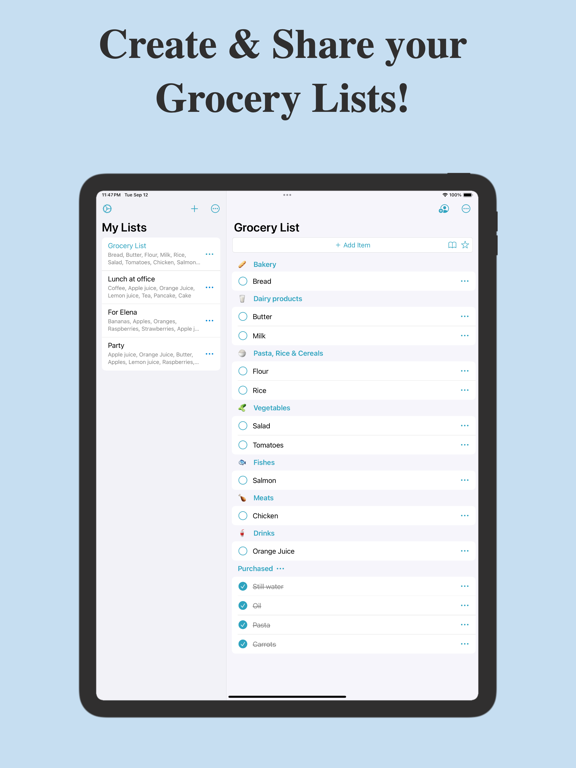

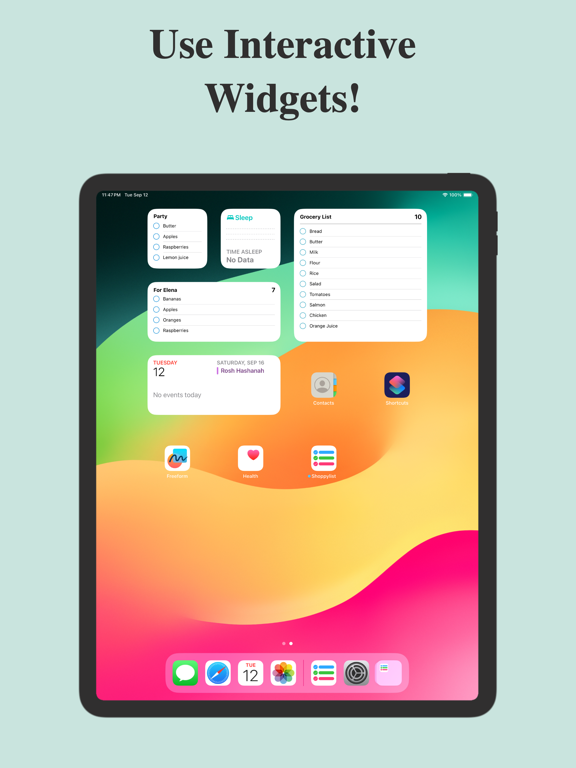
Pricing & paywalls
App Store
- Monthly Premium Subscription — $0.99/month
- Monthly Premium Subscription — $8.99/year ($0.74/mo)
- Lifetime Premium — $24.99
Ratings & reviews
App Store
-
5/5Best replacement for GroceryIQ!
I was looking for a replacement for GroceryIQ, and tried Out of Milk first. However, continued sync issues made that one a big dud for me. I’m so glad I found Shoppylist! I can create lists for multiple stores and easily update the category lists, and syncing between devices is instantaneous…and accurate. The app saves your updates, so it becomes easier each time to refresh your lists. You can even copy items between lists, or undelete items removed by mistake (added per feedback from another user, yay!). I also love that an Apple Watch version is available. I am just not a fan of the left side interface on the iPad - I don’t need to see the list items for each of the list names. And the left side should be more easily sortable alphabetically (although I can do this manually by the drag-and-drop method). However, I still think this is the best grocery list replacement for GroceryIQ!
FridayGirl · 6 Aug 2026
-
5/5Help with crash
I love this app especially when you allowed longer items - I have many lists and some shared - unfortunately I just added a very long item in a not shared to do list and it crashed when finished the add and every time I restart the app it crashes - how to do I get back in without losing all my data? backup of apps and their data is wonderful. apple care just helped me delete the app and reload the app and all its data even the item that crashed it - the restore process worked perfectly including getting the pro version with list sharing etc - everything is back - wonderful- I did notice my todo list was in a different order - but I don’t care I got everything back! apple care well worth the money after this incident. you can delete this review if you like
gllawson · 6 Aug 2026
-
5/5Great Shopping App!
I was forced to replace my previous grocery shopping app after buying a new phone. I do not like ones that are over complicated and insult my intelligence by having a picture of each item added to the list - I do know how to read. This app, once purchased at reasonable cost, allows for multiple lists, revising categories, and color coding. My only suggestion would be the lists be color coded in the Lists section. All in all, I love this app, and do not miss the old one at all; this one is actually a bit better!
PPRYORS · 6 Aug 2026
-
3/5It has the potential to be a great app
I got this app to replace Grocery PaI that went from free to costing $ and no option to stay with the free version. I liked Shoppylist at first but found there are definitely room for improvements. My biggest issue is while in the grocery store and you are relying on this app to get everything you need, then you accidentally touch the screen to keep it from closing, it marks off whatever item you accidentally touched and that item disappears and you have no idea what item it was until you get home and realized you missed a few things because you apparently touched them by accident. I don’t know how to fix it, maybe require a double touch? Or have the checked off items for that shopping trip moved to a new place so you can verify if you missed anything.
Pamz38 · 6 Aug 2026
-
2/5Almost Perfect
After using the purchased app for a couple months I do see some downsides of it. Once I check off the items I purchased I can’t figure out a way where I can reuse the same items again because I buy the same things over and over again. It’s down a huge list and uncheck them all. I wish there was a way to click a button and they all became new again. Also, when I put in the app that I want new items to go to the top they don’t go to the top they go somewhere in the middle and I have to hunt for it to put it into the correct category. Other than that it’s a nice little app but I wish these items would be fixed. it does get u or I’m gonna have to look for another one. It bothers me a lot when you pay for an app and then they quit updating it and then you can’t even use it anymore.
cantwait2retire · 6 Aug 2026
Privacy & accessibility
App Store
Privacy
- Data Not Linked to You — Third-Party Advertising — Identifiers — Device ID Developer declared
- Data Not Linked to You — Identifiers Developer declared
- Data Used to Track You — Identifiers — Device ID Developer declared
- Data Used to Track You — Identifiers Developer declared
Accessibility
- Dark Interface — SUPPORTED Store published
- Larger Text — SUPPORTED Store published
Versions
App Store
-
10
Added iOS 15 & iOS 16 support New menus You now have to tap the checkbox to select an item Tapping an item now shows item details Tapping a category in the main page opens the corresponding category page Suggested items are now sorted by alphabetic order Total price of purchased items is now always visible iCloud syncing is more reliable All error messages are now display in case of problem with iCloud syncing iPad version has been improved
-
10.1
- Improved app thanks to many user feedbacks - Item name just needs to be tapped to be selected unlike previous version - Most of iCloud sync errors have been fixed - iCloud sync error messages are no longer displayed in a modal window - Many misc improvements
-
10.2
iCloud sync has been improved for shared lists
-
10.3
Improved syncing of shared lists Suggested items are now sorted by their frequency of use App is even easier to use Improved and simplified menus Added menus into Lists Page Editing item name from main list renames it instead of creating a new one Improved management of texts with large font Item names and descriptions are no longer truncated Many minor improvements
-
10.4
Add widgets to home and lock screen. Each widget can show items from a specified list Large texts are better managed
-
10.5
Widgets are now interactive : you can check items on both Home and Lock Screens (only available with iOS 17) New app icon
-
11
There are many improvements in this new version !! The app is even easier to use. The interface, menus and widgets have been improved. iOS 18 is supported. iCloud sync has been improved and category sync between users has been completely revised.
-
11.1
New weekly update: - The item sheet now allows you to copy or move an item from one list to another. - Various minor fixes.
-
11.2
-ShoppyList adopts a new icon. -The app is now also available in Japanese, Chinese, Portuguese, and Russian. -Various improvements
-
11.3
The app is now also available in Hindi, Korean, Indonesian, Turkish, Polish, and Dutch. The app keeps getting better!
-
11.4
The app keeps getting better with minor bug fixes
-
11.5
Added FAQ The app keeps improving
-
11.6
New setting: Choose how to check your items (row, checkbox, or double-tap on the row). The app keeps improving.
-
11.7
Optimized for iOS 26! The app now perfectly adapts to the new visual style and display behaviors introduced in iOS 26.
-
11.8
Fix for a missing button on iPhone Pro Max running iOS 18 that prevented access to the lists page.
-
11.9
Templates now support quantities and descriptions. You can now enter non-integer quantities (e.g. 0.5, 1.25). We now display the total price of unpurchased items.
-
11.91
· 21 Apr 2026
Improved iCloud sync
-
8.6
-An image has been added if list is empty -General improvements
-
8.7
-Syncing of categories in shared lists has been improved -General improvements
-
8.8
The total price of checked/unchecked items is now displayed
-
8.9
-Better support of text with big font size -Better management of prices -Prices are now used when duplicating lists -General improvements
-
8.95
General improvements
-
8.97
iOS 14 support
-
9
- Added an option to sync categories of items within lists shared between users - The local currency is now used for prices - Improved lists syncing - Added direct access to Settings page from within the Menu page - Added a link to new Instagram account for those who want to contact support by this way - Many general improvements
-
9.1
- Added back up of prices to iCloud - Added syncing of prices within lists shared between users - Improved syncing of categories within lists shared between users - Added ability to add an item to list by tapping on a clear part of the screen - Many general improvements thanks to users' feedbacks
Alternatives
- Grocery & Shopping List Pro — Same category + similar ratings
- Grocery Gadget — Same category + similar ratings
- Grocery - Smart Shopping List — Same category + similar ratings
- Grocery List: Out of Milk — Same category + similar ratings
- SIMPLE Shopping List + To Do — Same category + similar ratings
- List Maker ◎ — Same category + similar ratings
Availability by market
- US
Data quality & evidence
- Page completeness
- Live store listing
- Last verified
- 6 Aug 2026
- Sources
- App Store
- Independent summary has not been published yet.