Apoku MCP provides app discovery, detailed cards, evidence, sources and screenshots where available. Unknown or conflicting prices stay explicit.
View JSON
GET /api/v3/apps/6774512379
{
  "app_id": 6774512379,
  "canonical_url": "https://appcorpus.com/apps/sharktty-ssh-mosh-6774512379",
  "identity": {
    "name": "SharkTTY: SSH & Mosh",
    "slug": "sharktty-ssh-mosh",
    "developer": {
      "name": "Jingjing Li",
      "url": "https://appcorpus.com/developers/jingjing-li-developer_f9ffd7059557d8dc6572425488bf88b7"
    },
    "icon_url": "https://is1-ssl.mzstatic.com/image/thumb/Purple211/v4/4f/9a/f2/4f9af276-55a1-8190-e2e8-68ec6318439b/AppIcon-0-0-1x_U007epad-0-1-85-220.png/512x512bb.jpg",
    "stores": [
      "apple"
    ],
    "platforms": [
      "iphone",
      "ipad"
    ],
    "status": {
      "state": "active",
      "label": "Active",
      "last_checked": "2026-08-07",
      "last_checked_label": "7 Aug 2026",
      "banner": null,
      "region_note": null,
      "data_state": "stale",
      "data_state_label": "Some store data may be out of date"
    }
  },
  "listings": [
    {
      "store": "apple",
      "status": "ACTIVE",
      "url": "https://apps.apple.com/us/app/sharktty-ssh-mosh/id6774512379?uo=4",
      "rating": 0.0,
      "rating_count": 0,
      "formatted_price": "Free",
      "is_free": true,
      "has_iap": true,
      "has_subscription": null,
      "version": "1.9",
      "updated": "2026-08-07",
      "currency": "USD"
    }
  ],
  "summary": {
    "one_liner": null,
    "summary": null,
    "best_for": [],
    "not_for": [],
    "status": "fallback",
    "at_a_glance": [
      "Free to download",
      "In-app purchases"
    ]
  },
  "categories": {
    "official": [
      "Developer Tools",
      "Utilities"
    ],
    "appcorpus": [
      {
        "category_id": "developer-tools",
        "label": "Developer tools",
        "url": "https://appcorpus.com/categories/developer-tools"
      },
      {
        "category_id": "utilities",
        "label": "Utilities",
        "url": "https://appcorpus.com/categories/utilities"
      }
    ]
  },
  "use_cases": [],
  "features": [
    {
      "capability_id": "free_app",
      "label": "Free app",
      "availability": "yes",
      "access_level": "free",
      "scope": null,
      "evidence": "Store published"
    },
    {
      "capability_id": "in_app_purchases",
      "label": "In-app purchases",
      "availability": "yes",
      "access_level": "free_limited",
      "scope": null,
      "evidence": "Store published"
    },
    {
      "capability_id": "family_sharing",
      "label": "Family Sharing",
      "availability": "unknown",
      "access_level": "unknown",
      "scope": null,
      "evidence": "Store published"
    }
  ],
  "pricing": [
    {
      "store": "apple",
      "formatted_price": "Free",
      "is_free": true,
      "has_iap": true,
      "has_subscription": null,
      "currency": "USD",
      "market": "de",
      "last_verified": "2026-08-07",
      "rows": [
        "Large Coffee Tip",
        "Large Monthly Tip",
        "Small Coffee Tip",
        "Small Monthly Tip"
      ],
      "state": "current"
    }
  ],
  "screens": [
    {
      "url": "https://is1-ssl.mzstatic.com/image/thumb/PurpleSource211/v4/42/9d/71/429d7142-b65e-16c6-90af-ec893d66971d/02-remote-mac-control.png/1600x1600bb.jpg",
      "store": "apple",
      "platform": "ipad",
      "alt": "SharkTTY: SSH & Mosh ipad screenshot 1"
    },
    {
      "url": "https://is1-ssl.mzstatic.com/image/thumb/PurpleSource211/v4/42/9d/71/429d7142-b65e-16c6-90af-ec893d66971d/02-remote-mac-control.png/360x480bb.jpg",
      "store": "apple",
      "platform": "ipad",
      "alt": "SharkTTY: SSH & Mosh ipad screenshot 2"
    },
    {
      "url": "https://is1-ssl.mzstatic.com/image/thumb/PurpleSource221/v4/2a/24/b4/2a24b489-5cfb-8227-ffa6-96f7bdca0e45/01-multiscreen.png/1600x1600bb.jpg",
      "store": "apple",
      "platform": "ipad",
      "alt": "SharkTTY: SSH & Mosh ipad screenshot 3"
    },
    {
      "url": "https://is1-ssl.mzstatic.com/image/thumb/PurpleSource221/v4/2a/24/b4/2a24b489-5cfb-8227-ffa6-96f7bdca0e45/01-multiscreen.png/360x480bb.jpg",
      "store": "apple",
      "platform": "ipad",
      "alt": "SharkTTY: SSH & Mosh ipad screenshot 4"
    },
    {
      "url": "https://is1-ssl.mzstatic.com/image/thumb/PurpleSource211/v4/af/22/86/af228611-08a0-ae8d-92cf-b250c215ad83/02-control.png/1600x1600bb.jpg",
      "store": "apple",
      "platform": "ipad",
      "alt": "SharkTTY: SSH & Mosh ipad screenshot 5"
    },
    {
      "url": "https://is1-ssl.mzstatic.com/image/thumb/PurpleSource211/v4/af/22/86/af228611-08a0-ae8d-92cf-b250c215ad83/02-control.png/360x480bb.jpg",
      "store": "apple",
      "platform": "ipad",
      "alt": "SharkTTY: SSH & Mosh ipad screenshot 6"
    },
    {
      "url": "https://is1-ssl.mzstatic.com/image/thumb/PurpleSource211/v4/d9/fb/d8/d9fbd8c0-3afd-792e-19fb-21a11f032663/03-quality-audio.png/1600x1600bb.jpg",
      "store": "apple",
      "platform": "ipad",
      "alt": "SharkTTY: SSH & Mosh ipad screenshot 7"
    },
    {
      "url": "https://is1-ssl.mzstatic.com/image/thumb/PurpleSource211/v4/d9/fb/d8/d9fbd8c0-3afd-792e-19fb-21a11f032663/03-quality-audio.png/360x480bb.jpg",
      "store": "apple",
      "platform": "ipad",
      "alt": "SharkTTY: SSH & Mosh ipad screenshot 8"
    },
    {
      "url": "https://is1-ssl.mzstatic.com/image/thumb/PurpleSource221/v4/2a/ae/df/2aaedf15-0f2e-72dd-272b-f8f2755cae44/03-keys-settings.png/1600x1600bb.jpg",
      "store": "apple",
      "platform": "ipad",
      "alt": "SharkTTY: SSH & Mosh ipad screenshot 9"
    },
    {
      "url": "https://is1-ssl.mzstatic.com/image/thumb/PurpleSource221/v4/2a/ae/df/2aaedf15-0f2e-72dd-272b-f8f2755cae44/03-keys-settings.png/360x480bb.jpg",
      "store": "apple",
      "platform": "ipad",
      "alt": "SharkTTY: SSH & Mosh ipad screenshot 10"
    },
    {
      "url": "https://is1-ssl.mzstatic.com/image/thumb/PurpleSource221/v4/ec/d5/75/ecd57501-b89d-6057-e2c1-60b6d6be3184/01-terminal.png/1600x1600bb.jpg",
      "store": "apple",
      "platform": "ipad",
      "alt": "SharkTTY: SSH & Mosh ipad screenshot 11"
    },
    {
      "url": "https://is1-ssl.mzstatic.com/image/thumb/PurpleSource221/v4/ec/d5/75/ecd57501-b89d-6057-e2c1-60b6d6be3184/01-terminal.png/360x480bb.jpg",
      "store": "apple",
      "platform": "ipad",
      "alt": "SharkTTY: SSH & Mosh ipad screenshot 12"
    },
    {
      "url": "https://is1-ssl.mzstatic.com/image/thumb/PurpleSource211/v4/d7/5f/30/d75f30da-9670-108c-1e1b-b7a2ba4bfd03/02-hosts-scripts.png/1600x1600bb.jpg",
      "store": "apple",
      "platform": "ipad",
      "alt": "SharkTTY: SSH & Mosh ipad screenshot 13"
    },
    {
      "url": "https://is1-ssl.mzstatic.com/image/thumb/PurpleSource211/v4/d7/5f/30/d75f30da-9670-108c-1e1b-b7a2ba4bfd03/02-hosts-scripts.png/360x480bb.jpg",
      "store": "apple",
      "platform": "ipad",
      "alt": "SharkTTY: SSH & Mosh ipad screenshot 14"
    },
    {
      "url": "https://is1-ssl.mzstatic.com/image/thumb/PurpleSource211/v4/31/1a/a8/311aa8d5-c88d-b6ad-485d-c496dabb4096/01-terminal.png/1320x1600bb.jpg",
      "store": "apple",
      "platform": "iphone",
      "alt": "SharkTTY: SSH & Mosh iphone screenshot 15"
    },
    {
      "url": "https://is1-ssl.mzstatic.com/image/thumb/PurpleSource221/v4/6a/e9/f7/6ae9f7fd-ab8b-41b4-4592-e064bb3e875c/01-multiscreen.png/1320x1600bb.jpg",
      "store": "apple",
      "platform": "iphone",
      "alt": "SharkTTY: SSH & Mosh iphone screenshot 16"
    },
    {
      "url": "https://is1-ssl.mzstatic.com/image/thumb/PurpleSource221/v4/8b/68/ed/8b68eda6-dd4c-9e10-e29c-6a6c9ad136a5/02-control.png/1320x1600bb.jpg",
      "store": "apple",
      "platform": "iphone",
      "alt": "SharkTTY: SSH & Mosh iphone screenshot 17"
    },
    {
      "url": "https://is1-ssl.mzstatic.com/image/thumb/PurpleSource221/v4/4f/cf/6a/4fcf6aca-c918-34bd-7d9f-20505ff9a3ef/03-quality-audio.png/1320x1600bb.jpg",
      "store": "apple",
      "platform": "iphone",
      "alt": "SharkTTY: SSH & Mosh iphone screenshot 18"
    },
    {
      "url": "https://is1-ssl.mzstatic.com/image/thumb/PurpleSource211/v4/48/e3/c9/48e3c941-73e0-73d5-0799-12b07a72b2e3/01-remote-desktop-hosts.png/1320x1600bb.jpg",
      "store": "apple",
      "platform": "iphone",
      "alt": "SharkTTY: SSH & Mosh iphone screenshot 19"
    },
    {
      "url": "https://is1-ssl.mzstatic.com/image/thumb/PurpleSource221/v4/a8/21/b1/a821b175-e20d-a453-8425-7a08c74a6f80/03-keys-settings.png/1320x1600bb.jpg",
      "store": "apple",
      "platform": "iphone",
      "alt": "SharkTTY: SSH & Mosh iphone screenshot 20"
    },
    {
      "url": "https://is1-ssl.mzstatic.com/image/thumb/PurpleSource211/v4/8a/46/a5/8a46a5a2-f254-0a3d-d4a4-73223a113c21/02-hosts-scripts.png/1320x1600bb.jpg",
      "store": "apple",
      "platform": "iphone",
      "alt": "SharkTTY: SSH & Mosh iphone screenshot 21"
    }
  ],
  "data_states": {
    "screens": "current"
  },
  "ratings": [
    {
      "store": "apple",
      "average": 0.0,
      "count": 0,
      "market": "de",
      "observed_at": "2026-08-07",
      "state": "current",
      "reviews": []
    }
  ],
  "privacy": [
    {
      "store": "apple",
      "declarations": [
        {
          "title": "Data Not Collected",
          "detail": "",
          "source": "Developer declared"
        }
      ],
      "accessibility": []
    }
  ],
  "changes": [
    {
      "store": "apple",
      "version": "1.0",
      "released_at": null,
      "notes": ""
    },
    {
      "store": "apple",
      "version": "1.5",
      "released_at": null,
      "notes": "Now you can control your Mac, too. Open SharkTTY on your iPhone or iPad and your desktop is right there — its full screen, keyboard and mouse, whether you're on the same Wi-Fi or far from home. Sign in on both, tap, and you're in. • Smooth screen with keyboard, mouse and a shared clipboard • HD / Standard / Smooth — eases off on its own when the signal drops • End-to-end encrypted Every feature is free — the only in-app purchases are optional tips to buy the developer a coffee. Also new: an in-app community to share feedback and ideas, plus smoother, steadier remote sessions."
    },
    {
      "store": "apple",
      "version": "1.6",
      "released_at": null,
      "notes": "See your whole Mac at once. Got more than one display? Now you can watch them all side by side on your iPhone or iPad — and tap or drag any screen to take control of it. One display or every display, it's a tap away. • View all screens, control any of them by touch • Steadier connections that reconnect faster after a hiccup • Edit a saved desktop and grab its share link without leaving the session Every feature is free — the only in-app purchases are optional tips to buy the developer a coffee."
    },
    {
      "store": "apple",
      "version": "1.7",
      "released_at": null,
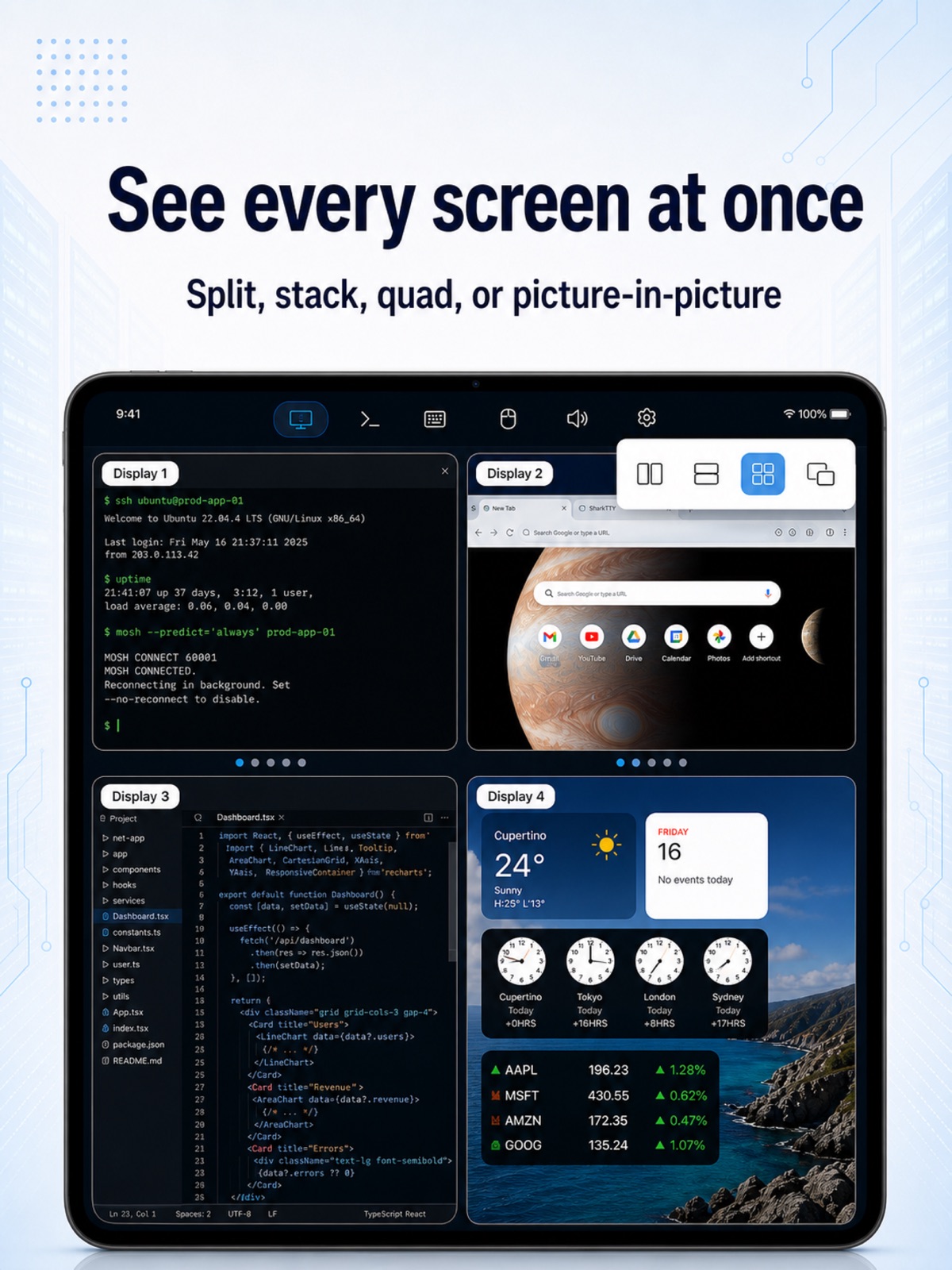
      "notes": "Take control of your Mac computer from your pocket — the remote desktop just got a lot more powerful. • See every screen at once — side by side, stacked, quad or picture-in-picture, reordered your way • A virtual mouse with a built-in magnifier for pixel-perfect taps • A floating on-screen keyboard you can move, resize and dim — full symbols, ⌘⌥⌃ modifiers and F-keys; or switch to the system keyboard + shortcut bar • Hear your Mac computer's sound live, and turn your device into its microphone • Choose xHD, HD or SD, easing off on its own when the signal drops • Two-finger tap to right-click; pinch and drag to frame the picture Every feature is free — the only in-app purchases are optional tips."
    },
    {
      "store": "apple",
      "version": "1.8",
      "released_at": null,
      "notes": "Your terminal can hear you now — hold to talk, release to type. • New voice input: hold to speak, recognized right on your device — free, private, works offline; trim segments, re-recognize, browse history • AI turns your words into ready-to-run commands and answers your questions — bring your own AI provider or use the built-in official models, with an AI chat panel one tap away • Floating keyboard, upgraded: six layouts (US, UK, JIS, AZERTY, QWERTZ, Spanish), smart command suggestions, and a mic key — hold it to talk • New experimental Eternal Terminal (ET) connections — sessions that survive network switches and sleep, even where Mosh's UDP is blocked • Terminal bells become notifications, so you know the moment a long task finishes; remote desktop sound uses less data, and disconnecting keeps the tab for one-tap reconnect"
    },
    {
      "store": "apple",
      "version": "1.8.1",
      "released_at": null,
      "notes": "The virtual mouse just got a lot more comfortable. • Dock the mouse buttons: they become one panel along the bottom of the screen, sliding left or right to wherever your hand rests — and it rides up on top of the keyboard whenever one is open • With the buttons docked, the magnifier sits right above your fingertip; it no longer bounces around near screen edges, and the magnified view lines up exactly with the cursor • Sliding a finger off the screen edge no longer makes the cursor jump or leaves a button stuck down • Fixed ⌘ ⌥ ⌃ modifiers sometimes staying pressed and turning the next key into a surprise shortcut"
    },
    {
      "store": "apple",
      "version": "1.9",
      "released_at": "2026-07-29",
      "notes": "Sharing got friendlier, and touch got a full rework — in the terminal and on the remote desktop. • A friendlier way to share: one tap on your link and they're in — friends without the app see a simple guide page instead • Scroll up to read without the terminal yanking you back down when new output arrives — and scrolling finally works inside tmux, vim, and pagers • Tap to drop the command-line cursor right where you touch; text selection holds steady while output keeps streaming • Direct touch on the remote desktop, reworked: one finger glides the pointer without clicking, a second finger clicks — and touch follows you when you switch displays • Fixed a rare freeze during remote desktop sessions; long terminal sessions with heavy output are faster and use far less memory"
    }
  ],
  "alternatives": [
    {
      "app_id": 6778351644,
      "name": "Motif - SSH Terminal",
      "url": "https://appcorpus.com/apps/motif-ssh-terminal-6778351644",
      "reason": "Same category + similar ratings"
    },
    {
      "app_id": 6758830369,
      "name": "AFK - AI Code Terminal",
      "url": "https://appcorpus.com/apps/afk-ai-code-terminal-6758830369",
      "reason": "Same category + similar ratings"
    },
    {
      "app_id": 6759545173,
      "name": "tmuxonwatch",
      "url": "https://appcorpus.com/apps/tmuxonwatch-6759545173",
      "reason": "Same category + similar ratings"
    },
    {
      "app_id": 6761809507,
      "name": "Synapse Console Pro",
      "url": "https://appcorpus.com/apps/synapse-console-pro-6761809507",
      "reason": "Same category + similar ratings"
    },
    {
      "app_id": 6760943581,
      "name": "CoTerm – AI Coding Terminal",
      "url": "https://appcorpus.com/apps/coterm-ai-coding-terminal-6760943581",
      "reason": "Same category + similar ratings"
    },
    {
      "app_id": 6772558877,
      "name": "FEWS — Cloud Status",
      "url": "https://appcorpus.com/apps/fews-cloud-status-6772558877",
      "reason": "Same category + similar ratings"
    }
  ],
  "evidence_summary": {
    "index_state": "S1",
    "evidence_level": 1,
    "level_label": "Live store listing",
    "indexable": true,
    "last_verified_at": "2026-08-07",
    "unknown_fields": [
      "Apoku editorial summary has not been published yet."
    ],
    "sources": [
      "App Store"
    ]
  },
  "availability_markets": {
    "live": [
      "us"
    ],
    "selected": "de",
    "note": "No LIVE observation for DE yet."
  },
  "feature_events": {
    "events": []
  },
  "features_slice": {
    "plans": [
      {
        "code": "large-coffee-tip",
        "label": "Large Coffee Tip",
        "kind": "unknown",
        "status": "store_listed",
        "prices": [],
        "trial": null
      },
      {
        "code": "large-tip",
        "label": "Large Monthly Tip",
        "kind": "subscription",
        "status": "store_listed",
        "prices": [],
        "trial": null
      },
      {
        "code": "small-coffee-tip",
        "label": "Small Coffee Tip",
        "kind": "unknown",
        "status": "store_listed",
        "prices": [],
        "trial": null
      },
      {
        "code": "small-tip",
        "label": "Small Monthly Tip",
        "kind": "subscription",
        "status": "store_listed",
        "prices": [],
        "trial": null
      }
    ],
    "features": [],
    "unknown_features": [],
    "data_cutoff": "7 Aug 2026"
  }
}