
Quick verdict
- What it is
- Store information collected; an Apoku editorial summary is not yet published.
- At a glance
-
- From $0.58/mo
- Free to download
- In-app purchases
Categories and search queries
Official categories
- Productivity
- Shopping
Apoku categories
Key functions
| Function | Availability | Access | Scope | Evidence |
|---|---|---|---|---|
| Free app | Yes | Free | Context-specific | Store published |
| In-app purchases | Yes | Limited free | Context-specific | Store published |
| Family Sharing | Unknown | Unknown | Scope unknown | Store published |
Screens
App Store
21 store screenshots

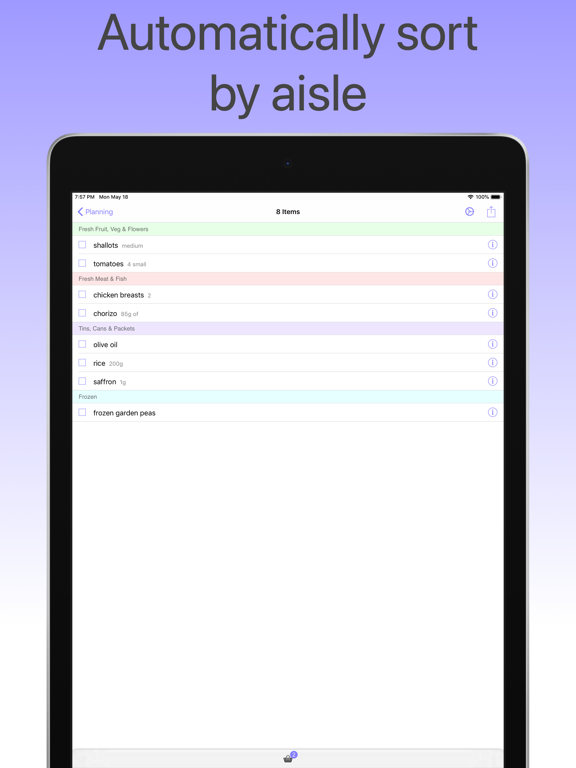

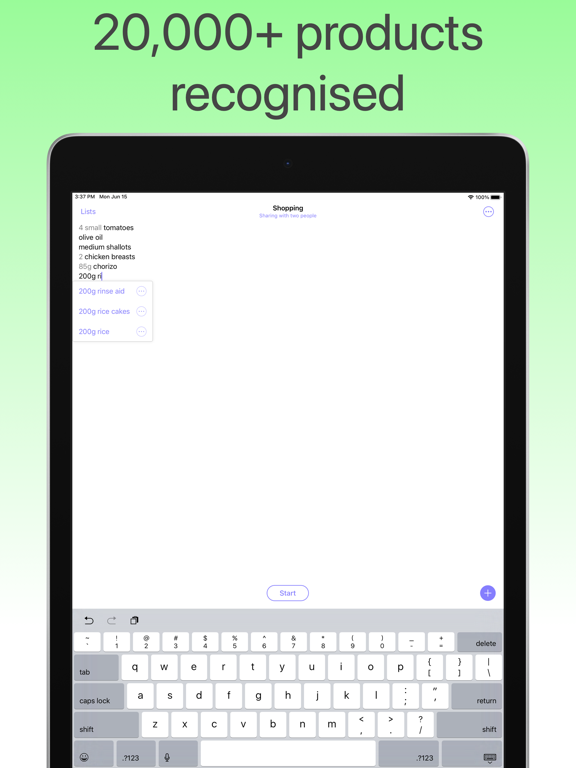
Pricing & paywalls
App Store
- Shopping UK Premium (Monthly) — $0.99/month
- Shopping UK Premium (Monthly) — $6.99/year ($0.58/mo)
- Shopping UK Premium (Monthly) — $14.99
- Premium Yearly Membership — $14.99/year ($1.24/mo)
- Premium Yearly Membership — $24.99/year ($2.08/mo)
- Premium Yearly Membership — $29.99/year ($2.49/mo)
- Monthly Subscription — $4.99/month
- Monthly Subscription — $19.99/year ($1.66/mo)
- Lifetime Promo — $29.99
Ratings & reviews
App Store
-
5/5Absolutely the best...
Simply amazing list for groceries! I also use it for other lists because I love all the functionality of the lists. Extremely customizable! Use it, buy it!
Sam the Butchers · 6 Aug 2026
-
5/5Great app
Buy it
Constantino24 · 6 Aug 2026
-
1/5Collaborative Sharing doesn’t work
I got this app so that I could use it collaboratively with my family, but that’s the one thing that doesn’t work. I tried repeatedly to create a collaborative link and it always gives an error.
Ephie_22 · 6 Aug 2026
-
3/5Not very Friendly when it comes to sharing
This app really needs to improve its sharing interface. It’s not very intuitive at all.
Digquickly · 6 Aug 2026
-
5/5For forgetful and not very))
With this app you will never forget to buy anything no matter how longest shopping list was not. Make a shopping list all week and probably nothing will be forgotten! I do not know how anyone, I liked it.
AlisaLev07 · 6 Aug 2026
Privacy & accessibility
App Store
Privacy
- Data Not Linked to You — Analytics — Diagnostics — Performance Data Developer declared
- Data Not Linked to You — Analytics — Identifiers — Device ID Developer declared
- Data Not Linked to You — Analytics — Identifiers — User ID Developer declared
- Data Not Linked to You — Analytics — Usage Data — Product Interaction Developer declared
- Data Not Linked to You — App Functionality — Diagnostics — Crash Data Developer declared
- Data Not Linked to You — App Functionality — Diagnostics — Performance Data Developer declared
- Data Not Linked to You — App Functionality — Identifiers — Device ID Developer declared
- Data Not Linked to You — App Functionality — Identifiers — User ID Developer declared
- Data Not Linked to You — App Functionality — User Content — Other User Content Developer declared
- Data Not Linked to You — Diagnostics Developer declared
- Data Not Linked to You — Identifiers Developer declared
- Data Not Linked to You — Usage Data Developer declared
- Data Not Linked to You — User Content Developer declared
Accessibility
No accessibility labels collected yet.
Versions
App Store
-
5.0.2
Version 5.0.2 — The Big One Shopping UK has been rebuilt from the ground up. Same app you love, now faster and smarter in every way. What's new in this version: — Redesigned from scratch using the latest Apple technologies. Everything feels snappier and more polished. — Lists now load instantly. The keyboard appears the moment you open a list. No more waiting. — Your lists sit in a visual stack on the home screen so you can see everything at a glance — and drag to reorder them. — Sharing is now dead simple. Send a 6-character code to anyone and they can join your list in seconds. No iCloud, no accounts, no hassle. — The app now greets you by name with a time-aware message. Tap the dotted underline on the home screen to set your name. — Every feature from the previous app is here. Item prices, history, shopping mode, aisle grouping — all of it. As always, if anything looks off or something is missing, we want to hear from you. Tap ··· in the top right corner and send us a note. Happy shopping
-
5.0.3
Version 5.0.3 — The Big One Shopping UK has been rebuilt from the ground up. Same app you love, now faster and smarter in every way. What's new in this version: — Redesigned from scratch using the latest Apple technologies. Everything feels snappier and more polished. — Lists now load instantly. The keyboard appears the moment you open a list. No more waiting. — Your lists sit in a visual stack on the home screen so you can see everything at a glance — and drag to reorder them. — Sharing is now dead simple. Send a 6-character code to anyone and they can join your list in seconds. No iCloud, no accounts, no hassle. — The app now greets you by name with a time-aware message. Tap the dotted underline on the home screen to set your name. — Every feature from the previous app is here. Item prices, history, shopping mode, aisle grouping — all of it. As always, if anything looks off or something is missing, we want to hear from you. Tap ··· in the top right corner and send us a note. Happy shopping Note: 5.0 is a significant rewrite of the app for improved performing, styling and experience. Releases 5.0.X are incremental fixes to ensure feature and functional parity with the former app our users know and love.
-
5.0.4
Version 5.0.6 — Includes fixes to categorization and sharing for the rebuilt app. Shopping UK has been rebuilt from the ground up. Same app you love, now faster and smarter in every way. What's new in this version: — Redesigned from scratch using the latest Apple technologies. Everything feels snappier and more polished. — Lists now load instantly. The keyboard appears the moment you open a list. No more waiting. — Your lists sit in a visual stack on the home screen so you can see everything at a glance — and drag to reorder them. — Sharing is now dead simple. Send a 6-character code to anyone and they can join your list in seconds. No iCloud, no accounts, no hassle. — The app now greets you by name with a time-aware message. Tap the dotted underline on the home screen to set your name. — Every feature from the previous app is here. Item prices, history, shopping mode, aisle grouping — all of it. As always, if anything looks off or something is missing, we want to hear from you. Tap ··· in the top right corner and send us a note. Happy shopping Note: 5.0 is a significant rewrite of the app for improved performing, styling and experience. Releases 5.0.X are incremental fixes to ensure feature and functional parity with the former app our users know and love.
-
5.0.5
Version 5.0.5 — Includes fixes to sharing and categorization for the rebuilt app. Shopping UK has been rebuilt from the ground up. Same app you love, now faster and smarter in every way. What's new in this version: — Redesigned from scratch using the latest Apple technologies. Everything feels snappier and more polished. — Lists now load instantly. The keyboard appears the moment you open a list. No more waiting. — Your lists sit in a visual stack on the home screen so you can see everything at a glance — and drag to reorder them. — Sharing is now dead simple. Send a 6-character code to anyone and they can join your list in seconds. No iCloud, no accounts, no hassle. — The app now greets you by name with a time-aware message. Tap the dotted underline on the home screen to set your name. — Every feature from the previous app is here. Item prices, history, shopping mode, aisle grouping — all of it. As always, if anything looks off or something is missing, we want to hear from you. Tap ··· in the top right corner and send us a note. Happy shopping Note: 5.0 is a significant rewrite of the app for improved performing, styling and experience. Releases 5.0.X are incremental fixes to ensure feature and functional parity with the former app our users know and love.
-
5.0.6
Version 5.0.5 — Includes fixes to sharing and categorization for the rebuilt app. Shopping UK has been rebuilt from the ground up. Same app you love, now faster and smarter in every way. What's new in this version: — Redesigned from scratch using the latest Apple technologies. Everything feels snappier and more polished. — Lists now load instantly. The keyboard appears the moment you open a list. No more waiting. — Your lists sit in a visual stack on the home screen so you can see everything at a glance — and drag to reorder them. — Sharing is now dead simple. Send a 6-character code to anyone and they can join your list in seconds. No iCloud, no accounts, no hassle. — The app now greets you by name with a time-aware message. Tap the dotted underline on the home screen to set your name. — Every feature from the previous app is here. Item prices, history, shopping mode, aisle grouping — all of it. As always, if anything looks off or something is missing, we want to hear from you. Tap ··· in the top right corner and send us a note. Happy shopping Note: 5.0 is a significant rewrite of the app for improved performing, styling and experience. Releases 5.0.X are incremental fixes to ensure feature and functional parity with the former app our users know and love.
-
5.0.9
Version 5.0.9 - Added requested new features and UI polishes: • Import Recipes from Links — paste a URL and we'll pull out the ingredients • Dark Mode — toggle in Settings → Appearance • Copy To — swipe left on any item, then copy to another list • Default List Colour — pick a favourite, or Random, in Settings • Polish & Fixes — clearer Shopping mode headers, spacer rows between sections, and a fresh coat of paint throughout Thanks for the feedback — keep it coming!
-
5.1.0
Version 5.0.10 • Swipe left on any item to delete it — tap Select to multi-select • Return All items from your basket in one tap — great for restarting a shop • Press Enter on any row to add a new line below, just like the original • List items now follow your iPhone's text size setting • Plus dozens of fixes for users upgrading from older versions Thanks for all the feedback — keep it coming.
-
5.1.1
Version 5.1.1 • Lists now sync automatically between your iPhone and iPad — no setup, no invites needed • Long-press any item to drag it into a new spot, so your list matches your store's aisle order • First-time tips help new users find features they might miss • Crisper accent colour on white lists, easier to read at a glance • A round of small usability fixes based on your feedback Thanks for the feedback. Keep it coming.
-
5.2.0
This update brings back features you missed and fixes the bugs you reported. Here's what's new: Printing is back — Open a list's menu, tap Print List, then send to AirPrint, save as PDF, or share with whoever's doing the shopping. Recipe paste works again — Copy a multi-line ingredient list from any recipe website, Notes, or email and paste it into your list. Each line becomes its own item. Bullets and numbers are stripped automatically. Works on both new lists and existing ones. Categories stick across all your lists — Move soap to Bathroom once and it stays in Bathroom on every list, every time you add it. "Return All Items" actually returns all items — Picked a basket of items and changed your mind? Tap Return All in shopping mode and every single one comes back, not just the first couple. Sharing fixes — Lists no longer auto-share themselves. The "Sharing" indicator only appears once you've explicitly tapped Share Live. Existing accidentally-shared lists are cleaned up automatically. Trim your History — Open the History drawer and swipe left on any item to remove it. Smoother typing — The keyboard stays planted while you add items. No more bouncing or jumping when you press Return or tap a suggestion. Plus: better category suggestions for produce (bell peppers, green beans, plum tomatoes now correctly land in Fresh Fruit & Veg), faster autocomplete, swipe-to-dismiss shopping mode, a redesigned print layout that fits a typical weekly shop on one page, and dozens of smaller polish touches. Thanks for sticking with us — keep the feedback coming.
-
5.3.0
More polish for your daily shop: • Picking items now fills the checkbox with a satisfying pop animation • New rotating example hints on empty lists ("e.g. 6 large eggs") show what you can type • Cursor stays visible while typing on long lists — never hidden behind the suggestion box • Type "6 apples" or "apples x6" — either way, the quantity gets dimmed automatically • Tooltips now show only once per user, even across reinstalls • Cleaner home screen with proper drop shadows on list cards • Start Shopping button responds instantly — no more waiting for letters to clear • Smoother typing, sharper category suggestions for fresh produce, better recipe paste • Safer data recovery in Settings if items disappeared after upgrade • Restored print layout, redesigned for a single-page weekly shop Thanks for the feedback — keep it coming.
-
5.4.0
Version 5.4.0 • Open straight to your last-used list • Scroll the screen while it's locked, without risking accidental taps. • Smarter autocomplete: drilling into a suggestion never repeats what you just saw. • Cleaner select mode with Select All in the top-right and a "12 selected" count title. • New Settings toggles for the home greeting and the open-last-list behaviour. • Dozens of smaller fixes: one-tap delete on blank-space rows, fresh-line cursor on list open, lighter home backdrop, full suggestion-popover shadows.
-
5.5.0
Version 5.5.0 A reliability pass: • The green check fires on every tap in shopping mode. • The lock screen actually blocks picks now. • Haptics work — your phone buzzes when you tick items off. • Edits to notes or prices in the (i) sheet show on the row immediately. • "Return all to list" drops items back into their aisles one-by-one. • Smoother "You've Finished" celebration
-
5.6.0
Version 5.6.0 A round of fixes you flagged: • Recipes now feel like lists — smooth typing, reliable paste, ingredients no longer disappear. • Multi-line paste splits cleanly even when the source uses unusual line breaks. • New Edit button on every category picker — add, reorder, or recolour without leaving your list. • Built-in categories can be re-coloured again. • Newest basket pick at the top. • Premium subscribers no longer get stuck on Start Shopping.
-
5.7.0
What's new in 5.7.0: • Press and hold to mark, release to lock. While the screen is locked in shopping mode, hold the new button at the bottom-right to temporarily unlock and mark items. Let go and it relocks. No more tapping the corner lock between every item. • Printed lists are categorised now. Each section gets its own heading in the same shopping order you use in store. Picked items show at the bottom of each section with a tick, so re-printing mid-shop works too. • Fixed a dictation quirk: dictating an item and pressing Return no longer adds it twice. Thank you for the detailed feedback — both of these were back from the original app at your request. Keep it coming.
-
5.8.0
This update brings back more of what you loved in the original Shopping app: • Improved lock mode — press to unlock and mark items off, release to lock again. • Print from shopping mode — AirPrint your list or save it as a PDF without leaving shopping. • Redesigned notes — cleaner inline on your list, and full-length while you shop. • Redesigned select mode — delete, copy or move items to another list, or share, all from one toolbar. • Hold the Clean Up button to instantly select every ticked-off item. Thanks for the feedback — keep it coming via Send Feedback in any list's menu.
-
5.9.0
Your shared lists now sync automatically between your iPhone, iPad and Mac. Set a list to Shared, sign in to iCloud with the same Apple ID on each device, and it appears everywhere. Also new: • A brand new in-app Help section — searchable across every screen, feature and tip. • Tap Checkbox Only: turn this on in Settings to stop accidental row taps from marking items off — only the checkbox does it. • Cleaner prices: clearing a price now actually clears it, and prices show on printed lists alongside notes with a running total at the top. • Smoother shopping: mark several items off in one motion (the list stays still while you tap), and price/note edits show instantly in shopping mode. • iPad polish: Onboarding's Continue button and Join List both behave properly now. • The three-dot menu no longer hides an item's note or price while you're editing. Tap Send Feedback in any list's menu to reach us directly.
-
6.0.0
Shared lists no longer lose items when multiple people edit at the same time. This fix needs everyone on a shared list to be on the latest version. If you share a list, please ask your collaborators to update — they'll see your latest changes once they do (and they'll be notified inside their app, too). Tap Send Feedback in any list's menu to reach us directly.
-
6.0.1
Added several new features: • Helpful tips now guide new users through key features • Sort recipe ingredients alphabetically from the recipe menu • New option to hide the home-screen greeting (Settings → Shopping) if you'd rather just see "Shopping" Tap Send Feedback in any list's menu to reach us directly
-
6.0.2
This update is all about stability and reliability: • Items stay put — no more duplicate entries or items jumping to random spots, even on shared lists. • Shared lists stay connected — fixed cases where a shared list could quietly lose its link to the people you share with. • Better Clean Up — now clears blank lines too, and marked-off items stay crossed out right where they are, just like the original app. • Smoother typing — fixed cursor jumpiness and dropped or doubled letters when adding and editing items. • Tap once, add once — quickly tapping a suggested item no longer adds it twice. As always, tap Send Feedback in any list's menu to reach us directly.
-
6.0.3
A fresh home screen, and shared lists that show who did what. • A fresh home screen — your lists fill the screen edge to edge, with a single Create List button. Hold it to join a shared list with a 6-digit code. • Activity on shared lists — tap Show All Activity in the Collaborate screen to see who added, marked off, or removed what. • See who changed what — turn on Show Annotations to label each item with the person who last edited it. • Smarter shopping order — in shopping mode, items sort by the product itself, so "2 pints of milk" files under milk. • Smoother list reordering — hold a list's name and drag; it now glides instead of jumping. • Plus: delete your last list and a fresh one appears instantly, so you're never left staring at an empty screen. Questions or ideas? Email [email protected]
-
6.0.4
Setting up and sharing your lists just got smoother. • Faster new lists — when you create a list, you can now name it, pick a colour, and share it all in one place, right away. • See who did what — shared lists now keep an activity log, and you can turn on annotations to label each item with whoever last changed it. • More reliable sharing — real-time updates are steadier (including a fix for a freeze when someone else added an item), and the list of people on a shared list no longer shows anyone twice. • Smooth drag-to-reorder — hold a list's name and drag; it now glides instead of jumping. Thanks for shopping with us! Tap Send Feedback in any list's menu to reach us anytime.
-
6.0.5
FIX: Bug blocking older lists from opening Setting up and sharing your lists just got smoother. • Faster new lists — when you create a list, you can now name it, pick a colour, and share it all in one place, right away. • See who did what — shared lists now keep an activity log, and you can turn on annotations to label each item with whoever last changed it. • More reliable sharing — real-time updates are steadier (including a fix for a freeze when someone else added an item), and the list of people on a shared list no longer shows anyone twice. • Smooth drag-to-reorder — hold a list's name and drag; it now glides instead of jumping. Thanks for shopping with us! Tap Send Feedback in any list's menu to reach us anytime.
-
6.1
Your shopping list, everywhere you look: • Widgets are here! See your list on your Home Screen and check items off without opening the app. Choose from four styles, including a two-column grid and an items-remaining counter — plus a one-tap Lock Screen shortcut. • Sync Across Devices (Premium) — your lists now appear on every device signed into your iCloud account, always up to date. • Notifications for shared lists — know the moment someone updates a list you share, and control it per list with "Notify Me". • A fuller activity log — see a month of who-did-what, including items marked off and cleaned up after the shop.
-
6.1.1
Your shopping list, everywhere you need it: • Widgets are here! See your list on your Home Screen and check items off without opening the app. Choose from four styles, including a two-column grid and an items-remaining counter — plus a one-tap Lock Screen shortcut. • Sync Across Devices (Premium) — your lists now appear on every device signed into your iCloud account, always up to date. • Notifications for shared lists — know the moment someone updates a list you share, and control it per list with "Notify Me". • A fuller activity log — see a month of who-did-what, including items marked off and cleaned up after the shop.
-
6.2.0
· 18 Jul 2026
Your shopping list, everywhere you need it: • Widgets are here! See your list on your Home Screen and check items off without opening the app. Choose from four styles, including a two-column grid and an items-remaining counter — plus a one-tap Lock Screen shortcut. • Sync Across Devices (Premium) — your lists now appear on every device signed into your iCloud account, always up to date. • Notifications for shared lists — know the moment someone updates a list you share, and control it per list with "Notify Me". • A fuller activity log — see a month of who-did-what, including items marked off and cleaned up after the shop. • Category Improvements — custom categories sit at the top of your category list for easy finding and usage. • UI Improvements — Basket items remain in order of recency, and custom categories no longer reset per list.
Alternatives
- PDF Scanner App: Photo to PDF — Same category + similar ratings
- Super To-Do's — Same category + similar ratings
- AI Language Translator + — Same category + similar ratings
- Dumbphone : Limit Distractions — Same category + similar ratings
Availability by market
- US
Data quality & evidence
- Page completeness
- Live store listing
- Last verified
- 6 Aug 2026
- Sources
- App Store
- Apoku editorial summary has not been published yet.