
Quick verdict
- What it is
- Store information collected; independent summary not yet available.
- At a glance
-
- Free to download
Categories and search queries
Official categories
- Business
- Productivity
AppCorpus categories
Key functions
| Function | Availability | Access | Scope | Evidence |
|---|---|---|---|---|
| Free app | Yes | Free | — | Store published |
Screens
App Store
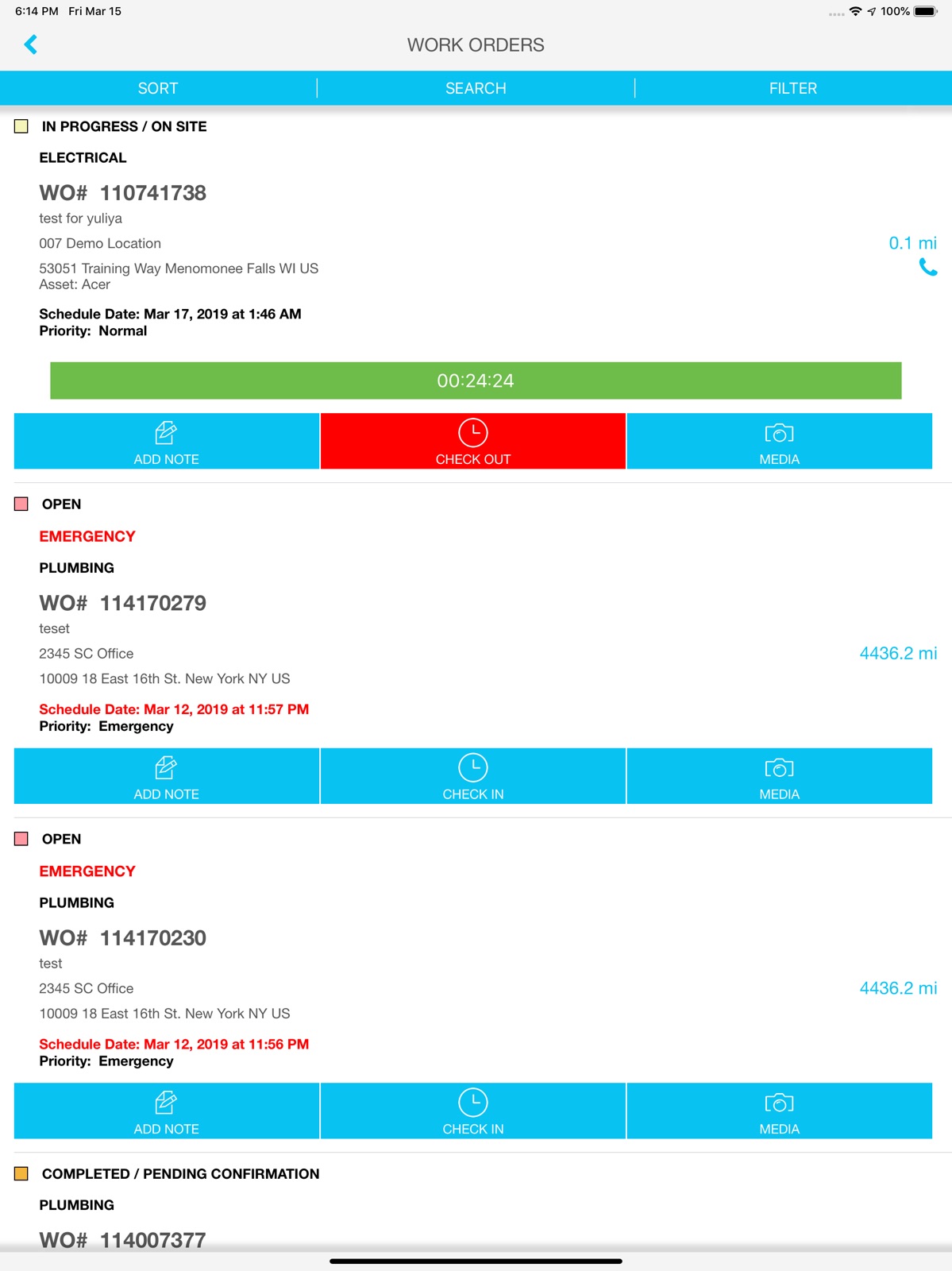
10 store screenshots



Pricing & paywalls
App Store
- Free
Ratings & reviews
App Store
-
1/5Zero stars!!!
How about the app doesn’t have to completely reload every time I swap to another app to get a number or something. OR timeout constantly. Also, how come the WO I’m logged in at doesn’t stay at the top of the screen. If I accept a WO, it doesn’t always go to my assigned jobs. This app is missing EVERY QOL function possible. Impossible to use. My work just implemented this app and now my job is 10x harder just to do simple tasks. ZERO STARS WOULD NOT RECOMMEND!!!
MrFixxer · 6 Aug 2026
-
1/5Borderline useless
This app constantly loses connection to the server, makes adjusting your time nearly impossible, and crashes at least daily. I don’t know if they hired the worst app programmer available, or shot themselves in the foot by stiffing the developer, but this app is trash. If I wasn’t required to use the app for work, it would have been deleted long ago.
TreadFether · 6 Aug 2026
-
1/5Worse App Ever
This app is not user-friendly and frequently displays error codes, leading to wasted time when trying to enter services. It consistently fails to function as expected, making it difficult to complete tasks efficiently. Out of the five apps we are required to use for snow removal services, this is by far the worst. A more reliable and streamlined system is badly needed.
BrandyScore · 6 Aug 2026
-
4/5Still having issues
Just happened to me today where I clocked into job and then I went to clock out the timer was gone. Then randomly it showed back up and obviously it says I’ve been clocked in for 10hrs to the job.
Dflynn90 · 6 Aug 2026
-
1/5Junk
I can’t list every single problem with this app, I do not have time. I just wish they could get email alerts when we have problems with app. Like clocking in and out, adding refrigerant and parts to the client parts list. Wish it would disturb this developer with emails when problems come up.
NMCR 1 · 6 Aug 2026
Privacy & accessibility
App Store
Privacy
- Data Linked to You — Analytics — Diagnostics — Crash Data Developer declared
- Data Linked to You — Analytics — Diagnostics — Other Diagnostic Data Developer declared
- Data Linked to You — Analytics — Location — Precise Location Developer declared
- Data Linked to You — App Functionality — Contact Info — Email Address Developer declared
- Data Linked to You — App Functionality — Contact Info — Name Developer declared
- Data Linked to You — App Functionality — Contact Info — Other User Contact Info Developer declared
- Data Linked to You — App Functionality — Contact Info — Phone Number Developer declared
- Data Linked to You — App Functionality — Contact Info — Physical Address Developer declared
- Data Linked to You — App Functionality — Diagnostics — Crash Data Developer declared
- Data Linked to You — App Functionality — Diagnostics — Other Diagnostic Data Developer declared
- Data Linked to You — App Functionality — Identifiers — User ID Developer declared
- Data Linked to You — App Functionality — Location — Precise Location Developer declared
- Data Linked to You — App Functionality — User Content — Audio Data Developer declared
- Data Linked to You — App Functionality — User Content — Customer Support Developer declared
- Data Linked to You — App Functionality — User Content — Photos or Videos Developer declared
- Data Linked to You — Product Personalization — Location — Precise Location Developer declared
- Data Linked to You — Contact Info Developer declared
- Data Linked to You — Diagnostics Developer declared
- Data Linked to You — Identifiers Developer declared
- Data Linked to You — Location Developer declared
- Data Linked to You — User Content Developer declared
- Data Not Linked to You — Analytics — Usage Data — Product Interaction Developer declared
- Data Not Linked to You — App Functionality — Usage Data — Product Interaction Developer declared
- Data Not Linked to You — Usage Data Developer declared
Accessibility
No accessibility labels collected yet.
Versions
App Store
-
2507.2
NEW - As an FTM internal technician using the SC Provider app, you can view tech’s assigned WOs in a calendar view aligned with the Dispatch Board in Provider Automation. Select the My Schedule button on the Home screen to be redirected to the My Schedule screen. Contact your ServiceChannel representative to enable the feature.
-
2508.1
The app occasionally crashed during the check-out process. This happened if you tried to change an asset on the Part Usage screen. No more crashes in this case.
-
2508.2
NEW - A face ID login icon has been added to the app login screen, allowing you to authenticate quickly and securely using biometric recognition. This enhancement streamlines the login process, improving overall user convenience. FIXED - When you applied a WO filter, it correctly displayed the filtered work orders. However, after logging out and back in, the filter reset to default and showed all work orders. The last applied filter is now saved and automatically restored upon login.
-
2509.1
FIXED - Only the first 50 assets linked to a work order were displayed in the Not Validated asset list on the Work Order Asset screen, limiting visibility and access to additional linked assets. The asset list now displays all assets linked to a work order. - You were unable to delete an incorrect asset from a refrigerant work order. Even after deletion, the asset remained visible in the Select Assets screen, causing confusion. The issue has been resolved. You can now successfully remove an incorrect asset from a refrigerant work order. Once deleted, the asset disappears from the Select Assets screen, allowing you to choose the correct asset before creating the leak record.
-
2509.2
NEW - When an FTM technisian attempts to check in to a work order while there is another check-in on a different work order, the system now displays an updated message to inform the technisian about the conflict. Press Cancel to close the message without any changes. Click Check Out to be redirected to the checked-in work order for next steps.
-
2510.1
NEW - Previously, you couldn't submit the refrigerant usage for the part on the Parts Used screen if the threshold was exceeded. You saw the error message, hence the part usage couldn't be processed. We've added the ability to submit the refrigerant usage for the part even if the threshold is exceeded. You'll see the following warning message: Entered quantity is greater than threshold quantity. Please review the parts entered or continue. Select Cancel to close the pop-up without changes, or press Continue to save the entered quantity and continue the flow. FIXED - When a provider creates a work order via the Contractor-Initiated Work Order (CIWO) experience, any attachments added during creation were not saved, leading to missing documentation. Attachments added during CIWO work order creation are now successfully saved and retained as expected.
-
2510.2
- When multi-leak flow is enabled, the SC Provider app now displays circuits for selection on the Select Asset screen. Previously, circuits were not shown even if the added or selected asset had them, limiting visibility and selection options.
-
2511.1
NEW - What happens to attachments added to a work order without a comment? Well, they are posted as system notes, and followers receive a notification. We’ve revised the warning message that you see upon trying to proceed without a comment, so you know what to expect next. - Under the “More” menu, we’ve renamed the option for creating a linked service request — from “Link Work Order” to “Create Linked Work Order.” After all, “linking” and “creating” are distinct actions, and the new label better reflects the functionality. FTM technicians will find the renamed option in the new app version. FIXED - In some cases, for an asset associated with a work order, you couldn’t open the asset attachment from the “Asset Record” screen. - If you had granted only limited access to photos in the app settings, the app continuously requested full access and didn’t allow selecting pictures from the gallery. You can choose the desired pictures from your device without issues now. - Upon checkout, you might have noticed that the on-site time always displayed 00:00 on the “Check-out Summary” screen. Sorry for the confusion. - As a result of an error, it was possible to edit checklist answers from the WO details screen. The app mistakenly allowed you to update your responses for the check-in segment under the “Checklists” tab of the WO details screen.
-
2511.2
FIXED - On the Inventory > Mark Received screen, you did not see the complete list of parts available for marking as received. The full list of parts is now displayed in the Mark Received section, ensuring accurate and complete processing. - Previously, if you didn’t have permission to edit attributes on a work order, the attributes appeared editable on the Asset Record screen. Attempting to edit them resulted in a system error message. The design now clearly indicates when attributes are non-editable, preventing confusion and unnecessary error messages.
-
2512.1
NEW - During work order creation with interactive troubleshooting, you can now select date and time for the corresponding questions. FIXED - After you created a linked work order, you've observed that the Linked to [WO#] field was missing on the Work Order Created pop-up. The field has been reinstated. - Occasionally, when you as an FTM internal technician performed actions such as checking out, changing the work order status to In Progress / Incomplete, or selecting End My Day, the system displayed random notifications. Such notifications will no longer appear at inappropriate times. - This update corrects the behavior of note creation during work order reassignment. Even if the you did not fill in the Add Notes field during work order reassignment, a note with the Notes... text was still created. Now, if the Add Notes field is left empty, no note will be created, ensuring cleaner and more accurate work order history.
-
2601.1
FIXED - When checking out from a work order and selecting a source location during the add part process, you couldn't see the source location addresses. We restored the source location addresses so they now appear on the Choose Source Location screen. - When providers created a service request via the CIWO experience, a system error message appeared if they skipped the Choose Problem step. Additionally, the displayed checklist did not correspond to the selected trade, location, or category. We made the Choose Problem step mandatory to prevent these issues in the future.
-
2601.2
FIXED - A checklist would unexpectedly appeared on a work order even when no checklist was configured for that specific work order. This occurred when you previously opened another work order that did have an associated checklist. A checklist is now displayed only on work orders that have a checklist explicitly configured. - In some cases, an FTM internal technician could not log out from the app if the time tracking activity was set incorrectly. This prevented technicians from ending their session as expected. We fixed the issue so an FTM tech can now log out even when no time tracking activity is present or configured. - Occasionally, the Accept and/or Log Time buttons on a work order weren't clickable and displayed as a spinning gear icon. As a result, you were unable to accept a work order or log time efficiently. We fixed the issue so the Accept and Log Time buttons now load correctly and are fully usable when interacting with a work order. - You couldn't open and view asset attachments in PDF format. We fixed the issue so PDF attachments now open and display correctly within the asset record.
-
2602.1
No visible changes for this version. We are currently working on new features that are going live down the road. Stay tuned!
-
2602.2
FIXED - Occasionally, when you attempted to check out from a non‑refrigerant work order, the system incorrectly displayed the Refrigerant settings is not found error message. We've fixed the incorrect validation behavior. You can now check out from non‑refrigerant work orders without encountering the refrigerant settings error. - Previously, if an asset was associated with a work order and had an assigned asset category, the system did not automatically select that category on the Select Asset Category screen. This added unnecessary steps as you had to manually select the correct category. Now, if an asset is associated with a work order and the asset has an asset category, that category will be automatically selected.
-
2603.1
FIXED - During checkout, some refrigerant assets incorrectly triggered an error message stating that the asset was not refrigerant, even though it was. The error no longer appears for refrigerant assets. - Selecting a specific checklist question on a WO, the app crashed immediately, preventing the question from opening or being completed. We've fixed an issue that caused a crash.
-
2603.2
NEW - Our icons just got a makeover. FTM technicians will notice the updated style across the home screen, work orders, inventory, checklists, and more. - When viewing location details (whether from the work order details screen, the summary screen, or elsewhere), you’ll see the “Main Contact” listed for that location. The label has been updated from “Store Manager” to “Main Contact.” - We updated the “REASSIGN” button under “More” to follow our standard button‑label style. Before: “REASSIGN.” Now: “Reassign.” FIXED - Custom filtering stopped working, making it impossible to view work orders based on your chosen criteria. Sorry about that and thanks for your patience! You can use custom filters without any trouble. - When you edit image attachments in the app, you can draw using a full range of colors. The color picker is now fully functional and no longer restricted to black. - A small interface fix has been included in this app version. When users view assets associated with a work order, they will now find the process of selecting the necessary asset to capture leak details more intuitive.
-
2603.2.1
No visible changes for this version. We are currently working on new features that are going live down the road. Stay tuned!
-
2604.1
NEW - This release introduces improvements to mobile refrigerated asset management. You can now create and edit refrigerated asset records in the SC Provider app, with required fields enforced dynamically based on field status. FIXED - Occasioanlly, checking out from a work order that contained many assets, you saw a system error message. Unexpected errors no longer occur during checkout, even for work orders with many associated assets. - You couldn't create a service request via the Contractor-Initiated Work Order (CIWO) experience. The process failed and displayed the following error message: API unknown error. We fixed the underlying API error. Service requests can now be created successfully through the CIWO experience without errors.
-
2604.2
FIXED - Attempting to view a linked work order, you saw that the Link Work Orders screen appeared completely blank. The Link Work Orders screen now loads correctly and displays all linked work orders as expected. - On the Settings screen, some of you couldn't set up notification sounds because the notification sound buttons were not responding. Notification sound buttons now work correctly, allowing you to select and save notification sounds as intended.
-
2605.1
FIXED - Recently, work orders in the Completed status were mistakenly accessible to FTM internal technicians on the Assigned tab. We've removed them.
-
2605.1.1
Improved compatibility of computer vision with retail, restaurant, logistics, and inventory management barcode formats.
-
2606.1
No visible changes for this version. We are currently working on new features that are going live down the road. Stay tuned!
-
2606.2
No visible changes for this version. We are currently working on new features that are going live down the road. Stay tuned!
-
2607.1
No visible changes for this version. We are currently working on new features that are going live down the road. Stay tuned!
-
2607.2
· 27 Jul 2026
FIXED - After you answered a checklist question, you encountered an API related error message. As a result, you couldn't proceed with the check-in process. We've fixed the underlying API error. - In some cases, you could check out and mark a work order as Completed even if there is an open leak record on it. We've corrected the process to prevent this from occurring in the future. - FTM internal technicians couldn't log into the app due to an API error message. We've resolved the issue.
Availability by market
- US
Data quality & evidence
- Page completeness
- Live store listing
- Last verified
- 6 Aug 2026
- Sources
- App Store
- Independent summary has not been published yet.