AppCorpus MCP gives your agent current app data, prices, screens, features and sources.
View JSON
GET /api/v3/apps/6760661273
{
  "app_id": 6760661273,
  "canonical_url": "https://appcorpus.com/apps/selene-moon-calendar-6760661273",
  "identity": {
    "name": "Selene Moon Calendar",
    "slug": "selene-moon-calendar",
    "developer": {
      "name": "Thomas Erwin Stange",
      "url": "https://appcorpus.com/developers/thomas-erwin-stange-developer_5961b3ee33780848eb997c6e6f3226b0"
    },
    "icon_url": "https://is1-ssl.mzstatic.com/image/thumb/Purple211/v4/6e/a6/5f/6ea65f0b-5947-a440-6437-d43a9a16c35a/AppIcon-0-0-1x_U007emarketing-0-8-0-85-220.png/512x512bb.jpg",
    "stores": [
      "apple"
    ],
    "platforms": [
      "iphone",
      "ipad"
    ],
    "status": {
      "state": "active",
      "label": "Active",
      "last_checked": "2026-08-18",
      "last_checked_label": "18 Aug 2026",
      "banner": null,
      "region_note": null
    }
  },
  "listings": [
    {
      "store": "apple",
      "status": "ACTIVE",
      "url": "https://apps.apple.com/us/app/selene-moon-calendar/id6760661273?uo=4",
      "rating": 0.0,
      "rating_count": 0,
      "formatted_price": "$2.99",
      "is_free": false,
      "has_iap": false,
      "has_subscription": false,
      "version": "1.9.2",
      "updated": "2026-08-16",
      "currency": "USD"
    }
  ],
  "summary": {
    "one_liner": null,
    "summary": null,
    "best_for": [],
    "not_for": [],
    "status": "fallback",
    "at_a_glance": [
      "$2.99"
    ]
  },
  "categories": {
    "official": [
      "Weather",
      "Education"
    ],
    "appcorpus": [
      {
        "category_id": "weather",
        "label": "Weather",
        "url": "https://appcorpus.com/categories/weather"
      },
      {
        "category_id": "education",
        "label": "Education",
        "url": "https://appcorpus.com/categories/education"
      }
    ]
  },
  "use_cases": [],
  "features": [
    {
      "capability_id": "family_sharing",
      "label": "Family Sharing",
      "availability": "yes",
      "access_level": "unknown",
      "scope": "App Store",
      "evidence": "Store published"
    }
  ],
  "pricing": [
    {
      "store": "apple",
      "formatted_price": "$2.99",
      "is_free": false,
      "has_iap": false,
      "has_subscription": false,
      "currency": "USD",
      "market": "us",
      "last_verified": "2026-08-18",
      "rows": [
        "Price: $2.99"
      ]
    }
  ],
  "screens": [
    {
      "url": "https://is1-ssl.mzstatic.com/image/thumb/PurpleSource211/v4/2b/62/41/2b62417c-c8b5-d98a-c050-70b45843b88c/01_ipad_dark_moon.png/1600x1600bb.jpg",
      "store": "apple",
      "platform": "ipad",
      "alt": "Selene Moon Calendar ipad screenshot 1"
    },
    {
      "url": "https://is1-ssl.mzstatic.com/image/thumb/PurpleSource211/v4/2b/62/41/2b62417c-c8b5-d98a-c050-70b45843b88c/01_ipad_dark_moon.png/360x480bb.jpg",
      "store": "apple",
      "platform": "ipad",
      "alt": "Selene Moon Calendar ipad screenshot 2"
    },
    {
      "url": "https://is1-ssl.mzstatic.com/image/thumb/PurpleSource211/v4/cd/8e/0e/cd8e0e9f-ecb3-1cd0-5549-0cf908b45d29/02_ipad_light_skytrack.png/1600x1600bb.jpg",
      "store": "apple",
      "platform": "ipad",
      "alt": "Selene Moon Calendar ipad screenshot 3"
    },
    {
      "url": "https://is1-ssl.mzstatic.com/image/thumb/PurpleSource211/v4/cd/8e/0e/cd8e0e9f-ecb3-1cd0-5549-0cf908b45d29/02_ipad_light_skytrack.png/360x480bb.jpg",
      "store": "apple",
      "platform": "ipad",
      "alt": "Selene Moon Calendar ipad screenshot 4"
    },
    {
      "url": "https://is1-ssl.mzstatic.com/image/thumb/PurpleSource221/v4/a0/c8/ef/a0c8ef01-fcd8-5dcf-52dd-2d11e3a4d004/03_ipad_dark_lunar_map.png/1600x1600bb.jpg",
      "store": "apple",
      "platform": "ipad",
      "alt": "Selene Moon Calendar ipad screenshot 5"
    },
    {
      "url": "https://is1-ssl.mzstatic.com/image/thumb/PurpleSource221/v4/a0/c8/ef/a0c8ef01-fcd8-5dcf-52dd-2d11e3a4d004/03_ipad_dark_lunar_map.png/360x480bb.jpg",
      "store": "apple",
      "platform": "ipad",
      "alt": "Selene Moon Calendar ipad screenshot 6"
    },
    {
      "url": "https://is1-ssl.mzstatic.com/image/thumb/PurpleSource221/v4/44/01/0a/44010a40-b94f-7298-e177-6b22764a10de/04_ipad_light_moonfinder.png/1600x1600bb.jpg",
      "store": "apple",
      "platform": "ipad",
      "alt": "Selene Moon Calendar ipad screenshot 7"
    },
    {
      "url": "https://is1-ssl.mzstatic.com/image/thumb/PurpleSource221/v4/44/01/0a/44010a40-b94f-7298-e177-6b22764a10de/04_ipad_light_moonfinder.png/360x480bb.jpg",
      "store": "apple",
      "platform": "ipad",
      "alt": "Selene Moon Calendar ipad screenshot 8"
    },
    {
      "url": "https://is1-ssl.mzstatic.com/image/thumb/PurpleSource211/v4/67/ad/ec/67adecf3-5c0a-a70c-cc0d-fb11d02c49e0/05_ipad_dark_orbit.png/1600x1600bb.jpg",
      "store": "apple",
      "platform": "ipad",
      "alt": "Selene Moon Calendar ipad screenshot 9"
    },
    {
      "url": "https://is1-ssl.mzstatic.com/image/thumb/PurpleSource211/v4/67/ad/ec/67adecf3-5c0a-a70c-cc0d-fb11d02c49e0/05_ipad_dark_orbit.png/360x480bb.jpg",
      "store": "apple",
      "platform": "ipad",
      "alt": "Selene Moon Calendar ipad screenshot 10"
    },
    {
      "url": "https://is1-ssl.mzstatic.com/image/thumb/PurpleSource221/v4/6f/fd/7d/6ffd7d22-3427-b7a3-785d-64a7101e2c12/06_ipad_light_timeline.png/1600x1600bb.jpg",
      "store": "apple",
      "platform": "ipad",
      "alt": "Selene Moon Calendar ipad screenshot 11"
    },
    {
      "url": "https://is1-ssl.mzstatic.com/image/thumb/PurpleSource221/v4/6f/fd/7d/6ffd7d22-3427-b7a3-785d-64a7101e2c12/06_ipad_light_timeline.png/360x480bb.jpg",
      "store": "apple",
      "platform": "ipad",
      "alt": "Selene Moon Calendar ipad screenshot 12"
    },
    {
      "url": "https://is1-ssl.mzstatic.com/image/thumb/PurpleSource211/v4/1a/e3/ab/1ae3abb4-8572-104c-d5ba-4680aab449f4/07_ipad_dark_observer.png/1600x1600bb.jpg",
      "store": "apple",
      "platform": "ipad",
      "alt": "Selene Moon Calendar ipad screenshot 13"
    },
    {
      "url": "https://is1-ssl.mzstatic.com/image/thumb/PurpleSource211/v4/1a/e3/ab/1ae3abb4-8572-104c-d5ba-4680aab449f4/07_ipad_dark_observer.png/360x480bb.jpg",
      "store": "apple",
      "platform": "ipad",
      "alt": "Selene Moon Calendar ipad screenshot 14"
    },
    {
      "url": "https://is1-ssl.mzstatic.com/image/thumb/PurpleSource221/v4/e0/ef/31/e0ef31ba-b7b3-ee6c-3ef9-1a52be46da84/08_ipad_dark_eclipses.png/1600x1600bb.jpg",
      "store": "apple",
      "platform": "ipad",
      "alt": "Selene Moon Calendar ipad screenshot 15"
    },
    {
      "url": "https://is1-ssl.mzstatic.com/image/thumb/PurpleSource221/v4/e0/ef/31/e0ef31ba-b7b3-ee6c-3ef9-1a52be46da84/08_ipad_dark_eclipses.png/360x480bb.jpg",
      "store": "apple",
      "platform": "ipad",
      "alt": "Selene Moon Calendar ipad screenshot 16"
    },
    {
      "url": "https://is1-ssl.mzstatic.com/image/thumb/PurpleSource221/v4/42/44/54/4244544d-f389-c142-7946-ffd3a2db35b7/09_ipad_dark_sharing.png/1600x1600bb.jpg",
      "store": "apple",
      "platform": "ipad",
      "alt": "Selene Moon Calendar ipad screenshot 17"
    },
    {
      "url": "https://is1-ssl.mzstatic.com/image/thumb/PurpleSource221/v4/42/44/54/4244544d-f389-c142-7946-ffd3a2db35b7/09_ipad_dark_sharing.png/360x480bb.jpg",
      "store": "apple",
      "platform": "ipad",
      "alt": "Selene Moon Calendar ipad screenshot 18"
    },
    {
      "url": "https://is1-ssl.mzstatic.com/image/thumb/PurpleSource221/v4/48/9b/9a/489b9a73-8d00-9104-e353-f514f3fdbb4b/10_ipad_light_planner.png/1600x1600bb.jpg",
      "store": "apple",
      "platform": "ipad",
      "alt": "Selene Moon Calendar ipad screenshot 19"
    },
    {
      "url": "https://is1-ssl.mzstatic.com/image/thumb/PurpleSource221/v4/48/9b/9a/489b9a73-8d00-9104-e353-f514f3fdbb4b/10_ipad_light_planner.png/360x480bb.jpg",
      "store": "apple",
      "platform": "ipad",
      "alt": "Selene Moon Calendar ipad screenshot 20"
    },
    {
      "url": "https://is1-ssl.mzstatic.com/image/thumb/PurpleSource211/v4/5f/bb/56/5fbb5682-9bca-dcd2-6034-c532ec130982/01_iphone_dark_moon.png/1320x1600bb.jpg",
      "store": "apple",
      "platform": "iphone",
      "alt": "Selene Moon Calendar iphone screenshot 21"
    },
    {
      "url": "https://is1-ssl.mzstatic.com/image/thumb/PurpleSource221/v4/22/4a/53/224a530f-8107-4b72-3c78-5baf67c1678c/02_iphone_light_skytrack.png/1320x1600bb.jpg",
      "store": "apple",
      "platform": "iphone",
      "alt": "Selene Moon Calendar iphone screenshot 22"
    },
    {
      "url": "https://is1-ssl.mzstatic.com/image/thumb/PurpleSource211/v4/fc/49/54/fc495474-3f11-e3f7-e61e-5e53b2499719/03_iphone_dark_lunar_map.png/1320x1600bb.jpg",
      "store": "apple",
      "platform": "iphone",
      "alt": "Selene Moon Calendar iphone screenshot 23"
    },
    {
      "url": "https://is1-ssl.mzstatic.com/image/thumb/PurpleSource221/v4/dd/6f/f7/dd6ff735-d626-047e-5b57-8c6ccb8a5b57/04_iphone_light_moonfinder.png/1320x1600bb.jpg",
      "store": "apple",
      "platform": "iphone",
      "alt": "Selene Moon Calendar iphone screenshot 24"
    },
    {
      "url": "https://is1-ssl.mzstatic.com/image/thumb/PurpleSource211/v4/18/1c/1e/181c1e10-689a-f750-ace4-a0358e45e40d/05_iphone_dark_orbit.png/1320x1600bb.jpg",
      "store": "apple",
      "platform": "iphone",
      "alt": "Selene Moon Calendar iphone screenshot 25"
    },
    {
      "url": "https://is1-ssl.mzstatic.com/image/thumb/PurpleSource211/v4/0d/4a/26/0d4a2613-6ce5-33fb-21a7-eb8496e98c10/06_iphone_light_timeline.png/1320x1600bb.jpg",
      "store": "apple",
      "platform": "iphone",
      "alt": "Selene Moon Calendar iphone screenshot 26"
    },
    {
      "url": "https://is1-ssl.mzstatic.com/image/thumb/PurpleSource211/v4/d8/8c/8c/d88c8cac-a609-88e6-85e0-4cae84353cd2/07_iphone_dark_observer.png/1320x1600bb.jpg",
      "store": "apple",
      "platform": "iphone",
      "alt": "Selene Moon Calendar iphone screenshot 27"
    },
    {
      "url": "https://is1-ssl.mzstatic.com/image/thumb/PurpleSource211/v4/33/34/9e/33349e59-e6be-a4d2-767f-1d663133d201/08_iphone_dark_eclipses.png/1320x1600bb.jpg",
      "store": "apple",
      "platform": "iphone",
      "alt": "Selene Moon Calendar iphone screenshot 28"
    },
    {
      "url": "https://is1-ssl.mzstatic.com/image/thumb/PurpleSource211/v4/c1/c9/75/c1c97527-9956-f9af-4603-424f61404fc6/09_iphone_dark_sharing.png/1320x1600bb.jpg",
      "store": "apple",
      "platform": "iphone",
      "alt": "Selene Moon Calendar iphone screenshot 29"
    },
    {
      "url": "https://is1-ssl.mzstatic.com/image/thumb/PurpleSource221/v4/f3/6f/0f/f36f0f41-d2ee-806b-3534-94564d4aa3a2/10_iphone_light_planner.png/1320x1600bb.jpg",
      "store": "apple",
      "platform": "iphone",
      "alt": "Selene Moon Calendar iphone screenshot 30"
    },
    {
      "url": "https://is1-ssl.mzstatic.com/image/thumb/PurpleSource221/v4/5d/29/b4/5d29b4e4-9b0a-c5ef-c66a-5bd187b7f992/01_mac_dark_main.png/1600x1600bb.jpg",
      "store": "apple",
      "platform": "mac",
      "alt": "Selene Moon Calendar mac screenshot 31"
    },
    {
      "url": "https://is1-ssl.mzstatic.com/image/thumb/PurpleSource211/v4/cf/30/ff/cf30ff50-03ab-39de-d5f8-b7c194da6b6b/02_mac_light_skytrack.png/1600x1600bb.jpg",
      "store": "apple",
      "platform": "mac",
      "alt": "Selene Moon Calendar mac screenshot 32"
    },
    {
      "url": "https://is1-ssl.mzstatic.com/image/thumb/PurpleSource211/v4/1b/5c/09/1b5c0993-a06d-c591-fcd0-b70669adeb62/03_mac_dark_lunar_map.png/1600x1600bb.jpg",
      "store": "apple",
      "platform": "mac",
      "alt": "Selene Moon Calendar mac screenshot 33"
    },
    {
      "url": "https://is1-ssl.mzstatic.com/image/thumb/PurpleSource221/v4/af/b0/d1/afb0d102-53e2-5135-0c6e-3ce290247f04/04_mac_light_orbit.png/1600x1600bb.jpg",
      "store": "apple",
      "platform": "mac",
      "alt": "Selene Moon Calendar mac screenshot 34"
    },
    {
      "url": "https://is1-ssl.mzstatic.com/image/thumb/PurpleSource211/v4/30/2d/c1/302dc1c7-834c-9e22-dfdd-def213fe12e0/05_mac_dark_timeline.png/1600x1600bb.jpg",
      "store": "apple",
      "platform": "mac",
      "alt": "Selene Moon Calendar mac screenshot 35"
    },
    {
      "url": "https://is1-ssl.mzstatic.com/image/thumb/PurpleSource211/v4/ec/52/e1/ec52e1c0-83fc-eabc-55e2-2ca3cb71a188/06_mac_light_observer.png/1600x1600bb.jpg",
      "store": "apple",
      "platform": "mac",
      "alt": "Selene Moon Calendar mac screenshot 36"
    },
    {
      "url": "https://is1-ssl.mzstatic.com/image/thumb/PurpleSource221/v4/f2/e7/fb/f2e7fbfd-3f98-66d4-a082-5699727893e5/07_mac_dark_eclipses.png/1600x1600bb.jpg",
      "store": "apple",
      "platform": "mac",
      "alt": "Selene Moon Calendar mac screenshot 37"
    },
    {
      "url": "https://is1-ssl.mzstatic.com/image/thumb/PurpleSource211/v4/f9/7a/a4/f97aa4f0-5316-7ea4-3851-759cbb1b54b8/08_mac_light_sharing.png/1600x1600bb.jpg",
      "store": "apple",
      "platform": "mac",
      "alt": "Selene Moon Calendar mac screenshot 38"
    },
    {
      "url": "https://is1-ssl.mzstatic.com/image/thumb/PurpleSource221/v4/19/0f/d5/190fd5ad-607c-4341-31ed-40f816ff3daa/09_mac_dark_scale.png/1600x1600bb.jpg",
      "store": "apple",
      "platform": "mac",
      "alt": "Selene Moon Calendar mac screenshot 39"
    },
    {
      "url": "https://is1-ssl.mzstatic.com/image/thumb/PurpleSource211/v4/b4/43/f5/b443f560-3ab0-252f-d9a3-e6f07a93eb64/10_mac_light_planner.png/1600x1600bb.jpg",
      "store": "apple",
      "platform": "mac",
      "alt": "Selene Moon Calendar mac screenshot 40"
    },
    {
      "url": "https://is1-ssl.mzstatic.com/image/thumb/PurpleSource211/v4/7e/30/e7/7e30e7c6-2853-45c7-ad3c-38ac223f8629/01_watch_series10_overview.png/416x496bb.jpg",
      "store": "apple",
      "platform": "watch",
      "alt": "Selene Moon Calendar watch screenshot 41"
    },
    {
      "url": "https://is1-ssl.mzstatic.com/image/thumb/PurpleSource221/v4/89/e1/f1/89e1f116-a7ed-c778-8767-10ba679c84c5/02_watch_series10_skytrack.png/416x496bb.jpg",
      "store": "apple",
      "platform": "watch",
      "alt": "Selene Moon Calendar watch screenshot 42"
    },
    {
      "url": "https://is1-ssl.mzstatic.com/image/thumb/PurpleSource221/v4/ef/53/48/ef5348ab-31d4-11b1-1090-92245c1fab85/03_watch_series10_compass.png/416x496bb.jpg",
      "store": "apple",
      "platform": "watch",
      "alt": "Selene Moon Calendar watch screenshot 43"
    },
    {
      "url": "https://is1-ssl.mzstatic.com/image/thumb/PurpleSource211/v4/07/aa/50/07aa508c-f7e6-6277-190f-643b64de001d/04_watch_series10_complication.png/416x496bb.jpg",
      "store": "apple",
      "platform": "watch",
      "alt": "Selene Moon Calendar watch screenshot 44"
    },
    {
      "url": "https://is1-ssl.mzstatic.com/image/thumb/PurpleSource221/v4/a0/e3/7e/a0e37e66-d76a-6517-ad01-638e4ea753e2/05_watch_series10_moon-fullscreen.png/416x496bb.jpg",
      "store": "apple",
      "platform": "watch",
      "alt": "Selene Moon Calendar watch screenshot 45"
    },
    {
      "url": "https://is1-ssl.mzstatic.com/image/thumb/PurpleSource221/v4/51/65/98/51659825-970e-22d1-0069-52245d8825db/06_watch_series10_orbit.png/416x496bb.jpg",
      "store": "apple",
      "platform": "watch",
      "alt": "Selene Moon Calendar watch screenshot 46"
    },
    {
      "url": "https://is1-ssl.mzstatic.com/image/thumb/PurpleSource221/v4/cd/ea/66/cdea66ef-3245-c0ab-9e3d-829eee9a826c/07_watch_series10_moon-focus-face.png/416x496bb.jpg",
      "store": "apple",
      "platform": "watch",
      "alt": "Selene Moon Calendar watch screenshot 47"
    },
    {
      "url": "https://is1-ssl.mzstatic.com/image/thumb/PurpleSource211/v4/5b/1b/46/5b1b4690-6936-ca09-01d4-567af4028729/08_watch_series10_moon-observatory-face.png/416x496bb.jpg",
      "store": "apple",
      "platform": "watch",
      "alt": "Selene Moon Calendar watch screenshot 48"
    },
    {
      "url": "https://is1-ssl.mzstatic.com/image/thumb/PurpleSource221/v4/d3/de/e5/d3dee58b-6ccf-de25-85c2-1e8cc7083db1/09_watch_series10_orbit-orientation-face.png/416x496bb.jpg",
      "store": "apple",
      "platform": "watch",
      "alt": "Selene Moon Calendar watch screenshot 49"
    },
    {
      "url": "https://is1-ssl.mzstatic.com/image/thumb/PurpleSource211/v4/87/e9/b7/87e9b771-d86f-4637-3027-9880825eca71/10_watch_series10_watchface-gallery.png/416x496bb.jpg",
      "store": "apple",
      "platform": "watch",
      "alt": "Selene Moon Calendar watch screenshot 50"
    }
  ],
  "ratings": [
    {
      "store": "apple",
      "average": 0.0,
      "count": 0,
      "market": "us",
      "observed_at": "2026-08-18",
      "reviews": []
    }
  ],
  "privacy": [
    {
      "store": "apple",
      "declarations": [
        {
          "title": "Data Not Collected",
          "detail": "",
          "source": "Developer declared"
        }
      ],
      "accessibility": []
    }
  ],
  "changes": [
    {
      "store": "apple",
      "version": "1.0",
      "released_at": null,
      "notes": ""
    },
    {
      "store": "apple",
      "version": "1.0.1",
      "released_at": null,
      "notes": "Improved small widget layout for better readability on all screen sizes Lock Screen widgets now available: circular, rectangular, and inline Internal code improvements for better performance and maintainability."
    },
    {
      "store": "apple",
      "version": "1.1",
      "released_at": null,
      "notes": "added a new moon calendar with a full monthly overview explore lunar phases day by day and inspect major events directly from the calendar improved navigation between the main moon view and calendar view additional polish and stability improvements"
    },
    {
      "store": "apple",
      "version": "1.2",
      "released_at": null,
      "notes": "What’s New in This Version added local observation with current location support added manual place selection added favorite locations for faster switching added moon tilt to the main lunar view expanded the calendar with detailed daily lunar information improved navigation and overall polish A slightly more elegant version: What’s New current location support for local lunar observation choose any place manually and save favorites moon tilt is now shown in the main lunar view richer calendar details for each day polish, refinements, and stability improvements"
    },
    {
      "store": "apple",
      "version": "1.3",
      "released_at": null,
      "notes": "Improvements and bug fixes and Moon Sky View."
    },
    {
      "store": "apple",
      "version": "1.4",
      "released_at": null,
      "notes": "Selene is now localized in 50 languages. Dates, percentages, and measurements now follow your locale more closely. Polish and clarity improvements across the calendar and widgets."
    },
    {
      "store": "apple",
      "version": "1.5",
      "released_at": null,
      "notes": "Selene is now localized in 50 languages. Dates, percentages, and measurements now follow your locale more closely. Polish and clarity improvements across the calendar and widgets."
    },
    {
      "store": "apple",
      "version": "1.5.1",
      "released_at": null,
      "notes": "This update fixes an issue where the main view on iPhone and iPad could show an outdated moon phase after a phase change. The timeline, main view, and current status now use the same phase data."
    },
    {
      "store": "apple",
      "version": "1.5.2",
      "released_at": null,
      "notes": "This update adds a new appearance setting for iPhone and iPad. Choose Light, Dark, or System in Controls, and the moon view, calendar, and sheets now follow your selection."
    },
    {
      "store": "apple",
      "version": "1.6",
      "released_at": null,
      "notes": "Orbit is here: a new tab visualizes the Sun, Earth, and Moon in sync with the time controls. It explains moon phases, local orientation, and why eclipses need alignment and lunar nodes. Scale: True proportions for Sun, Earth, and Moon. The Sun is 109 Earth diameters wide and about 389 lunar distances away, so a single true-scale drawing would hide the Moon."
    },
    {
      "store": "apple",
      "version": "1.7",
      "released_at": null,
      "notes": "Orbit has been refined: phase geometry, observer perspective, and time-lapse now sit together, with Scale following as a calm true-proportion comparison. Light and dark appearance and the App Store screenshots have been refreshed with clearer contrast."
    },
    {
      "store": "apple",
      "version": "1.8",
      "released_at": null,
      "notes": "Selene 1.8 adds configurable Moon rendering: Classic, Natural, Contrast, Relief, and Coordinates. NASA/LRO-based surface rendering improves visual quality while phase, location, visibility, and calendar calculations remain unchanged. New App Store screenshots and preview videos show the new views."
    },
    {
      "store": "apple",
      "version": "1.8.1",
      "released_at": null,
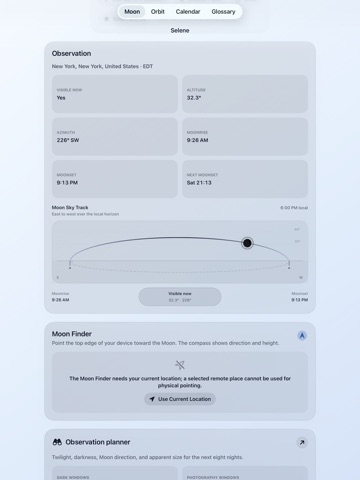
      "notes": "1.0: Initial version 1.0.1: Current Moon · Local Moonrise 1.1: Calendar 1.2: Use Current Location · Choose Place · Favorites 1.3: Moon Sky Track · Calendar 1.4: Selene is now localized in 50 languages. 1.5: Apple Watch · Current Moon · Local Moonrise · Favorites 1.5.1: Phase Timeline · Current State · Current Moon 1.5.2: Auto · Light · Dark 1.6: Orbit · Observer perspective · Scale · Eclipse geometry 1.7: Orbit · Time-lapse · Observer perspective · Eclipses · Glossary 1.8: Moon Rendering · Classic · Natural · Contrast · Relief · Coordinates 1.8.1: Moon Finder Point the top edge of your device toward the Moon. The compass shows direction and height. The Moon Finder needs your current location; a selected remote place cannot be used for physical pointing. The Moon Finder is available only in Live mode."
    },
    {
      "store": "apple",
      "version": "1.8.2",
      "released_at": null,
      "notes": "1.0: Initial version 1.0.1: Current Moon · Local Moonrise 1.1: Calendar 1.2: Use Current Location · Choose Place · Favorites 1.3: Moon Sky Track · Calendar 1.4: Selene is now localized in 50 languages. 1.5: Apple Watch · Current Moon · Local Moonrise · Favorites 1.5.1: Phase Timeline · Current State · Current Moon 1.5.2: Auto · Light · Dark 1.6: Orbit · Observer perspective · Scale · Eclipse geometry 1.7: Orbit · Time-lapse · Observer perspective · Eclipses · Glossary 1.8: Moon Rendering · Classic · Natural · Contrast · Relief · Coordinates 1.8.1: Moon Finder Point the top edge of your device toward the Moon. The compass shows direction and height. The Moon Finder needs your current location; a selected remote place cannot be used for physical pointing. The Moon Finder is available only in Live mode. 1.8.2: This update adds a calm, hourly timeline to the main Moon card. Explore 180 days back or ahead and watch phase, illumination, age, surface and the Moon’s location-dependent rotation update together. “Now” returns directly to live data, and Selene still always launches live. The astronomical model is unchanged, and the new control works offline on iPhone and iPad."
    },
    {
      "store": "apple",
      "version": "1.9",
      "released_at": null,
      "notes": "1.0: Initial version 1.0.1: Current Moon · Local Moonrise 1.1: Calendar 1.2: Use Current Location · Choose Place · Favorites 1.3: Moon Sky Track · Calendar 1.4: Selene is now localized in 50 languages. 1.5: Apple Watch · Current Moon · Local Moonrise · Favorites 1.5.1: Phase Timeline · Current State · Current Moon 1.5.2: Auto · Light · Dark 1.6: Orbit · Observer perspective · Scale · Eclipse geometry 1.7: Orbit · Time-lapse · Observer perspective · Eclipses · Glossary 1.8: Moon Rendering · Classic · Natural · Contrast · Relief · Coordinates 1.8.1: Moon Finder Point the top edge of your device toward the Moon. The compass shows direction and height. The Moon Finder needs your current location; a selected remote place cannot be used for physical pointing. The Moon Finder is available only in Live mode. 1.8.2: This update adds a calm, hourly timeline to the main Moon card. Explore 180 days back or ahead and watch phase, illumination, age, surface and the Moon’s location-dependent rotation update together. “Now” returns directly to live data, and Selene still always launches live. The astronomical model is unchanged, and the new control works offline on iPhone and iPad. 1.9: Selene becomes your personal lunar observatory: local event alerts, an 8-night observation and photography planner, and an interactive lunar map with 120 formations, libration, and the terminator. Configurable widgets, Shortcuts, Spotlight, sharing, and calendar/data export bring the Moon into your day. Every astronomical calculation stays on your device, offline, private, and ad-free."
    },
    {
      "store": "apple",
      "version": "1.9.1",
      "released_at": null,
      "notes": "1.0: Initial version 1.0.1: Current Moon · Local Moonrise 1.1: Calendar 1.2: Use Current Location · Choose Place · Favorites 1.3: Moon Sky Track · Calendar 1.4: Selene is now localized in 50 languages. 1.5: Apple Watch · Current Moon · Local Moonrise · Favorites 1.5.1: Phase Timeline · Current State · Current Moon 1.5.2: Auto · Light · Dark 1.6: Orbit · Observer perspective · Scale · Eclipse geometry 1.7: Orbit · Time-lapse · Observer perspective · Eclipses · Glossary 1.8: Moon Rendering · Classic · Natural · Contrast · Relief · Coordinates 1.8.1: Moon Finder Point the top edge of your device toward the Moon. The compass shows direction and height. The Moon Finder needs your current location; a selected remote place cannot be used for physical pointing. The Moon Finder is available only in Live mode. 1.8.2: This update adds a calm, hourly timeline to the main Moon card. Explore 180 days back or ahead and watch phase, illumination, age, surface and the Moon’s location-dependent rotation update together. “Now” returns directly to live data, and Selene still always launches live. The astronomical model is unchanged, and the new control works offline on iPhone and iPad. 1.9: Selene becomes your personal lunar observatory: local event alerts, an 8-night observation and photography planner, and an interactive lunar map with 120 formations, libration, and the terminator. Configurable widgets, Shortcuts, Spotlight, sharing, and calendar/data export bring the Moon into your day. Every astronomical calculation stays on your device, offline, private, and ad-free. 1.9.1: New Apple Watch complication. The current Moon now appears directly on the watch face with a realistic surface and the correct phase."
    },
    {
      "store": "apple",
      "version": "1.9.2",
      "released_at": "2026-08-16",
      "notes": "1.0: Initial version 1.0.1: Current Moon · Local Moonrise 1.1: Calendar 1.2: Use Current Location · Choose Place · Favorites 1.3: Moon Sky Track · Calendar 1.4: Selene is now localized in 50 languages. 1.5: Apple Watch · Current Moon · Local Moonrise · Favorites 1.5.1: Phase Timeline · Current State · Current Moon 1.5.2: Auto · Light · Dark 1.6: Orbit · Observer perspective · Scale · Eclipse geometry 1.7: Orbit · Time-lapse · Observer perspective · Eclipses · Glossary 1.8: Moon Rendering · Classic · Natural · Contrast · Relief · Coordinates 1.8.1: Moon Finder Point the top edge of your device toward the Moon. The compass shows direction and height. The Moon Finder needs your current location; a selected remote place cannot be used for physical pointing. The Moon Finder is available only in Live mode. 1.8.2: This update adds a calm, hourly timeline to the main Moon card. Explore 180 days back or ahead and watch phase, illumination, age, surface and the Moon’s location-dependent rotation update together. “Now” returns directly to live data, and Selene still always launches live. The astronomical model is unchanged, and the new control works offline on iPhone and iPad. 1.9: Selene becomes your personal lunar observatory: local event alerts, an 8-night observation and photography planner, and an interactive lunar map with 120 formations, libration, and the terminator. Configurable widgets, Shortcuts, Spotlight, sharing, and calendar/data export bring the Moon into your day. Every astronomical calculation stays on your device, offline, private, and ad-free. 1.9.1: New Apple Watch complication. The current Moon now appears directly on the watch face with a realistic surface and the correct phase. 1.9.2: Selene now shows lunar eclipses directly on the Moon across iPhone, iPad, Apple Watch, Mac, and widgets. On Apple Watch, Moon path and Moon compass lead to a new live orbit model that shows the current geometry of the Sun, Earth, and Moon. On Mac, optimized background updates keep scrolling smooth even during long sessions. Legibility and reliability have also been improved. Selene Watch Faces: Choose one of three Selene designs."
    }
  ],
  "alternatives": [
    {
      "app_id": 6755657280,
      "name": "WBuilds for Building Guide",
      "url": "https://appcorpus.com/apps/wbuilds-for-building-guide-6755657280",
      "reason": "Same category + similar ratings"
    },
    {
      "app_id": 6475648610,
      "name": "Wonjo Kids Learning Games",
      "url": "https://appcorpus.com/apps/wonjo-kids-learning-games-6475648610",
      "reason": "Same category + similar ratings"
    }
  ],
  "evidence_summary": {
    "index_state": "S1",
    "evidence_level": 1,
    "level_label": "Live store listing",
    "indexable": true,
    "last_verified_at": "2026-08-18",
    "unknown_fields": [
      "Independent summary has not been published yet."
    ],
    "sources": [
      "App Store"
    ]
  },
  "availability_markets": {
    "live": [
      "us"
    ],
    "selected": "us",
    "note": null
  },
  "feature_events": {
    "events": []
  },
  "features_slice": {
    "plans": [],
    "features": [],
    "unknown_features": [
      "family_sharing"
    ],
    "data_cutoff": "18 Aug 2026"
  }
}