
Seesaw
Seesaw is an educational platform for elementary classrooms
iPhone · iPad · Android
Quick verdict
- What it is
- Seesaw brings together high-quality instruction, authentic assessments, and inclusive communication. It provides tools for teachers to deliver instruction, assign activities, and track student progress. Students can showcase their learning and creativity, and families can stay informed about their child's progress.
- Best for
-
- teachers
- students
- families
- At a glance
-
- Free (App Store) · Free (Google Play)
- In-app purchases
Categories and search queries
Official categories
- Education
- Photo & Video
Apoku categories
Key functions
| Function | Availability | Access | Scope | Evidence |
|---|---|---|---|---|
| Free app | Yes | Free | Context-specific | Store published |
| In-app purchases | Yes | Limited free | Context-specific | Store published |
Screens
15 store screenshots


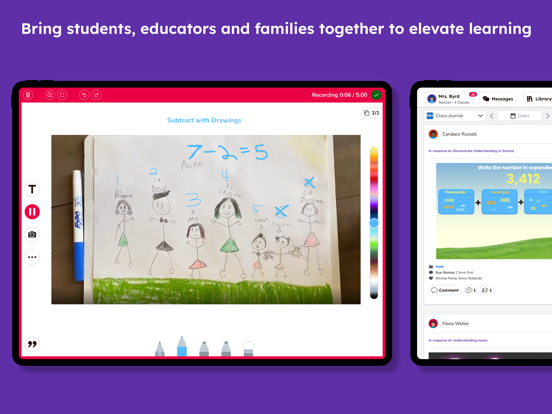

15 store screenshots


Pricing & paywalls
Shown for US
- 1 Month of Seesaw Plus
Shown for US
- Free to download
Ratings & reviews
Shown for US
-
5/5Best Ever!!
I teach 1st grade, and I love the way that Seesaw allows my students and me to share what is happening in our classroom. My students are able to record their voices, take pictures of their work, and share their thinking with me and with their families via Seesaw. It is also a really fast way for me to communicate with parents. I use Seesaw to send out my weekly class newsletter and to send out last minute announcements, as well. Great way for teachers, parents, and students to stay connected! Also, it is a great place for teachers to share things with each other. I use so many assignments from the community of teachers on Seesaw to advance the thinking and learning in my classroom. The only thing I wish were different about Seesaw is I wish I were able to assign things just to certain students instead of to the whole class. It would help me differentiate my assignments better. Maybe there’s a way to do that and I just haven’t figured it out yet... 🤷♀️ Not sure. But overall, Seesaw has been such a neat tool and resource for my classroom!
C.Oleru · 4 Oct 2026
-
2/5New Messaging Update is Awful
I LOVE this app and have been using it for 7 years. I was so excited when they said they were merging class and family into 1 and updating. The update is awful with messages though. I am a kinder teacher and it used to be so easy to find and message parents for my class. Now I have to jump through a ton of hoops to even create a message. I can’t just scroll through parent names of my class to send a message I have to actually know their names and search which often times in the beginning of the year I don’t off they top of my head. I have parents emailing that they can’t write a message to me or reply. They used to easily be able to just type under any message I sent and it would go privately to me. I have watched the video on this over and over but it doesn’t match what they see on their end. I love the idea of group messages but the rest of this is garbage. I was also hoping families would be able to add to their children’s journal since they help with the homework at home. Now they are having to log between student and family accounts. I hyped up this app to my families like I do every year but they are frustrated and not impressed this year. I hope they rework this or go back to the old user friendly way or we may have to find another program.
Kay1268 · 4 Oct 2026
-
4/5Behavior Management
I really love how engaging Seesaw is for the kids and how many options they have to show their work. The ability to add voice instructions to assignments are very helpful, especially to us who work in Hawaiian language immersion. I wish Seesaw had a resource for behavior-management like ClassDojo, where they accumulate points depending on their behavior. If there was some way this platform could incorporate that, that would make this app the BEST! The “Skills” resource is extremely valuable. That is what separates Seesaw from the rest, being able to give the students quantifiable and qualitative feedback on specific standards. This Is the second time i am writing a review and I still wish that seesaw would add a behavior management resource to show the children and parents how they have been behaving. I do appreciate some of the updates made to editing and creating activities. I would appreciate if the activity didn’t change so much when I create it on my laptop to when the students work on it on their iPads. The dimensions differ I imagine and then certain text boxes move
Kaumualiʻi · 4 Oct 2026
-
5/5Best platform to use for elementary school
I have always loved Seesaw, but when we suddenly got thrown into distance learning I had to think on my feet and use Seesaw on a whole new level. Seesaw did not disappoint! I was able to use it to assign activities to students on different levels, on different days at different times. I could provide feedback and interact with my students either through text or audio recordings. I even could record myself making changes to their assignments so they could see how to do their assignment. I also created a class blog so that my students could interact with each other while at home. This allowed them to post pictures or videos and comment on each other’s posts. I was still the moderator on all of those. I raved about it so much that my district has now purchased it for all of our elementary schools to use! I highly recommend it!!!!
lmhoug · 4 Oct 2026
-
3/5Disappointed in the Updates
I have been using Seesaw as a teacher for 7 years and I love Seesaw! However, many of the updates this year are not user friendly for teachers or families. The update that I am having the most difficulty with is the new way teachers comment on student work on my phone. It is just a running line and there is no way to view it before it is posted. I know you can edit it after it’s posted but it makes the process inconvenient. In previous versions you could see your whole message and were able reread it before posting. This makes me not want to check Seesaw posts on my phone which puts me behind on checking my students’ work. I always have my phone with me but I don’t always have a computer. Whenever I have a free moment I would check it. I know many teachers who prefer to check their Seesaw on their phones. Can we please go back to the old version of commenting on student work? I want my students and families to see my feedback in a timely manner.
hhmmttmm · 4 Oct 2026
Shown for US
No store reviews collected for Google Play · DE
Privacy & accessibility
Privacy
- Data Linked to You — Analytics — Identifiers — User ID Developer declared
- Data Linked to You — Analytics — Usage Data — Product Interaction Developer declared
- Data Linked to You — App Functionality — Contact Info — Email Address Developer declared
- Data Linked to You — App Functionality — Contact Info — Name Developer declared
- Data Linked to You — App Functionality — Diagnostics — Crash Data Developer declared
- Data Linked to You — App Functionality — Diagnostics — Performance Data Developer declared
- Data Linked to You — App Functionality — Identifiers — Device ID Developer declared
- Data Linked to You — App Functionality — Identifiers — User ID Developer declared
- Data Linked to You — App Functionality — Usage Data — Product Interaction Developer declared
- Data Linked to You — App Functionality — User Content — Audio Data Developer declared
- Data Linked to You — App Functionality — User Content — Customer Support Developer declared
- Data Linked to You — App Functionality — User Content — Other User Content Developer declared
- Data Linked to You — App Functionality — User Content — Photos or Videos Developer declared
- Data Linked to You — Contact Info Developer declared
- Data Linked to You — Diagnostics Developer declared
- Data Linked to You — Identifiers Developer declared
- Data Linked to You — Usage Data Developer declared
- Data Linked to You — User Content Developer declared
Accessibility
No accessibility labels collected yet.
Privacy
- Data collected — Analytics — App activity — App interactions Developer declared
- Data collected — Analytics — App info and performance — Crash logs Developer declared
- Data collected — Analytics — App info and performance — Diagnostics Developer declared
- Data collected — Analytics — App info and performance — Other app performance data Developer declared
- Data collected — Analytics — Device or other IDs Developer declared
- Data collected — Analytics, Fraud prevention, security, and compliance — Location — Approximate location Developer declared
- Data collected — App functionality — App activity — Other user-generated content Developer declared
- Data collected — App functionality — Audio — Other audio files Developer declared
- Data collected — App functionality — Audio — Voice or sound recordings Developer declared
- Data collected — App functionality — Files and docs Developer declared
- Data collected — App functionality — Messages — Other in-app messages Developer declared
- Data collected — App functionality — Personal info — Phone number Developer declared
- Data collected — App functionality — Photos and videos — Photos Developer declared
- Data collected — App functionality — Photos and videos — Videos Developer declared
- Data collected — App functionality, Account management — Personal info — Email address Developer declared
- Data collected — App functionality, Account management — Personal info — Name Developer declared
- Security practices — The developer has committed to follow the Play Families Policy for this app. See the policy — Committed to follow the Play Families Policy Developer declared
- Security practices — Your data is transferred over a secure connection — Data is encrypted in transit Developer declared
- Security practices — The developer provides a way for you to request that your data be deleted — You can request that data be deleted Developer declared
Accessibility
No accessibility labels collected yet.
Versions
-
10.115.1
- Fix issue where users may encounter a white screen when loading the app or journal posts with missing content - Small UI polish and improvements. - Minor bug fixes and feature enhancements.
-
10.116.0
- Minor bug fixes and UI enhancements.
-
10.117.0
- Ensure iOS take video function doesn't record until after alerts are dismissed. - Support uploading SVG to Creative Tools. - Minor bug fixes and UI enhancements.
-
10.117.1
- Ensure iOS take video function doesn't record until after alerts are dismissed. - Support uploading SVG to Creative Tools. - Minor bug fixes and UI enhancements.
-
10.118.0
- Behavior prompt chip now available in the messaging composer. - Minor bug fixes and UI enhancements.
-
10.119.0
- Updated organization of the tools menu for teachers when editing activities. - Teachers can search Sessaw’s image library for images to add to activities. - Minor bug fixes and UI enhancements.
-
10.119.1
- Updated organization of the tools menu for teachers when editing activities. - Teachers can search Sessaw’s image library for images to add to activities. - Minor bug fixes and UI enhancements.
-
10.120.0
- Platform language support expanded to 11 new languages, including Chinese – Simplified, Chinese – Traditional, Hindi, Indonesian, Irish, Japanese, Korean, Malay, Tamil, Thai, and Vietnamese. - AI Messages Assistant now available in group and 1:1 conversations. - Minor bug fixes and UI enhancements.
-
10.121.0
- Support multiple font sizes for formative assessment question widget. - Minor bug fixes and UI enhancements.
-
10.122.0
- Minor bug fixes and UI enhancements.
-
10.125.0
- AI Credits Chip display and Out of Credits modal. - Journal feed composer. - Minor bug fixes and UI enhancements.
-
10.125.1
- Fix issue with incorrectly showing feature package names on My Account view - Add ClassLink SSO capabilities
-
10.126.0
- Enhanced filters in image search. - Storage effeciencies. - Minor bug fixes and UI enhancements.
-
10.127.0
- Minor bug fixes and UI enhancements.
-
10.128.0
- Generative voice added to key locations. - Ability to trim embedded Youtube videos. - Rostering improvements. - Minor bug fixes and UI enhancements.
-
10.129.0
- Generative voice added to key locations. - Ability to trim embedded Youtube videos. - Rostering improvements. - Minor bug fixes and UI enhancements.
-
10.129.1
- Generative voice added to key locations. - Ability to trim embedded Youtube videos. - Rostering improvements. - Minor bug fixes and UI enhancements.
-
10.130.0
- Minor bug fixes and UI enhancements.
-
10.131.0
- Minor bug fixes and UI enhancements.
-
10.132.0
- Minor bug fixes and UI enhancements.
-
10.133.0
- Minor bug fixes and UI enhancements
-
10.134.0
- Minor bug fixes and UI enhancements.
-
10.135.0
- Minor bug fixes and UI enhancements.
-
10.136.0
- Minor bug fixes and UI enhancements
-
10.137.0
· 5 Aug 2026
- Minor bug fixes and UI enhancements.
-
10.138.0
- Minor bug fixes and UI enhancements. - Assessment enhancement that auto-grades student Draw + Record screen recording responses.
-
10.139.0
- Minor bug fixes and UI enhancements.
-
10.140.0
- Minor bug fixes and UI enhancements
-
10.141.0
· 1 Sep 2026
- Minor bug fixes and UI enhancements - Introduced the 'Generate Voice' features to add AI generated voice to their Activities.
-
10.142.0
- Minor bug fixes and UI enhancements
-
10.143.0
- Minor bug fixes and UI enhancements.
-
10.144.0
- Minor bug fixes and UI enhancements
-
10.145.0
· 30 Sep 2026
- Minor bug fixes and UI enhancements
- 10.137.0 · 4 Aug 2026
Alternatives
- Kids A-Z — Same category + similar ratings
- SchoolCafé — Same category + similar ratings
- Homework Help - AI Math Solver — Same category + similar ratings
- Identifier: Plant IQ AI — Same category + similar ratings
- Good Inside: Parenting — Same category + similar ratings
- IXL - Math, English, & More — Same category + similar ratings
Availability by market
- US
Data quality & evidence
- Page completeness
- Apoku summary published
- Last verified
- 4 Oct 2026
- Sources
- App Store, Google Play