
Quick verdict
- What it is
- Store information collected; independent summary not yet available.
- At a glance
-
- Free to download
- In-app purchases
Categories and search queries
Official categories
- Photo & Video
- Utilities
AppCorpus categories
Key functions
| Function | Availability | Access | Scope | Evidence |
|---|---|---|---|---|
| Free app | Yes | Free | — | Store published |
| In-app purchases | Yes | Limited free | — | Store published |
Screens
App Store
10 store screenshots
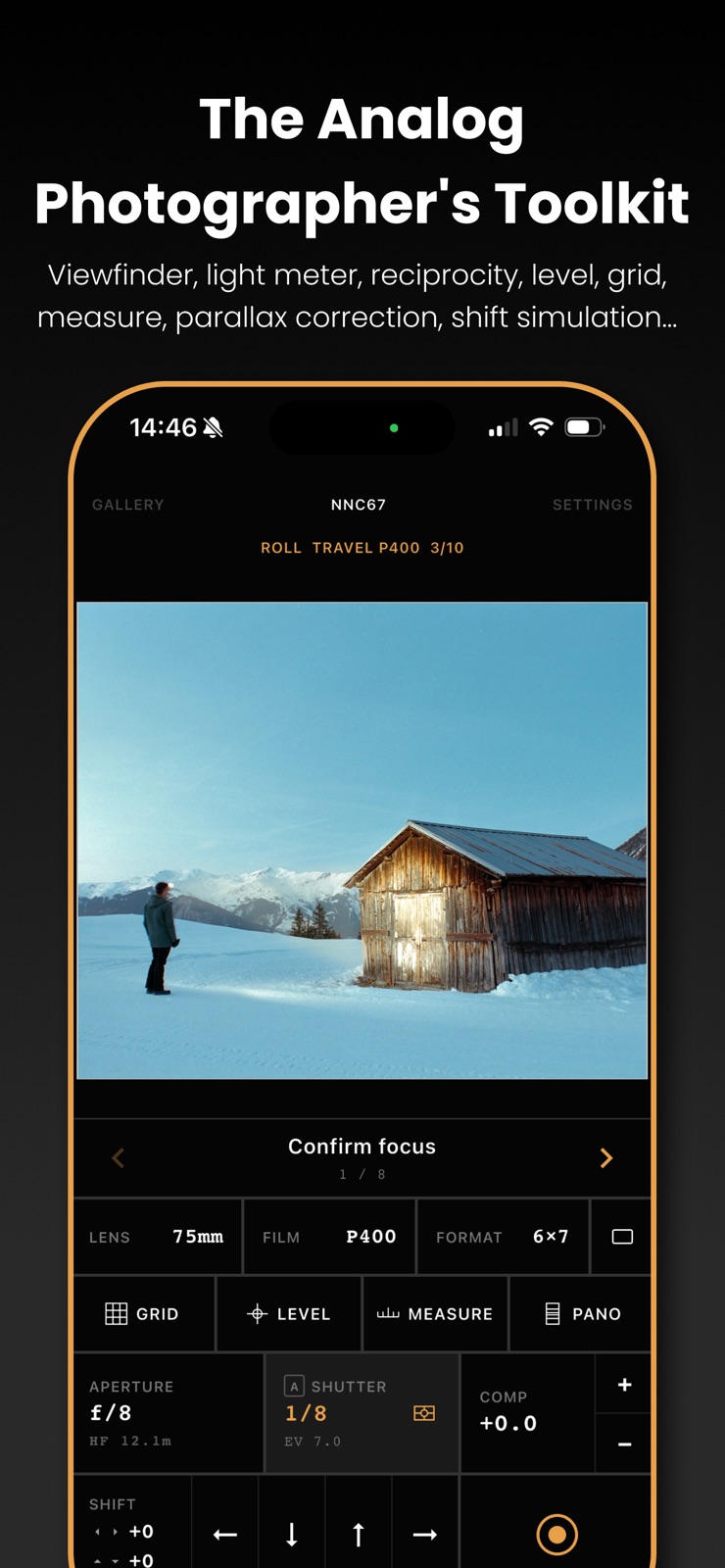


Pricing & paywalls
App Store
- Free to download
- In-app purchases
Ratings & reviews
App Store
-
5/5Best in Class
Benoit really nailed it! This is the best app of its kind that I’ve used, and I’ve used many! It’s simple, yet powerful and it has the best user interface of any of the apps I’ve used. It’s so well thought out and a pleasure to set up and use. This app has a perfect balance of tools and functionality with easy of use. Most apps of this kind try to be all things to all people making them cluttered and complicated. Second View is exceptionally easy to set up and effortless to use. It provides everything you need, and nothing you don’t. Thank you for bringing such an amazing tool to the analog photography community!
Fuji_Kon · 31 Jul 2026
-
1/5Very poor focus
All functional elements are great but the shot results suck. Focus is way off a bad no way to adjust it. It’s nothing more than a viewer - might as well use the camera.
dwmetzler · 31 Jul 2026
-
3/5Really wanted to like it
I really wanted to like this camera app. I am always on the lookout for a more realistic experience on the iPhone. However this falls short in a few ways 1) it heats up the phone pretty hard 2) no way to pull focus. Measuring is nifty, but what’s that do when I cant pull focus. 3) some of the buttons are small when in landscape mode. And are beneath some of the iPhone native functions.
Hersheyfam · 31 Jul 2026
-
2/5setup and payment required before seeing the UI
Downloaded the app to see what it does and if it would be useful. on startup it required setup (very limited options). then after Kit setup you must pick an in-app pay option. i have no idea if this app will be useful, i couldn't even see the UI.
foldedtraveler · 31 Jul 2026
-
1/5Subscription :( Just 3-day trial?
Just a 3-day trial? I understand that you need fo be paid for your work, but a subscription? Really? Can’t you do like some other app, ask for a paid upgrade to the next version, and let people decide whether or not to upgrade? The “Adobification” of things is the bane of all our existence…
G.BG · 31 Jul 2026
Privacy & accessibility
App Store
Privacy
- Data Linked to You — Analytics — Identifiers — Device ID Developer declared
- Data Linked to You — App Functionality — Identifiers — Device ID Developer declared
- Data Linked to You — Third-Party Advertising — Identifiers — Device ID Developer declared
- Data Linked to You — Identifiers Developer declared
- Data Not Linked to You — Analytics — Purchases — Purchase History Developer declared
- Data Not Linked to You — Analytics — Usage Data — Product Interaction Developer declared
- Data Not Linked to You — App Functionality — Diagnostics — Crash Data Developer declared
- Data Not Linked to You — App Functionality — Purchases — Purchase History Developer declared
- Data Not Linked to You — Third-Party Advertising — Purchases — Purchase History Developer declared
- Data Not Linked to You — Diagnostics Developer declared
- Data Not Linked to You — Purchases Developer declared
- Data Not Linked to You — Usage Data Developer declared
- Data Used to Track You — Identifiers — Device ID Developer declared
- Data Used to Track You — Identifiers Developer declared
- Data Used to Track You — Purchases — Purchase History Developer declared
- Data Used to Track You — Purchases Developer declared
Accessibility
No accessibility labels collected yet.
Versions
App Store
- 1.0
-
1.0.1
- Metric or imperial units toggle. - Add custom film formats and focal lengths during onboarding.
-
1.0.2
- Custom apertures: enter any f-stop and save it to your list - Custom shutter speeds: enter decimals (1.5) or fractions (1/5, 1/10) and save them
-
1.0.3
- Edit film stock, aperture, shutter, or ISO on any capture in the gallery. - Add notes to captures. - Export the gallery as a CSV for film logs and spreadsheets. - Long-press the GRID button to switch families (rule of thirds, phi, golden triangle, custom). - Measure now stays on across launches. Tap to refresh the reading, long-press to turn it off.
-
1.0.4
- Manual meter preview BETA: enable it in Settings under Light Meter. In manual shutter mode the viewfinder preview should dim or brighten to match your selected speed. The EV number in the shutter button shows how many stops you're off from the metered light. - Kit film stock: the film stock you pick is now saved per kit. Switch to another kit and back, and it should remember what you had. - Custom ISO label: when you're using a custom ISO, the info bar now shows ISO instead of FILM.
-
1.0.5
- quick bug fix
-
1.1.0
- Spot meter: tap anywhere on the preview to meter from that point. Pair it with the new meter calibration in advanced settings for precise readings. - Group your captures into rolls in the gallery by kit and film stock. - Per-kit shot checklist. Create your steps in settings and advance them from the viewfinder, with optional auto capture. - Panoramic stitching simulation with auto calculation from your format and your max shift. - Set the parallax subject distance manually with a slider. Parallax correction now works on iPhones without LiDAR too. - And a handful of correctness fixes.
-
1.1.5
- Lens filters: list the ND, polarizer, and color filters mounted on your lens. The meter compensates the recommended shutter and every capture logs them. - Digital sensor formats: the format picker now has Film and Digital tabs, with sensor sizes from compact up to medium format. - Square 1:1 composition grid for framing square crops. - The shutter readout can now show the metered EV instead of the shutter speed. Choose SPEED or EV in Settings. - Long-press PANO to save the stitched panorama preview as a planning image.
-
1.1.6
- Pick which side your landscape controls sit on: Classic Left, Classic Right, or the Compact two-row layout. Saved per kit so every camera feels right in the hand. - Upside-down portrait now works. Flip the phone over and the whole viewfinder rotates to match. - Toggle COMP in the feature settings. - Reworked shutter panel: switch between Global, Spot, and Manual metering from a single tab strip, with a clearer meter-state readout in the shutter cell. - Clean of the main screen, no more overlap issues, more consistent font sizes and more
-
1.1.7
- Add a preset system - Preset for the VZ-6617 camera with a dedicated feature for film advance
-
1.1.8
- VZ-6617 checklist template: load the full shooting sequence in Settings. The exposure step auto-fires the shutter and the advance step shows the live wind-to frame for the selected format.
-
1.1.9
Dial in your panorama range: long-press PANO to open the shift sub-menu, then use the two sliders to trim how far the composite reaches on each side of the axis. The dashed plates and stitched crop update live as you drag.
-
1.2
- Workspaces: design your own bottom control panel per kit. Arrange the controls you actually use, then switch layouts with an edge-swipe on the viewfinder. Start from the built-ins (Default, Frame, Meter) or build your own in Settings (Pro). - Freeze mode: pause the frame on a still to compose rise and shift, spot-meter any point, and probe distance anywhere in it, all without the scene moving. - Richer exports: save a frame with a full data overlay including exposure, film, kit etc. - Bellows factor compensation: a new BELLOWS meter cell folds close-focus light loss into your reading for macro and large-format close-ups, set manually or by LiDAR. - Custom film stocks: add your own stocks, tag them color or B&W, set the white balance, and tune the reciprocity curve. Now with a dedicated ECN-2 category. - Simulate B&W film with color filters in the preview and captures, and preview color-film white balance derived from the loaded stock. - Hold and drag to switch values much quicker (on lens, film, format, grid, aprture, speed, comp, filters) - A lot more settings (timer options, increments, miror image), all rearranged into global parameters and by kit.
-
1.2.1
· 30 Jul 2026
- Grid & level stay put: the composition grid and bubble level overlays now remember whether you left them on. - Cleaner custom film form
Alternatives
- Better Camera: No AI — Same category + similar ratings
Availability by market
- US
Data quality & evidence
- Page completeness
- Live store listing
- Last verified
- 31 Jul 2026
- Sources
- App Store
- Independent summary has not been published yet.