
Quick verdict
- What it is
- Store information collected; independent summary not yet available.
- At a glance
-
- Free to download
- In-app purchases
Categories and search queries
Official categories
- Graphics & Design
- Entertainment
AppCorpus categories
Key functions
| Function | Availability | Access | Scope | Evidence |
|---|---|---|---|---|
| Free app | Yes | Free | — | Store published |
| In-app purchases | Yes | Limited free | — | Store published |
| SharePlay | Yes | Unknown | App Store | Store published |
Screens
App Store
38 store screenshots
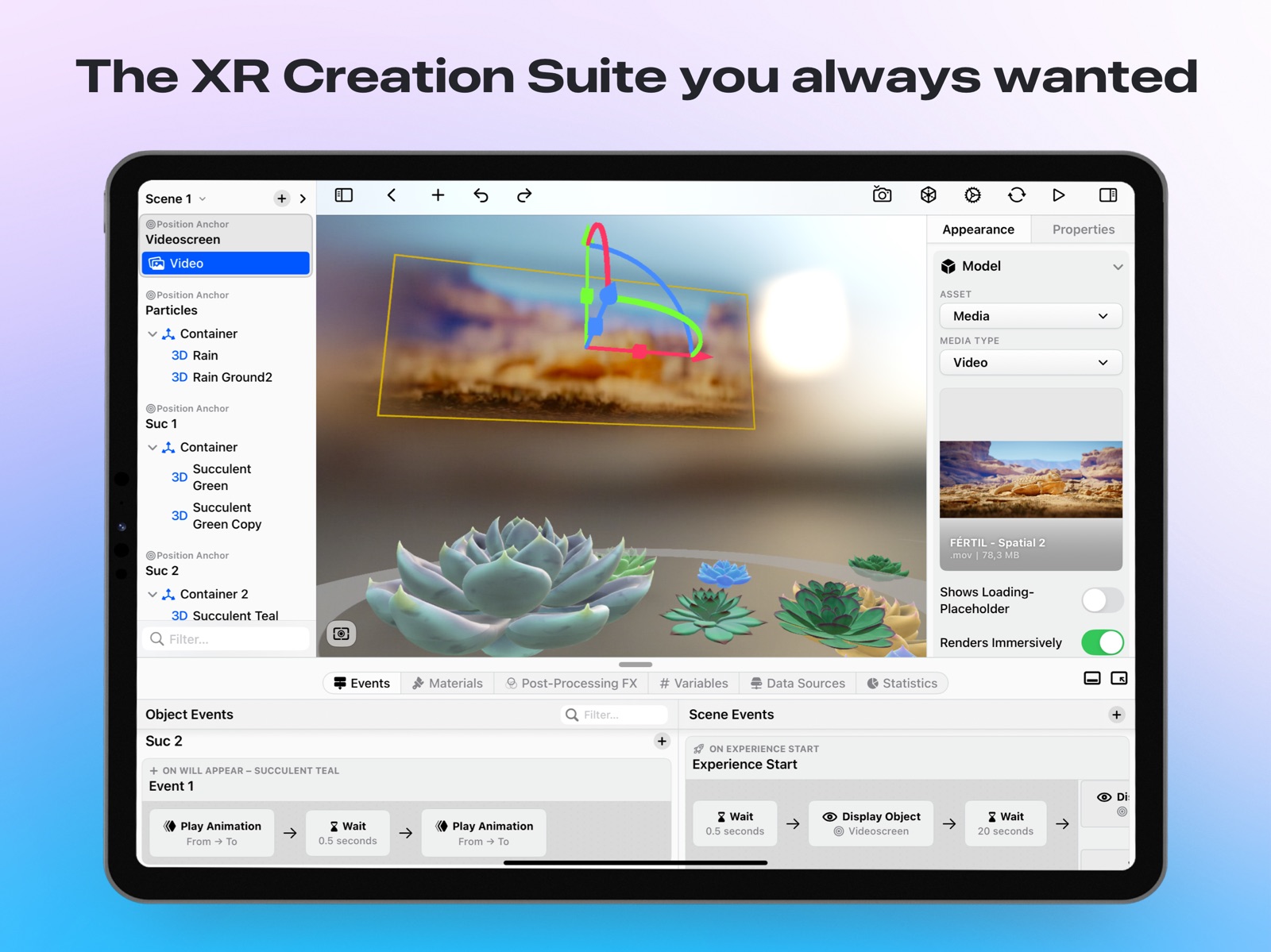


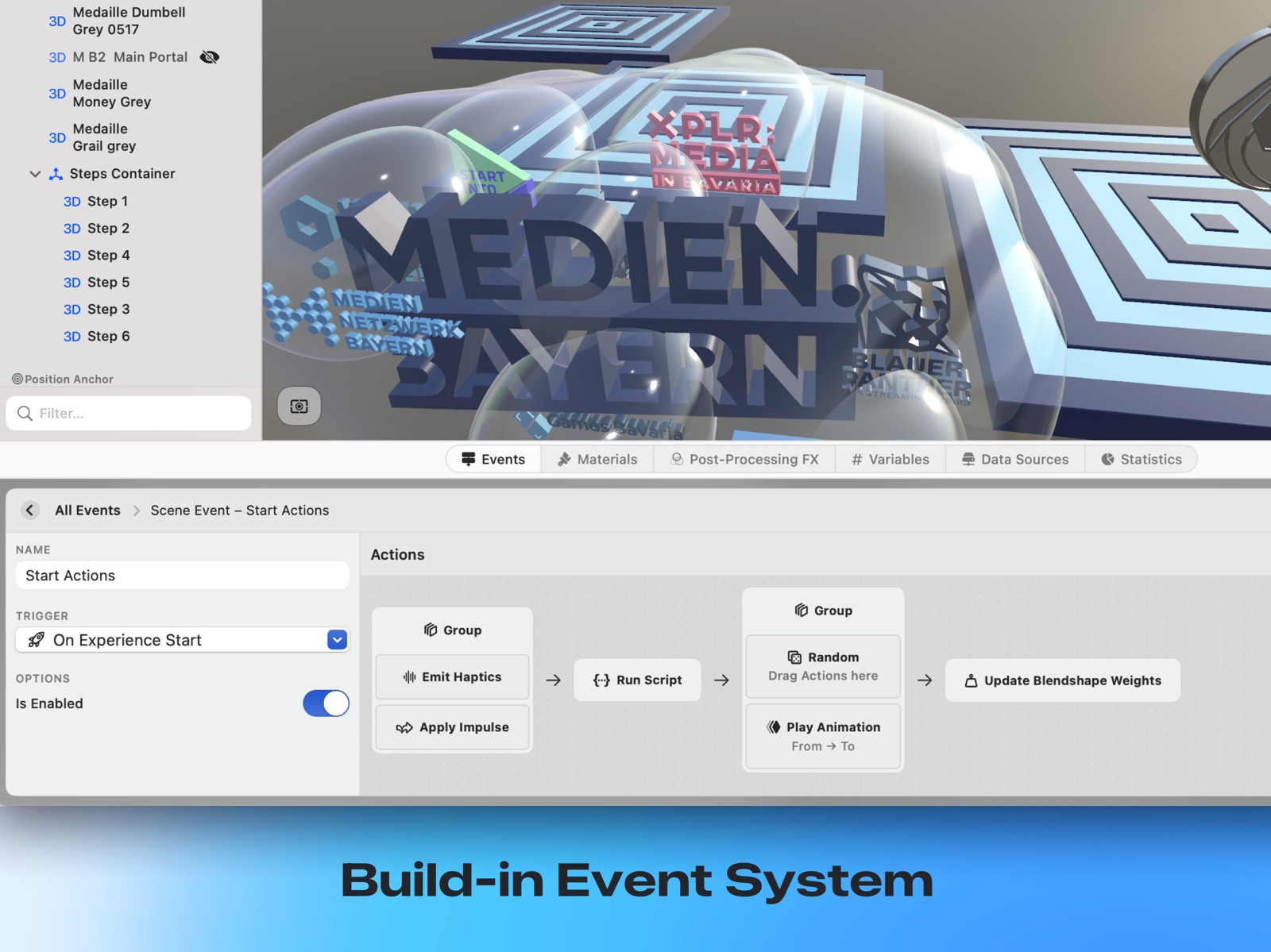
Pricing & paywalls
App Store
- Free to download
- In-app purchases
Ratings & reviews
App Store
-
5/5The Blender or Maya for spatial content?
Having spent 20 years in the computer graphics industry working with similar tools, I can say Scenery is top-notch. It brings the simplicity and elegance of Apple’s user experience to the complex world of spatial creation. The tool is comprehensive — it feels like a Maya or Blender-style environment sitting on top of the dense RealityKit codebase — yet it makes building spatial experiences incredibly accessible for artists. One of the best aspects is that users who consume your creations require no installs. You can just share a link, and people can experience the spatial scene directly on iPhone, iPad, and even Vision Pro. That frictionless approach makes Scenery a standout for anyone serious about spatial content.
GravitasDarkMatter · 31 Jul 2026
-
5/5Great tool for designers
As a designer, this is the quickest and easiest creation tool for the Apple Vision Pro. Importing models and wiring up interactions is simple. Experiences update real time so you can make a change and then try it in the headset seconds later. So glad to see creation tools like this coming to Apple Vision.
UserAbility · 31 Jul 2026
-
5/5Interactive AR prototyping!!!
This is the best tool I found for creating fast interactive prototypes as a designer. It’s easy to use and it’s being updated and improved quickly. This is the best AR creation tool that I know of right now.
UserAbility · 31 Jul 2026
-
5/5Artist and Educator
This app is amazing and allows artist to create mind awesome experiences! This is also a very powerful tool for education and storytelling. Great value and great app support.
BROWNTECK · 31 Jul 2026
-
5/5Create spatial experiences easily
Scenery is a great app to create XR experiences easily. It is built on top of reality kit and feels like a Maya blender or unity on top of Apple’s native augmented reality tools.
GravitasDarkMatter · 31 Jul 2026
Privacy & accessibility
App Store
Privacy
- Data Linked to You — Analytics — Identifiers — User ID Developer declared
- Data Linked to You — App Functionality — Identifiers — User ID Developer declared
- Data Linked to You — App Functionality — Usage Data — Product Interaction Developer declared
- Data Linked to You — Identifiers Developer declared
- Data Linked to You — Usage Data Developer declared
- Data Not Linked to You — Analytics — Diagnostics — Crash Data Developer declared
- Data Not Linked to You — App Functionality — Body — Hands Developer declared
- Data Not Linked to You — App Functionality — Body — Head Developer declared
- Data Not Linked to You — App Functionality — Contact Info — Email Address Developer declared
- Data Not Linked to You — App Functionality — Diagnostics — Crash Data Developer declared
- Data Not Linked to You — App Functionality — Location — Coarse Location Developer declared
- Data Not Linked to You — App Functionality — Surroundings — Environment Scanning Developer declared
- Data Not Linked to You — App Functionality — User Content — Gameplay Content Developer declared
- Data Not Linked to You — App Functionality — User Content — Other User Content Developer declared
- Data Not Linked to You — Body Developer declared
- Data Not Linked to You — Contact Info Developer declared
- Data Not Linked to You — Diagnostics Developer declared
- Data Not Linked to You — Location Developer declared
- Data Not Linked to You — Surroundings Developer declared
- Data Not Linked to You — User Content Developer declared
Accessibility
No accessibility labels collected yet.
Versions
App Store
- 1.0.3
-
1.0.4
- Bugfixes & Performance Improvements
-
1.0.5
This update bring support for iOS 18 as well as various new features that can also be utilised in custom experiences created with our editor. For example custom materials and portals.
-
1.0.6
This update bring support for iOS 18 as well as various new features that can also be utilised in custom experiences created with our editor. For example custom materials and portals.
-
1.0.7
– Bugfixes
-
1.0.8
– Bugfixes
-
1.1.1
– Scenery Pro & Agency Subscriptions – Custom Materials & Post Processing – Bugfixes & Improvements
-
1.1.10
– Starter Assets Take your experience to the next-level with our hand-crafted asset packs for 3D models, shaders, particles and more. – Video Events Trigger events during video playback like playback begins, ends, or when timestamps are reached. – Toggle Object Action Dynamically hide and show nested objects within your scene through an action. – Open Link Action Launch websites or open deeplinks using an action. – Draw Order Groups Control precise layering of transparent objects to solve visual glitches and ensure consistent rendering. – Stability & Performance Bug fixes, UI improvements, and performance optimizations.
-
1.1.12
– Starter Assets Take your experience to the next-level with our hand-crafted asset packs for 3D models, shaders, particles and more. – Custom Lighting Environments Set the perfect lighting and reflections for your scene with custom environment maps alongside our default options. – Video Events Trigger events during video playback like playback begins, ends, or when timestamps are reached. – Toggle Object Action Dynamically hide and show nested objects within your scene through an action. – Open Link Action Launch websites or open deeplinks using an action. – Draw Order Groups Control precise layering of transparent objects to solve visual glitches and ensure consistent rendering. – Stability & Performance Bug fixes, UI improvements, and performance optimizations.
-
1.1.13
– Starter Assets Take your experience to the next-level with our hand-crafted asset packs for 3D models, shaders, particles and more. – Custom Lighting Environments Set the perfect lighting and reflections for your scene with custom environment maps alongside our default options. – Video Events Trigger events during video playback like playback begins, ends, or when timestamps are reached. – Toggle Object Action Dynamically hide and show nested objects within your scene through an action. – Open Link Action Launch websites or open deeplinks using an action. – Draw Order Groups Control precise layering of transparent objects to solve visual glitches and ensure consistent rendering. – Stability & Performance Bug fixes, UI improvements, and performance optimizations.
-
1.1.14
– SharePlay Support View immersive experiences together with friends and family through FaceTime. Interactions and events are synchronized in real-time. – Starter Assets Take your experience to the next-level with our hand-crafted asset packs for 3D models, shaders, particles and more. – Custom Lighting Environments Set the perfect lighting and reflections for your scene with custom environment maps alongside our default options. – Video Events Trigger events during video playback like playback begins, ends, or when timestamps are reached. – Toggle Object Action Dynamically hide and show nested objects within your scene through an action. – Open Link Action Launch websites or open deeplinks using an action. – Draw Order Groups Control precise layering of transparent objects to solve visual glitches and ensure consistent rendering. – Stability & Performance Bug fixes, UI improvements, and performance optimizations.
-
1.1.15
– SharePlay Support View immersive experiences together with friends and family through FaceTime. Interactions and events are synchronized in real-time. – Volume Mode Launch experiences in volumes so they can coexist alongside other apps and windows. – Custom Lighting Environments Set the perfect lighting and reflections for your scene with custom environment maps alongside our default options. – Stability & Performance Bug fixes, UI improvements, and performance optimizations.
-
1.1.16
– SharePlay Support View immersive experiences together with friends and family through FaceTime. Interactions and events are synchronized in real-time. – Volume Mode Launch experiences in volumes so they can coexist alongside other apps and windows. – Custom Lighting Environments Set the perfect lighting and reflections for your scene with custom environment maps alongside our default options. – Stability & Performance Bug fixes, UI improvements, and performance optimizations.
-
1.1.17
– SharePlay Support View immersive experiences together with friends and family through FaceTime. Interactions and events are synchronized in real-time. – Volume Mode Launch experiences in volumes so they can coexist alongside other apps and windows. – Editor Improvements Orientation gizmo, better object orbiting and orthographic camera support. – Custom Lighting Environments Set the perfect lighting and reflections for your scene with custom environment maps alongside our default options. – Stability & Performance Bug fixes, UI improvements, and performance optimizations.
-
1.1.18
– SharePlay Support View immersive experiences together with friends and family through FaceTime. Interactions and events are synchronized in real-time. – Volume Mode Launch experiences in volumes so they can coexist alongside other apps and windows. – Editor Improvements Orientation gizmo, better object orbiting and orthographic camera support. – Custom Lighting Environments Set the perfect lighting and reflections for your scene with custom environment maps alongside our default options. – Stability & Performance Bug fixes, UI improvements, and performance optimizations.
-
1.1.19
– SharePlay Support View immersive experiences together with friends and family through FaceTime. Interactions and events are synchronized in real-time. – Volume Mode Launch experiences in volumes so they can coexist alongside other apps and windows. – Editor Improvements Orientation gizmo, better object orbiting and orthographic camera support. – Custom Lighting Environments Set the perfect lighting and reflections for your scene with custom environment maps alongside our default options. – Stability & Performance Bug fixes, UI improvements, and performance optimizations.
-
1.1.20
· 27 Jul 2026
Spatial user interfaces, Apple Immersive Video on Apple Vision Pro, direct screen gestures, and a much larger scripting runtime. - Spatial user interfaces – build interface panels and place them in a scene or fix them to the screen. Labels, buttons, toggles, sliders, text fields, images, shapes, stacks and web views, with a style system for fonts, colours, borders, shadows, corner radii and frosted glass. Styles can differ per state, so a button can look different while pressed. Labels interpolate scene variables live – write ${score} and it updates itself. Panels are built in a dedicated editor with its own inspector, undo and preview. - Apple Immersive Video – play Apple Immersive Video and spatial media on Apple Vision Pro. Objects and interface panels stay visible over a fully immersive video, and the new Set Immersion Mode action moves an experience between mixed and full immersion while it runs. - Screen gestures – pan, pinch and rotate anywhere on screen, plus double tap and long press on an object. A new On Gesture trigger fires throughout the drag, so an object can react while it is being moved rather than only at the end. - Throw and momentum – objects with a drag gesture can keep the motion they were released with. Choose whether an object stays where it was dropped, springs back, or carries its momentum so a flick throws it. - Per-device anchoring – give an object a different anchor per device, so one experience can anchor to a plane on iPhone, to the screen on Mac and to a hand on Apple Vision Pro. Includes a screen-space anchor, an option to hide an object on a given device, and a fallback transform for devices without tracking. - Copy and paste in the editor – copy objects and their visual content and paste them elsewhere in the same experience, including as a sibling or wrapped into a container. - Cycle action – one trigger steps through any number of states, animations or behaviours, so a single tap can advance a sequence. - Platform condition – Conditional Logic can branch on the device an experience is running on. - Scripting 0.2.0 – a large, mostly additive runtime release: paths and splines, mesh instancing, GPU compute kernels, runtime meshes, device location, screen gestures, physics primitives, object cloning, hand and face tracking, inline materials, and script-built interface panels. - Documentation – https://scenery.app/docs/ is new: a written guide to the editor, anchors, triggers, actions, materials, post-processing and the scripting API. Fixed - macOS 27 compatibility – the app would not launch at all on macOS 27, and the editor sidebars would not scroll. Both are fixed. - Discover no longer shows an error and an empty feed when a single experience cannot be read. - An experience created with a newer version of Scenery no longer disappears from your library. It stays in place and explains that the app needs updating to open it. - Rotation no longer flips onto a different axis after using the rotate gizmo. - Moving several selected objects at once now moves them together, in the direction you dragged. - The add-object menu is no longer empty on Macs running macOS 15 and earlier. - Replacing an asset keeps it in its folder, and the asset library search field survives switching tabs. - Duplicating an experience now gives you your own copy rather than one still tied to the original. - The first tap on an object is no longer occasionally swallowed. - Preview sessions no longer leak, and placing an object in a non-tracked scene no longer crashes.
-
1.1.3
– Scenery Pro & Agency Subscriptions – Custom Materials & Post Processing – Bugfixes & Improvements – Fixes App Clip Crash on iOS 17
-
1.1.4
– Enhanced Event Action Editing Drag and drop or right-click on event actions to group them. – Improved Portal Editing You can now toggle a preview mode for your portals during editing. – iPad AR Preview On iPad you can now preview world-, image- and face-tracking based experiences in AR right from within the editor. – Additional Material Editing Options Override the default material face culling used by objects within your scene. – Stability & Performance Bug fixes, UI improvements, and performance optimizations.
-
1.1.5
– Enhanced Event Action Editing Drag and drop or right-click on event actions to group them. – Improved Portal Editing You can now toggle a preview mode for your portals during editing. – iPad AR Preview On iPad you can now preview world-, image- and face-tracking based experiences in AR right from within the editor. – Additional Material Editing Options Override the material face culling used by objects within your scene. – Stability & Performance Bug fixes, UI improvements, and performance optimizations.
-
1.1.6
– Enhanced Event Action Editing Drag and drop or right-click on event actions to group them. – Improved Portal Editing You can now toggle a preview mode for your portals during editing. – iPad AR Preview On iPad you can now preview world-, image- and face-tracking based experiences in AR right from within the editor. – Additional Material Editing Options Override the material face culling used by objects within your scene. – Stability & Performance Bug fixes, UI improvements, and performance optimizations.
-
1.1.7
– Starter Assets Take your experience to the next-level with our hand-crafted asset packs for 3D models, shaders, particles and more. – Toggle Object Action Dynamically hide and show nested objects within your scene through an action. – Open Link Action Launch websites or open deeplinks using an action. – Draw Order Groups Control precise layering of transparent objects to solve visual glitches and ensure consistent rendering. – Stability & Performance Bug fixes, UI improvements, and performance optimizations.
-
1.1.8
– Starter Assets Take your experience to the next-level with our hand-crafted asset packs for 3D models, shaders, particles and more. – Toggle Object Action Dynamically hide and show nested objects within your scene through an action. – Open Link Action Launch websites or open deeplinks using an action. – Draw Order Groups Control precise layering of transparent objects to solve visual glitches and ensure consistent rendering. – Stability & Performance Bug fixes, UI improvements, and performance optimizations.
-
1.1.9
– Starter Assets Take your experience to the next-level with our hand-crafted asset packs for 3D models, shaders, particles and more. – Video Events Trigger events during video playback like playback begins, ends, or when timestamps are reached. – Toggle Object Action Dynamically hide and show nested objects within your scene through an action. – Open Link Action Launch websites or open deeplinks using an action. – Draw Order Groups Control precise layering of transparent objects to solve visual glitches and ensure consistent rendering. – Stability & Performance Bug fixes, UI improvements, and performance optimizations.
Availability by market
- US
Data quality & evidence
- Page completeness
- Live store listing
- Last verified
- 31 Jul 2026
- Sources
- App Store
- Independent summary has not been published yet.